
When an AI video generation failed and returned no clip, the cause is one of five. A safety or content filter blocked the prompt, the input or the result. An input file broke a size or format rule. Two settings conflicted. The service was at capacity or the request timed out. Or the account reached a limit. Each cause has its own sign and its own fix.
A failed run is different from a bad clip. A bad clip has warped hands or a flicker, and you can look at it. A failed run gives you an error line and nothing else.
This guide sorts failed runs by cause, for a team that makes video every week. Every vendor rule below was read on the vendor’s own page in October 2026.
Key Takeaways
- A failed run has five causes. A safety filter, an input file, a setting conflict, capacity, or an account limit.
- Read the error before you press Run again. Three causes need a change. Two need time.
- Filters check people first. Google documents blocks for children, prominent people and third-party content.
- Charging rules differ. Google and Kling say they do not charge for a failed video. Runway keeps the credits for a rejected input.
- A wait is not always a failure. Google lists Veo latency of up to 6 minutes at peak hours.
Why AI video generation failed: the five causes
“Generation failed” on its own tells you nothing. The useful part is the code or the sentence next to it.
| Cause | What you see | First thing to check |
|---|---|---|
| Safety or content filter | A policy message, a safety code, or fewer clips than you asked for | People, brands and logos in the prompt and the image |
| Input file | An error at once, before any wait | File size, format, aspect ratio and resolution |
| Setting conflict | An error at once, or a rejected result | Duration, resolution and references together |
| Capacity or timeout | A long wait, then an error, or a queue status | Wait, then retry |
| Account limit | An error about quota, rate, balance or plan | Daily limit, credit balance and plan |
Timing is the fastest clue. An error in the first second points to the file, the settings or the account. An error after a wait points to capacity, or to a filter that checked the finished clip.
Cause 1: safety and content filters
A filter can stop a run at three points: the prompt, the input image and the finished clip. Google says of Veo: “Prompts that violate our terms and guidelines are blocked” (ai.google.dev, October 2026).
That is what a content policy violation means in AI video. The model did not break. A check before or after the model said no.
Google Cloud’s Veo documentation names the filter categories. They include Child, Celebrity, Third-party content, Sexual, Hate and Dangerous content (docs.cloud.google.com, October 2026). Four matter for brand work.
- People. In the Gemini API, image-to-video and reference images allow adults only.
- Minors. The Child category “rejects requests to generate content depicting children” unless the project has a specific setting or is on an allowlist. A kidswear or toy brand should expect this filter.
- Public figures. The Celebrity category rejects “a photorealistic representation of a prominent person”.
- Brands and logos. Google names “Guardrails related to third-party content”. The Gemini API also has a blocked code for copyright restrictions (ai.google.dev, October 2026).
Runway uses failure codes. A code that starts with SAFETY.INPUT means an input was rejected. A code that starts with SAFETY.OUTPUT means “content moderation rejected the output of the task” (docs.dev.runwayml.com, October 2026).
How to tell. The message names a policy, a guideline or a safety code. A quieter sign comes from Google Cloud: “If fewer videos than requested are returned, then some generated output is being blocked.”
The fix. Change the input. Remove the name of a real person or of a brand you do not own. Use an adult model image. Do not send the same request again. Runway says an account with too many moderated requests is suspended (docs.dev.runwayml.com, October 2026).
Cause 2: input file problems
An input problem fails fast. The service rejects the file before the model starts. Runway gives the clearest list of limits (docs.dev.runwayml.com, October 2026).
- File size. An image sent by URL may be 16MB at most. A video may be 32MB.
- Format. Runway says “GIF images are not supported.”
- Aspect ratio. For Gen-4.5 image-to-video, the image’s width divided by its height must sit between 0.5 and 2.
- The link. The URL must be HTTPS, and Runway does not follow redirects. A file that takes longer than ten seconds to download fails (docs.dev.runwayml.com, October 2026).
How to tell. The error arrives at once and often names the field. Runway’s code is ASSET.INVALID, which “often indicates a problem with the dimensions, duration, or other properties of the media you provided”.
The fix. Change the file. Export a JPEG, PNG or WebP at a normal size, and crop it to the output ratio yourself. If you leave it, Runway crops from the center, and the product can lose an edge.
Cause 3: prompt and setting conflicts
Some requests ask for two things the model cannot do together. Each setting is fine alone. The pair is the problem.
Google’s Veo page documents several pairs for Veo 3.1. The duration must be 8 seconds when you use reference images, extension, 1080p or 4K. Extension works at 720p only. Veo 3.1 Lite does not offer 4K. So a 4-second clip at 1080p fails.
Runway documents another kind. Its code INTERNAL.BAD_OUTPUT covers results that its own systems rejected. The common causes it lists are “logos, watermarks, or overlaid text in input media” and prompts that ask for explicit text in the video.
That matters for product video. A packshot with a price badge or a watermark is a risky first frame. Use the clean photo and add the text later in an editor.
How to tell. The error names a parameter, or the run fails with one combination of settings and works with another.
The fix. Read the model’s parameter table before a batch. The AI video prompting guide shows the prompt structure each vendor documents.
Cause 4: capacity, queues and timeouts
Sometimes the request is correct and the service is busy. This is the cause behind most “AI video stuck” searches.

First, check that the run is stuck at all. Google lists Veo’s request latency as “Min: 11 seconds; Max: 6 minutes (during peak hours)”.
In the Gemini API, a 503 means the service is “temporarily overloaded or down”, and a 504 means the request did not finish within the deadline. Runway returns 502 and 503 when it “is shedding load” (docs.dev.runwayml.com, October 2026).
A queue is different from a failure. On Runway, a task above your concurrency limit gets the status THROTTLED. It is “stored on our servers but has not been enqueued for processing” (docs.dev.runwayml.com, October 2026).
How to tell. The error comes after a wait, the code is in the 500 range, and the same request worked earlier.
The fix. Wait, then retry with a longer pause between tries. Google’s Python SDK retries a transient error up to four times by itself (ai.google.dev, October 2026). Do not change the prompt. How to make AI videos fast covers where the minutes go in a batch.
Cause 5: account limits
The last cause has nothing to do with the clip. The account cannot run more work right now.
- Rate. Too many requests in a minute. The Gemini API returns a 429 and says to wait and retry.
- Daily quota. Google’s daily quotas “reset at midnight Pacific time” (ai.google.dev, October 2026). Runway counts a daily maximum in “a 24-hour rolling window”.
- Balance. The Gemini API returns a 402 when the prepaid balance is empty. Google adds: “Don’t retry”.
- Plan or permission. A model or a resolution is outside your plan, or the API key lacks access.
How to tell. The message mentions quota, rate, balance, billing or permission. Every request fails, with any prompt.
The fix. For rate and quota, wait for the reset. For balance, add credit. For a plan limit, pick a model your plan includes. Google applies rate limits per project, so a team on one account reaches them first.
Do vendors charge for a failed run?
It depends on the vendor and on the cause. Three model vendors state a rule in their own documentation.
| Vendor | What its documentation says |
|---|---|
| Google, Veo in the Gemini API | ”You will only be charged if your video is successfully generated.” |
| Google, Veo in the Gemini API | ”You will not be charged if your video is blocked from generating.” |
| Runway API | ”Unlike other failures, credits are not refunded for SAFETY.INPUT.* failures.” |
| Runway API | ”Moderated generations have the same credit cost as successful generations.” |
| Kling API | ”Failed video generations will not deduct any unit.” |
Google’s first sentence is on its pricing page, and the second is on its Veo page. Kling’s is under “More Rules” on its developer pricing page. Runway’s wording suggests that it returns credits for failures other than a rejected input.

Two limits apply. These are API rules, and an app that resells a model sets its own rule. Also, a clip that finishes counts as a success in billing, even when it misses the brief. AI video credits explains how re-rolls use a balance, and AI video generation cost lists the vendors’ per-second rates.
Which failed runs to retry, and which to change
The expensive habit is to press Run again on a request that cannot pass. Sort the failure first.
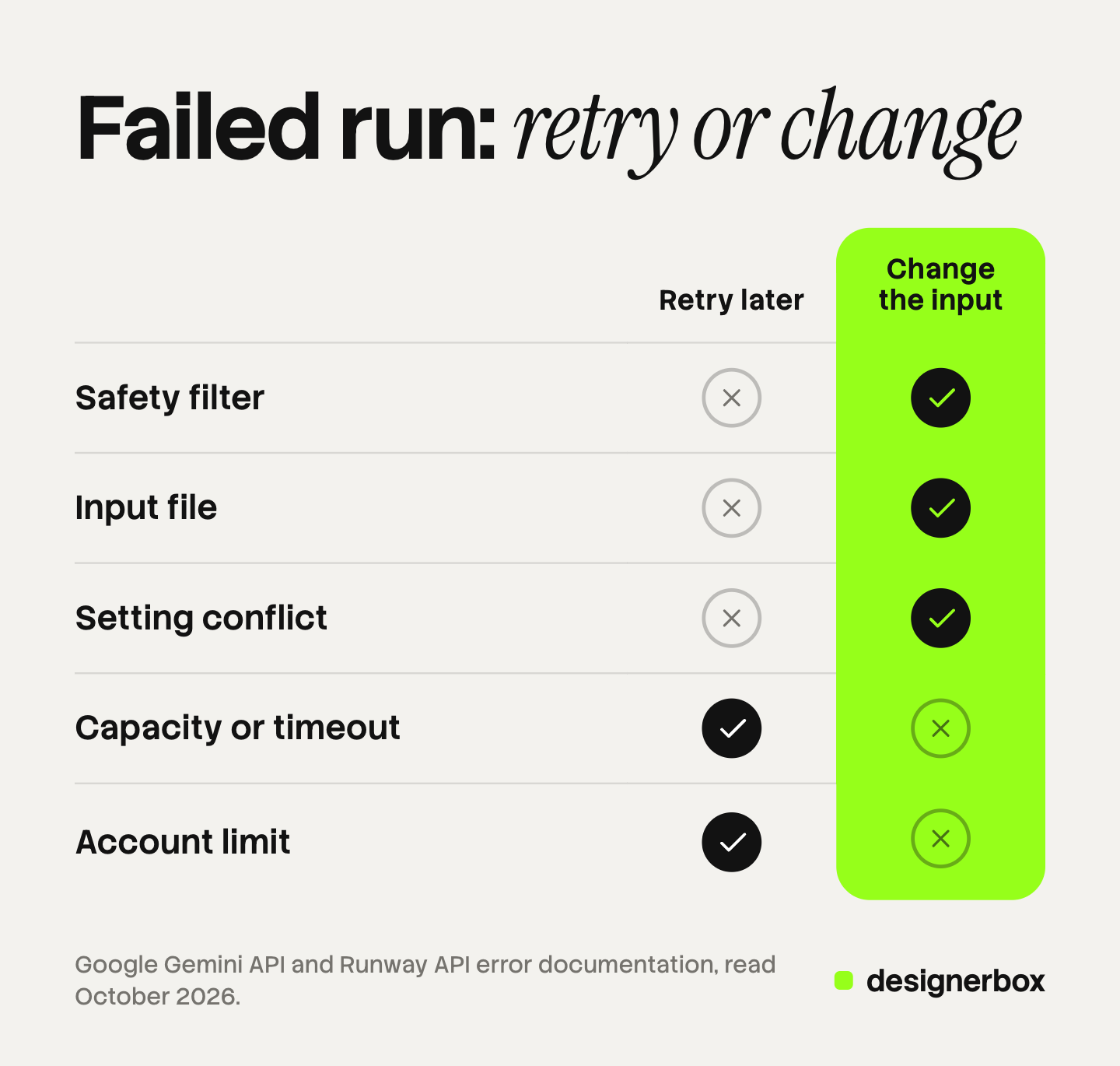
- Safety filter: change the prompt or the image.
- Input file: change the file.
- Setting conflict: change one setting.
- Capacity or timeout: retry later with the same request.
- Account limit: retry after the reset, or add credit.
Three causes need a change and two need time. If you cannot tell which cause you have, send the same request once more after ten minutes. A second failure with the same message means the request is the problem.
Before a weekly batch, run one clip first. One clip shows a filter or a conflict before forty clips do. Model choice matters too: the AI video generator comparison ranks six models on published specs. For a presenter, character consistency in AI video shows how to keep one adult reference image across clips.
Failed runs in a weekly video workflow
DesignerBox is AI creative production for brands and agencies. It makes images, ads and video from your brand rules and your inputs, and a product photo is one of those inputs. Anyone can make an AI picture. Making hundreds that still look like your brand is the hard part.
A failed run is cheaper to fix when the job is saved. In DesignerBox you build a workflow once, with the model, the settings and the brand rules inside it. A saved workflow runs the same way next time. So a setting conflict that you fixed once stays fixed for the next product and the next client.
The first frame comes from an image step, so you approve a clean still before any video step starts. Critic steps score the results of a run, and best-of-N keeps the best one. The AI video ads page shows the video workflows. The full workflow from the first product photo to the finished ad, in one subscription.
The cost is shown before the run. An 8-second clip costs 40 to 560 credits, depending on the model.
Here are the limits. A workflow cannot remove a model vendor’s safety filter, and it cannot make a busy model faster. DesignerBox does not send results to an ad account or a store. You download the results, or send them with a webhook or an S3 step. Every plan below Ultra is one seat. Uploading your own photos and the commercial license start on the Pro plan. AI video, virtual try-on, upscaling, the image editor and the video editor start on the Premium plan. Plans and credits are on the pricing page.
For a team that makes video for several brands, the page for agencies shows how one workflow runs for each client.
FAQ
Why did my AI video generation fail?
There are five causes: a safety or content filter, an input file that broke a rule, two settings that conflict, a service at capacity, or an account limit. The error message and its timing tell you which one.
Why is my AI video generator not working?
If every request fails with any prompt, check the account: balance, daily limit and plan. If only one request fails, the cause is in that request: the prompt, the image or the settings.
What does a content policy violation mean in AI video?
A filter stopped the run. It checks the prompt, the input image and the finished clip. Google’s Veo documentation names categories that include children, prominent people and third-party content (docs.cloud.google.com, October 2026). Change the input before you try again.
Why is my AI video stuck?
It may still be running. Google lists Veo latency of up to 6 minutes during peak hours (ai.google.dev, October 2026). On Runway, a task above your concurrency limit waits with the status THROTTLED.
Am I charged for a failed AI video generation?
It depends on the vendor. Google charges only when a Veo video is successfully generated. Kling says failed video generations do not deduct units. Runway does not refund credits when moderation rejects an input (ai.google.dev, kling.ai and docs.dev.runwayml.com, October 2026).
Should I retry a failed generation with the same prompt?
Only when the cause is capacity or an account limit. For a safety filter, an input file or a setting conflict, the same request fails again.
Sources
- Google, Veo in the Gemini API: safety filters, person settings, duration and resolution rules and request latency: ai.google.dev, October 2026
- Google, Gemini API pricing, the note on charging for Veo: ai.google.dev, October 2026
- Google, Gemini API errors: status codes and generation blocked codes: ai.google.dev, October 2026
- Google, Gemini API troubleshooting, retry strategy: ai.google.dev, October 2026
- Google, Gemini API rate limits: ai.google.dev, October 2026
- Google Cloud, Responsible AI for Veo, safety filter categories: docs.cloud.google.com, October 2026
- Runway API, task failures and failure codes: docs.dev.runwayml.com, October 2026
- Runway API, content moderation: docs.dev.runwayml.com, October 2026
- Runway API, HTTP errors: docs.dev.runwayml.com, October 2026
- Runway API, inputs, size limits and aspect ratios: docs.dev.runwayml.com, October 2026
- Runway API, troubleshooting assets: docs.dev.runwayml.com, October 2026
- Runway API, usage tiers and limits: docs.dev.runwayml.com, October 2026
- Kling, developer pricing, “More Rules”: kling.ai, October 2026
- DesignerBox plans and feature gating: DesignerBox pricing page (designerbox.ai/pricing), October 2026
Vendor rules checked against each company’s own documentation as of October 2026. Error codes and charging rules change. Individual results vary.