AI video upscaling raises the resolution of a clip with a model that predicts the missing pixels. It works in three ways. A precise upscaler sharpens what is in the frame. A restoring upscaler also removes noise, blur and compression damage. A creative upscaler draws new detail that the source never held. The third kind can change a face, a logo or a product.
A brand finds a strong customer clip from 2019, shot on a phone and saved three times. Or it has an AI clip that was drafted at 720p. Both look soft on a large screen, and both have a product in the frame that must stay exact.
This guide is for a brand or an agency that reuses footage in ads and on product pages. It explains the three kinds of upscaler, the damage each can fix, what a 4K upscale costs with a model vendor’s public rates, and the checks that protect a face and a logo.
Key Takeaways
- Upscaling and restoration are two jobs. Upscaling adds pixels. AI video restoration also removes noise, flicker, blur and compression blocks.
- Creative modes invent detail. Black Forest Labs says its creative mode “does not preserve identity as strictly, so faces and products can drift”.
- Use a precise mode for anything a customer can recognize. That means faces, logos, labels and the product.
- 4K is rarely the target for a social ad. TikTok accepts a vertical ad from 540 by 960 pixels.
- Upscaling later can cost more than making the clip larger. In one example with listed rates, it costs $5.23 against $2.40.
- Start from the best source file. Each re-save adds damage that the model has to guess through.
What is AI video upscaling?
AI video upscaling is the use of a trained model to turn a low-resolution clip into a higher-resolution one. A classic resize spreads the existing pixels over a larger frame, so the picture gets bigger and softer. A model predicts what the extra pixels should contain, frame by frame, and tries to keep the frames consistent with each other.
That last part is what makes video harder than a still. A still can be upscaled once. A clip has 24 or more frames each second, and a detail that changes between frames shows as flicker. Our guide to low-resolution product images covers the still-image version of the problem.
What are the three kinds of AI video upscaler?
The three kinds differ in how much the model is allowed to invent. Vendors use different names, so read the mode description and not the product name.
| Kind | What it does | Risk to a face or a logo | Example from a vendor’s documentation |
|---|---|---|---|
| Precise | Sharpens and enlarges what the source holds | Low | FLUX Video Upscale with creativity set to 0 |
| Restoring | Removes blur, noise and compression damage while it enlarges | Medium | SeedVR2, a one-step restoration model from ByteDance Seed |
| Creative | Draws new texture and detail | High | FLUX Video Upscale with creativity set to 1, the default |
Black Forest Labs describes its two modes in plain terms. Precise “preserves the source exactly and sharpens it”. Creative “restores and invents fine detail more aggressively”. The same page adds: “Use precise when a face, product or brand asset has to stay exactly as it is” (bfl.ai, October 2026).
SeedVR2 comes from a research paper by the ByteDance Seed team. The paper describes “a one-step diffusion-based” video restoration model built for high-resolution video in real-world settings (arxiv.org, version 2, January 2026).
Topaz Labs offers a third route, a diffusion model named Starlight Precise. A hosting platform’s documentation describes it as a model that “upscales, denoises, de-aliases, and sharpens video” (runware.ai, October 2026). Many platforms resell these same models behind one upscale tool. Higgsfield’s guide, for example, lists a ByteDance model, a FLUX model and a Topaz model inside its own (higgsfield.ai/blog/ai-video-restoration-high-quality, October 2026).
What can AI video restoration fix?
AI video restoration can fix damage that follows a pattern. It cannot recover a detail that was never recorded.
| Damage | Where it comes from | What a model can do |
|---|---|---|
| Low resolution | An old camera, a phone, a 720p draft | Predict the extra pixels |
| Compression blocks | A file saved and shared many times | Smooth the blocks and rebuild edges |
| Noise and grain | Low light | Remove it, or keep a little so the clip still looks real |
| Flicker | Old tape, frame rate changes | Even out brightness between frames |
| Interlacing lines | Broadcast and tape formats | Turn the fields into whole frames |
| Soft faces and text | All of the above | Draw a sharper version, which is a guess |
The last row is the one to watch. A sharper face is a new face drawn by a model. On a person your customers know, a small change reads as a different person. On a label, a wrong letter is a defect.
Editing models are a separate job. ByteDance describes Seedance 2.5 as a model for clips of up to 30 seconds “with precise reference control and powerful editing capabilities” (seed.bytedance.com, October 2026). An editing model changes part of a clip from a prompt, such as the color or the light. It redraws the clip, so the same checks apply.
Do you need 4K for an ad?
Usually not. Social ad placements accept far less than 4K, and most people watch on a phone.

TikTok’s specification for in-feed auction ads asks for a vertical video of 540 by 960 pixels or more (ads.tiktok.com, last updated June 2026). Meta’s ads guide lists a resolution of 1440 by 2560 pixels in its design recommendations for Instagram Reels video ads (facebook.com, October 2026). Both are well under the 3840 by 2160 pixels of 4K.
4K earns its cost in three places: a large screen in a store or at an event, a television placement, and a master file you plan to crop into several formats. For a feed ad, pick the smallest size that meets the placement and looks sharp on a phone. Our guide to UGC video quality covers what viewers notice first.
What does a 4K upscale cost?
An upscale is billed like a new clip, and it can cost more than making the clip larger in the first place. Two model vendors publish rates that show this.
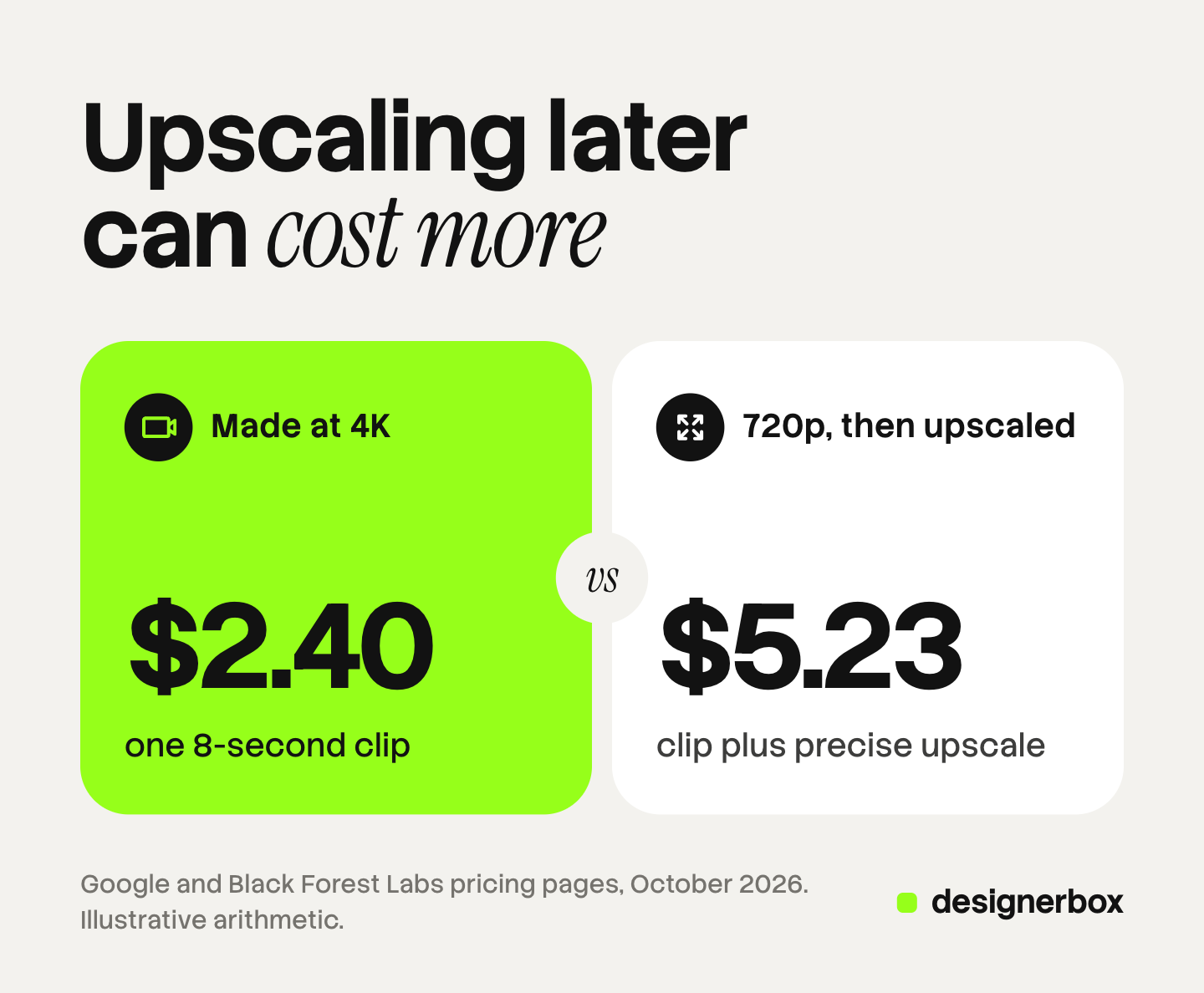
Black Forest Labs prices FLUX Video Upscale per megapixel-second of output: $0.07 in precise mode and $0.10 in creative mode. Its own example is a 10-second clip upscaled to 1080p, which is 19.8 megapixel-seconds, or $1.39 in precise mode (docs.bfl.ai, October 2026). Google lists Veo 3.1 Fast at $0.10 per second at 720p, $0.12 at 1080p and $0.30 at 4K (ai.google.dev, October 2026).
The table applies those rates to one 8-second clip. It is illustrative arithmetic from listed prices, and it is not a measured result. A 4K frame of 3840 by 2160 pixels is about 7.91 megapixels on the definition Black Forest Labs uses.
| Route to an 8-second clip | Arithmetic | Total |
|---|---|---|
| Veo 3.1 Fast made at 4K | 8 x $0.30 | $2.40 |
| Veo 3.1 Fast made at 720p, then a precise upscale to 4K | $0.80 + (7.91 x 8 x $0.07) | $5.23 |
| Veo 3.1 Fast made at 1080p | 8 x $0.12 | $0.96 |
| Veo 3.1 Fast made at 720p, then a precise upscale to 1080p | $0.80 + (1.98 x 8 x $0.07) | $1.91 |
So “draft small and upscale later” is a quality decision, not a saving, at these rates. It makes sense when the footage already exists, such as a customer clip or an old campaign. For a new AI clip, draft small, then run the accepted shot again at the final size. Our guide to AI video credits covers the draft and final split.
How to restore old footage step by step
Follow these six steps for footage you plan to publish.
- Find the best source. Use the camera original, or the copy closest to it. A file that came back from a messaging app has been compressed again.
- Keep the frame rate and the aspect ratio. Change neither before the upscale. Crop afterwards.
- Name the damage. Write down what is wrong: soft, noisy, blocky, flickering. Pick the mode that matches.
- Test five seconds. Choose the hardest five seconds, with a face and the product in the frame. Run that first.
- Compare frame by frame. Put the source and the result side by side. Check the face, the logo, the label text and the hands at full size.
- Keep the audio in sync. Some tools return the clip without sound. Black Forest Labs says its upscaler preserves the source track. For others, add the original audio back in an editor.
Before any of this, confirm that you still hold the rights to the footage and to the people in it. An old release may not cover a new ad. This is general information, not legal advice.
What a good result looks like
A good result passes five checks. Use them as the review list.
- Natural detail. Skin and fabric look like skin and fabric, with no waxy or over-sharp texture.
- Stable motion. No new flicker, and no detail that appears and disappears between frames.
- A clean picture. The blocks and noise of the source are gone.
- The same face and product. A person who knows them sees no change.
- Correct text. Every letter on a label or a sign matches the source.
If the fourth or fifth check fails, go back to a precise mode or a smaller upscale factor. A slightly soft face that is the right face beats a sharp one that is not.
Upscaled footage in DesignerBox
DesignerBox is AI creative production for brands and agencies. This section is for an agency, or for a brand with 20 to 500 products, that turns existing clips and product photos into ads.
Where upscaling sits. A model is one step in a workflow. In DesignerBox, upscaling starts on the Premium plan, together with AI video, virtual try-on, the image editor and the video editor. Uploading your own photos and the commercial license start on the Pro plan. Plans and credits are on the pricing page.
The cut. The video editor is a timeline with several tracks, transitions, animated text and audio. A restored clip still has to be cut, captioned and sized for each placement. Our guide to the DesignerBox editors explains both, and the video editor page shows the timeline.
Cost. The cost is shown before the run.
Brand rules. A saved workflow reads your brand record on every run. Anyone can make an AI picture. Making hundreds that still look like your brand is the hard part. The full workflow from the first product photo to the finished ad, in one subscription.
The honest limits, as of October 2026:
- This guide makes no claim that DesignerBox restores old tape or film. For badly damaged archive footage, test a dedicated restoration tool.
- We publish no accuracy figure for how well a face or a logo survives an upscale. Run the five-second test.
- The free plan cannot make video.
FAQ
What is AI video upscaling?
AI video upscaling uses a trained model to raise the resolution of a clip. The model predicts the extra pixels for each frame and tries to keep the frames consistent. A plain resize only stretches the pixels that exist.
What is the difference between upscaling and AI video restoration?
Upscaling raises resolution. Restoration also removes noise, flicker, blur, interlacing lines and compression blocks. Many tools do both in one pass.
Can AI upscale video to 4K?
Yes. Black Forest Labs lists output at 1080p, 2K and 4K for its video upscaler. Check that you need it first. A social ad placement accepts much less, and an 8-second precise upscale to 4K costs about $4.43 at the vendor’s listed rate.
Does AI upscaling change faces?
It can. A creative mode draws new detail, and Black Forest Labs says faces and products can drift in that mode. Use a precise mode for a recognizable person, and compare the result with the source frame by frame.
Can AI restore old VHS footage?
It can improve it. Restoration models reduce noise and flicker, turn interlaced fields into whole frames and sharpen soft detail. They cannot recover what the tape never recorded, so fine detail in the result is a prediction.
Is it cheaper to make an AI clip small and upscale it later?
Not at the listed rates in this guide. Veo 3.1 Fast at 4K is $2.40 for 8 seconds. The same clip at 720p plus a precise upscale to 4K is $5.23. Upscaling makes sense for footage that already exists.
Sources
- Black Forest Labs, FLUX Video Upscale, read October 2026: the precise and creative modes, output sizes, the source limits, the statement on faces and products
- Black Forest Labs documentation, pricing, read October 2026: $0.07 and $0.10 per megapixel-second, the megapixel definition, the 10-second example
- Google AI for Developers, Gemini API pricing, read October 2026: Veo 3.1 Fast rates per second
- Wang et al., “SeedVR2: One-Step Video Restoration via Diffusion Adversarial Post-Training”, arXiv:2506.05301, version 2, 28 January 2026
- ByteDance Seed, Seedance 2.5, read October 2026
- TikTok Business Help Center, TikTok Auction In-Feed Ads, last updated June 2026
- Meta Ads Guide, video ad specs on Instagram Reels, read October 2026
- Runware documentation, Topaz Labs Starlight Precise 2.5 (runware.ai/docs), read October 2026
- Higgsfield blog, “AI Video Restoration” (higgsfield.ai/blog/ai-video-restoration-high-quality), read October 2026: the three models inside its upscale tool
- DesignerBox pricing page (designerbox.ai/pricing) and video editor page (designerbox.ai/product/video-editor), October 2026
Vendor rates and model facts verified from Black Forest Labs, Google, ByteDance and the platform help pages as of October 2026. The cost arithmetic is illustrative. We did not test the output of any upscaler. Individual results vary.