The DesignerBox image editor changes one picture at a time on a canvas, and each edit keeps the detail and the resolution. The DesignerBox video editor puts clips, captions and sound on a timeline and exports one video. Three AI tools sit beside them: AI Image, AI Video and AI Character. You make the work yourself in the editors, or from a sentence with the AI tools.
A workflow gives you forty good product pictures. Then one needs the logo and a headline, and another has to become a short clip with captions. Those are small jobs done by hand, and the editors and the AI tools exist for them. They are one part of the rebuilt app, and the new DesignerBox covers every other part. This guide covers what each of the five tools does, a product ad made in four steps, the plan gates and the limits.
Key Takeaways
- The app groups five tools under one sidebar heading: the image editor, the video editor, AI Image, AI Video and AI Character.
- The image editor makes one edit after another. The picture keeps its detail and resolution.
- The video editor is a real timeline, with several tracks, transitions, animated text and audio.
- The image editor, the video editor and AI video start on the Premium plan.
Five tools under one heading
The app describes the page in one line: “Make it yourself in the editors, or from a sentence with AI.” Two of the five are editors, where you change something by hand. The other three are AI tools, where a sentence or a still returns something new.
| Tool | The app’s own line | When to use it |
|---|---|---|
| Image editor | ”Design on a canvas: pictures from your library, text, shapes and layers, ready to export.” | One picture needs a logo, a headline or a fix |
| Video editor | ”Put clips, generated footage, captions and sound on a timeline, and export one video.” | Several clips have to become one finished video |
| AI Image | ”Describe a picture, or start from one, and get new versions in seconds.” | You need a new picture, or more versions of one you have |
| AI Video | ”Turn a sentence or a still into a short video clip.” | A still has to move |
| AI Character | ”Create a character and make it speak” | A presenter has to say your script |
The tools work together. Every image result opens in the image editor. You put the clips you make on the timeline in the video editor.
That is the second half of what DesignerBox is for. The full workflow from the first product photo to the finished ad, in one subscription.
The DesignerBox image editor
The image editor is a canvas. You put pictures from your library on it, then add text, shapes and layers. When the design is finished, you export it.

You change a picture in two ways. You describe the change in a sentence, or you mark the part with a brush and say what should happen. The editor changes that part and leaves the rest of the picture alone.
The image editor page lists what one edit can change:
- The background. Put the product on a plain ground, or in a new scene.
- An object in the frame. Remove what should not be there, or add a prop.
- The light. Relight the shot for a warmer room or a harder sun.
- The size, as the last step. Upscale once, when the picture is finished.
The image editor makes one edit after another. The picture keeps its detail and resolution. The image editor page shows one sneaker photo through two edits, and every version has the same pixel size.
The brand is present too. Every run uses the brand’s colors and fonts, and the image editor offers the brand logo.
Every image result opens in the editor, and you can upload a picture of your own. If your job is choosing a photo editor in general, our roundup of AI photo editors by the job compares ten tools.
The DesignerBox video editor
The video editor is a real timeline, with several tracks, transitions, animated text and audio. The video editor page describes three lanes and a player. The clips run in order, the words sit over them, and the sound runs underneath.
- The clips lane. You drag the clips into order, trim each one and add a transition.
- The words lane. Speech in a clip becomes subtitles you can edit. Titles use your brand font.
- The sound lane. You type a script and pick a voice. You add music underneath and set how loud each one is.
At the end you set the color over the whole video and download one file. A template, an app or AI Video makes the clips, and the editor turns them into one finished ad.
AI Image, AI Video and AI Character
AI Image takes a description, or a picture you start from, and returns new versions. The cost is shown before the run.
AI Video turns a sentence or a still into a short video clip. An 8-second clip costs 40 to 560 credits, depending on the model. Our guide to image to video for ecommerce covers which stills make good clips.
AI Character is the app’s label for a character that speaks. You create the character, type the script, and the character says it with lip sync. The presenter is made with AI, so the clip is not a customer review. Never present it as one.
Fixed poses of one person are a separate job. An avatar run returns nine fixed poses for 25 credits.
A product ad in four steps
This is one common job: a short ad for one product.
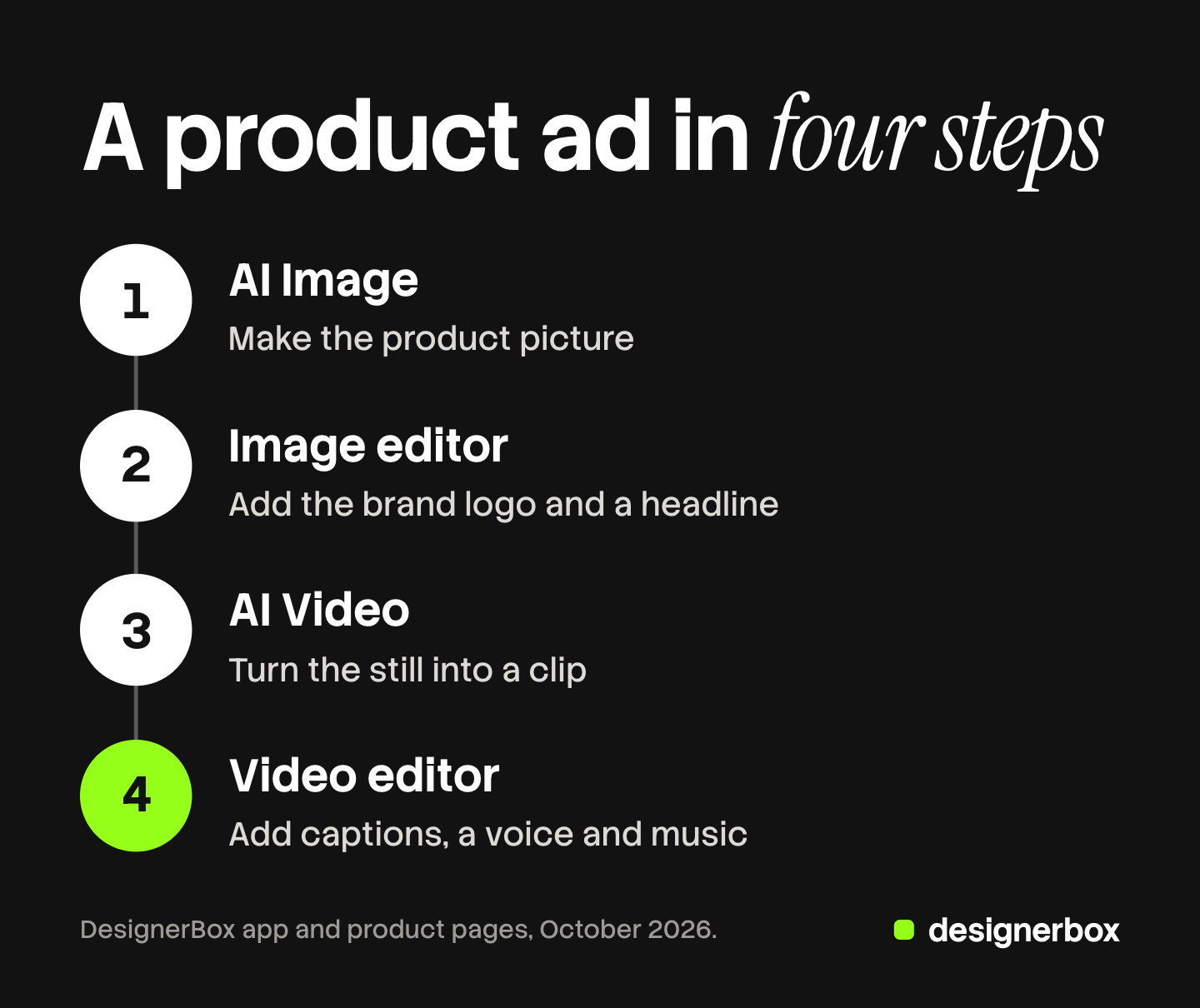
- Make the product picture with AI Image. Describe the scene, or start from a product picture. Keep the version that shows the product best.
- Finish it in the image editor. Open the picture you kept. Add the brand logo and a headline as text. Fix one detail with a sentence or the brush. Export the finished still.
- Turn the still into a clip with AI Video. Add the still and one sentence about the movement. Check the cost, then run it. The clip lands in your library.
- Cut it in the video editor. Drag the clip onto the timeline with any others you have. Add captions, a voice and music. Download one video.
Each result lands in Assets, beside the picture that went in. The app sidebar calls the same place My Library.
Editors, apps, workflows and batch
The editors are for one piece of work, done by hand. Everything else in DesignerBox is for a job you repeat. Choose by the job.
| The job | One piece, by hand | The same job on many products |
|---|---|---|
| A new background | A sentence or the brush in the image editor | A template or a workflow, run again for each product |
| The logo and a headline on one picture | Text and layers in the image editor | A workflow that reads the brand on every run |
| A short clip from a still | AI Video | An app a colleague runs from a form |
| The same change on a whole catalog | Outside scope: the editor changes one picture at a time | A batch, one product per row |
| One finished ad from several clips | The video editor | Outside scope: each video is cut by hand |
Anyone can make an AI picture. Making hundreds that still look like your brand is the hard part. That is why a job you do twice should move out of the editor. Save the steps as a workflow, and DesignerBox workflows explains how. Give the job to a colleague as a form, which DesignerBox apps covers. Then run it over a sheet of products with DesignerBox batch.
Plans for the editors
AI video, virtual try-on, upscaling, the image editor and the video editor start on the Premium plan. Uploading your own photos and the commercial license start on the Pro plan. Plans and credits are on the pricing page. To edit a picture you did not make in DesignerBox, you need both: uploads from the Pro plan and the editor from the Premium plan.
Limits of the editors
- The image editor changes one picture at a time. For the same change on every product, use a template and run it as a batch.
- The free plan cannot make video. It runs on sample products.
- Every plan below Ultra is one seat. A shared workspace and team seats are on the Ultra plan.
- Delivery is a download or an outbound step. You download the results, or send them with a webhook or an S3 step. DesignerBox does not post an ad to an ad account.
Teams that use the editors most
An agency can use the image editor for client changes: a different headline or a warmer light is one edit on one picture. A brand with 20 to 500 products can use the editors after a batch, for the few pictures that need a fix. A reseller can use the video editor as the last step before one finished video goes to the customer.
There is a free plan, and it runs on sample products. Get started free.
FAQ
What is the DesignerBox image editor?
It is a canvas for one picture. You add pictures from your library, text, shapes and layers, and you export the result. You can also change part of a picture with a sentence or a brush. Each edit keeps the detail and the resolution of the edit before it.
What is the DesignerBox video editor?
It is a timeline with lanes for clips, words and sound. You put clips in order, trim them and add transitions. You add captions, a voice and music, then download one video.
Which plan includes the image editor and the video editor?
Both editors start on the Premium plan, and so does AI video. Uploading your own photos starts on the Pro plan. The pricing page lists what each plan holds.
Can I edit a whole set of pictures at once?
Not in the image editor. It changes one picture at a time. For the same change on every product, run a template or a workflow as a batch, one product per row, and review each result.
How much does an AI Video clip cost?
An 8-second clip costs 40 to 560 credits, depending on the model. The cost is shown before the run, so you read the number before you spend credits.
Sources
- DesignerBox image editor page (designerbox.ai/product/image-editor), October 2026
- DesignerBox video editor page (designerbox.ai/product/video-editor), October 2026
- DesignerBox Assets page (designerbox.ai/product/assets), October 2026
- DesignerBox pricing page (designerbox.ai/pricing), October 2026: plans, credits and the plan gates
- The DesignerBox app, read October 2026: the lines for the image editor, the video editor, AI Image, AI Video and AI Character, and the Brand page
Tool descriptions and plan gates checked against designerbox.ai and the DesignerBox app in October 2026. The cost of a run depends on the model. Plans and limits change, so check the pricing page before you plan a large job. Individual results vary.