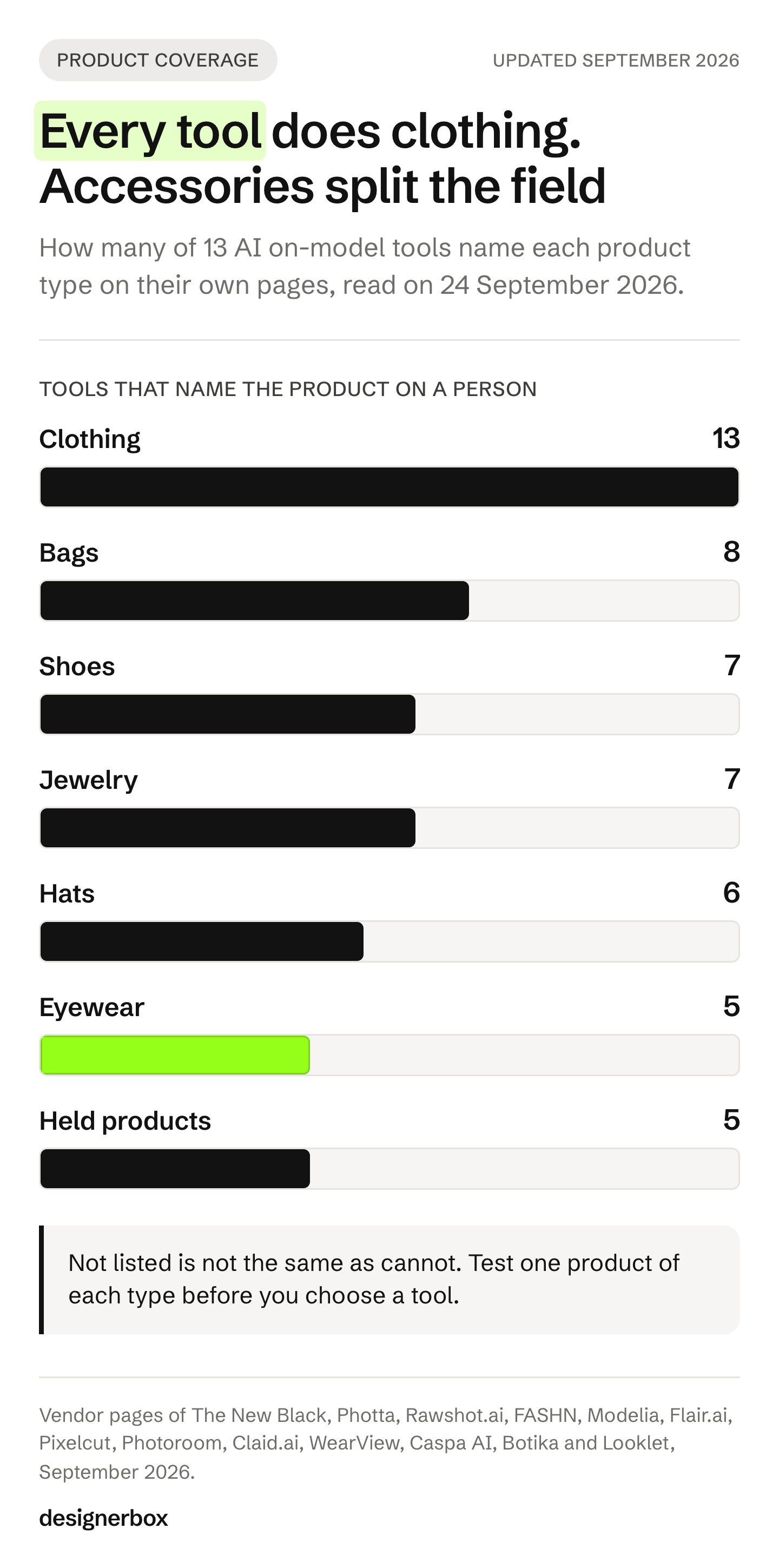
The best AI on-model photography tool depends on what the model has to wear or hold. All 13 tools in this guide put clothing on an AI model. Fewer handle the rest. Eight state bags, seven state shoes, seven state jewelry, five state eyewear and five state products held in a hand. The New Black, Photta and Rawshot.ai list the widest range.
A brand rarely sells only clothing. A spring drop has 40 dresses, and it also has 12 bags, 8 pairs of sunglasses and a row of earrings. Every piece needs a worn shot. A tool that handles the dresses well can still refuse the sunglasses.
So the product type is the first question to ask a tool. This guide covers only tools whose own pages say they put a product on a person. Background and design tools that never put a person in the frame are left out. It sorts them by product type, from each vendor’s pages on 24 September 2026, and it names what each vendor excludes. We sell DesignerBox, so read its lines as our own case.
Key Takeaways
- Pick the tool by product type first. Clothing is covered by all 13 tools. Shoes, jewelry, eyewear, bags, hats and held products are not.
- Read the exclusions. Botika says it focuses on clothing only. Looklet’s Virtual Studio does not process eyewear, scarves, footwear, jewelry or bags. Pixelcut’s try-on says pants, dresses and accessories are “coming soon”.
- Only adult apparel may use a model in the Amazon main image. Shoes, bags, jewelry and eyewear on a model go in the secondary images.
- Tag AI people on Amazon. Add contains-synthetic-performer to the dc:subject (XMP) field when the person is fully AI-generated.
- Each product type breaks in its own place. Check the sole on shoes, the clasp on jewelry, the lens on eyewear, the strap on bags and the label on held products.
- Test one product of each type. Six products tell you more than sixty dresses.
What is an AI on-model photography tool?
An AI on-model photography tool takes a photo of your product and returns a photo of a person wearing it or holding it. You upload a flat lay, a packshot, a ghost mannequin shot or a photo on a person. You pick or describe the model. The tool returns the worn shot, often in several poses and scenes.
Two nearby tools do different jobs. A background tool puts the product in a scene with no person. A virtual try-on widget lets a shopper see the product on their own photo. This guide covers the brand-side worn shot. On-model photography with AI covers how to match AI shots to a catalog you already shot.
The key question is how the tool treats your product. Some tools keep the product pixels and build the person around them. Others draw the product again on the person, which can change a logo, a stone or a stitch. Either way, you check every result against the real product.
Which products each tool puts on a model
The table records what each vendor’s own pages state on 24 September 2026. “Yes” means a page names that product type on a person or in a hand. “Not listed” means the pages we read did not say it. It does not mean the tool cannot do it. Image quality is not scored, because it changes with every model update and every source photo. No price appears in this guide: each vendor lists its plans on its own pricing page.
| Tool | Clothing | Shoes | Jewelry | Eyewear | Bags | Hats | Held products |
|---|---|---|---|---|---|---|---|
| The New Black | Yes | Yes | Yes | Sunglasses | Yes | Yes | Beauty products |
| Photta | Yes | On-foot | Yes | Yes | Yes | Not listed | In-hand tool |
| Rawshot.ai | Yes | Yes | Yes | Yes | Yes | Yes | Not listed |
| FASHN | Yes | Yes | Yes | Not listed | Yes | Yes | Not listed |
| Modelia | Yes | Yes | Not listed | Yes | Yes | Yes | Not listed |
| Flair.ai | Yes | Yes | Yes | Not listed | Yes | Not listed | Beauty and tech |
| Pixelcut | Tops in try-on | Not listed | Wrist, neck, ear | Not listed | Shoulder or hand | Not listed | Beauty, in a hand |
| Photoroom | Yes | Not listed | Yes | Yes | Not listed | Not listed | Not listed |
| Claid.ai | Yes | With an outfit | Not listed | Not listed | Not listed | With an outfit | Not listed |
| WearView | Yes | Pages disagree | Pages disagree | Not listed | Yes | Yes | Cosmetics excluded |
| Caspa AI | Yes | Not listed | Not listed | Not listed | Not listed | Not listed | ”Interact with your products” |
| Botika | Yes | Excluded | Excluded | Excluded | Not listed | Excluded | Cosmetics excluded |
| Looklet | Yes | Excluded | Excluded | Excluded | Excluded | Not listed | Not listed |
| DesignerBox | Try-on, Dress my model | Not listed | Not listed | Not listed | Not listed | Not listed | Creator-style video |
Count the columns and the pattern is plain. Clothing has 13 of 13. Bags have 8, shoes and jewelry have 7 each, hats have 6, and eyewear and held products have 5 each. Watches appear on one page only: Rawshot.ai names them.
Where an on-model image can run
The marketplace decides the slot before the tool decides the look. Amazon’s rule is the strictest one for accessories.
Amazon. “Main images that show products on human models are not allowed, except for adult apparel” (Amazon human models, accessed September 2026). The same page bars models for children’s and baby undergarments, leotards and swimwear, and for multipack apparel. So a shoe, a bag, a ring or a pair of sunglasses on a model goes in the secondary images. The product image guide also asks you to tag AI people. Add the keyword contains-synthetic-performer to the dc:subject (XMP) field “if your image features people who were entirely generated by AI” (Amazon product image guide, accessed September 2026). Amazon then adds a disclosure where it applies.
Google. Merchant Center asks for “images of products worn by people for clothing (apparel) products”. It also says: “Show non-clothing products, such as shoes, handbags, or accessories, alone in your main images, and on a model in your additional images” (Google Merchant Center image requirements, accessed September 2026). The same page says not to include “any product that’s not sold together with the main product”. A styled look with a bag you do not sell breaks that rule.
Your own store. No marketplace rule applies, so the worn shot can lead the gallery. It still has to show the product the buyer will receive.
The tools, one by one
The tools appear in order of how many product types each one names. Every fact comes from the vendor’s own pages, read on 24 September 2026. For clothing depth, such as back views and video, the best AI fashion photography tools compares 15 garment-first tools.
The New Black
The New Black has a separate page for each product type. It builds “realistic fashion models wearing any head accessory you upload: a hat, a beanie, a cap”. Its bag page takes “a handbag, a purse, a tote, or a backpack”. Its jewelry page covers “a ring, a necklace, a bracelet, a pair of earrings, even sunglasses”. For cosmetics, “the model is built around your product, holding it at natural scale” (thenewblack.ai, September 2026).
You set the model’s age and country in fields, not in a prompt. Its shoe try-on page states its limits: extreme angles and tall boots are hard. Its pricing page says “Your designs are private. Never shared, never reused to train a model” and “You keep full ownership of everything you generate”. It lists an API and Shopify publishing.
Best for: brands whose range crosses clothing, shoes, jewelry, eyewear, bags, hats and beauty.
Photta
Photta has one tool per product type. Its jewelry tool places “rings, necklaces, earrings, and bracelets on realistic AI models”. Its eyewear studio puts glasses and sunglasses “on diverse face models”. Its shoe tool makes on-foot shots from “a clear side-view photo of your shoe”. Its bag tool shows “your handbag worn and styled” (photta.app, September 2026).
Its in-hand tool is the clearest one for held products. It adds “a natural, well-groomed hand holding your product” and “works best for products that fit in one hand, cosmetics, bottles, electronics, food, small accessories”. Each tool returns two photos. A Model Maker creates a custom model, and there is a free start.
Best for: sellers with many small product types who want one tool per job.
Rawshot.ai
Rawshot.ai names the widest list of worn products we found: “Clothing, footwear, jewellery, bags, eyewear, watches and other fashion accessories, from full-body images to hand, ankle, ear and eye details”. Six poses have the model “carry, wear or hold the piece”, and it takes up to four products in one frame (rawshot.ai, September 2026).
Every model is “a synthetic composite” that “stays the same person across every shot”. Rawshot adds C2PA content credentials to every result and says you get full commercial rights. It also says: “Configurations cannot yet be saved for a later shoot.” The page we read does not list an API or a Shopify app. There is a free trial.
Best for: accessory brands that need hand, ankle, ear and eye detail shots, including watches.
FASHN
FASHN converts “flat lays, mannequin, and ghost mannequin shots into on-model images for apparel, footwear, jewelry, hats, bags, and complete outfits” (fashn.ai/product-to-model, September 2026). A Face Reference keeps one face across results. Uploading your own face is on its Agency plan.
A changelog entry from October 2025 says its video works better “for fashion products beyond apparel, such as jewelry and accessories”. FASHN says generated images can be used for commercial purposes. It offers a free start, a REST API and mobile apps. Eyewear is not named on the pages we read.
Best for: teams that want one API for clothing and accessories, with one face across the set.
Modelia
Modelia has separate styling tools for accessories. It can “Add any hat to a model instantly”, show shoes “with realistic pose and proportions”, show a bag “with natural hand and body poses” and try eyewear “with accurate face alignment” (modelia.ai, September 2026). You save a model to your library and reuse it across tools.
Read its terms before the free plan. They grant Modelia a license to train on content from free and starter plans. They also say: “MODELIA WILL NEVER USE CONTENT FROM PAID USERS TO TRAIN ITS AI MODELS.” Watermarked images from the free plan are not for commercial use. It has a Shopify app and an API.
Best for: Shopify brands that sell clothing with hats, shoes, bags and eyewear.
Flair.ai
Flair.ai has category pages that show products “on diverse models or in elegant settings” for jewelry, handbags and footwear. For beauty and tech it shows products “in use with diverse models” (flair.ai, September 2026). Its AI Human Builder creates a brand model “that you can use across all your product photography needs”.
Its license page says companies get a commercial license on the Pro+ plan. It also says images made on a paid plan stay licensed “forever, even if you later cancel your plan”. It lists bulk tools and an API.
Best for: brands with beauty or tech products next to fashion items.
Pixelcut
Pixelcut splits the work in two. Its Product Studio places jewelry “in an on-skin close-up worn on a wrist, neck, or ear”. Its Bag Scene format shows a purse “held in hand or on a model’s shoulder”. Its Beauty Scene format places a product “held in hand, or in a model’s hand” (pixelcut.ai, September 2026).
Its clothing try-on is narrower today. The try-on FAQ says: “The ability to try on pants, dresses, accessories is coming soon.” You can upload your own model. Pixelcut says images are never used for model training. It lists bulk tools and an API.
Best for: jewelry, bag and beauty sellers who want worn and held shots from one editor.
Photoroom
Photoroom’s AI Fashion Models tool starts from “a shot of someone wearing your products or simple flat lays”. Its page says: “Whether you sell clothing, jewelry, eyewear, or other fashion items, achieve model consistency and aesthetic control” (photoroom.com/tools/virtual-model, September 2026). You can “save your own custom models within Brand Kit”.
It sits next to Photoroom’s background, batch and API tools, so one account covers the white main image and the worn shot. Shoes, bags and held products are not named on the model page. Photoroom alternatives compares it with the nearest tools.
Best for: teams that already use Photoroom for backgrounds and want saved models in the same account.
Claid.ai
Claid.ai is built around clothing. Its flat-lay-to-model tool is “optimized for any apparel item”. For accessories it recommends its AI Photoshoot tool instead (claid.ai/fashion/flatlay-to-model, September 2026). When you style a full look, “You can add tops and bottoms, shoes, and some accessories (for instance, hats) to complete the look”.
You can upload “photos of a model whose likeness you have the right to use”. It offers 100+ AI models, results in 4K and an API for large volumes.
Best for: clothing catalogs that run through an API and style shoes and hats as part of a look.
WearView
WearView’s product-to-model page says it “Works with clothing, accessories, jewelry, and footwear”. The same page offers to “Display bags, shoes, hats, and accessories on real-looking AI models” (wearview.co, September 2026). You can store “consistent model profiles in your library” and reuse them.
Its FAQ page gives a different answer on scope. It says: “Right now, we only focus on clothing to ensure top-notch, realistic results.” That answer names jewelry, footwear and cosmetics. Ask WearView which one applies before you plan a jewelry or shoe run. Its pricing page lists API access, and it says images come with full commercial usage rights.
Best for: clothing brands that want saved model profiles and also sell bags and hats.
Caspa AI
Caspa AI works across product categories. Its home page says “Add AI Human Models. Have people interact with your products” (caspa.ai, September 2026). Its clothing page shows garments “complete with lifelike models”, and its beauty page shows lifestyle shots with human models. It also creates product bundles with many products in one image.
It does not name specific worn accessories on a person. Its FAQ says you can use your images “wherever you want with no restrictions”. Its terms say Caspa keeps the IP rights and grants you a license for your business. There is a free start.
Best for: small brands that sell many product types and want people in lifestyle scenes.
Botika
Botika makes on-model shots of clothing from a photo on a person, a flat lay or a mannequin shot. Its models are fully AI-generated. It has a Shopify app and bulk uploads (botika.com, September 2026).
Its FAQ states the scope: “Right now, we only focus on clothing to ensure top-notch, realistic results.” It adds that glasses, hats and jewelry already on your model “might be removed, slightly changed”. Its FAQ says images can be used commercially. Its terms describe a license to display images in connection with your own fashion business. Read both before you publish.
Best for: clothing brands that want a library of AI models and no accessory work.
Looklet
Looklet runs two services. Its Virtual Studio processes women’s and men’s apparel “except for the following categories: Eyewear, Scarves, Footwear, Jewelry, Bags and Multi-colored transparent garments” (looklet.com/faq, September 2026). Its enterprise studio can shoot shoes, bags, bracelets, necklaces, scarves, watches and belts on a mannequin, as styling items in a look.
Its enterprise service uses digitized real fashion models, with usage terms agreed with model agencies. That makes it the one tool here with licensed real people. Integration is a custom API.
Best for: larger retailers that want real, licensed models for their clothing.
Build it with an image model
Some teams skip the tools and use an image model through an API. That gives the most control and puts all the checks on you.
Google’s Nano Banana Pro (Gemini 3 Pro Image) takes up to 14 reference images. Google says it keeps “the consistency and resemblance of up to five characters and the fidelity of up to fourteen objects” (Google DeepMind, accessed September 2026). So one request can hold a model, a bag and a pair of shoes together. Its people setting can allow adults and block children (Vertex AI Gemini 3 Pro Image, accessed September 2026).
OpenAI’s GPT Image models accept “up to 16 images” in an edit request. OpenAI also says the model “may occasionally struggle to maintain visual consistency for recurring characters or brand elements across multiple generations” (OpenAI image generation guide, accessed September 2026).
Google’s Vertex AI Virtual Try-On does one narrow job. It generates “images of people to virtually try-on clothing products”, from one person image and one product image (Vertex AI Virtual Try-On, accessed September 2026). Its docs do not list accessory categories.
What to check for each product type
A model has to invent the parts of a product your photo does not show. Those parts differ by product type, so the check list differs too.
| Product | What the model invents | What to check |
|---|---|---|
| Clothing | The back, the fit on a body, the drape | Print, logo, seams and length against the real garment |
| Shoes | The foot inside, the side you did not shoot | Left or right shoe, laces, sole pattern, logo side |
| Jewelry | The clasp, the post, the skin contact | Stone size, metal tone, chain length on the neck |
| Eyewear | The fit on the face, the lens | Lens tint, temple arms, bridge width, reflections |
| Bags | The strap drop, the scale against a body | Strap length, hardware color, bag size against the model |
| Hats | The head size, the brim angle | Brim width, crown shape, label position |
| Held products | The grip, the label at an angle | Label text, cap color, product size in the hand |
Scale is the silent error. A bag or a ring shown larger than it is misleads the buyer, and it raises returns. The FTC Jewelry Guides say a depiction that shows a gemstone larger than its real size may mislead unless the true size is disclosed (16 CFR Part 23, accessed September 2026).

Each product type has its own guide on this blog. Handbag product photography covers strap drop and hardware. Eyewear product photography covers lenses and reflections. AI footwear tools and AI jewelry tools sort the tools for those two categories by listing slot. For products held in a hand, AI virtual models for product photos covers hands, scale and labels.
Rights, training data and disclosure
Three questions come before the first published image. Can you use the result commercially? Does the vendor train on your uploads? Does the image need a label?
On rights, most vendors state commercial use, but on different terms. Flair.ai ties it to the Pro+ plan. Modelia excludes watermarked free-plan images. Caspa AI and Botika grant a license in their terms rather than ownership. The New Black says you keep full ownership.
On training, The New Black and Pixelcut say they never train on your content. Modelia says it never trains on paid-plan content, and its terms allow training on free and starter plans. Many pages do not state a policy. Ask in writing.
On labels, two US states now regulate AI people in ads. New York requires an ad to “conspicuously disclose” a synthetic performer when the maker knows it contains one (NY General Business Law 396-b, accessed September 2026). California signed a similar law, SB 1050, on 16 September 2026, and it takes effect on 1 January 2027 (California SB 1050, accessed September 2026). In the EU, Article 50 of the AI Act has applied since 2 August 2026 (European Commission Article 50 FAQ, accessed September 2026). How to label AI-generated fashion images covers the wording and placement. This is general information, not legal advice.
How to test an AI on-model tool
A test on 60 dresses tells you about dresses. A test on one product of each type tells you where the tool stops.
- Pick six products. One garment with a print, one pair of shoes, one piece of jewelry with a clasp, one pair of sunglasses, one bag with hardware and one product with a small label.
- Use your normal source photos. Test with the photos you will really upload, not your best ones.
- Run the same model on all six. This shows whether the face holds across product types.
- Check each result against the table above. Hold the real product next to the screen.
- Count the results you would publish. Also count how many runs each one took.
- Read the terms for the plan you will buy. Check commercial use, training and model likeness.
If you need one model across many products, how to choose an AI virtual model covers casting and the lock test.
One on-model setup for every product
DesignerBox is AI creative production for brands and agencies. It turns the creative work your team repeats every week into a system that runs on hundreds of products.
For clothing, the on-model work is live today. The virtual try-on template puts one garment on the person in your photo. The Dress my model app dresses your model in your garments and makes three photos. The model pose set shows the same model in a set of fixed poses, and an avatar run returns nine fixed poses for 25 credits. The UGC product video app makes a short creator-style video with your product in it.
You build the job once as a workflow, with your brand, your model and your rules. The workflow reads them on every run. Batch runs that workflow over a whole sheet of products, and you keep or discard per row. Critic steps score the results of a run, and best-of-N keeps the best one. The cost of a run is shown before you press Run.
The limits, stated plainly (DesignerBox pricing, September 2026):
- Try-on is for clothing. No live DesignerBox template puts shoes, jewelry, eyewear or bags on a model today. The New Black, Photta and Rawshot.ai list those.
- Delivery is a download. You can also send results with a webhook or an S3 step. Nothing lands in your store on its own.
- The commercial license starts on the Pro plan. AI video and virtual try-on start on the Premium plan. Team features, shared brand kits, white label and the API are on the Ultra plan, and every plan below Ultra is one seat.
- The free plan cannot make video.
Plans and credits are on the pricing page. Fashion brands can see the full on-model set on the page for fashion brands.
Anyone can make an AI picture. Making hundreds that still look like your brand is the hard part. The templates, the workflows, batch, the editors, the brand profiles and the Assets library sit together. The full workflow from the first product photo to the finished ad, in one subscription. Start from a template, add your brand and your products, and see the cost before you run it. Get started free.
FAQ
What is the best AI on-model photography tool?
It depends on what the model has to wear or hold. For clothing, all 13 tools here state it. For a range with shoes, jewelry, eyewear, bags and hats, The New Black, Photta and Rawshot.ai name the most product types. Test each one on one product of each type before you pay.
Can AI put accessories on a model?
Yes, but not every tool does it. The New Black, Photta, Rawshot.ai, FASHN, Modelia and Flair.ai name accessories on a person. Botika says it focuses on clothing only, and Looklet’s Virtual Studio excludes eyewear, footwear, jewelry and bags. Check the clasp, the strap and the lens on every result.
Can I use an AI on-model photo as my Amazon main image?
Only for adult apparel. Amazon says main images that show products on human models are not allowed, except for adult apparel. Shoes, bags, jewelry and eyewear on a model go in the secondary images. Add the contains-synthetic-performer tag when the person is fully AI-generated.
Which AI tools can show a product held in a hand?
Photta has an in-hand tool for cosmetics, bottles and electronics. Pixelcut places beauty products in a hand or in a model’s hand. The New Black builds a model holding a cosmetic product, and Flair.ai shows beauty and tech products in use. Check that the label stays readable.
Do I need to label AI model photos?
In some places, yes. New York requires ads to disclose a synthetic performer when the maker knows it is there. California’s similar law takes effect on 1 January 2027. The EU AI Act’s Article 50 has applied since 2 August 2026. This is general information, not legal advice.
Is there a free AI on-model photography tool?
Several tools let you start free. FASHN, Photta, Modelia and Caspa AI list a free start, and Rawshot.ai and Botika list free trials. Free plans often carry limits: Modelia’s free images are watermarked and not for commercial use. Read the terms for the plan you will use.
Can I keep the same AI model across clothes and accessories?
Yes, in several tools. FASHN uses a Face Reference, Photoroom saves custom models in Brand Kit, Modelia saves models to a library and Rawshot.ai keeps each model the same person across shots. Run the same model on one product of each type to check the face holds.
Sources
- Amazon Seller Central, human models (sellercentral.amazon.com, accessed September 2026)
- Amazon Seller Central, product image guide (sellercentral.amazon.com, accessed September 2026)
- Google Merchant Center, image requirements (support.google.com, accessed September 2026)
- Google DeepMind, Gemini 3 Pro Image (deepmind.google, accessed September 2026)
- Google Cloud, Gemini 3 Pro Image on Vertex AI (docs.cloud.google.com, accessed September 2026)
- Google Cloud, Virtual Try-On (docs.cloud.google.com, accessed September 2026)
- OpenAI, image generation guide (developers.openai.com, accessed September 2026)
- New York General Business Law 396-b (nysenate.gov, accessed September 2026)
- California SB 1050 (leginfo.legislature.ca.gov, accessed September 2026)
- European Commission, Article 50 FAQ (digital-strategy.ec.europa.eu, accessed September 2026)
- FTC Jewelry Guides, 16 CFR Part 23 (ecfr.gov, accessed September 2026)
- Vendor pages, read 24 September 2026, not linked: thenewblack.ai (shoe, jewelry, bag, head accessory, beauty, models, pricing and terms pages), photta.app (jewelry, eyewear, shoe, bag, in-hand and model maker tools), rawshot.ai, fashn.ai (product to model, consistent models, model swap, changelog), modelia.ai (product to model, terms, FAQ), flair.ai (category pages, AI human builder, license), pixelcut.ai (jewelry, bags, beauty, virtual try-on), photoroom.com/tools/virtual-model, claid.ai (fashion, flat lay to model, clothing on models), wearview.co (product to model, FAQ, pricing), caspa.ai (home, FAQ, terms), botika.com (FAQ, terms), looklet.com/faq
- DesignerBox Dress my model, workflows, batch and pricing pages (September 2026)
Tool features verified on each vendor’s own pages on 24 September 2026. This is general information, not legal advice. Individual results vary.