Product staging is the work of choosing what sits around a product in a photo. It covers five things: the surface, the props, the scale cue, the direction of the light, and how much of the frame the product keeps. A photographer stages a product with real props. An AI model builds a scene around one product photo.
Both routes follow the same rules. This guide writes them as checks for a brand or an agency: the physical set first, then the AI scene, then the channel rules. Every platform rule below was read on the platform’s own page on 7 October 2026.
Key Takeaways
- Staging has five parts. Surface, props, scale cue, light direction and frame share. Write one rule for each.
- Every prop needs a job. A prop shows scale, use, material or setting. A prop with no job leaves the set.
- An AI scene needs six checks. Scale, shadow, reflection, contact, an unchanged product, and props that promise nothing extra.
- The main image is rarely staged. Amazon’s main image needs a pure white background, with the product as 85% of the image.
- Google has a slot for staged images. The lifestyle image link attribute takes up to five images per product.
- A staged image is a claim. The FTC reads pictures as part of an ad, so the scene must match what the buyer receives.
What is product staging?
Product staging is the arrangement of everything in a product photo that is not the product. The surface under it, the objects beside it, the light on it and the space around it are all staging decisions. Staging changes what the shopper understands about the product’s size, use and place.
Three related terms describe parts of the same job:
| Term | What it means | Who does it |
|---|---|---|
| Product staging | The whole scene around the product: surface, props, scale, light and framing | A photographer, a stylist or an AI model |
| Prop styling | Choosing and placing the physical objects in the scene | A prop stylist on a set |
| Product styling | Preparing the product itself: steaming, polishing, filling, folding | A product stylist or the brand |
Our guide to the seven types of product photography shows where the staged shot sits in a full set.
The five parts of a staged product photo
Decide each part once and write it down. Every later photo can then be checked against it.
Surface. The surface is the thing the product stands on. It tells the shopper the setting: marble for a bathroom, oak for a kitchen. Choose a tone that contrasts with the product, so its edge stays clear.
Props. Props are the other objects in the frame. The next section gives their rules.
Scale cue. A scale cue is an object whose size everybody knows: a hand, a cup, a book, a chair. Baymard Institute’s product page testing found that 42% of users try to judge the size of a product from its images. In its benchmark of 60 large ecommerce sites, 28% offered no in-scale image (Baymard Institute, published May 2017, read October 2026). The figures are old, so read them as a direction.
Light direction. A scene has one main light, and it comes from one side. Every object in the frame casts its shadow away from that side.
Frame share. Frame share is how much of the image the product fills. The product stays the largest, sharpest object. Channels set numbers for the main image, listed below.
Prop styling rules for a physical set
Prop styling fails when the props become the subject. Each of these eight rules is a yes or no check.
- Give every prop one job. A prop shows scale, use, material or setting. Lemons beside a lemon soap show the scent. A prop with no job leaves the set.
- Keep props smaller and quieter than the product. Nothing in the frame is brighter, sharper or more colorful than the product.
- Use no prop the buyer could expect in the box. A brush beside a paint set reads as included. Show it only if it ships with the product.
- Remove other brands. A visible logo on a prop suggests a partnership that does not exist.
- Keep one light direction. Place props so their shadows fall the same way as the product’s shadow.
- Add one scale cue. Use an object of known size, and place it at the same distance from the camera as the product.
- Leave room for the crop. The same photo becomes a square for a store and a tall image for a social post.
- Run the thumbnail test. Shrink the photo to the size of a search result. If the product is hard to find, remove a prop and test again.
A top-down set follows the same rules with one more constraint, covered in our guide to flat lay photography.

After the shoot, record the set. Write the surface, the prop list, the light side and the camera height into your product photography style guide. The next product can then use the same scene.
How do you stage a product with AI?
AI product staging starts from one clean photo of the product, usually on a plain background. You describe the scene with a prompt, a preset or a reference picture.
Tools build the scene in two ways. Some keep your product photo as a cutout and build the scene around it, so the label and the color stay the same. Others redraw the whole image, the product included. A redrawn product can lose small text, a pattern or a seam.
A staging prompt needs the same five parts as a physical set: the surface, each prop, one object for scale, the light side and the frame share. A prompt that only says “on a kitchen table” leaves four of the five decisions to the model.
Our comparison of AI lifestyle photo generators sorts the tools by how they build the scene. For the photo type itself, see our guide to lifestyle product photography.
Six review checks for an AI-staged scene
On a physical set, a real cup has a real size, and a real light casts a real shadow. In an AI scene nothing is fixed, so each staging rule becomes a review check. Run all six on the full-size file, with the source photo beside it.
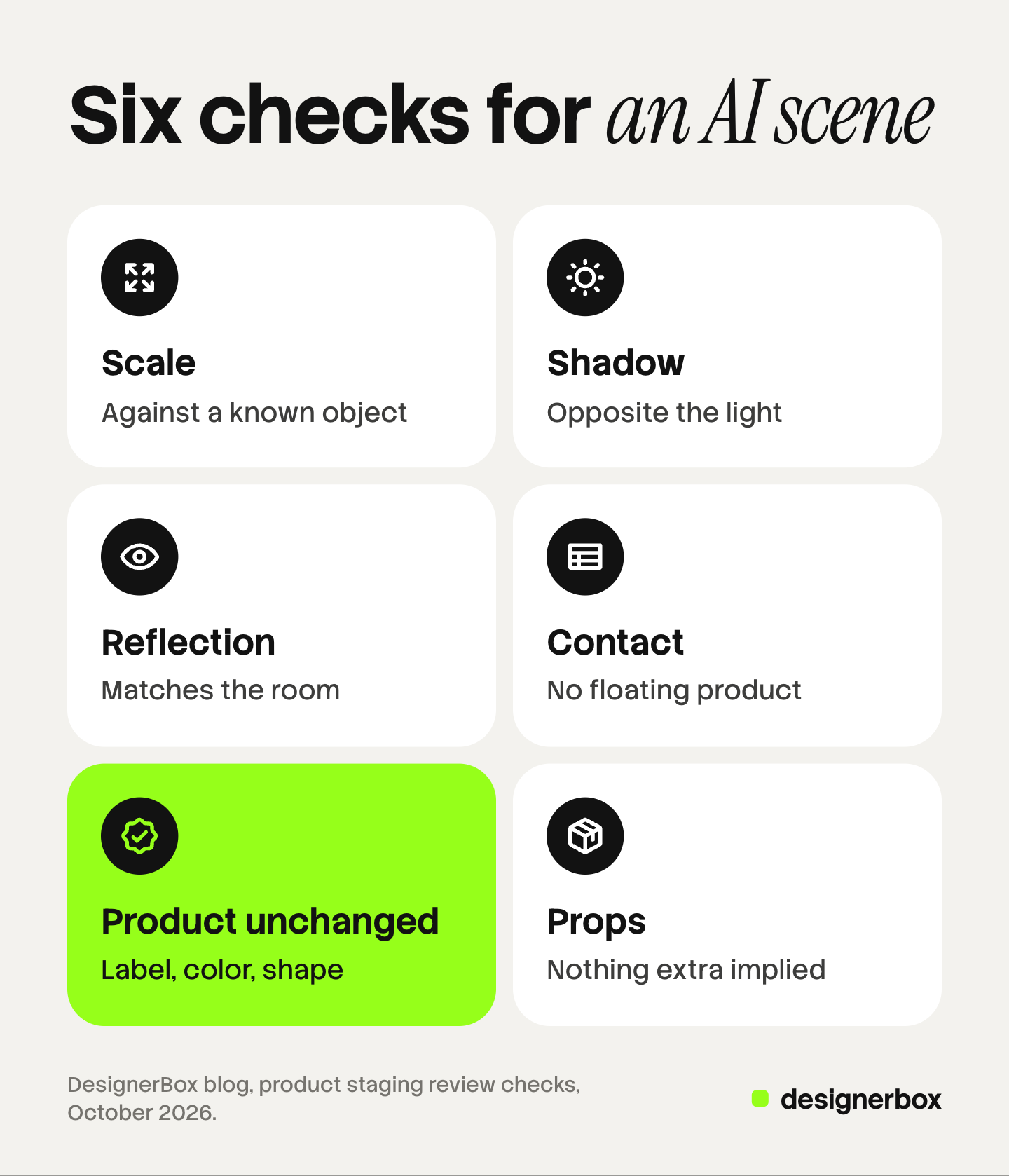
- Scale. Compare the product with one known object in the scene. A 10 cm candle beside a 20 cm book must be half its height.
- Shadow. Find the brightest side of the product. The shadow must fall on the opposite side, and it must match the shadows of the props.
- Reflection. Glass, metal and gloss show the room. Check that the reflection contains no window or object that the scene does not have.
- Contact. Look at the line where the product meets the surface. A product with no contact shadow looks like it floats.
- Product unchanged. Compare the label text, the logo, the color and the shape with the source photo. Read the small text letter by letter.
- Props promise nothing extra. List every object the model added. Remove any that a shopper could read as part of the order or as a feature.
A scene that fails check 5 shows a different product. Our guide on how to test AI product photos for accuracy gives a longer test for that one check.
Where a staged image may go
The main image is the strict slot on both Amazon and Google.
| Slot | What the platform says | Staged image? |
|---|---|---|
| Amazon main image | Pure white background, RGB 255, 255, 255. The product as 85% of the image. No props that are not included | No, with one exception |
| Amazon additional images | Variant slots for additional angles, product in use and details | Yes |
| Google primary image | A clean view of the item. No promotional elements or overlays. No product that is not sold with the main product | Only with nothing extra in the frame |
| Google lifestyle image link | The product in a real world context. Up to five images, each at least 600 x 600 pixels | Yes |
Amazon. The main image rules name props directly: “Don’t show accessories or any props that aren’t included with the product and could confuse the customer.” (Amazon Seller Central, product image guide, October 2026). The exception is six product types: BED, BED_FRAME, MATTRESS, RUG, RUG_PAD and SOFA may use a lifestyle main image, with no text or extra logos (Amazon product page style guide, October 2026). Our guide to Amazon image requirements covers the full list. For the specs of five channels side by side, see our guide to ecommerce product photography.
Google Merchant Center. The primary image “must offer an unobstructed, clean view of the item for sale”, and added text, callouts or graphics cause a disapproval. As a best practice, the product takes up no less than 75% and no more than 90% of the image (Google Merchant Center Help, image link, October 2026). Google’s own example for the lifestyle image link is “furniture staged within a room” (Google Merchant Center Help, lifestyle image link, October 2026).
An image made with generative AI must also keep the metadata that says so. Google lists the value CompositeSynthetic for “a composite that includes synthetic elements” (Google Merchant Center Help, October 2026). That describes a real product photo in an AI scene. Do not remove it in your export step.
What a staged image must not imply
The US Federal Trade Commission says it looks at an ad “in context - words, phrases, and pictures - to determine what it conveys to consumers”. It counts implied claims as well as express ones, and an advertiser needs proof for both (FTC, Advertising FAQs: A Guide for Small Business, October 2026).
For staging, that gives three tests:
- What is in the box. A shopper should be able to tell which objects ship. If a prop could be read as included, remove it.
- How big it is. A product made to look larger than it is misleads on a main feature.
- What it does. A scene implies use. A speaker staged beside a pool implies it survives water. Stage only uses that the product supports.
This section is general information, not legal advice.
Staged scenes in DesignerBox
DesignerBox is AI creative production for brands and agencies. It makes images, ads and video, and a staged scene is one step in that work. Anyone can make an AI picture. Making hundreds that still look like your brand is the hard part.
The five staging decisions live in two places. A brand holds your products, your reference pictures and your rules, such as the surface, the props that are allowed and the side of the light. A workflow holds the steps, and it reads the brand on every run.
Review is part of the workflow. Critic steps score the results of a run, and best-of-N keeps the best one. The six checks above still need a person, and you keep or discard each result yourself.
The scene step is rarely the end. The same workflow can turn a kept scene into an ad or a short video. The full workflow from the first product photo to the finished ad, in one subscription. The cost is shown before the run. For the still-image side, see AI product photography.
DesignerBox does not send finished work to a marketplace or an ad account. You download the results, or send them with a webhook or an S3 step. The free plan runs on sample products, and every plan below Ultra is one seat. Uploading your own photos and the commercial license start on the Pro plan. AI video, virtual try-on, upscaling, the image editor and the video editor start on the Premium plan. Plans and credits are on the pricing page.
FAQ
What is the difference between product staging and prop styling?
Product staging is the whole scene around the product: the surface, the props, the scale cue, the light and the framing. Prop styling is one part of it. A staged photo can have no props at all, only a surface and a light.
Can I use a staged photo as my Amazon main image?
In most categories, no. Amazon’s main image needs a pure white background and no props that are not included with the product. Six product types, including sofas, rugs and mattresses, may use a lifestyle main image. For everything else, staged photos go in the additional image slots (Amazon Seller Central, October 2026).
Does Google Shopping allow staged product images?
Yes, in the right attribute. The primary image needs a clean view of the item, with no overlays and no product that is not sold with it. A staged scene goes in the lifestyle image link attribute, which takes up to five images per product (Google Merchant Center Help, October 2026).
How do I check an AI-staged product photo?
Run six checks on the full-size file beside the source photo. Check the scale against a known object, the shadow direction, the reflections and the contact with the surface. Then confirm that the label, color and shape are unchanged. Last, list every added prop and remove any that suggests an extra.
Can I stage products in DesignerBox?
Yes. A scene is one step in a workflow, and the workflow reads your brand rules and reference pictures on every run. Critic steps score the results and best-of-N keeps the best one. You see the cost before you press Run, and you decide which results to keep.
Sources
- Amazon main image rules (pure white background, 85% of the image, props, packaging, accurate representation) and variant slots: Amazon Seller Central, product image guide, accessed October 2026
- The six product types allowed a lifestyle main image: Amazon Seller Central, product page style guide, accessed October 2026
- Google primary image rules (promotional elements and overlays, products not sold together, the 75% to 90% best practice, AI image metadata): Google Merchant Center Help, image link, accessed October 2026
- Google lifestyle image link (real world context, up to five images, 600 x 600 pixels): Google Merchant Center Help, lifestyle image link, accessed October 2026
- How the FTC reads pictures and implied claims in an ad: FTC, Advertising FAQs: A Guide for Small Business, accessed October 2026
- 42% of users judge product size from images, and 28% of 60 sites with no in-scale image: Baymard Institute, in-scale product images, published May 2017, accessed October 2026
- DesignerBox brand, workflows and plan gates: DesignerBox brand page (designerbox.ai/product/brand), workflows page (designerbox.ai/product/workflows) and pricing page (designerbox.ai/pricing), October 2026
Amazon, Google, FTC and Baymard facts verified on each publisher’s own page, October 2026. DesignerBox features verified on designerbox.ai, October 2026. The staging rules are working practice, not a platform requirement. Individual results vary.