Google Ads AI is the set of creative tools inside your Google Ads account. Asset Studio generates and edits images, text customization writes headlines and descriptions, and Google builds videos from the assets you provide. Google limits the tools on purpose: no children, no well-known people, and no logos you did not supply. You still fill each slot, and one Performance Max asset group takes up to 20 images.
So start inside the account. The tools are already there, and Google’s help page calls its generative AI “helpful, free technologies”. The better question is what they cannot hold. They do not hold your product’s real look across hundreds of products, and they hold only part of your brand rules.
This guide reads Google’s own help pages, as they stood on 4 October 2026. It covers what the AI makes, which slots you must fill, what Google’s rules say about AI-made assets, and where creative from outside fits. It ends with how one saved workflow makes the master image and the ratios Google asks for.
Key Takeaways
- Asset Studio is the hub. Google calls it the central place to create, edit, manage and share assets. It includes the Nano Banana Pro image model.
- Access is restricted. Prompted image generation needs an account that has run ads for at least 30 days, in one of eight interface languages.
- Google’s AI will not draw everything. It limits children, prominent likenesses, and branded items and logos that you did not provide as input.
- Performance Max asks for three image ratios. Horizontal 1.91:1 and square 1:1 are required. Vertical 4:5 is optional. Each row on Google’s table says “Add up to 20 images”.
- Every image made in Google Ads carries a mark. Google embeds a SynthID watermark and C2PA markup in all images and videos generated in Google Ads tools.
- You stay responsible. Google says advertisers should review generated assets for accuracy, policy and law before they publish them.
What does Google Ads AI make for creative today?
Google Ads AI makes four kinds of creative: images, text, video and product images from your feed. Each one lives in a different place in the account, and each has its own limits.
| Tool | Where it lives | What it makes | Limit Google states |
|---|---|---|---|
| Asset Studio | Tools menu in Google Ads | Images, text and video from one prompt box, product images, edits, video builder, voiceover | Projects and assets you generate are kept for 55 days |
| Generated images | Campaign setup, asset groups, Asset library | New images from a prompt, or from one or more photos of your product | Eligible accounts only, prompts in eight languages |
| AI image editor | Asset Studio, and the media picker in Performance Max and Demand Gen | Background replacement, object removal, crops in three ratios | Background prompts in eight languages |
| Text customization and AI Max | Search and Performance Max campaigns | Extra headlines and descriptions from your landing page and ads | You must turn on AI Max in Search to use it |
| Auto-generated video | Performance Max, Demand Gen, App campaigns | Videos in horizontal, square and vertical from your text and images | In Performance Max, it turns off when you upload your own videos |
| Product Studio | Merchant Center | Backgrounds, higher resolution, product video | Video only for merchants in six countries |
Sources: the Google help pages linked in the sections below, read 4 October 2026.
Asset Studio and generated images
Asset Studio is in the Tools menu. Google describes it as the “centralized destination in Google Ads for creating, editing, managing, and sharing your assets”. The page says it includes the Nano Banana Pro image generation model (About Asset studio, October 2026).
You type a prompt, and you can add product images, documents or brand guidelines. Asset Studio returns a batch of images, text and videos as one project. Google keeps the projects and assets you generate for 55 days.
One feature matters most for a brand that sells physical goods. You can give Google one or more photos of your product, and it creates lifestyle images around it. Google says the results “are more likely to be faithful to the product images you provide”. It also tells you to “ensure generated images are accurate before adding them to a campaign” (About generated images in Google Ads, October 2026).
Access is not open to every account. Google lists these conditions for prompted image generation:
- The Google Ads interface is in English, Dutch, French, German, Italian, Japanese, Portuguese or Spanish.
- The account is active and has run ads for at least 30 days.
- The account has a history of policy compliance.
- The account has not completed Election Advertising Verification.
- The account does not advertise in a sensitive vertical.
Google adds that the features “are rolling out gradually”, so an eligible account may still not have them.
The AI image editor
The image editor works in Performance Max and Demand Gen. When you generate an image, you can choose from up to 8 results. When you replace a background, Google offers up to 4. The editor also crops one image to three sizes that match the landscape, portrait and square ratios (Use the image editor, October 2026).
Text customization and AI Max for Search
Text customization used to be called automatically created assets. It writes extra headlines and descriptions from your domain, landing page, existing ads and keywords. Google says the assets are reviewed and refreshed “at least every 48 hours”.
In Search campaigns, the setting is now part of AI Max, and you must turn on AI Max to use it. Google states that, starting in September 2026, campaigns that use text customization are upgraded to AI Max (About text customization, October 2026). AI Max also adds search term matching and final URL expansion (About AI Max for Search campaigns, October 2026).
In Performance Max, the same setting reaches further. Google says its AI “may create descriptions, headlines, image, and video assets” from your landing page and existing ads (Build an asset group, October 2026).
Video tools
If your Performance Max asset group has no video, Google may build one from your text and images. The system turns this off when you upload your own videos. In Demand Gen, Google says it can now turn a still image into a 10-second video clip. Google stores these videos on a channel it owns, and you cannot edit them (About auto-generated video ads, October 2026).
Video enhancements make vertical, square and shorter versions of a video you uploaded. Google can also add a voiceover, and it says the AI voiceover is “only available for accounts and assets in English” (About video enhancements, October 2026).
Product Studio in Merchant Center
Product Studio is the Merchant Center tool. Google calls it “a suite of free, AI-powered tools” for product images and videos. It is available to all Merchant Center users except those based in Russia and France, and video generation only in Australia, Canada, India, Japan, the UK and the US (About Product Studio, October 2026). Our guide to free platform AI tools covers Product Studio in detail. Google Labs also has a separate tool, and our guide to Google Pomelli explains it.
What does Google Ads AI not make?
Google lists what its tools are built to limit. The list matters, because these are the assets you must bring.
- Children and prominent likenesses. Google says people and face generation “is currently limited to adults”.
- Brands you did not supply. The tools limit “branded items and logos not provided as input”.
- Sensitive verticals. Google AI does not automatically suggest generated images for verticals “such as political or pharmaceutical ads”.
- Regulated goods in Product Studio. Google names alcohol, pharmaceuticals, gambling-related products, weapons and tobacco among the goods it does not support.
- A guaranteed approval. “Assets created by generative AI aren’t guaranteed to be approved by Ads Policy.”
There is a second gap, and Google does not list it. A generated image is a new picture. Google’s own wording is “more likely to be faithful”, and it asks you to check each result. A photo of the real product is still the proof.
Brand control is also partial. Brand guidelines in Performance Max hold a business name, 1 to 5 logos, colors and a font. Google applies the colors and font to autogenerated videos on YouTube and to responsive display ad formats. It adds that “not every creative type will support rendering with your specific brand guidelines” (About brand guidelines, October 2026).
Text guidelines control the words. You can add up to 25 term exclusions and up to 40 messaging restrictions per campaign. Google labels this feature an experimental beta (Use text guidelines, October 2026). No setting holds the light, the framing or the model across 300 products.
Which asset slots do you have to fill?
Each campaign type has its own slots. The numbers below are copied from Google’s specification pages. Where Google prints a recommended size, use it. The minimum is the smallest file Google accepts.
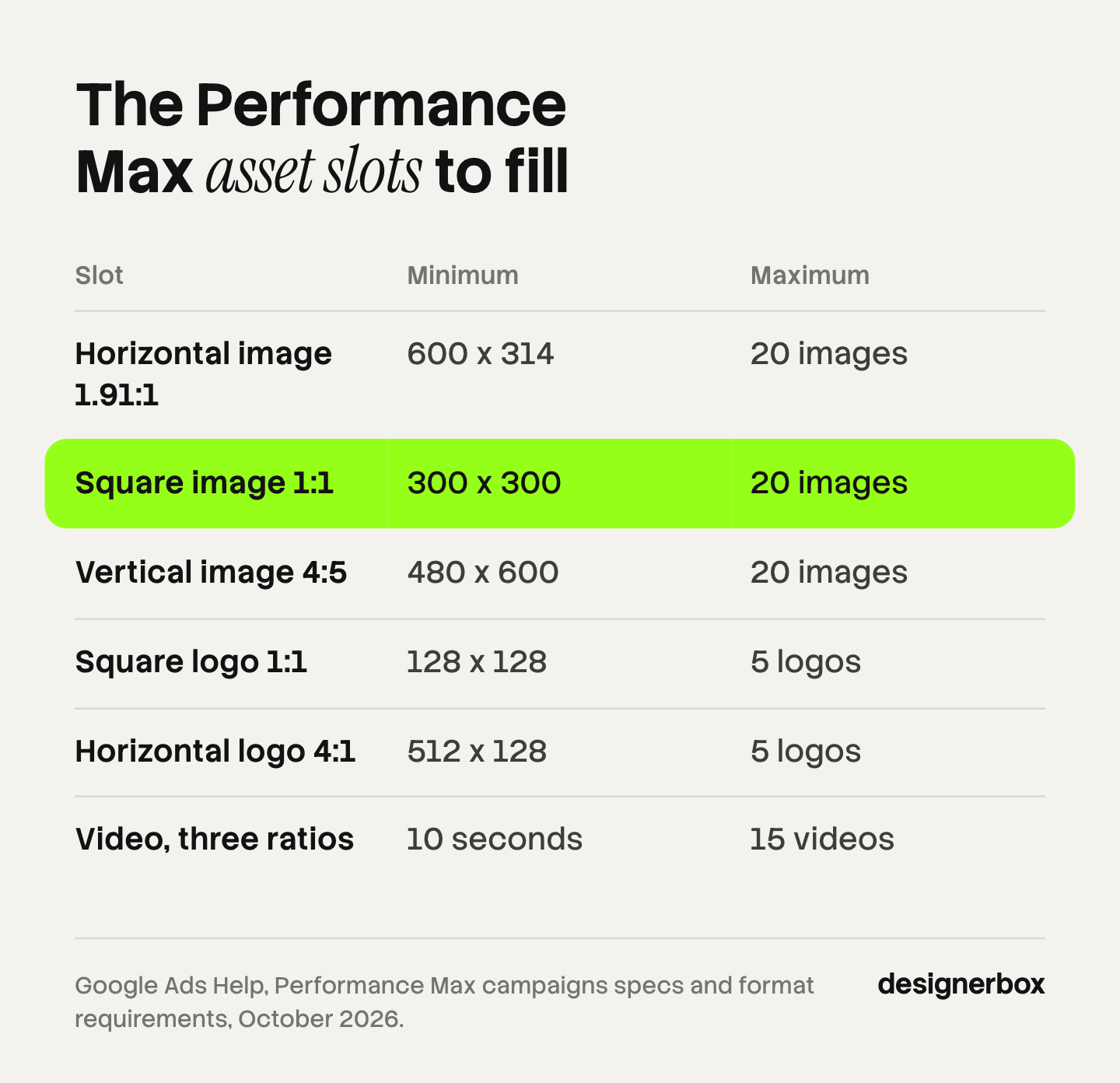
| Campaign type | Slot | Ratio | Minimum size | Maximum count |
|---|---|---|---|---|
| Performance Max | Horizontal image, required | 1.91:1 | 600 x 314 | Up to 20 images |
| Performance Max | Square image, required | 1:1 | 300 x 300 | Up to 20 images |
| Performance Max | Vertical image, optional | 4:5 | 480 x 600 | Up to 20 images |
| Performance Max | Square logo, required | 1:1 | 128 x 128 | Up to 5 logos |
| Performance Max | Horizontal logo, optional | 4:1 | 512 x 128 | Up to 5 logos |
| Performance Max | Video, optional | 16:9, 1:1, 9:16 | 10 seconds or more | Up to 15 videos |
| Responsive display ad | Horizontal image, required | 1.91:1 | 600 x 314 | 1 to 15 images |
| Responsive display ad | Square image, required | 1:1 | 300 x 300 | 1 to 15 images |
| Responsive display ad | Logo, optional | 1:1 or 4:1 | 128 x 128 or 512 x 128 | 1 to 5 each |
| Responsive display ad | Video, optional | 16:9, 1:1, 2:3 | Any length | 1 to 5 videos |
| Demand Gen image ad | Image | 1:1, 1.91:1, 4:5, 9:16 | 300 x 300, 600 x 314, 480 x 600, 600 x 1067 | Up to 20 per ad |
| Demand Gen video ad | Video | 16:9, 1:1, 4:5, 9:16 | 5 seconds | 1 to 5 per ad |
Sources: Google Ads Help specification pages for Performance Max, responsive display ads, Demand Gen images and Demand Gen video, read 4 October 2026.
A few lines from the same pages change how you prepare files.
- File type and weight. Performance Max images are JPG or PNG, with a maximum file size of 5120 KB.
- The safe area. Google says content must sit in “the center 80% of the image”, because the edges can be cut on some screens.
- Recommended sizes. Google recommends 1200 x 628 for horizontal, 1200 x 1200 for square and 960 x 1200 for vertical images in Performance Max.
- Overlays. You can use images with text overlays. Google recommends at least one image without overlays for each ratio.
- Text assets. Performance Max takes 3 to 15 headlines of 30 characters, 1 to 5 long headlines of 90 characters, and 2 to 5 descriptions of 90 characters.
- Shorts. Google asks for at least one vertical video of 10 to 60 seconds for Shorts eligibility in Performance Max (About video assets, October 2026).
- Short videos in Demand Gen. A video under 10 seconds does not serve on YouTube in-stream.
For YouTube video campaigns, Google recommends 15 seconds for in-feed and skippable in-stream ads, and 6 seconds for a bumper (Video ads specs, October 2026).
One product can fill three image ratios in Performance Max and four in Demand Gen. A catalog of 200 products makes that 600 files or more before any testing. Our guide to ad resizing for every platform size covers the same problem on Meta and TikTok.
What are Google’s rules on AI-made assets?
Google treats an AI-made asset like any other asset, and adds marks and labels on top. Three rules matter.
Every image made in Google Ads is marked. Google embeds “non-visible SynthID digital watermarks and C2PA” markup “into all images and videos generated within Google Ads tools”. The SynthID mark is built to survive screenshots, filters and compression (Use AI content label settings and disclosures, October 2026).
Some regions need a visible label. Google’s help pages say AI regulations in the European Union, India and New York require labels on ads with certain AI-generated or edited assets. The AI label setting lets you mark an asset as created or edited with AI. For campaigns that target those three locations, the ad then shows a visible overlay. Everywhere else, the disclosure appears in the “How this ad was made” panel.
The setting covers assets you made anywhere, not only inside Google. Google also says the setting “doesn’t guarantee your compliance with specific regulations” and tells advertisers to seek legal guidance. This section is general information, not legal advice. Our guide to AI disclosure in advertising lists the laws behind these labels.
The same policies apply. Google writes that “all advertising content is subject to Ads Policy, regardless of how it’s created”. It also asks advertisers to review generated or suggested assets “to ensure that they’re accurate, not misleading, and not in violation of any Google advertising policies or applicable laws before publishing them”. When you upload an image, you confirm that you own all legal rights to it.
Where does creative made outside Google fit?
Outside creative fits in every slot that needs your real product, your full brand rules, or something Google’s tools limit. You make the file elsewhere, check it, and upload it to the asset group or the Asset library. Asset Studio imports from your computer, Merchant Center, Google Drive and Dropbox.
Four jobs usually sit outside:
- Product-true images. The shot shows the real item, with the real label, print and color.
- A person in the frame under your rules. Your casting, your wardrobe, your rights.
- The same look on every product. One light, one framing and one background family across the catalog.
- Video you control. Your own video stops the auto-generated one in Performance Max, and you can edit it.
Outside tools come in three broad types. The table shows what each type holds.
| Tool type | What it does | What it holds | What stays with you |
|---|---|---|---|
| Resizer | Takes one finished ad and makes each ratio | The layout | The source image and the brand rules |
| Template-based ad maker | Fills a fixed layout with your text and photo | Fonts, colors and logo position | The product photo |
| Product-photo tool | Makes a new scene around your product | The product’s look | Ad layout and ratios |
No tool type replaces a check by a person. Our comparison of the best AI ad generators names the tools in each group.
A sensible split looks like this. Use Google’s tools for text variants, for background tests, and for a video where you have none. Bring your own files for the hero image in each ratio, for logos, and for any claim a shopper will check against the product.
One workflow for the master and every Google ratio
Anyone can make an AI picture. Making hundreds that still look like your brand is the hard part.
DesignerBox is built for that part. You save the steps once as a workflow: the product photo, the scene, the light and the crop. A brand profile holds your logos, fonts, palette and rules, and the workflow reads it on every run.
The ads resizer in the AI ad generator then rebuilds one approved master in the formats ad platforms need, so the 1.91:1, 1:1 and 4:5 files come from the same picture. A batch runs the workflow over a sheet, one product per row, up to 200 rows in a sheet. You keep or discard each result, and you re-run one row alone. The cost is shown before the run.
The full workflow from the first product photo to the finished ad, in one subscription.
The limits are plain:
- DesignerBox does not upload to Google Ads or Merchant Center. You download the results, or send them with a webhook or an S3 step. Then you upload them in Google Ads.
- DesignerBox does not manage bids, budgets or campaigns. Google Ads does that work.
- It does not write your Search headlines inside the account. Text customization does.
- Every plan below Ultra is one seat. Team features, shared brand kits and white label are on the Ultra plan.
Uploading your own photos and the commercial license start on the Pro plan. AI video, virtual try-on, upscaling, the image editor and the video editor start on the Premium plan. Plans and credits are on the pricing page.
The page for performance marketers shows how the pieces fit a paid team.
A check before launch
Run this list on every asset group before you publish it.
- Each required slot is full. Horizontal and square images, a square logo, and the minimum text assets.
- Each file passes the minimum. Check the pixel size and the 5120 KB cap.
- The subject sits in the center 80%. Look at the crop on a phone preview.
- One image per ratio has no overlay. Google recommends it.
- The product is right. Compare each generated image with the real item: label, color, shape, count of parts.
- The brand guidelines are set. Business name, logos, colors and font at campaign level.
- The text guidelines are set. Add the terms and messages your brand never uses.
- The AI label is decided. Mark each AI-made or AI-edited asset if you target the European Union, India or New York.
- You chose the video. Upload your own in three orientations, or accept that Google may build one.
- You know what Google may add. Review text customization, image enhancements and video enhancements, and turn off what you do not want.
After launch, read the asset report. Google suggests you wait about 2 to 3 weeks, then replace assets that perform poorly. Our guide to ad creative testing explains how to read those results.
A free plan for your first run
Start from a template and run it once. The free plan runs on sample products.
FAQ
What is Google Ads AI?
Google Ads AI is the name people use for the AI features inside Google Ads. For creative, that means Asset Studio, generated images, the AI image editor, text customization, AI Max for Search and auto-generated video. Product Studio does similar work for product images in Merchant Center.
What is Google Ads Asset Studio?
Asset Studio is a section in the Tools menu of Google Ads. Google describes it as the central place to create, edit, manage and share assets. It holds the Asset library, product image generation, the AI image editor, a video builder, video trimming, voiceover and shareable previews.
What image sizes does Performance Max need?
Google requires a horizontal 1.91:1 image of at least 600 x 314 pixels and a square 1:1 image of at least 300 x 300 pixels. A vertical 4:5 image of at least 480 x 600 pixels is optional. Google recommends 1200 x 628, 1200 x 1200 and 960 x 1200. The maximum file size is 5120 KB.
Does Google label images made with AI in Google Ads?
Yes. Google embeds a SynthID watermark and C2PA markup in all images and videos generated in Google Ads tools. For campaigns that target the European Union, India or New York, assets marked as AI-made also show a visible overlay on the ad.
Can Google Ads AI generate people?
Yes, with limits. Google says people and face generation is limited to adults. Images of children and of prominent people are not allowed. When you provide photos of your product, Google says the results can show people wearing or using it.
Can I upload images made with another AI tool?
Yes. Google Ads accepts JPG and PNG images that meet its specifications and policies. The AI label setting lets you mark an uploaded asset as created or edited with AI. Google says all advertising content is subject to Ads Policy, regardless of how it is created.
Does DesignerBox publish ads to Google Ads?
No. DesignerBox does not upload to Google Ads or Merchant Center, and it does not manage campaigns. You download the results, or send them with a webhook or an S3 step. In DesignerBox the cost is shown before the run.
Sources
- Google Ads Help, About Asset studio: definition, Nano Banana Pro, prompt box, 55-day retention, feature list, import sources, SynthID (support.google.com, read 4 October 2026)
- Google Ads Help, About generated images in Google Ads: product-based images, eligibility, prompt languages, adults only, content restrictions, sensitive verticals, SynthID, advertiser review (support.google.com, read 4 October 2026)
- Google Ads Help, Use the image editor to generate and edit images with Google AI: campaign types, up to 8 images, up to 4 backgrounds, three crop ratios (support.google.com, read 4 October 2026)
- Google Ads Help, About text customization in Search campaigns: former name, AI Max requirement, September 2026 upgrade, 48-hour refresh (support.google.com, read 4 October 2026)
- Google Ads Help, About AI Max for Search campaigns: search term matching, text customization, final URL expansion (support.google.com, read 4 October 2026)
- Google Ads Help, Build an asset group: text customization in Performance Max, asset types (support.google.com, read 4 October 2026)
- Google Ads Help, About auto-generated video ads: source assets, 10-second clips in Demand Gen, Google-owned channel, upload turns it off (support.google.com, read 4 October 2026)
- Google Ads Help, About video enhancements: orientations, shorter versions, English-only voiceover (support.google.com, read 4 October 2026)
- Google Ads Help, About brand guidelines: business name, 1 to 5 logos, colors, font, eligible formats (support.google.com, read 4 October 2026)
- Google Ads Help, Use text guidelines with Performance Max and Search campaigns (beta): 25 term exclusions, 40 messaging restrictions (support.google.com, read 4 October 2026)
- Google Ads Help, Performance Max campaigns specs and format requirements: text, image, logo and video slots (support.google.com, read 4 October 2026)
- Google Ads Help, About image assets for Performance Max campaigns: JPG or PNG, center 80%, overlays, rights confirmation, 2 to 3 week check (support.google.com, read 4 October 2026)
- Google Ads Help, About video assets for Performance Max campaigns: Shorts eligibility, auto-generated video (support.google.com, read 4 October 2026)
- Google Ads Help, Responsive display ads specs and format requirements (support.google.com, read 4 October 2026)
- Google Ads Help, image and video asset specifications for Demand Gen campaigns (images, video, read 4 October 2026)
- Google Ads Help, Video ads specs and format requirements: recommended lengths (support.google.com, read 4 October 2026)
- Google Ads Help, Use AI content label settings and disclosures: label setting, regions, SynthID and C2PA (support.google.com, read 4 October 2026)
- Google Merchant Center Help, About Product Studio: free tools, availability, video countries, unsupported goods (support.google.com, read 4 October 2026)
- DesignerBox batch: one product per row, up to 200 rows, keep or discard per row: DesignerBox batch page (designerbox.ai/product/batch), October 2026
- DesignerBox brand rules: DesignerBox brand page (designerbox.ai/product/brand), October 2026
- DesignerBox ads resizer: DesignerBox AI ad generator page (designerbox.ai/ai-ad-generator), October 2026
Google’s limits, sizes and availability verified on Google’s own help pages on 4 October 2026. Google changes them often, so read each page before a launch. The file count for 200 products is example arithmetic. This article is general information, not legal advice. DesignerBox publishes this article and sells creative production, not campaign management. Individual results vary.