
Furniture ads work when they let the buyer check three things a screen hides: how big the piece is, what it is made of, and whether it fits a room like theirs. Each ad format proves one of the three. A person next to the piece proves scale. A slow close pass proves material. A room scene proves fit. Pick the format by the doubt you need to remove.
A sofa is not a T-shirt. The buyer cannot try it, and a return means a courier and a week of waiting. So the buyer looks at an ad for proof, and most furniture advertising gives a mood instead. A styled room with warm light says the brand has taste. It does not say whether the armchair seats a tall person, or whether the oak is solid or a printed film.
This guide is for furniture and home decor brands with 20 to 500 products, and for the agencies that run their ads. It covers what a furniture ad has to prove, six formats ranked by what they prove, the video specs for Meta, TikTok and Pinterest, and the one limit on AI room scenes. All sources were read in October 2026.
Key Takeaways
- Three doubts decide the sale: scale, material and fit. An ad that answers none of them is decoration.
- Each format proves one thing well. A person with the piece proves scale. A close pass proves material. A room scene proves fit.
- Run the formats as a set. One product needs at least one ad for each doubt, so the buyer who has all three can resolve all three.
- A generated room may change the room, never the product. Dimensions, color and finish must match what you ship.
- Build vertical first. Instagram Reels and TikTok both ask for 9:16. Facebook Feed asks for 4:5. Pinterest accepts both.
- Published furniture return rates have no clear public source. This guide quotes only the retail-wide figures from the National Retail Federation.
What furniture ads have to prove
Furniture ads have to prove what the buyer would check in a showroom. In a showroom the buyer stands next to the piece, touches the surface, and pictures it at home. Online, the ad has to do those three jobs. That gives three questions: how big is it, what is it made of, and will it fit a room like mine.

Returns show why this matters. Retailers expected shoppers to return 15.8% of their sales in 2025, and an estimated 19.3% of online sales (National Retail Federation and Happy Returns, October 2025, accessed October 2026). Those are figures for all of retail. Many blogs print a return rate for furniture alone. None of the ones we found names a public original with a method, so this guide does not print one.
The logic holds without a number. A buyer who expected a deep three-seat sofa and receives a compact one has a reason to return it. So does a buyer who expected linen and received polyester. An ad that shows the true size and the true surface removes that reason before the order.
The stills side of this problem is covered in two other guides: furniture product photography for the five listing shots, and home decor product photography for glaze, weave and grain. This guide covers the ads.
Six furniture ad formats, ranked by what they prove
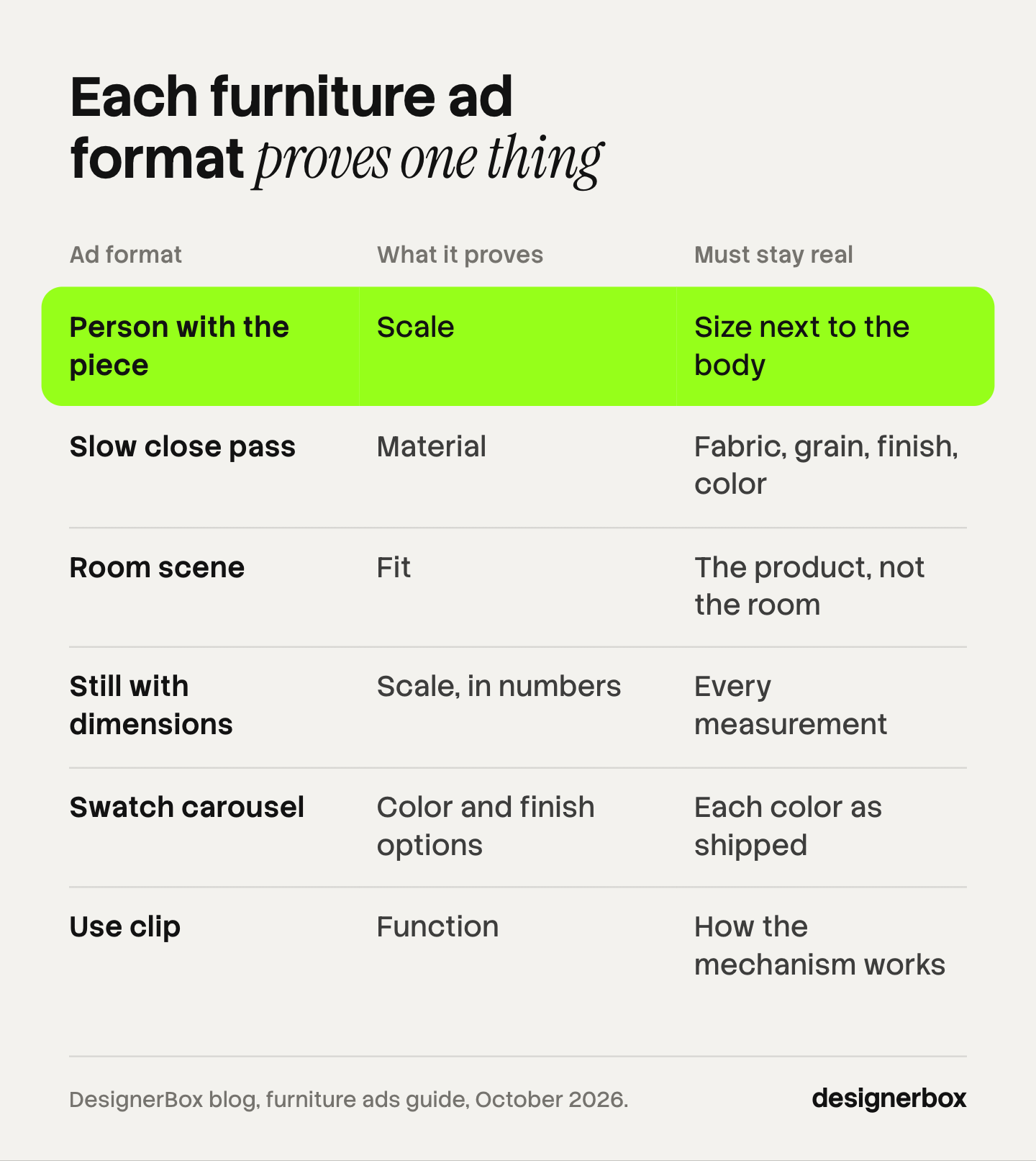
The six formats below are ranked by how directly each one answers a buyer’s doubt. The first three each prove one of the three things on their own. The last three support them.
| Rank | Format | What it proves | What must stay real |
|---|---|---|---|
| 1 | A person with the piece | Scale | The size of the piece next to the body |
| 2 | A slow close pass | Material | Fabric, grain, finish and color |
| 3 | A room scene | Fit | The product. The room may change |
| 4 | A still with dimensions | Scale, in numbers | Every measurement |
| 5 | A swatch carousel | Color and finish options | Each color as it ships |
| 6 | A use clip | Function | How the mechanism works |
1. A person with the piece
A person sitting on the sofa, or standing next to the shelf, is the fastest proof of scale there is. The viewer knows how big a person is, so the body works as a ruler. This is why creator-style clips suit furniture: someone sits down, leans back, puts a cup on the side table. The viewer reads seat depth, back height and arm height in two seconds.
Keep the person plain and the framing wide enough to show the whole piece. A tight crop on a face proves nothing about the sofa. For how these clips are scripted, see the UGC ads guide.
2. A slow close pass
A slow close pass is a clip where the camera moves along the surface at close range: across the weave of a cushion, along the edge of a table, over a stitched seam. It proves material. Motion helps here because light moves across the surface, and that is how a viewer tells velvet from flat cotton, or oiled oak from laminate.
Shoot or build this one from a real close photo of the real surface. It is the format where a generated texture does the most harm, because the texture is the claim.
3. A room scene
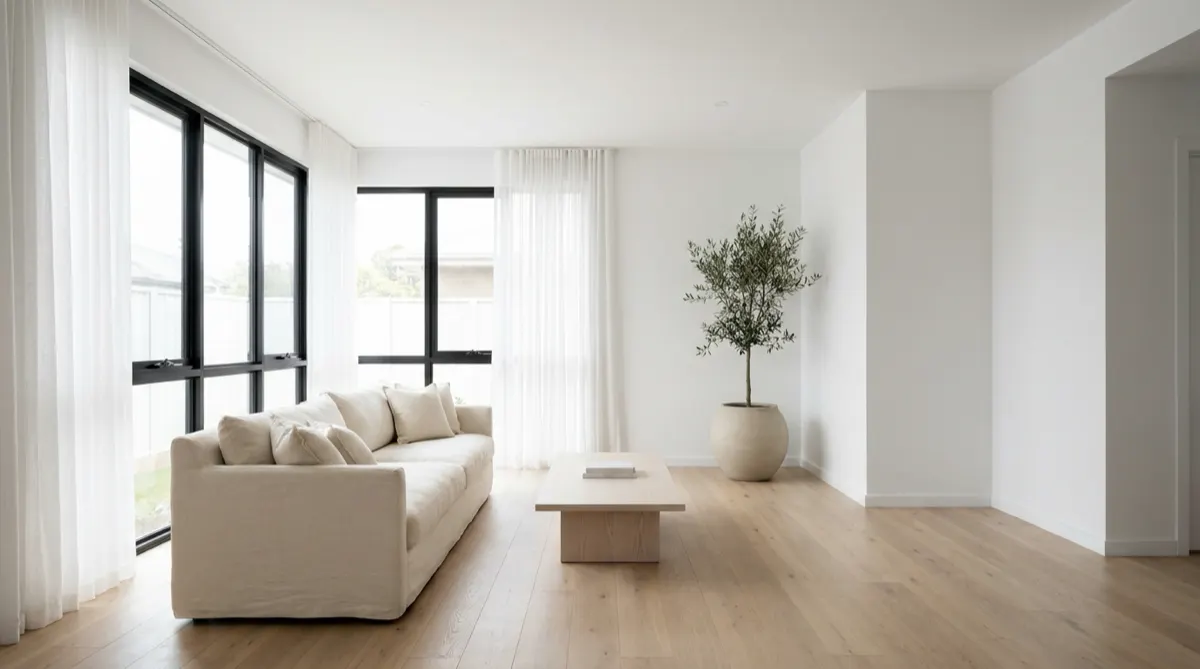
A room scene shows the piece in a room, and it proves fit: does the style sit with other furniture, and does the piece leave space to walk around it. One product in three or four different rooms answers more buyers than one hero room does. A small apartment, a family living room and a bright open space each speak to a different buyer.
This is also the format AI changes most, and the limit on it has its own section below.
4. A still with dimensions
A still with dimension lines is the cheapest scale proof and one of the least used in ads. Width, depth, height and seat height, drawn on the product photo. It works as the second or third card of a carousel, after the person clip has caught attention. It gives the number, where the person clip gives the feeling.
5. A swatch carousel
A swatch carousel shows each color or finish as its own card. It proves that the option exists and what it looks like. Each card has to show the color as it ships. A recolored hero image is a risk here, because a color that is close is still the wrong color when the box arrives.
6. A use clip
A use clip shows the piece doing its job: the sofa bed opening, the drawer closing softly, the table extending. It proves function, and it often proves scale too, because a person operates it. Use it for any product with a moving part. Skip it for a product without one.
To choose between still and motion for a given placement, see static ads vs video. For how to turn one approved still into a clip, see product photo to video ad.
The limit: change the room, never the product
A generated room scene may change the room. It may not change the product. The wall color, the floor, the plants and the window light can all be new. The dimensions, the color and the finish of the piece must match what the buyer receives. This is the returns problem and the legal line at the same time.
In the United States, the Federal Trade Commission says an ad is deceptive if it is likely to mislead consumers acting reasonably, and the point is material. The FTC gives “representations about a product’s performance, features, safety, price, or effectiveness” as examples of material claims (FTC, Advertising FAQ’s: A Guide for Small Business, accessed October 2026). The size and the surface of a sofa are features.
In the European Union, Article 6 of the Unfair Commercial Practices Directive treats a practice as misleading when its overall presentation is likely to deceive the average consumer about the main characteristics of the product, even if the information is factually correct (Directive 2005/29/EC, EUR-Lex, accessed October 2026). This section is general information, not legal advice.
Three failures are common in generated furniture scenes. Check for each one against the source photo:
- The piece changed size. A model that redraws the room often scales the sofa to suit the room. Compare the piece to a door, a person or a standard object in the frame.
- The color moved with the light. Warm evening light turns a grey fabric beige. Grade the room, then check the product color.
- The finish was redrawn. Legs, stitching, wood grain and hardware get smoothed or invented. Zoom in on each.
A generated person adds a second line. An FTC rule bans testimonials that misrepresent that they are by someone who does not exist, or by someone with no real experience of the product (FTC, August 2024, accessed October 2026). So a generated presenter can sit on the sofa to show scale. A generated presenter should not say “I bought this and love it”.
For the same rule across all product types, see AI product ads.
Furniture Facebook ads and other placements: the video specs
Build the vertical version first. Instagram Reels and TikTok both ask for 9:16, and Facebook Feed asks for 4:5, which you can crop from the vertical file. The table lists what each platform’s own help page states.
| Placement | Aspect ratio | Resolution or minimum | Length and file |
|---|---|---|---|
| Instagram Reels | 9:16 | 1440 x 2560 pixels | MP4 or MOV, up to 4 GB |
| Facebook Feed | 4:5 | 1440 x 1800 pixels | MP4, MOV or GIF, up to 4 GB |
| TikTok In-Feed (non-Spark) | 9:16 recommended | At least 540 x 960 pixels | Up to 10 minutes, up to 500 MB |
| Pinterest standard video | 1:1, 2:3, 4:5 or 9:16 | Not stated on the specs page | 4 seconds to 15 minutes, up to 2 GB |
Sources: Meta Ads Guide, Instagram Reels video, Meta Ads Guide, Facebook Feed video, TikTok auction In-Feed ads and Pinterest ad specs, all accessed October 2026.
Two details matter for furniture. First, Meta recommends that you keep about 14% of the top, 35% of the bottom and 6% of each side of a Reels ad free of text and logos. So put dimension labels in the middle of the frame, away from the bottom third. Second, Pinterest recommends 6 to 15 seconds for a video ad. That is enough for one proof: one person sitting down, or one pass along a surface.
For the still formats and their specs, see these seven product ad formats.
AI labels on furniture ads
The label rules depend on what the AI made. On TikTok, ads with fully AI-generated images or video need the AIGC label or your own clear disclaimer. TikTok lists “removing or modifying backgrounds” and changes to lighting or color as insignificant edits. If TikTok finds undisclosed AI content, “your ad will be rejected or restricted” (TikTok ads policy, accessed October 2026).
Meta labels ads itself. It adds an “AI info” label when you use its own generative tools, and when it detects third-party AI through signals such as C2PA metadata (Meta Business Help Center, accessed October 2026).
In practice, a real sofa photo with a new background is the light case. A fully generated room clip or a generated presenter is the case to label. The rules in full are in AI disclosure in advertising.
Home decor ads: the same three proofs, smaller objects
Home decor ads follow the same logic, with the weight moved. For a vase, a lamp or a cushion, scale is the doubt buyers forget to ask about, and material is the reason they buy. So the close pass moves to first place, and the scale proof becomes a hand: a hand that lifts the vase or places the candle.
Room fit works at the level of a shelf or a table. Show the object with two or three neighbors of known size, such as books or a cup. Do not fill the frame with props. A shelf full of styled objects hides which one is for sale and how big it is.
The ad set for one product
A furniture ad set covers each doubt once. For one product, that is a small fixed list:
- One person clip, vertical, for scale.
- One close pass, vertical, for material.
- Two or three room scenes, as stills and as short clips, for fit.
- One carousel with the dimension still and the swatches.
- One use clip, if the piece has a moving part.
Then test which proof your buyers need most. Change one thing per variant, as in ad creative testing. If the close pass wins, material was the doubt. That tells you what to put first on the product page too. The cost side of the source photos is in furniture photography cost.
The same ad set on every product
Anyone can make an AI picture. Making hundreds that still look like your brand is the hard part. A furniture brand with 200 products needs the same ad set 200 times, with the same framing, the same rooms and the same rules.
DesignerBox is AI creative production for brands and agencies. You build the ad set once as a workflow, and you run it on every new product.
- The product photo is the start. The workflow places your photo in the scene. You still check size, color and finish against the source, as above.
- The brand is a record. You set logos, fonts, colors and rules once in your brand profile. The workflow reads it on every run.
- The clips are cut on a timeline. The video editor has several tracks, transitions, animated text and audio, so the dimension labels and captions are yours to place.
- The whole collection runs at once. Batch runs one workflow over a sheet of products, with the same standard on row one and row two hundred. You keep or discard each row.
The full workflow from the first product photo to the finished ad, in one subscription. An 8-second clip costs 40 to 560 credits, depending on the model. Uploading your own photos and the commercial license start on the Pro plan. AI video, virtual try-on, upscaling, the image editor and the video editor start on the Premium plan. Plans and credits are on the pricing page.
Here are the limits. DesignerBox does not post to your ad accounts: you download the results, or send them with a webhook or an S3 step. Every plan below Ultra is one seat. Critic steps score the results of a run and keep the best one, but they do not replace your own check of size, color and finish. The page for furniture and homeware brands shows the room-scene side, and the AI video ads page shows the clips.
A free plan for your first run
There is a free plan, and it runs on sample products. Start from a template and see the cost before you run it.
FAQ
What makes a good furniture ad?
A good furniture ad lets the buyer check one thing they cannot check through a screen: the size of the piece, the material, or how it fits a room. Pick one proof per ad. A person next to the piece shows size, a close pass shows material, and a room scene shows fit.
Do furniture Facebook ads need video?
No. Facebook Feed accepts both images and video, and Meta’s guide lists 4:5 as the ratio for Feed video. Video helps most for the two proofs that need motion: a person sitting down, and light moving across a surface. Dimensions and swatches work well as stills in a carousel.
How long should a furniture video ad be?
Pinterest recommends 6 to 15 seconds for a video ad. Meta and TikTok allow much longer files, but one proof rarely needs more than 15 seconds. If the ad needs to prove scale and material, make two short ads.
Can I use AI room scenes in furniture advertising?
Yes, if the product stays true. The room, the light and the props may change. The dimensions, the color and the finish of the piece must match what you ship. Compare every result with the source photo before the ad goes live.
Do I have to label AI furniture ads?
It depends on the platform and on what the AI made. TikTok asks for a label on fully AI-generated media, and does not ask for one when only the background changed. Meta adds an “AI info” label itself when it detects AI signals in an ad.
How are home decor ads different from furniture ads?
The three proofs are the same, but the order changes. For decor, material comes first, and a hand holding the object is the scale proof. Keep props few, so the buyer can see which object is for sale.
What does a furniture video ad cost in DesignerBox?
The cost is shown before each run. An 8-second clip costs 40 to 560 credits, depending on the model, and AI video starts on the Premium plan.
Sources
- National Retail Federation and Happy Returns: 2025 Retail Returns Landscape, published 15 October 2025, accessed October 2026
- Federal Trade Commission: Advertising FAQ’s: A Guide for Small Business, accessed October 2026
- Federal Trade Commission: final rule banning fake reviews and testimonials, August 2024, accessed October 2026
- Directive 2005/29/EC, the Unfair Commercial Practices Directive, Article 6, EUR-Lex, accessed October 2026
- Meta Ads Guide: Instagram Reels video, accessed October 2026
- Meta Ads Guide: Facebook Feed video, accessed October 2026
- Meta Business Help Center: AI info on ads, accessed October 2026
- TikTok Ads Manager: auction In-Feed ads, accessed October 2026
- TikTok ads policy: misleading and false content, accessed October 2026
- Pinterest Business help: review ad specs, accessed October 2026
- DesignerBox brand, video editor, batch, furniture and homeware brands, AI video ads and pricing pages (designerbox.ai), October 2026
Platform specs, platform policies and legal sources verified as of October 2026. Individual results vary.