





Google Pomelli is a free AI marketing tool from Google Labs, built with Google DeepMind. It reads your website to build a brand profile, then makes social campaigns, product photos, short animations, a brand book and a simple website. Its Photoshoot feature makes studio and lifestyle images from a single product photo. It is still an experiment, it works in English only, and Google lists it in 202 countries and territories as of October 2026.
That is the short answer. If your job is the same set of photos for every product in a catalog, DesignerBox for ecommerce brands covers that route, and a later section explains the difference.
Pomelli has changed fast. It launched on 28 October 2025 in four countries with one job, social campaigns. Eleven months later it also makes product photos, animations, brand books and websites, and the country list is far longer. A description of Pomelli from early 2026 no longer matches the product.
This guide reads Google’s own pages: the eight Pomelli Help Center articles, four Google blog posts and the posts from Google’s Labs and Pomelli accounts, all on 1 October 2026. Where Google documents nothing, this guide says so instead of guessing. DesignerBox publishes this article and sells a different product, so read that section with the bias in mind.
Key Takeaways
- Pomelli is free today, with a cap. Google says “You can currently use Pomelli at no charge” and that users can create “several hundred image and video generations”. It gives no exact number and no period.
- It is in 202 countries and territories, in English only. That includes the whole EU and the UK since 21 April 2026. Users must be 18 or older.
- Photoshoot takes one product per image and up to 6 templates per run. Google names Nano Banana as the image model behind it.
- Google itself tells you to review. Its Help Center says AI “can sometimes modify fine details of your products, like colors, logos, or textures”.
- It is still an experiment. Google’s Help Center calls Pomelli “an early experiment that will be improved over time”.
- Google documents no API, no run across many products at once and no team seats for Pomelli. Its Catalog adds one product URL at a time.
- Pomelli fits one business with a website and a small product range. Google’s pages describe adding products one URL at a time, so check that first if you have hundreds of products or many clients.
What is Google Pomelli?
Google Pomelli is “an AI marketing tool that helps you generate scalable, tailored, on-brand content to grow your business”, in the words of Google’s Help Center (Get started with Pomelli, October 2026). Google launched it on 28 October 2025 as an experiment from Google Labs in partnership with Google DeepMind, for small and medium-sized businesses (Google blog, Pomelli launch, October 2025).

It works in three moves. First, Pomelli reads your website and builds a profile of your brand. Next, it suggests campaign ideas. Then it makes the images and text for the idea you pick, and you edit them.
Three facts matter for everything else.
It is a web app. Google describes “a standalone web application optimized for desktop and mobile use”. Google’s pages describe no separate phone app.
It is an experiment. The Help Center says “During the experimental phase” and “Pomelli is an early experiment”. Google’s general terms add that it sometimes will “add or remove features and functionalities” and “stop offering old ones” (Google Terms of Service, October 2026).
The brand profile has two names. Google’s blog posts call it Business DNA. The Help Center now calls it Business Profile. Both mean the same thing: your “brand fonts, colors, values, and images”. Do not confuse it with Google Business Profile, the listing on Google Maps. Pomelli can import from that listing once, and the two are not updated together.
What can Pomelli make in October 2026?
Pomelli started with social campaigns, and Google has added to it in at least six steps since. This is the timeline from Google’s own posts.
| Date | What Google added | Source |
|---|---|---|
| 28 October 2025 | Launch: the brand profile, campaign ideas and editable creatives | Google blog |
| 10 December 2025 | Animate: short animations, on the Veo 3.1 model | Google Labs on X |
| 19 February 2026 | Photoshoot: studio and lifestyle product images, on Nano Banana | Google blog |
| 5 May 2026 | Catalog: saved products and services | Pomelli on X |
| 19 May 2026 | Pomelli Agent, Brand books and Websites | Google blog |
| 13 August 2026 | Custom Photoshoot templates and new preset templates | Pomelli on X |
| Date not published | Sharing to Google Ads, and posting to Instagram | Help Center |
Sources: Pomelli Photoshoot, Pomelli’s new agent features, Google Labs on X, 10 December 2025, Pomelli on X, 5 May 2026 and 13 August 2026, read 1 October 2026.
Two notes on that table. Some pages date Animate to January 2026. Google Labs’ own post is dated 10 December 2025. And the Pomelli Agent matters for new businesses: since May 2026 you can build the brand profile with no website, by uploading up to 20 files or by chatting with the agent.
How does Pomelli Photoshoot work?
Photoshoot turns “simple product photos into professional-grade studio and lifestyle imagery” (Create Photoshoots in Pomelli, October 2026). You need a Business Profile first. Pomelli then “automatically applies your Business Profile and aesthetics to the photos it generates”.
The steps Google documents:
- Upload one product photo. Google’s rules: “Choose an image that shows the entire product clearly”, “Include only one product in each image”, use adequate lighting and add no extra graphics.
- Pick templates. “Select up to 6 preset and/or custom templates.” A custom template is your own image, used as the style.
- Run it, then edit by prompt. You describe the change in a prompt box, or add reference images.
- Resize, animate or save. You can pick a new aspect ratio, turn an image into an animation, or save a result as a new Catalog item.
- Download or share. “Download all assets” saves the set. Animations download in formats such as MP4 or GIF.
Google names the model family: Photoshoot “uses business context (Business DNA) and Nano Banana image generation”. It does not say which Nano Banana version. Our comparison of Nano Banana 2 and Nano Banana Pro for product photos explains what separates the two.
The most useful sentence on the page is Google’s own warning. Under the heading “Review your images”, the Help Center says: “AI can sometimes modify fine details of your products, like colors, logos, or textures. We recommend reviewing all AI-generated images before publishing to ensure they accurately represent your real-world products.”
That is honest, and it applies to every tool in this category, ours included. Our guide to AI product photo accuracy lists what to check: the label, the color, the print and the shape.
Where is Pomelli available, and is it free?
Pomelli is available in 202 countries and territories, by our count of Google’s list, to users aged 18 or older, and in English only (Where you can use Pomelli, October 2026).
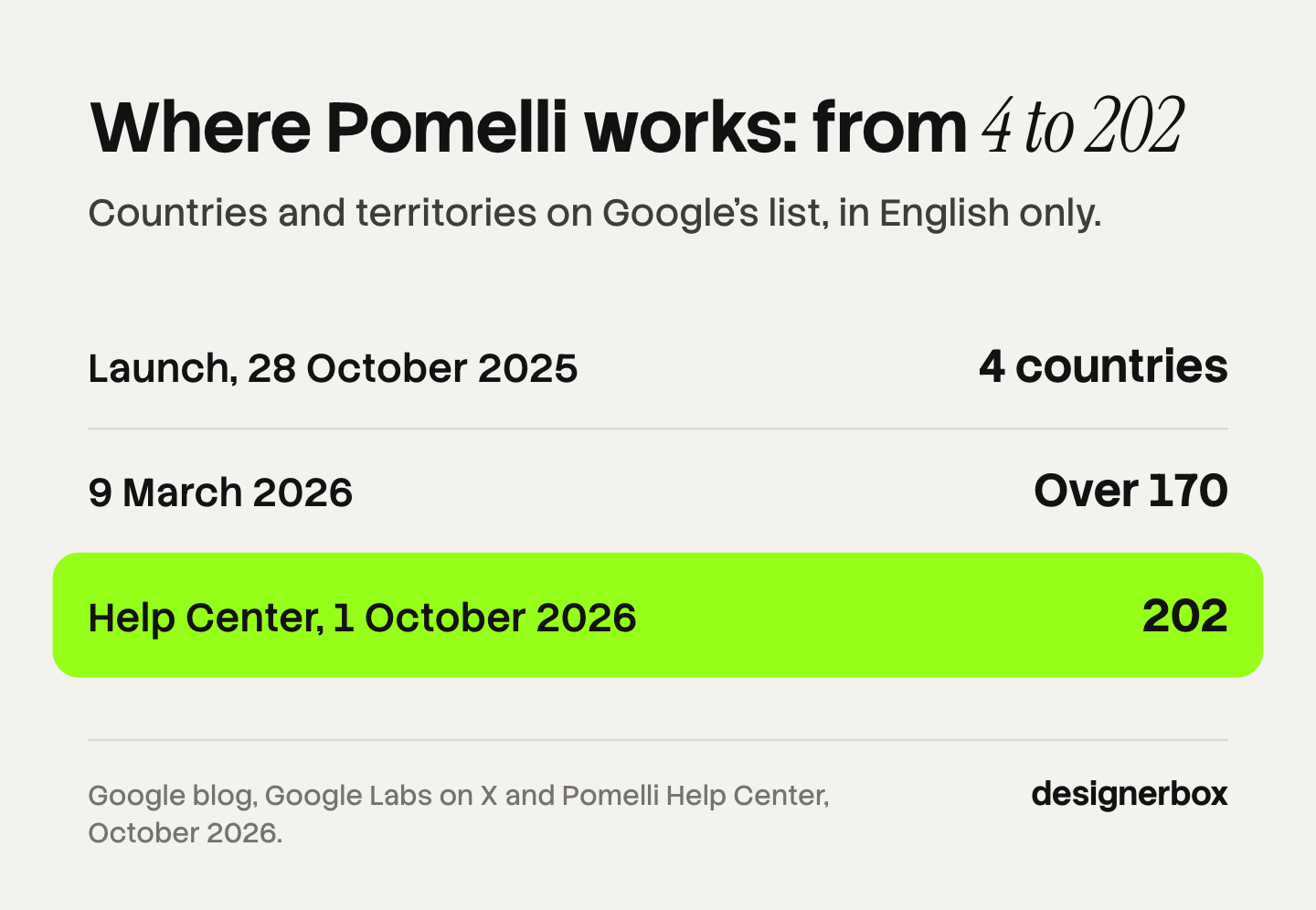
The list grew in two steps. On 9 March 2026, Google Labs said it had “expanded Pomelli to over 170 countries & territories” (Google Labs on X, March 2026). On 21 April 2026, Google released it “in English across the E.U., Iceland, Liechtenstein, Norway, Switzerland and the U.K.” (Google blog, Pomelli in Europe, April 2026).
What that means in practice:
- Listed: the United States, Canada, Australia, New Zealand, all 27 EU member states, the United Kingdom, India, Japan, Brazil and Mexico, among many others.
- Not on the list on 1 October 2026: China, Hong Kong, Russia, Ukraine and Serbia, among others.
- English only. The interface is in English, and the text in generated images is in English. You can edit that text yourself.
- Features can differ. Google says “Product feature availability may differ by country of use.”
- Accounts. A personal Gmail account always works. A Google Workspace account may need an admin to turn the service on.
Some comparison pages still say four countries. Check the date on any Pomelli comparison you read.
On price, Google’s wording is careful: “You can currently use Pomelli at no charge.” There is a cap: “Users can create several hundred image and video generations. This Help Center will reflect any future updates to these caps.” Google gives no exact number, and it does not say whether the cap is per day, per month or in total. Treat any exact figure you see elsewhere as unconfirmed. Google has published no plan to charge. The word “currently” is the only signal.
What does Google not document for Pomelli?
This section lists what Google’s eight Help Center articles and four blog posts do not describe, as read on 1 October 2026. An absence on a help page is no proof that a feature does not exist. Parts of the product sit behind a sign-in. The list still tells you what Google has documented.
| Job | What Google documents | What it does not document |
|---|---|---|
| Many products in one run | Up to 6 templates for one product image | A run across many products at once |
| Catalog import | One product URL at a time, or manual entry | A store feed, a spreadsheet or a store sync |
| Code access | Nothing | An API |
| Teams | A Workspace admin switch | Seats, roles or approvals |
| Publishing | Sharing to Google Ads, posting to Instagram | Scheduling, or posting to other networks |
| File quality | Aspect ratios, and animation formats such as MP4 or GIF | Output resolution, and image file formats |
| Several brands | One Pomelli account per Instagram account | How many brands one account can hold |
Two details in the publishing row are worth knowing. Sharing to Google Ads sends the files only: “Sharing your images & videos with Google Ads does not launch ad campaigns.” And Instagram posting needs a professional account and ends at “Post now”. Google documents no schedule step (Share assets to connected apps, October 2026).
For a single shop, none of the undocumented items in the right-hand column matters much. For a catalog or an agency, the first, fourth and last rows decide the fit.
Rights, data and labels in Pomelli
Read these before you run a paid campaign on Pomelli images. This is general information, not legal advice.
The terms are Google’s general ones. “Use of Pomelli is subject to the Google Terms of Service and the Generative AI Prohibited Use Policy.” We found no Pomelli-specific privacy notice on the public pages.
Google does not claim your results. On usage rights, its wording is short. The terms say: “Some of our services allow you to generate original content. Google won’t claim ownership over that content.” No sentence on the Pomelli pages grants a commercial license by name. The stated purpose is marketing: “All assets can be downloaded and are ready to be used across your channels.”
Training is not addressed for Pomelli. No Pomelli page says whether your uploads improve Google’s models. Google’s general privacy policy says it uses “interactions with AI models and technologies like Gemini Apps to develop, train, fine-tune, and improve these models” (Google Privacy Policy, October 2026). If that matters for a client’s unreleased product, ask before you upload.
You must hold the rights to what you upload. “Do not share copyrighted content without necessary rights to do so.”
The visible AI mark is your choice. In Account Settings you can “opt to add a watermark to your exported images to let viewers know they were generated with AI”. Google’s terms also list as abuse “misleading others into thinking that generative AI content was created by a human”.
No indemnity is documented. We found no promise on the Pomelli pages that results will not infringe someone else’s rights.
Ad platforms and marketplaces have their own label rules. Our guides to commercial use of AI images and AI disclosure in advertising cover them.
Who Pomelli fits, and who needs something else
Pomelli is a strong starting point for one kind of business, and Google says which one: “any business with a website looking to generate marketing Campaigns”.

Pomelli fits you if:
- You run one brand, with a website or a Google Business Profile.
- You sell a small range, and you can add products one URL at a time.
- You post in English.
- You want campaign ideas, images, a brand book and a simple website from one free tool.
- You can check each image yourself before you publish it.
You need something else if:
- You have a catalog. Forty new products a month, each with five fixed shots, is a job for a tool that runs one set of steps over many products.
- You sell on marketplaces with strict image rules. Google does not document output resolution, so check each channel’s image rules first. Our guide to AI product photos and marketplace rules lists each channel’s rules.
- You are an agency. Google documents no seats and does not say how many brands one account holds. Each Instagram account needs its own Pomelli account.
- You need a contract. Google calls Pomelli an experiment, and its terms say features can change.
- You publish in other languages.
The usual alternatives sit in three groups. Product photo platforms such as Photoroom run AI edits on many images at once in a web app, and they have an API (photoroom.com/batch and photoroom.com/api, October 2026). Design tools build the layout around the photo. Workflow tools run a saved set of steps on every product. Our guide to AI creative tools for small business covers the first purchase, and Photoroom alternatives covers the photo platforms.
A saved workflow for the whole catalog
Anyone can make an AI picture. Making hundreds that still look like your brand is the hard part.
DesignerBox is AI creative production for brands and agencies. Scale your images, ads and video with AI and keep your brand on every piece: build the workflow once with your brand rules, run it on every product, see the cost before each run, and keep everything from the first product photo to the finished ad in one place.
Pomelli and DesignerBox start from the same idea: set the brand once, then make the content. They differ in what happens next. In DesignerBox you save the job as a workflow: the shot list, the light, the crop and your brand rules. Batch runs that workflow over a whole sheet of products. You keep or discard each row, and you re-run one row alone. A workflow can also end in a static ad built from the same product photo.
The full workflow from the first product photo to the finished ad, in one subscription.
Here are the limits, because Pomelli is ahead on four points:
- Pomelli costs nothing today. There is a free plan in DesignerBox, and it runs on sample products. Uploading your own photos and the commercial license start on the Pro plan.
- Pomelli posts to Instagram and shares to Google Ads. DesignerBox does not publish. You download the results, or send them with a webhook or an S3 step.
- Pomelli builds a website and a brand book. DesignerBox makes images, ads and video.
- Pomelli needs no setup beyond a URL. A workflow takes time to build once.
Other limits to know. AI video, virtual try-on, upscaling, the image editor and the video editor start on the Premium plan. Team features, shared brand kits and white label are on the Ultra plan, and every plan below Ultra is one seat. Plans and credits are on the pricing page.
How to decide
Read down the list and stop at the first line that fits.
- One shop, a few products, English content, no budget. Start with Pomelli. It is free today and Google built it for you.
- You need listing photos for marketplaces, at volume, with an API. Look at a product photo platform.
- Your photos are ready and the layout is the slow part. Use a design tool.
- You run the same shots on every new product, month after month. Save the job as a workflow and run it by sheet.
- You are an agency with many client brands. Read the agency page and keep one brand profile per client.
Whatever you choose, keep Google’s own advice: review every AI image against the real product before it is published.
Scale content without limits.
Generate content for your products or services with AI, starting today, and keep your brand on every piece.
FAQ
What is Google Pomelli?
Google Pomelli is a free AI marketing tool from Google Labs, built in partnership with Google DeepMind and launched on 28 October 2025. It builds a brand profile from your website, then makes social campaigns, product photos, animations, a brand book and a website. Google still describes it as an experiment (Pomelli Help Center, October 2026).
Is Pomelli free?
Yes, today. Google’s Help Center says “You can currently use Pomelli at no charge.” There is a cap of “several hundred image and video generations”. Google gives no exact number and no period, and it has published no plan to charge.
Which countries is Pomelli available in?
Google’s list holds 202 countries and territories on 1 October 2026, for users aged 18 or older, in English only. It includes the United States, Canada, Australia, the whole EU and the United Kingdom. Europe was added on 21 April 2026. China, Russia and Ukraine were not on the list on 1 October 2026.
What is Pomelli Photoshoot?
Photoshoot is the Pomelli feature that makes studio and lifestyle images from a single product photo. You upload one product per image and select up to 6 preset or custom templates. Google says it uses your brand profile and Nano Banana image generation. It launched on 19 February 2026.
Can I use Pomelli images in ads?
Google’s stated purpose is marketing use, and its terms say Google will not claim ownership of content you generate. The pages we read grant no commercial license by name and document no indemnity. Google recommends that you review every image for accuracy before publishing. This is general information, not legal advice.
Does Pomelli have an API or bulk processing?
Google documents neither. Its Help Center describes up to 6 templates for one product image, a Catalog that adds one product URL at a time, and “Download all assets”. It describes no API and no run across many products at once (read 1 October 2026).
Does Pomelli add a watermark?
A visible AI watermark is optional. You turn it on in Account Settings. No Pomelli page mentions SynthID. Google’s general statement, from November 2025, is that media made by its tools carries the invisible SynthID watermark (Google blog, Nano Banana Pro, November 2025).
Sources
Competitor pages are cited by domain and date, not linked.
- Definition, web app, experiment status, price, usage cap, accounts, review warning, optional watermark, copyright and governing terms: Google Labs Help, Get started with Pomelli (read 1 October 2026)
- Countries, territories, languages and the age limit: Google Labs Help, Where you can use Pomelli (read 1 October 2026)
- Photoshoot steps, inputs, templates, editing, resizing and downloads: Google Labs Help, Create Photoshoots in Pomelli (read 1 October 2026)
- Business Profile, uploads and Catalog: Google Labs Help, Build your Business Profile and Catalog in Pomelli (read 1 October 2026)
- Google Ads sharing and Instagram posting: Google Labs Help, Share assets to connected apps (read 1 October 2026)
- Launch, Google Labs and Google DeepMind, the first four countries: Google blog, Create on-brand marketing content for your business with Pomelli (28 October 2025)
- Photoshoot and Nano Banana: Google blog, Pomelli Photoshoot (19 February 2026)
- The EU, Iceland, Liechtenstein, Norway, Switzerland and the UK: Google blog, Pomelli in Europe (21 April 2026)
- Pomelli Agent, Brand books and Websites: Google blog, Pomelli agentic capabilities (19 May 2026)
- Animate on Veo 3.1: Google Labs on X (10 December 2025). Over 170 countries and territories: Google Labs on X (9 March 2026)
- Catalog: Pomelli on X (5 May 2026). Custom templates: Pomelli on X (13 August 2026)
- Ownership of generated content and changes to services: Google Terms of Service (read 1 October 2026)
- Use of AI interactions: Google Privacy Policy (read 1 October 2026)
- SynthID on media from Google’s tools: Google blog, Nano Banana Pro (20 November 2025)
- Photoroom batch editing and API: (photoroom.com/batch and photoroom.com/api, October 2026)
- DesignerBox plan gates and the free plan: DesignerBox pricing page (designerbox.ai/pricing), October 2026
Google Pomelli facts verified from Google’s Help Center, blog and official accounts on 1 October 2026. Pomelli is an experiment and changes often, so check Google’s pages before you rely on a feature.

