




To sell on Instagram, you need a professional account, products for sale on your own website, and posts that send people to them. You can tag products in posts and Reels once Meta approves your shop. Since September 2025 the buyer pays on your website, not inside Instagram. The rest is steady work: good product photos, a clear bio link, a posting rhythm and fast replies.
Most guides still describe a checkout inside the app. That ended in 2025. A brand that follows an old guide sets up the wrong thing, and then wonders why the shop is invisible.
This guide is for brands with 20 to 500 products and for one-person shops. It covers the six steps in order, the rules Meta publishes for each one, and what to do if you have no website yet.
Key Takeaways
- The buyer pays on your website. Meta says “Shops on Facebook and Instagram now use website checkout” since September 2025.
- A shop needs a website. Your products must be “available for direct purchase from your website”, on one domain you give Meta.
- Tags have limits. Up to 20 products on a feed post, 5 per carousel slide, 30 on a Reel and 25 tagged posts a day.
- Your bio holds five links. A link-in-bio page puts the rest behind one link.
- The photo does most of the selling. One look across every product makes the feed read as one shop.
- Comments that ask for the link are orders in progress. Answer them in the DM, fast, with the product page.
How do you sell on Instagram?
You sell on Instagram in six steps. Set up a professional account and a shop. Make product photos with one look. Turn your bio into a shop front. Post on a rhythm you can keep. Tag products in posts and Reels. Send the link to everyone who asks for it in the comments. The buyer pays on your website.
| Step | What you do | The rule to check |
|---|---|---|
| 1. Shop | Connect a professional account to your website’s catalog | Meta’s five commerce eligibility requirements |
| 2. Photos | One look for every product, in feed sizes | Instagram’s image sizes |
| 3. Bio | Five links, or one link-in-bio page | Instagram’s five-link limit |
| 4. Rhythm | A posting plan per product, not per week | Your own capacity |
| 5. Tags | Tag products in posts and Reels | 20, 5 per slide, 30, and 25 a day |
| 6. Replies | Send the product page in a DM | Meta’s messaging rules |
The order matters. Tags need an approved shop, and a tagged post without a good photo sells nothing.
Step 1: Set up a professional account and a shop
Switch your account to a professional account, then connect it to a product catalog in Meta’s Commerce Manager. Meta reviews the shop before product tags appear. The review checks five requirements (Meta Business Help Center, read 13 November 2026):
- Follow Meta’s policies, including its Commerce Policies and Seller Policies.
- Represent your business and your domain. Your profile must “contain product listings that are available for direct purchase from your website”. You give Meta the one domain you sell through, and Meta may ask you to verify it.
- Be in a supported country.
- Show that you are trustworthy, through “an authentic, established presence”. Meta says this may include a sufficient follower base.
- Give accurate information. No misleading prices or stock, and your refund and return policies must be easy to find.
The checkout rule changed in 2025. Meta’s help page says: “As of September 2025, Shops on Facebook and Instagram now use website checkout” (Meta Business Help Center, read 13 November 2026). A shop that still used checkout inside the app was updated or hidden. So your product page does the closing work, and Shopify product page optimization covers what that page needs.
The guide to social commerce compares this model with TikTok Shop, where the buyer pays inside the app.
Step 2: Make product photos with one look
People scroll past a product before they read a caption. The photo has to show the product clearly at phone size, and the feed has to look like one shop.

Three rules do most of the work:
- One look for every product. The same light, background and framing, written down once. A feed with five styles reads as five shops.
- More than one shot per product. A clean product shot for the shop, a scene that shows it in use, and a detail shot of the texture or the label.
- Real products only. A photo that changes the print, the color or the shape leads to returns. Check every image against the real product.
Instagram product photos turns one catalog shoot into a month of posts, with the sizes for the feed, Stories and Reels.
Step 3: Turn your bio into a shop front
Your bio is where people go when a post does not carry a link. Instagram lets every account add up to five links to its bio since April 2023, and the profile shows the first one (Social Media Today, April 2023).
Five links fill up fast for a brand. You need the shop, the newest product, a sale, and maybe a booking page or a wholesale form. A link-in-bio page holds all of them behind one link.
More.You, built by the same team as DesignerBox, is a free link-in-bio page. A product block on it has “a photo, a price and a Buy button that opens your store”. It can also hold bookings, events and FAQs, and it shows the views and clicks on each block. On its Pro plan, Auto-Pin moves the link from your newest post to the top of the page for a set time (more.you, November 2026). It sends the buyer to your store. It does not take the payment.
Step 4: Post on a rhythm you can keep
A shop with three posts a month looks closed. A shop with three posts a day and no product photos looks like noise. Pick a rhythm you can keep for a year, then plan it per product.
A new product usually needs several posts: the product shot, a scene, a short Reel and a Story on launch day. Ten new products at four posts each is 40 posts. That is illustrative arithmetic, and your numbers will differ. Count it before the products land. How often to post on social media turns the per-platform ranges into a number of assets a month.
Meta Business Suite lets you “create and schedule posts to publish on Facebook and Instagram” for free (Meta Business Help Center, read 13 November 2026). If you also post to TikTok, YouTube or LinkedIn, a scheduler puts everything on one calendar. PostNext, a scheduler built by the same team as DesignerBox, posts to Instagram, TikTok, YouTube, LinkedIn, X, Threads and Bluesky. It does not post to Facebook or Pinterest (postnext.io, November 2026).
Step 5: Tag products in posts and Reels
A product tag puts the product’s name and price on the post. A tap opens the product, and from there the buyer goes to your website. Tags need an approved shop with a catalog, and only approved products show their tags.
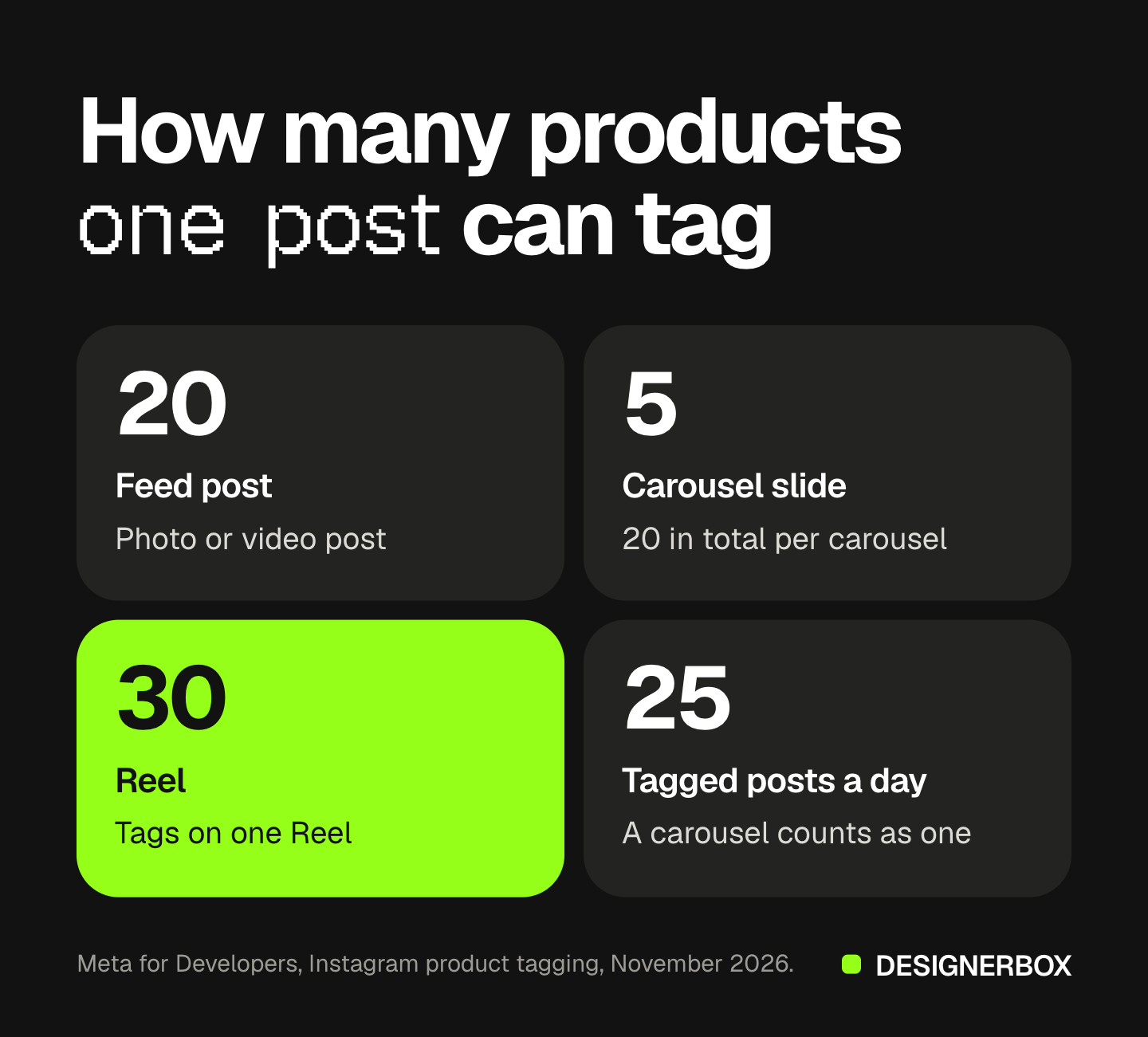
Meta’s developer documentation lists the limits (Meta for Developers, read 13 November 2026):
- Feed posts: up to 20 tags on a photo or video post.
- Carousels: up to 20 tags in total, with up to 5 on each slide.
- Reels: up to 30 tags.
- Daily cap: 25 tagged posts in 24 hours. A carousel counts as one post.
The same page says “Product tagging is not supported for Instagram Creator accounts.” A brand selling its own products needs a business account.
Tag the product that is in the frame. A tag on a product the photo does not show sends people to the wrong page, and they leave.
Step 6: Send the link to people who ask for it
A post that works brings comments: “price?”, “link?”, “do you ship to Canada?”. Each one is a buyer in the middle of a purchase. If the answer takes a day, many of them buy somewhere else.

Many brands now put a keyword in the caption: “Comment LINK and we’ll send it to you.” Everyone who comments that word gets a DM with the product page. It works because the person asked for the message, and the DM goes to the exact product instead of a menu. The Instagram DM funnel covers the whole path from the Reel to the product page.
CreatorFlow, built by the same team as DesignerBox, sends that DM. It answers Reel comments, post comments, Story replies and keyword DMs. On its paid plans it can ask for an email address before it sends the link. It has a free plan with 500 DMs a month, and it works on Instagram only (creatorflow.so, November 2026).
Write a real message, not a bare link. Name the product, give the link, and say how to ask a person a question.
How to sell on Instagram without a website
You cannot use an Instagram shop without a website. Meta’s rules ask for products “available for direct purchase from your website”, so product tags are out. You can still sell, in three ways:
- Sell through a marketplace you already use. Link the listing from your bio or your DMs. The marketplace takes the payment.
- Sell through DMs. Agree the order in the DM and send a payment link from your payment provider. This works for small volumes and made-to-order products. Each order takes a person’s time.
- Build a simple store. Most store builders give you a checkout and a domain in a day. Once it is live, you can apply for a shop and use tags.
The DM route breaks first. At 10 orders a week it works. At 100 orders a week, a person spends the day copying addresses. Move to a store before that point.
One look for every product post
Step 2 is the step that repeats. Every new product needs the same set of photos, in the same look, in every size. Anyone can make an AI picture. Making hundreds that still look like your brand is the hard part.
DesignerBox is AI creative production for brands and agencies. You start from a product photo template, add your brand, and run it on your product photo. You see the cost before the run. Save it as a workflow, and the next product gets the same light, framing and background. Batch runs that workflow over a sheet of products, so row one and row two hundred come back in the same look. The stills, the short clips, the editors and your brand rules sit in one account.
You still check every result against the real product before you post it. Uploading your own photos and the commercial license start on the Pro plan. Plans and credits are on the pricing page.
The first job, built once
Start from a template, add your brand and your products, and run it. The cost is shown before the run.
FAQ
Can you sell on Instagram without a shop?
Yes. You can sell through your bio link, through DMs with a payment link, or through a marketplace listing. You cannot use product tags without an approved shop, and a shop needs products for sale on your own website.
Does Instagram still have checkout?
No. Meta says that as of September 2025, shops on Facebook and Instagram use website checkout. The buyer taps the product on Instagram and pays on your website.
How many products can you tag on Instagram?
Up to 20 on a photo or video feed post, up to 20 in total on a carousel with 5 per slide, and up to 30 on a Reel. An account can publish 25 tagged posts in 24 hours, according to Meta’s developer documentation.
Can a creator account tag products?
Meta’s developer documentation says product tagging is not supported for Instagram Creator accounts. A brand that sells its own products needs a business account and an approved shop.
What do you need to open an Instagram shop?
You need a professional account, a website where your products are for sale, and a location in a supported country. Meta also checks for an established presence and clear refund and return policies. It may ask you to verify your domain.
How many links can you put in your Instagram bio?
Up to five. The profile shows the first link and the number of others. A link-in-bio page lets you share more than five behind one link.
How do you get people to buy from an Instagram post?
Show the product clearly, tag it, and make the next step obvious. Put a keyword in the caption and send the product page by DM to everyone who comments it. Answer questions the same day.
Sources
- Meta Business Help Center, commerce eligibility requirements: facebook.com/business/help/2347002662267537, read 13 November 2026
- Meta Business Help Center, website checkout for shops since September 2025: facebook.com/business/help/1314349509894768, read 13 November 2026
- Meta Business Help Center, creating and scheduling posts in Meta Business Suite: facebook.com/business/help/942827662903020, read 13 November 2026
- Meta for Developers, Instagram product tagging limits and account types: developers.facebook.com, read 13 November 2026
- Social Media Today, Instagram adds up to five links in a profile bio: socialmediatoday.com, April 2023
- More.You link-in-bio page, product blocks, analytics and Auto-Pin: more.you, accessed 13 November 2026
- PostNext channels and calendar: postnext.io/features, accessed 13 November 2026
- CreatorFlow comment-to-DM triggers, Email Gate and free plan: creatorflow.so, accessed 13 November 2026
- DesignerBox plan gates (DesignerBox pricing, designerbox.ai/pricing), November 2026
Meta’s shop, checkout and product tag rules verified from Meta’s own help center and developer pages as of November 2026. Instagram changes these features often, so check each linked page before you set up a shop. Individual results vary.