





An AI video generation API is a web address your code sends a prompt or an image to. It returns a job ID first and a video clip later. Every vendor read for this guide works that way. The vendors differ on six points: clip length, audio, price per second, concurrency, how long the file is stored, and how long the model stays on sale.
The last point is easy to miss. OpenAI removed Sora 2 and its whole Videos API on 24 September 2026. Google lists 22 October 2026 as the earliest shutdown date for its Veo 3.1 preview models. A team that picked a video endpoint in spring has already planned one migration.
This guide explains how a video API call works, what three vendor routes document, and the six checks to run before you write code. Every vendor fact comes from that vendor’s own page, read on 4 October 2026. It ends with the route for a brand or an agency that has no engineers.
Key Takeaways
- Every call is a job. You submit a request, get an ID, then poll or receive a webhook. No vendor read here returns a clip in the first response.
- Clips are short. Veo 3.1 makes 4, 6 or 8 seconds in one request, and 1080p or 4K needs the 8-second length.
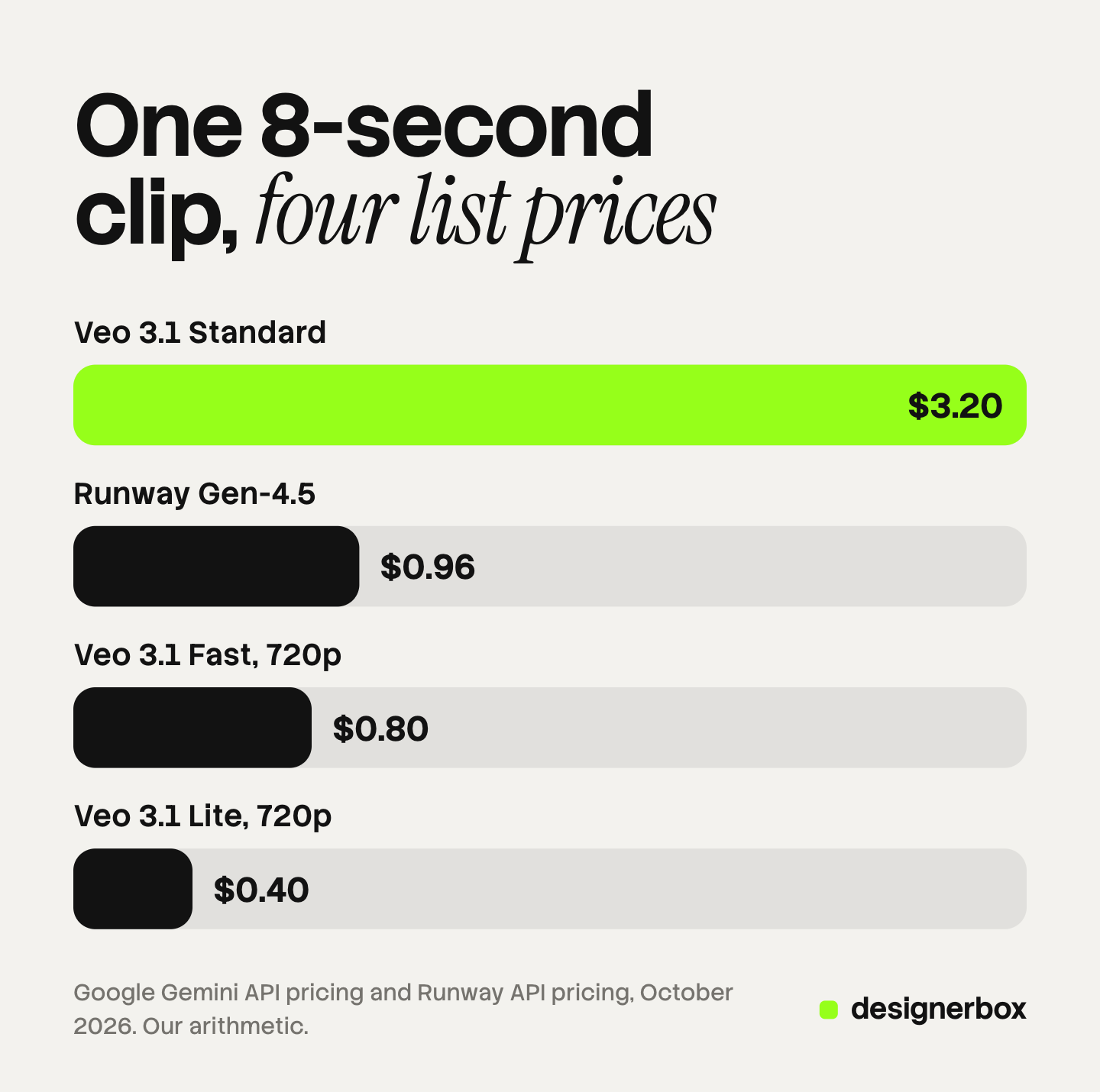
- List prices sit 8 times apart. One 8-second clip costs $0.40 on Veo 3.1 Lite at 720p and $3.20 on Veo 3.1 Standard.
- Files do not wait. Google stores a Veo clip for 2 days. Replicate removes API results after an hour by default.
- Models leave. The Sora 2 API is gone, and the Veo 3.1 previews have a shutdown date. Plan the next model on day one.
What is an AI video generation API?
An AI video generation API lets your software ask a video model for a clip. The request holds a model name, a text prompt, and often a first-frame image. A text to video API takes only the prompt. An image to video API takes your picture as the first frame, which is the route a product needs. The vendor runs the model and gives you a file link when the clip is ready.
The API gives you one clip per request. It gives you no review screen, no brand rules and no long-term storage. Our guide to build vs buy for AI creative production lists the parts a team builds around the model call.
How does a video API call work?
A video takes longer to make than a web request can stay open. So the call is split into steps.
- Submit. Your code sends the prompt and the settings. The vendor answers with a job ID.
- Wait. The job sits in a queue, then runs. Google documents a request latency of 11 seconds at the minimum and 6 minutes at peak hours for Veo 3.1 (Gemini API Veo guide, read 4 October 2026).
- Check. Your code polls a status address, or the vendor calls your webhook.
- Download. You copy the file to your own storage before the vendor deletes it.
Google’s Veo examples poll a long-running operation until it reports done. Runway returns a task ID that you use to fetch the task status (Runway API docs, read 4 October 2026). The model host fal recommends its queue, where you poll for status or receive a webhook (docs.fal.ai, October 2026).

Still images have a second option, the half-price batch file. We explain it in our guide to the image generation API. No video vendor read for this guide documents a batch file for clips.
Which routes can you call today?
There are three routes. A model owner sells its own model. A reseller sells its own model and other vendors’ models under one key. A model host sells many vendors’ models and builds none.
| Route | Example | What you get | What to check |
|---|---|---|---|
| Model owner | Google’s Gemini API | Veo 3.1 and Gemini Omni Flash, at Google’s list price | Preview status and shutdown dates |
| Model owner that also resells | Runway’s API | Gen-4.5, plus Veo 3.1, Seedance 2.5 and WAN 3.0 under one credit balance | Tier limits and each model’s own rules |
| Model host | fal, Replicate | Many vendors’ models behind one key | The price on each model page, and file retention |
Sources: the vendor pages cited in each section below, read on 4 October 2026.
Google: Veo 3.1 and Gemini Omni Flash
Google’s video page now tells developers to use Gemini Omni Flash as the default model for video generation. It keeps Veo 3.1 for scene extension, last-frame control and older pipelines (Gemini API video guide, read 4 October 2026).
Veo 3.1 makes clips of 4, 6 or 8 seconds with audio, at 720p, 1080p or 4K. A 1080p or 4K clip must be 8 seconds long. Google stores each clip on its server for 2 days. Every clip carries a SynthID watermark (Gemini API Veo guide, read 4 October 2026).
All three Veo 3.1 models are previews. Google’s deprecations page lists 22 October 2026 as their earliest shutdown date and names Gemini Omni Flash 1.1 as the replacement. Omni Flash 1.1 has no shutdown date announced (Gemini API deprecations, read 4 October 2026).
Runway: its own models and other vendors’ models
Runway’s API lists its own Gen-4.5, Gen-4 Turbo and Aleph 2.0. It also lists Veo 3.1, Seedance 2.5, WAN 3.0, MiniMax H3 and Gemini Omni Flash 1.1 (Runway API models, read 4 October 2026). One credit balance pays for all of them.
Runway sets limits by tier. Tier 1 allows 1 Gen-4.5 clip at a time and 50 a day. Tier 5 allows 20 at a time and 25,000 a day. A project moves to Tier 2 after it buys $50 of credits. Runway sets no requests-per-minute limit. A task over the concurrency limit waits with the status “THROTTLED”, and a request over the daily limit gets a 429 response (Runway usage tiers, read 4 October 2026).
Model hosts: one key, many models
A model host gives you one key and one bill for many vendors’ models. fal and Replicate are two of them. Higgsfield also sells an API that puts its own models and other vendors’ models behind one key (higgsfield.ai, October 2026).
Read two things on a host before you build. The first is the price on each model page, because a host sets its own rate per model. The second is retention. Replicate removes the inputs, results and files of an API prediction after an hour by default. It accepts 600 new predictions a minute (replicate.com/docs, October 2026). fal re-queues a failed runner and retries up to 10 times (docs.fal.ai, October 2026).
ByteDance sells Seedance through BytePlus ModelArk, and Kuaishou sells Kling through its own developer platform. Neither set of pages loaded in a form we could verify on 4 October 2026, so this guide prints no numbers for them. For Alibaba’s model, see our guide to the Wan 2.5 API.
What does an AI video generation API cost?
Video is billed by the second of finished clip. The table shows vendor list prices and the arithmetic for one 8-second clip.
| Model, as sold by its listed vendor | Price per second | One 8-second clip |
|---|---|---|
| Veo 3.1 Lite, 720p (Google) | $0.05 | $0.40 |
| Veo 3.1 Fast, 720p (Google) | $0.10 | $0.80 |
| Gemini Omni Flash 1.1, 720p (Google) | about $0.10 | about $0.80 |
| Gen-4.5 (Runway) | $0.12 | $0.96 |
| Veo 3.1 Standard, 720p or 1080p (Google) | $0.40 | $3.20 |
| Veo 3.1 Standard, 4K (Google) | $0.60 | $4.80 |
Sources: Gemini API pricing and Runway API pricing, read 4 October 2026. Runway sells credits at $0.01 each, so the dollar figure is our conversion. The 8-second column is our arithmetic.
Three details change the bill.
- Audio. Google’s Veo prices include audio. On Runway’s API, Veo 3.1 costs $0.40 a second with audio and $0.20 without.
- Tokens. Google bills Gemini Omni Flash by output tokens. Its pricing page works that out to about $0.10 a second at 720p.
- Failed clips. Google states that you are charged only when a Veo video is successfully generated.
The price of a generated second is the smaller number. You will reject some clips, so the cost that matters is the price of an accepted clip. We work through that in AI video generation cost.
Six checks before you build
Run these six checks on any vendor’s page before you write code.
- Clip length. Find the longest clip one request returns. Veo 3.1 stops at 8 seconds. A 30-second ad is several jobs plus an edit.
- Image input. A catalog needs the endpoint that takes your product photo as the first frame. A prompt alone draws a product from words.
- Audio. Check that the model makes sound, and that sound does not change the price.
- Limits. Read the concurrency and the daily limit for your tier. They decide how long 500 clips take.
- Storage. Find the retention window. Copy every file to your own storage when the job completes.
- Shutdown date. Open the vendor’s deprecations page. A preview model can leave on short notice.
Why the shutdown date belongs on the list
OpenAI told developers on 24 March 2026 that the Videos API and the Sora 2 models would leave. It removed them on 24 September 2026 and named no replacement (OpenAI API deprecations, read 4 October 2026). That was six months of notice.

So write your code with the model name in one place. Keep your prompts and first frames in your own storage. Test a second model before you need it. Our guides to Sora alternatives and Veo alternatives list what each model does.
Product video as a workflow
Anyone can make an AI picture. Making hundreds that still look like your brand is the hard part.
DesignerBox is AI creative production for brands and agencies. An agency that makes product video for 20 clients has the same six checks, and no time to write the calling code. In DesignerBox you build a workflow once with your brand rules: the first frame, the motion, the cut and the caption. The workflow picks a video model for each step. The cost is shown before the run.
Batch runs that workflow over a sheet of products. You keep or discard each row, and you re-run one row alone. The video editor is a real timeline, with several tracks, transitions, animated text and audio. The full workflow from the first product photo to the finished ad, in one subscription.
Know the limits before you choose this route.
- DesignerBox does not have a public API. It has 68 tools over MCP, so an AI chat such as Claude, ChatGPT or Cursor can run your workflows. If your own software must call a video endpoint, a model owner or a model host is the right route.
- You do not get a per-second price. An 8-second clip costs 40 to 560 credits, depending on the model.
- Results are downloaded, or sent with a webhook or an S3 step. Nothing is published to a store for you.
- Plan gates apply. Uploading your own photos and the commercial license start on the Pro plan. AI video, virtual try-on, upscaling, the image editor and the video editor start on the Premium plan. Plans and credits are on the pricing page.
- Models change here too. The current list is on the models page. Check it before you assume a model is there.
How to decide
Read down the list and stop at the first line that fits.
- Video is a feature of your own product. Build on an API. Start with the model owner’s endpoint, and run the six checks.
- You want to test several vendors’ models. Use a reseller or a model host, and read each model page for its price.
- You need clips longer than 8 seconds. Plan for several jobs and an edit step, or read the limits of a model with a longer clip.
- You are a brand or an agency with no engineers. Run video as a step in a saved workflow, and review by row.
Whichever route you take, count accepted clips, and write the shutdown date in your plan.
A free plan for your first run
Start from a template and run it once before you plan a whole sheet. The free plan runs on sample products.
FAQ
What is the best AI video generation API?
There is no single best one. It depends on the six checks. For short clips with audio from one vendor, Google’s Gemini API lists Gemini Omni Flash as its default. For several vendors’ models under one balance, Runway’s API or a model host fits. Check the shutdown date of any preview model first.
Is there a free AI video generation API?
Not at Google. The Gemini API pricing page lists Veo 3.1 and Gemini Omni Flash 1.1 as not available on the free tier. Other vendors set their own terms, so read each pricing page. Plan for a paid account before you build.
What is the difference between a text to video API and an image to video API?
A text to video API takes a written prompt and draws the whole scene. An image to video API takes your picture as the first frame and adds motion. A product needs the second kind, because the clip must show the real product.
Can I still use the Sora API?
No. OpenAI removed Sora 2, Sora 2 Pro and the Videos API from its API on 24 September 2026. Its deprecations page names no replacement. Code that called those models needs a different vendor.
How long does an AI video API take to return a clip?
It depends on the model, the resolution and the queue. Google documents 11 seconds at the minimum and 6 minutes at peak hours for Veo 3.1, and says a higher resolution takes longer. Your code should poll or use a webhook.
Does DesignerBox have a video API?
DesignerBox does not have a public API. It has 68 tools over MCP, so an AI chat can run your saved workflows. In DesignerBox the cost is shown before the run.
Sources
- Gemini API video guide: Gemini Omni Flash as the default model, Veo 3.1 for extension and last-frame control (ai.google.dev, read 4 October 2026)
- Gemini API Veo guide: 4, 6 or 8 seconds, 720p, 1080p and 4K, the 8-second rule, polling, latency of 11 seconds to 6 minutes, 2-day retention, SynthID (ai.google.dev, last updated 17 September 2026, read 4 October 2026)
- Gemini API pricing: Veo 3.1 Standard, Fast and Lite per second, Gemini Omni Flash 1.1 token billing and the effective price per second, free tier not available, charges only for successful videos (ai.google.dev, read 4 October 2026)
- Gemini API deprecations: Veo 3.1 preview models, earliest shutdown date of 22 October 2026, the named replacement, no shutdown date for Gemini Omni Flash 1.1 (ai.google.dev, read 4 October 2026)
- OpenAI API deprecations: notice on 24 March 2026, removal of the Videos API and the Sora 2 models on 24 September 2026, no replacement named (developers.openai.com, read 4 October 2026)
- Runway API pricing: $0.01 a credit, Gen-4.5, Veo 3.1 with and without audio (docs.dev.runwayml.com, read 4 October 2026)
- Runway API models: the list of Runway and third-party video models (docs.dev.runwayml.com, read 4 October 2026)
- Runway usage tiers: concurrency and daily limits by tier, the throttled status, no requests-per-minute limit, the 429 response (docs.dev.runwayml.com, read 4 October 2026)
- Runway API guide: the task ID and task status (docs.dev.runwayml.com, read 4 October 2026)
- fal queue documentation: asynchronous inference recommended, polling and webhooks, up to 10 retries (docs.fal.ai/model-apis/model-endpoints/queue, read 4 October 2026)
- Replicate documentation: API prediction data removed after an hour by default, 600 new predictions a minute (replicate.com/docs/topics/predictions/data-retention and replicate.com/docs/topics/predictions/rate-limits, read 4 October 2026)
- Higgsfield: an API with its own and other vendors’ models behind one key (higgsfield.ai/blog/best-ai-video-generation-apis, read 4 October 2026)
- DesignerBox workflows, batch, video editor and MCP: DesignerBox product pages (designerbox.ai/product/workflows, designerbox.ai/product/batch, designerbox.ai/product/video-editor, designerbox.ai/mcp), October 2026
Vendor prices, limits and dates verified on each vendor’s own documentation on 4 October 2026. They change often, so read each page before you build. The 8-second clip column is example arithmetic, not a measurement. DesignerBox publishes this article and sells a different route from a direct API call. Individual results vary.


