Makeup product photography is the set of images that lets a buyer choose a shade and a format without touching the product. Each product form needs its own shots: a bullet lipstick, a liquid in a tube, a pressed powder, a pencil, a mascara and a foundation bottle. The hard part is color. A swatch on screen has to match the product that arrives.
One foundation in 30 shades needs the same shots 30 times, in the same light. If shade 12 looks warmer than shade 13 only because the light changed, the buyer picks the wrong one. This guide is for makeup brands with 20 to 500 products, for the agencies that shoot for them, and for one-person shops.
Key Takeaways
- Shoot by product form. A bullet, a tube, a pan, a pencil, a mascara and a bottle each hide something different from the buyer.
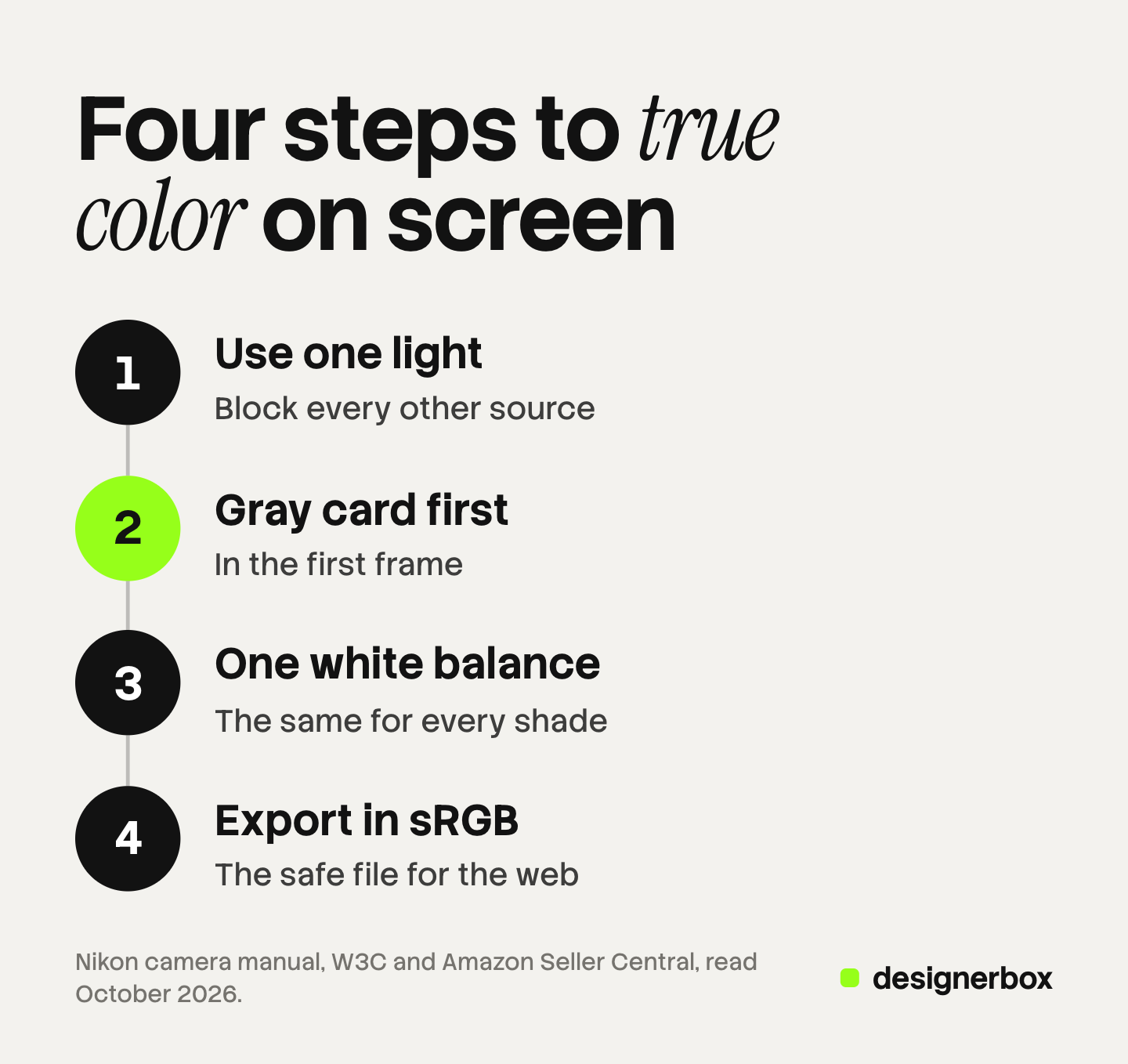
- Color accuracy has four steps. One light, a gray card in the first frame, one white balance and an sRGB export.
- Swatches are photographed, never generated. A shade on skin is a claim about the product, and a generated shade is an invented claim.
- Marketplaces ask for true color. Amazon and Google both require the image to show the real color of the exact variant.
What is makeup product photography?
Makeup product photography covers every image a makeup listing needs: the pack, the open product, the applicator, the swatch and the shade range. It differs from other beauty photography in one way. The buyer is choosing a color, and the image is the only evidence of that color.
The object side shares a lot with skincare product photography, which covers glass, texture and the label. The ad side is in our guide to makeup ads, with eight ad formats and the ad rules by market.
The shot set for six makeup forms
Each form has one thing the closed pack hides, and the shot set shows it.
| Product form | Shots it needs | What to check |
|---|---|---|
| Bullet lipstick | Closed tube, cap off with the bullet raised, bullet tip close-up, arm or lip swatch | Every bullet is raised to the same height |
| Liquid in a tube (gloss, liquid lipstick, concealer) | Closed tube, wand out beside the tube, applicator tip close-up, swatch | The wand carries a normal amount of product |
| Pressed powder pan or palette | Closed compact, open compact from above, one pan close-up, swatch of each shade | Pans are clean and in the order of the shade names |
| Pencil (eye, lip, brow) | Capped pencil, sharpened tip close-up, a drawn line on skin or paper | The line shows the real width and the real finish |
| Mascara | Closed tube, wand out, brush close-up | The bristles are visible and the brush shape is true |
| Foundation bottle | Front with the shade name, pump or dropper detail, a drop on a surface, shade on skin | The shade name on the label is readable |
Bullet lipstick. In lipstick photography the metal case reflects the room, and the bullet takes color from anything near it. Light the case with a large, even source, then check that the bullet color did not shift.
Liquid in a tube. The applicator is the product here. A doe-foot tip, a brush tip and a sponge tip apply color in different ways, so show the wand.
Pressed powder and palettes. Shoot the open palette from directly above, so every pan has the same shape. A matte pan needs soft light. A shimmer pan needs light from the side, or the sparkle disappears.
A shot list template keeps the same shots for every product in the line.
Why is color the hard problem in makeup photography?
Color is the hard problem because three things change it between the product and the buyer: the light, the camera setting and the screen. Each one can move a shade further than the gap between two shades.

The light. A lamp can show some colors poorly. The Color Rendering Index compares how a set of color samples looks under a lamp and under a reference light. NIST notes that this index has known deficiencies for white LED sources (NIST, October 2026). So test a lamp with a color target and the real product.
The camera. White balance tells the camera what white is under the current light. If it is wrong, every shade moves in the same direction.
The screen. Amazon says “Customers use a wide variety of displays that render colors differently” (Amazon Seller Central, October 2026). You cannot fix the buyer’s screen, so make the file correct before it leaves.
Colored sets add a fourth risk, because a pink wall or a gold tray reflects onto the product. The theory is in color theory in photography.
Four steps to color that matches on screen
- Use one light. Pick one kind of light and block the others. Window light mixed with a warm bulb gives two color casts in one frame.
-
Put a gray card in the first frame. Nikon’s camera manual describes the method: place “a neutral gray or white object under the lighting that will be used in the final photograph”. It adds that “a standard gray panel can be used as a reference object” (Nikon, October 2026).
-
Set one white balance. Measure it from the gray card, then lock it. Automatic white balance changes from frame to frame, because each shade changes what the camera sees.
-
Export in sRGB. The W3C says untagged images must be treated as sRGB (W3C, CSS Color Module Level 4, October 2026). Amazon also says not to rely on ICC color profiles for accurate color display on its pages (Amazon Seller Central, October 2026).
Then approve with the product beside the screen, on a phone as well as a monitor.
How do you photograph makeup swatches?
Photograph makeup swatches with the real product, on a clean surface or on bare skin, in the same light as the rest of the range. Apply each shade with the same pressure and the same number of passes.
There are three kinds of swatch.
- A surface swatch. A swipe on white paper or glass shows the color and the finish with nothing behind it.
- An arm swatch. A row of stripes on the inner forearm shows how the shade sits on skin.
- A lip or face swatch. It shows the shade where it is worn. Lip and skin color mix with the product there.
Skin tone changes how a shade reads. Shoot complexion and lip shades on more than one skin tone. Google’s Monk Skin Tone Scale is one open reference. Google describes it as “a 10-shade scale” and says it is released openly so anyone can use it (Google, October 2026).
Swatches and shade-on-skin images are photographed, never generated. An image model does not know the pigment, the coverage or the finish of your formula. A generated swatch is an invented claim about the product.
A shade range that reads as one set
A shade range works when the shade is the only thing that changes between frames. Use one crop, one light, one background and one position for every shade.
As an illustrative count, one foundation in 30 shades with four shots each is 120 images. Write the crop, the light and the order of the shades before the first frame.
Google asks for a distinct image for every variant and says the photo should accurately reflect “the exact color, pattern, finish, and material”. It also says to show one variant per image and to avoid group photos of several colorways in the main image. A plain square of color is not accepted as a product image (Google Merchant Center Help, October 2026). So the group shot of all 30 shades is a secondary image, and each shade still needs its own main image.
Makeup flat lay and group images
A makeup flat lay shows several products from directly above on one surface. Use it for a set, a routine or a full shade family. More scene ideas for a beauty range are in skincare photoshoot ideas.
Keep the camera parallel to the surface, so round compacts stay round. Keep the surface neutral when shades matter, because a colored surface reflects onto open pans. Our guide to flat lay photography covers the camera settings and the layout.
Marketplace image rules for beauty listings
| Rule | Amazon | Google Merchant Center |
|---|---|---|
| True color | The image should accurately represent the real scale, quantity and color of the product | The photo should reflect the exact color and finish of the variant |
| Main image | Pure white background, RGB 255, 255, 255, with the product as 85% of the image | A clean view of the product, with no added text or graphics |
| Swatch or variant image | A swatch image, code SWCH, is the small color sample shown for pages with several versions | One variant per image, and a unique image for each variant |
The Amazon rules are on its product image requirements page (October 2026). If no swatch image exists, Amazon uses the main image as the thumbnail. Ecommerce product photography compares the image specs of five sales channels.
What a makeup image may claim
A makeup image is a claim about the product. Three sources say so. This is general information, not legal advice.
The EU and the UK. Commission Regulation (EU) No 655/2013 applies to cosmetic claims “in the form of texts, names, trademarks, pictures and figurative or other signs” (legislation.gov.uk, Article 1, October 2026). Its annex says “Presentations of a product’s performance shall not go beyond the available supporting evidence” (legislation.gov.uk, Annex, October 2026).
The UK advertising regulator. The ASA says visual claims “should not misleadingly exaggerate the effect the product is capable of achieving”. It upheld a complaint about a nail product where editing had been used “to brighten the colour of the nail” (ASA, updated 18 August 2025, read October 2026). For makeup, the color and the finish are the product’s effect.
The US. The FTC looks at an ad in context, “words, phrases, and pictures”, to decide what it tells consumers. Advertisers need proof for express and implied claims (FTC, October 2026).
The ASA has also addressed generated images. It says it is “likely to be materially misleading to include an AI generated image showing the effect of a cosmetic product that does not accurately reflect real-world results” (ASA, October 2026).
So correct the white balance and the exposure for the whole frame. Do not change the color, the coverage or the finish of the product area.
Where generated images fit, and where they stop
Fits. A new surface or background behind a photographed pack. A seasonal scene for a campaign. A different crop or size of an approved image.
Stops. A swatch. A shade on an arm, a lip or a face. A before and after. A change to the bullet color, the pan color or the shade name on the label.
Every generated scene still needs a color check, because a new background can shift the product color. Our guide to AI product photo accuracy lists what to compare.
Makeup images as one brand workflow
DesignerBox is AI creative production for brands and agencies. It makes images, ads and video from your brand rules, and a product photo is one input. Anyone can make an AI picture. Making hundreds that still look like your brand is the hard part.
For a makeup line, the split is clear. You photograph the pack, the open product and every swatch. A workflow then builds the frames around them: the scene, the ad layout and the sizes each channel needs. You set the palette, fonts and rules once in the brand record, and the workflow reads them on every run.
A batch runs one workflow over a sheet, one row per shade, with up to 200 rows in a sheet. Row one and row two hundred read the same rules. The cost is shown before the run. You keep or discard each result. The full workflow from the first product photo to the finished ad, in one subscription.
The limits matter here. DesignerBox does not make swatches or shade-on-skin images, and virtual try-on is for garments only. It does not send finished work to a store or an ad account. You download the results, or send them with a webhook or an S3 step. Every plan below Ultra is one seat.
Uploading your own photos and the commercial license start on the Pro plan. AI video, virtual try-on, upscaling, the image editor and the video editor start on the Premium plan. Plans and credits are on the pricing page.
There is a free plan, and it runs on sample products. Get started free
FAQ
What shots does a makeup product listing need?
A makeup listing needs four proofs for each product: the closed pack, the open product, the applicator and the color on a surface or on skin. A product with several shades also needs one image per shade.
How do you photograph makeup swatches accurately?
Use one light and block the others. Put a gray card in the first frame and set the white balance from it. Keep that value for every shade. Apply each shade with the same pressure, export in sRGB, and approve with the product beside the screen.
Can AI generate makeup swatches?
No. An image model does not know the pigment, the coverage or the finish of your formula, so a generated swatch is an invented claim. The UK ASA says an AI image of a cosmetic’s effect that does not reflect real results is likely to be materially misleading. Photograph every swatch.
Can you edit the color of a makeup photo?
You can correct the white balance and the exposure of the whole frame, so the image matches the real product. Making the shade brighter or smoother than the product changes the claim the image makes.
Does Amazon allow swatch images for makeup?
Yes. Amazon lists a swatch image, with the code SWCH, as a color sample for pages with several versions. If none exists, the main image is used as the thumbnail. The main image still needs a pure white background and the real color of the product (Amazon Seller Central, October 2026).
Sources
- Amazon product image requirements: accurate scale, quantity and color, pure white background, 85% of the image, the SWCH swatch image, accurate representation on all images: Amazon Seller Central, product image requirements, accessed October 2026
- Amazon technical image file requirements: displays render colors differently, RGB, ICC color profiles: Amazon Seller Central, technical image file requirements, accessed October 2026
- Google Merchant Center image rules: a unique image per variant, exact color and finish, one variant per image, no single-color square, no added text: Google Merchant Center Help, image link, accessed October 2026
- Untagged images are treated as sRGB: W3C, CSS Color Module Level 4, read through a web.archive.org copy, October 2026
- Measuring white balance from a neutral gray or white object: Nikon D850 online manual, preset manual white balance, accessed October 2026
- The Color Rendering Index method and its deficiencies for white LED sources: NIST, The Color Quality Scale, accessed October 2026
- The Monk Skin Tone Scale, a 10-shade scale released openly: Google, Improving skin tone representation across Google, accessed October 2026
- Commission Regulation (EU) No 655/2013, UK retained text: Article 1 and the Annex, accessed October 2026
- ASA and CAP, “Beauty and Cosmetics: The use of production techniques”: asa.org.uk, updated 18 August 2025, accessed October 2026
- ASA, “Disclosure of AI in advertising: striking the balance between creativity and responsibility”: asa.org.uk, 29 May 2025, accessed October 2026
- FTC, “Advertising FAQ’s: A Guide for Small Business”: ftc.gov, accessed October 2026
- DesignerBox batch, brand and plan gates: DesignerBox batch page (designerbox.ai/product/batch), brand page (designerbox.ai/product/brand) and pricing page (designerbox.ai/pricing), October 2026
Amazon, Google, W3C, Nikon, NIST, legislation.gov.uk, ASA and FTC facts verified on each publisher’s own page, October 2026. DesignerBox features verified on designerbox.ai, October 2026. The 120-image count is illustrative arithmetic. Individual results vary.