





The most useful real estate video ideas sort into two groups. Eleven can be made from listing photos and a script: photo walkthroughs, room features, staged-room reveals, floor plans, market updates and narrator explainers. Seven must be filmed, including the agent on camera, the phone walkthrough, the neighborhood tour and the client testimonial. Each idea also has one advertising rule to check before you post.
An idea alone leaves two questions open. Does it need a camera? Which rule does a housing ad have to meet? Those two answers decide your week. A filmed idea costs a visit to the property. A photo idea costs a script and the photos you already paid for.
This guide lists 18 ideas for agents, brokerage marketing teams and the agencies that make listing video for them. Every idea names how it is made and the rule that applies to it. This is general information, not legal advice.
Key Takeaways
- Sort every idea by one question. Can you make it from listing photos and a script, or does someone have to film it? 11 of the 18 ideas here need no camera, and 7 do.
- Words and pictures in a housing ad are regulated. The Fair Housing Act makes it unlawful to publish an advertisement for the sale or rental of a dwelling that indicates a preference based on race, color, religion, sex, handicap, familial status or national origin (law.cornell.edu, October 2026).
- The property must look like the property. Article 12 of the NAR Code of Ethics tells REALTORS to “present a true picture in their advertising, marketing, and other representations” (nar.realtor, October 2026).
- A testimonial needs a real client. The FTC rule at 16 CFR 465.2 covers a testimonial that misrepresents that the testimonialist exists (ecfr.gov, October 2026).
- A reel with a realistic AI voice needs a label on Instagram. Meta lists “a reel narrated with a realistic AI-generated voiceover” as content that requires a label (Instagram Help Center, October 2026).
- One listing gives a week of posts. Five of the photo ideas use the same photo set, so the second and third video cost a new script and no new visit.
How do you sort real estate video ideas?
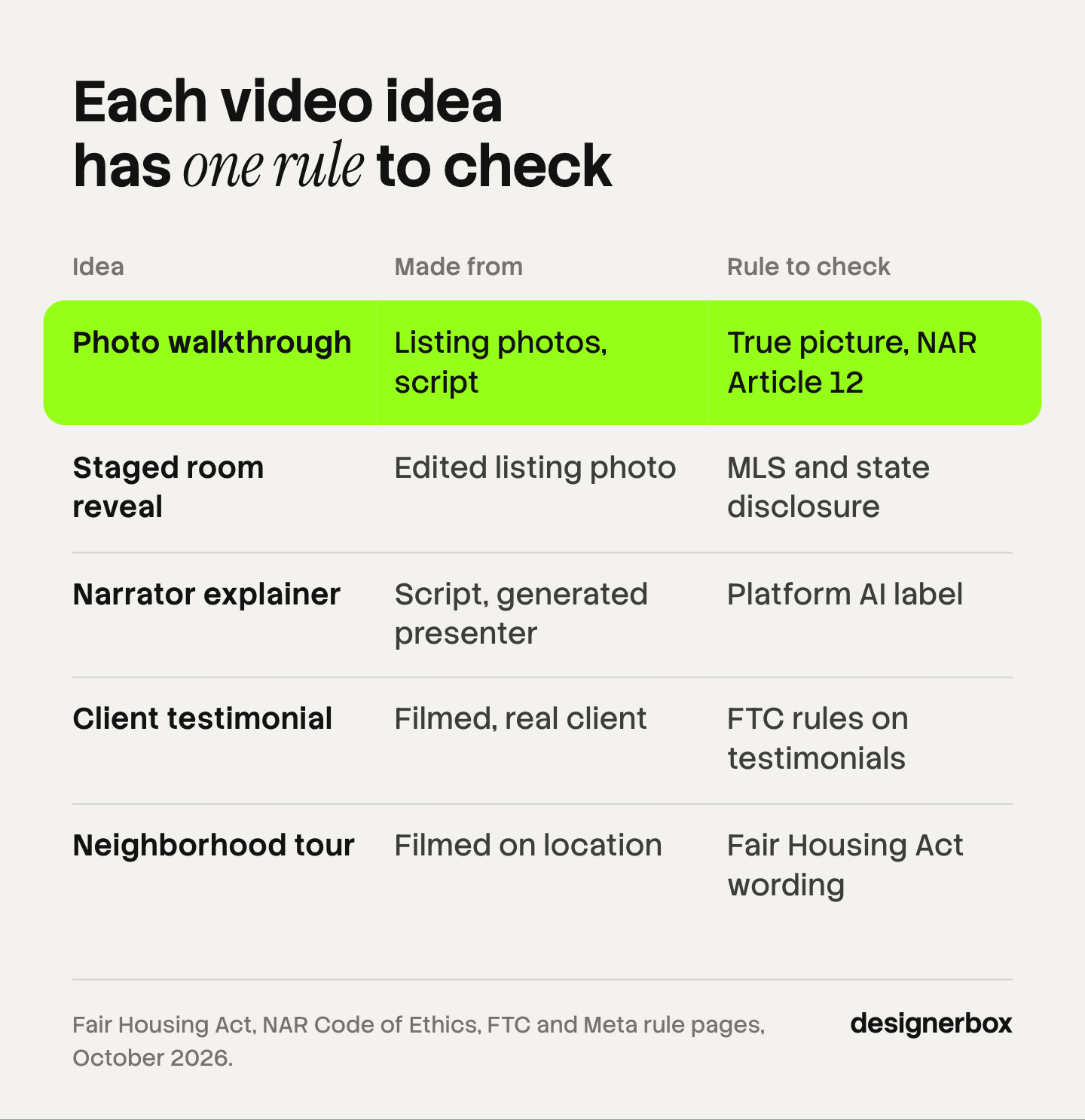
Sort real estate video ideas by one question: can the video be made from listing photos and a script, or must it be filmed? The answer sets the cost and the timing. Then check one rule for each idea. The table lists all 18.
| # | Idea | Made from | Rule to check |
|---|---|---|---|
| 1 | Photo walkthrough in the buyer’s order | Listing photos, script | True picture (NAR Article 12) |
| 2 | One-room feature clip | Listing photos, script | True picture |
| 3 | Three facts on screen | Listing photos, text | Fair Housing Act wording |
| 4 | Empty room and staged room | Edited listing photo | MLS and state disclosure |
| 5 | Floor plan with a voice track | Floor plan, script | Platform AI label |
| 6 | New listing and open house notice | Listing photos, text | True picture |
| 7 | Monthly market update | Charts, script | True picture |
| 8 | One buyer question answered | Script | Fair Housing Act wording |
| 9 | Three homes at one price | Your own listing photos | Permission (Standard of Practice 12-10) |
| 10 | Process explainer with a narrator | Script, generated presenter | FTC testimonial rule, platform AI label |
| 11 | Paid ad version of a listing clip | An existing clip | Housing ad targeting limits, AI label |
| 12 | Agent introduction at the property | Filmed | Agent status visible (Article 12) |
| 13 | Phone walkthrough | Filmed | True picture |
| 14 | Neighborhood tour | Filmed | Fair Housing Act wording |
| 15 | Client testimonial | Filmed, real client | FTC rules on testimonials |
| 16 | A working day of an agent | Filmed | Agent status visible |
| 17 | Open house recap | Filmed | Fair Housing Act pictures |
| 18 | View, light and sound proof | Filmed | True picture |
“Made from listing photos” means the clip starts from a real photograph of the real property. An image-to-video model adds a slow camera move to that photo. It does not mean a room made from a text prompt. The six rules for AI product video cover clip length, drift between shots and AI labels, and they apply to a listing photo as much as to a product photo.
11 real estate video ideas from listing photos and a script
These 11 ideas need no visit to the property. They need the photo set, a script and a way to add motion, text and a voice. For the build steps, read how to make a real estate video from listing photos.
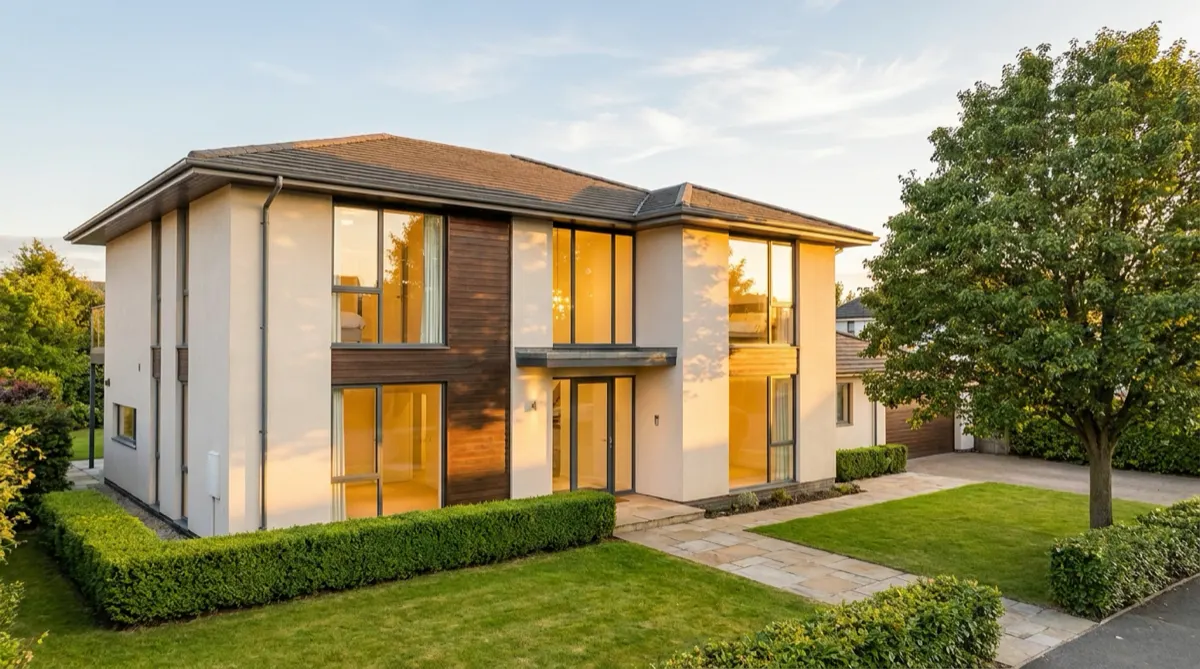
1. Photo walkthrough in the buyer’s order
Order the photos the way a buyer walks the house: front door, hall, kitchen, living room, bedrooms, garden. Animate each photo as its own short clip. Keep each camera move small, so the model shows what the photo shows and adds no new wall or window.
Rule to check: true picture. Animate rooms one at a time. A generated path between rooms can show a layout that does not exist.
2. One-room feature clip
Pick the room that sells the house and make one clip about it. Use three photos of that room and one line of text per photo. A kitchen clip names the counter material, the storage and the light.
Rule to check: true picture. Name only features the photo shows.
3. Three facts on screen
Put three facts over the best exterior photo: the price, the bedroom count and the area. This is the shortest idea on the list, and it works with sound off. DesignerBox’s guide to social posts for a new property listing shows how to make a card with the beds, baths and size.
Rule to check: Fair Housing Act wording. Describe the property, never the person who should buy it.
4. Empty room and staged room
Show the empty room first, then the same photo with furniture added. The reveal holds attention because the viewer compares two versions of one room. Virtual staging cost for four rooms covers what the stills cost.
Rule to check: MLS and state disclosure. Label the staged frame on screen, and keep the original photo in the video.
5. Floor plan with a voice track
Show the floor plan and move through it room by room with a voice track. A floor plan shows how the rooms connect, which separate photos do not.
Rule to check: platform AI label. A realistic generated voice needs a label on Instagram.
6. New listing and open house notice
Make one template clip: the exterior photo, the address, the date and the time. Change four fields for each listing. This is the idea that repeats most, so build it once.
Rule to check: true picture. The date, the price and the status must match the listing on the day you post.
7. Monthly market update
Use two charts and a script: the median price and the days on market for your area. Name the source of each number on screen.
Rule to check: true picture. Article 12 covers “other representations” as well as listing media, so a market claim needs a source you can show.
8. One buyer question answered
Take one question buyers ask you each week and answer it in 20 seconds. Text on screen carries the answer, and the voice repeats it. Our guide to video hooks for the first three seconds explains how to open it.
Rule to check: Fair Housing Act wording. Answer the question about the process or the property. Do not say which kind of buyer suits an area.
9. Three homes at one price
Put three of your listings at one price point into one clip. A comparison gives the viewer a reason to save the clip.
Rule to check: permission. Standard of Practice 12-10 bars “presenting content developed by others without either attribution or without permission”. Use your own listing photos, or ask first.
10. Process explainer with a narrator
Write a script that explains one step, such as an offer or an inspection. A generated presenter can read it. The presenter narrates and explains. The UGC script templates with word counts give the length: about 45 spoken words fit 15 seconds.
Rule to check: FTC testimonial rule and platform AI label. A generated presenter must never speak as a past client.
11. Paid ad version of a listing clip
Take the clip that earned the most saves and run it as an ad. Change the first line and the call to action, and keep the rest.
Rule to check: housing ad targeting limits and the AI label on ads.
Which realtor video ideas need a camera?
Seven realtor video ideas need a camera, because the subject is a real person, a real place or a real condition. A photo cannot prove any of the three.
12. Agent introduction at the property
Film the agent at the front door for 15 seconds: who they are, what the house is, and one reason to see it. It shows the person a buyer will call.
Rule to check: agent status. Article 12 says a REALTOR’s status as a real estate professional must be “readily apparent” in advertising.
13. Phone walkthrough
Walk the house with a phone in one take. The take shows how rooms connect, which no set of photos can show.
Rule to check: true picture. Film it, because a model cannot know the route between rooms.
14. Neighborhood tour
Film the street, the nearest shops, the park and the station. Say what each place is and how far it is from the door.
Rule to check: Fair Housing Act wording. Name places and distances. Do not describe the people who live there.
15. Client testimonial
Film a real client who agrees to appear. Ask one question and keep the answer in their words.
Rule to check: FTC rules on testimonials. The client must be real, and a gift or a discount for the video must be disclosed.
16. A working day of an agent
Film four moments of one day: a viewing, a call, a contract, the keys. It shows the service, which a listing clip cannot.
Rule to check: agent status, and the truth of any result you mention.
17. Open house recap
Film the house during the open house and post the recap the same evening. Ask visitors before you film them.
Rule to check: Fair Housing Act pictures. HUD’s rule covers photographs as well as words.
18. View, light and sound proof
Film the view from the main window, the light at 9 am and at 5 pm, and the street noise with the window open. These are the three questions a buyer cannot answer from photos.
Rule to check: true picture. This footage must stay unedited, because its value is that it is real.
Which rule applies to which idea?
Five rules cover all 18 ideas. Each one below names its source, so you can read the original text.
1. Fair housing wording and pictures. Section 3604(c) of the Fair Housing Act makes it unlawful to “make, print, or publish” any advertisement “with respect to the sale or rental of a dwelling that indicates any preference, limitation, or discrimination” based on a protected class (law.cornell.edu, October 2026).
HUD’s rule at 24 CFR 100.75 adds that discriminatory advertisements include “words, phrases, photographs, illustrations, symbols or forms” which convey that dwellings are available or not available to a particular group (ecfr.gov, October 2026). This applies to ideas 3, 8, 14 and 17. It also applies to idea 10, because you choose how a generated presenter looks.
2. A true picture. Article 12 of the NAR Code of Ethics says REALTORS “shall present a true picture in their advertising, marketing, and other representations”. Standard of Practice 12-10 extends that to internet content and images, and it prohibits “otherwise misleading consumers, including use of misleading images” (nar.realtor, October 2026). This applies to every idea that shows the property.
3. Disclosure of staged or altered media. These rules differ by MLS and by state, so read your own. Two examples show the range. NorthstarMLS has guidelines dated 10 July 2026. They say a listing photo that is virtually staged, AI-generated or AI-enhanced “should be clearly disclosed” and shown with an unaltered image of the room. They also say virtual staging “is permitted only to add or remove personal property such as furniture and décor” (northstarmls.com, October 2026).
California’s AB 723 requires a statement that an image has been altered, placed “on or adjacent to the image”, plus a link, URL or QR code to the original, unaltered image (leginfo.legislature.ca.gov, October 2026). The same bill says an image is not “digitally altered” when only lighting, sharpening, white balance, color correction, angle, straightening, cropping or exposure change, and the edit does not change how the property is represented. This applies to idea 4, and to any clip built from an edited photo.
4. Testimonials. The FTC rule at 16 CFR 465.2 makes it an unfair or deceptive act to create a consumer testimonial that materially misrepresents “that the reviewer or testimonialist exists” (ecfr.gov, October 2026).
The FTC’s Endorsement Guides add two points. Endorsements “must reflect the honest opinions, findings, beliefs, or experience of the endorser”. A material connection, such as a payment or a free or discounted product, “must be disclosed clearly and conspicuously” (ecfr.gov, October 2026). This applies to ideas 10 and 15. AI UGC video for real estate and the legal line covers the generated-presenter case in full.
5. Platform AI labels. The next section covers these, because they differ on Instagram and TikTok.
Real estate reels ideas and TikTok ideas: what changes on each platform?
The 18 ideas work as real estate reels ideas and as real estate TikTok ideas. Three things change by platform: the label, the ad targeting and where the video can go.
Instagram. Meta requires a label on content with “photorealistic video or realistic-sounding audio that has been digitally generated or altered, including with AI”. Its examples include “a reel narrated with a realistic AI-generated voiceover”. Meta does not require a label on images that were created or altered with AI (Instagram Help Center, October 2026). We read that as covering ideas 1, 2, 5 and 10 when a model animates the photo or speaks the script.
TikTok. TikTok’s Community Guidelines “require creators to label AI-generated or significantly edited content that shows realistic-looking scenes or people” (tiktok.com, October 2026). For ads, TikTok asks for its AIGC label or your own clear disclaimer. It counts real images or videos altered substantially with AI as significant edits, and it counts lighting or color adjustments as minor (TikTok Advertising Policies, October 2026).
Paid ads on Meta. Meta says advertisers running housing ads have “a limited number of targeting options”, including “a restriction on using age, gender or ZIP code” (about.fb.com, a June 2022 post, read October 2026). Meta also says it automatically labels ads created or edited with some of its own generative AI tools or with third-party ones. It says the feature may not be available in every region (Meta Business Help Center, October 2026). So idea 11 runs with fewer targeting options than a product ad.
Portals. A social clip does not go onto a Zillow listing. Zillow’s Showcase guide says videos “must be created by the same photographer who provided all other media for the listing”, with a maximum length of 120 seconds (grow.zillow.com, October 2026). AI real estate video marketing and the portal rules covers each destination.
Real estate social media content ideas for one listing week
One listing can fill a week of real estate social media content ideas, and only one of the five posts needs a visit. This is a working plan, not a measured result.
| Day | Idea | Made from |
|---|---|---|
| Monday | 6. New listing notice | Exterior photo, four text fields |
| Tuesday | 1. Photo walkthrough | The photo set |
| Wednesday | 2. One-room feature clip | Three photos of one room |
| Thursday | 12. Agent introduction | Filmed at the property |
| Friday | 3. Three facts on screen | Exterior photo, text |
Four of the five posts come from the same photo set. Book the filmed post for the day of the photo shoot, so the agent and the photographer visit once. Real estate videographer cost against AI video compares the two budgets.

Measure saves and shares for each post, and repeat the idea that earns the most. Then run that clip as idea 11.
The same listing set every week
A team that makes video for many agents does not need more ideas. It needs the same five clips for every listing, every week, in the same look. Anyone can make an AI picture. Making hundreds that still look like your brand is the hard part.
DesignerBox is AI creative production for brands and agencies. You build a workflow once with your brand rules and run it on every product. You see the cost before each run. The full workflow from the first product photo to the finished ad, in one subscription. DesignerBox is not a real estate product. Here a listing takes the place of a product.
The listing photos go in, and the photo ideas above become steps in one saved workflow: animate each photo, add the text, add the voice. Your brand rules set the font, the colors and the logo once, and the workflow reads them on every run. Batch runs that workflow over a whole sheet of listings, with the same standard on row one and row two hundred. The video editor is a timeline where you cut the clips, add captions and set the audio. The AI video ads page shows the path from a photo to a short ad.
The limits matter for this job. Uploading your own photos and the commercial license start on the Pro plan. AI video, virtual try-on, upscaling, the image editor and the video editor start on the Premium plan. Plans and credits are on the pricing page. There is a free plan, and it runs on sample products, so it cannot make video from your listings. Team features, shared brand kits and white label are on the Ultra plan, and every plan below Ultra is one seat.
Nothing goes to a portal or an MLS from DesignerBox. You download the results and post them yourself. DesignerBox does not check your MLS handbook, your state’s disclosure law or the fair housing wording in your script. Those checks stay with you. The seven filmed ideas stay with a camera too. AI avatar tools for real estate walkthroughs compares the presenter tools if idea 10 is your main format.
If you make listing video for several agents each week, see DesignerBox for agencies.
FAQ
What are good real estate video ideas for a new agent?
Start with three ideas that need no budget: the new listing notice, the three facts on screen and one buyer question answered. All three come from listing photos or a script. Add the agent introduction at the property as the one filmed idea, because it shows the person a buyer will call.
What are the best real estate reels ideas?
The photo walkthrough, the one-room feature clip and the empty room and staged room reveal fit a reel well, because each works with sound off. On Instagram, a reel with photorealistic generated video or a realistic AI voice requires a label, according to Meta’s help page read in October 2026.
Do you have to label an AI real estate video on TikTok?
TikTok’s Community Guidelines require creators to label AI-generated or significantly edited content that shows realistic-looking scenes or people. A listing photo animated by a model is real source material altered with AI, so plan to label it. For ads, TikTok accepts its AIGC label or your own clear disclaimer.
Can you use a virtually staged room in a real estate video?
Yes, where your MLS and your state allow it, so read both. NorthstarMLS, as one example, says virtual staging is permitted only to add or remove personal property such as furniture and décor, with disclosure and an unaltered image. California’s AB 723 requires a statement and access to the original image.
Can an AI presenter give a client testimonial?
No. The FTC rule at 16 CFR 465.2 covers a testimonial that misrepresents that the testimonialist exists, and a generated presenter is not a client. A generated presenter can narrate a process or explain a listing. Film a real client for the testimonial, and disclose any gift or discount.
How many videos can one listing produce?
Five of the 11 photo ideas use one photo set: the walkthrough, the feature clip, the three facts, the staged-room reveal and the new listing notice. Add the floor plan clip if you have a plan. The filmed ideas add an agent introduction and a phone walkthrough from one visit.
Does DesignerBox post listing videos to an MLS or a portal?
No. You download the results and post them yourself. DesignerBox runs the same workflow on each listing’s photos and shows the cost before the run. AI video and the video editor start on the Premium plan, and uploading your own photos starts on the Pro plan.
Sources
All read in October 2026.
- Fair Housing Act, 42 U.S.C. 3604(c), on advertisements that indicate a preference, limitation or discrimination: law.cornell.edu
- HUD rule 24 CFR 100.75, on words, phrases, photographs, illustrations and symbols in housing advertisements: ecfr.gov
- NAR Code of Ethics, Article 12 and Standard of Practice 12-10, 2026 edition: nar.realtor
- NorthstarMLS, Guidelines for Virtual Staging and AI-Enhanced Listing Photos, 10 July 2026: northstarmls.com
- California AB 723, Business and Professions Code section 10140.8, on digitally altered images in property advertising: leginfo.legislature.ca.gov
- FTC Rule on the Use of Consumer Reviews and Testimonials, 16 CFR 465.2: ecfr.gov
- FTC Endorsement Guides, 16 CFR 255.1 and 255.5, on honest opinions and material connections: ecfr.gov
- Instagram Help Center, Label AI content on Instagram, on when a label is required: facebook.com
- Meta Business Help Center, About AI info on ads created or edited with generative AI tools: facebook.com
- Meta, Expanding Our Work on Ads Fairness, June 2022, on targeting limits for housing ads: about.fb.com
- TikTok Community Guidelines, Integrity and Authenticity, on labels for AI-generated content: tiktok.com
- TikTok Advertising Policies, Misleading and false content, on the AIGC label for ads: ads.tiktok.com
- Zillow Showcase guide, on video requirements for a Showcase listing: grow.zillow.com
- DesignerBox plan gates: DesignerBox pricing page (designerbox.ai/pricing), October 2026
Statute, regulation, code and platform policy text checked against each source as of October 2026. This is general information, not legal advice. MLS rules and state laws differ and change often, so confirm your own before you post. Individual results vary.


