A realistic AI video prompt names seven things the model cannot guess: the subject, the camera and lens, the light direction, the motion, what stays consistent, the color grade, and the delivery format. Weak prompts give only the subject, so the model fills the rest with its average, and the average looks generic. Specify all seven and the clip gets closer to footage.
It is easy to blame the model. You type “woman drinking coffee”, get a plastic-looking clip, and conclude AI video is not ready. The clip is what a three-word brief returns from a system that will invent every decision you did not make.
The fix is structure. There is no secret keyword and no better tool. The same model that returns a generic clip from “woman drinking coffee” returns a usable one from a prompt that names the lens, the light, the motion, and the frame.
This guide breaks a realistic AI video prompt into seven layers and shows the weak and strong version of the same shot. It gives seven AI video prompts you can copy, maps which model holds which look, and covers what it costs to iterate until the take is right. A longer set, sorted by the job each shot does in an ad, is in the AI video prompt examples.
Key Takeaways
-
A prompt has seven layers. Subject, camera, light, motion, continuity, grade, delivery. Name all seven or the model chooses for you, and its choice is the generic average.
-
Weak prompts run three to six words. The strong prompts in this guide run 40 to 70 words and read like a shot brief, not a wish.
-
Your product photo is frame one. Veo 3.1, Seedance 2.0, Kling 2.6 and Runway Gen-4.5 all take a first frame. OpenAI documented that an input image “acts as the first frame of your video” for Sora 2 Pro. OpenAI removed Sora 2 and Sora 2 Pro from its API on 24 September 2026 (OpenAI API deprecations, accessed September 2026). The motion starts from your real product, with the same light and framing you shot.
-
Iteration is the real cost, and the model sets it. One 8-second clip in DesignerBox costs 40 to 560 credits, depending on the model. Draft cheap, finish expensive.
What makes an AI video prompt realistic
Realism is the sum of decisions the model would otherwise guess. Every one you leave out, it fills with an average.
A camera in the real world has a focal length, an aperture, a position, and a move. Light comes from a direction and has a quality. A subject behaves according to physics. When your prompt states those, the model reproduces footage. When it omits them, the model averages every video it has seen that matches your three words, and an average of everything reads as generic.
So a realistic AI video prompt is a specification, not a description. “Someone using a blender” is a description. “Medium shot, 35mm lens at f/2.8, soft window light from camera-left, hands pressing the blender button with real resistance, steam rising, slow push-in, warm grade, 9:16, 6 seconds” is a specification. Same subject. Different result.
Why most AI video prompts return generic clips
Most AI video prompts return generic clips because the prompt names the subject and stops.
“Woman drinking coffee” leaves the model to invent the lens, the light, the framing, the motion, the grade, and the pacing. It will pick the most probable option for each. The most probable option is the one it has seen most often, which is the one everyone else already generated. The plastic, over-lit, weightless look comes from those defaults. When the weightlessness is in the body rather than the frame, it is a separate failure with its own fixes, covered in realistic AI human movement.
Three habits cause most weak prompts:
- Subject-only briefs. No camera, no light, no motion rules.
- Adjectives instead of specs. “Cinematic”, “beautiful”, and “high quality” are not instructions. “50mm at f/2.0, hard rim light from behind” is one.
- No continuity constraints. Nothing tells the model to hold the face, the hands, or the logo steady, so they drift frame to frame and the eye catches it instantly.
The rest of this guide replaces each habit with a layer.
The seven layers of a realistic AI video prompt
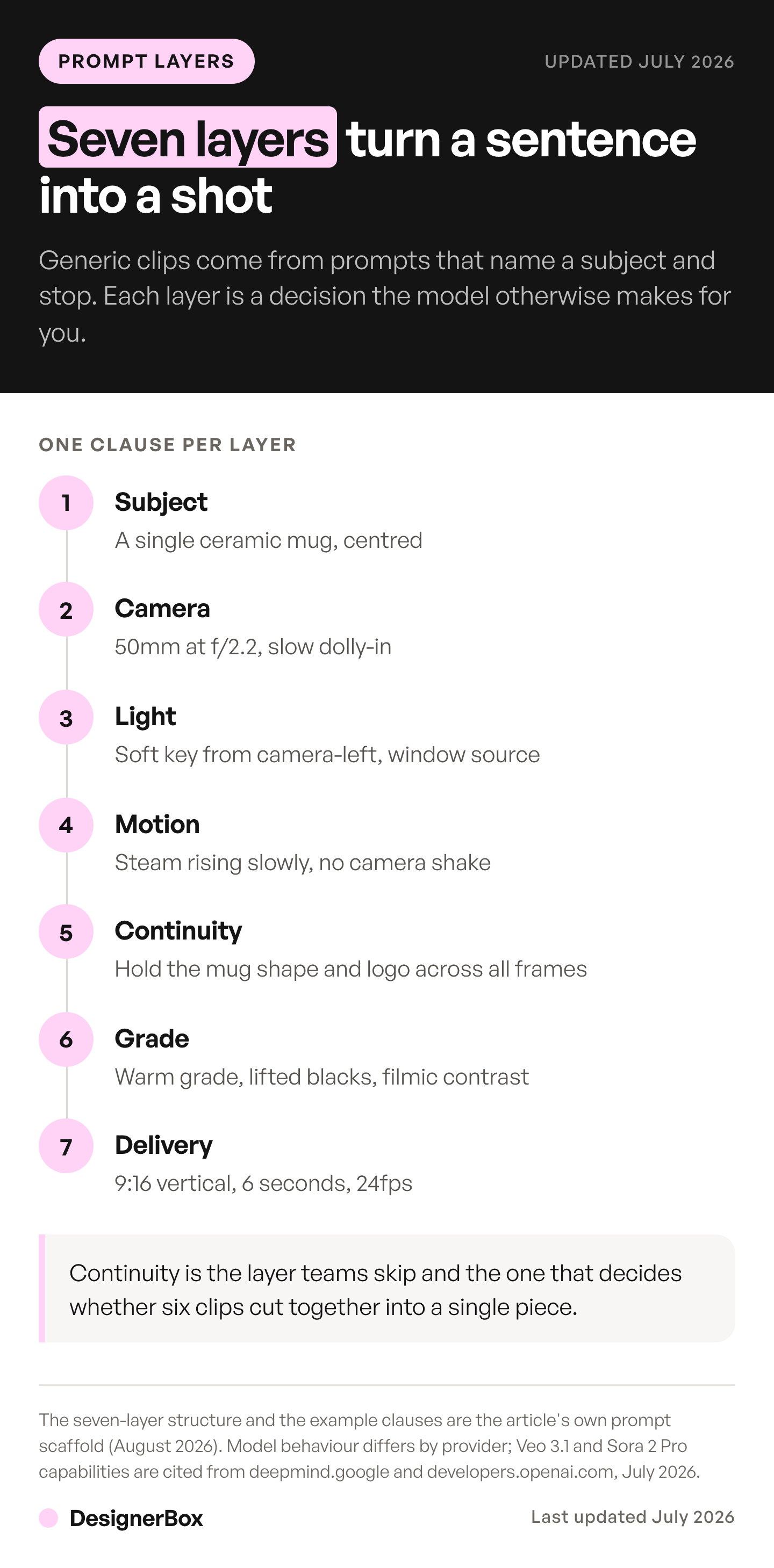
Think of a prompt as seven decisions, made in order. You do not need a paragraph for each. One precise clause per layer is enough.
| Layer | The decision | Example clause |
|---|---|---|
| 1. Subject | The one hero of the frame | A single ceramic mug, centered |
| 2. Camera | Lens, aperture, position, move | 50mm at f/2.2, slow dolly-in |
| 3. Light | Direction, quality, source | Soft key from camera-left, window source |
| 4. Motion | What moves, how fast, physics | Steam rising slowly, no camera shake |
| 5. Continuity | What must not change | Hold the mug shape and logo across all frames |
| 6. Grade | Color and era | Warm grade, lifted blacks, filmic contrast |
| 7. Delivery | Ratio, duration, frame rate | 9:16 vertical, 6 seconds, 24fps |
1. Subject
Name one hero and its hierarchy. If everything is important, nothing is. State what is in focus and what is background so the model does not split attention across the frame.
2. Camera
This is the layer that separates footage from render. State the focal length, the aperture, and the move. A 35mm lens at f/2.8 gives a natural, slightly wide look with soft background separation. An 85mm at f/2.0 flattens and isolates a face. A whip pan is urgent, a slow dolly is premium, a locked-off frame is editorial. Name the lens and the move or the model picks a nervous default.
3. Light
Light direction carries more realism than any other single word. Say where it comes from and what quality it has. “Soft key from camera-left” reads honest and commercial. “Single hard source from behind with a rim light” reads premium. “Overhead flat light” reads like a render, so avoid it unless you want that.
4. Motion
Describe what moves and how it obeys physics. Real objects have weight. Steam rises slowly, fabric settles, a hand meets resistance when it presses a button. Also state what does not move: “no camera shake” or “stable handheld drift” tells the model how much energy to add.
5. Continuity
This is the layer weak prompts always miss. Tell the model what must stay identical across every frame: the face, the hands, the product shape, the logo, the label text. Without it, those elements morph second to second and the clip screams AI. A single clause fixes most of it: “hold the product shape, label, and logo consistent across all frames.”
Continuity within a clip is a prompt job. Continuity across clips is not, and once a second shot exists the room needs a reference plate rather than a better sentence. Physics is neither, because no clause makes a model render a collision it cannot predict, which is why distortion is worth diagnosing by mode before you rewrite anything.
6. Grade
Color sets the era and the mood. Cool and neutral reads modern tech. Warm with lifted blacks reads film. Name the grade so the model does not default to an over-saturated, high-contrast look that ages the clip immediately.
7. Delivery
State the aspect ratio, the duration, and the frame rate up front, because they change how you should brief everything above. A 4-second 9:16 clip for a feed needs a one-second hook and minimal camera movement so captions stay readable. A 12-second 16:9 talking-head clip can afford a slow, locked frame. Deciding delivery last means re-shooting.
Weak vs strong: the same shot, two prompts
The gap between a generic clip and a usable one is visible in the prompt before you ever render.
Hero product shot
- Weak: “Bottle on a table.”
- Strong: “A single matte glass serum bottle centered on dark stone. 50mm lens at f/2.2, slow dolly-in. Studio softbox key from the front, hard rim light from behind for edge separation, controlled reflections. Hold the bottle shape and label text consistent across all frames. Cool neutral grade. 9:16 vertical, 4 seconds, 24fps.”
UGC handheld clip
- Weak: “Someone using a skincare product.”
- Strong: “Smartphone-style vertical clip of a hand applying serum, imperfect framing, slight micro-shake. Soft daylight from a window camera-right. Realistic skin texture and hand anatomy, phone-camera compression look. Hold the face and hands consistent. Natural grade. 9:16 vertical, 7 seconds, 30fps.”
Lifestyle micro-story
- Weak: “Woman drinking coffee in the morning.”
- Strong: “Medium shot of a woman lifting a coffee mug, warm golden light through a window camera-left. 35mm lens at f/2.8, slow push-in. Steam rising, natural hand movement with weight. Hold facial features consistent across frames. Warm filmic grade, lifted blacks. 16:9, 8 seconds, 24fps.”
The strong versions are not longer for the sake of it. Every added clause removes one decision the model was about to guess.
Prompt patterns worth reusing
Once the seven layers are habit, a few patterns cover most brand footage. Treat these as templates, then swap the subject.
- Hero product. Centered subject, slow dolly-in, softbox key plus rim light, tight continuity on the label, cool grade. Best for launches and PDP video.
- UGC handheld. Imperfect framing, micro-shake, window light, phone-compression look, natural grade. Best for paid social that needs to read as real.
- Lifestyle micro-story. Product in use, warm window light, 35mm at f/2.8, slow push-in. Best for feed ads that play silent.
- Talking-head authority. Medium close-up at eye level, 85mm at f/2.0, soft key from one side, locked camera, hard continuity on the face. Best for founder and testimonial clips.
- Macro detail. 100mm macro at f/3.2, shallow focus, a slow lateral slide, one controlled rim highlight. Best for texture and craft.
Seven AI video prompts to copy
Each prompt below states all seven layers. Copy one, change the subject clause to your product, and keep the rest.
- Packshot turntable. A single white ceramic mug on a plain light gray paper sweep, centered. 85mm lens at f/4, locked-off camera. Large soft key light from camera-left, white fill card on the right. The mug turns slowly through 90 degrees on a turntable. Hold the mug shape, the handle and the printed logo identical across all frames. Clean neutral grade. 1:1 square, 6 seconds, 24fps.
- Pour shot for a drink ad. Close-up of cold coffee pouring into a clear glass with ice on a wooden counter. 100mm macro at f/4, fixed camera. Hard backlight from behind the glass, soft fill from the front. The liquid falls with real weight and the ice shifts as the glass fills. Hold the glass shape and the bottle label consistent across all frames. Warm grade with deep shadows. 9:16 vertical, 5 seconds, 24fps.
- Skincare texture. Macro shot of a fingertip pressing into a white face cream in an open jar. 100mm macro at f/3.2, slow lateral slide. Soft window light from camera-right. The cream holds a real peak where the finger lifts away. Hold the jar shape and the lid color across all frames. Clean, bright grade. 4:5 vertical, 4 seconds, 30fps.
- Handheld unboxing. Smartphone-style vertical clip of two hands lifting a white sneaker out of a plain brown box on a bed. Slight handheld shake, imperfect framing. Soft daylight from a window camera-left. Real hand anatomy, and the laces move as the shoe lifts. Keep the shoe design and the sole color the same in every frame. Natural grade, phone-camera look. 9:16 vertical, 7 seconds, 30fps.
- Coat on a model. Full-body shot of a woman walking toward the camera in a camel wool coat on a quiet city street in the morning. 50mm lens at f/2.8, slow dolly-back that matches her pace. Low sun from behind for a rim light, soft fill from the front. The coat moves with her stride and settles. Hold her face, the coat color and the buttons consistent. Warm filmic grade. 9:16 vertical, 8 seconds, 24fps.
- Founder to camera. Medium close-up of a man at eye level in a bright workshop, speaking to camera. 85mm lens at f/2.0, locked camera. Soft key from a large window camera-left, background falling into shadow. Natural head movement and blinking, no camera shake. Hold the face and the shirt consistent across all frames. Neutral grade. 16:9, 8 seconds, 24fps.
- Product photo as frame one. Use the attached product photo as the first frame. Slow push-in toward the bottle, same framing style as the photo. Keep the light direction and the shadows from the photo. A thin mist drifts across the lower third of the frame. Do not change the bottle shape, the label text or the cap color. Keep the grade of the photo. 9:16 vertical, 5 seconds, 24fps.
Prompt 7 needs a model that takes a first frame. The model table below lists which ones do.
For the lighting, camera, and grade side of these looks in more depth, see AI cinematic ad styles. For turning a still into motion specifically, AI image to video for ecommerce compares the video models on animating a product photo. For the still that becomes frame one, 24 AI image prompts by ad format cover the image side. For how brands used AI video inside finished spots, see how the best AI commercials were made.
Which model holds which prompt
A prompt is only as realistic as the model rendering it, and the models differ. One decision sits above all seven layers: which input mode the shot starts from, because a text prompt and a first-frame photo constrain the model very differently. You pick the model for each step when you build the workflow, and every run after that uses it. A template comes with its model already picked. The models below publish specs precise enough to decide a shot on, verified against each provider’s documentation as of September 2026.
| Your prompt needs | Model | What the provider documents |
|---|---|---|
| Native audio in the take | Veo 3.1 | Generates video with native audio (ai.google.dev, September 2026) |
| A 4K master | Veo 3.1 | Generates 720p, 1080p or 4K, with 1080p and 4K at 8 seconds only (ai.google.dev, September 2026) |
| A person, character or product reference | Veo 3.1 | Takes up to three reference images “of a single person, character, or product” (ai.google.dev, September 2026) |
| Your product photo as literal frame one | Veo 3.1, Seedance 2.0, Kling 2.6 or Runway Gen-4.5 | Each takes a first frame; Veo 3.1, Seedance 2.0 and Kling 2.6 also take a last frame (vendor docs, September 2026) |
| A single clip longer than 8 seconds | Seedance 2.0 or Kling 3.0 | Seedance 2.0 runs 4 to 15 seconds (docs.byteplus.com, September 2026). Kling 3.0 runs 3 to 15 seconds (kling.ai, September 2026) |
That first-frame behavior is why the workflow starts from your product photo. Your packshot is frame one, and the seven layers describe how it should move. To test how well each model follows a prompt, see the best AI video model.
The seven layers stay the same on every model. The order you brief them in does not, because each provider publishes its own prompt shape. Google’s Veo 3.1 guide opens with cinematography (Google Cloud blog, September 2026). ByteDance’s Seedance 2.0 formula runs subject, action, scene, lighting and color, camera movement, visual style, image quality and constraints (docs.byteplus.com, September 2026). ByteDance’s API reference recommends prompts of no more than 1,000 English words (docs.byteplus.com, September 2026).
Sora 2 Pro prompts used labeled blocks (OpenAI Sora 2 prompting guide, September 2026) until OpenAI removed the model from its API on 24 September 2026. Sora alternatives by job covers what replaces it. The five documented prompt structures, side by side covers the conversion routine.
For Kling 2.6 Pro and Runway Gen-4.5, check the current spec with the provider before you commit a shot. The model list names every model DesignerBox runs. Kling 3.0 is in the table as a vendor fact, and it is not on that list today (designerbox.ai/models, October 2026). This category changes monthly, and a capability that was true in January is routinely wrong by July. How completely each provider documents its limits is itself a selection criterion. Which models publish enough spec to plan a shot list against scores the six that publish one.
Cost of iterating on a video prompt
No prompt is right on the first take. The real cost of realistic AI video is the cost of iterating until it is, and the model you draft on decides how far a plan goes.
In DesignerBox an 8-second clip costs 40 to 560 credits, depending on the model. The model sets the cost, and that spread should shape how you work. Every run shows its cost before you start it, so you choose with the number in front of you.
AI video and the video editor start on the Premium plan. Plans and credits are on the pricing page.
That produces one rule: draft cheap, finish expensive. Block the shot on Veo 3.1 Fast while you get the framing, light and motion clauses right. Spend the premium budget once, on the take you already know works. For what drives the cost of a shot, see AI video generation cost. One step earlier than that, a storyboard settles the framing before any prompt gets a video budget.
If a look needs no dialogue, it needs no native audio. Music can go under the take in the edit. When the clip does need a spoken line, the AI UGC video prompts guide gives the dialogue form each model documents.
A prompt that runs again
A prompt that works is worth more than the clip it made, because it runs again. Save it as a workflow and the next product gets the same lens, the same light and the same continuity clause. A shot list of forty products then reads like one shoot instead of forty. Trim and caption each take in the multi-track video editor, or start from a garment with a fashion video template.
If you would rather brief a shot from an AI chat, the DesignerBox MCP server gives an AI chat such as Claude, ChatGPT or Cursor access to 75 DesignerBox tools. To test a prompt on one clip first, use Generate. You choose the model and the video length, add a start frame and press run. Open any clip in Assets to see its prompt and model. The prompts, the clips and the video editor sit in one account.
For the delivery layer on a specific platform, read how to create TikTok video ads with AI. It covers the hook timing and format rules that decide whether a feed clip works.
Start from a template, add your brand and your products, and run it. See the templates.
FAQ
What makes a realistic AI video prompt?
A realistic AI video prompt specifies the seven decisions a model would otherwise guess: subject, camera and lens, light direction, motion and physics, continuity constraints, color grade, and delivery format. Weak prompts name the subject only, so the model averages everything else and the average reads as generic. The more of the seven layers you state, the closer the output gets to footage.
What are some good AI video prompts?
Good AI video prompts read like a shot brief and state all seven layers. One example is a white ceramic mug on a light gray paper sweep, shot on an 85mm lens at f/4 with a locked-off camera. A soft key light comes from camera-left, the mug turns slowly through 90 degrees, and the logo stays identical. The grade is neutral, at 1:1, 6 seconds and 24fps.
How long should an AI video prompt be?
Long enough to cover the seven layers. The strong prompts in this guide run 40 to 70 words, with one clause per layer. A shot with tight continuity needs more clauses and more words. The count is a symptom, not a target. If a prompt is under 20 words, it is missing layers, and the model is filling them for you.
Why does my AI video look generic?
Usually because the prompt named the subject and stopped. With no lens, light direction, motion rule, or continuity constraint, the model picks the most probable option for each, which is the look it has generated most often. Add the camera, light, and continuity layers first. They remove most of the plastic, weightless look, and they are the cheapest way to cut the re-roll count that drives AI video turnaround.
Can I reuse the same prompt across different products?
Yes, and that is the point of treating prompts as patterns. Keep the camera, light, motion, grade, and delivery layers fixed, then swap the subject clause. A hero-product template built for a serum bottle works for a sneaker or a mug with one line changed. Saving the working prompt as a reusable workflow is how teams keep results on brand from one product to the next.
Which AI video model gives the most realistic result?
No single model wins every shot. Veo 3.1 generates up to 4K with native audio and accepts up to three reference images of a person, character or product (ai.google.dev, September 2026). It fits a polished 4K hero. Seedance 2.0 and Kling 3.0 run up to 15 seconds in one take (docs.byteplus.com and kling.ai, September 2026). They fit longer single clips. Sora 2 Pro reached 20 seconds, but OpenAI removed it from its API on 24 September 2026 (OpenAI API deprecations, September 2026). Run the same shot on two models and keep the one that holds.
Do I need to name the camera and lens in the prompt?
Yes. The camera layer is the one that most separates footage from render. A focal length and aperture tell the model how to handle depth, separation, and perspective, and a named move (“slow dolly-in”, “whip pan”, “locked off”) sets the energy. Without them the model defaults to a nervous, over-wide look that reads as AI.
Sources
- Veo 3.1 native audio, 720p, 1080p and 4K output, first and last frame input, and up to three reference images of a single person, character or product: ai.google.dev, accessed September 2026
- Veo 3.1 prompt formula opening with cinematography: Google Cloud blog, accessed September 2026
- Sora 2 and Sora 2 Pro removal from the API on 24 September 2026: OpenAI API deprecations, accessed September 2026
- Sora 2 Pro input image acting as the first frame, and up to 20-second clips: OpenAI video generation guide, accessed September 2026
- Sora 2 Pro prompt structure with labeled blocks: OpenAI Sora 2 prompting guide, accessed September 2026
- Seedance 2.0 durations, first frame input and the recommended prompt length of no more than 1,000 English words: docs.byteplus.com, and the Seedance 2.0 prompt formula: docs.byteplus.com, accessed September 2026
- Kling 2.6 first and last frame input and Kling 3.0 durations: kling.ai capability map, accessed September 2026
- Runway Gen-4.5 first frame input: docs.dev.runwayml.com, accessed September 2026
- DesignerBox plan gates and the video credit range: DesignerBox pricing page (designerbox.ai/pricing), September 2026
Model capabilities verified from Google, OpenAI, ByteDance, Kuaishou and Runway documentation as of September 2026. Google’s Veo guide and prompting guide, ByteDance’s Seedance 2.0 prompt guide and API reference, OpenAI’s video guide and deprecations page and the DesignerBox model list were re-checked on 2 October 2026. DesignerBox plan gates from the DesignerBox pricing page, September 2026. Individual results vary.