
A negative prompt is a second piece of text you give an AI image or video model. It lists the things the result should leave out, such as a watermark, extra fingers or a blurry background. The main prompt says what to make. Some models take the negative prompt in its own field. Other models have no such field, and their makers tell you to describe the scene in positive words.
This guide explains where the negative prompt came from and how it works. Then it checks 11 current models against their vendors’ own documents. The last part covers four prompt mistakes that no negative prompt fixes, with a rewrite for each.
Key Takeaways
- A negative prompt lists what to leave out. It is a separate text, and it works beside the main prompt.
- It comes from classifier-free guidance. The model compares two predictions at each step and moves away from the negative one.
- Field support is split. Stable Diffusion, Veo on Vertex AI, Wan 2.7 and LTX-2.3 take a separate negative prompt. FLUX, Runway Gen-4 and Gemini Omni Flash do not.
- Write a list of things, with no instruction words. Google says to write “wall, frame” and to avoid “no walls”.
- Positive wording works on every model. Ask what you would see in place of the unwanted thing, and write that.
- Four mistakes stay after any negative prompt. A vague subject, instructions that conflict, too many actions and no camera or light.
What is a negative prompt?
A negative prompt is a description of what you want a model to leave out of an image or a video. Google’s Imagen guide gives a short example. The prompt “a rainy city street at night with no people” can fail, because the model “may interpret” the word people as something to include. The better way is the prompt “a rainy city street at night” with the negative prompt “people” (cloud.google.com, October 2026).
That example shows the reason the field exists. Image models read words as things to draw. The word “no” in front of a thing is weak, and the thing itself is strong. A separate field tells the model which words to move away from.
Where negative prompts come from
The negative prompt is a side effect of a method called classifier-free guidance. Jonathan Ho and Tim Salimans described it in a 2022 paper. In their words, “we jointly train a conditional and an unconditional diffusion model, and we combine the resulting conditional and unconditional score estimates” (arxiv.org, October 2026).

In plain terms, a diffusion model makes two predictions at every step. One follows your prompt. The other follows an empty prompt. The model then moves toward the first and away from the second.
The negative prompt replaces the empty prompt with your text. The Stable Diffusion web UI by AUTOMATIC1111 made this popular. Its wiki says the feature works “by using user-specified text instead of empty string” for the second prediction (github.com, October 2026).
A 2024 study looked at when the negative prompt acts. The authors found a “Delayed Effect”: the negative prompt works after the main prompt has started to draw the content. They also found that it removes a concept by canceling it against the positive prompt (arxiv.org, October 2026).
The method needs guidance to be active. The Hugging Face documentation for Stable Diffusion says the negative prompt is “ignored when not using guidance” (huggingface.co, October 2026). A model built in another way may have no place for a negative prompt at all.
Which models take a separate negative prompt field?
We read each vendor’s own documentation in October 2026. “Yes” means the document describes a separate negative prompt field. “No” means the vendor says the model does not support one. “None listed” means the page we read lists no such field.
| Model | Separate negative field | Source |
|---|---|---|
| Stable Diffusion (diffusers pipeline) | Yes | huggingface.co |
| Imagen on Vertex AI | Legacy. Three Imagen 3.0 models only | cloud.google.com |
| Veo on Vertex AI | Yes | cloud.google.com |
| Gemini Omni Flash | No | ai.google.dev |
| Nano Banana (Gemini image models) | None listed. The guide asks for positive words | ai.google.dev |
| FLUX | No | docs.bfl.ai |
| Runway Gen-4 | No | help.runwayml.com |
| Kling VIDEO 3.0 Omni | None listed. The prompt holds both | kling.ai |
| Wan 2.7 | Yes, up to 500 characters | alibabacloud.com |
| LTX-2.3 | Yes | ltx.io |
| Seedance | None listed | docs.byteplus.com |
Some rows need a note.
Imagen. Google calls negative prompts “a legacy feature”. They are “not included with the Imagen models starting with imagen-3.0-generate-002 and newer”.
Gemini Omni Flash. Google says negative prompts “are not supported” and adds: “you can put your negatives in the regular prompt”. Its examples are short lines such as “No dialogue” and “No extra sound effects”.
FLUX. Black Forest Labs writes: “FLUX models don’t support negative prompts.” The same page explains the risk. When you write “a person without glasses”, the model “focuses on the word” glasses and often draws them.
Runway Gen-4. Runway’s guide says: “Negative phrasing is not supported and may produce unpredictable or even opposite results.”
Kling. The API reference for VIDEO 3.0 Omni says the prompt “can include positive and negative descriptions”. We found no separate field on that page.
Midjourney has its own form. You add two hyphens and the word no to the end of the prompt, then the things to leave out. Its documentation warns that each word is read alone, so “modern clothing” after that parameter reads as “no modern” and “no clothing” (docs.midjourney.com, October 2026).
Model documents change often. Check the vendor page again before you build a saved prompt around a field.
How to write a negative prompt when the field exists
Three rules come from the vendors that support the field.
List things, and leave out instruction words. Google’s Veo guide does not recommend “instructive language or words such as no or don’t”. It recommends that you describe what you do not want to see. Its example is “wall, frame”.
Keep the list short. Lightricks writes about LTX-2.3 that “a focused list of five to eight clear concepts will outperform a kitchen-sink list of forty”. Every extra word takes strength from the others.
Name what you saw. Run the prompt once with no negative prompt. Look at the result. Then add only the faults that appeared. A list copied from a forum removes things your prompt never produced.
A negative prompt for a product video on a model with the field may look like this:
text overlay, watermark, second bottle, hands, lens flare, flicker
Negative prompt examples and their positive rewrites
On a model with no negative field, turn each item into the thing you want to see. Black Forest Labs gives the test question: “If this thing wasn’t there, what would I see instead?” Runway gives a video example. It replaces “No camera movement” with “Locked camera. The camera remains still.”
The pairs below use product and ad work.
| What you want gone | Negative prompt (field exists) | Positive rewrite (no field) |
|---|---|---|
| Text on the image | text, watermark, logo overlay | Clean, unmarked background. The only text is the label on the bottle |
| People in a product scene | people, hands | The bottle stands alone on an empty stone counter |
| Camera movement | camera shake, zoom | Locked camera. The frame stays still |
| A drawn look | cartoon, illustration, 3D render | A photograph shot on a 50mm lens in soft daylight |
| A busy background | clutter, props, furniture | Plain warm gray wall, one shadow from the left |
For more complete prompts, see the AI video prompt examples and the AI image prompts for advertising. The Nano Banana Pro prompts guide covers Google’s positive wording rule in detail.
Four prompt mistakes a negative prompt does not fix
A negative prompt removes things. It cannot add what the main prompt left out. These four mistakes cause most weak results in product and ad work, and each one needs a rewrite of the main prompt.
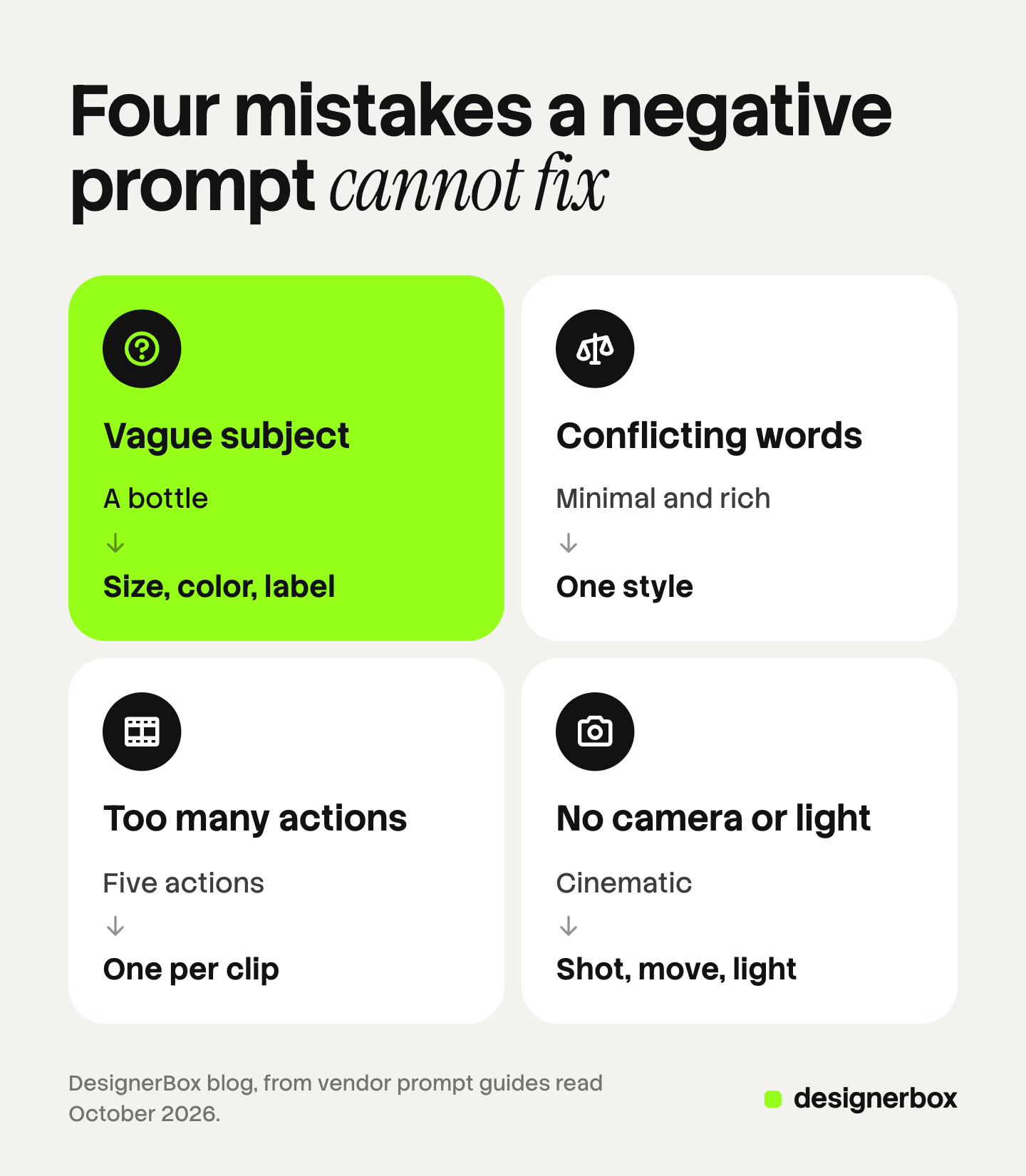
1. A vague subject
The model fills every gap with its own choice. A negative prompt cannot name the right bottle.
- Before: A skincare bottle on a table.
- After: A 30 ml amber glass dropper bottle with a white label and a black cap, on a pale stone counter.
For video, give the product as a reference image as well. Words alone rarely keep a label correct.
2. Instructions that conflict
Two style words that disagree give the model no clear target. Banning one of them in a negative prompt does not settle it.
- Before: Minimal, clean product shot, rich and detailed scene with many props, dark moody light, bright and fresh.
- After: Minimal product shot. One prop, a folded linen cloth. Bright, soft daylight from a window on the left.
3. Too many actions in one clip
A short clip holds one main action. A prompt with four actions makes the model rush or drop some of them.
- Before: A woman opens the box, takes out the cream, applies it, smiles at the camera and walks to the window.
- After: A woman’s hand lifts the jar from the open box and turns the label to the camera.
Put the next action in the next clip. The AI video prompting guide shows how to split a scene into shots.
4. No camera and no light
A prompt with no camera and no light leaves the look to chance. People then add “bad lighting, shaky” to the negative prompt, which names no target.
- Before: A sneaker on a street, cinematic.
- After: Low-angle close-up of a white sneaker on wet asphalt. Slow push-in. Early morning light from behind, soft reflections on the ground.
Name the shot size, the camera move and the light source. The guide to realistic AI video prompts lists the camera and light terms that vendors document.
Prompt help inside a saved workflow
DesignerBox is AI creative production for brands and agencies. It makes images, ads and video. Anyone can make an AI picture. Making hundreds that still look like your brand is the hard part.
A team that writes prompts every week repeats the same fixes. In DesignerBox, prompt help sits inside the workflow. You write a rough brief, and the workflow turns it into an art-directed prompt with the subject, the camera and the light named. You build the workflow once with your brand, your products and your rules.
The workflow reads your brand profile on every run. The voice, the colors and the rules do not depend on who typed the brief that day. Three critic steps score the results of a run, and best-of-N keeps the best one. The full workflow from the first product photo to the finished ad, in one subscription.
You see the cost of a run before you press Run. An 8-second clip costs 40 to 560 credits, depending on the model.
Here are the limits. Every plan below Ultra is one seat. You download the results, or send them with a webhook or an S3 step. Uploading your own photos and the commercial license start on the Pro plan. AI video, virtual try-on, upscaling, the image editor and the video editor start on the Premium plan. Plans and credits are on the pricing page.
One brief for every client
An agency writes the brief once and runs it for each brand. See DesignerBox for agencies
FAQ
What is a negative prompt?
A negative prompt is a text that lists what an AI image or video model should leave out of the result. It works beside the main prompt, which says what to make. Models that support it take it in a separate field.
What are good negative prompt examples?
Good examples are short lists of things that appeared in a test run. For a product shot: “text, watermark, hands, second bottle”. For a realistic look: “cartoon, illustration, 3D render”. Google’s Veo guide gives “wall, frame” as the form to use.
Do all AI models support negative prompts?
No. In October 2026, Stable Diffusion, Veo on Vertex AI, Wan 2.7 and LTX-2.3 document a separate negative prompt. Black Forest Labs says FLUX does not support one, and Runway says the same about negative phrasing in Gen-4. Google says Gemini Omni Flash has no negative prompt.
Should I write “no” or “don’t” in a negative prompt?
Not in a separate negative field. Google’s Veo guide advises against words such as “no” or “don’t” there and asks for a plain list of things. Gemini Omni Flash is different. It has no field, so Google says to put lines such as “No dialogue” in the regular prompt.
What does a negative prompt not fix?
It does not fix a vague subject, instructions that conflict, too many actions in one clip, or a missing camera and light. Each of these needs a clearer main prompt. A negative prompt only removes things the model already drew.
How do I replace a negative prompt on a model without the field?
Ask what you would see if the unwanted thing were gone, and write that. “No text” becomes “clean, unmarked surfaces”. “No camera movement” becomes “Locked camera. The camera remains still.” Both examples come from the vendors’ own guides.
Sources
- Ho and Salimans, Classifier-Free Diffusion Guidance, 2022: arxiv.org, read October 2026
- Ban and co-authors, Understanding the Impact of Negative Prompts, 2024: arxiv.org, read October 2026
- AUTOMATIC1111 Stable Diffusion web UI wiki, Negative prompt: github.com, read October 2026
- Hugging Face diffusers documentation, Stable Diffusion text-to-image pipeline: huggingface.co, read October 2026
- Google Cloud, Omit content using a negative prompt (Imagen): cloud.google.com, read October 2026
- Google Cloud, video generation prompt guide for Veo: cloud.google.com, read October 2026
- Google, Gemini Omni Flash documentation: ai.google.dev, read October 2026
- Google, Gemini API image generation guide: ai.google.dev, read October 2026
- Black Forest Labs, Working Without Negative Prompts: docs.bfl.ai, read October 2026
- Runway, Gen-4 Video Prompting Guide: help.runwayml.com, read October 2026
- Kling AI API reference, text to video: kling.ai, read October 2026
- Alibaba Cloud, Wan 2.7 text-to-video API reference: alibabacloud.com, read October 2026
- Lightricks, Negative Prompts Guide for LTX-2.3: ltx.io, read October 2026
- BytePlus ModelArk, Create a video generation task (Seedance): docs.byteplus.com, read October 2026
- Midjourney documentation, No parameter: docs.midjourney.com, read October 2026
- DesignerBox pricing and product pages: designerbox.ai, October 2026
Model documentation changes often. Every model fact here was read on the vendor’s own page in October 2026. Check the page again before you rely on it.