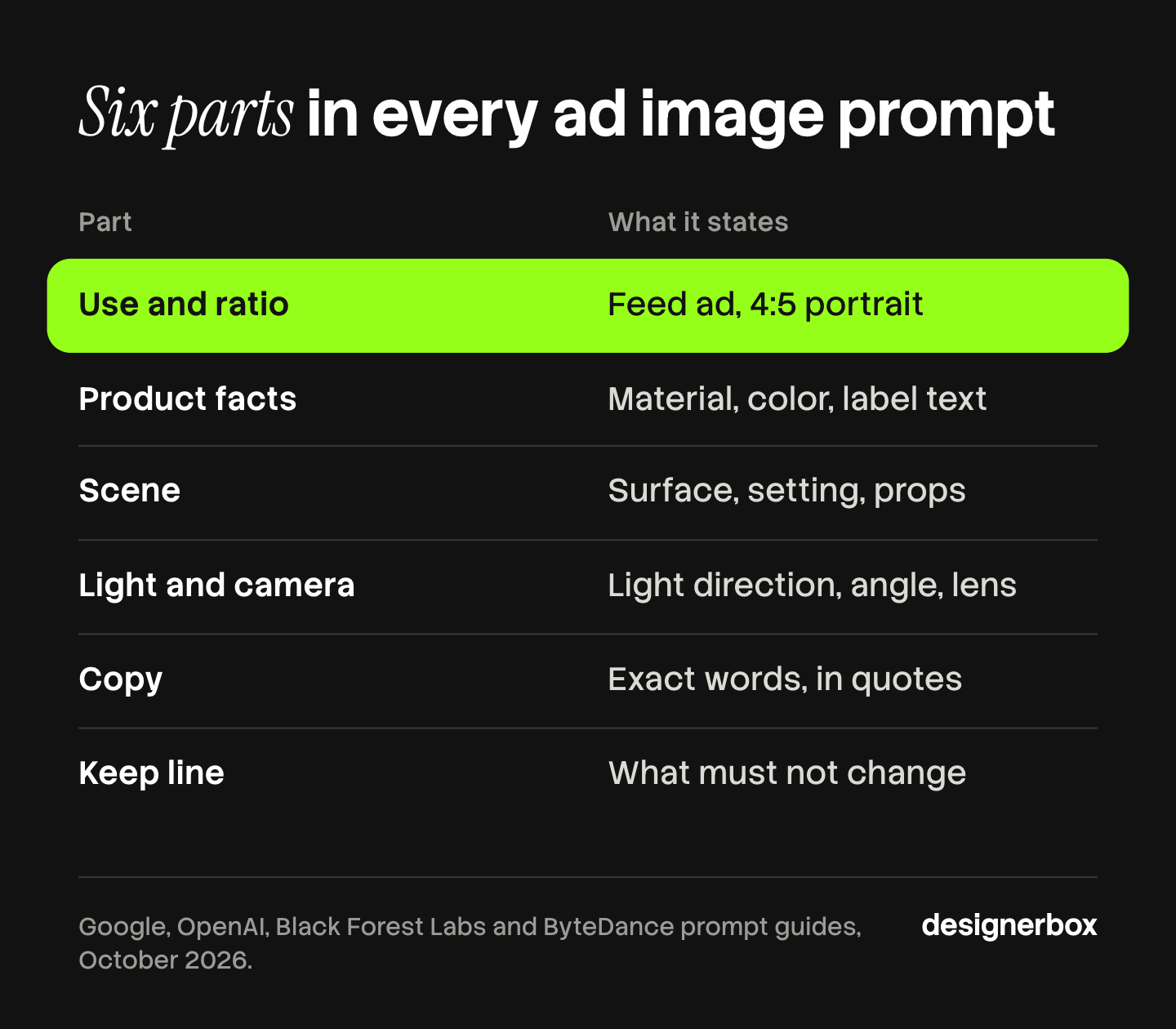
Good advertising prompts for AI images state six things: the use and the ratio, the product facts, the scene, the light and camera, the exact copy, and a keep line. Google, OpenAI, Black Forest Labs and ByteDance ask for visible details in their own prompt guides. Words such as “high-converting” describe a result, and a model cannot draw a result.
The usual failure looks like this. The prompt says “scroll-stopping social media ad, professional marketing campaign”. The image comes back square, the product label is invented, and the headline has a spelling error. Nothing in the prompt named the placement, the label or the words. On one ad you fix it by hand. On 40 variants for a creative test, you fix it 40 times.
Below are 24 AI image prompts for advertising, in eight ad formats. All 24 follow the same six-part structure, so you change the product and keep the rest. You also get the placement sizes that Meta and Google publish, and the label rules for AI ads. If you sell clothing, the garment version is in AI prompts for clothing product photos.
Key Takeaways
- Six parts, every time. Use and ratio, product facts, scene, light and camera, copy, keep line.
- Outcome words do nothing. None of the four model makers’ guides lists a conversion word as a control. They ask for materials, light, framing and exact text.
- Name the placement first. Meta recommends 4:5 for a Facebook Feed image and 9:16 for an Instagram Stories image. Google’s image models return a 1:1 square by default.
- Leave room on vertical ads. Meta asks you to keep 14% of the top and 35% of the bottom of a Stories image free from text and logos.
- Put copy in quotes. OpenAI, Black Forest Labs and ByteDance all say to quote the words that must appear in the image.
- Start from the real product photo. A model cannot protect a label it never saw. The keep line names what must not change.
What are advertising prompts for AI images?
Advertising prompts are text instructions that tell an AI image model what ad image to make. A working one names the placement and its ratio, describes the real product in facts, sets the scene and the light, quotes any words that must appear, and lists what must stay unchanged. It reads like a brief to a photographer. It is longer than a keyword list and shorter than a page.
The difference from a general image prompt is the constraint. An ad image has a fixed shape, a real product, a fixed line of copy and a platform that reviews it. A prompt for a poster on your wall has none of those.
OpenAI’s guide starts at the same place. Its first step is to “name the subject and intended use, such as a product photograph, advertisement, or diagram”, then to “specify the composition, aspect ratio, and important placement constraints” (OpenAI image prompting guide, October 2026). Google gives the same advice in other words: “Explain the purpose of the image” (Google AI for Developers, October 2026).
The six parts of an advertising image prompt
Write the prompt in six short blocks, in this order. The first block names the use and the ratio. The second describes the product in facts. The third sets the scene, and the fourth sets the light and the camera. The fifth quotes the copy, or reserves empty space for it. The sixth is the keep line: what must stay the same, and what must stay out.
| Part | What it states | Example |
|---|---|---|
| Use and ratio | The placement and its shape | A paid social feed ad, 4:5 portrait |
| Product facts | Type, material, color, label text | Matte white 50 ml pump bottle, black cap, label reads “DAILY SERUM” |
| Scene | Surface, setting, props, action | On a wet gray stone slab, two water drops beside it |
| Light and camera | Light direction, angle, lens, focus | Soft daylight from the left, eye-level, 85mm look, sharp focus on the label |
| Copy | The exact words, their place and style, or empty space | The headline “Skin that drinks” once, top left, bold sans serif, black |
| Keep line | What must not change, and what must stay out | Keep the bottle shape, cap and label text exactly as in the photo. Clean background with no other text or logos |
Order matters for at least one model family. Black Forest Labs writes that FLUX.2 “pays more attention to what comes first”, and it gives a priority order: main subject, key action, critical style, essential context, then secondary details (Black Forest Labs, October 2026). The same guide calls 30 to 80 words “usually ideal for most projects”. The prompts below sit in or near that range.
Two details from the guides save time:
- Camera words set a look. OpenAI says to treat camera specifications “as cues for appearance, not a guarantee of exact physical simulation”. Write “85mm look”, then judge the picture.
- Sentences beat keyword lists. ByteDance’s Seedream guide recommends coherent natural language, and its own “avoid” example is a list of loose keywords. It adds that concise and precise prompts usually work better than “repeatedly stacking ornate and complex vocabulary” (BytePlus ModelArk, October 2026).
Why outcome words fail in ad prompts
Outcome words describe what you hope the ad does. The model can only draw what a camera would see. “High-converting”, “scroll-stopping” and “professional marketing campaign” name no surface, no light and no position, so the model fills the gap with its average ad. That average is the generic image you wanted to avoid.
We searched the four prompt guides cited here for the words convert, conversion and scroll-stopping. None of them appears as a prompt instruction. What the guides ask for is visible: materials, lighting, colors, framing, texture, exact text. OpenAI says to specify “scale, atmosphere, and color instead of relying on mood words alone”.
Replace each outcome word with the visible fact behind it:
| Outcome word | What you meant | What to write |
|---|---|---|
| High-converting | The product is obvious at a glance | The bottle fills two thirds of the frame height, label facing the camera |
| Scroll-stopping | Strong contrast against the feed | Solid cobalt blue background, product in warm orange light |
| Premium, luxury | Costly materials, quiet set | Brushed brass tray on dark green marble, one soft light from above |
| Authentic | It looks like a phone photo | Handheld phone photo, slightly off-center, kitchen counter, daylight from a window |
| Professional | Clean studio work | Plain light gray backdrop, soft shadow under the product, sharp focus on the label |
| Engaging | A person does something with it | A hand presses the pump, a drop of serum on the fingertip |
The table is a writing aid, and nobody measured it. The test for any word in a prompt is simple: could a photographer act on it without asking a question?
Placement sizes to state in the prompt
State the ratio in the prompt and in the model setting. A model that gets no ratio picks its own. Google’s guide says its image models match the input image, “or otherwise generates 1:1 squares”. Black Forest Labs warns that a mismatched ratio forces the model “to either crop or pad the composition” (Black Forest Labs, October 2026).
| Placement | Ratio | Recommended size | What to add to the prompt |
|---|---|---|---|
| Facebook Feed, image | 4:5 | 1440 x 1800 pixels | Product in the middle third, copy space above or below |
| Instagram Stories, image | 9:16 | 1440 x 2560 pixels | Keep the top 14%, the bottom 35% and 6% on each side free from text and logos |
| Google responsive display, landscape | 1.91:1 | 1200 x 628 pixels | Product on one side, plain space on the other |
| Google responsive display, square | 1:1 | 1200 x 1200 pixels | Product centered, no text near the edges |
Sizes and safe areas are from Meta’s ads guide and Google Ads Help, read in October 2026. Meta’s Facebook Feed page also says ratios from 1.91:1 to 4:5 are supported. Platforms change these pages, so check them before a large run. LinkedIn, TikTok and Pinterest sizes are in image ad specs for five platforms.
A crop made after the fact rarely works. A wide image cut to 9:16 keeps the middle and loses the product or the text. Compose for each shape in its own prompt. The method is in one ad in every platform size.
Text inside the image, or added later
Decide per ad whether the model draws the words or leaves space for them. Both work. Each needs a different fifth block in the prompt.
When the model draws the words. Put the copy in quotes, and say where it sits and what it looks like. OpenAI: “Put required wording in quotes and describe its position and typography”, and spell unusual brand names letter by letter when needed. Black Forest Labs adds placement, font style, size and a hex code for brand colors, such as “The logo text ‘ACME’ in color #FF5733”. ByteDance says to use double quotation marks for text that must appear. OpenAI’s own ad example ends with “Render the tagline exactly once” and “No extra text, no watermarks, no unrelated logos”.
When you add the words afterwards. Ask for empty space, and say where: “the top third is plain background with no objects”. This is the safer route for legal lines, prices and anything that changes per market. Your layout tool sets the type, so spelling is not at risk.
Google adds one more tip: its model “works best if you first generate the text and then ask for an image with the text”. Write the headline first. Then prompt the image.
Check every drawn word against the brief. OpenAI’s guide tells you to “check spelling and legibility in the output”. A model that renders text well still makes mistakes on small type and long lines.
24 AI image prompts for advertising, by ad format
Each prompt below is complete. Replace the product facts with your own, and attach your product photo where the prompt says so. The products named here are examples.
Product hero ads
- Studio hero, feed. A paid social feed ad, 4:5 portrait. Use the attached product photo: a matte white 50 ml pump bottle with a black cap and a label that reads “DAILY SERUM”. The bottle stands on a plain light gray backdrop with a soft shadow under it. Soft light from the front left, eye-level, 85mm look, sharp focus on the label. The top quarter is plain background. Keep the bottle shape, cap and label text exactly as in the photo.
- Color-block hero. A square display ad, 1:1. Wireless over-ear headphones in matte cobalt blue with silver hinges, seen at a three-quarter angle. Solid warm orange background, one hard light from the upper right, a crisp shadow to the lower left. The headphones fill two thirds of the frame. Plain background with no text, no other objects.
- Hero on a surface. A landscape display ad, 1.91:1. Use the attached product photo: a stainless steel watch with a navy dial and a brown leather strap. The watch lies on dark green marble on the left third of the frame. Soft window light from the left, 45-degree angle, macro look, sharp focus on the dial. The right half is empty marble. Keep the dial, hands and strap stitching exactly as in the photo.
Product in a scene
- Kitchen counter. A paid social feed ad, 4:5 portrait. Use the attached product photo: a 250 g bag of ground coffee, kraft paper, with a black label that reads “MORNING BLEND”. The bag stands on an oak counter next to a white ceramic mug with steam rising. Morning daylight from a window on the right, eye-level, shallow depth of field. Keep the bag shape and label text exactly as in the photo.
- Bathroom shelf. A Stories ad, 9:16 vertical. Use the attached product photo: an amber glass bottle with a white pump. The bottle stands on a white stone shelf beside a folded linen towel and one olive branch. Soft daylight from the left, eye-level. The product sits in the middle of the frame. The top 14% and the bottom 35% are plain wall and shelf with no objects. Keep the bottle and label as in the photo.
- Outdoor table. A square feed ad, 1:1. Use the attached product photo: a 330 ml aluminum can, pale yellow, with the word “CITRA” in white capitals. The can stands on a wooden picnic table with two lemon halves and drops of water on the can. Late afternoon sun from behind, a long shadow toward the camera, low angle. Keep the can color and the word “CITRA” exactly as in the photo.
Product in use
- Hands only. A paid social feed ad, 4:5 portrait. Use the attached product photo: a matte white pump bottle labeled “DAILY SERUM”. A hand with short natural nails presses the pump, and one clear drop sits on the fingertip of the other hand. Light gray background, soft light from the front, close framing on the hands and the bottle. Keep the bottle and label exactly as in the photo.
- Desk in use. A landscape display ad, 1.91:1. A woman in her thirties in a navy sweater types on a silver laptop at a light wood desk. She looks at the screen, shoulders relaxed. A notebook and a glass of water sit beside the laptop. Daylight from a window on the left, eye-level, 50mm look. The right third of the frame is a plain white wall.
- Worn on the move. A Stories ad, 9:16 vertical. A man in his twenties in a gray hoodie walks on a city street and wears matte cobalt blue over-ear headphones. He looks ahead and smiles slightly. Overcast daylight, chest-up framing, 50mm look, background softly blurred. His head sits in the middle third of the frame. The top 14% and the bottom 35% show only sky and pavement.
Text-led offer ads
- Headline and product. A paid social feed ad, 4:5 portrait. A white running shoe with an orange sole floats at a slight angle on a solid deep green background. One hard light from the upper left. The headline “Run the long way home” appears once, top left, in a bold white sans serif, large. No other text, no logos.
- Sale card. A square feed ad, 1:1. Solid cream background, color #F3EAD9. Three ceramic mugs in terracotta, sage and off-white stand in a row in the lower half. Soft light from above. The text “Autumn sale” appears once in the upper half, centered, in a black serif, large. Below it, the smaller text “Ends 31 October”. No other text.
- Brand color poster. A Stories ad, 9:16 vertical. Background in color #1F3A8A. A pale yellow 330 ml can labeled “CITRA” stands in the middle of the frame with water drops on it. One light from the right. The headline “Cold. Sharp. Lemon.” appears once in white bold capitals, directly above the can, inside the middle third. The top 14% and the bottom 35% are plain blue.
Any offer you render has to be true on the day the ad runs. A date in a picture does not change when the sale does.
Phone-photo style ads
- Unboxing on a bed. A paid social feed ad, 4:5 portrait. Handheld phone photo, slightly off-center. Use the attached product photo: a white shipping box, open, with the matte white “DAILY SERUM” bottle inside on brown paper. The box sits on a rumpled beige duvet. Flat daylight from a window, no studio light. Keep the bottle and label exactly as in the photo.
- Mirror shelf. A Stories ad, 9:16 vertical. Phone photo taken at arm’s length. A hand holds an amber glass bottle with a white pump in front of a bathroom mirror shelf. Warm ceiling light, slight grain, focus on the bottle, background soft. The bottle sits in the middle third of the frame. Keep the bottle shape and label as in the attached photo.
- Car cup holder. A square feed ad, 1:1. Phone photo from the driver’s seat. A pale yellow can labeled “CITRA” sits in a car cup holder, with the dashboard and a strip of sunlit road behind it. Hard midday sun through the windshield. Keep the can color and the word “CITRA” exactly as in the attached photo.
A generated person is not a customer. The FTC says its rule on reviews and testimonials has “no blanket prohibition on the use of AI-generated avatars in marketing”, and that such use is prohibited only if the underlying testimonials “were fake or false” (FTC, October 2026). So keep quotes and star ratings off these images unless a real customer gave them. The filmed version of this format is in the UGC ads guide.
Comparison and detail ads
- Two sizes side by side. A landscape display ad, 1.91:1. Use the two attached product photos: a 30 ml and a 50 ml matte white pump bottle from the same line. They stand side by side on a light gray backdrop, the small one on the left. Even soft light, eye-level, both labels facing the camera and sharp. Keep both bottles and labels exactly as in the photos. No text.
- Material close-up. A square feed ad, 1:1. Macro photo of the brown leather strap of a watch, where the strap meets the steel case. Visible grain in the leather, cream stitching, a thin line of light on the steel edge. Soft light from the left, very shallow depth of field. Keep the stitching color and case shape as in the attached photo.
- Scale in a hand. A paid social feed ad, 4:5 portrait. An open adult hand holds a small white wireless earbud case, lid open, with two white earbuds inside. Plain light blue background, soft light from the front, close framing so that the case fills the middle of the frame. Keep the case shape and hinge as in the attached photo.
Compare your own products with each other. A competitor’s product in your ad brings trademark and comparison-claim questions that a prompt cannot answer.
Software and B2B ads
- Screen on a laptop. A landscape display ad, 1.91:1. Use the attached screenshot as the laptop screen, unchanged. A silver laptop stands open on a white desk at a slight angle, with a plant out of focus behind it. Soft daylight from the left, eye-level. The left third is plain wall. Keep every word and number in the screenshot exactly as it is.
- Team at a monitor. A paid social feed ad, 4:5 portrait. Two colleagues in their thirties stand at a desk and look at one large monitor. One points at the screen. Bright office, daylight from large windows behind the camera, 35mm look, both faces in focus. The monitor shows the attached screenshot, unchanged. The top quarter is plain ceiling and wall.
- Phone in hand. A Stories ad, 9:16 vertical. A hand holds a black phone upright against a soft beige background. The phone screen shows the attached app screenshot, unchanged and sharp. Soft light from the front. The phone sits in the middle third of the frame. The top 14% and the bottom 35% are plain beige.
Use a real screenshot. A model that invents an interface shows features your product may not have. Which format fits each buying stage is in B2B ads by buying stage.
Seasonal and market variants
These three are edits. They start from an approved ad image and change one thing.
- Season swap. Edit the attached ad image. Change only the surface and the props: replace the stone slab with a wooden table covered in dry autumn leaves and two small pumpkins behind the product. Keep the product, its label, its position, the camera angle and the light direction exactly as they are.
- Background color per audience. Edit the attached ad image. Change only the background color to #0F766E. Keep the product, its shadow, the headline text, its position and its font exactly as they are.
- Headline in another language. Edit the attached ad image. Change only the headline: replace “Run the long way home” with “Nimm den langen Weg nach Hause”. Keep the font, color, size and top-left position. Keep the shoe, the background and the light exactly as they are. Render the new headline exactly once.
This follows the editing advice all four guides share. OpenAI’s wording: say “change only X” and list the details to preserve. Longer text can break a layout, so check each language by eye.
Prompt mistakes that waste a run
Most wasted runs come from five habits. Each has a fix you can apply in the prompt.
- No ratio. The image comes back square and gets cropped. State the placement and the ratio first.
- No product photo. The model invents a label. Attach the photo and write a keep line.
- A list of “no” items. Google recommends describing the scene in positive words and calls this a semantic negative prompt. Black Forest Labs gives the swap: write “clean surfaces” in place of “no text”. OpenAI’s ad example does end with “No extra text, no watermarks, no unrelated logos”. So keep exclusions short and specific, and describe the rest positively.
- Five changes in one edit. OpenAI’s guide says to request one change, then repeat the details to preserve. Google says to make small changes in follow-up prompts.
- One prompt, one image, done. A prompt gives you a draft. Plan three to five results per prompt and pick with a checklist, then test the picks. The testing method is in ad creative testing.
No guide promises that a product stays pixel-identical. OpenAI’s advice for a region that must not change is to “composite the approved edit into the original image instead of relying on prompting alone”. Check each result against the product photo before it ships. The five checks are in AI product ads.
AI label rules for ad images
The label rules depend on the platform and on what the AI changed. This section is general information, not legal advice.
- TikTok ads. Fully AI-generated or heavily AI-edited ad media needs the AIGC label or your own clear disclaimer. TikTok lists lighting and color adjustments and “removing or modifying backgrounds” as edits that need no label. Undisclosed AI content means the ad “will be rejected or restricted” (TikTok ads policy, October 2026).
- Meta ads. Meta applies an “AI info” label itself when you use its AI features, or when it detects that an ad “was created or edited by third-party generative AI tools” (Meta Business Help Center, October 2026). Detection needs a signal such as metadata, so not every AI ad gets the label.
A real product on a new background is the low-risk case. A generated person, or a product that no longer matches the real one, is where the rules begin to apply. The full list by platform and by law is in AI disclosure in advertising.
Prompts as a saved workflow
A prompt library in a document has one weak point: every person pastes it a little differently. The 24 prompts above stay consistent only when the product facts, the brand colors and the keep line are filled the same way on every run.
Anyone can make an AI picture. Making hundreds that still look like your brand is the hard part. DesignerBox is AI creative production for brands and agencies. You build the ad set once as a workflow, with the six parts fixed, then run it on every new product.
- Prompt help sits inside the workflow. You write a rough brief, and the workflow turns it into an art-directed prompt.
- The brand is a record. You set the logos, fonts, colors and rules once in your brand profile. The workflow reads it on every run.
- Review is built in. Critic steps score the results of a run, and best-of-N keeps the best one. You still check the product and the copy yourself.
- One workflow, many products. Publish the workflow as an app, and a colleague runs it from a form. Batch runs it over a whole sheet of products, and you review the results in one pass.
- Sizes and languages. The ads resizer rebuilds one ad for another placement, and the ad localizer rebuilds it in another language with the layout redrawn.
The full workflow from the first product photo to the finished ad, in one subscription. Uploading your own photos and the commercial license start on the Pro plan. Plans and credits are on the pricing page.
Here are two limits. DesignerBox does not post to your ad accounts: you download the results, or send them with a webhook or an S3 step. Every plan below Ultra is one seat, so an agency team needs Ultra. Agencies can see how it works per client on the agencies page, and the ad side is on the AI ad generator page.
A free plan for your first run
There is a free plan, and it runs on sample products. Start from a template and see the cost before you run it.
FAQ
What should an advertising image prompt include?
Six parts: the use and the ratio, the product facts, the scene, the light and camera, the exact copy or the empty space for it, and a keep line. OpenAI’s guide asks for the intended use, the aspect ratio and the placement constraints first. Google asks for the purpose of the image and for specific detail.
How long should an AI image prompt for an ad be?
Black Forest Labs calls 30 to 80 words usually ideal for most projects with FLUX.2, and reserves 80 words or more for complex scenes. ByteDance says concise and precise prompts usually work better than stacked descriptive vocabulary. Six short sentences, one per part, fit both.
Do the same advertising prompts work in every AI image model?
The structure carries over, because all four model makers ask for the same things: a clear subject, visible details and quoted text. The syntax for extras differs. FLUX.2 reads hex color codes and structured JSON. Google’s guide prefers positive wording over “no” lists. Test a prompt on your model before a large run.
Can AI image models write the headline inside the ad?
Yes, with checks. OpenAI, Black Forest Labs and ByteDance all say to put the words in quotes and to describe position and style. Google suggests writing the text first, then asking for the image. Check spelling on every result. For prices and legal lines, leave empty space and add the text in your layout tool.
Do AI ad images need a label?
It depends on the platform and the edit. TikTok requires the AIGC label or a clear disclaimer on fully AI-generated or heavily AI-edited ad media, and treats a background change as an edit that needs no label. Meta adds an “AI info” label itself when it detects AI signals. Check each platform’s page before launch.
How many images should one prompt produce for a creative test?
There is no published number that fits every account. A practical plan is three to five results per prompt, picked against a checklist, with one variable changed between ads. In DesignerBox, the cost is shown before the run, so you can size the test before you start.
Sources
Prompt guidance read in October 2026 from OpenAI’s image prompting guide, Google’s Gemini image generation guide, Black Forest Labs’ FLUX.2 prompting guide and technical parameters guide, and ByteDance’s Seedream prompt guide on BytePlus. Placement sizes from Meta’s ads guide for Facebook Feed images and Instagram Stories images, and from Google Ads Help, read in October 2026. Label and testimonial rules from the TikTok ads policy, the Meta Business Help Center and the FTC’s questions and answers on its reviews and testimonials rule, read in October 2026. DesignerBox plans and plan gates: DesignerBox pricing page (designerbox.ai/pricing), October 2026.
Prompt guidance, placement sizes and label rules verified from the model makers’ and platforms’ own documentation as of October 2026. Individual results vary.