





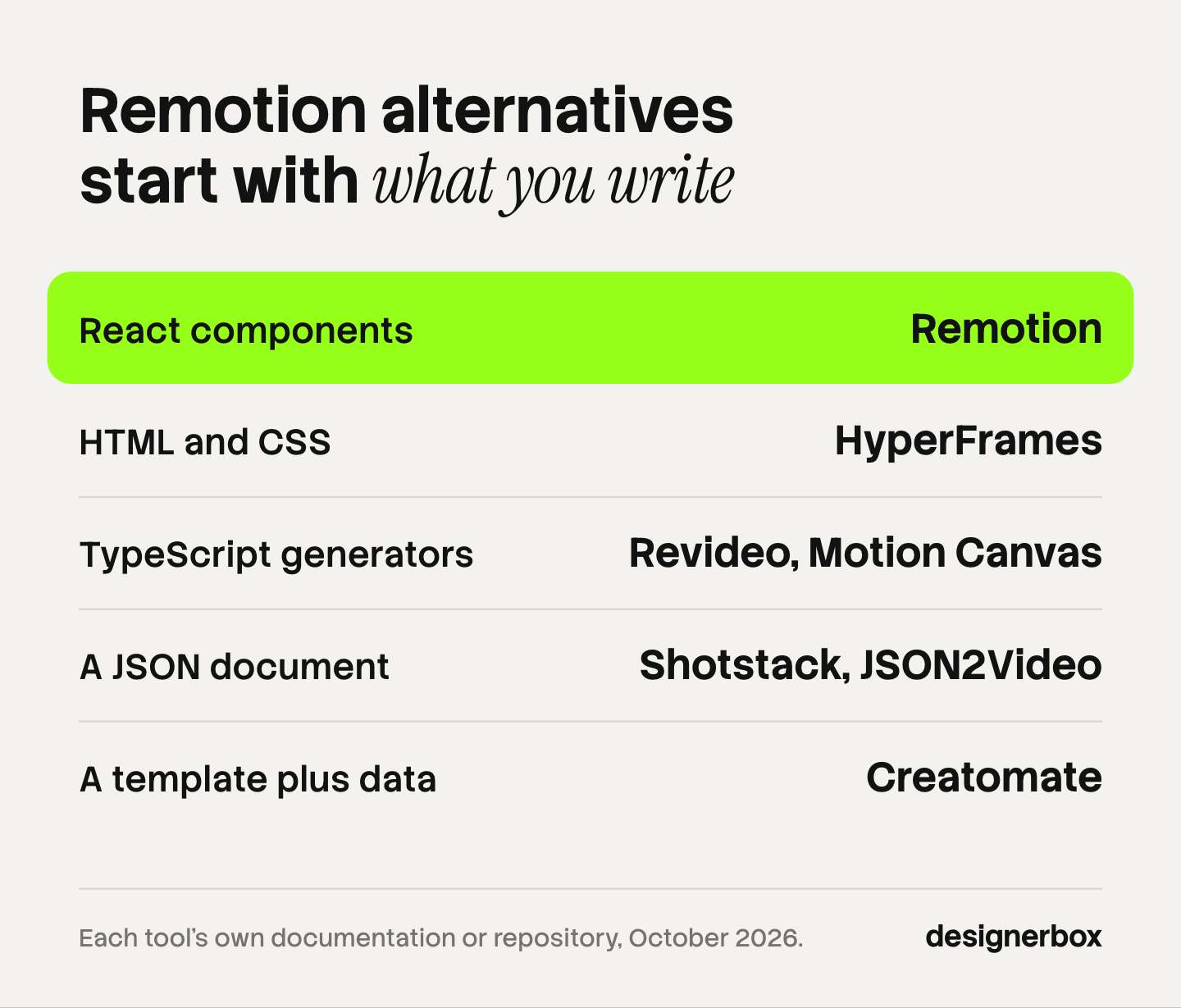
The main Remotion alternatives fall into three groups. Open-source frameworks keep the video in code: HyperFrames uses HTML, and Revideo and Motion Canvas use TypeScript. Hosted APIs take the renderer off your hands: Shotstack and JSON2Video accept a JSON document, and Creatomate fills a template. Rendi runs FFmpeg as an API for the final encode. Choose by what you write and who runs the renderer.
Remotion is a framework, so it gives you a library and leaves the server to you. Its own documentation lists four ways to render in the cloud, and each one runs in an account you own (remotion.dev, October 2026). That is the real reason people search for an alternative. The React part works. The part where somebody has to own queues, cold starts and a license count is the part that sends a team looking.
This guide sorts seven tools by two questions, with every fact taken from the vendor’s own documentation in October 2026. It also covers the case where no developer is on the team at all.
Key Takeaways
- Two questions decide the pick. What does your team write: React, HTML, TypeScript, JSON or a template? And who runs the renderer: you or a vendor?
- Remotion has four cloud render paths, all in your own account. Lambda, Vercel Sandbox, Cloud Run and the Node.js APIs. Remotion recommends Lambda for most people and marks Cloud Run as Alpha (remotion.dev, October 2026).
- The license has a headcount line. Remotion is free for individuals and companies of up to 3 people. Companies of 4 or more need a Company License (remotion.dev, October 2026).
- Open-source alternatives still need a host. HyperFrames, Revideo and Motion Canvas remove the license question. They do not remove the server.
- Hosted APIs remove the server and narrow the format. A JSON timeline or a template is easier to run and less free than a React component.
- None of these tools makes footage. They compose and encode what you supply. A product clip from a video model is a separate step.
Why do teams look for Remotion alternatives?
Teams look for Remotion alternatives for three reasons: the rendering infrastructure, the license and the language. None of the three is about picture quality.

Infrastructure. Remotion Lambda splits a video into chunks and renders them in parallel across many Lambda functions. Remotion calls it the fastest option and recommends it for most people. It also lists the limits. A single function runs for 15 minutes at most, the default cap is 1,000 concurrent functions per region, and AV1 encoding is not available on Lambda (remotion.dev, October 2026). AWS documents the same two quotas: a 900-second timeout and 1,000 concurrent executions by default (docs.aws.amazon.com, October 2026).
License. Remotion is source-available, with a free license for individuals and for companies of up to 3 people. A company of 4 or more needs a Company License, and automated rendering is billed by usage under it. The terms and current rates are on Remotion’s license page (remotion.dev, October 2026).
Language. A Remotion video is a React component. That suits a product team with React engineers. It suits a marketing team less, because every change to a title card is a code change.
Remotion has also become the default for AI coding tools. It maintains its own Agent Skills for Claude Code, Codex and Cursor (remotion.dev, October 2026). Search interest in the framework grew about six times between September 2025 and August 2026 (DataForSEO, US). More people now reach the hosting question without a backend engineer beside them.
The four ways to render Remotion itself
Before you replace Remotion, check which of its own render paths you are on. The first alternative to Remotion Lambda is often another Remotion option.
| Option | Where it runs | What Remotion says about it |
|---|---|---|
| Remotion Lambda | Your AWS account | Fastest, distributed rendering, recommended for most people |
| Vercel Sandbox | Your Vercel account | Easiest setup, new, longer cold starts today |
| Cloud Run | Your Google Cloud account | Alpha, no distributed rendering |
| Node.js or Bun APIs | Your own server | Cheapest compute, and you build the queue, logging and scaling |
Source: Remotion’s comparison of server-side rendering options (remotion.dev, October 2026).
Remotion states the cost trade plainly. Lambda compute costs more per second, and you pay only while a render runs. A long-running server has the cheapest compute, and you pay for idle time. Its own conclusion: the more videos you render, the more a server is worth it.
There is no fifth option where Remotion runs the renderer for you. Every path above needs a cloud account that you own.
Open-source Remotion alternatives
Three open-source frameworks keep the video in code and change the language. All three still need a machine with a headless browser to render.
HyperFrames
HyperFrames turns HTML, CSS and seekable animations into MP4 files. It is open source under Apache 2.0, with no per-render fee in the license (github.com/heygen-com/hyperframes, October 2026). The project is built for AI coding tools and ships its own skills for them, including one that ports an existing Remotion composition to HTML.
It renders locally through a command line tool, and the repository documents an AWS Lambda path for distributed renders. The same repository describes Remotion Lambda as the mature cloud renderer. Best for teams that want plain HTML and no license count.
Revideo
Revideo is a rendering engine where a scene is a TypeScript generator function. It is MIT licensed and ships a headless render function, a render endpoint you can expose from your own project, parallelized rendering and a React player for preview (github.com/redotvideo/revideo, October 2026). It is the engine behind the Midrender editor.
Best for teams that want a code-first engine they can put behind their own endpoint. You supply the host.
Motion Canvas
Motion Canvas is a TypeScript library for animations, paired with an editor that previews them in real time. Its own description is specific: a tool for informative vector animations synchronized with voice-overs (github.com/motion-canvas/motion-canvas, October 2026). It is MIT licensed.
Best for explainers and technical diagrams. Batch rendering from data is outside its stated scope, so plan your own job runner if you need that.
Hosted render APIs
Hosted APIs answer the second question differently. The vendor runs the renderer, and you send a document instead of a component.

Shotstack
Shotstack is a cloud video editing API. You describe an edit as JSON with a timeline, tracks and clips, then POST it to a render endpoint. The model follows desktop editing concepts, so a clip has a start time, a length, transitions and filters (shotstack.io/docs, October 2026).
Best for developers who think in timelines and want no render infrastructure. Custom React animation logic does not carry over, so budget a rebuild for it.
Creatomate
Creatomate starts from a design template. You build the template once, then fill it from a spreadsheet, a REST API call, or an automation tool such as Zapier, Make or n8n (creatomate.com/docs, October 2026). Its documentation gives the pattern in one line: every spreadsheet row becomes its own video or image.
Best for many versions of one layout: one per product, per market or per customer. A video that needs a different structure each time is outside what a template does.
JSON2Video
JSON2Video takes a JSON document over a REST API and returns an MP4. It also offers a visual editor, templates, and connections to Make, n8n and Zapier (json2video.com/docs, October 2026).
Best for small teams that want one request in and one file out.
Rendi
Rendi does not compose a video. It runs FFmpeg commands that you send as a POST request, and you poll for the result (rendi.dev, October 2026). That covers the last step under any framework here: joining clips, transcoding and adding audio.
Best as the encode layer when your runtime cannot hold an FFmpeg binary.
Remotion alternatives compared
| Tool | You write | Renderer runs on | License or type |
|---|---|---|---|
| Remotion | React components | Your cloud account | Source-available, free up to 3 people |
| HyperFrames | HTML and CSS | Your machine or your AWS | Apache 2.0 |
| Revideo | TypeScript generators | Your host | MIT |
| Motion Canvas | TypeScript generators | Your machine | MIT |
| Shotstack | JSON timeline | The vendor | Hosted API |
| Creatomate | Template plus data | The vendor | Hosted API |
| JSON2Video | JSON scenes | The vendor | Hosted API |
| Rendi | FFmpeg commands | The vendor | Hosted API |
Each hosted vendor lists its plans on its own pricing page. Check them in the month you decide, because render pricing changes often.
How to choose
Start with what exists. If you have a working Remotion codebase and someone who knows AWS, stay. Remotion’s own data point is that its highest-volume customers render on Lambda.
If you have no codebase yet, answer the two questions in order.
- Who edits the video next month? If it is an engineer, a code framework fits. If it is a marketer, pick a template or a timeline they can open.
- Who gets paged when a render fails? If nobody on the team can own a queue, choose a hosted API.
- Does each video differ in content or in structure? Different content fits a template. Different structure needs code.
- Where does the footage come from? Every tool here arranges assets you supply. If the clip itself comes from a video model, that is another step with its own cost. Veo alternatives compares those models.
One more check for agencies: count the people before you count the renders. A license with a headcount line and an API billed per render scale in different directions.
Catalog video without a developer
Many searches for a Remotion alternative come from a brand or an agency, not from an engineering team. The job is the same product video for every product: a clip, a caption, a logo and the right size for each placement. That job does not need a rendering framework. It needs one job built once.
DesignerBox is built for that case, and it is a different kind of product from the tools above. DesignerBox does not have a public API, and you do not write a composition in code. It has 68 tools over MCP, so an AI chat such as Claude, ChatGPT or Cursor can run it. If your product needs a render endpoint, use one of the tools above.
What it does: you build a workflow once with your brand, your products and your rules. A colleague runs it as an app, through a form. Batch runs it over a sheet of up to 200 rows, and you keep or discard each row in one review pass. Anyone can make an AI picture. Making hundreds that still look like your brand is the hard part. The video editor is a real timeline, with several tracks, transitions, animated text and audio. That covers the full workflow from the first product photo to the finished ad, in one subscription.
The cost of a run is shown before you press Run. An 8-second clip costs 40 to 560 credits, depending on the model.
The limits, stated plainly. Uploading your own photos and the commercial license start on the Pro plan. AI video and the video editor start on the Premium plan. Every plan below Ultra is one seat. There is a free plan, and it runs on sample products. Nothing publishes to a store: you download the results, or send them with a webhook or an S3 step. Plans and credits are on the pricing page.
For the surrounding decisions, Claude as an AI video generator covers the chat route, skills vs MCP explains the two ways an AI coding tool gets its instructions, and what creative automation is covers the template pattern in general. Ecommerce product video frameworks gives the beat sheets to put inside any of these tools.
Start from a template, add your brand and your products, and run it. See the templates.
FAQ
What is the best Remotion alternative?
It depends on what you write. HyperFrames fits teams that want HTML under an Apache 2.0 license. Revideo fits teams that want a TypeScript engine behind their own endpoint. Shotstack, Creatomate and JSON2Video fit teams that want a vendor to run the renderer.
Is Remotion free?
Remotion is free for individuals and for companies of up to 3 people. Companies of 4 or more need a Company License, and automated rendering is billed by usage under it. Rates are on Remotion’s license page (remotion.dev, October 2026).
Does Remotion have a hosted rendering API?
No. Remotion documents four cloud options: Lambda, Vercel Sandbox, Cloud Run and the Node.js APIs. Each one runs in an account or on a server that you own.
What are the limits of Remotion Lambda?
Remotion lists a 15-minute function timeout, a default of 1,000 concurrent functions per region, about 5 GB for the finished file and no AV1 encoding. It gives about 80 minutes of Full HD video as the practical length before the timeout.
Is there an open-source alternative to Remotion?
Yes. HyperFrames is Apache 2.0, and Revideo and Motion Canvas are MIT. All three need your own machine or server to render.
Can an AI coding tool write these videos?
Yes, for the code frameworks. Remotion and HyperFrames both publish skills for AI coding tools, and Revideo’s repository says Claude or Codex can produce a scene from a prompt. The tool writes the composition. You still review the render.
Do these tools generate video with AI?
No. They compose and encode assets you supply: clips, images, text and audio. Generating a clip is a job for a video model, and the result becomes one input to the composition.
Sources
- Remotion, Comparison of server-side rendering options: https://www.remotion.dev/docs/compare-ssr
- Remotion, Lambda documentation: https://www.remotion.dev/docs/lambda
- Remotion, Cloud Run documentation: https://www.remotion.dev/docs/cloudrun
- Remotion, License and pricing: https://www.remotion.dev/docs/license/pricing
- Remotion, Agent Skills: https://www.remotion.dev/docs/ai/skills
- AWS, Lambda quotas: https://docs.aws.amazon.com/lambda/latest/dg/gettingstarted-limits.html
- HyperFrames repository (github.com/heygen-com/hyperframes, October 2026)
- Revideo repository (github.com/redotvideo/revideo, October 2026)
- Motion Canvas repository (github.com/motion-canvas/motion-canvas, October 2026)
- Shotstack documentation, core concepts (shotstack.io/docs, October 2026)
- Creatomate documentation, getting started (creatomate.com/docs, October 2026)
- JSON2Video documentation (json2video.com/docs, October 2026)
- Rendi (rendi.dev, October 2026)
- DataForSEO, US search volume for “remotion”, September 2025 to August 2026
Remotion render options, limits and license terms verified from Remotion’s own documentation, and each alternative from its own documentation or repository, as of October 2026. Vendor terms change, so confirm them before you commit. DesignerBox plans and credits are on the DesignerBox pricing page (designerbox.ai/pricing), October 2026.


