An AI video ad generator is one of five different products, and the input decides which one you have. Some take a product URL. Some take a product photo. Some take a script and an avatar. Some take a text prompt for a video model. Some take an ad that already works and make new versions of it. Choose by the input you have and the ad job you need.
You run paid social for six clients. One ad is winning this week, and it will tire soon. You need 12 new versions of it, in three ratios, before Friday. A video ad maker that starts from a blank prompt does not fit that job. A video ad maker that starts from the winning ad does.
This guide sorts ten tools by input, then gives seven checks to run on your own product. It is not a ranking. Each feature was read on the vendor’s own page in October 2026. We make DesignerBox, and it has its own section near the end.
Key Takeaways
- Five inputs, five products. An AI video ad generator starts from a product URL, a product photo, a script with an avatar, a text prompt, or an existing ad.
- The input decides the job. A URL fits fast concept tests. A photo fits product clips. A script fits a presenter. A prompt fits a scene with no source. An existing ad fits variants of a winner.
- One model clip is short. Google’s Veo 3.1 makes clips of 4, 6 or 8 seconds, so a 15-second ad is several clips cut together.
- Seven checks come before the commitment. Product fidelity, the ratio set, length, safe zones, voice and language, editing, and AI labels.
- TikTok asks for a label. Ads with AI-generated or heavily AI-edited media need the AIGC label or your own clear disclaimer.
What is an AI video ad generator?
An AI video ad generator is software that makes a video ad without a film shoot. The name covers five products that start from five inputs: a product URL, a product photo, a script with an avatar, a text prompt, or an existing ad. Each input gives a different kind of ad.
The names “video ad generator” and “video ad maker” cover the same group. Some tools draw every frame with a model, and a drawn frame can change a logo or a label. Some cut your own photos and stock clips into a sequence. So ask of any tool: what do I give it, and what does it draw?
For product clips outside ads, see the four types of AI product video generator.
The five inputs, and the ad job each one fits
Each input fits one ad job. A product URL fits fast concept tests. A product photo fits product clips for a catalog. A script with an avatar fits a presenter or a testimonial format. A text prompt fits a scene that has no source material. An existing ad fits new variants of a winner.
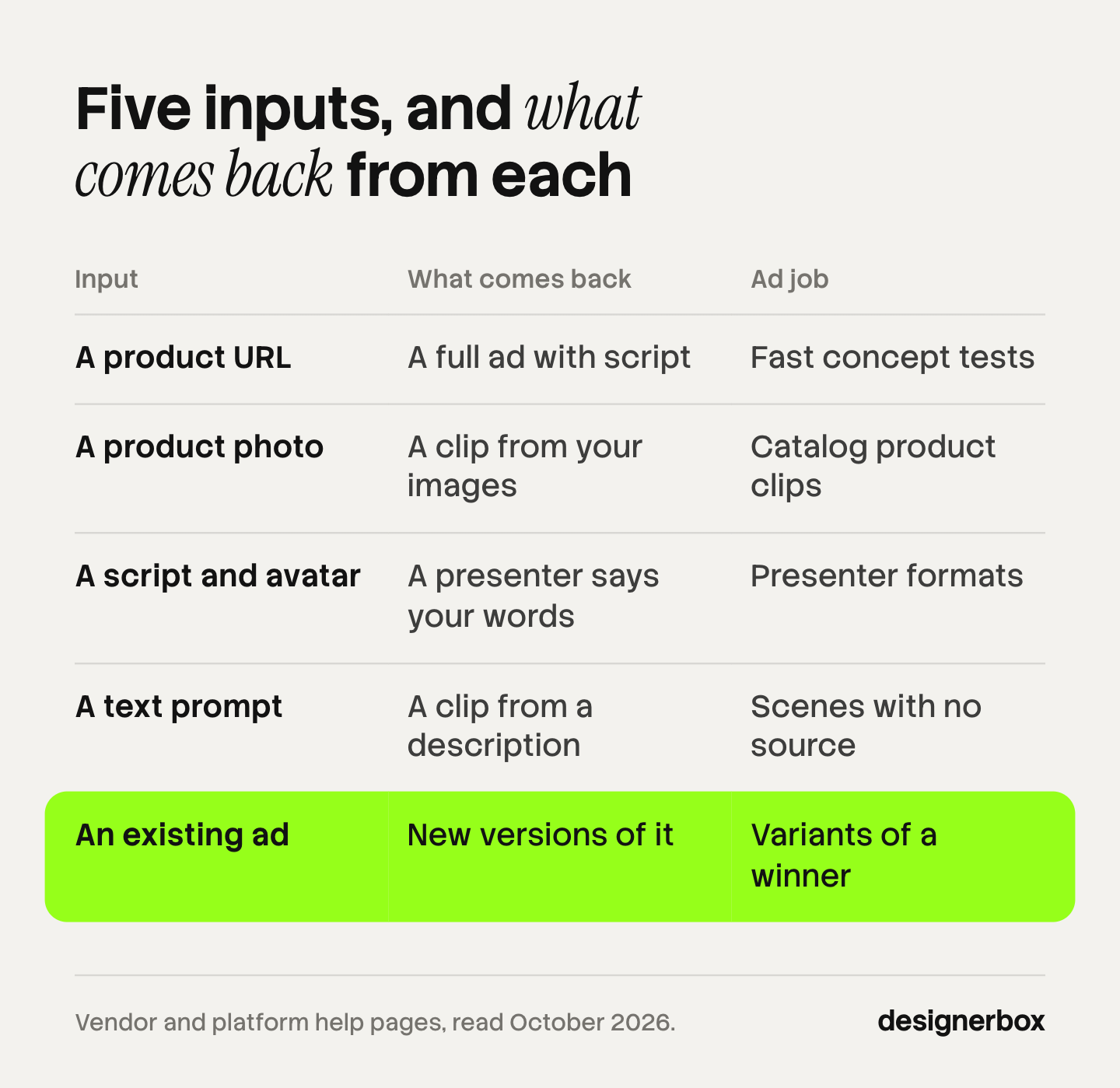
| Input you give | What comes back | Ad job it fits | What you review |
|---|---|---|---|
| A product URL | A full ad with a script, visuals and a voice | Fast tests of many concepts | The script, the claims and each product shot |
| A product photo | A short clip or a multi-clip video from your images | Product clips across a catalog | Logo, label, shape and color in motion |
| A script and an avatar | A presenter who says your words | Presenter and testimonial formats | The avatar’s license for paid ads, and lip sync |
| A text prompt | A clip or a full draft from a description | A scene with no source material | Everything, because the model draws all of it |
| An existing ad | New versions of an ad that already works | Variants of a winner, new ratios | That the new version keeps the proven structure |
Most tools accept more than one input. The sections below place ten tools by the input each page leads with. Each vendor lists its plans on its own pricing page.
Which video ad generators start from a product URL?
URL tools read a product page and return a whole ad. You paste a link. The tool reads the images and the text, writes a script and builds the video. This input fits concept tests, where you need many angles on one product.
Creatify turns a product link into a video ad. Its page says it pulls your assets, writes the script and delivers the ad. It renders an ad again in 75+ languages (creatify.ai/features/url-to-video, October 2026). Tools for the same job are sorted in Creatify alternatives.
Predis.ai accepts a product URL, a text prompt or an image, alone or together. Its page says it makes the visuals, copy and video in one run, matched to your brand kit. It makes ad creatives in over 19 languages and has a built-in video and image editor (predis.ai, October 2026).
Scope: In both tools, the software writes the script. Read every claim in it against your product page before the ad runs.
Which tools start from a product photo?
Photo tools build motion from your own images. You add one or more product photos, and the tool animates them or cuts them into a multi-clip video. Your real product is in the first frame, so this input fits catalogs.
AdCreative.ai makes video ads from an uploaded image. Its page lists UGC-style content, product videos, stock visuals and fashion clips, and says you upload a product photo to make the video (adcreative.ai, October 2026).
Meta has video generation inside Advantage+ creative. Meta says the feature turns several single images into a multi-clip video with text overlays and music. It asks for your product URL and your images. Meta returns several versions, and it says you are required to review them (Meta Business Help Center, accessed October 2026).
Scope: Meta says video generation works only where the predicted ad language is English, French, German, Italian, Korean, Japanese or Chinese, and only for selected verticals.
Google Ads has Asset studio. Google says you can give it text prompts, product images, documents or brand guidelines. It returns a batch of images, text and videos, grouped as a project. Asset studio also has a video builder for horizontal or vertical ads (Google Ads Help, accessed October 2026).
The shot plan for a photo-led ad is in product photo to video ad.
Which tools start from a script and an avatar?
Script tools make a presenter. You write the words and choose a face, and an AI avatar says the script on screen. The person is the subject of the video, so product shots come from another source.
HeyGen makes complete videos from a script. Its page says the generator adds voiceovers, visuals and avatars. Translation covers 175+ languages and dialects. HeyGen says every custom avatar requires on-camera identity verification from the person shown (heygen.com, October 2026).
Synthesia makes videos with AI avatars and voiceovers in 140+ languages. You can also start from a document or a link (synthesia.io, October 2026).
Scope: Synthesia’s terms prohibit stock avatars in content made for promoted, boosted or paid advertising on any social media platform (help.synthesia.io, October 2026). Check the avatar type before a video runs as an ad.
Arcads has a library of 1,000+ AI actors, and you can create your own AI actor. Its page says an actor can hold your product, show your app and wear your clothes. It lists translation in more than 30 languages (arcads.ai, October 2026).
Whose face the presenter has decides the consent rules. Those are in AI spokesperson, and ten avatar tools are compared in AI UGC video generators.
Which tools start from a text prompt?
Prompt tools start from a description. You write what the scene shows, and a video model draws it. The model draws every frame, so this input needs the most review.
InVideo AI makes ads from text prompts, images or a product link. Its page says you describe an idea and it returns a scene-by-scene storyboard. You then edit with a text prompt. It makes ads in 50+ languages (invideo.io/make/ad-maker, October 2026).
TikTok Symphony Creative Studio has three modes: text to video, image to video and reference to video. TikTok tells you to describe a single scene, then join scenes in an editor. A timeline editor adds voiceover and captions. You download the result or sync it to TikTok Ads Manager (TikTok Business Help Center, accessed October 2026).
Scope: TikTok says the Dreamina Seedance 2.0 model in Symphony does not accept images or videos with real faces as references in this first rollout.
A video model on its own is the third route. Google’s Veo 3.1 makes clips of 4, 6 or 8 seconds in 16:9 or 9:16, and it makes audio with the video (Gemini API docs, accessed October 2026). Google lists 22 October 2026 as the shutdown date for the Veo 3.1 preview models in the Gemini API (Gemini API deprecations, accessed October 2026). A model returns a clip with no script and no captions. The full build is in how to make AI ads.
Which tools start from an ad that already works?
Variant tools start from a finished ad. You give the tool a video that performs, and it returns new versions. The job is common in paid social: an ad is winning, it will tire, and you need more of it.

Creatify’s Ad Clone takes a video ad that you upload. Its page says it extracts the structure, rewrites the script for your product and makes new versions. It renders the versions in 9:16, 16:9 and 1:1 together (creatify.ai/features/ad-clone, October 2026).
Scope: The page says the reference can be your own ad or a competitor’s. It also says Ad Clone analyzes structure and does not copy content. Check each new version against the source before it runs, so no script line, footage or claim is carried over.
Meta’s video touch-ups work on a video you already have. Meta says the feature crops your video or uses generative AI to expand it to a 9:16 or 4:5 ratio. Expansion can change up to the first 15 seconds of the video (Meta Business Help Center, accessed October 2026).
Scope: Touch-ups change the frame of an existing video. A new hook or a new script is outside scope.
Seven checks on your own product before you commit
Run one real product through the tool, then apply seven checks: product fidelity, the ratio set, length, captions and safe zones, voice and language, editing after generation, and AI labels. Use a product with a logo and small label text.

1. Product fidelity
Pause the clip on the frame with the most motion. Compare it with your product photo. Read every letter of the logo and the label, and check the shape and the color. A clip that changes the product does not go into an ad.
2. The ratio set: 9:16, 1:1 and 16:9
Plan for three ratios. TikTok’s in-feed specs list 9:16 as recommended, and also accept 16:9 and 1:1 (TikTok Ads Manager, accessed October 2026). Meta recommends 9:16 for Instagram Reels ads (Meta Ads Guide, accessed October 2026). Google says vertical 9:16 video suits Shorts ads, and horizontal video serves there with a blurred top and bottom (Google Ads Help, accessed October 2026).
Check which ratios the tool makes in one run. Veo 3.1 makes 16:9 or 9:16, so a 1:1 version needs a crop or a second step.
3. Length against the placement
One model clip is short. Veo 3.1 stops at 8 seconds. Google recommends vertical videos of 10 to 30 seconds for action-oriented Shorts ads. So one ad is two to four clips cut together, as simple arithmetic. Check that the product looks the same in every clip. What that adds to the bill is in what one shipped AI video ad costs.
4. Captions and safe zones
Platform buttons cover parts of a vertical ad. Meta says to leave about 14% of the top, 35% of the bottom and 6% of each side free of text and logos on a Reels ad. TikTok publishes its safe zones as files you download for each ad format. Place the tool’s captions on those files. If the tool fixes captions in the video at one position, check that position first.
5. Voice and language
List the markets you run. Then read the language count on the vendor’s page: 175+ at HeyGen, 140+ at Synthesia, 75+ at Creatify, 50+ at InVideo AI, more than 30 at Arcads and over 19 at Predis.ai. A count is a claim, so test your own language with a native speaker. Veo 3.1 makes audio with every clip, so decide if you keep it or add your own voiceover.
6. Editing after generation
The first result is a draft. Check what you can change without a new run. Meta’s video generation lets you reorder clips and edit the music, text overlay and font. Symphony opens a clip in a timeline editor. InVideo AI edits by text prompt. A model clip has no editor, so you cut it in a separate one.
7. AI disclosure labels on Meta, TikTok and YouTube
Each platform has its own rule, and this is general information, not legal advice.
- TikTok. Ads with AI-generated or heavily AI-edited media are allowed when you add the AIGC label or your own clear disclaimer, caption, watermark or sticker. If TikTok finds AI content with no disclosure, it rejects or restricts the ad (TikTok ads policy, accessed October 2026). TikTok adds an AI-generated label to every video exported from Symphony.
- Meta. Meta adds an “AI info” label itself when you use its own generative features, or when it detects a third-party AI tool through signals such as C2PA metadata. Meta says the feature may not be available in every region. Advertisers must disclose AI in ads about social issues, elections or politics (Meta Business Help Center, accessed October 2026).
- YouTube and Google Ads. YouTube requires creators to disclose realistic content that AI made or changed in a meaningful way, with a setting in YouTube Studio (YouTube Help, accessed October 2026). Ads on YouTube follow Google Ads policies. Google Ads has an AI label setting. For campaigns that target the European Union, India or New York, assets you mark as AI also show a visible label on the ad. Google says the setting does not guarantee that you comply with a regulation (Google Ads Help, accessed October 2026).
Ad variants from one workflow
DesignerBox is AI creative production for brands and agencies. For video ads it starts from two of the five inputs: a product photo, and a frame from an ad you already ran.
The Animate an image app takes one picture and a line of text. It returns one five-second clip at 1280 by 720. The picture can be a static ad that already performed. The UGC product video app takes a product photo and a short brief. It returns one vertical video at 1080 by 1920 (DesignerBox apps, October 2026).
The video editor is a real timeline, with several tracks, transitions, animated text and audio. You cut the clips there into one ad. The rest is on the AI video ads page.
Anyone can make an AI picture. Making hundreds that still look like your brand is the hard part. You set the brand once, and the workflow reads it on every run. A saved workflow runs the same way on the next product, and batch runs it over the whole sheet, the same on row one and row two hundred. The full workflow from the first product photo to the finished ad, in one subscription. How a test round is built is on the page for performance marketers.
The cost is shown before each run. An 8-second clip costs 40 to 560 credits, depending on the model. Uploading your own photos and the commercial license start on the Pro plan. AI video, virtual try-on, upscaling, the image editor and the video editor start on the Premium plan. Plans and credits are on the pricing page.
The limits: DesignerBox does not read a product URL and write the ad for you. The free plan runs on sample products and cannot make video. Every plan below Ultra is one seat, and team features, shared brand kits and white label are on the Ultra plan. DesignerBox does not post to your ad account: you download the results, or send them with a webhook or an S3 step. If your whole job is a talking avatar from a product link, a URL tool fits better.
Start from a template, add your brand and your products, and see the cost before you run it. Get started free
FAQ
What is the best AI video ad generator?
No single tool is best for every job. Match the tool to your input. A product URL fits Creatify or Predis.ai. A product photo fits AdCreative.ai, Meta’s video generation or DesignerBox. A script fits HeyGen, Synthesia or Arcads. A text prompt fits InVideo AI or TikTok Symphony. Then run the seven checks on your own product.
What is the difference between a video ad generator and a video ad maker?
The two names are used for the same group of tools. A generator usually draws new frames with an AI model. A maker can also be an editor that cuts your own clips and stock footage on a timeline. Ask what the tool draws, because drawn frames need a product check.
Can an AI video ad generator make new versions of my winning ad?
Yes, some can. Creatify’s Ad Clone takes a video ad and makes new versions around its structure. Meta’s video touch-ups crop or expand an existing video to 9:16 or 4:5. In DesignerBox, the Animate an image app moves a static ad that already performed. Check each new version against the original.
Do I have to label an AI video ad?
On TikTok, yes, when the ad has AI-generated or heavily AI-edited media. Add the AIGC label or your own clear disclaimer. Meta adds an “AI info” label itself when it detects AI signals. Google Ads has an AI label setting. Read each policy in the month the ad runs. This is general information, not legal advice.
How much does an AI video ad generator cost in DesignerBox?
DesignerBox shows the cost of a run before you start it. An 8-second clip costs 40 to 560 credits, depending on the model. AI video starts on the Premium plan, and plans are on the DesignerBox pricing page. For other tools, read the vendor’s own pricing page.
Sources
- Creatify, URL to video page (creatify.ai/features/url-to-video) and Ad Clone page (creatify.ai/features/ad-clone), read October 2026
- Predis.ai, homepage (predis.ai), read October 2026
- AdCreative.ai, homepage (adcreative.ai), read October 2026
- HeyGen, homepage (heygen.com), read October 2026
- Synthesia, homepage (synthesia.io) and platform integrity page (help.synthesia.io/en/articles/8330564-platform-integrity), read October 2026
- Arcads, homepage (arcads.ai), read October 2026
- InVideo AI, ad maker page (invideo.io/make/ad-maker), read October 2026
- Meta Business Help Center, about video generation in Meta Ads Manager, about Advantage+ creative and AI info labels on ads, accessed October 2026
- Meta Ads Guide, Instagram Reels video ad specs, accessed October 2026
- Google Ads Help, about Asset studio, YouTube Shorts ads asset specs and AI content label settings, accessed October 2026
- Google, Gemini API Veo documentation and Gemini API deprecations, accessed October 2026
- YouTube Help, disclosing use of AI content, accessed October 2026
- TikTok Business Help Center, how to generate videos with Symphony Creative Studio, last updated June 2026, accessed October 2026
- TikTok Ads Manager, auction in-feed ad specs and ads policy on misleading and false content, accessed October 2026
- DesignerBox, Animate an image and UGC product video apps, the AI video ads page and pricing, October 2026
Tool features verified on each vendor’s own pages as of October 2026. Plans and features change often, so check the vendor’s page before you buy.