





An AI video generator with sound is a video model that makes the audio in the same pass as the picture. The clip arrives with speech, sound effects and ambient sound already in sync. Veo 3.1, Gemini Omni Flash, Seedance 2.0, Kling 3.0 and LTX-2.3 all work this way. Other models return a silent clip, and you add the audio afterward in an editor.
That split matters for a video ad, because an ad has three audio layers: speech, sound effects and music. A model with native audio is strong on one of them and weaker on the other two.
This guide is for a brand or an agency that makes video ads with AI. Every model fact comes from the vendor’s own documentation, read in October 2026.
Key Takeaways
- Native audio means one pass. The model makes the picture and the sound together, so the sound matches the action on screen.
- A video ad has three audio layers. Speech, sound effects and music. Each one has a best source.
- Three things need a separate step. An exact brand line, a licensed music track, and one voice that stays the same across many clips.
- Clip length is the hard limit. Veo 3.1 stops at 8 seconds. Seedance 2.0 and Kling 3.0 reach 15 seconds, and LTX-2.3 reaches 20.
- Assemble in a fixed order. Picture, voice, effects, music, captions. Each step depends on the one before it.
What is an AI video generator with sound?
An AI video generator with sound returns a video file that already has an audio track. The vendors call this native audio. The model reads one prompt and produces the frames and the sound in a single generation. Nothing has to be lined up by hand.
The older route has two steps. A video model returns a silent clip. Then a second model, or a person in an editor, adds a voice, effects and music. Most finished ads mix both routes.
Google’s documentation shows how the native route is prompted. Its Veo guide says: “You can provide Veo with cues for sound effects, ambient noise, and dialogue.” It then gives one rule per cue. Put speech in quotes, describe each sound effect, and describe the background sound of the place (ai.google.dev, October 2026).
The three audio layers of a video ad
Sound in an ad is three separate layers, and each one has a different job.
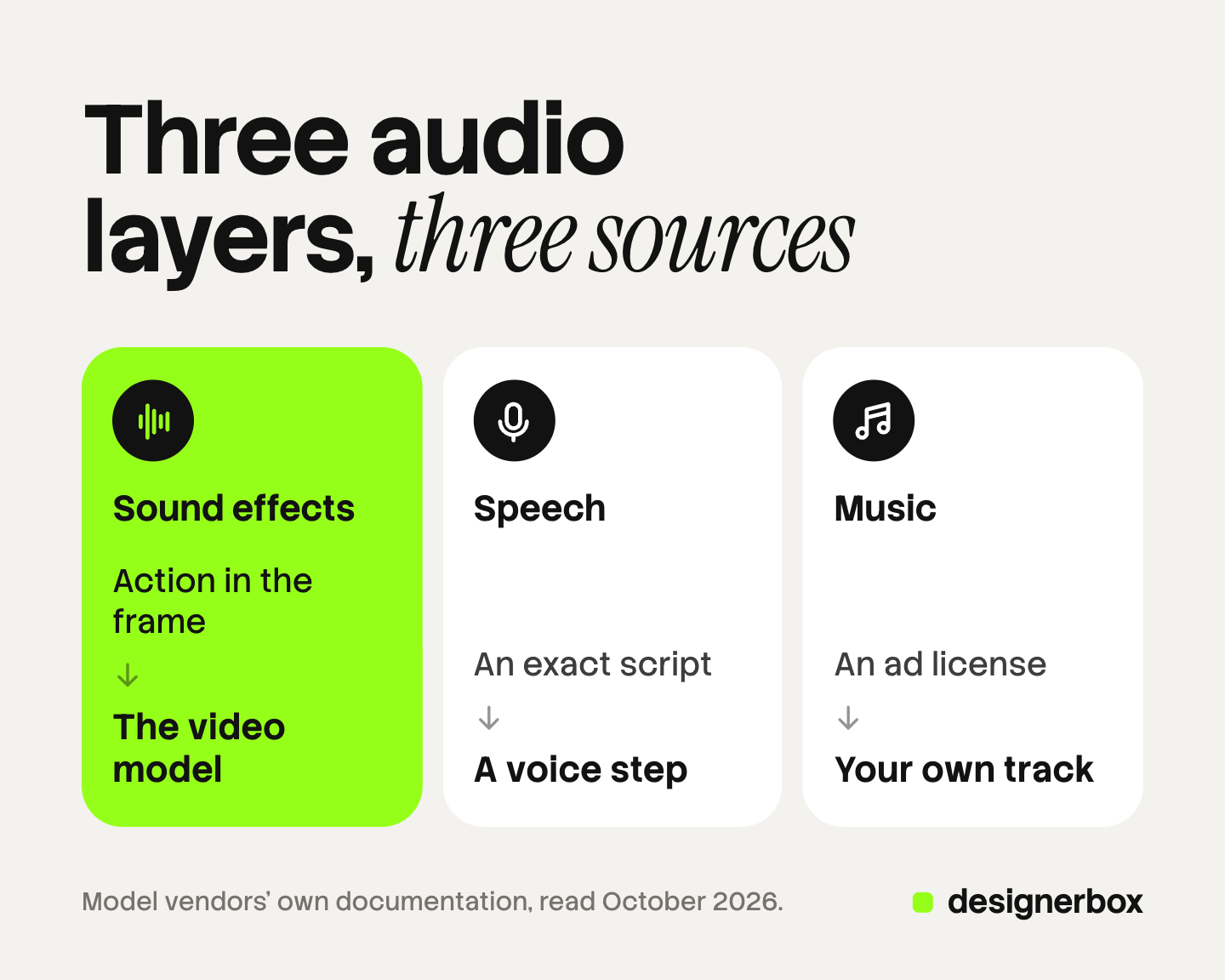
- Speech. A presenter on screen, or a voice over the picture. This layer carries the brand name, the offer and the call to action.
- Sound effects. The sounds of things in the frame: a zipper, a pour, footsteps. Ambient sound belongs here too.
- Music. A track under the whole ad. It sets the pace and often carries the brand feel.
A native-audio model makes all three layers at once and returns them mixed into one track. That is fast. It also means you cannot lower the music or replace one word without a new generation.
So choose a source per layer. Effects and ambient sound fit the video model, because the sound is made for the exact motion. Speech fits a voice step you control. Music fits a track you hold rights to.
Which AI video models generate sound natively?
Five of the six models below generate sound with the picture. One lists no audio on its spec page.
| Model | Sound with the picture | Clip length | Speech notes from the vendor |
|---|---|---|---|
| Veo 3.1 (Google) | Yes, always on | 4, 6 or 8 seconds | Put speech in quotes in the prompt |
| Gemini Omni Flash (Google) | Yes, by default | See Google’s guide | Voice editing and audio references are not supported |
| Seedance 2.0 (ByteDance) | Yes | 4 to 15 seconds | Accepts an audio clip as a voice reference |
| Kling 3.0 (Kuaishou) | Yes, as a mode | Up to 15 seconds | Dialogue in five languages |
| LTX-2.3 (Lightricks) | Yes | Up to 20 seconds | Audio and video in one pass |
| Gen-4.5 (Runway) | No audio row on the spec page | 2 to 10 seconds | Add sound afterward |
Veo 3.1. Google’s feature table marks audio as always on (ai.google.dev, October 2026). Google lists 22 October 2026 as the shutdown date for the Veo 3.1 preview models in the Gemini API, with Gemini Omni Flash as the replacement (ai.google.dev, October 2026).
Gemini Omni Flash. Google says the model “generates a video with audio based on your text description”. It also says the default track “might not always be what you want”, and that describing the audio matters most “if you want music in your video” (ai.google.dev, October 2026).
Seedance 2.0. ByteDance says the model “natively supports joint audio and video generation” (docs.byteplus.com, October 2026). Its paper page gives clips of 4 to 15 seconds (seed.bytedance.com, October 2026).
Kling 2.6 and 3.0. Kling 2.6 has a native audio toggle, runs 5 or 10 seconds, and speaks Chinese and English (kling.ai, October 2026). Kling 3.0 runs up to 15 seconds and supports dialogue in Chinese, English, Japanese, Korean and Spanish (kling.ai, October 2026).
LTX-2.3. Lightricks lists synchronized audio and video in one pass, up to 20 seconds per clip (ltx.io, October 2026).
Runway Gen-4.5. Runway’s spec table lists duration, aspect ratio, resolution and frame rate, and it has no audio row (help.runwayml.com, October 2026).
Specs in this group change every few weeks. Read the vendor page again before a campaign.
What native audio does not do reliably
Native audio is a good default for effects and ambient sound. Three jobs in an ad need more control than one prompt gives.
An exact brand line
An ad line has to be right word for word. The vendors say plainly that speech is the hardest part.
Google’s model page states that “creating videos with natural and consistent spoken audio, particularly for shorter speech segments, remains an area of active development” (deepmind.google, October 2026). Kling’s guide asks users to write acronyms and proper nouns in uppercase so the model reads them correctly. A brand name is a proper noun.
Listen to every generated line against the script. If the product name is unusual, take the speech from a voice step. AI voiceover for UGC ads compares the three places a voice comes from.
Licensed music
A video model can add music when the prompt asks for it. You cannot ask it for a specific released song, and the music arrives mixed into the speech track.
Music in a paid ad needs a license that covers advertising. TikTok points advertisers to its Commercial Music Library for “brand-ready songs that are available to use” (ads.tiktok.com, October 2026). For a track of your own, the advertising jingle guide covers what each music model’s terms allow.
One voice across many clips
Each generation picks a voice again. Two clips from the same prompt can sound like two different people.
Some models now address this. Kling 3.0 lets you bind a voice tone to a saved character, and the guide says the tone then stays with that character. Seedance 2.0 accepts an audio clip as a reference for the voice. Gemini Omni Flash states the opposite for now: “Uploading audio references is unsupported in the current version of the API.”
If the same voice must read 40 product ads, a separate voice file is the safer route. ElevenLabs alternatives sorts the voice tools by job.
How to add sound to a silent AI clip
A silent clip is a normal starting point. The model may have no audio, or you turned audio off to control the mix. Each layer has its own source.
Speech. Two routes exist. A text to speech voice reads the script, and you place the file over the picture. Or, when a face must speak on screen, a lip sync step moves the mouth to match the voice file. AI lip sync for video ads explains when the second route is needed.
Sound effects. AI sound effects come from a text prompt, such as “glass bottle set down on a wooden table”. ElevenLabs lists a sound effects generator with clips of up to 30 seconds, and commercial use on paid accounts (elevenlabs.io/sound-effects, October 2026). Adobe Firefly has one that takes a text prompt and a recorded audio hint (adobe.com, October 2026). You then place each effect on the frame where the action happens.
Music. Use a licensed track or make one. Google’s Lyria 3 Clip model always returns a 30-second clip, which is a standard ad length. Google blocks prompts that ask for specific artist voices or copyrighted lyrics, and it adds a SynthID watermark to all generated audio (ai.google.dev, October 2026).
In a translated version, the speech layer changes and the other two stay. AI dubbing for video ads covers the process.
The order to assemble the audio
Build the sound in this order. Each step sets a timing that the next step needs.
- Picture. Generate the clips and choose the takes. Keep native audio on if the model has it.
- Voice. Generate or record the read, then cut the picture to it. A line that takes four seconds to say needs four seconds of picture.
- Effects. Keep the native effects where they are clean. Where the clip is silent, add generated effects on the right frames.
- Music. Place the track last among the sounds. Set its volume under the voice so every word stays clear.
- Captions. Transcribe the final read and add captions. Viewers who watch with the sound off still get the message.
Step 5 does not replace sound. TikTok reports that 88% of its users say sound is vital to the TikTok experience. That is TikTok’s own figure (ads.tiktok.com, October 2026). Make the ad work both ways: complete with sound, and clear without it.
AI voices and AI music can also fall under platform label rules. AI disclosure in advertising lists the rules by platform.
Sound in a DesignerBox workflow
DesignerBox is AI creative production for brands and agencies. Anyone can make an AI picture. Making hundreds that still look like your brand is the hard part. Sound has the same problem: ad forty has to sound like ad one.
In DesignerBox you build a workflow once with your brand, your products and your rules. The workflow picks the image or video model for each step, and some of those video models return sound with the picture. A text to speech step reads a script in a voice you choose. A talking avatar step adds lip sync, and a transcription step turns the read into text for captions. The AI video ads page shows the path from a product photo to a short video ad.
You assemble the layers in the video editor. It is a real timeline, with several tracks, transitions, animated text and audio. You place the voice, the effects and the music on their own tracks and set each volume. That is the full workflow from the first product photo to the finished ad, in one subscription.
You see the cost of a run before you press Run. An 8-second clip costs 40 to 560 credits, depending on the model.
Here are the limits. DesignerBox does not make the music track, so bring one you hold advertising rights to. It does not send the finished ad to an ad account. You download the results, or send them with a webhook or an S3 step. Uploading your own photos and the commercial license start on the Pro plan. AI video, virtual try-on, upscaling, the image editor and the video editor start on the Premium plan. Plans and credits are on the pricing page.
A free plan for your first run
There is a free plan, and it runs on sample products. The free plan does not make video, so use it to see how a workflow and its steps fit together. Get started free
FAQ
Which AI video generator has sound?
Veo 3.1, Gemini Omni Flash, Seedance 2.0, Kling 2.6, Kling 3.0 and LTX-2.3 all document native audio on their vendors’ pages, read in October 2026. Runway’s Gen-4.5 spec page lists no audio row.
Can an AI video generator with voice say my exact script?
Often, and you still have to check. You put the line in quotes in the prompt, and the model speaks it. Google states that natural and consistent spoken audio is still in active development for Veo. For a brand name or a price, a separate voice file is more dependable.
How do I add AI sound effects to a silent video?
Describe the sound in a text prompt in a sound effects generator, such as “zipper closing slowly”. Place the clip on the frame where the action happens. Repeat for each action.
What order should I add voice, effects and music?
Picture first, then voice, then effects, then music, then captions. The voice sets the length of each shot. Music goes under the voice at a lower volume. Captions follow the final read.
Does DesignerBox make video with sound?
Yes, in two ways. Some of the video models in a DesignerBox workflow return sound with the picture. A text to speech step and the video editor’s audio tracks cover the rest. AI video and the video editor start on the Premium plan, and the cost of a run is shown before the run.
Sources
- Google, Gemini API Veo guide: native audio, durations and audio prompt cues: ai.google.dev, October 2026
- Google, Gemini API deprecations: Veo 3.1 preview shutdown date and replacement: ai.google.dev, October 2026
- Google, Gemini Omni Flash guide: default audio, audio prompts and limits: ai.google.dev, October 2026
- Google DeepMind, Veo model page, Limitations: deepmind.google, October 2026
- Google, Gemini API music generation (Lyria): ai.google.dev, October 2026
- BytePlus, Dreamina Seedance 2.0 series prompt guide: docs.byteplus.com, October 2026
- ByteDance Seed, Seedance 2.0 paper page: seed.bytedance.com, October 2026
- Kling AI, Video 2.6 audio user guide: kling.ai, October 2026
- Kling AI, Video 3.0 model user guide: kling.ai, October 2026
- Lightricks, LTX release notes, LTX-2.3 entry of 26 March 2026: ltx.io, October 2026
- Runway, Creating with Gen-4.5, spec details: help.runwayml.com, October 2026
- TikTok for Business, creative best practices for TikTok ads: ads.tiktok.com, October 2026
- Vendor product pages for the sound effects generators of ElevenLabs and Adobe Firefly (elevenlabs.io/sound-effects, adobe.com), October 2026
- DesignerBox plans and feature gating: DesignerBox pricing page (designerbox.ai/pricing), October 2026
Model and platform facts checked against each company’s own pages as of October 2026. Model specs change often, so read them again before a campaign. This is general information, not legal advice. Individual results vary.


