
AI dubbing replaces the speech in a video with the same words in another language. Software transcribes the original voice, translates the script, makes a new voice track and fits it to the picture. A video ad can use one of three levels: translated subtitles, a voice-over dub, or a lip-synced dub. Each level changes more of the ad, takes more review and brings more rules.
Take one approved 20-second ad with a founder who talks to the camera. The campaign now runs in Germany, Spain and Brazil. A dubbing product returns three voice tracks in minutes. The German read runs past the last frame. Nobody has checked the founder’s release for a cloned voice.
Key Takeaways
-
AI dubbing is a five-step pipeline. Transcribe, translate, make the voice, fit the timing, then sync the lips if a person talks on camera.
-
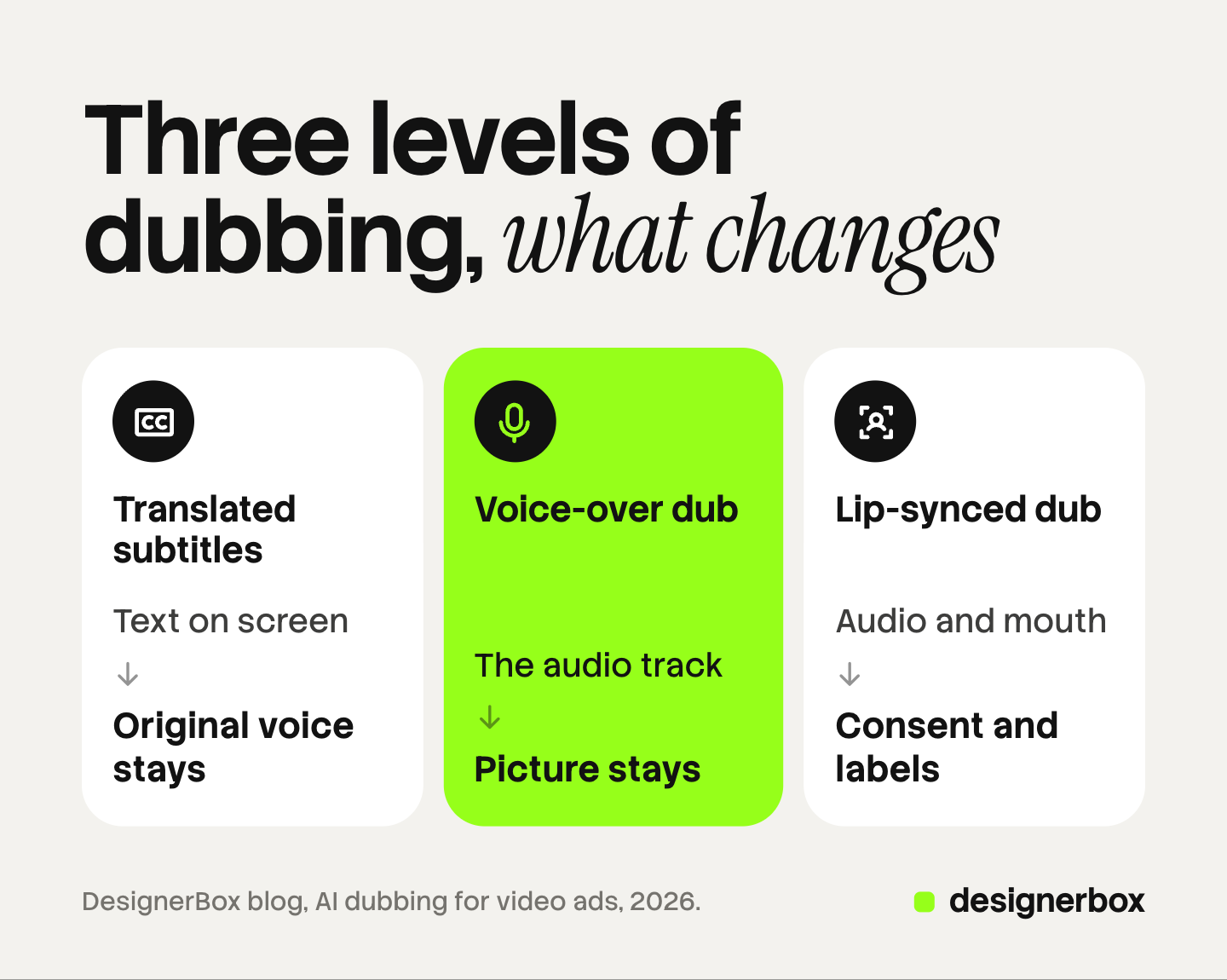
There are three levels. Subtitles change the text. A voice-over dub changes the audio. A lip-synced dub changes the audio and the speaker’s mouth.
-
The platforms dub some video themselves. YouTube dubs from English into 20 languages. Meta dubs the voiceover of single video ads from English into 13 listed languages.
-
A translated line is longer. IBM’s figures put English text of 31 to 50 characters at 140 to 160% of its length in European languages.
-
A cloned voice needs consent. New York requires written consent to use a living person’s voice in advertising. California requires prior consent.
What is AI dubbing?
AI dubbing is the use of speech and translation models to replace a video’s spoken language with another one. The software writes the original audio as text, translates the text and makes a new voice track. Some products call this an AI video translator.
Video dubbing is one layer of a larger job. Video localization for fashion ads covers every layer of a localized ad.
How does AI dubbing work?
AI dubbing works in five steps. Most products run them in one pass, and the result improves when you edit the script between steps.
- Transcribe. A speech model turns the original audio into text with time codes.
- Translate. A translation model writes the script in the target language. Edit this step by hand. Fix product names, numbers and claims before a voice reads them.
- Make the voice. The product reads the script with a stock voice, or with a clone of the original speaker’s voice. A clone needs that person’s consent. The AI voice cloning guide explains what that consent has to cover.
- Fit the timing. The new read has to start and stop with the picture. The product shortens the translation, speeds up the read, or both.
- Sync the lips. This step is optional. A lip sync model changes the speaker’s mouth to match the new audio. AI lip sync for video ads explains when that step needs its own product.
AI voiceover for UGC ads compares the ways to get a voice track.
The three levels of AI dubbing
Each level changes more of the original and needs more checks. Choose the lowest level that carries the message in that market.
| Level | What changes | Effort | When to use it |
|---|---|---|---|
| 1. Translated subtitles | The text on screen. The original voice stays | Low. One translation and a timing check | A test in a new market, or an ad with no speaker on camera |
| 2. Voice-over dub | The audio track. The picture stays | Medium. Script edit, voice choice, timing fit, a native speaker listen | An off-camera voice, a product demo, a hands-only clip |
| 3. Lip-synced dub | The audio track and the speaker’s mouth | High. All of level 2, plus consent, AI labels and a frame check of the face | A person who talks to the camera, in a market that justifies the review |
Dubbing vs subtitles is the first choice. Subtitles keep the real voice, cost the least and carry no cloned-voice rules. A dub lets the viewer watch the product and not read. A viewer with the sound off hears no dub, so keep subtitles on a dubbed ad too.
Why does a dubbed line run longer than the original?
A dubbed line runs longer because most translations from English use more characters and more syllables. The W3C publishes IBM’s average expansion rates for text translated from English into European languages. A source of 31 to 50 characters averages 140 to 160% of its length (W3C, October 2026).
A longer sentence takes longer to say, and the picture does not get longer. The dub has three ways to fit:
- Cut the script. Rewrite the line with fewer words that keep the meaning.
- Speed up the voice. Small changes pass. YouTube does not auto-dub a video when the original speech is too fast, because the result would be “an unlistenable, sped-up dub” (YouTube Help, October 2026).
- Extend the shot. Hold the last frame, or trim a pause elsewhere.
Transcreation covers when a line needs a rewrite for the market.
What do YouTube, Meta and TikTok dub for you?
YouTube, Meta and TikTok each dub some video inside their own products: channel videos, creator reels or ads. Each statement below comes from the platform’s own page.
YouTube. Automatic dubbing makes translated audio tracks for channel videos, and YouTube marks them as “auto-dubbed” in the description. From English, the help page lists 20 languages. YouTube says, “You cannot edit automatic dubs.” Lip sync is an experimental feature for select channels. The page does not mention ads (YouTube Help, October 2026).
Meta, for reels. Meta says Meta AI “translates, dubs, and lip syncs reels on Facebook and Instagram.” In July 2026 Meta added French, German, Italian, Japanese and Korean on Instagram (Meta Newsroom, October 2026).
Meta, for ads. In Ads Manager, voiceover translations dub the original voiceover of single video ads. The listed languages go from English into 13 others. That section of the help page does not mention lip sync (Meta Business Help Center, October 2026).
TikTok. TikTok’s Symphony translate and dub feature uses a clone of the original voice or a stock voice. TikTok says its lip sync setting does not work with several speakers, a covered mouth, poor lighting or background noise. Every exported video gets an AI-generated label, and the feature is not available in Texas or Illinois (TikTok Business Help Center, October 2026).
The native features limit what you can edit, so read the translated script before you approve it.
AI dubbing tools by type
Separate dubbing products give you more languages and a file you can use anywhere. The four below are examples of four types, in no ranked order.
- Voice-first dubbing: ElevenLabs. ElevenLabs dubs content in 90+ languages and delivers each dub in a voice clone of the original speaker (elevenlabs.io/dubbing-studio, October 2026).
- Video translator with lip sync: HeyGen. HeyGen translates video into 175+ languages and dialects with voice cloning and lip sync. Its brand glossary supports protected terms and correct pronunciation (heygen.com/translate, October 2026).
- Localization for teams: Rask AI. Rask AI offers video dubbing in 135+ languages, voice cloning in 32+ languages, detection of several speakers, lip sync and captions (rask.ai, October 2026).
- Lip sync inside a video suite: Higgsfield. Higgsfield’s lip sync product takes an image or a video plus audio, and lets you choose among several lip sync models (higgsfield.ai, October 2026).
What are the consent and disclosure rules for a cloned voice?
A cloned voice in an ad raises two duties: consent from the person, and disclosure to the viewer. This is general information, not legal advice.
Consent. In New York, using a living person’s voice for advertising without written consent is a misdemeanor (New York Civil Rights Law section 50, October 2026). California makes a person liable for damages if they knowingly use another’s voice for advertising without prior consent (California Civil Code section 3344, October 2026). A release that covers one video may not cover a cloned voice in four more languages.
EU disclosure. Article 50 of the EU AI Act has applied since 2 August 2026. The European Commission defines a deep fake as AI-made or AI-edited image, audio or video that resembles existing persons and would falsely appear authentic. Deployers must disclose a deep fake at the latest when a person first sees it (European Commission FAQ, October 2026). Check a lip-synced dub against that definition.
New York disclosure. New York requires an ad to disclose a synthetic performer. The law does not apply where AI is used only for “the language translation of a human performer” (New York General Business Law section 396-b, October 2026). The exemption covers the label. The consent duty stays.
Platform labels. TikTok requires the AIGC label or a clear disclaimer when AI voice cloning makes a person say something they did not say (TikTok ads policy, October 2026).
AI disclosure in advertising covers the label rules for each ad platform.
Reframing as a separate step
Reframing changes the shape of the video for a placement, such as 9:16 for Reels and TikTok or 16:9 for YouTube. Finish every language in the master shape first, then reframe each approved version.
The order saves work. Five languages in three shapes make 15 files. If you reframe first, a script fix in one language means three new dubs. If you dub first, the same fix means one new dub and three new crops.
After each reframe, check that the speaker’s mouth, the subtitles and the product stay in frame. Ad localization without rebuilding the layout covers the same problem for static ads.
A QC checklist for a dubbed ad
A dubbed ad is ready when a native speaker has heard it and the details below match the market. YouTube says its automatic dubs can have trouble with proper nouns, idioms and jargon, so software alone does not close this check.

- Native speaker listen. One person who speaks the language hears the full ad with the picture.
- Brand and product names. Each name is said the way the brand says it in that market.
- Numbers and currency. Prices, sizes, dates and percentages are correct for the market.
- Legal lines. Disclaimers and offer terms are present in the local language.
- On-screen text. Subtitles, text on the picture and the end card match the new audio.
- Timing and mouth. The read ends before the last frame. On a lip-synced dub, watch the mouth at full size.
- Consent and label. The release covers the cloned voice, and the AI label is set in each ad manager.
Localized versions in DesignerBox
DesignerBox is AI creative production for brands and agencies. State the limit first: DesignerBox does not dub existing footage and does not clone a voice. Use a dubbing product or the ad platform for that step.
For one campaign in several markets, it covers the work around the dub. Transcription turns the speech in your master into text, so the translator starts from a script. Text to speech turns an approved script into a voice track. A talking avatar with lip sync speaks a script. The video editor is a timeline with several tracks, animated text, audio and transitions. You place the new voice track and change the text for the market.
Anyone can make an AI picture. Making hundreds that still look like your brand is the hard part. You set the brand once, and the workflow reads its rules on every run. Batch runs one workflow over a whole sheet, so each market is a row. The standard is the same on row one and row two hundred.
The full workflow from the first product photo to the finished ad, in one subscription. The cost is shown before the run. An 8-second clip costs 40 to 560 credits, depending on the model.
You download the results, or send them with a webhook or an S3 step. Every plan below Ultra is one seat. Uploading your own photos and the commercial license start on the Pro plan. AI video, virtual try-on, upscaling, the image editor and the video editor start on the Premium plan. Plans and credits are on the pricing page.
There is a free plan, and it runs on sample products. Get started free.
FAQ
Is dubbing better than subtitles for video ads?
Neither is better in every case. Subtitles keep the real voice, cost the least and bring no cloned-voice rules. A dub lets the viewer watch the product and not read.
Can YouTube, Meta or TikTok dub my video for me?
Yes, within limits. YouTube auto-dubs channel videos from English into 20 languages. Meta dubs reels for creators, and the voiceover of single video ads from English into 13 listed languages. TikTok’s Symphony feature dubs a voiceover with a cloned or stock voice.
Do I need permission to clone a voice for a dubbed ad?
Yes. New York requires written consent to use a living person’s voice in advertising, and California requires prior consent. Check that the release names AI-made versions in other languages, and ask a lawyer about your contract.
Do I have to label an AI-dubbed ad?
That depends on the level and the place. TikTok requires a label or disclaimer for AI voice cloning. In the EU, Article 50 of the AI Act requires disclosure of a deep fake, so check a lip-synced dub against that definition.
Does DesignerBox do AI dubbing?
No. DesignerBox does not dub existing footage or clone a voice. It has transcription, text to speech, a talking avatar with lip sync and a video editor timeline. You see the cost before each run.
Sources
- YouTube Help, Use automatic dubbing: support.google.com, accessed October 2026
- Meta Newsroom, Discover Reels From Around the World With Meta AI Translation, with updates to 14 July 2026: about.fb.com, accessed October 2026
- Meta Business Help Center, text, voiceover and overlay translations in Ads Manager: facebook.com/business/help, accessed October 2026
- TikTok Business Help Center, How to translate and dub videos, last updated August 2026: ads.tiktok.com, accessed October 2026
- TikTok advertising policies, misleading and false content: ads.tiktok.com, accessed October 2026
- European Commission, Transparency obligations under Article 50 of the AI Act: digital-strategy.ec.europa.eu, accessed October 2026
- New York Civil Rights Law section 50: nysenate.gov, accessed October 2026
- New York General Business Law section 396-b: nysenate.gov, accessed October 2026
- California Civil Code section 3344: leginfo.legislature.ca.gov, accessed October 2026
- W3C, Text size in translation, with IBM’s average expansion rates: w3.org, accessed October 2026
- ElevenLabs dubbing page (elevenlabs.io/dubbing-studio), October 2026: features only
- HeyGen video translator page (heygen.com/translate), October 2026: features only
- Rask AI home page (rask.ai), October 2026: features only
- Higgsfield lip sync page (higgsfield.ai), October 2026: features only
- DesignerBox video editor and DesignerBox pricing (designerbox.ai/product/video-editor and designerbox.ai/pricing), October 2026: plan gates and the video cost range
Platform features verified on YouTube, Meta and TikTok help pages, and laws verified from European Commission, New York State and California sources, as of October 2026. Tool features verified on each vendor’s own site. Features and rules change often, so check each page before a launch. This is general information, not legal advice.