
AI workflow software runs a fixed set of steps, some of them AI model calls, the same way every time. An agency can get it in three ways: write code against the model APIs, connect steps on a general automation platform such as n8n, Make or Zapier, or use a media workflow tool made for images and video. The right layer depends on what the steps return and who has to maintain them.
Most guides describe one pipeline: an input, a model and a result. An agency has a harder version of the problem. The same job has to run for fifteen brands, each with its own logo, tone and approval chain. The first version works in a week. The trouble starts at the third client, when a prompt change made for one brand quietly changes the work for the other two.
This guide covers what an agency needs from AI workflow software, the three layers you can build on, and five questions that pick between them. Every vendor fact comes from that vendor’s own documentation, read in October 2026.
Key Takeaways
- The unit of work is a client deliverable. An agency workflow is a job that repeats on a schedule for many brands. A prompt is one part of it.
- Three layers exist. Custom code, a general automation platform, and a media workflow tool. Each one moves a different kind of data well.
- Files decide the layer. Automation platforms were built to move records. A step that returns a video file needs more care there, and each platform documents its own file limits.
- Model versions change under you. OpenAI and Google both document aliases that move to a newer model, and fixed versions that do not. Pin the version for client work.
- A person approves before the client sees it. n8n and Zapier both document a pause for human approval. Use one on any layer.
- Buy the plumbing, build the job. Queues, retries and storage are solved. The steps of your deliverable are the part only your agency knows.
What is AI workflow software?
AI workflow software is a tool that stores a job as a list of steps and runs those steps on new inputs. Some steps call an AI model. Other steps resize a file, check a rule or wait for a person. The software holds the order, passes each result to the next step, and records what happened.
The term covers very different products. A script that calls an image model in a loop is one. So is an automation platform with hundreds of app connections, and so is a canvas where image and video models connect in a chain. They share one idea: the steps are saved, so the tenth run matches the first.
For an agency the saved job is the asset. Advertisers are moving the same way. In the IAB’s 2025 video ad report, 86% of buyers were using or planning to use generative AI to build video ad creative (iab.com, July 2025). When every client asks for more versions, the agency that saved the job can run it again. The agency that did not starts from a blank page each time.
What an agency needs that one pipeline does not have
A single pipeline has to work once. An agency workflow has to work for every brand on the roster, and a mistake goes to a client. Five requirements follow from that.
| Requirement | Why it matters | What to check in any tool |
|---|---|---|
| Client settings outside the steps | One job, many brands. The logo, colors and tone arrive at run time | Can one workflow take a different brand record on each run? |
| A review gate | One off-brand asset in a client inbox costs more than a reviewer | Can a run pause until a named person approves? |
| Version history | A change on Tuesday must not alter Monday’s deliverable | Can you see and restore an older version? |
| Cost per client | A fixed retainer hides which account uses the budget | Is the cost of each run recorded against a client? |
| Files as a normal result | Ads are images and video, and each step passes a file on | What happens to a large video file between steps? |
The first row is the one teams miss. If the brand lives inside the prompt, you have fifteen workflows to maintain. If the brand is a record that the workflow reads, you have one. Managing creative for multiple clients covers how to keep those records apart.

The three layers you can build on
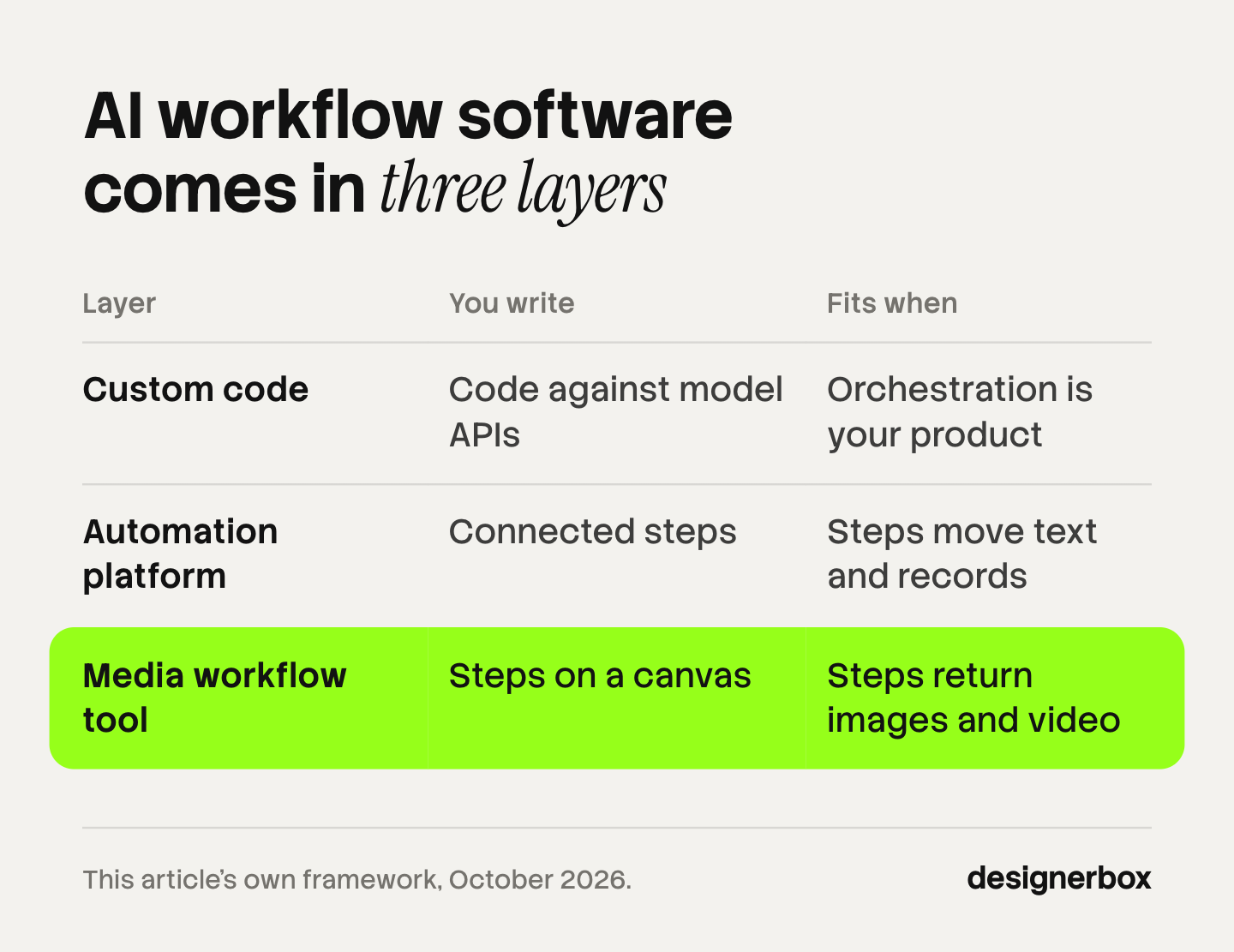
| Layer | What you write | Who maintains it | Fits when |
|---|---|---|---|
| Custom code | Code against the model APIs | An engineer | The orchestration is what you sell |
| General automation platform | Connected steps in n8n, Make or Zapier | An operations lead | Steps move text and records between apps |
| Media workflow tool | Steps on a canvas, or a form on top of them | The creative team | Steps return images and video |
Custom code against the model APIs
Code gives you full control, and it gives you every problem the vendors already document. Three of them matter for client work.
Versions. OpenAI’s API reference says the best way to get consistent behavior is to use pinned model versions and to run evaluations (developers.openai.com, October 2026). Google’s Gemini documentation says a stable model usually does not change, and that the “latest” alias is swapped with every new release (ai.google.dev, October 2026). A workflow that calls an alias can change its results with no change on your side.
Shutdowns. Models are retired on a date. OpenAI states that a deprecated model is no longer accessible after its shutdown date, with at least six months of notice for generally available models and much shorter notice for preview models (developers.openai.com, October 2026). Somebody on your team has to own that calendar.
Volume. Both vendors document a batch API that returns results within 24 hours at 50% of the standard cost (developers.openai.com and ai.google.dev, October 2026). Both also tell you to retry rate-limit errors with exponential backoff. You write that queue and that retry logic yourself.
Code fits when the orchestration is the product you sell, and when an engineer is on the payroll for the long term.
A general automation platform
n8n, Make and Zapier connect apps without code, and all three have added AI steps. They are strong where a workflow moves text and records: a brief from a form, a row in a sheet, a message to a channel.
n8n can run on your own servers, which matters when a client contract limits where data goes. It uses the Sustainable Use License and says it does not call itself open source (docs.n8n.io, October 2026). It documents an approval step that pauses a workflow until a person reviews an AI tool call, and both an MCP server and an MCP client. Its documentation also notes that n8n keeps binary data in memory by default, which can cause crashes with large files, so a video job needs the storage settings changed.
Make passes a file from the module that fetched it to the modules after it. Its help center states that the maximum file size depends on your plan (help.make.com, October 2026). Version history restores manually saved versions of a scenario for up to 60 days. Make also offers an MCP server, so an AI chat can run your scenarios.
Zapier has a built-in Human in the Loop step that pauses a run until a reviewer approves, declines or changes the data (help.zapier.com, October 2026). It sends files as file objects or links, and it must fetch a file within 30 seconds or the request times out. Version rollback is available on paid plans, and Zapier MCP works with any client that supports Streamable HTTP.
Each platform lists its plans on its own pricing page. The pattern across all three is the same: approvals and history are there, and large media files are the part to test before you commit.
A media workflow tool
A media workflow tool treats an image or a video as the normal result of a step. The picture from one model goes to the next model as a reference, with no file handling written by you. Most show the steps as a canvas, and some put a form on top so a colleague runs the job without opening the canvas. AI workflow builders compares how these canvases work.
The trade is scope. A media tool will not update your CRM or send an invoice. Many agencies end with two layers: a media tool for the creative work, and an automation platform for everything around it.
Build or buy: five questions
Answer these in order. The first clear answer picks the layer.
- Is the orchestration what you sell? If clients pay for the software itself, write code. If they pay for finished ads, buy the layer under the ads.
- What do the steps return? Text and records fit an automation platform. Images and video fit a media tool.
- Who changes the workflow next month? If it is a strategist or a designer, code is the wrong layer. Every edit becomes a ticket.
- Does a client’s own system need to start a run? That needs an API or a webhook trigger. Check it before anything else, because many tools run only when a person presses a button.
- Who approves, and where? If nobody can name the reviewer, no layer is ready.
One caution on the build side. In July 2024 Gartner predicted that at least 30% of generative AI projects would be abandoned after proof of concept by the end of 2025, and it named poor data quality, weak risk controls, rising costs and unclear business value as the causes (gartner.com, July 2024). That was a forecast, not a measured result. The four causes are still the right list to check an internal build against.
How to scope the first workflow
Start with one deliverable, not a platform. Pick the job your team makes most often: weekly static ad variants, product photo sets, or one video cut in three sizes. Write every step down, including the ones people do without thinking, such as checking that the logo is the current one.

Then sort each step into one of three kinds.
| Kind of step | Example | What to do with it |
|---|---|---|
| A rule | Resize to three aspect ratios | Automate it. A rule gives the same answer every time |
| A model call | Place the product in a scene | Automate it, and pin the model version |
| A judgment | Is this on brand for this client? | Keep a person there. This is the review gate |
The mistake is automating the judgment steps to save time. The clients of that agency are the ones who receive off-brand work. The seven stages of an agency workflow shows where those judgment steps sit in a normal week.
Keep the first workflow small. Each added model step is one more place where a format can break. A short chain that a reviewer trusts is worth more than a long chain that needs watching.
What to record on every run
Record six things for each run: the client, the inputs, the model version, the duration, the cost and the review result. That table answers the questions a retainer raises.
- Which workflows earn money? Cost per run against the fee for that line.
- Which fail often? Failures by step show where the chain is weak.
- Which always need a person? The reasons for rejection are your list of fixes, and they are more useful than general prompt tuning.
Set your own approval threshold before a workflow runs with less review, and hold it for a full month of real client work. There is no standard number. The cost of one wrong asset differs by client.
Price from the record, not from a guess. Agency creative pricing covers the four pricing models once the cost per run is known.
One legal point belongs in the record too. Article 50 of the EU AI Act has applied since 2 August 2026, and it places labeling duties on those who publish deep fakes (European Commission, October 2026). Record which assets show a realistic person, so the label decision is made once, at review. This is general information, not legal advice. AI disclosure in advertising covers the platform rules.
Agency workflows in DesignerBox
DesignerBox is a media workflow tool, the third layer above, built for one agency job: the same creative set for every product and every client brand. Anyone can make an AI picture. Making hundreds that still look like your brand is the hard part.
You build a workflow once with the brand, the products and the rules. Each client brand has its own brand profile, with logos, fonts, palette and rules, and the workflow reads it on every run. A colleague runs the workflow as an app, through a form. Batch runs it over a sheet of up to 200 rows, and you keep or discard each row in one review pass. The cost of a run is shown before you press Run. That covers the full workflow from the first product photo to the finished ad, in one subscription.
The limits, stated plainly. DesignerBox does not have a public API, so a client’s system cannot call it as an endpoint. It runs over MCP, so an AI chat such as Claude, ChatGPT or Cursor can run your workflows, and an outbound step can send results with a webhook or to S3. If you need an endpoint that a client posts a brief to, use code or an automation platform for that part. Nothing publishes to a store or an ad account: you download the results.
Uploading your own photos and the commercial license start on the Pro plan. AI video, virtual try-on, upscaling, the image editor and the video editor start on the Premium plan. Team features, shared brand kits and white label are on the Ultra plan, and every plan below Ultra is one seat. There is a free plan, and it runs on sample products. Plans and credits are on the pricing page.
For the parts around this decision, skills vs MCP explains how an AI chat reaches a tool, and video automation covers the three layers for video alone.
DesignerBox for agencies shows how an agency runs one workflow for each client brand.
FAQ
What is AI workflow software?
AI workflow software stores a job as a list of steps and runs it on new inputs. Some steps call an AI model, and others apply a rule or wait for a person. The steps are saved, so each run follows the same order.
Should an agency build or buy AI workflow software?
Buy the layer that handles queues, retries, storage and model access. Build the workflows on top of it, because they hold your creative process. Write custom code only when the orchestration is the product your clients pay for.
Can n8n, Make or Zapier run image and video workflows?
Yes, with limits to test first. n8n keeps binary data in memory by default, Make’s maximum file size depends on your plan, and Zapier must fetch a file within 30 seconds. Each fact is from the vendor’s own documentation, read in October 2026.
Do I need engineers to build an agency workflow?
Not for a first version on an automation platform or a media workflow tool. You need an engineer when a client’s system has to start runs through an API, or when you write the orchestration in code.
How do you keep one workflow on brand for many clients?
Keep the brand outside the steps. The workflow holds the order of work, and a record for each client supplies the logo, colors, tone and sizes at run time. Add a review step where a named person approves before delivery.
Why should an agency pin model versions?
An alias such as “latest” moves to a new model when the vendor releases one. OpenAI and Google both document fixed versions that stay the same. A pinned version keeps this month’s client work consistent with last month’s.
When can a workflow run without review?
When your own approval threshold has held for a month of real client work, and every failure you have seen has a retry or a fallback. Until then, keep a person at the gate.
Sources
- IAB, 2025 Digital Video Ad Spend and Strategy Report, press release, 15 July 2025: https://www.iab.com/news/nearly-90-of-advertisers-will-use-gen-ai-to-build-video-ads/
- OpenAI, API reference overview: https://developers.openai.com/api/reference/overview
- OpenAI, Deprecations: https://developers.openai.com/api/docs/deprecations
- OpenAI, Batch API guide: https://developers.openai.com/api/docs/guides/batch
- OpenAI, Rate limits guide: https://developers.openai.com/api/docs/guides/rate-limits
- Google, Gemini API models: https://ai.google.dev/gemini-api/docs/models
- Google, Gemini Batch API: https://ai.google.dev/gemini-api/docs/batch-api
- Google, Gemini API troubleshooting: https://ai.google.dev/gemini-api/docs/troubleshooting
- Gartner, press release, 29 July 2024: https://www.gartner.com/en/newsroom/press-releases/2024-07-29-gartner-predicts-30-percent-of-generative-ai-projects-will-be-abandoned-after-proof-of-concept-by-end-of-2025
- European Commission, Transparency obligations under Article 50 of the AI Act: https://digital-strategy.ec.europa.eu/en/faqs/transparency-obligations-under-article-50-ai-act
- n8n documentation: binary data, hosting, license, MCP nodes, human-in-the-loop tools, workflow history (docs.n8n.io, October 2026)
- Make help center: working with files, restore and recover a scenario, MCP toolboxes (help.make.com, October 2026)
- Zapier help center: Human in the Loop, field types in Zaps, Zap drafts and versions, Zapier MCP (help.zapier.com, October 2026)
- DesignerBox for agencies and DesignerBox batch (designerbox.ai, October 2026)
Vendor facts verified from each vendor’s own documentation as of October 2026. Vendor terms change, so confirm them before you commit. DesignerBox plans and credits are on the DesignerBox pricing page (designerbox.ai/pricing), October 2026.