
A video production workflow is the fixed order of steps that turns a client brief into a delivered video. For an agency it has six stages: brief, footage, edit, versions, review and delivery. Each stage has its own kind of software. No single tool covers all six well, so most agencies run three or four tools and move files between them.
The stages are old. Two things inside them are new. Footage can now be generated, so a shoot is no longer the only source. And one master video now becomes many files, because every platform wants its own shape and every market wants its own language.
This guide is for agencies and in-house teams that make client video every week. It walks through the six stages, names the software that fits each one, and lists the platform specs your versions must meet. It prints no vendor prices. A note on bias: DesignerBox makes AI creative production software, and this guide says where other tools are the better choice.
Key Takeaways
- The workflow has six stages. Brief, footage, edit, versions, review and delivery. Pick software by stage.
- Generated footage is now normal. In an IAB survey of 360 US ad buyers, 62% use generative AI for digital video creative, up from 51% a year earlier.
- Model clips are short. Google documents Veo 3.1 at 8 seconds a clip, and Runway documents Gen-4.5 at 2 to 10 seconds. A 30-second ad is still an edit.
- Versions are where the hours go. One master becomes a file for each ratio, each length and each language.
- Review needs comments on the frame. A note without a timestamp costs a round.
- Check library licenses before a client ad ships. Some editors clear only labeled templates and music for commercial use.
What is a video production workflow?
A video production workflow is the repeatable path a video follows from the first brief to the final file. It names each stage, who owns it, what goes in and what comes out. Film crews split it into pre-production, production and post-production. For an agency that makes ads and social video, six smaller stages are more useful, because each one maps to a tool and a person.

A written workflow matters most when the work repeats. An agency with ten clients makes the same kinds of video every month: product clips, talking-head edits, cut-downs and translated versions. The agency workflow guide covers the wider process around it, from intake to the monthly report.
The six stages of a video production workflow
| Stage | What goes in | What comes out | Software type |
|---|---|---|---|
| 1. Brief | Client goal, product, audience | Script and shot list | Documents, AI chat |
| 2. Footage | Script, product photos | Raw clips, filmed or generated | Camera, video models |
| 3. Edit | Raw clips, audio | One master video | Editor with a timeline |
| 4. Versions | Master video | Files for each ratio, length and language | Resize, subtitle and dubbing tools |
| 5. Review | Version set | Approved files | Review links with frame comments |
| 6. Delivery | Approved files | Files at each platform’s spec | Export presets, storage |
Stages 1 to 3 make one video. Stages 4 to 6 turn it into many. Most of the repeat work for an agency sits in the second half.
Which software fits each stage?
Vendor facts below were read on each vendor’s own pages on 4 October 2026.
Stage 1: brief and script
The brief stage needs little software. A shared document holds the goal, the audience, the script and the shot list. An AI chat can draft script options from a product page. The decision stays with a person: one message for each video, and one ask.
Stage 2: footage, filmed or generated
Footage now comes from a camera, from a video model or from both.
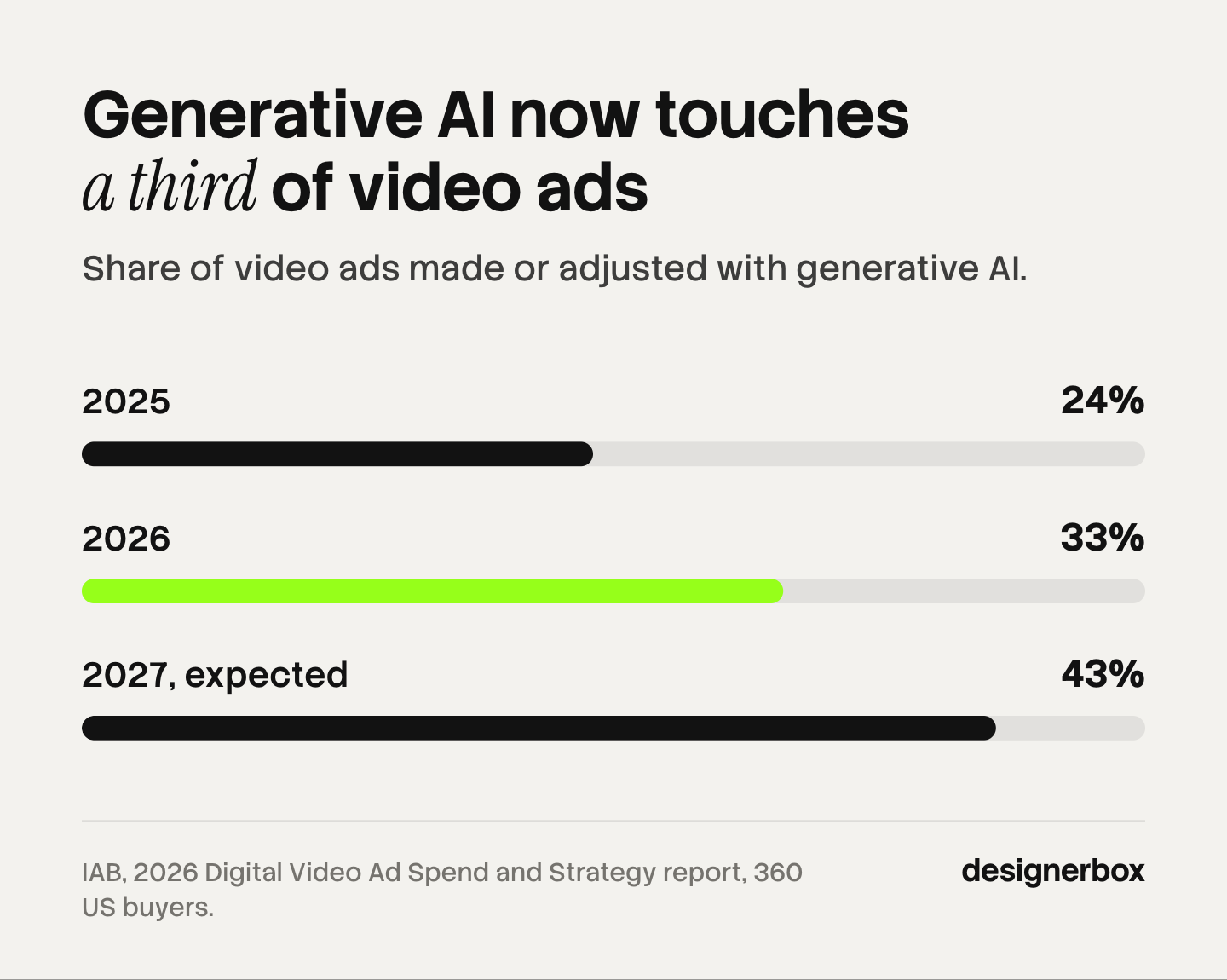
Generative AI has moved into regular use here. In the IAB’s 2026 Digital Video Ad Spend and Strategy report, 62% of US ad buyers said they use generative AI for digital video creative, up from 51% in 2025. Among those buyers, the share of video ads made or adjusted with it rose from 24% to 33%, and they expect 43% in 2027. The survey covered 360 buyers (IAB, July 2026).
Two model vendors document their limits clearly.
- Google Veo 3.1 generates 8-second videos at 720p, 1080p or 4K with native audio (Gemini API docs, October 2026).
- Runway Gen-4.5 generates clips of 2 to 10 seconds at 720p, and upscaling is a separate step (Runway Help Center, October 2026). Runway also has workspaces that keep each client engagement apart, with its own members and assets (Runway Help Center, October 2026).
Clips this short mean a finished ad is still assembled in an editor. Plan generated footage as shots, the same way you plan a shoot.
Stage 3: edit
The edit stage turns clips into one master. The right editor depends on the kind of video.
Adobe Premiere Pro fits finishing work and long timelines. Its Generative Extend tool adds frames to the start or end of a clip. Adobe documents the limit at 2 seconds of video and 10 seconds of audio (helpx.adobe.com, October 2026). It extends a clip and does not create new shots.
Descript fits talking-head and interview video. You edit the video by editing its transcript: delete words or move sentences, and the cut follows. It removes filler words in one click, and Studio Sound cleans background noise (descript.com, October 2026).
For clips made by a model, how to edit AI-generated video covers the cuts and fixes that matter most.
Stage 4: versions
One master becomes many files. This stage decides how many hours a campaign takes.
Canva fits client-editable templates. Its Brand Kit holds logos, colors and fonts in one place. Brand Templates have two lock types: one stops all edits, and one allows limited edits. Its Pro plan includes Resize and Magic Switch (canva.com, October 2026). It suits a client team that changes text without touching the layout.
VEED runs in the browser and is strong on language. It states auto-generated subtitles in over 125 languages and dubbing that keeps the speaker’s voice across 29 languages. Teams get a Brand Kit and timestamped comments (veed.io, October 2026).
Creatify fits high volumes of ad variants. It turns a product link into a video ad, and Batch Mode makes several variations at once. Brand Spaces hold separate client brands, and it has an API (creatify.ai, October 2026). The best AI UGC video tools for agencies compares tools of this kind.
CapCut is widely used for short vertical edits and templates. Read its terms before a client ad ships. CapCut states that only library materials with a “commercial use” mark are cleared for commercial purposes, and its terms license no rights in sound recordings (capcut.com/clause/terms-of-service, October 2026). Its sister product Pippit is the one built for business use.
When the versions follow a fixed pattern, video automation explains how a template and a data sheet can make them.
Stage 5: review
Review is where a campaign stalls. A client note such as “the logo is late” needs a frame number, or the editor guesses.
Frame.io is built for this. Reviewers click on the frame and leave a comment at that exact point. It comes with Creative Cloud and has a panel inside Premiere Pro (frame.io and helpx.adobe.com, October 2026).
Descript and VEED both offer browser review with comments, which is enough for simple social video. Set two rules whatever the tool: one named approver for each client, and a fixed number of rounds in the contract.
Stage 6: delivery
Delivery means the right file at the right spec, named so that the media buyer can find it. Keep an export preset for each platform, and deliver the set in one folder with the ratio and language in each file name.
Platform specs for video ad versions
Every version must meet the platform’s own spec. These are the current ones for the three vertical placements.
| Placement | Ratio | Length | Note |
|---|---|---|---|
| Instagram Reels ads | 9:16 | Meta’s ads guide lists up to 15 minutes | Keep key content clear of the top 14%, the bottom 35% and 6% on each side |
| TikTok in-feed ads, auction, non-Spark | 9:16 recommended, also 16:9 and 1:1 | Up to 10 minutes | Reservation buys list 5 to 60 seconds |
| YouTube Shorts ads | 9:16 | Google recommends 10 to 30 seconds | Only the first 60 seconds play in the Shorts feed |
Sources: Meta Ads Guide, TikTok Business Help Center and Google Ads Help, all read in October 2026.

One concept in three ratios, two lengths and four languages is 24 files. That number is why the versions stage needs a system. One ad in every platform size covers the resize step for stills and video.
How to set up a video production workflow for clients
- Write the six stages down. Name one owner and one tool for each stage. The five roles of an AI video production studio show one way to split them.
- Fix the version list for each client. Ratios, lengths and languages, agreed once.
- Template the repeat work. Intros, end cards, subtitle style and export presets.
- Set the review rules. One approver, comments on the frame and a fixed number of rounds.
- Check every license. Music, templates, stock and the commercial terms of each AI tool.
- Count cost per approved video. Include the clips you discard. What AI video ads cost shows the math.
Video production in DesignerBox
DesignerBox is AI creative production for brands and agencies. In the six-stage workflow it covers footage, edit and versions for product video. It does not replace a finishing editor for long-form work. For stills, Reviews sends your client a page of pictures to choose from, and the client needs no account. For comments on a video frame, keep your video review tool.
Anyone can make an AI picture. Making hundreds that still look like your client’s brand is the hard part, and video multiplies it. You save one workflow for each client, with that client’s logos, fonts, palette and rules. A step in the workflow makes the clip from a product photo, and the workflow picks the model for that step. An 8-second clip costs 40 to 560 credits, depending on the model, and you see the cost before each run.
The video editor is a real timeline, with several tracks, transitions, animated text and audio. The ad localizer rebuilds one ad in another language, and the ads resizer makes each platform size. Batch runs one workflow over a sheet of up to 200 products, so row one and row two hundred get the same standard. The full workflow from the first product photo to the finished ad, in one subscription.
Here are the limits. An agency keeps its video review tool for comments on a frame. You download the results, or send them with a webhook or an S3 step. AI video and the video editor start on the Premium plan. Uploading your own photos and the commercial license start on the Pro plan. Team features, shared brand kits and white label are on the Ultra plan, and every plan below Ultra is one seat. Plans are on the pricing page. AI video ads in DesignerBox shows the ad formats.
Bring one client product and the video set you make for it. See DesignerBox for agencies.
FAQ
What is a video production workflow?
It is the repeatable order of stages that turns a brief into a delivered video. For an agency the six stages are brief, footage, edit, versions, review and delivery, each with an owner and a tool.
What are the stages of video production?
Film production uses three: pre-production, production and post-production. Agency video work splits into six smaller stages, because versions, review and delivery each take real time and need their own software.
What software do agencies use for video production?
Most agencies use three or four tools. A common set is a video model for generated footage, an editor such as Premiere Pro or Descript, a versions tool such as Canva or VEED, and a review tool such as Frame.io.
How long can an AI-generated video clip be?
It depends on the model. Google documents Veo 3.1 at 8 seconds a clip, and Runway documents Gen-4.5 at 2 to 10 seconds (vendor documentation, October 2026). Longer videos are assembled from several clips in an editor.
How many versions does one video ad need?
Multiply the ratios, lengths and languages. Three ratios, two lengths and four languages make 24 files from one concept. Agree the list with each client once and reuse it.
Can I use CapCut templates in client ads?
Only where CapCut marks them for commercial use. Its terms say that only labeled materials are cleared for commercial purposes, and that no rights are licensed in sound recordings (capcut.com, October 2026). Check each asset before the ad ships.
Does DesignerBox cover the whole video production workflow?
No. DesignerBox covers generated footage, the timeline edit and the versions for product video. For stills, Reviews sends your client a page of pictures to choose from, and the client needs no account. For comments on a video frame, keep your video review tool. AI video and the video editor start on the Premium plan.
Sources
- Generative AI use for digital video creative, 360 US buyers: IAB, 2026 Digital Video Ad Spend and Strategy report, July 2026
- Veo 3.1 clip length, resolution and audio: Google, Gemini API video docs, October 2026
- Gen-4.5 durations and resolution: Runway Help Center, Creating with Gen-4.5, October 2026
- Runway workspaces: Runway Help Center, Introduction to workspaces, October 2026
- Generative Extend limits and the Frame.io panel in Premiere Pro: (helpx.adobe.com, October 2026)
- Frame.io comments on the frame: (frame.io/features/review-and-approval, October 2026)
- Descript transcript editing, filler word removal, Studio Sound and browser review: (descript.com/video-editing, descript.com/studio-sound and descript.com/teams, October 2026)
- Canva Brand Kit, Brand Template locks and Resize: (canva.com/pro/brand-kit and canva.com/help/brand-template-locks, October 2026)
- VEED browser editor, subtitle and dubbing languages, Brand Kit and comments: (veed.io/tools/video-editor and veed.io/tools/video-translator, October 2026)
- Creatify link to video, Batch Mode, Brand Spaces and API: (creatify.ai, October 2026)
- CapCut commercial use marks and sound recording terms: (capcut.com/clause/terms-of-service and capcut.com/clause/material-license-agreement, October 2026)
- Instagram Reels ad ratio and safe zones: Meta Ads Guide, October 2026
- TikTok in-feed ad ratios and length: TikTok Business Help Center, October 2026
- YouTube Shorts ad ratio and length: Google Ads Help, October 2026
- DesignerBox plan gates, video editor, batch and video cost range: (DesignerBox pricing and product pages, October 2026)
Vendor facts verified from each vendor’s own pages as of October 2026. Individual results vary.