



The standard banner ad sizes are 300x250 (medium rectangle), 728x90 (leaderboard), 300x600 (half page), 336x280 (large rectangle), 160x600 (wide skyscraper) and 320x50 or 320x100 on phones. Google Ads accepts an uploaded banner in GIF, JPG or PNG up to 150 KB. As of November 2026, Google is also moving Display campaigns into Demand Gen, which changes a few rules.
A banner set looks simple until you count it. One concept in six sizes is six files. Three concepts make 18. Each size has a different shape, so a crop of one file rarely works as another. A 728x90 leaderboard is about eight times wider than it is tall, and a 160x600 skyscraper is almost four times taller than it is wide.
This guide puts the sizes in one table, with the names Google, the IAB and AdSense use for them. It covers the file limits, the responsive display ad specs, the move to Demand Gen and a build order for a full set. It is for brands and agencies that make display ads every month. For social placements, the Meta ad specs guide covers Facebook and Instagram.
Key Takeaways
-
Six sizes cover most of the work. 300x250, 336x280, 728x90, 300x600, 160x600 and 320x50 are on Google’s list for uploaded display ads in Demand Gen.
-
Google’s file limit is 150 KB. Uploaded image banners are GIF, JPG or PNG, and an HTML5 or AMPHTML ZIP can be up to 600 KB.
-
Responsive display ads need three image shapes. 1200x628 (1.91:1), 1200x1200 (1:1) and 900x1600 (9:16), with a 30-character short headline and a 90-character long headline.
-
Display is moving to Demand Gen. Google started a migration tool in June 2026, and a migrated campaign cannot go back. In Demand Gen, uploaded GIF banners must be non-animated.
-
The IAB moved to flexible sizes. Its fixed-size list still names 300x250, 728x90 and 160x600, with a file weight of 150 kB at first load.
-
Build by shape, then by size. Four shapes (wide strip, rectangle, tall column, mobile strip) cover the common sizes, so design four layouts, not fourteen.
What are the standard banner ad sizes?
The standard banner ad sizes are the fixed pixel sizes that ad networks and websites agree on. Google Ads lists 20 sizes for uploaded display ads, from a 200x200 small square to a 980x120 panorama. Google AdSense names five of them as its top performing ad sizes: 300x250, 336x280, 728x90, 300x600 and 320x100 (November 2026).

The table lists the common sizes by shape. “Google Ads” means the uploaded display ads list, and “IAB” means the IAB’s fixed-size specification.
| Size | Name | Shape | Listed by |
|---|---|---|---|
| 300x250 | Medium rectangle (Google: inline rectangle) | Rectangle | Google Ads, IAB, AdSense top performing |
| 336x280 | Large rectangle | Rectangle | Google Ads, AdSense top performing |
| 250x250 | Square | Square | Google Ads |
| 200x200 | Small square | Square | Google Ads |
| 728x90 | Leaderboard | Wide strip | Google Ads, IAB, AdSense top performing |
| 970x90 | Large leaderboard (IAB: super leaderboard) | Wide strip | Google Ads, IAB |
| 970x250 | Billboard | Wide strip | Google Ads, IAB |
| 468x60 | Banner | Wide strip | Google Ads |
| 160x600 | Wide skyscraper (IAB: skyscraper) | Tall column | Google Ads, IAB |
| 120x600 | Skyscraper | Tall column | Google Ads |
| 300x600 | Half-page ad | Tall column | Google Ads, AdSense top performing |
| 300x1050 | Portrait | Tall column | Google Ads, IAB |
| 320x50 | Mobile banner (mobile leaderboard) | Mobile strip | Google Ads, IAB |
| 300x50 | Mobile banner | Mobile strip | Google Ads, IAB |
| 320x100 | Large mobile banner | Mobile strip | Google Ads, AdSense top performing |
Sources: Google Ads Help, uploaded display ads specifications, Google AdSense Help, guide to ad sizes and the IAB fixed size ad specifications, all read November 2026.
The same size has different names in different places. Google calls 300x250 an “inline rectangle” on its Ads list and a “medium rectangle” in AdSense and Demand Gen. Brief your designer with the pixel size, not the name.
Which banner sizes should you make first?
Make 300x250, 728x90, 300x600, 336x280 and 320x50 first. Google AdSense calls the first four and 320x100 its top performing sizes. It says 300x250 and 336x280 “tend to have more ad inventory available from advertisers”, and that 300x600 is “one of the fastest growing sizes by impressions” (AdSense Help, November 2026).
That is the publisher’s view: the sizes that sites sell most. For an advertiser it means the same thing in reverse. These are the slots your banner competes for most often. AdSense also notes the limits of the smaller sizes. It says the supply of display ads for 468x60 “is generally limited”, and that 234x60 “doesn’t tend to perform as well as others”.
A practical first set, in order:
- 300x250. The rectangle that appears inside articles and in sidebars.
- 728x90. The wide strip above or below the main content.
- 320x50. The phone strip, often at the bottom of a page.
- 300x600. The tall half page, which gives the picture more room.
- 336x280. A larger rectangle for sites that offer it.
Add 160x600, 970x250 and 320x100 when the first five are running. That makes eight files per concept.
Google display ad sizes and file limits
Google display ad sizes follow one file limit: 150 KB for an uploaded image ad in GIF, JPG or PNG. An HTML5 or AMPHTML ad is a ZIP with a total size of up to 600 KB. An animated GIF must stop after 30 seconds and run slower than 5 frames per second (Google Ads Help, November 2026).
| Rule | Uploaded image banner | HTML5 or AMPHTML banner |
|---|---|---|
| File types | GIF, JPG, PNG | A ZIP with one HTML file |
| Maximum size | 150 KB | 600 KB for the ZIP |
| Animation | 30 seconds or shorter, slower than 5 FPS | Built into the HTML |
| Who can use it | Any advertiser | Accounts that meet Google’s eligibility rules, for example open for more than 90 days |
Google also lists sizes that only some countries use. They include three Polish billboards (750x100, 750x200 and 750x300), a 980x120 panorama and a 250x360 triple widescreen for Sweden, and a 930x180 top banner for Denmark. All of them carry the same 150 KB limit. Make them only if you buy media in those markets.
150 KB is a small file. A detailed photo saved as a PNG at 728x90 can pass it, but a 300x600 often needs JPG compression. Check the file size before upload, not after a rejection. The guide to resizing an image without losing quality covers the export settings.
Responsive display ads: the asset sizes
Responsive display ads replace a fixed set of banners with assets. You upload images, logos, headlines and descriptions, and Google builds the ad to fit each slot. The images come in three shapes: 1200x628 landscape (1.91:1), 1200x1200 square and 900x1600 vertical (9:16). Each file can be up to 5120 KB (Google Ads Help, November 2026).
| Asset | Recommended size | Minimum size | Limit |
|---|---|---|---|
| Landscape image (1.91:1) | 1200x628 | 600x314 | 5120 KB |
| Square image (1:1) | 1200x1200 | 300x300 | 5120 KB |
| Vertical image (9:16) | 900x1600 | 600x1067 | 5120 KB |
| Landscape logo (4:1) | 1200x300 | 512x128 | 5120 KB |
| Square logo (1:1) | 1200x1200 | 128x128 | 5120 KB |
| Short headline | 30 characters or fewer | 1 required | Up to 5 |
| Long headline | 90 characters or fewer | 1 required | 1 |
| Description | Up to 5 | 1 required | See Google’s form |
You can upload up to 15 images across the three shapes. Google’s best practices guide suggests 5 to 10 images per shape. A landscape and a square image are required, and the vertical one is optional.
The same guide asks for clean pictures. It says to avoid overlaid text and logos, because Google already adds the headline and the logo, and text on the picture becomes unreadable in small slots. It also says to avoid collages and products on an all-white or digital background. Blank space “shouldn’t take up more than 80% of the image”. Buttons drawn into the picture, such as a fake “play” or “download”, break Google’s ad policy.
That changes how you plan. A fixed banner carries its own words and button. A responsive display image should be a clean product photo in a real setting. Most teams need both: fixed banners for direct deals and responsive assets for Google.
Google Display is moving to Demand Gen
Google is moving Display campaigns into Demand Gen. Google says eligible advertisers could start moving existing Display campaigns with a migration tool from June 2026. Later, new Display campaigns can only be created in Demand Gen, and the remaining campaigns will move automatically. Google gives no date for those two steps (Google Ads Help, November 2026).
Four details matter for anyone who makes the banners:
- The sizes stay. Demand Gen lists seven common sizes for uploaded display ads: 300x250, 336x280, 728x90, 970x90, 160x600, 300x600 and 320x50.
- The file limit stays. Uploaded display ads in Demand Gen are JPG, PNG or GIF up to 150 KB.
- The GIF must be still. Demand Gen lists “.gif (non-animated)”. An animated GIF banner made for a Display campaign needs a still version, or an HTML5 build.
- A migrated campaign cannot go back. Google says campaigns moved to Demand Gen “can’t be reverted back”. The tool carries 42 days of performance history.
Demand Gen also runs on YouTube, Discover and Gmail, so its own image assets add a 4:5 vertical (960x1200) to the 1.91:1 and 1:1 shapes. If your team plans one campaign for Display and YouTube, plan the 4:5 and 9:16 files at the same time as the banners.
IAB banner sizes and file weight
The IAB is the trade body that set the first standard banner sizes. In 2017 it moved its New Ad Portfolio from fixed pixel sizes to flexible, aspect-ratio ads. It still publishes a fixed-size list for the slots most sites sell, with a maximum file weight for the first load and for the later “subload” (IAB Tech Lab, fixed size ad specifications).
| IAB ad unit | Size | First load | Subload |
|---|---|---|---|
| Medium Rectangle | 300x250 | 150 kB | 300 kB |
| Leaderboard | 728x90 | 150 kB | 300 kB |
| Skyscraper | 160x600 | 150 kB | 300 kB |
| Super Leaderboard or Pushdown | 970x90 | 200 kB | 400 kB |
| Billboard | 970x250 | 250 kB | 500 kB |
| Portrait | 300x1050 | 250 kB | 500 kB |
| Smartphone Banner | 300x50 or 320x50 | 50 kB | 100 kB |
The phone banner has the tightest limit: 50 kB at first load. That is a third of Google’s 150 KB. If a publisher buys by IAB rules, make the 320x50 as a simple JPG or a light HTML5 file.
How to build one concept in every banner size
Build by shape, not by size. The common banner sizes fall into four shapes, and each shape needs its own layout. Inside a shape, one layout scales to the other sizes with small changes. Four layouts cover the fourteen sizes in the table below.
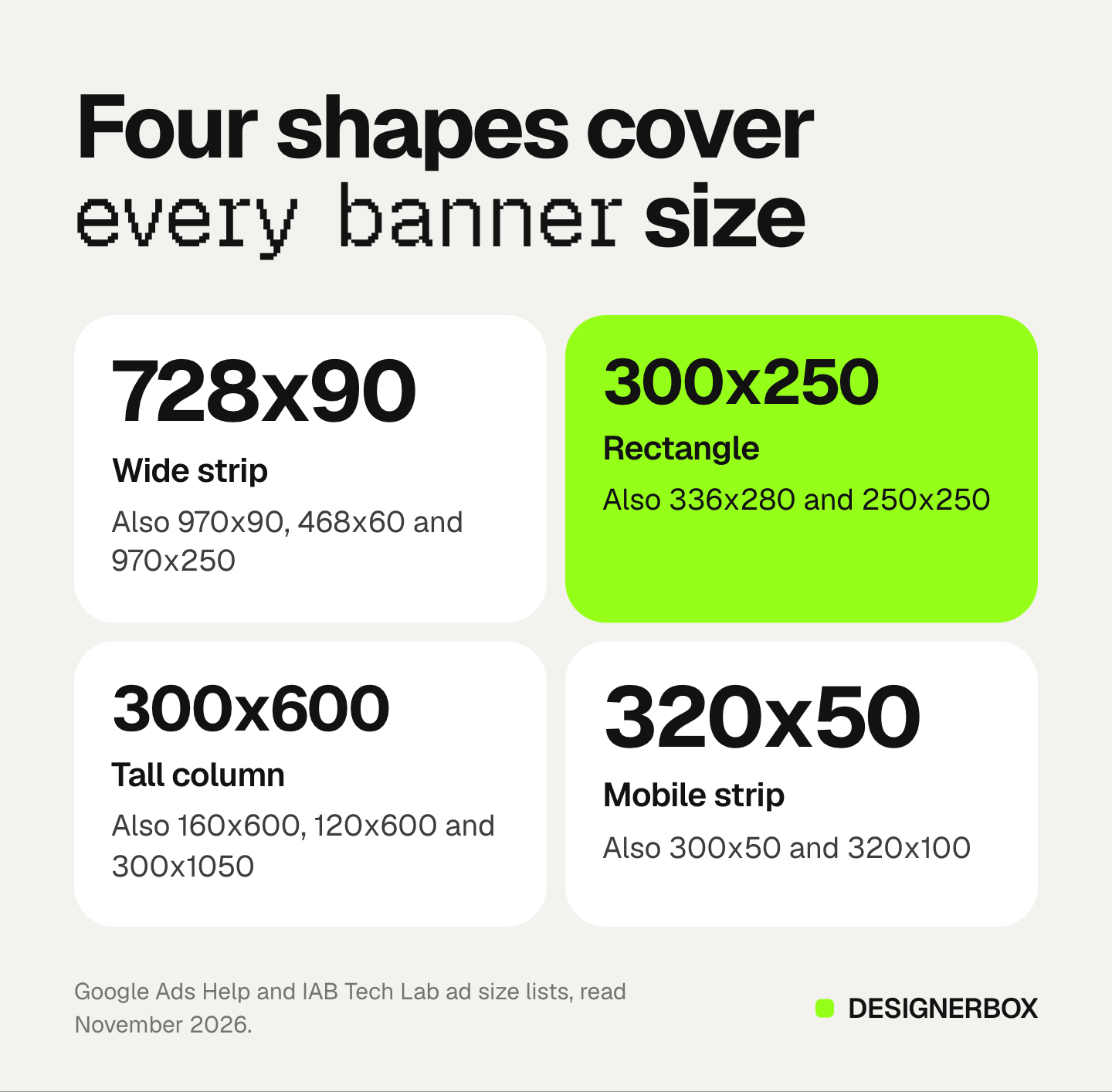
| Shape | Sizes | Ratio (width to height) | What fits |
|---|---|---|---|
| Wide strip | 728x90, 970x90, 468x60, 970x250 | About 8:1 (970x250 is about 4:1) | Logo, product, one line, button in a row |
| Rectangle | 300x250, 336x280, 250x250 | About 1.2:1 | Product, one line, button stacked |
| Tall column | 160x600, 120x600, 300x600, 300x1050 | 1:2 to 1:5 | Product at the top, line, button at the bottom |
| Mobile strip | 320x50, 300x50, 320x100 | 6.4:1 to 3.2:1 | Logo or product, a few words, button |
The ratios are arithmetic from the pixel sizes, so treat the shape groups as a working method, not a rule from any network. 970x250 sits with the strips because it runs in the same place on the page, even though it is taller.
- Lock the concept on the 300x250 first. It is the most common slot, and its near-square shape shows quickly whether the product, the line and the button fit.
- Make one master per shape. Wide strip, rectangle, tall column and mobile strip. Each master sets where the product, the logo, the words and the button sit.
- Write one short line. On a 320x50 there is room for five or six words at most. Use the same line on every size, so the set reads as one campaign.
- Export each size from its master. Check every file against the 150 KB limit, and against 50 kB if a publisher uses IAB weights.
- Make the responsive display assets from the same photo. A clean 1200x628, a 1200x1200 and a 900x1600, with no text on the picture.
The guide to ad resizing explains why a crop breaks a layout. Static ad examples sorts 30 static formats by the job each one does, and the ad layout guide covers where the product, the words and the button go.
Banner sets as a workflow
Anyone can make an AI picture. Making hundreds that still look like your brand is the hard part. A banner set multiplies that problem: eight sizes per concept, three concepts per month, and the same logo, colors and product in every file.
DesignerBox is AI creative production for brands and agencies. You add the product photo and build the job once as a workflow: the scene, the ad and the sizes. The AI ad generator makes product ads from one photo. You set the brand rules once in Brand, and the workflow reads them on every run. The photos, the ads, the editors and your brand rules sit in one account.
The Ads resizer app rebuilds one static ad in 9:16, 1:1, 3:4 and 16:9, with the picture framed again and the words set again for each shape. Those are the social and responsive shapes. It does not make fixed banner sizes such as 728x90 or 160x600. For those, the image editor adds your text and logo and exports each size. Batch runs one workflow over a sheet of products, so each product is one row.
DesignerBox does not upload banners to Google Ads or an ad server. You download the results, or send them with a webhook or an S3 step. You still check every file against the size and weight limits above. Uploading your own photos and the commercial license start on the Pro plan. The image editor starts on the Premium plan. Plans and credits are on the pricing page.
The first job, built once
Start from a template, add your brand and your products, and run it. The cost is shown before the run. See the templates.
FAQ
What is the most common banner ad size?
300x250, the medium rectangle. Google AdSense lists it first among its top performing ad sizes and says it tends to have more ad inventory available from advertisers. Google Ads, Demand Gen and the IAB fixed-size list all include it.
What size is a leaderboard banner ad?
A leaderboard is 728x90 pixels. The large or super leaderboard is 970x90, and the billboard is 970x250. On phones, the mobile leaderboard is 320x50.
What is the maximum file size for Google display ads?
150 KB for an uploaded image ad in GIF, JPG or PNG. An HTML5 or AMPHTML ad is a ZIP of up to 600 KB. Responsive display ad images can be up to 5120 KB each, because Google builds the ad from them.
What image sizes do responsive display ads need?
A 1200x628 landscape image and a 1200x1200 square image are required. A 900x1600 vertical image is optional. You can add a 1200x300 or 1200x1200 logo, up to 5 short headlines of 30 characters, and a long headline of 90 characters.
Can I still use animated GIF banners?
In a Google Display campaign, yes: the animation must stop after 30 seconds and run slower than 5 frames per second. In Demand Gen, which Display campaigns are moving into, uploaded GIF banners must be non-animated. Use an HTML5 build if you need motion there.
Are banner ad sizes the same on every ad network?
Mostly. The core sizes, 300x250, 728x90, 160x600, 300x600 and 320x50, appear on Google’s lists and the IAB’s list. File weight limits differ: Google allows 150 KB for an image banner, while the IAB sets 50 kB at first load for a smartphone banner.
Sources
- Google Ads Help, Uploaded display ads specifications: support.google.com/google-ads/answer/1722096, accessed November 2026
- Google Ads Help, Create a responsive display ad: support.google.com/google-ads/answer/7005917, accessed November 2026
- Google Ads Help, Best practices guide for responsive display ads: support.google.com/google-ads/answer/9823397, accessed November 2026
- Google Ads Help, Google Display Ads campaigns have a new home in Demand Gen: support.google.com/google-ads/answer/17051545, accessed November 2026
- Google Ads Help, Demand Gen campaign creative, asset specifications and guidelines: support.google.com/google-ads/answer/13704860, accessed November 2026
- Google AdSense Help, Guide to ad sizes: support.google.com/adsense/answer/6002621, accessed November 2026
- IAB Tech Lab, New Ad Portfolio, fixed size ad specifications: iab.com, accessed November 2026
- DesignerBox, Ads resizer app: designerbox.ai/apps/ads-resizer, accessed November 2026
Banner ad sizes and limits verified from Google Ads Help, Google AdSense Help and the IAB as of November 2026. Ad networks change their specs, so check each one before a campaign runs.