





Marketing agency tools are the software an agency uses to win clients, plan work, make creative, get approval, buy media, report and bill. A small agency needs one main tool for each of those seven jobs. Sort the stack by job first. Then check four things on every tool: seats, client separation, client-facing branding and cost before the work runs.
Take a six-person agency with fifteen clients on fixed retainers. Every new tool adds a login, a monthly bill and one more place where a file waits. The client pays the same fee either way. So each tool has to do a job that no other tool in the stack already does.
This guide is for performance and creative agencies of 3 to 15 people. It lists the seven layers of an agency tech stack, names two or three well-known tools for each layer, and gives the four checks that decide each purchase. It ends with a test for cutting a stack that grew too large.
Key Takeaways
-
Sort the stack by job. Seven layers cover the stack: clients, planning, research, creative production, approvals, media and reporting, and billing.
-
One main tool for each layer. Two tools that do the same job cost you a second bill and a second place to look.
-
Four checks decide every layer. Seats, client separation, client-facing branding, and cost before the work runs.
-
Small teams are the norm. In the AgencyAnalytics 2026 benchmark of 494 agency professionals, 49% work at agencies with 1 to 10 full-time employees.
-
AI sits inside the layers. In the same survey, 35% said AI saves them 10 or more hours a week. Reporting and performance summaries lead AI use at 42%.
-
Cut with the overlap test. List each tool, the job it does and who opened it last month. Two tools on one job means one of them goes.
What are marketing agency tools?
Marketing agency tools are the software a marketing agency runs its client work on. The term covers seven jobs: winning and onboarding clients, planning and tracking work, research and strategy, creative production, approvals, media buying and reporting, and billing. Marketing agency software differs from a single team’s software in one way. Every job repeats for many clients, so the tool has to keep each client separate.
Most agencies that buy these tools are small. AgencyAnalytics, a reporting vendor, surveyed 494 agency professionals between February and April 2026. In that survey, 49% work at agencies with 1 to 10 full-time employees, and 21% at agencies with 11 to 20 (agencyanalytics.com, October 2026). A stack built for a 200-person network does not fit a team of six.
The marketing agency tech stack by job
An agency tech stack has seven layers, and each layer does one job. The table lists the job, the type of tool that does it, well-known examples, and the first question to ask. The named tools are examples, in no ranked order. Many of them cover more than one layer, which is where overlap starts.
| Layer | The job | Tool type | Well-known examples | First question |
|---|---|---|---|---|
| 1. Clients | Win and onboard clients | CRM, proposals | HubSpot, Pipedrive, PandaDoc | Does a signed proposal create the client record? |
| 2. Planning | Plan and track work | Project management | Teamwork.com, ClickUp | Can a client see their own project and nothing else? |
| 3. Research | Research and strategy | SEO and ad research | Semrush, Meta Ad Library | Does the research reach the brief? |
| 4. Production | Make the creative | Design and AI production | Canva, Figma, DesignerBox | Does it save one setup for each client? |
| 5. Approvals | Get a recorded yes | Online proofing | Filestage, Ziflow | Can a client approve without an account? |
| 6. Media and reporting | Buy media, show results | Ad platforms, dashboards | Google Ads, Data Studio, DashThis | Does the report carry your name? |
| 7. Billing | Track time, send invoices | Time tracking, invoicing | Harvest, QuickBooks Online | Do hours split by client? |
The seven layers follow the order of a client job. The agency workflow guide covers the stages of that job and where the hours go on a fixed fee.
Marketing agency software for each layer
Each section below names what the layer does and one checked fact for each tool. Every fact was read on the vendor’s own site in October 2026. Features change, so read the page again before you buy.

1. Win and onboard clients
This layer holds the pipeline, the proposal and the signed contract. HubSpot has a free CRM that covers contacts, deals and tasks for up to two users (hubspot.com/products/crm, October 2026). Pipedrive builds its CRM around the sales pipeline, and it can create and send proposals and contracts (pipedrive.com/en/features, October 2026). PandaDoc sends proposals, includes e-signatures on every plan, and connects to CRMs such as HubSpot and Pipedrive (pandadoc.com/proposal-software, October 2026).
2. Plan and track work
This layer shows where each job sits today. Teamwork.com is built for client work: its plan page lists organizing work by client, inviting client users into projects and managing ongoing retainers (teamwork.com/pricing, October 2026). ClickUp offers guest access with detailed permissions, so you share client-ready views and keep internal lists private (clickup.com/solutions/client-project-management, October 2026).
3. Research and strategy
This layer feeds the brief. Semrush covers keyword rank tracking and site audits, and it builds branded reports that you can schedule for clients (semrush.com/features, October 2026). For paid social, the Meta Ad Library is a searchable database of all active ads on Meta’s apps. You search by page name or keyword (facebook.com/business/help, October 2026). The ad spy tools guide compares what that library shows with what paid research tools add.
4. Creative production
This layer makes the files: images, ads and video. Canva’s Brand Kit stores logos, colors, fonts and templates, and Canva Pro manages up to 5 separate brands (canva.com/pro/brand-kit, October 2026). Figma covers design and prototyping, and its product list includes Figma Buzz for on-brand assets and Figma Weave for AI image and video workflows (help.figma.com, October 2026). Content creation tools by job splits this layer into six jobs.
UGC-style video ads are one part of this layer, with their own tools. The AI UGC video tools for agencies comparison covers six of them on seats, brand separation and white label. The AI UGC agency guide shows how that work runs across clients. The AI creative agency guide lists what seven of these tools’ own terms say on commercial use and indemnity.
5. Approvals
This layer records who approved which version. Filestage lets you invite any number of reviewers, and reviewers do not need an account to see files or give feedback (help.filestage.io, October 2026). Ziflow lets guest reviewers comment and approve through a shared link, with no paid seat (ziflow.com/online-proofing, October 2026). The tool matters less than the rule. The third revision round covers the contract clauses that cap the rounds.
6. Media buying and reporting
The ad platforms are the buying tools. A Google Ads manager account gives an agency one sign-in for all its client accounts and reports across them (support.google.com, October 2026). For reports, Google’s Data Studio, formerly Looker Studio, is a no-cost dashboard tool (docs.cloud.google.com, October 2026). DashThis builds a separate branded dashboard for each client, with your logo and your own domain (dashthis.com/white-label, October 2026).
7. Billing
This layer turns hours and deliverables into invoices. Harvest tracks time, creates invoices from the tracked time and expenses, and copies invoices to QuickBooks Online or Xero (getharvest.com/features, October 2026). In the AgencyAnalytics survey, 68% of agency leaders said their team spends 60% or more of its time on billable work. A time tracker that splits hours by client shows where the rest goes. Your pricing model decides what the invoice says, and agency creative pricing compares four models.
Four checks before an agency buys any tool
Four checks decide whether a tool fits an agency: seats, client separation, client-facing branding and cost before the work runs. A tool can do its job well for one brand and still fail an agency on one of these. Run all four on every layer, and write the answers next to the tool’s name.
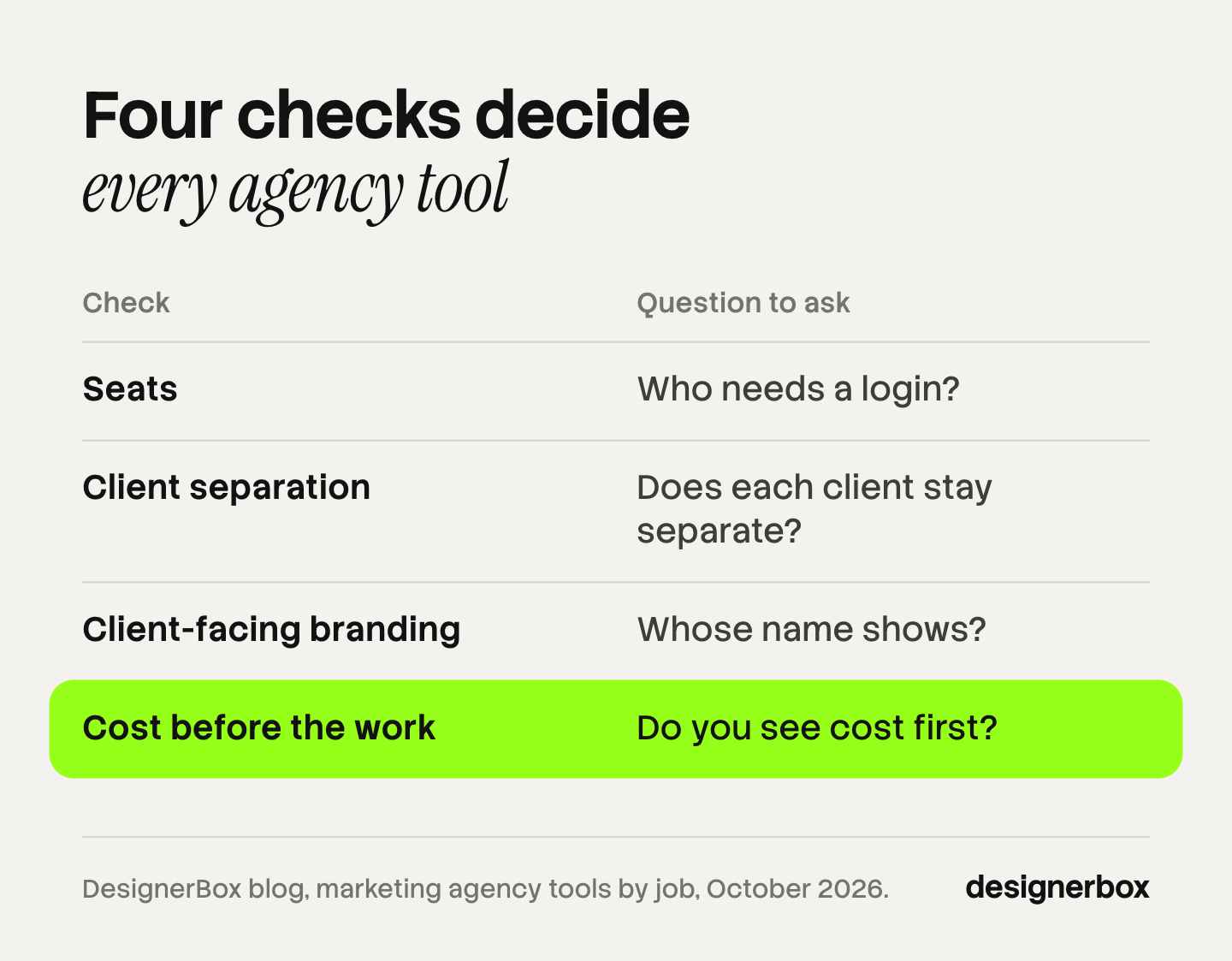
1. Seats: who needs a login? Count your team, then count clients and freelancers. Ask whether guests and reviewers need a paid seat. In the approvals layer, a client who must create an account has one more step before the review.
2. Client separation: does each client stay separate? One client’s files, brand rules and data must never appear in another client’s work. Ask how the tool divides clients: folders, projects, workspaces or brand records. Managing creative for multiple clients covers the three things that must stay separate.
3. Client-facing branding: whose name shows? A report, a dashboard or a proof link is something the client sees. Ask whether it carries your logo and your domain, or the vendor’s. White label creative explains what that means for work you sell under your own name.
4. Cost before the work: do you see cost first? On a fixed retainer, you set the fee before the month starts. A tool that charges for each run, credit or export changes your margin after you have quoted. Ask whether the tool shows the cost before the work runs.
Creative production in DesignerBox
Anyone can make an AI picture. Making hundreds that still look like your brand is the hard part. An agency has to do that for every client brand it carries.
DesignerBox is AI creative production for brands and agencies. In this stack, it sits in layer 4. You save each client’s brand once: logos, fonts, palette and rules. You build a job once as a workflow, and the workflow reads that client’s brand rules on every run. A saved workflow runs the same way on the next product, and batch runs it over the whole sheet at once. The standard is the same on row one and row two hundred. For approvals on stills, rReviews sends your client a page of pictures. The client opens the link with no account, chooses the pictures they want and sends the choice back to you.
You publish a workflow as an app, which is a workflow with a form. A colleague completes the form and presses Run. The cost is shown before each run, so the fourth check has a clear answer.
The full workflow from the first product photo to the finished ad, in one subscription. That covers templates, workflows, apps, batch, the image editor, the video editor and brand rules. DesignerBox also has 68 tools over MCP, so an AI chat such as Claude, ChatGPT or Cursor can run the same workflows.
Here are the limits. DesignerBox does not do the other six layers: no CRM, no project board, no media buying, no client reports and no invoices. It does not publish into a shop or an ad account. You download the results, or send them with a webhook or an S3 step. Uploading your own photos and the commercial license start on the Pro plan. AI video, virtual try-on, upscaling, the image editor and the video editor start on the Premium plan. Team features, shared brand kits and white label are on the Ultra plan, and every plan below Ultra is one seat. Plans and credits are on the pricing page.
How do you cut an agency stack?
Cut an agency stack with the overlap test. List every tool you pay for. Next to each one, write the layer it covers, who opened it last month and what would break without it. Two tools on one layer means one of them goes. A tool that nobody opened last month goes first.

Follow these steps once a quarter:
- List every tool and its bill. Include the free ones. A free tool still costs a login and a place where files wait.
- Write one layer next to each tool. If a tool covers two layers, write both. That is where you can remove a second product.
- Mark the overlaps. Two project boards, two proofing tools and two places for brand files are the common ones.
- Count the file moves. Each time a file leaves one tool and enters another, someone exports, renames and uploads it. Fewer moves matter more than fewer tools.
- Run the four checks on what stays. A tool that fails client separation is a risk at any price.
AI tools for marketing agencies need the same test. In the AgencyAnalytics survey, 35% of respondents said AI saves them 10 or more hours a week, and 58% said they have increased human oversight of AI work. So an AI tool earns its place by the layer it covers and the review step around it. The six-tool AI stack shows what happens when each AI job gets its own product.
Scale content without limits.
Generate content for your products or services with AI, starting today, and keep your brand on every piece. See how one workflow for each client brand works on DesignerBox for agencies.
FAQ
What tools does a marketing agency need?
A marketing agency needs one tool for each of seven jobs: a CRM with proposals, a project board, research tools, a creative production tool, a proofing tool, the ad platforms with a reporting dashboard, and time tracking with invoicing. A team of 3 to 15 people rarely needs more than one main tool for each job.
What is the best software for a small marketing agency?
There is no single best product, because no tool covers all seven jobs well. Pick one tool for each layer. Then check seats, client separation, client-facing branding and cost before the work runs. The best fit is the tool that passes all four for your number of clients.
What is an agency tech stack?
An agency tech stack is the full set of software an agency uses to run client work, from the first sales call to the invoice. A clear stack has one main tool for each job and a written rule for how files move between tools.
Which AI tools do marketing agencies use?
In the AgencyAnalytics 2026 benchmark, reporting and performance summaries led AI use at 42%, and 38% of agencies said agentic AI already runs workflow automation. AI tools belong to a layer, like any other tool.
How many tools should a marketing agency use?
No fixed number is correct. A useful rule is one main tool for each of the seven jobs, plus the ad platforms your clients buy on. Count the times a file moves between tools. If that number grows each quarter, the stack is too large.
Where does DesignerBox fit in an agency stack?
DesignerBox fits in the creative production layer. You build a job once as a workflow with a client’s brand rules, and you see the cost before each run. It does not replace the CRM, the project board, the reporting dashboard or the invoicing tool.
Sources
- AgencyAnalytics 2026 Marketing Agency Benchmarks Report, 494 agency professionals surveyed February to April 2026: agencyanalytics.com, accessed October 2026
- Meta Business Help Center, About the Meta Ad Library: facebook.com/business/help, accessed October 2026
- Google Ads Help, About Google Ads manager accounts: support.google.com, accessed October 2026
- Google Cloud, Data Studio documentation (formerly Looker Studio): docs.cloud.google.com, accessed October 2026
- HubSpot free CRM product page (hubspot.com/products/crm), October 2026
- Pipedrive features page (pipedrive.com/en/features), October 2026
- PandaDoc proposal software page (pandadoc.com/proposal-software), October 2026
- Teamwork.com plan comparison page (teamwork.com/pricing), October 2026: features only
- ClickUp client project management page (clickup.com/solutions/client-project-management), October 2026
- Semrush features page (semrush.com/features), October 2026
- Canva Pro Brand Kit page (canva.com/pro/brand-kit), October 2026
- Figma Help Center product list (help.figma.com), October 2026
- Filestage Help Center, roles and permissions (help.filestage.io), October 2026
- Ziflow online proofing page (ziflow.com/online-proofing), October 2026
- DashThis white label page (dashthis.com/white-label), October 2026
- Harvest features page (getharvest.com/features), October 2026
- DesignerBox for agencies and DesignerBox pricing (designerbox.ai/for/agencies and designerbox.ai/pricing), October 2026: plan gates and seats
Tool features verified on each vendor’s own site, and agency survey data from AgencyAnalytics, as of October 2026. Individual results vary.


