


Claude video editing works through tools, because Claude cannot open a video file. Anthropic’s API takes images and documents only. So Claude edits by reading: a transcript with a time on every word, a few still frames, or the structure of an editor project. Claude writes the cut, and a renderer makes the file. For Instagram Reels, four setups do this, and each sees a different part of the clip.
A brand team films three takes on Monday. By Friday the same footage needs a 30-second Reel, a shorter cut for Stories, burned-in captions and a version with the new price. The edit is the same every week, and someone rebuilds it by hand each time.
This guide covers the four setups as they work in November 2026: what each one reads, what you install, and where a person still has to watch. It is for brand and agency teams who post Reels every week, and it checks each setup against Instagram’s own rules for reach.
Key Takeaways
- Claude reads video and never plays it. Every setup turns the clip into text or a few frames first.
- An editing skill cuts raw footage. video-use transcribes each take, cuts on word boundaries, burns captions and checks every cut before you see the file.
- Code builds motion and text Reels. HyperFrames renders HTML to MP4, and Remotion renders React. A company of more than 3 people needs a Remotion company license.
- A connector works inside an editor. Claude builds the timeline, and you open the project to check it.
- The chat alone plans the Reel. It writes the hook, script, shot list and caption text. You still make the cut.
- Captions alone do not make a Reel original. Instagram says subtitles or a watermark on someone else’s clip do not add enough value.
- A person still watches the final file. Each setup moves the check to a cheaper place. None removes it.
How does Claude video editing work?
Claude video editing is a loop of reading, deciding and rendering. A tool turns the footage into something Claude can read: a transcript with a time on every word, or a sheet of still frames. Claude picks the cuts and writes them as an edit list or as code. A renderer such as FFmpeg then builds the MP4. Claude never plays the file.
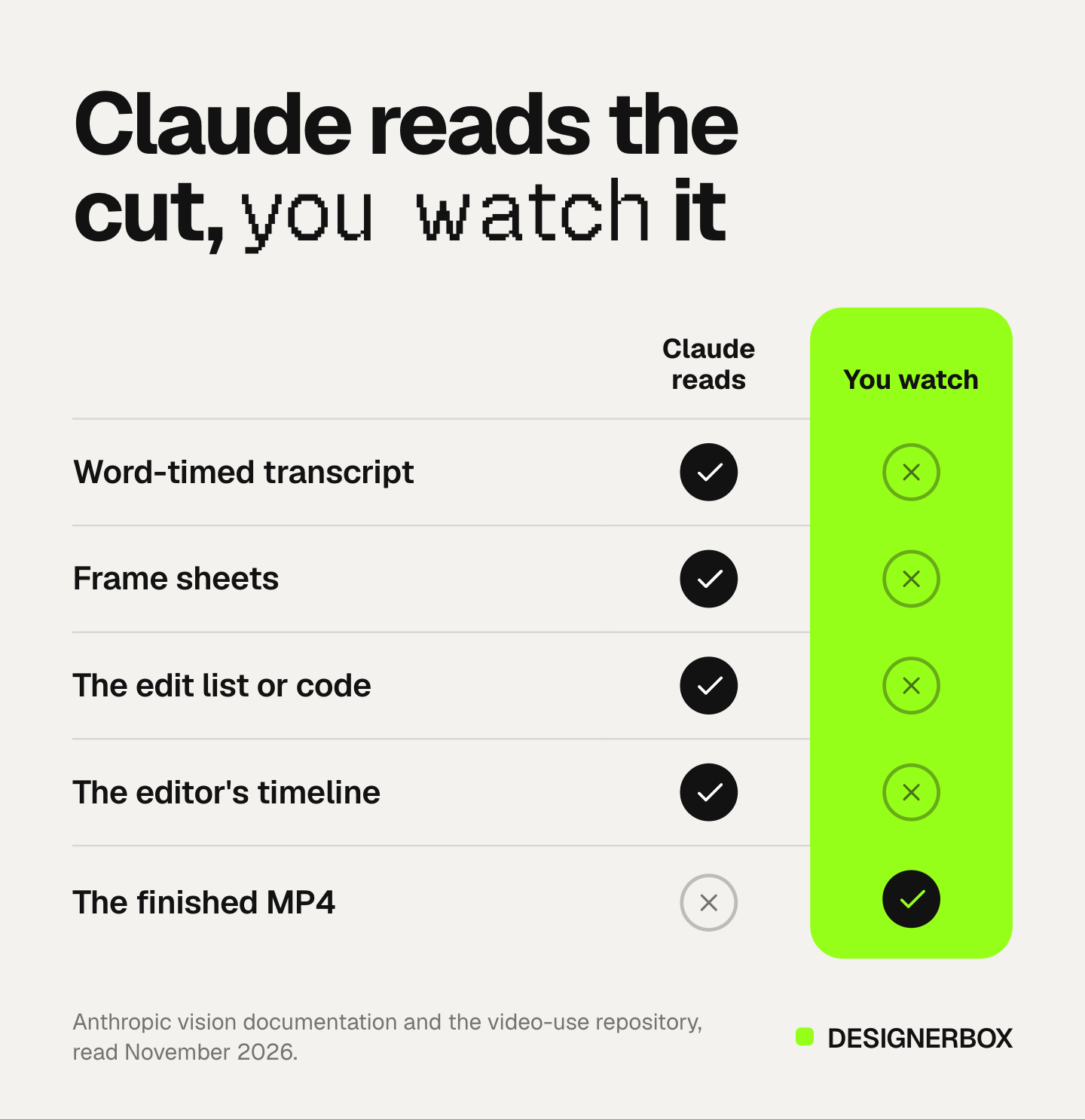
Anthropic’s documentation lists the image formats Claude accepts: JPEG, PNG, GIF and WebP. For an animation, only the first frame is used (platform.claude.com, November 2026). The same page allows up to 600 images in one API request, or 100 on models with a 200k-token context window, and 20 images a turn on claude.ai.
A 30-second Reel at 30 frames per second holds 900 frames. So no setup sends Claude every frame. The README of the editing skill in setup 1 says it in one line: “The LLM never watches the video. It reads it.” (github.com/browser-use/video-use, November 2026).
That decides where Claude is strong. It catches what a transcript shows: filler words, a fluffed line, a take that names the product wrong, a long pause before the hook. It is weaker on what only the picture shows: a soft focus, a logo out of shot, a hand over the label. Plan your check around that gap.
What a Reel needs from the edit
Set the target before you pick a setup. Instagram and Meta publish four points that change how you cut a Reel.
- 9:16, full screen. Meta’s ads guidance recommends 9:16 for Reels placements, because most people hold their phone upright (Meta Business Help Center, November 2026).
- 3 minutes or less for new viewers. Instagram recommends videos of 3 minutes or less to people who do not follow you (creators.instagram.com, November 2026).
- No third-party watermark. The same page says a reel with another app’s watermark can lose reach. If a tool downloads a clip from another platform, the watermark comes with it.
- Original work. Since 30 April 2026, accounts that mostly re-upload other people’s work are not recommended, and the rule covers photos and carousels as well as reels (Instagram for Creators, November 2026). A border, a watermark, subtitles or credits on someone else’s clip do not count as enough value. Meaningful edits can count, such as text that adds context or graphics with new information.
The last rule matters most for AI editing. The fastest thing an AI editor does is burn captions. On your own takes, that is fine. On a clip you downloaded, captions are the exact change Instagram says is not enough. Cut your own footage, and share other people’s work with Instagram’s repost feature, which the same page recommends.
Setup 1: an editing skill for raw footage
An editing skill is a set of instructions and scripts that Claude Code loads. The best-known one for footage is video-use, an open-source skill from Browser Use under the MIT license. You put raw takes in a folder, open Claude Code there and describe the Reel. It transcribes each take, proposes a plan, waits for your approval, then renders the cut.
The repository describes each part of the job (github.com/browser-use/video-use, November 2026):
- Transcript first. ElevenLabs Scribe gives a time for every word, plus speaker labels and sounds such as laughter. All takes go into one small text file, which is what Claude mostly reads.
- Pictures on demand. At a hard decision, it draws a filmstrip with the waveform and the words for that range.
- The cut. It removes filler words and dead space, adds a 30 ms audio fade at every cut, grades the color and burns subtitles. The default subtitle style is two words at a time, in capitals.
- A self-check. After the render it inspects every cut point for jumps, audio pops and hidden subtitles. It fixes and renders again up to three times before you see a preview.
- Memory. Session notes go into a project file, so next week’s edit starts from the same rules.
You need Claude Code, FFmpeg and an ElevenLabs API key. The steps for a weekly Reel:
- Ask Claude Code to set up video-use from its GitHub page. It installs the parts and asks for the ElevenLabs key once.
- Put the week’s takes in one folder and open Claude Code in that folder.
- Describe the Reel in one message.
- Read the plan before you approve it. Check the opening line and the product name.
- Watch the final file on a phone, full screen, and ask for changes in plain words.
A brief that covers the Reel rules above:
Cut these takes into a 9:16 Reel for Instagram, 30 to 45 seconds. Open on the shot where I hold the finished product. Remove filler words and retakes. Burn captions in two-word chunks, above the bottom quarter of the frame. End on the product name. Save these caption rules for next week.
Keep the captions away from the bottom of the frame. Instagram draws your username, caption and buttons over that part of a Reel.
Best for: talking heads, founder clips, product demos and UGC-style takes your own team filmed. Limits: it runs on a computer with a terminal. Claude judges the picture from a few frames, so you still check focus and framing yourself.
Setup 2: Reels built from code
Some Reels have no camera footage at all: a launch card, a price change, five tips in a row, a before and after. Claude can write these as code, and a framework renders the code to MP4. The two common frameworks are HyperFrames, which renders HTML and CSS, and Remotion, which renders React components.

HyperFrames is open source from HeyGen under the Apache 2.0 license. It turns HTML, CSS, media and seekable animations into MP4 files, and the same input always gives the same video. It installs as a Claude Code plugin, and its skills teach Claude to plan the video, write the HTML, check it, preview it and render it. The renderer steps through each frame in headless Chrome and encodes with FFmpeg (github.com/heygen-com/hyperframes, November 2026).
Remotion says it works well with coding agents such as Claude Code, and it publishes agent skills you add to a project (remotion.dev, November 2026). Check the license first. The free license covers individuals and companies of up to 3 people. A larger company needs a company license (remotion.dev, November 2026).
Code suits a weekly Reel because one composition takes variables. Change the price, the headline or the product photo, and render again. A 9:16 Reel and a 4:5 feed post can share one source file.
The limit is the material. Code makes motion graphics, and it does not cut camera takes the way setup 1 does. The two combine: video-use can call HyperFrames or Remotion to build an animated overlay inside a cut. Remotion and its alternatives compares the frameworks on what you write and who runs the renderer.
Setup 3: a connector to a video editor
A connector lets Claude work inside an app your team already uses. Claude builds or changes a project in the editor, and you open that project to check it. This suits teams that do not use a terminal, and it keeps the timeline in a place where an editor can still adjust it by hand.
Anthropic launched connectors for creative tools on 28 April 2026. One of them, Adobe for creativity, draws on more than 50 tools across Creative Cloud apps, including Photoshop, Premiere and Express, according to Anthropic’s announcement (anthropic.com, November 2026). Before you plan a Reels workflow around a connector, list the exact tools it exposes on your account. The Claude connectors guide shows how to add one and how to set which tools run without asking.
Any remote MCP server can be a custom connector. The MCP servers marketing teams use cover ad accounts, analytics and creative production, and a Reels workflow often touches all three.
Setup 4: Claude chat with no tools
With no tools connected, Claude cannot touch the video. It can still do every part of the edit that is words: the hook, the script, the shot list, the caption text, the on-screen text for each beat and the edit notes. Paste a transcript, and Claude marks the cuts by timestamp for the person who edits.
A prompt for that job:
Here is the transcript of three takes, with timestamps. Mark every line to keep for a 30-second Reel, in order, with start and end times. Open on the strongest result. Flag any line that names the product wrong.
On claude.ai you can add up to 20 images a turn. Export stills from the draft and ask Claude to check text placement and framing on each one. This is the cheapest setup and the slowest, because a person still makes every cut. For the craft of the script itself, how to make Instagram content with AI covers formats and hooks.
Which setup fits which Reel
Pick by what the Reel is made of and who on the team will run it.
| Setup | What Claude reads | Best Reel type | What you install | Where you check |
|---|---|---|---|---|
| Editing skill (video-use) | A word-timed transcript and frame sheets | Talking heads, demos, UGC-style takes | Claude Code, FFmpeg, an ElevenLabs key | The final file, after its own cut check |
| Code (HyperFrames, Remotion) | The HTML or React it wrote | Launch cards, price changes, tips, motion text | Claude Code, Node.js | The rendered preview |
| Connector to an editor | The project’s timeline | Brand Reels from clips you already own | A connector in Claude | The project, inside the editor |
| Chat with no tools | Your transcript, notes and stills | Any Reel, at the planning stage | Nothing | The cut a person makes |
Two patterns cover most teams. A team with one person who is comfortable in a terminal runs setup 1 for filmed takes and setup 2 for text Reels. A team without a terminal plans in the chat and edits through a connector. In both cases, generating new footage is a separate job, and the Claude AI video generator guide covers what Claude can and cannot do there.
Weekly Reels in DesignerBox
DesignerBox runs as a custom connector in Claude, ChatGPT and Cursor, with 75 tools over MCP. One of them builds a video project: a multi-track timeline with picture in picture, 11 transitions, timed text, audio layers and 25 color looks. Building the project charges no credits. A separate render step makes the MP4 in about 1 to 5 minutes, and a failed render gives its credits back.
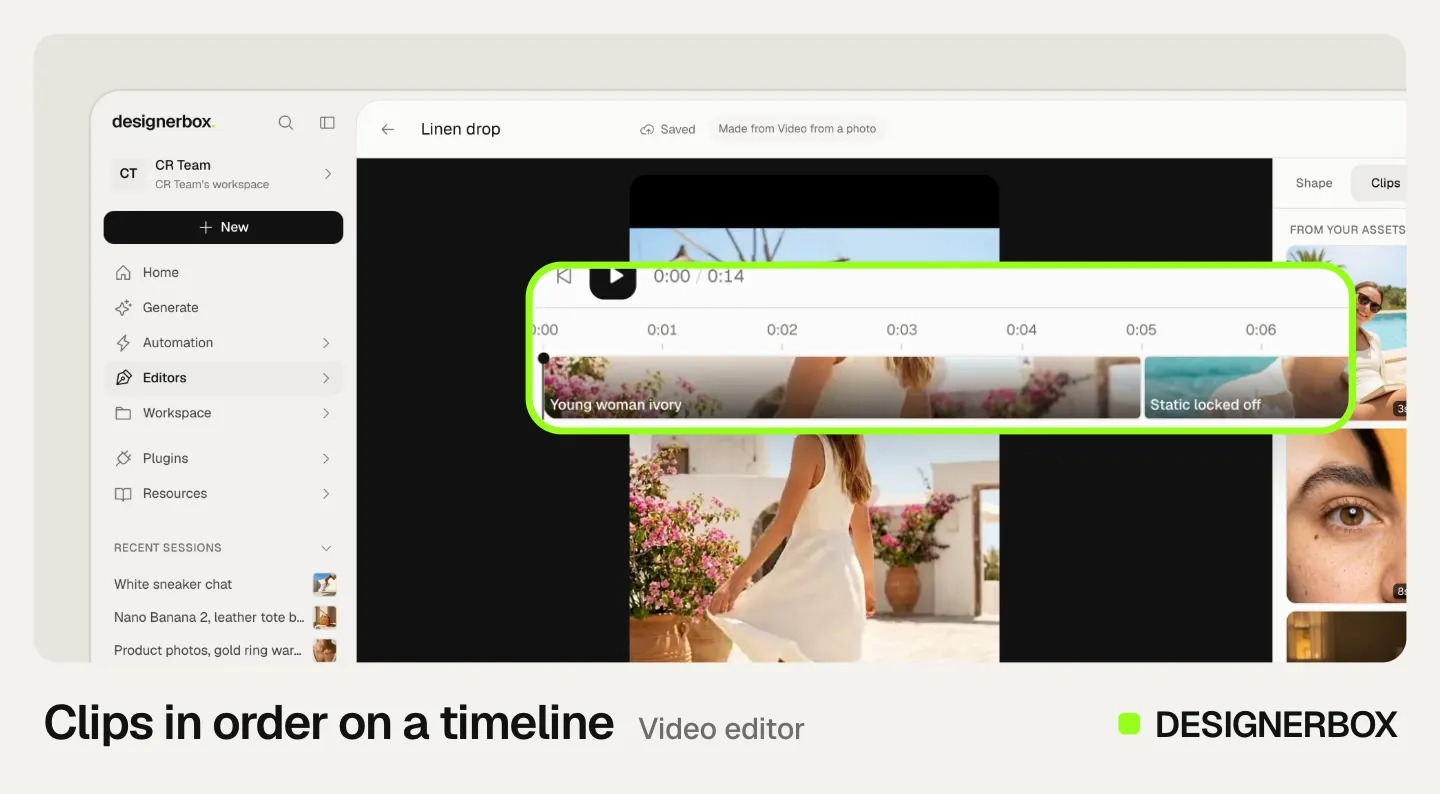
The project can use the logo from your library, and the timeline opens in the DesignerBox video editor. There you add automatic captions from speech, a voiceover in one of 20 voices, and music. The product photos, the clips and the finished Reel stay in one account. The image editor and video editor guide shows each panel.
The same rules hold on the hundredth Reel. You set your logo, fonts and colors once in Brand, and a workflow reads them on every run, so each new product gets the same look. The cost is shown before the run. AI video and the video editor start on the Premium plan. Plans and credits are on the pricing page.
The first job is one Reel format, built once. Start from a template, add your brand and your products, and run it. See the templates.
FAQ
Can Claude edit videos?
Yes, through tools. Claude cannot open a video file, so a tool turns the footage into a transcript or still frames first. Claude decides the cuts, and a renderer such as FFmpeg builds the MP4. Claude Code with an editing skill, a code framework or a connector to an editor are the common routes.
Can Claude watch a video?
No. Anthropic’s documentation lists JPEG, PNG, GIF and WebP as the image formats Claude accepts, and only the first frame of an animation is used. Editing tools send Claude a transcript and a few frames from the clip instead of the video.
What is the best Claude Code video editing setup for talking heads?
An editing skill such as video-use. It transcribes each take with a time on every word, cuts filler words and dead space, burns captions and checks every cut point after the render. You need Claude Code, FFmpeg and an ElevenLabs API key.
Is there a Claude video editor I can use without code?
Yes, through connectors. Anthropic’s creative connectors include Adobe for creativity, which draws on tools across Creative Cloud apps. DesignerBox also runs as a connector: Claude builds a video project, and you open it in the DesignerBox video editor.
Does adding captions make a reposted Reel original?
No. Instagram says adding a border, a watermark, subtitles or credits to someone else’s content does not add enough value. Meaningful edits can count, such as text that adds context or graphics with new information.
How long should an Instagram Reel be?
Instagram recommends videos of 3 minutes or less to people who do not follow you. Meta’s ads guidance recommends 9:16 for Reels placements, because most people hold their phone upright.
What does Claude video editing cost in DesignerBox?
Building a video project through Claude charges no credits. Rendering it to MP4 charges credits, a failed render gives them back, and the cost is shown before the run. AI video and the video editor start on the Premium plan.
Sources
- Anthropic, “Vision”: supported image formats, images per request and per claude.ai turn: platform.claude.com, read November 2026
- Anthropic, “Claude for creative work”: the creative connectors and the Adobe for creativity description, 28 April 2026: anthropic.com, read November 2026
- Browser Use, video-use repository: how the skill reads, cuts, checks and saves an edit, MIT license: github.com/browser-use/video-use, read November 2026
- HyperFrames repository: license, Claude Code plugin, skills and renderer (github.com/heygen-com/hyperframes, November 2026)
- Remotion, “Claude Code” and “License and pricing”: remotion.dev/docs/ai/claude-code and remotion.dev/docs/license/pricing, read November 2026
- Instagram for Creators, FAQ: the 3-minute recommendation and watermarks: creators.instagram.com, read November 2026
- Instagram for Creators, “Rewarding original creators”, 30 April 2026: creators.instagram.com, read November 2026
- Meta Business Help Center, “Best practices for aspect ratios in Meta ads”: facebook.com, read November 2026
- DesignerBox MCP and video editor: tool count, video project and render rules, editor features: DesignerBox MCP page and DesignerBox video editor page, November 2026. Plan gates: DesignerBox pricing, November 2026
Claude input formats, connector details, tool repositories and Instagram guidance verified against the sources above on 13 November 2026. Open-source tools change often, so read each repository before you install it.