AI product ads are paid ads where AI builds the scene, the person, the motion or the format around a real product photo. One rule decides whether they work: the AI may change everything around the product, never the product itself. Keep the label, the logo, the color, the shape and the scale exactly as you ship them, then check each result before launch.
The first step of an AI product ad is one upload and one prompt. That part is fast. The cost comes after. A label with one wrong letter, a bottle that grew taller, a sofa in a fabric you do not sell: each one is a product you advertised and cannot ship. The European Commission now names that exact case as a deep fake.
This guide is for brands and agencies that make product ads every week. It covers what AI may change in a product ad, how to build one ad set per product, the five checks before launch, and the AI label rules on Meta, TikTok, Google and Amazon, as of September 2026.
Key Takeaways
- The scene is free, the product is fixed. Background, light, people, format and copy can change. Label text, logo, color, material, shape, scale and quantity cannot.
- The line is written down now. The EU’s Article 50 guidelines say a real product on an AI background is not a deep fake. That holds as long as the ad does not mislead about the product. An AI image that misleads about how the product looks can be a deep fake.
- Place the product, do not redraw it. A step that keeps your product photo and builds around it holds the details. A text prompt that describes the product invents them.
- Build the ad set once per product. The same formats, scenes and copy slots for every product, so the hundredth ad follows the same rules as the first.
- Check five things before launch: the label, the logo, the color, the shape and the scale. Compare each result with the source photo on the same screen.
- Labels depend on the platform. TikTok asks for a label on fully AI or heavily AI-edited media. Meta labels ads itself when it detects AI. Google Merchant Center requires AI metadata on product images.
What are AI product ads?
AI product ads are ads for a physical product where AI makes part of the creative. Usually that is the setting, the person holding or wearing the product, the motion in a video, or the extra sizes and copy variants. The product itself comes from a real photo. That split is what separates a product ad from a concept image: a buyer will receive the thing in the frame.
There are four common kinds, and most ad sets mix them:
| Kind | What AI makes | Where it runs |
|---|---|---|
| Scene ad | A new background, room or setting around the product | Feed, Shopping, marketplace |
| On-model or in-hand ad | A person wearing, holding or using the product | Feed, Stories, Reels |
| Motion ad | A short clip built from the product still | Reels, TikTok, Stories |
| Variant ad | New sizes, crops, headlines and offers from one approved ad | Every placement |
For the formats in more detail, with the specs for each placement, see these seven product ad formats. For a video built from one still, see product photo to video ad. For which jobs need a real shoot, see where ad visuals come from. For the still side of a campaign, see how to plan AI images for paid social.
What AI may change in a product ad, and what it may not
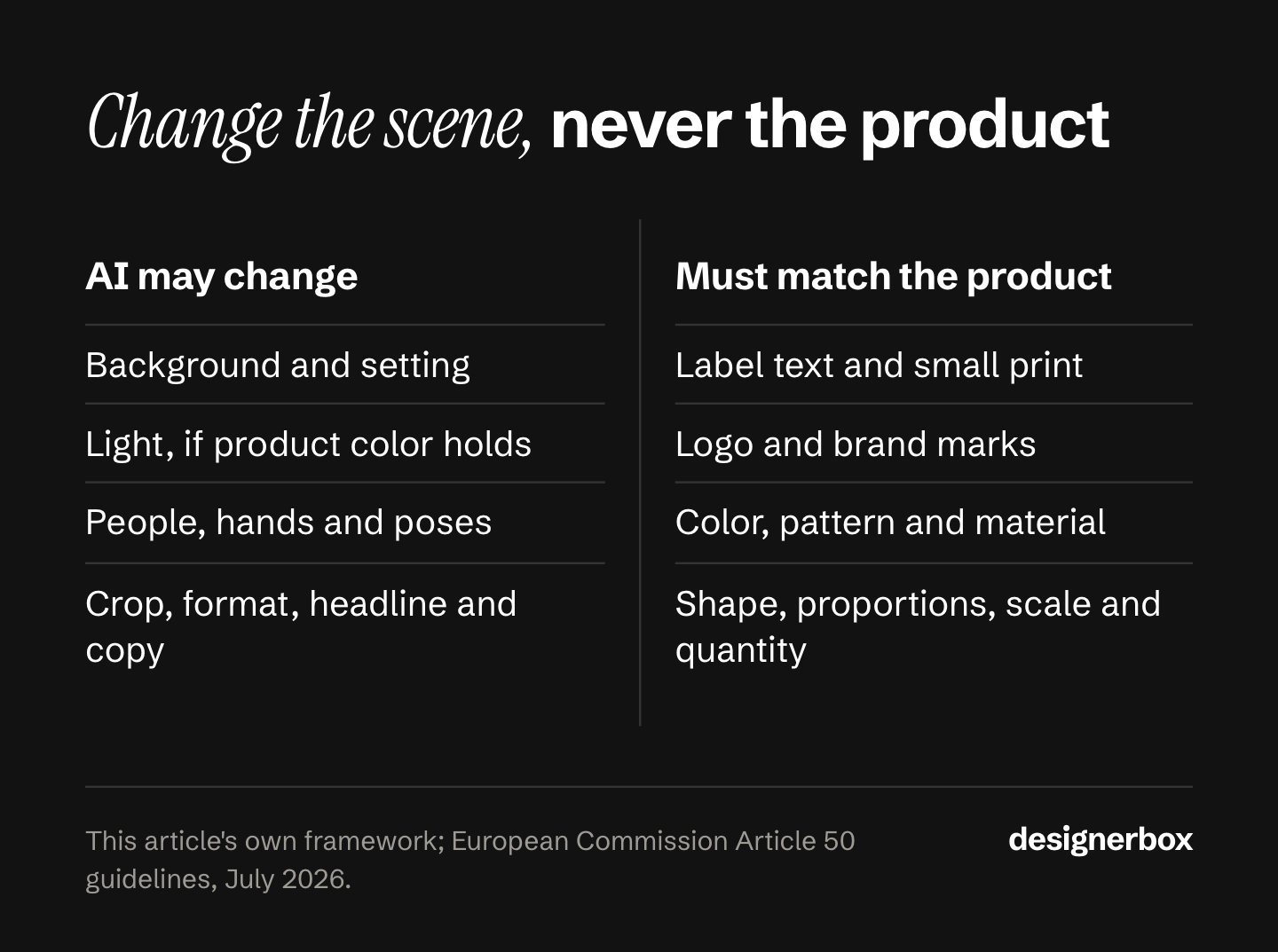
AI may change anything the buyer does not receive: the room, the light, the model, the crop, the words. It may not change anything the buyer does receive: the product’s label, logo, color, material, shape, size and quantity. If a detail will be in the box, it has to match the box.
| Element | AI may change it | It must match the real product |
|---|---|---|
| Background and setting | Yes | |
| Light and time of day | Yes, if the product color stays true | |
| People, hands and poses | Yes, with the label rules below | |
| Crop, size and format | Yes | |
| Headline and body copy | Yes, if every claim is true | |
| Label text and small print | Yes, letter for letter | |
| Logo and brand marks | Yes | |
| Color, pattern and material | Yes | |
| Shape and proportions | Yes | |
| Scale next to a hand, a body or a room | Yes | |
| Quantity and what comes in the pack | Yes |
The light row is the one teams miss. A warm sunset scene can shift a cream bag toward yellow. The background changed, which is allowed, but the product color changed with it, which is not. Grade the scene, then check the product color against the source.

Why the product has to stay the product
The rule is older than AI. In FTC v. Colgate-Palmolive, the US Supreme Court held that an undisclosed mock-up shown as a real test was “a material deceptive practice” (Cornell Law School LII, decided 5 April 1965, accessed September 2026). The Court treated the hidden mock-up as deceptive on its own. That was separate from the false claim about how fast the product worked.
The marketplaces write the same idea into their image rules. Amazon asks that the main image “accurately represent the product as a realistic, professional-quality image” (Amazon Seller Central, accessed September 2026). Google Merchant Center tells merchants to “match the image directly to the product option being sold”, with the exact color, pattern, finish and material (Google Merchant Center Help, accessed October 2026).
The EU now draws the line for AI directly. The Commission’s Article 50 guidelines give a real product shown against an AI-generated background as an example of what is not a deep fake, as long as the ad does not mislead about the product. They also give an AI product image that misleads about how the product looks as an example of what is a deep fake (European Commission, published 20 July 2026, accessed September 2026). This section is general information, not legal advice.
There is a plain business reason too. A buyer who gets a different color from the one in the ad has a reason to send it back.
How to make AI product ads from one photo
Start from one clean product photo, place the product into new scenes without redrawing it, build the same set of formats for every product, and check each result against the photo before launch. The steps below keep the product fixed at every stage.
- Start from a clean source photo. Sharp focus, the true color, the whole product in frame and the label readable. Every ad inherits the flaws of this file.
- Place the product, do not describe it. Remove the background from the product photo and build the scene around the real pixels. A prompt such as “a cream canvas tote bag” makes a new bag. An edit step that keeps your photo keeps your bag. For the wording of the scene itself, see 24 advertising prompts by ad format.
- Build the scenes as stills first. Approve the still before any motion, so a video starts from a product you have already checked.
- Cut every format from the approved still. Build vertical placements first, then crop down. The frame changes; the product does not.
- Write the copy variants from what already sells. Change one thing per variant, such as the headline or the offer, so a test tells you which change worked. See ad creative testing for how to read the results, and ad variants at scale for how many to make.
- Run the five checks, label, then launch. The checks and the label rules follow.
Save the steps once. The second product should run through the same steps, with the same formats and the same brand rules, and not through a new round of prompts. For the steps that come before the image, from the offer to the test, see how to make an ad in 7 steps.
The five checks before an AI product ad goes live
Put the source photo and the AI result side by side on one screen, at full size, and check five things: the label text, the logo, the color, the shape and the scale. Any change to one of them means you redo the result. A small fix in an editor is fine only if the fixed image matches the source.
- Label text. Read every word on the product, including small print. Image models can struggle with small text.
- Logo. Compare the mark, its position and its proportions. A logo that is almost right is wrong.
- Color. Check the product color, not the scene color. Warm or cool scene light is the usual cause of a shift.
- Shape and proportions. Check the height against the width, the handles, the seams, the closures and the corners.
- Scale. Next to a hand, a body or a room, the product must be its real size. A bag that looks bigger than it is misleads as much as a wrong color.
These five failures are also what makes AI ads read as low effort. For the wider list, see AI slop ads. For what the research says about AI ad performance, see AI generated ads.

AI label rules for product ads by platform
The label rules differ by platform, and a background change is not treated the same way everywhere. Check each one that applies before launch. The rules below are as of September 2026.
| Platform | What the rule says | What you do |
|---|---|---|
| TikTok ads | Fully AI or heavily AI-edited media needs the AIGC label or your own clear disclaimer. Undisclosed AI ads are “rejected or restricted”. Changing a background, lighting or color counts as an insignificant edit | Turn on the label for AI scenes with people or motion. A real product on a new background needs no label |
| Meta ads | Advertisers must disclose AI in ads about social issues, elections or politics that show a photorealistic image, video or audio. In the European Region, California, New York, India and Taiwan, advertisers can also choose to disclose AI themselves. Meta adds an “AI info” label itself when you use its AI tools, or when it detects third-party AI signals such as C2PA | Expect the label. Do not strip the metadata to avoid it |
| Google Ads | Since July 2026, advertisers can add an AI label to image and video ads, through a setting or in the creative | Use it where your market or your client expects a label |
| Google Merchant Center | Every image made with generative AI must keep metadata that says AI made it, such as the IPTC DigitalSourceType value TrainedAlgorithmicMedia. Google’s product data specification lists the rule under the minimum requirements for the image link | Keep the file metadata on every Shopping image |
| Amazon | An image with a photorealistic person made fully by AI needs the keyword contains-synthetic-performer in its XMP dc:subject field | Tag AI models before upload. A real product on a new background does not need the tag |
| EU (Article 50) | Since 2 August 2026, a business that publishes a deep fake must disclose it | Keep the product true, and an AI background is not a deep fake |
Sources: TikTok ads policy (last updated April 2026), Meta Business Help Center, Google Ads Help, Google Merchant Center Help, Google’s product data specification, Amazon Seller Central and the European Commission FAQ, all accessed September 2026. The two Google Merchant Center pages were read again in October 2026.
The pattern across all six: a real product in an AI scene is the low-risk case. An AI person, an AI video or a product that no longer matches is where the labels and the risk begin. For the disclosure rules in full, see AI disclosure in advertising.
One ad set for every product
Anyone can make an AI picture. Making hundreds that still look like your brand is the hard part. DesignerBox is AI creative production for brands and agencies. You build the product ad set once as a workflow, then run it on every new product.
- The product stays fixed. The workflow starts from your product photo and builds the scene around it. The image editor makes one edit after another, and the picture keeps its detail and resolution.
- The brand is a record. You set the logos, fonts, colors and rules once in your brand profile. The workflow reads it on every run.
- Review is built in. Critic steps score the results of a run, and best-of-N keeps the best one. You still run the five checks above.
- One workflow, many products. Publish the workflow as an app, and a colleague runs it from a form. Batch runs it over a whole sheet of products, and you review the results in one pass.
The full workflow from the first product photo to the finished ad, in one subscription. An 8-second clip costs 40 to 560 credits, depending on the model. Uploading your own photos and the commercial license start on the Pro plan. AI video and the image editor start on the Premium plan. Plans and credits are on the pricing page.
Here are two limits. DesignerBox does not post to your ad accounts: you download the results, or send them with a webhook or an S3 step. Every plan below Ultra is one seat, so an agency team needs Ultra. Agencies can see how it works per client on the agencies page, and the ad side is on the AI ad generator page.
A free plan for your first run
There is a free plan, and it runs on sample products. Start from a template and see the cost before you run it.
FAQ
What are AI generated product ads?
They are ads for a physical product where AI makes part of the creative, such as the background, a person holding the product, a short video or extra sizes. The product itself should come from a real photo, so the ad shows what the buyer receives.
Can AI change the product in an ad?
It should not. AI can change the scene, the light, the people and the format. The label, logo, color, material, shape, scale and quantity must match the real product. The EU’s Article 50 guidelines give an AI product image that misleads about how the product looks as an example of a deep fake.
Do I have to label AI product ads?
The rules differ by platform. TikTok asks for a label on fully AI or heavily AI-edited ads, but not for a changed background. Meta labels ads itself when it detects AI. Google Merchant Center requires AI metadata on product images. Amazon requires a tag when an image shows a fully AI person.
Is a product on an AI background a deep fake?
Not under the EU guidelines, as long as the ad does not mislead about the product. The Commission gives a real product in an ad against an AI-generated background as an example of what is not a deep fake.
How do I stop AI from changing my product’s label or logo?
Place the real product photo into the scene instead of describing the product in a prompt. Then compare every result with the source photo at full size. If a letter, a mark or a proportion changed, redo the result.
What is the best AI product ad generator?
The best one keeps your product exact and applies your brand rules on every run. For a comparison of the tools, see the best AI ad generator guide. In DesignerBox, the cost is shown before each run.
Sources
- FTC v. Colgate-Palmolive Co., 380 U.S. 374, Cornell Law School Legal Information Institute, decided 5 April 1965, accessed September 2026
- Amazon Seller Central: product image requirements, accessed September 2026
- Google Merchant Center Help: image link, including the AI image metadata rule, accessed October 2026
- Google Merchant Center Help: product data specification, minimum requirements for the image link, accessed October 2026
- European Commission: guidelines on the transparency obligations of Article 50, published 20 July 2026, accessed September 2026
- European Commission: transparency obligations under Article 50 of the AI Act, accessed September 2026
- TikTok ads policy: misleading and false content, last updated April 2026, accessed September 2026
- Meta Business Help Center: AI info labels on ads, accessed September 2026
- Google Ads policy: AI labels in ad creatives, accessed September 2026
- DesignerBox image editor, brand, batch and pricing pages (designerbox.ai), September 2026
Platform rules and legal sources verified as of September 2026. Google Merchant Center’s image link page and product data specification were re-checked on 2 October 2026. Individual results vary.