





DaVinci AI alternatives depend on which DaVinci you mean. Three products share the name: DaVinci AI at davinci.ai, which makes images and video from prompts; DaVinci Resolve, Blackmagic Design’s video editor; and a self-hosted writing script sold under the same name. This guide covers the first one, and the alternatives that suit an agency or brand team producing the same work every week.
This guide asks what you do with the pictures once they exist. Every claim about a named tool comes from that company’s own pages, read in September 2026, with the date attached. If you would rather read one head-to-head than a full roundup, the DesignerBox comparison pages cover these tools one at a time.
Key Takeaways
Three unrelated products share the name. DaVinci AI makes images and video. DaVinci Resolve edits and color grades video. A third is a self-hosted writing script. Check the domain before you compare.
DaVinci AI sells access to a model catalog. Its own homepage leads with “Access the world’s best AI models for images and video” (davinci.ai, September 2026). That is a real strength for one person making one asset.
Model catalogs move every month. OpenAI removed Sora 2 and Sora 2 Pro from its API on 24 September 2026. Any tool that sells a model list is selling a list that changes.
The job decides the tool, not the model count. One great image is a different job from forty products that each need four shots.
Pick on what happens after generation. Repeated work succeeds or fails on review, brand rules and delivery.
Free tiers differ sharply on commercial use. Three tools here restrict free output to personal use. Three permit commercial use on any tier, although Adobe Firefly excludes beta features. One does not say either way. Read the terms before a client job.
Which DaVinci do you mean?
Three separate products answer to this name, and search results mix them together. Sorting them out takes one look at the maker.
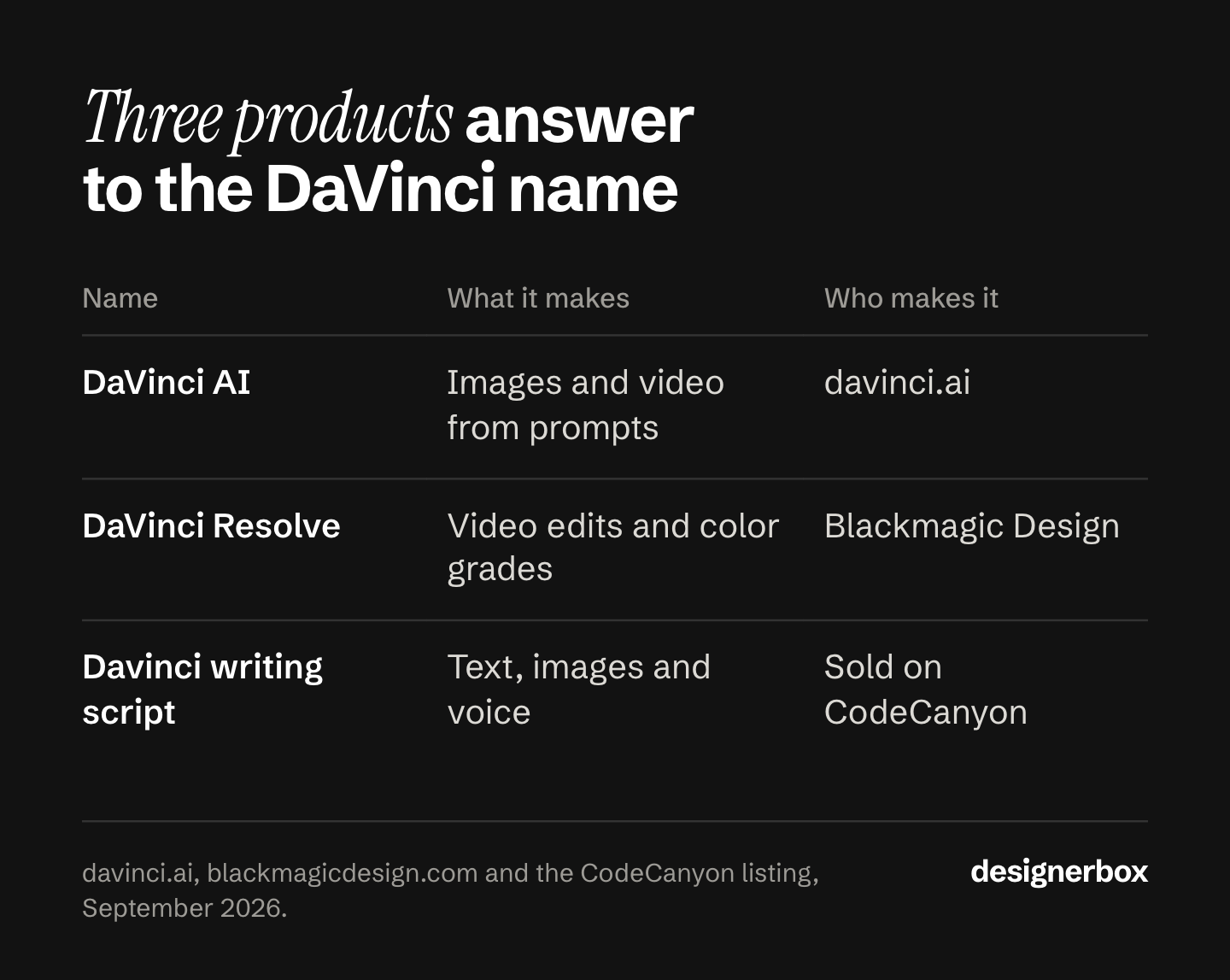
DaVinci AI is at davinci.ai. It makes images and video from text prompts and reference images, and it has iOS and Android apps (davinci.ai, September 2026). This is the product this guide compares.
DaVinci Resolve is made by Blackmagic Design. It combines “editing, color correction, visual effects, motion graphics, audio post production” in one application, and a free version is available (blackmagicdesign.com, September 2026). It is desktop post-production software. Nothing in this guide replaces it, and if that is what you came for, that is where to go.
A self-hosted writing script is also sold as Davinci AI, listed on CodeCanyon as an all-in-one script for text, image, audio and video generation (codecanyon.net, September 2026). It is a codebase you host yourself, not a subscription product.
There is a fourth source of noise. “davinci” was also the name of an OpenAI GPT-3 text model, retired some years ago, so older articles and forum posts using the word mean something else again.
What DaVinci AI does today
DaVinci AI’s homepage headline is “All Your Visual Creation. One Platform.” The line under it reads “Access the world’s best AI models for images and video, all in one powerful suite,” and the company claims more than 100 million creators worldwide (davinci.ai, September 2026).

Its own help center describes it as “a next-generation AI platform built for image and video creation,” where you “generate, transform, and animate visuals using text prompts, reference images, or both” (help.davinci.ai, September 2026).
The published feature set covers image generation, video generation, an editor, templates, image editing that includes object removal and replacement, restyling, relighting and background changes, video editing, image upscaling, and automatic resizing for different platforms. It also lists music and voice tools (davinci.ai, September 2026).
The models it names publicly include Sora 2, Sora 2 Pro, Veo 3.1 Fast, Kling 2.6, Kling O1 Image, Nano Banana, Nano Banana Pro, Seedance, Seedream 4.5, Flux and Grok Imagine (davinci.ai, September 2026).
Its help center overview does not list batch processing, brand kits, team seats, an API, workflow automation or review tools (help.davinci.ai, September 2026). That is a statement about what the document covers, not proof that the product lacks them. Check with the vendor if one of those decides your purchase.
DaVinci AI lists its plans on its own pricing page (davinci.ai/app/pricing, September 2026).
Model catalogs move faster than your workflow
A model list is the easiest thing to advertise and the hardest thing to rely on.
OpenAI notified developers in March 2026 that the Sora 2 video models and the Videos API would be removed from the API on 24 September 2026, and its deprecations page lists no recommended replacement for either sora-2 or sora-2-pro (developers.openai.com, September 2026). A tool page that still lists Sora 2 names a model that OpenAI removed from its API on 24 September 2026.
Every platform at this layer inherits the same churn. Providers add, rename and retire models on their own schedule, and the tools built on top follow along.
The practical consequence is simple. If you picked a tool because of one model on its list, you have bought something that can change without you. If you picked it because of the job it does with your brand and your products, a model swap is a step change inside a workflow you keep.
DaVinci AI alternatives, tool by tool
Each tool below is strong at something specific. Read these as scope, not as scores.
Photoroom, for product stills at catalog volume
Photoroom is built around the product photo. Its published tools include background removal, product scenes, AI product photography, AI fashion models, virtual try-on, ghost mannequin, flat lay, recolor clothing, relighting and AI shadows (photoroom.com, September 2026).
It is the strongest fit here for a large set of stills. Batch mode applies ghost mannequin, virtual model, recolor, flat lay and product staging to up to 250 images in one job (photoroom.com/batch, September 2026). A Brand Kit holds logos, fonts and colors with role-based access, and team workspaces carry Owner, Editor and Viewer roles (photoroom.com, September 2026). There is a REST API and an MCP connector for Claude (photoroom.com/api, September 2026).
Check the license before you start. Photoroom’s help center states that the free plan cannot be used for commercial use (help.photoroom.com, September 2026), so paid work needs a paid plan. There is a head-to-head on the Photoroom comparison page.
Outside scope: avatar and talking-head video.
Creatify, for ad variants from a product URL
Creatify starts from a product link. Its own wording is “paste a product link. Creatify pulls your assets, writes the script, and delivers a ready-to-run video ad” (creatify.ai/features/url-to-video, September 2026).
For a performance marketer this is the shortest path from a listing to a testable ad. Batch Mode creates multiple ad variations at once, the plan table names an AI Actor library for UGC-style video, and Ad Launcher connects Meta, TikTok and AppLovin (creatify.ai, creatify.ai/pricing, September 2026). If UGC-style ads are the whole job, compare it against the best AI UGC ad tools. Brand Spaces and seats are documented, and there is an API plus MCP access.
Two things to note. Its terms carry an effective date of 23 September 2024, older than the current product surface. They also say free-tier users “have limited rights” without defining them, so whether the free tier permits commercial use is not stated on its own pages (creatify.ai/terms, September 2026). Free exports carry a watermark.
HeyGen, for avatar and talking-head video
HeyGen makes video with a presenter. It builds custom avatars from about two minutes of footage, translates video into more than 175 languages and dialects, and clones voices (heygen.com, September 2026).
It has the clearest collaboration tooling of the tools here. Video comments, draft collaboration, task assignment, proofreader seats and role controls are all documented (heygen.com/pricing, September 2026). Batch runs through the API at up to 100 requests per call (developers.heygen.com, September 2026).
There is a head-to-head on the HeyGen comparison page. Its license terms are the most explicit, and they split by tier. On the Creator, Pro and Business plans “you own all rights in your User Input or User Output”, including commercial use. On the free plan output is licensed “solely for personal, non-commercial, and internal evaluation purposes” and may not be used for client work or advertising (heygen.com/terms, September 2026). HeyGen also requires you to disclose AI use when you distribute output, where the law requires it.
Outside scope: product stills and background editing.
Higgsfield, for cinematic video and effects
Higgsfield is the pick when the shot itself is the point. Cinema Studio offers control over camera, lens and light, Marketing Studio builds UGC ads and commercials from pre-built hooks, and Genjutsu transfers motion into new scenes (higgsfield.ai, September 2026).
Its commercial terms are among the most permissive here. Higgsfield states it “does not claim ownership of any of your Inputs or Outputs, nor does it restrict your commercial use of Outputs”, and its help center confirms there is no separate commercial license to buy (higgsfield.ai/terms-of-use-agreement, September 2026). Two conditions it names itself: legal indemnification against third-party IP claims is on the Enterprise plan only, and content is used to train its models except under Enterprise agreements.
Its API returns the cost of a request before you run it, and there is an MCP server and an After Effects plugin (higgsfield.ai, September 2026). What it calls parallel generation is concurrency, not a spreadsheet-fed batch run. A named brand kit is not listed on its public feature pages as of September 2026. Free accounts carry a watermark. We cover this one in more depth in our guide to Higgsfield AI alternatives and in our Higgsfield AI review.
Magnific, formerly Freepik AI, for the widest model list
Check the name first. Freepik’s AI platform now runs as Magnific, and freepik.com/ai carries the line “Freepik is now Magnific” (freepik.com/ai, September 2026). It is operated by Freepik Company, S.L. of Málaga (magnific.com/legal/terms-of-use, September 2026).
If a broad catalog is what drew you to DaVinci AI, this is the closest match. It names around 26 image and video models on one public page, covers images, video, audio and 3D, and documents Batch Run to run a flow over many inputs, plus Automations and scheduling (freepik.com/ai, September 2026). There is an API, an MCP server, and editor plugins including one for DaVinci Resolve.
On rights, its terms assign output ownership to paying subscribers, while a free account gets a license “exclusively for personal and non-commercial purposes” (magnific.com/legal/terms-of-use, September 2026). It also states it does not train its models on your inputs or outputs.
Adobe Firefly, for teams that need an indemnity
Firefly publishes an IP indemnity for Adobe’s own models. Higgsfield offers one on its Enterprise plan only. For a brand team or an agency with cautious clients, that cover can matter more than the output.
It generates images, video, audio and vector graphics, and it splits its model picker into Adobe models labeled commercially safe and partner models from others (adobe.com/products/firefly.html, September 2026). Adobe states its own models are trained on licensed Adobe Stock and public domain content, and that it does not train on users’ personal content.
Read the indemnity carefully. Adobe’s product description page lists eligible features with effective dates, and footnote one excludes capabilities denoted in the user interface as being powered or provided by non-Adobe trained models, and anything labeled beta or trial (helpx.adobe.com, September 2026). So the cover applies to Adobe’s own models on named features, under a customer agreement, and not to the partner models inside the same product.
Commercial use is permitted on features without the beta label, and is not tier-gated (helpx.adobe.com, September 2026). Firefly is not available in Russia, Belarus or China. Our guide to Adobe Firefly alternatives sorts five picks by team type. Leonardo AI alternatives covers the image platforms next to it.
Canva, for brand control and sign-off
Canva has the strongest documented approval workflow of any tool here. You request approval, assign a reviewer, and the publish options stay locked until it passes. Edit the design and it needs approval again (canva.com/help/get-approval, September 2026). Canva Teams supports individual reviewers, and Enterprise adds multiple approvers, group reviewers and a CSV export of approval history (canva.com/help/design-approval-for-enterprise, September 2026).
Brand Kits hold logos, colors and fonts, and Brand Controls can restrict a team to only those (canva.com/help/brand-kit, September 2026). Bulk Create generates variations from a sheet, with documented limits of 150 data fields and 300 rows (canva.com/help/bulk-create, September 2026).
Its newsroom post credits in-house models, Leonardo.Ai’s Phoenix model, and partnerships with OpenAI and Anthropic (canva.com/newsroom, September 2026). If picking the model per shot is the point, check how Canva shows model choice.
One licensing detail: you own your output, except where it incorporates Canva library content, which stays licensed rather than owned (canva.com/policies/ai-product-terms, effective 26 June 2026).
DaVinci AI alternatives compared
The last column matters most for client work. Free tiers differ sharply on whether you may use the result for paid work.
| Tool | Best for | Bulk work | Commercial use on the free tier |
|---|---|---|---|
| DesignerBox | The same job run on every product | Batch runs a whole sheet of products | Commercial license starts on Pro |
| DaVinci AI | One asset from a broad model catalog | Not listed in its help center | Check its own terms |
| Magnific, formerly Freepik AI | The widest published model list | Batch Run over many inputs | Personal and non-commercial only |
| Adobe Firefly | Teams that need an indemnity | Creative Production API | Permitted on features not in beta |
| Canva | Brand control and sign-off | Bulk Create, up to 300 rows | Permitted, and not tier-gated |
| Photoroom | Product stills at volume | Up to 250 images in one job | Not permitted on the free plan |
| Creatify | Ad variants from a product URL | Several variants at once | Not stated on its own pages |
| HeyGen | Avatar and talking-head video | Through the API, 100 per call | Personal and non-commercial only |
| Higgsfield | Cinematic video and effects | Parallel runs, not a batch job | Permitted, and not tier-gated |
Terms change, so read the current version before you commit to paid work. Sources for every cell are listed at the end.
Pick by the job, not the model list
Find the row that matches what your team does every week. Then pick the tool that does that job without a rebuild each time.

Teams and brands
| Your team | What repeats | Where to start |
|---|---|---|
| Agencies | One workflow for each client | DesignerBox, one workflow per client brand. Seats sit on Ultra, so check that cost first. See DesignerBox for agencies |
| Brand teams | One brand standard on every piece | Canva, for Brand Controls plus an approval gate that locks publishing until someone signs off. DesignerBox when the brand rules must apply on every run |
| Performance marketers | New ad variants from your winners | Creatify, which starts from a product URL and pushes to Meta and TikTok |
| Creative studios | Finished sets to sell under your name | Higgsfield for the shot, DesignerBox for the repeat. If a client demands an indemnity, that points at Adobe Firefly |
| Ecommerce brands | The same shot for every product | Photoroom for volume stills, DesignerBox to hold one standard. See DesignerBox for ecommerce |
| Fashion brands | On-model sets for every colorway | Photoroom for ghost mannequin and virtual try-on, or DesignerBox. See DesignerBox for fashion brands |
| Furniture and homeware brands | Room scenes from one product photo | DaVinci AI for a one-off scene, DesignerBox when every product needs one |
| Solo founders | Your brand, without a designer | DaVinci AI. One person making one asset at a time is what it is built for |
Use cases
| The job | What it produces | Where to start |
|---|---|---|
| Product imagery | Packshots, on-model shots and scenes | Photoroom for bulk, DesignerBox to keep one standard across products |
| Static ads | Still ads in your brand’s look | Creatify image ads, or a saved DesignerBox workflow |
| Video ads | A short ad from one product photo | Creatify from a product URL, Higgsfield when the shot carries the ad |
| User-generated content | Creator-style clips with a presenter | Creatify’s AI actor library, or HeyGen for a custom avatar |
| Social creatives | Carousels and posts for the feed | Canva, for templates, a brand kit and Bulk Create from a sheet |
| Campaign concepts | Moodboards and storyboards | Magnific or DaVinci AI, where a wide range of looks helps. Firefly Boards if the team already works in Adobe |
| Brand assets | Mockups, icons and a brand kit | Canva Brand Kits, or DesignerBox brand profiles that the workflow reads on every run |
| Automations | Resize and translate every ad | A saved DesignerBox workflow, run over the whole sheet in batch, or Creatify’s ad automations |
Two rows deserve a warning. Creative studios and brand teams both depend on seats and licensing more than on output quality, and both sit on the higher tier at most tools here. Check that before the trial, not after.
The run, the review and the delivery
DesignerBox is AI creative production for brands and agencies. Scale your images, ads and video with AI and keep your brand on every piece: build the workflow once with your brand rules, run it on every product, see the cost before each run, and keep everything from the first product photo to the finished ad in one place.
That one place holds templates, workflows, apps, batch, the image editor, the video editor, brand, Assets, the AI models, the MCP server, the Figma plugin, the Chrome extension and the iOS app.
Anyone can make an AI picture. Making hundreds that still look like your brand is the hard part. DesignerBox is built for that job.
One workflow has four ways to run it, and all four are live. A template is a workflow somebody already built, so you open one, add your photo and run it. A workflow is your own set of steps. An app is a workflow with a form, so a colleague completes it and presses Run without opening the workflow. Batch runs one workflow over a whole sheet of products. Step one is one photo. Step four is the whole catalog.
Two things separate this from a generation tool:
- Brand rules. You set the brand once, and the workflow reads it on every run. The model, the light and the framing hold on row one and on row two hundred.
- Review. Critic steps score each result and best-of-N keeps the best one. You keep or discard per row, and re-run one row alone.
Credit pricing differs across these tools. We broke down what an AI credit buys.
Some features are easy to miss. The image editor makes one edit after another, and the picture keeps its detail and resolution. The video editor is a real timeline, with several tracks, transitions, animated text and audio. An avatar run returns nine fixed poses for 25 credits.
There are 68 tools over MCP, so an AI chat such as Claude, ChatGPT or Cursor can run the same workflows. You pick the model for each step when you build the workflow, and every run after that uses it. A template comes with its model already picked.
These limits decide fit:
- Nothing publishes into a store on its own. You download the results, or send them with a webhook or an S3 step.
- Team features, shared brand kits and white label are on the Ultra plan, and every plan below Ultra is one seat.
- Uploading your own photos and the commercial license start on the Pro plan. AI video, virtual try-on, upscaling, the image editor and the video editor start on the Premium plan. Plans and credits are on the pricing page.
- There is a free plan, and it cannot make video.
If you need one great image now and then, a generator covers it and this is more machinery than the job needs.
A free plan for your first run
The free plan runs on sample products. Start from a template and run it.
FAQ
Is DaVinci AI free?
DaVinci AI lists its plans on its own pricing page (davinci.ai/app/pricing, September 2026). Check that page for current free access, because plan structures change.
Is DaVinci AI the same as DaVinci Resolve?
No. They are unrelated products from different companies. DaVinci AI at davinci.ai generates images and video from prompts. DaVinci Resolve is post-production software from Blackmagic Design for editing, color correction, visual effects and audio (blackmagicdesign.com, September 2026).
Which DaVinci AI alternative is best for an agency?
The one that lets you set each client’s brand once and run the same job for every client. Agencies bill a fixed retainer, so hours spent remaking the same asset come straight out of margin, which is the same math behind how agencies price creative work. Check team seats and licensing tiers before you commit, because those often sit on a tool’s highest plan.
Can I use AI images from these tools in paid ads?
That depends on each tool’s own license terms, and on the tier you are on. Read the terms before you run anything commercially. In DesignerBox the commercial license starts on the Pro plan (DesignerBox pricing, September 2026).
Does DaVinci AI do batch processing?
Its help center overview does not list batch processing (help.davinci.ai, September 2026), so ask the vendor if that decides your purchase. In DesignerBox, batch runs one workflow over a whole sheet of products.
What replaced the old davinci model from OpenAI?
That is a different thing entirely. “davinci” was a GPT-3 text model name, and it has nothing to do with the image and video platform at davinci.ai. If you are looking for a text model, start with OpenAI’s current model list rather than any tool on this page.
Sources
- DaVinci AI features, model list and plan names: davinci.ai, help.davinci.ai and davinci.ai/app/pricing, September 2026.
- DaVinci Resolve: Blackmagic Design, September 2026.
- Sora 2 and Sora 2 Pro removal from the API on 24 September 2026: OpenAI API deprecations, September 2026.
- Magnific, formerly Freepik AI, features and terms: freepik.com/ai and magnific.com/legal/terms-of-use, September 2026.
- Adobe Firefly features, commercial use, training data and IP indemnification: adobe.com/products/firefly.html and helpx.adobe.com, September 2026.
- Canva approval workflow, Brand Kits, Bulk Create and AI Product Terms: canva.com/help and canva.com/policies/ai-product-terms, effective 26 June 2026, read September 2026.
- Photoroom features, batch limits and free plan conditions: photoroom.com and help.photoroom.com, September 2026.
- Creatify features and terms: creatify.ai and creatify.ai/terms, September 2026.
- HeyGen features and terms: heygen.com and heygen.com/terms, September 2026.
- Higgsfield features and terms: higgsfield.ai and higgsfield.ai/terms-of-use-agreement, September 2026.
- DesignerBox plans, credits, model catalog and feature gating: DesignerBox pricing, September 2026.
Tool features and model availability verified from each company’s own documentation as of September 2026. Model catalogs and plan structures change often, so check the vendor’s current pages before you commit. Individual results vary.


