
The closest Arcads alternatives in September 2026 are Creatify, HeyGen, MakeUGC and Laria for AI actor video, plus Superscale and Pletor if you want an ad platform rather than a clip generator. Arcads itself publishes no pricing page, so every Arcads price you have read came from somewhere other than Arcads.
We planned to compare nine tools on price, and found that Arcads publishes none. So this guide compares them on what each one does, and tells you where to check each price yourself.
A note on bias. DesignerBox makes AI creative production software, so we are a tool in this category too. We do not make an AI actor library, and this guide says where the other tools are the better choice. It groups the nine tools by what they are, checks what each one can do with your real product, and lists the checks to run before you set a budget.
Key Takeaways
Arcads publishes no price. Both arcads.ai/pricing and arcads.ai/plans returned HTTP 404 on 15 September 2026, while the homepage loaded. The help center names five plans. It gives no dollar figures (intercom.help/arcads, September 2026).
Icon now sells human-filmed ads. Icon says it “originally launched as The AI Admaker”. Today it sells human-filmed UGC ads, described on its pricing page as “no AI / 100% real” (icon.com/story and icon.com/pricing, September 2026).
Four of the nine do a different main job. ReelFarm is TikTok slideshow automation, Superscale is a Meta and Google ads platform, Pletor is a multi-model production platform, and Icon uses human creators. ReelFarm, Superscale and Pletor list AI UGC too, as one feature among several.
Several have a free start. HeyGen and Creatify list free plans, Pletor says it is free to start, and Superscale gives free credits and then a 5-day free trial (vendor pricing pages, September 2026).
Credits are not a shared unit. Arcads counts talking actor video per minute, per actor. HeyGen says usage varies with the model, the video length and the complexity. Comparing credit totals across vendors tells you nothing.
Every tool here except ReelFarm lists a way to put your real product in frame. That does not separate them. What separates them is the job each one does.
What Arcads does, and why teams look around
Arcads makes AI actor video ads. You write or generate a script, pick an actor from a library the company states has “1,000+” AI actors, and get a creator-style clip. The homepage names product showcases, unboxing, talking actors and product visuals, with translation in “more than 30 languages” (arcads.ai, September 2026). The help center also has a guide to a fashion try-on tool.
It handles your own product directly. The getting-started guide says “Arcads detects the product automatically, no manual cropping needed” after you add your product image (intercom.help/arcads, September 2026). Its product-video guide asks for strict prompt rules, so the product keeps the same shape, size and proportions from shot to shot. That advice holds for every tool on this list.
Two things can lead a team to compare tools. The first is scope. An actor holding your product is one asset, and a launch also needs the stills, the on-model shots and the placements. The second is budget planning, because Arcads does not publish its prices.
Arcads does not publish a price
Arcads has no public pricing page. On 15 September 2026, arcads.ai/pricing and arcads.ai/plans both returned HTTP 404, while the homepage loaded. The homepage names no price.
What Arcads does publish sits in its help center. The help center names five plans: Starter, Creator, Pro, Scale and Business. On Starter and Creator, credits reset each cycle and do not roll over, and the account pauses at the monthly credit limit. On Pro, Scale and Business, unused credits roll over to the next cycle (intercom.help/arcads, updated 30 July 2026, read September 2026). No page we found gives a dollar figure.
So any Arcads price you read elsewhere comes from a third party, such as a blog or a screenshot of an account. Ask Arcads for a price before you set a budget.
The help center also explains how credits are counted. Talking actor models count per minute of video, per actor, and the length is rounded up. Other models count per generation, and the amount depends on the model (intercom.help/arcads, September 2026). If you read an Arcads credit figure elsewhere, check which unit and which date it uses.
The nine tools are not all the same kind of tool
The nine names often appear together in roundups as if they were substitutes. Four of them are not.
AI actor and UGC video generators. Arcads, Creatify, HeyGen, MakeUGC and Laria. You bring a script and a product, and you get a person on camera. These are real substitutes for each other.
Ad platforms and production platforms. Superscale describes itself as “the operating system for marketing teams, freelancers and agencies that scale brands on Meta and Google with AI”. Its homepage lists launch and scheduling to Meta ads or Google ads as “Coming soon” (superscale.ai, September 2026). Pletor calls itself “the creative system for commerce” and says it turns “your product catalog into high-performing e-commerce and social visuals” (pletor.ai, September 2026). Both make ads, and both list AI UGC. Neither is built around an actor library.
Social posting automation. ReelFarm’s homepage says it “automatically creates & posts TikTok slideshows”. You can schedule the slideshows, or “publish them directly from ReelFarm to TikTok” (reel.farm, September 2026). It makes slideshows and posts them on a schedule.
Human production. Icon’s ads are made by people. Real creators film real products, and its offer copy says “no AI / 100% real”.
Where each price lives
We read each vendor’s own page again on 15 September 2026. Prices in this category change often, so this guide does not reprint them. The table says what each tool is, what it is best for, and where its price lives. Open that page and note the date before you set a budget.
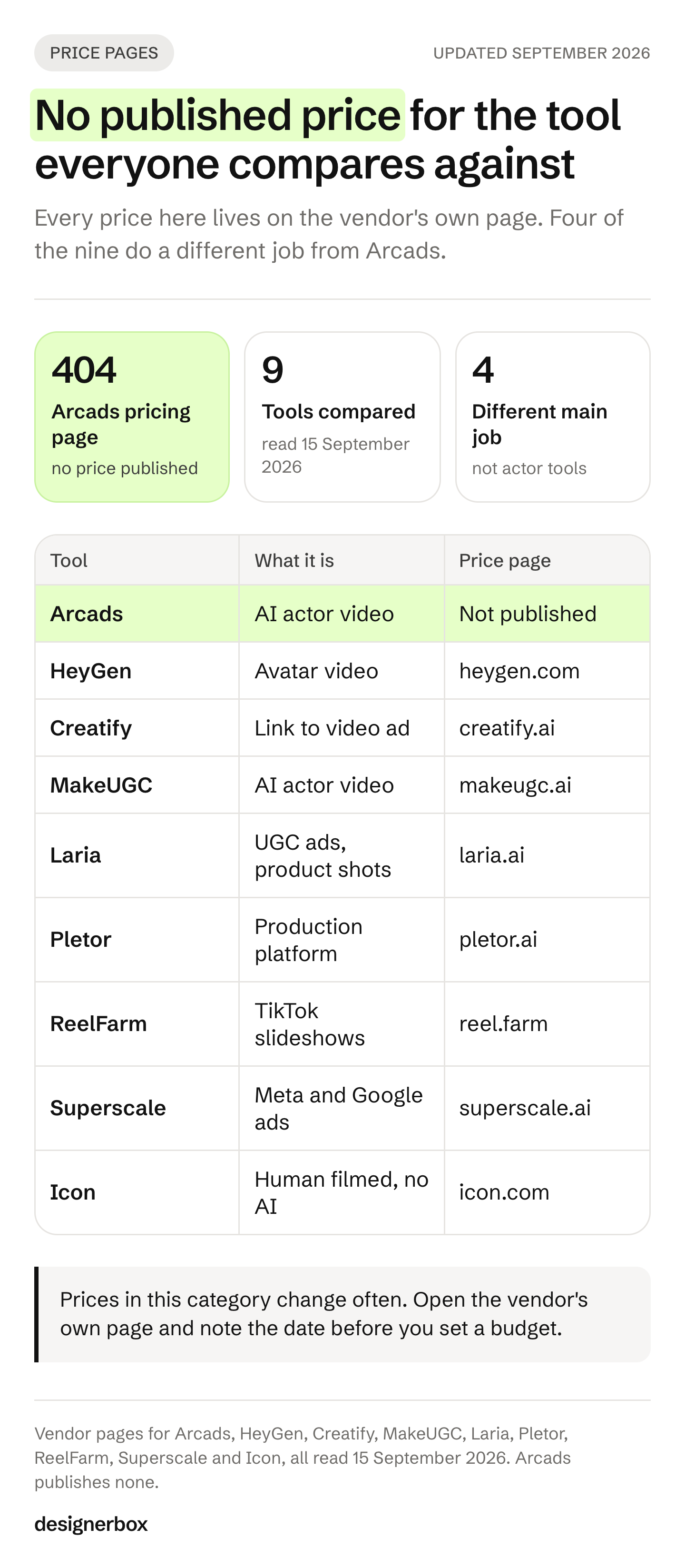
| Tool | What it is | Best for | Where to check the price |
|---|---|---|---|
| Arcads | AI actor video | UGC-style ads from a large library of AI actors | No public pricing page. Ask Arcads |
| HeyGen | Avatar video | Scripted avatar video, with a product placement feature | heygen.com/pricing |
| Creatify | Link to video ad | Turning a product page link into a video ad | creatify.ai/pricing |
| MakeUGC | AI actor video | Actor videos with your product in hand | makeugc.ai/pricing |
| Laria | UGC ads, avatars, product photos and product video | Actor ads and product visuals from one vendor | laria.ai/en/pricing |
| Pletor | Multi-model production platform | Marketing teams that want to build a creative system | pletor.ai/pricing |
| ReelFarm | TikTok slideshow automation | TikTok slideshows posted on a schedule | reel.farm |
| Superscale | Meta and Google ads platform | Ad research, strategy and new ads for Meta and Google in one place | superscale.ai/pricing |
| Icon | Human-filmed UGC ads, no AI | Categories where a real person on camera matters | icon.com/pricing |
All pages were read on 15 September 2026. The vendor’s own page is always the current source for a price.
Checks before you budget
A price in any roundup, this one included, is only as good as the date someone checked it. Before you commit a quarter’s budget to an AI ad tool, run these six checks on the vendor’s own page.

1. Find the vendor’s own price. If a vendor publishes no price, ask for a written quote. A price from a third-party blog is not a quote.
2. Check the billing period. Many pricing pages open on the annual view and show it as a per-month figure. If you read an annual rate as a monthly price, your budget is wrong from the start.
3. Find the full price behind a discount. A discount badge tells you little unless the full price appears next to it. Note whether the offer ends on a date.
4. Read the plan card and the plan table together. On a long pricing page they can disagree. If they do, ask the vendor which one is current.
5. Check what happens at the limit. Some plans pause at the monthly credit limit. Others keep running and charge for each extra credit.
6. Check rollover. Some plans reset credits every month. Others carry unused credits into the next cycle. A plan that resets costs more per finished ad if your volume changes from month to month.
Credits are not a shared unit
Reading the credits column across vendors is the easiest way to get this wrong. The unit means something different at each one.
| Tool | How it counts use |
|---|---|
| Arcads | Talking actor video per minute, per actor. Other models per generation, by model |
| HeyGen | Varies with the AI model, the video length and the complexity |
| Pletor | Per generation, by model and output type. Video by the second |
| ReelFarm | A monthly number of slideshows, plus TikTok formats |
HeyGen deserves a fair note. Its pricing page says credit use “can vary based on which AI model is used, video duration, and the complexity of the generation”. That is honest about a real variable. It also means the credit number alone does not tell you what one video costs.
Sources for the table: intercom.help/arcads, heygen.com/pricing, pletor.ai/pricing and reel.farm, all read 15 September 2026. The fix is the same for every tool. Calculate what one finished ad costs at each vendor, and compare that number.
Can the tool hold your actual product?
Ask this question first. The answer separates the tools less than you might expect, because nearly all of them support it.

Arcads takes a product image and detects the product automatically. Creatify says it can “turn any link into a ready-to-post video” (creatify.ai, September 2026). HeyGen has a Product Placement feature that puts your product photo with an avatar, and its guide says it works best with a handheld or small product (help.heygen.com, September 2026). MakeUGC lists “Product in hand videos” on its plans (makeugc.ai/pricing, September 2026). Laria lists product photos and product video next to its UGC ads (laria.ai, September 2026). Superscale adds your products from a URL you submit (superscale.ai/pricing, September 2026). Pletor turns a product catalog into e-commerce and social visuals. Icon ships your product to real creators.
The exception is ReelFarm. Its homepage says it “automatically sources images from Pinterest”, and we did not find a product-photo feature on its pages (reel.farm, September 2026).
MakeUGC and Superscale both state commercial rights on their own pages. MakeUGC’s terms say you own the output “including after your Subscription ends”, and that you are “solely responsible for verifying rights before commercial use” (makeugc.ai/terms-of-service, effective 17 November 2025, read September 2026). Superscale says you have “full commercial rights to use, modify, and profit from” what its AI makes for your business (superscale.ai/pricing, September 2026).
How to pick
You want a person on camera reading a script, at volume. Start with HeyGen or Creatify, because both list free plans you can test first. Try MakeUGC if the product must sit in the actor’s hand. Arcads states 1,000 or more AI actors, and Creatify lists 1,500 on its Pro plan.
You want the ad platform, not the clip. Superscale and Pletor. Compare them on where the work lives. Superscale connects to your Meta ads account to make new ads and pause the weakest ones (superscale.ai/pricing, September 2026). Its homepage lists campaign launch and scheduling as coming soon. Pletor lists API and MCP access on its plans (pletor.ai/pricing, September 2026).
You want TikTok slideshows posted on a schedule. ReelFarm. None of the actor tools does this job.
You want real humans on camera. Icon. It fits brands whose category or claims need a real person on camera.
You need the same set for every product. An actor clip is one placement for one product. If 40 products each need packshots, on-model shots and sized ad frames, the question changes. It becomes how the same job runs 40 times to the same standard. Our wider roundup of AI UGC video generators covers ten tools, and the Creatify alternatives and HeyGen alternatives comparisons go further on those two. Agencies buying for several clients should start with the agency shortlist, which filters on seats and white label.
DesignerBox fit and limits
DesignerBox is AI creative production for brands and agencies. It is not an actor library. You build a workflow once with a client’s brand, products and rules. Then you run it again on the next product. The cost is shown before each run.
Where the tools above are better: actor library size. Arcads states 1,000 or more AI actors (arcads.ai, September 2026). Creatify lists 1,500 on its Pro plan (creatify.ai/pricing, September 2026). HeyGen lists 700 or more stock video avatars on its paid plans (heygen.com/pricing, September 2026). If your job is casting a face from a large roster and having it read scripts, those tools are built for that, and DesignerBox is not the shortest path. In DesignerBox you build one on-camera person and keep them the same. An avatar run returns nine fixed poses for 25 credits, and a model-creator template is one place to start.
Where DesignerBox fits is the work you repeat every week. Making each ad by hand works for one product. At 200 products, the same manual steps start again for every product. In DesignerBox, a saved workflow runs the same way on the next product. You set the brand once, and the workflow reads it on every run. A colleague can run the same job through an app, which is a workflow with a form. Three critic steps score the results, and best-of-N keeps the best one. Batch runs one workflow over a whole sheet of products.
For ads, static ad templates make ad frames from your product photo. The ads resizer makes one ad in every size the ad platforms need. DesignerBox also has 68 tools over MCP, so an AI chat such as Claude can run it. Templates, workflows, apps, batch, the image editor, the video editor, brand rules and Assets sit in one place. That is the full workflow from the first product photo to the finished ad, in one subscription. The DesignerBox and Arcads comparison page sets the two side by side.
The plan gates matter for an agency. The commercial license starts on the Pro plan. AI video and virtual try-on start on the Premium plan. Team features, shared brand kits, white label and the API are on the Ultra plan, and every plan below Ultra is one seat, so an agency needs the Ultra plan. Plans and credits are on the pricing page.
For an agency, the first job is one workflow per client brand, with that brand’s rules and products. Build it once, run it on the next product, and see the cost before each run. Start with DesignerBox for agencies.
FAQ
How much does Arcads cost per month?
Arcads does not publish a price. Both of its pricing URLs answered HTTP 404 on 15 September 2026, while the homepage loaded. The help center names five plans, from Starter to Business, and gives no dollar figures (intercom.help/arcads, September 2026). Any Arcads price you read elsewhere comes from a third party, so ask Arcads for a written quote before you set a budget.
Is there a free Arcads alternative?
Yes. HeyGen and Creatify list free plans, and Pletor says it is free to start (heygen.com/pricing, creatify.ai/pricing and pletor.ai/pricing, September 2026). ReelFarm lets you make a few TikToks free. Superscale gives free credits when you sign up, then a 5-day free trial. MakeUGC offers a paid trial rather than a free plan (reel.farm, superscale.ai/pricing and makeugc.ai/pricing, September 2026).
How do I compare prices across these tools?
Open each vendor’s own pricing page and note the date. Check whether the price is billed monthly or annually. Check what one credit buys and whether unused credits roll over. Then calculate the cost of one finished ad at each vendor, and compare that number.
Is Icon an AI ad tool?
Its ads are no longer made with AI. Icon says it “originally launched as The AI Admaker”. As of September 2026 it sells human-filmed UGC ads, described on its pricing page as “no AI / 100% real” (icon.com/story and icon.com/pricing, September 2026).
Can these tools show my actual product, or only a generic one?
Almost all of them list a way to show your real product. Arcads detects the product in an image you add. Creatify turns a product link into a video. HeyGen has a Product Placement feature. MakeUGC lists “Product in hand videos”. Laria lists product photos and product video. Superscale adds your products from a URL. Pletor works from your product catalog. ReelFarm is the exception: it sources images from Pinterest, and we did not find a product-photo feature on its pages.
Why do different sites quote different Arcads and Creatify prices?
Four reasons we saw in this category. Annual-billed rates get reported as monthly. Promotional prices get recorded as list prices. Comparison pages go stale after a vendor changes its plans. And Arcads publishes no price to copy in the first place. Check the vendor’s own page and note the date.
Do credits mean the same thing across these tools?
No. Arcads counts talking actor video per minute, per actor. HeyGen says credit use varies with the model, the video length and the complexity. Pletor counts per generation, by model and output type. ReelFarm plans count slideshows. Calculate the cost of one finished ad at each vendor before you compare.
Sources
- Arcads: arcads.ai, arcads.ai/pricing (HTTP 404), arcads.ai/plans (HTTP 404), and the help center at intercom.help/arcads (Getting started, How to buy more credits, How are credits counted, How to show a product in a video, How to use the fashion try-on tool), all read 15 September 2026.
- Creatify: creatify.ai and creatify.ai/pricing, read 15 September 2026.
- HeyGen: heygen.com/pricing and help.heygen.com (Product Placement guide), read 15 September 2026.
- Icon: icon.com/story and icon.com/pricing, read 15 September 2026.
- Laria: laria.ai/en and laria.ai/en/pricing, read 15 September 2026.
- MakeUGC: makeugc.ai/pricing and makeugc.ai/terms-of-service, read 15 September 2026.
- Pletor: pletor.ai and pletor.ai/pricing, read 15 September 2026.
- ReelFarm: reel.farm, read 15 September 2026.
- Superscale: superscale.ai and superscale.ai/pricing, read 15 September 2026.
- DesignerBox plans and credits: DesignerBox pricing page (designerbox.ai/pricing), September 2026.
Feature claims verified from each vendor’s own pages as of September 2026. Prices in this category change often, so check the vendor page before you commit budget. Individual results vary.