
The closest MakeUGC alternatives in October 2026 depend on the job you want done. Arcads and Creatify make AI actor ads. Tagshop AI and JoggAI turn a product link into a video. HeyGen and Synthesia make avatar presenters with translation. Captions and Descript edit footage you filmed yourself. One question sorts all eight: which part of MakeUGC are you replacing?
Most roundups rank these tools from first to last. That ranking hides the real difference between them. A team that needs a presenter in twelve languages and a team that needs captions on real customer clips are not shopping for the same thing.
A note on bias. DesignerBox makes AI creative production software, so we are in this category too. We appear once in this guide, for one job, and we say where the other tools are the better choice. Every feature below comes from the vendor’s own pages, read on 4 October 2026. This guide prints no competitor prices, because they change often. It tells you where each price lives.
Key Takeaways
MakeUGC does more than talking actors. Its site lists talking actors, product in hand video, custom avatars, B-roll, gestures, a video editor and an AI workflow mode (makeugc.ai, October 2026).
The eight alternatives split into four jobs. AI actor ads, video from a product link, avatar presenters with translation, and editing of real footage. For a store on Shopify, our guide to Shopify UGC shows where each kind of video goes.
Language counts differ a lot. Vendor pages state from “more than 30” languages at Arcads to “175+ languages and dialects” at HeyGen (arcads.ai and heygen.com/pricing, October 2026).
Most have a free start. Creatify, HeyGen, Synthesia, JoggAI, Captions and Descript each state a free plan or free sign-up. Arcads states a free trial. MakeUGC offers a paid trial. Our check of 11 free AI UGC video generators covers what each free plan allows.
Two of the eight are editors first. Captions and Descript edit video you already have. They fit when real people film your product.
A fifth job sits outside all eight. Running the same set of assets for every product in a catalog is a workflow job, and the last section covers it.
What MakeUGC AI is and what it does
MakeUGC is an AI video ad maker. You write a script, pick an AI actor and get a creator-style video. Its homepage states the flow as “Write your script -> Pick an avatar -> Generate video” and lists “1000+ realistic AI actors” (makeugc.ai, October 2026).
The product covers more than one format. The site menu names Talking Actor, Custom AI Avatar, B-roll video, Product In Hand, AI Workflows and Gestures video. The product in hand feature is described as “Let any AI actor naturally hold and present your product on camera.” A built-in editor adds captions, music, B-roll and trims. A Video Agent takes a reference video and rebuilds its structure with your product (makeugc.ai, October 2026).
MakeUGC states “50+ Languages” on its languages page (makeugc.ai/languages, October 2026). Its pricing page lists batch mode, product in hand video and separate API plans, and each sits on a named plan. MakeUGC lists its plans on its own pricing page (makeugc.ai/pricing, October 2026). Read that page for the current plan names and what each one includes.
So MakeUGC is a broad actor-video product. Teams still compare tools, usually for one of two reasons. Either they need a format MakeUGC does not center on, such as long presenter video or editing of real footage. Or they want to test a second actor library before they commit.
MakeUGC alternatives by job
The eight MakeUGC alternatives in this guide fall into four jobs. Pick the job first, then compare the two tools inside it.
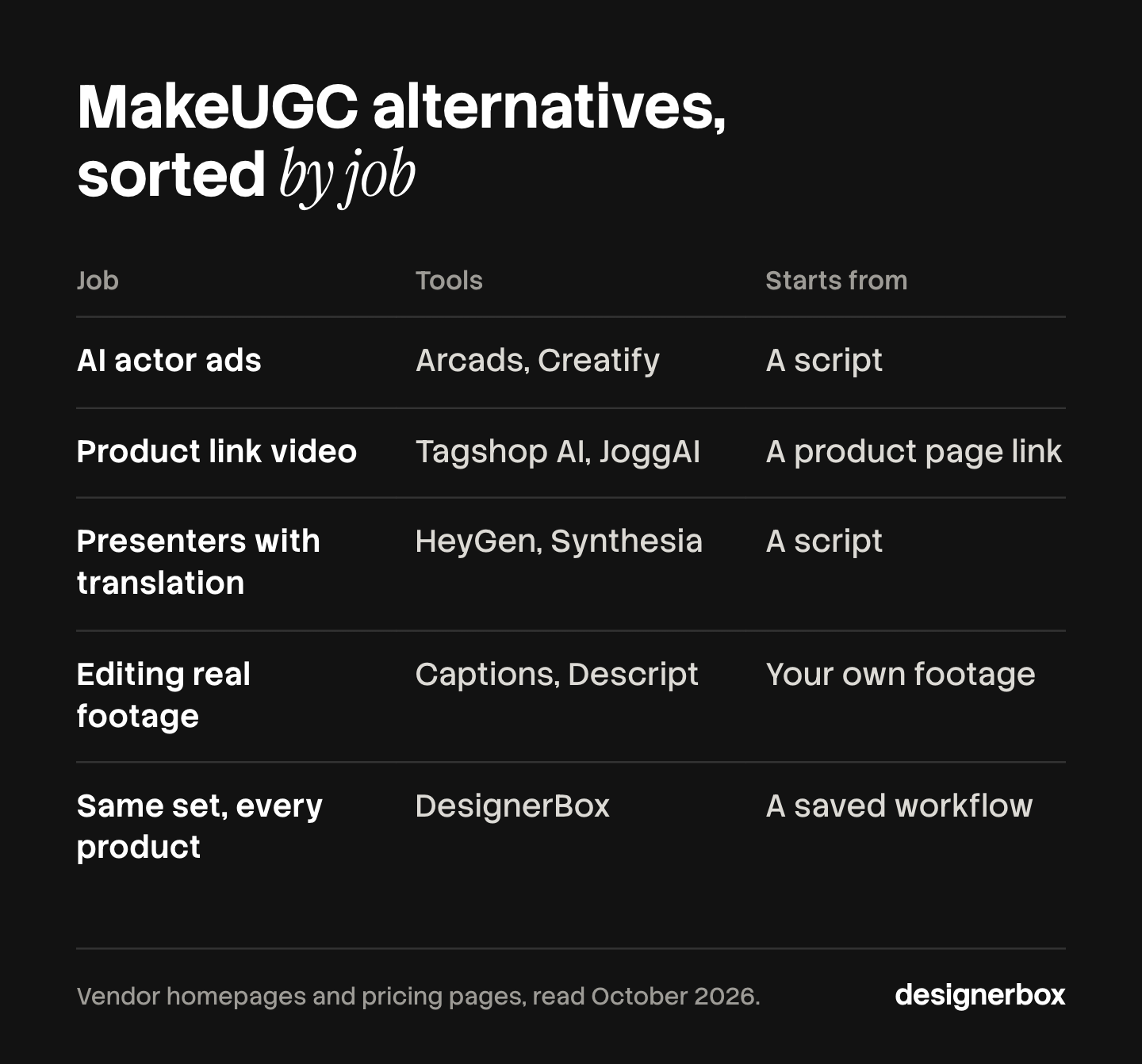
| Job you are replacing | Tools | What you start from |
|---|---|---|
| AI actor ads | Arcads, Creatify | A script |
| Video from a product link | Tagshop AI, JoggAI | A product page link |
| Avatar presenters with translation | HeyGen, Synthesia | A script |
| Editing and captions for real footage | Captions, Descript | Your own footage |
| The same set for every product | DesignerBox | A saved workflow |
Some tools cover more than one job. Creatify also turns a link into a video, and Arcads also translates. The table places each tool under the job its own homepage leads with.
AI actor ads: Arcads and Creatify
These two are the nearest like-for-like substitutes. You bring a script and get a person on camera who reads it.
Arcads
Arcads leads with its actor library. Its homepage says “Use our library of 1,000+ Captivating AI Actors, or create your own AI Avatar” (arcads.ai, October 2026). The same page lists talking actors, unboxing, product showcase, actor swap and video translation, with “Accurate translation in more than 30 languages.” It also names an avatar that holds your product, and one-click B-roll, music, captions and transitions.
Arcads states “Free trial available” on its homepage. We did not find a public pricing page: arcads.ai/pricing returned HTTP 404 on 4 October 2026. Check arcads.ai for its current plans. Our Arcads alternatives comparison covers Arcads in more detail.
Creatify
Creatify is built around ads for online stores. Its homepage says “Turn any link into a ready-to-post video” and names four ways to start: Agent, Ad Flow, URL-to-video, or a blank project (creatify.ai, October 2026). It also lists batch mode, product video, product photos and an API.
Its pricing page lists “1,500 Realistic AI Actors + 3 Custom Avatars” and “75+ Languages” on a paid plan, and a free plan with a smaller actor set (creatify.ai/pricing, October 2026). Plans are on that page. The Creatify alternatives guide goes further on this one.
Outside scope for both: long training or explainer video with slides, and editing of footage you filmed.
Video from a product link: Tagshop AI and JoggAI
These two start from the product page. You paste a link, and the tool reads the images and the description and drafts the video.
Tagshop AI
Tagshop AI describes its link feature this way: “Turn any product link into an AI video in seconds.” Its site also lists an AI Video Agent you brief in a chat, an Ad Clone feature that rebuilds a reference ad with your product, custom avatars, image to video and an image generator (tagshop.ai, October 2026).
Its pricing page lists “300+ AI Avatars” and “75+ Languages”, plus a separate API plan. Tagshop AI lists its plans on its own pricing page (tagshop.ai/pricing, October 2026).
JoggAI
JoggAI calls itself an AI video generator with lifelike AI avatars. Its site menu lists URL to Video, Product Avatar, Product Photo Shoot and Product Video Shoot under AI ads. It also lists a Video Translator, an AI lip sync feature, custom avatars, voice cloning and an API (jogg.ai, October 2026).
JoggAI states “Create For Free” on its homepage. The same menu lists a ChatGPT plugin and a JoggAI MCP, so it can run from an AI chat (jogg.ai, October 2026).
Outside scope for both, on the pages we read: text-based editing of your own long recordings.
Avatar presenters with translation: HeyGen and Synthesia
These two center on a presenter who speaks to camera, often for many markets. They fit explainers, product walk-throughs and localized versions of one script.
HeyGen
HeyGen’s pricing page lists stock video avatars, custom video avatars, photo avatars and voice cloning. Paid plans state “175+ languages and dialects”, and the page describes video translation with lip sync. The feature table also lists Product Placement and a brand glossary for translation (heygen.com/pricing, October 2026).
HeyGen has a free plan. Its plans are on its pricing page (heygen.com/pricing, October 2026). Our HeyGen alternatives comparison covers it in more depth, and the guide to AI lip sync in video ads explains what to check in a translated clip.
Synthesia
Synthesia describes itself as “The complete platform to create, manage, translate and distribute video.” Its pricing page lists AI avatars made from a script, personal avatars, AI video dubbing, “1-Click Translations into 80+ languages”, brand kits and SCORM export for learning systems. The top plan row lists “240+ stock AI Avatars” (synthesia.io/pricing, October 2026).
Synthesia states a free allowance on the same page. It suits training, onboarding and explainer video.
Outside scope for both: the handheld, creator-style ad is not the format either homepage leads with. HeyGen’s Product Placement feature is the nearest match.
Editing and captions for real footage: Captions and Descript
These two are not actor generators first. They fit when a real customer, founder or creator films the product and you need a finished cut.
Captions
Captions describes itself as “AI that edits like a professional editor would.” You add footage and pick a style, and the app cuts scenes and adds B-roll. Its feature list names automatic captions, “Translate and subtitle in 100+ languages”, eye contact correction, noise removal and trimming of pauses and filler words. It also offers AI avatars and an AI twin of yourself (captions.ai, October 2026).
Captions says it is free to sign up, with a subscription for the full feature set. It works on a phone or a computer.
Descript
Descript edits video through the transcript. Its site says “Edit your words to edit your video.” You record or upload, Descript transcribes the recording, and deleting a word deletes that moment of video. The site also lists filler word removal, Studio Sound for audio, captions, clip creation, translation and an AI editor named Underlord (descript.com, October 2026).
Descript states a free plan. It suits interviews, podcasts and long recordings that become short clips.
Outside scope for both: a large library of AI actors that hold your product. If the cut then needs motion graphics or a second pass, our guide on how to edit AI-generated video covers the steps.
Feature presence across the nine tools
This table shows what each vendor states on its own pages. A cell says what is listed. It does not rate quality.
| Tool | People on screen | Your product | Languages stated | Free start |
|---|---|---|---|---|
| MakeUGC | 1,000+ AI actors, custom avatar | Product in hand video | 50+ | Paid trial |
| Arcads | 1,000+ AI actors, own avatar | Avatar holds your product | More than 30 | Free trial |
| Creatify | 1,500 AI actors on a paid plan | Link to video, product video | 75+ | Free plan |
| Tagshop AI | 300+ AI avatars, custom avatar | Link to video, Ad Clone | 75+ | Not stated on the pages read |
| JoggAI | Stock and custom avatars | Link to video, Product Avatar | Video Translator, no count read | Free start |
| HeyGen | Stock, custom and photo avatars | Product Placement | 175+ with dialects | Free plan |
| Synthesia | 240+ stock avatars on the top plan | Not listed | 80+ | Free allowance |
| Captions | AI avatars, AI twin | Your own footage | 100+ | Free sign-up |
| Descript | AI avatars listed | Your own footage | Translation listed, no count read | Free plan |
Sources: makeugc.ai, makeugc.ai/pricing, makeugc.ai/languages, arcads.ai, creatify.ai, creatify.ai/pricing, tagshop.ai, tagshop.ai/pricing, jogg.ai, heygen.com/pricing, synthesia.io/pricing, captions.ai and descript.com, all read on 4 October 2026. “Not listed” means we did not find the feature on the pages we read. It does not mean the tool cannot do it.
Checks before you switch
A feature list tells you what a vendor offers. It does not tell you how a tool handles your product. Run these five checks during the free plan or the trial.

1. Test with your real product. Use the item with the most detail: a printed label, a logo, a pattern. Check that the shape, the text and the colors stay the same from shot to shot.
2. Test your second language. Run one script in the market you sell to next. Watch the mouth, and ask a native speaker to read the captions.
3. Read the billing terms. Find the billing period, what a trial converts to, and how to cancel. The vendor’s pricing page and terms are the only current source.
4. Read the rights terms. A pricing page does not grant rights. The terms of service say who owns the video and what you may use in paid ads.
5. Check the claims your actor makes. In the United States, the FTC says its Consumer Reviews and Testimonials Rule, 16 CFR Part 465, “has no blanket prohibition on the use of AI-generated avatars in marketing” (ftc.gov, accessed October 2026). The rule does cover testimonials that misrepresent a person’s experience with a product. So an AI actor should present the product and should not claim to have used it. This is general information, not legal advice. Our AI UGC ads guide covers the rule and the platform labels in full.
How to pick
You want creator-style actor ads from a script. Compare Arcads and Creatify, and keep MakeUGC in the test. All three state libraries of 1,000 or more AI actors.
You sell many products online and want a first draft from each listing. Compare Creatify, Tagshop AI and JoggAI. All three start from a product link.
You need one script in many languages. Compare HeyGen and Synthesia on the languages you sell in.
Real people already film your product. Compare Captions and Descript. Neither needs an AI actor.
You buy for several clients. Our agency shortlist of AI UGC video tools filters on seats and white label. The wider roundup of AI UGC ad tools covers more names, including several that are not in this guide. DesignerBox also keeps comparison pages for other tools in this category.

A repeatable workflow across many products
DesignerBox is AI creative production for brands and agencies. It fits a fifth job: the same set of assets for every product, to the same standard. Anyone can make an AI picture. Making hundreds that still look like your brand is the hard part.
Where the tools above are better: DesignerBox is not a library of hundreds of AI actors. If your job is to cast a face from a large roster and have it read scripts, MakeUGC, Arcads and Creatify are built for that. HeyGen and Synthesia state far more languages for presenter video. DesignerBox also sends nothing to an ad account. You download the results.
What DesignerBox does have for creator-style video ads: six ready-made avatars, a talking avatar with lip sync, and text to speech. You can also build one on-camera person and keep them the same. An avatar run returns nine fixed poses for 25 credits. The video editor is a real timeline, with several tracks, transitions, animated text and audio. The ad localizer rebuilds one ad in another language, and the ads resizer makes one ad in every size the ad platforms need.
The difference is how the work repeats. You build a workflow once with your brand, your products and your rules. The brand profile is read on every run. A colleague can run the same job through an app, which is a workflow with a form. Batch runs one workflow over a whole sheet of products, to the same standard on row one and row two hundred. The cost is shown before each run. An 8-second clip costs 40 to 560 credits, depending on the model. DesignerBox also has 68 tools over MCP, so an AI chat such as Claude, ChatGPT or Cursor can run it. The full workflow from the first product photo to the finished ad, in one subscription.
The plan gates matter here. Uploading your own photos and the commercial license start on the Pro plan. AI video, virtual try-on, upscaling, the image editor and the video editor start on the Premium plan. Every plan below Ultra is one seat. Plans and credits are on the pricing page.
There is a free plan, and it runs on sample products. Get started free.
FAQ
What is MakeUGC AI?
MakeUGC is an AI video ad maker. You write a script, pick an AI actor and get a creator-style video. Its site lists talking actors, product in hand video, custom avatars, B-roll, gestures video, a video editor and an AI workflow mode, with “1000+ realistic AI actors” and “50+ Languages” (makeugc.ai and makeugc.ai/languages, October 2026).
What are the best MakeUGC alternatives?
It depends on the job. For AI actor ads, compare Arcads and Creatify. For video from a product link, compare Tagshop AI and JoggAI. For avatar presenters with translation, compare HeyGen and Synthesia. For editing real footage, compare Captions and Descript. No single tool leads on all four jobs.
Is there a free MakeUGC alternative?
Several alternatives state a free start on their own pages. Creatify, HeyGen and Descript list free plans. Synthesia lists a free allowance, JoggAI says “Create For Free”, and Captions is free to sign up. Arcads states a free trial (vendor pages, October 2026). Free plans come with limits, so read each pricing page.
How much does MakeUGC cost?
MakeUGC lists its plans on its own pricing page (makeugc.ai/pricing, October 2026). This guide does not reprint competitor prices, because they change often. Open the page, note the date, and check the billing period and what the trial converts to before you pay.
Which MakeUGC alternative shows my real product?
Most of them list a way. Arcads names an avatar that holds your product. Creatify, Tagshop AI and JoggAI build a video from your product link. HeyGen lists Product Placement. Captions and Descript work on footage of the real product. Test each one with your most detailed item before you choose.
Can an AI actor give a testimonial in an ad?
The FTC says its rule has no blanket ban on AI avatars in marketing. The rule does cover testimonials that misrepresent a person’s experience with a product (ftc.gov, accessed October 2026). An AI actor should present the product and should not claim to have used it. Meta and TikTok also have labels for AI content.
Where does DesignerBox fit among these tools?
DesignerBox fits when the job is the same set of assets for every product. You build a workflow once and run it on each product, and you see the cost before each run. It is not a large actor library, and AI video starts on the Premium plan. For casting from hundreds of faces, the actor tools are the better choice.
Sources
- MakeUGC: makeugc.ai, makeugc.ai/pricing and makeugc.ai/languages, read 4 October 2026.
- Arcads: arcads.ai, and arcads.ai/pricing (HTTP 404), read 4 October 2026.
- Creatify: creatify.ai and creatify.ai/pricing, read 4 October 2026.
- Tagshop AI: tagshop.ai and tagshop.ai/pricing, read 4 October 2026.
- JoggAI: jogg.ai, read 4 October 2026.
- HeyGen: heygen.com/pricing, read 4 October 2026.
- Synthesia: synthesia.io/pricing, read 4 October 2026.
- Captions: captions.ai, read 4 October 2026.
- Descript: descript.com, read 4 October 2026.
- FTC, Consumer Reviews and Testimonials Rule: Questions and Answers, accessed October 2026.
- 16 CFR Part 465, Rule on the Use of Consumer Reviews and Testimonials, ecfr.gov, accessed October 2026.
- DesignerBox plans and features: DesignerBox pricing page (designerbox.ai/pricing), October 2026.
Feature claims verified from each vendor’s own pages as of October 2026. No competitor prices are printed. Check the vendor page before you commit budget. Individual results vary.