





Shopify UGC is creator-style or customer-made content that a Shopify store uses to sell its products. It is three separate jobs. First you get the footage, from a real creator or an AI presenter. Then you put it on the product page. Then you run it as an ad on Meta or TikTok. Each job has its own settings in Shopify and its own limits.
The tool question comes last. The three jobs use three different sets of plumbing, and a tool does only one of them. A video on your product page does nothing in Ads Manager until you upload it there.
This guide is for a Shopify brand with 20 to 500 products, and for the agency that runs its ads. Every platform fact comes from a Shopify, Meta or TikTok help page read in October 2026. The guide prints no vendor prices.
Key Takeaways
- Shopify UGC is three jobs. Getting the footage, showing it on the product page and running it as an ad are set in three different places.
- Shopify Collabs is an affiliate program. Shopify describes commissions, gifts and discount codes. Agree the right to use a creator’s video as an ad separately, in writing.
- A product page video has four limits. Shopify allows up to 10 minutes, 1 GB and 4K, in .mp4, .mov or .webm.
- The sales channels sync products, and the video goes in by hand. You build the ad in Meta Ads Manager or TikTok Ads Manager.
- An ad from a creator’s handle needs that creator. Meta partnership ads and TikTok Spark Ads both need permission from a real account.
What is Shopify UGC?
Shopify UGC is user-generated content used by a store that runs on Shopify. The term covers two things. One is content customers made without being asked, such as a review photo or a tagged post. The other is a paid or generated video filmed to look that way. Stores use both on product pages and in paid social ads.
Shopify has no single feature called “UGC”. It has separate parts: an affiliate app for creators, a media section on each product, an App Store with video apps, and sales channels for Meta and TikTok.
The three jobs of Shopify UGC
The three jobs are getting the footage, putting it on the product page and running it as an ad. Each job needs different inputs, is set in a different part of Shopify and meets a different platform limit.
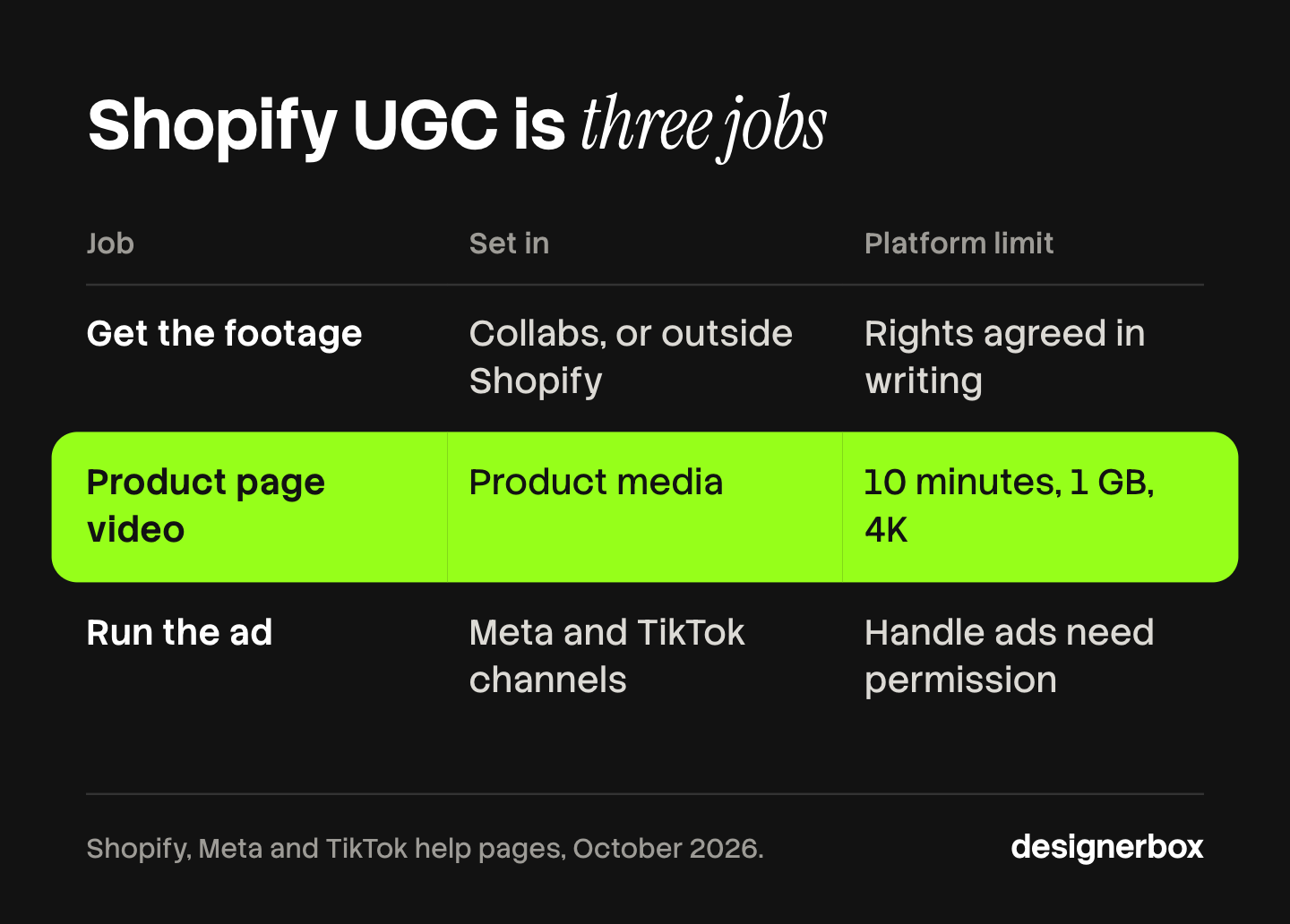
| Job | What you need | Where it is set in Shopify | What the platform limits |
|---|---|---|---|
| 1. Get the footage | A creator and a brief, or a script and an AI presenter | Shopify Collabs for affiliates. Other sources sit outside Shopify | Collabs covers commissions, gifts and discount codes. Usage rights are your own agreement |
| 2. Put it on the product page | A video file, or a YouTube or Vimeo link | Products, then the media section of each product. A shoppable gallery uses an app | 10 minutes, 1 GB, 4K, and .mp4, .mov or .webm |
| 3. Run it as an ad | An ad account, a synced catalog, and a creator’s permission for handle ads | The Facebook & Instagram and TikTok sales channels | Ads are built in Meta Ads Manager and TikTok Ads Manager. Handle ads need an ad code |
Job 1: how do you get UGC footage for a Shopify store?
You get UGC footage from one of three sources: a creator you recruit through Shopify Collabs, a creator you hire through a marketplace, or an AI generator that makes a presenter. Each source gives you a different kind of video and a different set of rights.

Shopify Collabs
Shopify Collabs is Shopify’s own app for working with creators. Shopify says it “helps businesses and creators connect using a marketplace-style app” (help.shopify.com, read October 2026). Stores can use it “to send gifts or discount codes, track affiliate sales, and send payments to their affiliates”. The app is free to install. Commission payments carry a 2.9% payment processing fee, paid by the merchant (shopify.com, read October 2026).
Two points matter for UGC. The pages we read do not describe a license to use a creator’s video in your own ads, so agree that in writing with each creator. And in October 2026 the help page carried a note: “Collabs isn’t accepting new creator signups at this time.” Merchants can still send direct invites, the note says.
Creator marketplaces
A creator marketplace pays a real person to film your product. Billo is one example. Its homepage lists “Human creators people trust” and “Ad-ready delivery” (billo.app, October 2026). Our guide to UGC platforms in three kinds compares six marketplaces on usage rights and ad codes.
AI UGC generators
An AI UGC generator makes a creator-style video from a script and a presenter. No product is shipped. Three examples, each read on the vendor’s own site in October 2026:
- Creatify starts from a product link. Its page says: “Paste Your Product URL”, and adds that it can re-render ads “in 29+ languages” (creatify.ai/features/url-to-video).
- Arcads offers a “library of 1,000+ Captivating AI Actors, or create your own AI Avatar” (arcads.ai).
- HeyGen has a video translator. Its page title reads “Translate Videos into 175+ Languages” (heygen.com/translate).
We compare this kind tool by tool in our guide to AI UGC video generators.
Only a real creator has a handle to run an ad from. Only a real user can describe a personal result.
Job 2: how do you put UGC video on a Shopify product page?
You add a video to a Shopify product in the product’s media section, next to the images. Shopify accepts an uploaded file or a YouTube or Vimeo link. The theme must support video. For a gallery where shoppers add to cart from the video, stores use an app from the Shopify App Store.
Shopify’s help page gives the limits for an uploaded product video (help.shopify.com, read October 2026):
| Limit | What Shopify states |
|---|---|
| Length | Up to 10 minutes |
| File size | Up to 1 GB |
| Resolution | Up to 4K (4096 x 2160 px) |
| File type | .mp4, .mov or .webm |
| Embeds | YouTube or Vimeo links only |
| 3D models | GLB or USDZ, up to 500 MB |
In browsers that support streaming, the video displays at 480p, 720p or 1080p, depending on the viewer’s connection. A short creator clip is far inside the limits.
Shoppable UGC apps
Shoppable UGC is video with products tagged inside it. Shopify’s product media page does not describe product tags inside a video, so stores use an app. Two examples from the Shopify App Store, both read in October 2026:
- Tolstoy imports “Instagram Reels, TikTok videos, and UGC”, and lets you “publish shoppable video galleries on product pages, your homepage, collections, and Shop App” (apps.shopify.com/tolstoy).
- Videowise offers a “UGC video gallery” and says you can import from Instagram or TikTok, or upload files to a media library (apps.shopify.com/videowise).
An app of this kind loads extra code on the page, so test page speed before and after. Our guide to Shopify product page optimization covers where video sits among the other page elements.
Job 3: how do you run UGC ads for a Shopify store?
You run UGC ads for a Shopify store through two sales channels, Facebook & Instagram and TikTok. Each channel syncs your products to the ad platform, and you build the ad in the platform’s own ads manager. An ad from a creator’s handle also needs that creator’s permission.
The Facebook & Instagram channel
Shopify says the channel syncs “your products to a catalog on Facebook and Instagram” (help.shopify.com, read October 2026). It holds “a single product catalog for shops on Facebook and Instagram, and for using with ads” (help.shopify.com, read October 2026).
The channel syncs products, and your UGC videos stay where they are. Shopify’s marketing page says: “For ad creation across the Facebook, Instagram, Messenger or Audience Network, use Meta’s Ads Manager” (help.shopify.com, read October 2026). You upload the video there.
The TikTok channel
Shopify says the TikTok sales channel connects to TikTok Shop and syncs “catalog, inventory, fulfillment, and orders between Shopify and TikTok Shop” (help.shopify.com, read October 2026). The app’s listing adds two ad features: “Create TikTok ads in minutes with your own images or videos” and a “1-click TikTok Pixel integration” (apps.shopify.com, read October 2026).
Ads from a creator’s handle
Two formats let a UGC ad run under the creator’s name. Both need a real account.
On Meta the format is the partnership ad. Meta says “advertisers need permission from the partner whose handle the ad will include”, and that partners “can revoke these permissions at any time” (facebook.com, read October 2026). Permission is given for one post, with a partnership ad code, or for the whole account.
On TikTok the format is Spark Ads. TikTok says Spark Ads can use “organic posts made by other creators (with their authorization)” (ads.tiktok.com, read October 2026). The creator makes a video code and picks how long it works: 7, 30, 60 or 365 days (ads.tiktok.com, read October 2026).
Ask for the code in the brief, with its duration, before the creator films. A video from an AI generator has no creator account, so it runs from your brand’s own handle. Our guide to video hooks covers the opening seconds.
What do “product URL” tools read from a Shopify store?
A “product URL” tool reads your public product page and drafts a video from it. You paste the link, and the tool takes what the page shows: the title, the images and the description. It then writes a script and builds a first cut.
Creatify describes the step in its own words: “Our AI analyzes your product details, features, benefits, and key selling points” (creatify.ai/features/url-to-video, October 2026). Billo’s homepage offers to “turn any product link into instant video briefs” for human creators (billo.app, October 2026).
The script is only as good as the page. Two checks before you approve a draft:
- Claims. A claim in your product description becomes a claim in the ad. Check that each one is true and that you can prove it.
- Variants. A page with ten colors may send the wrong one. Name the variant in the brief.
What may each kind of UGC say?
Each kind of UGC may say what is true for the person on camera. A paid creator must disclose the payment. A generated presenter cannot claim a personal experience. Two FTC texts set these limits in the United States. This section is general information, not legal advice.
A paid or gifted creator discloses the connection. The FTC’s Endorsement Guides say a material connection “must be disclosed clearly and conspicuously”. Connections “can include monetary payment or the provision of free or discounted products” (ecfr.gov, 16 CFR 255.5, read October 2026). A Collabs gift or a commission is that kind of connection.
No testimonial may come from a person who does not exist. The FTC rule on reviews and testimonials bans a testimonial that misrepresents “that the reviewer or testimonialist exists”, or that the person “used or otherwise had experience with the product” (ecfr.gov, 16 CFR 465.2, read October 2026).
So an AI presenter can demonstrate and explain. It cannot say “I used this for a month”. Our guide to AI UGC ads and the FTC rule covers the line in depth.
A working order for Shopify UGC
Plan the three jobs backwards. Start from the ad, then the page, then the footage.
- Pick the ad format. Decide between an ad from your brand’s handle and an ad from a creator’s handle. The second needs a real creator and a code.
- Write what the ad may claim. A personal result needs a real user. Product facts need only proof.
- Choose the source. Use a creator for testimonials and handle ads. Use a generator for many variants of one demo.
- Set the rights in writing. State where the video may run, for how long, and whether paid ads are included.
- Upload to both places. Add the file to the product’s media in Shopify, and upload the same file in the ads manager.
Cost belongs in step 3. Our UGC ads cost guide sets out how each production route charges.

Creator-style video ads as a saved workflow
DesignerBox is AI creative production for brands and agencies. In this guide it sits in job 1, on the generated side, and it does the part that repeats. Anyone can make an AI picture. Making hundreds that still look like your brand is the hard part.
You set the brand rules once. A saved workflow reads them on every run: the same presenter, the same script rules, the same sizes. You run that workflow on each new product. Batch runs it over a sheet of up to 200 rows. You see the cost before each run. An 8-second clip costs 40 to 560 credits, depending on the model.
The video editor is a real timeline. It has several tracks, transitions, animated text and audio. You cut the hook variants there. The full workflow from the first product photo to the finished ad, in one subscription. The AI UGC page shows the presenter workflow, and a second page covers AI product images for Shopify stores.
Uploading your own photos and the commercial license start on the Pro plan. AI video, virtual try-on, upscaling, the image editor and the video editor start on the Premium plan. Plans and credits are on the pricing page.
When another tool fits better
- You need a real creator or a testimonial. DesignerBox does not source creators, so it cannot supply a partnership ad code or a Spark Ads code. A generated presenter shows and explains the product.
- You need video hosted or published on the store. DesignerBox does not host shoppable video, and it does not publish to a store or a channel. You download the results, or send them with a webhook or an S3 step.
- Your team needs several seats. Every plan below Ultra is one seat. Team features, shared brand kits and white label are on the Ultra plan.
A free plan for your first run
There is a free plan, and it runs on sample products. It does not make video. Use it to see how a workflow and its cost line work before you choose a plan.
FAQ
What is Shopify UGC?
Shopify UGC is creator-style or customer-made content that a Shopify store uses on product pages and in ads. It covers three jobs: getting the footage, putting it on the product page, and running it as an ad through the Meta and TikTok sales channels.
Is there a Shopify UGC app?
There is no single one. Shopify Collabs recruits creators as affiliates. Apps such as Tolstoy and Videowise add shoppable video galleries to product pages. The Facebook & Instagram and TikTok sales channels sync your catalog for ads.
How long can a product video be on Shopify?
Shopify allows an uploaded product video of up to 10 minutes and up to 1 GB, at up to 4K resolution. The file must be .mp4, .mov or .webm. You can also embed a YouTube or Vimeo link.
Does Shopify Collabs give me the right to use a creator’s video in ads?
The Shopify pages we read in October 2026 describe commissions, gifts, discount codes and payments. They do not describe a content license. Agree usage rights with each creator in writing.
Can I make Shopify UGC ads in DesignerBox?
You can make creator-style product video ads with a generated presenter. The cost is shown before the run, and AI video starts on the Premium plan. DesignerBox does not source real creators. You download the finished file and add it to your store and your ad account yourself.
Sources
- Shopify Help Center, Shopify Collabs: what it is, invites, open access, gifts, discount codes, payments, the creator signup note (help.shopify.com, read October 2026)
- Shopify, Collabs for merchants: free to install, the 2.9% processing fee on commission payments, eligible plans (shopify.com, read October 2026)
- Shopify Help Center, product media types: video length, size, resolution, file types, embeds, streaming resolutions, 3D models, supported themes (help.shopify.com, read October 2026)
- Shopify Help Center, Facebook and Instagram by Meta: catalog sync, free with all plans (help.shopify.com, read October 2026)
- Shopify Help Center, requirements and considerations for Facebook and Instagram by Meta: one catalog for shops and ads (help.shopify.com, read October 2026)
- Shopify Help Center, marketing on Facebook and Instagram: ads are created in Meta’s Ads Manager (help.shopify.com, read October 2026)
- Shopify Help Center, setting up TikTok Shop: what the TikTok sales channel syncs (help.shopify.com, read October 2026)
- Shopify App Store, TikTok app listing: ads from your own images or videos, pixel integration (apps.shopify.com, read October 2026)
- Meta Business Help Center, partnership ad permissions (facebook.com, read October 2026)
- TikTok Business Help Center, Spark Ads: creator authorization (ads.tiktok.com, read October 2026)
- TikTok Business Help Center, Spark Ads authorization periods (ads.tiktok.com, read October 2026)
- FTC Endorsement Guides, 16 CFR 255.5 (ecfr.gov, read October 2026)
- FTC rule on consumer reviews and testimonials, 16 CFR 465.2 (ecfr.gov, read October 2026)
- Vendor pages, read October 2026, not linked: billo.app, creatify.ai/features/url-to-video, arcads.ai, heygen.com/translate, apps.shopify.com/tolstoy, apps.shopify.com/videowise
- DesignerBox AI UGC, batch, video editor and pricing pages, October 2026
Shopify, Meta and TikTok rules verified on each platform’s own help pages, and vendor features on each vendor’s own page, in October 2026. Platform rules change often, so check each page before you plan a campaign. Individual results vary.


