AI tools for dropshipping cover six jobs: finding products, setting up the store, writing product copy, making product images and ads, answering customers, and sending email. The useful ones in September 2026 include Sell The Trend and Dropship.io for research, AutoDS and Spocket for the store, and Shopify Magic for copy. Photoroom, Claid, Canva or DesignerBox make the images. Each result still needs one check from you.
That check matters more in dropshipping than in most stores. A store that runs on supplier products has never held most of what it sells. So the AI writes about a product you have not seen, pictures it in a scene you did not shoot, and promises a delivery date your supplier sets.
This guide sorts 13 tools by the job they do, in the order a new store meets them. For each job it names what the AI does, what you still check, and the rule behind the check. It is written for a one-person or small store team, on Shopify or a similar platform.
Key Takeaways
- Six jobs, not one tool. No single AI tool runs a dropshipping store. Research, store setup, copy, images, support and email each have their own tools.
- AI finds demand, not margin. Research tools show what sells. A sample order shows what arrives and how long it takes.
- Every delivery promise is yours. Under the FTC’s Mail Order Rule, you ship in the time you state, or within 30 days when you state none.
- Copy is your claim. Shopify says you are responsible for the accuracy of the descriptions its AI writes. The FTC wants proof before a claim runs.
- Images must match what ships. Restage the supplier photo, but never change the product itself. You also need the right to use that photo.
- One look across every product. Supplier photos arrive in many styles. A saved workflow gives each new product the same background, crop and light.
- Start with three tools. A research tool, your store platform’s built-in AI, and one image tool cover most of a new store’s work.
AI tools for dropshipping by job
The table sorts the 13 tools by the job they do. The last column is the check that stays with you, whatever the tool.
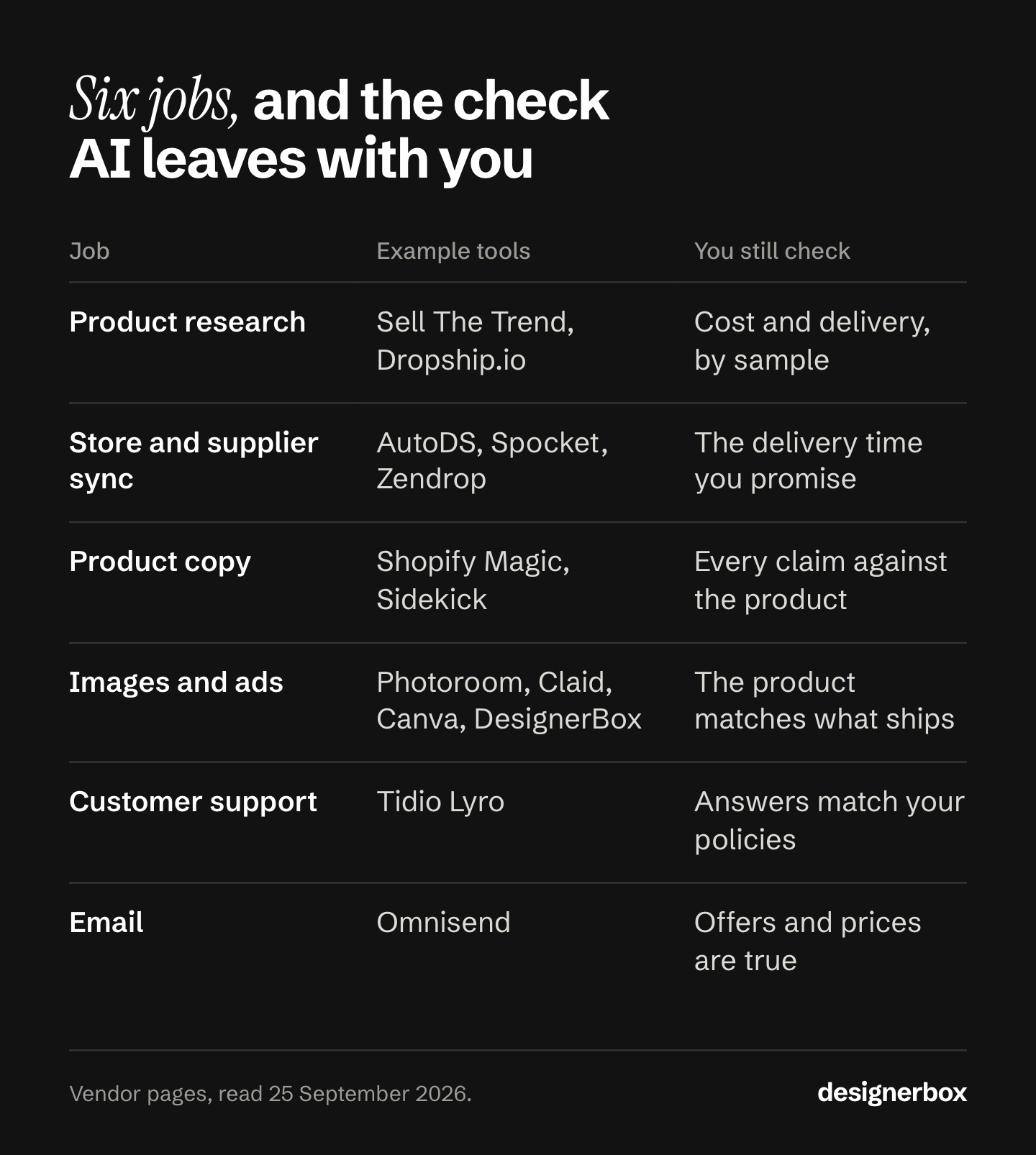
| Job | Tools | What the AI does | What you still check |
|---|---|---|---|
| Product research | Sell The Trend, Dropship.io, Minea | Finds products and ads that sell now | Landed cost and delivery time, with a sample |
| Store setup and supplier sync | AutoDS, Spocket, Zendrop | Builds a store, imports products, syncs stock | The delivery time you promise |
| Product copy | Shopify Magic and Sidekick | Writes titles and descriptions | Every claim, against the real product |
| Product images and ads | Photoroom, Claid, Canva, DesignerBox | Removes backgrounds, builds scenes, makes ad sizes | The product looks like what ships |
| Customer support | Tidio Lyro | Answers questions from your own content | The answers match your policies |
| Omnisend | Writes emails and builds segments | Offers and prices are true |
Tool features in this guide were read on each company’s own pages on 25 September 2026. No tool here paid to appear, and DesignerBox is our own product. Plans and prices change often, so check each tool’s pricing page before you buy.
Product research: Sell The Trend, Dropship.io and Minea
AI research tools read sales and ad data across many stores and show you which products are selling now. They answer “what do people buy?” They do not answer “can I sell it at a profit and deliver it on time?” A sample order answers that.
Sell The Trend uses an AI engine called NEXUS. The company says it analyzes “26+ data signals across 11 million products and 83 niches”, and you can filter by profit margin, competition level and supplier location (sellthetrend.com, September 2026). It fits a store owner who wants a shortlist of products with the supplier already attached.
Dropship.io has Magic AI Search. You upload an image, a video or a link, and it finds matching products and ads in its database (dropship.io, September 2026). It fits the moment you see a product in an ad and want to know who else sells it.
Minea is an ad research tool. It tracks ads across networks, and its plan table lists Meta ads and TikTok ads (minea.com, September 2026). It fits a store that picks products from the ads that already run. Ad spy tools compares it with the free ad libraries.
The check. A research tool shows a supplier’s listed price and a trend line. It cannot show the real product color, the packaging or the delivery time to your buyer. Order one sample of each product you plan to test. That sample also gives you a real photo, which matters in the image job below.
Store setup and supplier sync: AutoDS, Spocket and Zendrop
These tools connect your store to suppliers. They import products, keep stock levels in sync and send orders to the supplier. Some also build a first version of the store for you.

AutoDS builds a Shopify store after you pick a niche, with products, product pages and a theme already in place. It also imports products and has an AI tool that writes titles and descriptions in a tone you choose (autods.com, September 2026). It fits a first store that needs to go live fast. It has no free plan, and its trial is paid.
Spocket says it “connects you with top-rated US and EU suppliers”, and it also offers AliExpress and Alibaba dropshipping. It has an AI store builder (spocket.co, September 2026). It fits a store that wants shorter delivery times to US and European buyers.
Zendrop offers a prebuilt store with a theme and products. Its own page says people on its product team pick those products (zendrop.com, September 2026). It also has a free plan.
The check: the delivery time you promise. A supplier app shows an estimated delivery window. The promise on your product page is yours.
Under the FTC’s Mail, Internet, or Telephone Order Merchandise Rule, you must ship within the time you clearly state. If you state no time, you must ship within 30 days. If you cannot ship on time, you must ask the buyer to accept the delay or cancel for a prompt refund (ftc.gov, September 2026). So set the delivery time on your page from your sample order, not from the supplier’s best case. This is general information, not legal advice.
Product copy: Shopify Magic and Sidekick
Shopify Magic writes product description suggestions from details you give it, such as a product title and keywords. Sidekick is an AI helper in the Shopify admin. You ask in plain words, and it edits products, looks at your data and writes descriptions (help.shopify.com, September 2026). Both sit inside the admin, so a Shopify store needs no separate copy tool to start. The fields that copy goes into, and the limit on each, are in Shopify product page optimization.
Shopify’s own help page for Magic is clear about who owns the words: “You’re responsible for the accuracy of all of the content that you publish” (help.shopify.com, September 2026). An AI tool writes from the supplier listing. It does not know if the fabric is really cotton or if the battery really lasts ten hours.
The check: every claim against the product. The FTC says ads must be truthful and not deceptive, and advertisers “must have evidence to back up their claims” before the ad runs (ftc.gov, September 2026). A product page is advertising. Read each AI description once. Delete any material, size, result or safety claim that your sample or the supplier’s written spec does not support.
The same rule applies to reviews. The FTC’s rule on consumer reviews covers reviews by people who do not exist, “such as AI-generated fake reviews” (ftc.gov, August 2024). The maximum civil penalty is $53,088 per violation, and the FTC kept that level for 2026 (Federal Register, September 2026). Never let an AI tool write reviews for your store.
Product images and ads: Photoroom, Claid, Canva and DesignerBox
Every store that sells a supplier’s product gets the same supplier photo. So three stores in three browser tabs show one photo three times, and the buyer compares price. Image tools restage that photo: new background, new scene, new crop, same product. To compare image tools on your own products before you pay for one, see an AI proof of concept for product images.
Photoroom removes the background and puts the product on a studio-style backdrop, or on a background its AI makes. Batch editing applies the same background, effects or resizing to hundreds of images (photoroom.com, September 2026). It fits a store that wants clean images fast.
Claid makes AI product photoshoots and backgrounds, and it sharpens and fixes color. It also offers APIs for background generation, upscaling, image to video and AI fashion models (claid.ai, September 2026). It fits a store with a developer who wants images made through an API.
Canva covers design broadly. Magic Edit changes part of a photo from a short text, and its pricing page lists background removal and background generation under the Pro plan (canva.com, September 2026). It fits a store that already makes its ad layouts in Canva.
DesignerBox is our own product, so read this paragraph with that in mind. You build a workflow once with your background, crop, light and brand rules, then run it on each new product. The same workflow makes the listing images and the ad sizes. It fits a store that adds products every week and wants each one to look like the rest. DesignerBox for solo founders shows this setup for a one-person brand.
The check: the product must match what ships. Changing the background is presentation. Changing the product’s color, adding a detail or showing a size you have not measured is a claim you cannot support. You also need the right to use the supplier’s photo. In the US, copyright exists in a photo as soon as it is made (copyright.gov, September 2026), and only the owner can make or allow an adapted version (copyright.gov, September 2026). Ask the supplier for written permission. Dropshipping product photos covers where restaging ends and misdescribing starts.
Ads add one more check. Meta’s advertising standards prohibit commercial practices “such as deceptive pricing, unauthorized endorsements, and guaranteed investment returns” (transparency.meta.com, September 2026). In a dropshipping ad, the usual risk is a crossed-out “was” price that the store never charged. AI video ads for dropshipping covers the video side, and the AI ad generator makes static ads from a product photo.
Customer support and email: Tidio Lyro and Omnisend
Tidio Lyro is an AI agent that answers customer questions from your own knowledge base, across several channels. For online stores it also recommends products from your catalog (tidio.com, September 2026). Buyers ask where their order is every day, so this job suits an agent.
Omnisend uses AI to write emails and subject lines, add product recommendations, build segments from a plain-language description, and make signup forms. Its free plan includes the AI writing and segment features (omnisend.com, September 2026).
The check: the answers match your policies. A support agent answers from what you give it. If your knowledge base says “delivery in 5 to 7 days” and your supplier ships in 12, the agent repeats a promise the Mail Order Rule holds you to. Put the delivery time from your sample order into the knowledge base. Check every discount in an AI email against the real price history, for the same reason as the “was” price above.
Which AI tools should a new dropshipping store start with?
Start with three: one research tool, your store platform’s built-in AI, and one image tool. Add support and email tools once orders arrive every day. A new store with no orders has no support questions to answer and no list to email.
AI use is already normal among store owners. In Shopify’s Q4 2025 survey of store owners, 75% of business owners said they used AI tools, and content generation was the top use at 69% (shopify.com, September 2026). So using AI does not set a store apart. What sets it apart is what the AI makes, and whether it is true.
| Stage | Add this job | Why now |
|---|---|---|
| Before launch | Product research | You need products before you need anything else |
| Before launch | Product copy and images | Every product page needs both on day one |
| First orders | Store and supplier sync | Manual orders stop working after a few a day |
| Daily orders | Customer support | ”Where is my order?” becomes a daily question |
| A list of buyers | You have past buyers to write to |
If you want to go further than dropshipping tools, AI ecommerce automation tools sorts the wider store jobs by what to automate first.
One look across every product
Anyone can make an AI picture. Making hundreds that still look like your brand is the hard part. Supplier photos come from many factories, in many styles. A store that uses them as they arrive looks like a reseller, and buyers compare it on price.
In DesignerBox you build the look once as a workflow: one background, one crop, one light, your logo and your colors from the brand profile. Then you run that workflow on each new product. The workflow reads the same rules on every run, so product forty matches product one.
Batch runs the workflow over a whole sheet of products, and you review the results in one pass. Critic steps score each result, and the best one is kept.
The image editor makes one edit after another, and the picture keeps its detail and resolution. The video editor turns the same product into a short ad. The full workflow from the first product photo to the finished ad, in one subscription.
One limit matters for a store. You download the results, or send them with a webhook or an S3 step, and then add them to your product pages. If you want images to reach your store with no download step, check how each image tool delivers its results.
Uploading your own photos and the commercial license start on the Pro plan. AI video, the image editor and the video editor start on the Premium plan. Plans and credits are on the pricing page, and the Shopify stores page shows the product images a workflow makes.
The first job, built once
Start from a template, add your brand and your products, and run it. The cost is shown before the run. See the templates.
FAQ
What are the best AI tools for dropshipping?
The best tool changes with the job. Sell The Trend and Dropship.io find products. AutoDS, Spocket and Zendrop build the store and sync suppliers. Shopify Magic writes copy. Photoroom, Claid, Canva and DesignerBox make product images and ads. Tidio Lyro answers customers, and Omnisend writes email. Most new stores need three of these, not all of them.
Can AI run a dropshipping store on its own?
No. AI tools can find products, write copy, make images and answer questions. You still own every claim, every image and every delivery promise on the store. Under US rules the store is responsible for what it says, whether a person or an AI wrote it.
Are there free AI tools for dropshipping?
Yes. Shopify Magic is inside the Shopify admin. Zendrop, Omnisend and Canva have free plans, though Canva lists background removal under its Pro plan. Sell The Trend, Dropship.io, Tidio, Photoroom and Claid offer free trials. AutoDS has a paid trial only. Check each pricing page, because plans change often.
Can I use supplier photos with AI image tools?
Only with permission from the photo’s owner. A photo on a supplier listing is usually copyrighted, and an edited version needs the owner’s permission too. Ask the supplier in writing and keep the answer. Then you can restage the photo, as long as the product itself stays unchanged.
Can I use AI to write product reviews for my store?
No. The FTC’s rule on consumer reviews covers fake reviews, including AI-generated reviews by people who do not exist. The maximum civil penalty is $53,088 per violation. Collect real reviews from real buyers instead.
How do I make a dropshipping store look different from competitors?
Give every product the same background, crop and light, and add scenes the supplier never shot. A saved image workflow does this for each new product. Consistency across the whole store does more than one polished photo.
Is AI dropshipping legal?
Dropshipping and AI tools are both legal. The same consumer rules apply as in any store: truthful product claims, real reviews, honest prices and the delivery times you promise.
Sources
- FTC, Business Guide to the Mail, Internet, or Telephone Order Merchandise Rule (ftc.gov, accessed September 2026)
- FTC, Advertising FAQs: A Guide for Small Business (ftc.gov, accessed September 2026)
- FTC, Consumer Reviews and Testimonials Rule: Questions and Answers (ftc.gov, accessed September 2026)
- FTC, inflation-adjusted civil penalty amounts for 2025 (ftc.gov, accessed September 2026)
- FTC, final rule banning fake reviews and testimonials, 14 August 2024 (ftc.gov, accessed September 2026)
- FTC, civil penalty inflation adjustments for 2026 (Federal Register, accessed September 2026)
- U.S. Copyright Office, Circular 1 and Circular 14 (copyright.gov, copyright.gov, accessed September 2026)
- Meta Advertising Standards, Prohibited Commercial Practices (transparency.meta.com, accessed September 2026)
- Shopify Help Center, Shopify Magic product descriptions and Sidekick (help.shopify.com, help.shopify.com, accessed September 2026)
- Shopify, How to use AI, citing its Q4 2025 Survey of Store Owners (shopify.com, accessed September 2026)
- Vendor pages, read 25 September 2026, not linked: sellthetrend.com/dropshipping-product-research, dropship.io/solutions/magic-ai-search, minea.com, autods.com (AI-built Shopify store, product title and description generator), spocket.co, zendrop.com/prebuilt-stores, tidio.com/lyro, omnisend.com/features/ai, photoroom.com/tools/background-remover, claid.ai, canva.com (Magic Edit, pricing)
- DesignerBox pricing and Shopify stores pages (September 2026)
Tool features verified on each vendor’s own pages on 25 September 2026. Rules verified against FTC, U.S. Copyright Office, Meta and Shopify documentation as of September 2026. This is general information, not legal advice. Individual results vary.