





AI video effects are ready-made settings that turn one photo into a short clip. Each effect fixes the prompt, the motion and the scene, so you only add the photo. For a brand, the look of the effect is the easy part. The real questions are what the effect does to the product, who owns the source material, and whether the clip needs an AI label.
Most guides to effects are written for a personal page. They show a person placed inside a famous painting or riding a dolphin. A brand account has a different job. The clip has to show a product that a buyer can recognize and then find in the shop.
This guide is for a brand with products, or the agency that runs its social accounts. It sorts effects into five kinds, names what each kind does to a product, and lists the checks to run before a clip goes live.
Key Takeaways
- An effect is a fixed template. The prompt, the motion and the scene are set in advance. You supply one photo.
- Five kinds, and they do not suit a product equally. Camera moves and scene changes keep the product whole. Physics effects and style changes alter it on purpose.
- Four checks before you post. Compare the label text, the shape, the color and the unseen side with your photo.
- Rights depend on the source. An old painting is usually free to use. A current film, a known character or a real person is a different case.
- Realistic AI video needs a label. TikTok, YouTube and Meta each ask for one, and clearly unrealistic clips are treated differently.
- Nobody can promise a viral result. Test a trend effect at low resolution first, and keep a look of your own for the weeks between trends.
What are AI video effects?
An AI video effect is a saved recipe for image-to-video. Someone has already written the prompt, chosen the motion and set the scene. You pick the effect, add a photo and start the run. A clip of a few seconds comes back.
Two vendor pages describe the idea in their own words. Higgsfield calls its effects ready-made, with the “animation, location, and style” built into each one, so there is “no prompt writing” (higgsfield.ai, October 2026). Pika describes its effects as “playful physics effects applied to a still image” (dev.pika.art, October 2026).
That design explains both the speed and the limit. You get a finished format in minutes. You also get the same format as every other account that picked the same effect.
AI video effects, filters and templates
These three words appear together on most product pages. They name different things.
| Term | What it changes | What you start from |
|---|---|---|
| AI video effect | It creates new motion and often a new scene | One photo |
| AI video filter | It changes the look of footage you already have: color, grain, a drawn style | A filmed clip |
| AI video template | It saves a set of steps so the same job runs again | Your own inputs each time |
The difference matters for labels. YouTube lists “special effects filters, like adding background blur or vintage effects” among minor edits that need no disclosure (support.google.com, October 2026). An effect that invents a realistic scene is a different case, which a later section covers.
An effect is a template that someone else owns. A template that carries your own brand rules is a separate subject, covered in the guide to AI ad style presets.
Five kinds of AI video effect
Vendors group effects by mood. A brand should group them by what happens to the product.
| Kind | What it does | What it does to a product |
|---|---|---|
| Camera move | The camera circles, pushes in or freezes time around the subject | Keeps the product whole. The model invents the side your photo does not show |
| Scene change | The subject stays and the place changes | Keeps the product. The light and the scale can shift |
| Physics effect | The subject melts, inflates, breaks or is squashed | Deforms the product on purpose |
| Style change | The frame becomes a painting, a cartoon or an old photograph | Redraws the product, so color and label text change |
| Character scene | A person does something impossible, such as riding an animal | Needs a person. The product is small or absent |
Camera moves and scene changes fit a product account best. The product stays the subject, and the buyer still sees the real item. A frozen-time move around a sneaker is a product shot with a strong opening.
Physics effects fit a joke or a launch teaser. They work when the damage is the idea, for example a candle that melts. They work badly when the buyer needs to read the label.
Style changes and character scenes come from personal pages. The living-painting format places a person inside a classic artwork, often in a split screen with the original. A brand can use the format with a model who has signed a release. The product is rarely the subject, so count it as a brand post and expect little from it as a product post.
What an effect does to the product
An effect was built to look good on any photo. It was not built to keep your product correct. Run four checks on every clip, with the source photo open beside it.
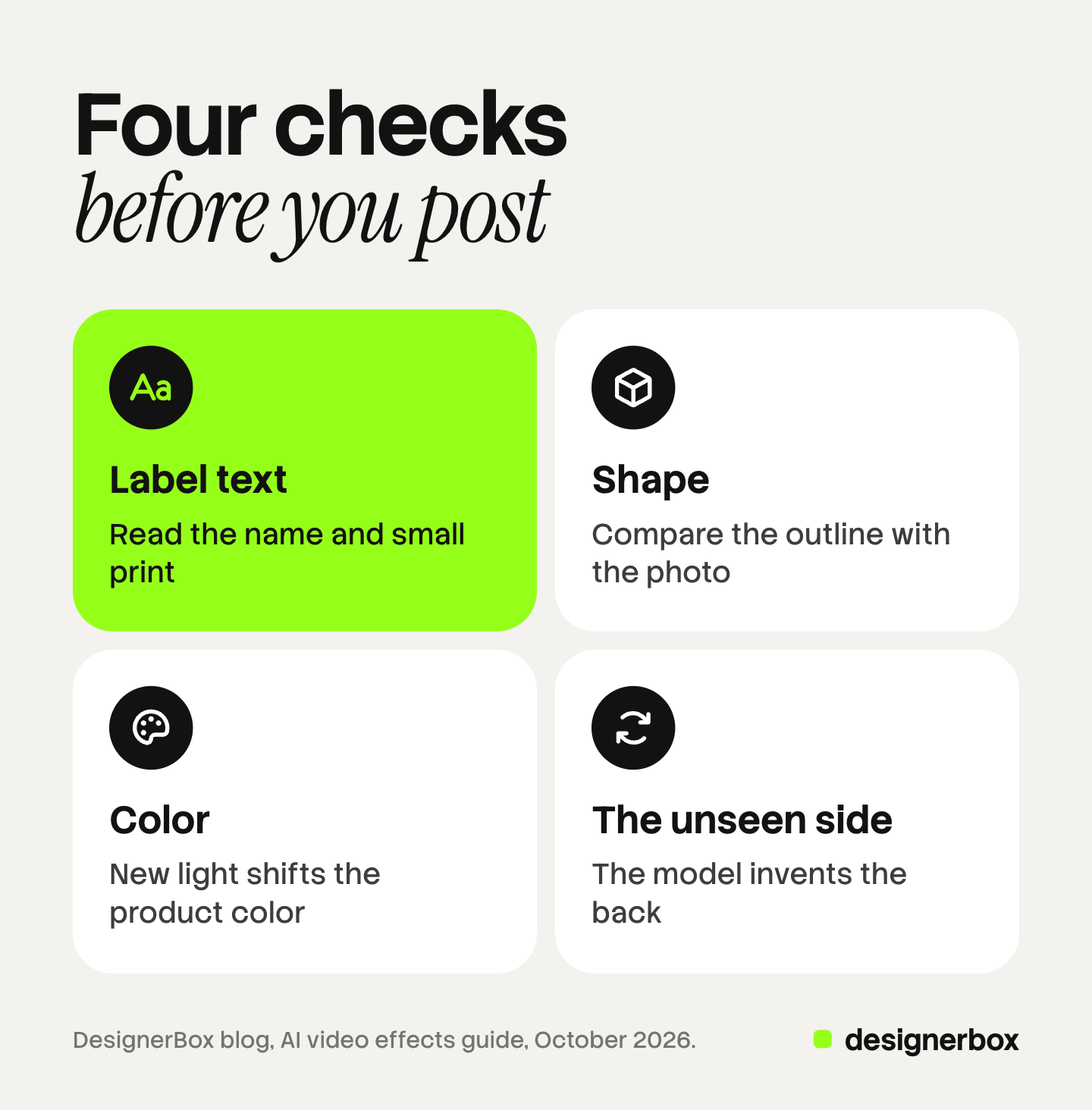
- Label text. Read the brand name and the small print in the clip. Video models redraw text in every frame, so letters can change shape or become unreadable.
- Shape. Look at the outline: the cap, the handle, the sole, the neck of the bottle. A camera move can stretch or bend it.
- Color. Compare the product color with the photo. A scene change adds new light, and new light shifts the color.
- The unseen side. A full circle around the product shows a back that your photo never contained. The model invents it. Check that it did not invent a second logo, a missing seam or a feature the product does not have.
A clip that fails one check is still useful as a mood clip. Do not post it as a picture of the product. The guide on how to animate a photo with AI explains which motions force a model to invent the most.
Who owns the source material?
Many effects borrow from something that already exists. What you may do depends on the source. This section is general information, not legal advice.
Old paintings. The U.S. Copyright Office says that “all works published in the United States before January 1, 1931, are in the public domain because copyright protection has expired” (copyright.gov, October 2026). A painting from the 1600s or 1800s falls well before that date. Other countries set their own terms, so check the country where you publish.
Current films and known characters. Some effects follow a film that is in cinemas now, or copy a known character. A personal page may post these as a fan. A brand that sells with them uses another company’s property in an advertisement. Ask the rights holder, or choose a different effect.
Real people. TikTok’s advertising policy does not allow content that uses “the likeness (audio or visual) of a public figure without their permission”. It gives “making a false endorsement” as an example (ads.tiktok.com, October 2026). For organic posts, TikTok also prohibits AI content that shows the likeness of “adult private figures used without their permission” (tiktok.com, October 2026). Use your own model with a signed release, or keep people out of the clip.
TikTok’s wider rule is short: “You should only post content you created or have the right to share” (tiktok.com, October 2026).
When does an effect clip need an AI label?
The answer depends on how real the clip looks. All three platforms draw the line at realistic content.
- TikTok. TikTok requires creators “to label AI-generated or significantly edited content that shows realistic-looking scenes or people” (tiktok.com, October 2026). TikTok says it labels content made with its own AI effects automatically. A clip from another product is yours to label.
- YouTube. YouTube requires disclosure when AI is used “to meaningfully alter or generate photorealistic content”. Its list of clips that need no disclosure includes “someone riding a unicorn through a fantastical world” (support.google.com, October 2026). An absurd effect is usually on that side of the line. A realistic camera move around your product in a place it never stood is closer to the other side.
- Meta. On Facebook, Instagram and Threads, Meta “may require an AI label when content has photorealistic video”. Its example of content that needs no label is a landscape video “created in a style resembling a cartoon” (meta.com, October 2026).
Paid ads follow separate rules. TikTok asks advertisers to apply its AI label or add “a clear disclaimer, caption, watermark, or sticker” when media is fully AI-generated or heavily edited by AI. It says that an ad with undisclosed AI content “will be rejected or restricted” (ads.tiktok.com, October 2026). TikTok adds that when you are uncertain, it is best to label.
The platform view of video, with sizes and lengths, is in the guide to an AI video generator for social media. The longer rules for ads are in AI disclosure in advertising.
Trend effects and a look of your own
A trend effect is dated by design. Effects tools add new ones to follow current trends. The effect that everyone posts this week is the one viewers have already seen next month.
That gives a trend effect one clear use. It makes the first second easy to read, because the viewer knows the format. The guide to video hooks covers that first second in detail.
It also gives a clear limit. A trend effect belongs to the tool, so many accounts can post the same clip with a different photo. Your brand look belongs to you. Split the calendar on purpose:
- Trend slots. A small part of the month. One effect, tested fast, posted while the format is current, then dropped.
- Brand slots. The rest of the month. The same light, framing and motion on every product, so a viewer knows the brand before the logo appears.
Can an effect make a viral AI video?
No tool can promise that. Higgsfield says so on its own page: “No tool can guarantee virality” (higgsfield.ai, October 2026). The many guides to viral AI videos and AI video trends describe formats that worked for someone else, once.

What a brand controls is the cost of each test. Three habits keep that cost low.
- Test at low resolution. A higher resolution usually costs more to run. Run the first versions small. Run the final version large only for the clip that passes the four product checks.
- Test three photos, one effect. The photo decides most of the result. A clean product photo on a plain background gives the model less to invent.
- Post, then read the numbers. Compare the clip with your own average for three-second views and for clicks to the shop. A clip with many views and no clicks sold the effect and left the product unsold.
The same motion on every product
DesignerBox is AI creative production for brands and agencies. Anyone can make an AI picture. Making hundreds that still look like your brand is the hard part.
A trend effect is a one-time clip, and an effects tool is the faster choice for it. DesignerBox does the other job: the brand slots. You build a workflow once with your brand, your product photos and your rules. The workflow reads your brand rules on every run, so the clip for the next product gets the same light, framing and motion. A template is a workflow that somebody already built, and the image-to-video app turns one picture into a clip.
Batch runs one workflow over a sheet of products. Row one and row two hundred follow the same steps, and you keep or discard each result. The video editor is a timeline with several tracks, transitions, animated text and audio. The full workflow from the first product photo to the finished ad, in one subscription. The AI video ads page shows the video workflows.
An 8-second clip costs 40 to 560 credits, depending on the model. You see the cost of a run before you press Run.
Here are the limits. DesignerBox does not post to social accounts. You download the results, or send them with a webhook or an S3 step. Every plan below Ultra is one seat. Uploading your own photos and the commercial license start on the Pro plan. AI video, virtual try-on, upscaling, the image editor and the video editor start on the Premium plan. Plans and credits are on the pricing page.
A free plan for your first run
There is a free plan, and it runs on sample products. It cannot make video, so use it to see how a template and a workflow work. Get started free
FAQ
What are AI video effects?
AI video effects are ready-made settings that turn one photo into a short clip. The prompt, the motion and the scene are fixed in advance. You choose an effect, add a photo and receive a clip of a few seconds.
What is the difference between an AI video effect and an AI video filter?
A filter changes the look of footage you already filmed, such as the color or the style. An effect creates new motion, and often a new scene, from one photo. A realistic effect can need an AI label where a simple filter does not.
Are AI video templates the same as effects?
Not quite. An effect is a template that the tool owns, and every user gets the same format. A template you save yourself holds your own steps and brand rules, so the same job runs again on the next product.
Which AI video effects suit a product brand?
Camera moves and scene changes suit a product best, because the product stays whole and stays the subject. Physics effects deform the product, and style changes redraw it. Use those for a joke or a teaser, and check the label text before you post.
Do AI video effects need an AI label on TikTok, YouTube and Instagram?
A realistic clip does. TikTok, YouTube and Meta each ask for a label or a disclosure when AI made or changed realistic video. Clearly unrealistic clips, such as a cartoon style or a fantasy scene, are treated differently. Read each platform’s rule before you post.
Can I use a famous painting in a brand video?
Often, yes. The U.S. Copyright Office says works published in the United States before January 1, 1931 are in the public domain. Other countries set their own terms. A current film, a known character or a real person’s face is a different case. This is general information, not legal advice.
Is DesignerBox an effects tool?
No. An effects tool is the faster choice for a one-time trend clip. DesignerBox is built for the repeatable job: the same motion and brand look on every product. You see the cost of a run before you press Run. AI video starts on the Premium plan.
Sources
- YouTube Help, Disclosing use of GenAI content: support.google.com, October 2026
- TikTok Community Guidelines, Integrity and Authenticity (effective September 24, 2026): tiktok.com, October 2026
- TikTok Support, About AI-generated content: tiktok.com, October 2026
- TikTok Advertising Policies, Misleading and false content: ads.tiktok.com, October 2026
- Meta Help Center, How to identify AI content on Meta products: meta.com, October 2026
- U.S. Copyright Office, What is Copyright?: copyright.gov, October 2026
- Higgsfield blog, guide to its ready-made video effects (higgsfield.ai), October 2026
- Pika API, Pikaffects image-to-video page (dev.pika.art), October 2026
- DesignerBox plans and feature gating: DesignerBox pricing page (designerbox.ai/pricing), October 2026
Platform rules and vendor features checked against each company’s own pages as of October 2026. This is general information, not legal advice. Individual results vary.


