To tell if a video is AI, check three things in order. First, look for a platform label or Content Credentials. Second, watch for eight visible signs: light with no source, motion with no weight, a camera that is too smooth, broken hands, garbled text, wrong physics, drifting details and loose audio sync. Third, find the original source. No single sign is proof.
A clip appears in your feed. A person speaks to the camera, the room looks normal, and something still feels wrong. You watch it twice and cannot name the problem. That feeling is common, and it is less reliable than most people think. A 2024 meta-analysis found that people identify video deepfakes correctly 57.31% of the time, which is close to a coin toss.
This guide gives you a checklist for the eye, then explains what detectors and labels can prove and where they stop. The last part is for brands and agencies that make AI video. It shows how to fix each sign before a viewer sees it, and how to label the result honestly.
Key Takeaways
- No single sign is proof. MIT Media Lab says there is “no single tell-tale sign” of AI-manipulated media. Use several signs together, then check the source.
- Your eye is near chance. A meta-analysis of 56 papers and 86,155 participants put human accuracy on video deepfakes at 57.31% (Diel et al., 2024).
- A detector gives a probability. On one 2024 benchmark of real-world deepfakes, the AUC score of open-source video detectors fell by 50% compared with older test sets.
- A label proves more than a missing label. Content Credentials and SynthID can show that AI made a file. Their absence shows nothing, because metadata is often removed.
- Platforms label some AI video themselves. YouTube, TikTok and Meta each add a label when they find a signal, and each asks the person posting to disclose.
- Brands fix the signs with inputs. A named light source, a motion reference, a short take and a real camera move do more than adjectives in a prompt.
How to tell if a video is AI: the 8 visible signs
You tell if a video is AI by checking for signs that a camera and a real room would not produce. Each sign below comes from the same cause. A video model predicts likely frames. It does not simulate light, mass or a camera operator. Watch the clip at full screen, with sound, at least twice.
| Sign | What to look for | Why it happens |
|---|---|---|
| 1. Light with no source | Even light on a face in a dark room. Shadows that point two ways. Glasses with glare that does not change as the head turns | The model renders a likely look, with no lamp or window behind it |
| 2. Motion with no weight | A walk that floats. A heavy object lifted like an empty one | Effort is a less likely frame, so the model removes it |
| 3. A camera that is too smooth | A perfect glide with no shake, no focus change and no operator | No person holds the camera |
| 4. Hands and contact | Fingers that merge when a hand grips a cup, a phone or another hand | Small detail, held across many frames, at the moment of contact |
| 5. Text | Signs, labels and screens with letters that change or mean nothing | Letters are shapes to the model |
| 6. Physics | A door that opens before the handle moves. Liquid that pours the wrong way | The model has no rule for cause and effect |
| 7. Continuity | An earring, a logo or a background object that changes or disappears | Nothing stores what was in the last frame |
| 8. Audio sync | Lips that close late on “b” and “p”. A voice with no room sound | Sound is often added in a separate step |
Light, motion and camera
These three signs show most often in clips that look polished. Real light comes from somewhere. Look for the window, the lamp or the sun, then check that the shadows agree with it. MIT Media Lab’s Detect Fakes project gives the same advice for faces: check whether shadows appear where you expect, and whether glare on glasses changes as the person moves (MIT Media Lab, October 2026).

Motion is the second check. A real body braces before it lifts, and a real foot presses into the floor. Runway names this limit in its own model. It calls it “success bias”: actions succeed too easily, such as “a poorly aimed kick still scoring a goal” (runway.com, October 2026).
The camera is the third check. A handheld phone shakes a little and hunts for focus. A tripod does not move at all. A slow, perfect glide in a kitchen, with no crew and no rail, is a reason to look closer.
Hands, text and physics
Pause the clip when a hand touches something. Contact is where fingers merge or pass through an object. Then read any text in the background. Street signs, packaging and phone screens often carry letters that change between frames.
Physics errors are rarer and stronger. Runway lists two more limits of its model. Effects sometimes come before causes, such as “a door opening before the handle is pressed”. Objects “may disappear or appear unexpectedly across frames”, such as a cup that vanishes after something passes in front of it (runway.com, October 2026).
Continuity and audio
Pick one small detail and follow it through the clip: an earring, a mole, a shirt button, a picture on the wall. In a camera recording it stays the same. In an AI clip it can change shape or disappear.
Sound is a weaker sign than it was. Google says Veo 3.1 makes 8-second videos “with natively generated audio” (ai.google.dev, October 2026). So a clip with matching sound can still be AI. Watch the lips on hard consonants, and listen for a voice that has no room around it.
How good are people at spotting AI video?
People are close to chance at spotting AI video. A 2024 meta-analysis pooled 56 papers with 86,155 participants. Human accuracy on video deepfakes was 57.31%, and across all media it was 55.54%. The authors report that detection rates “were not significantly above chance”, because the confidence intervals crossed 50% (Diel et al., Computers in Human Behavior Reports, read October 2026).
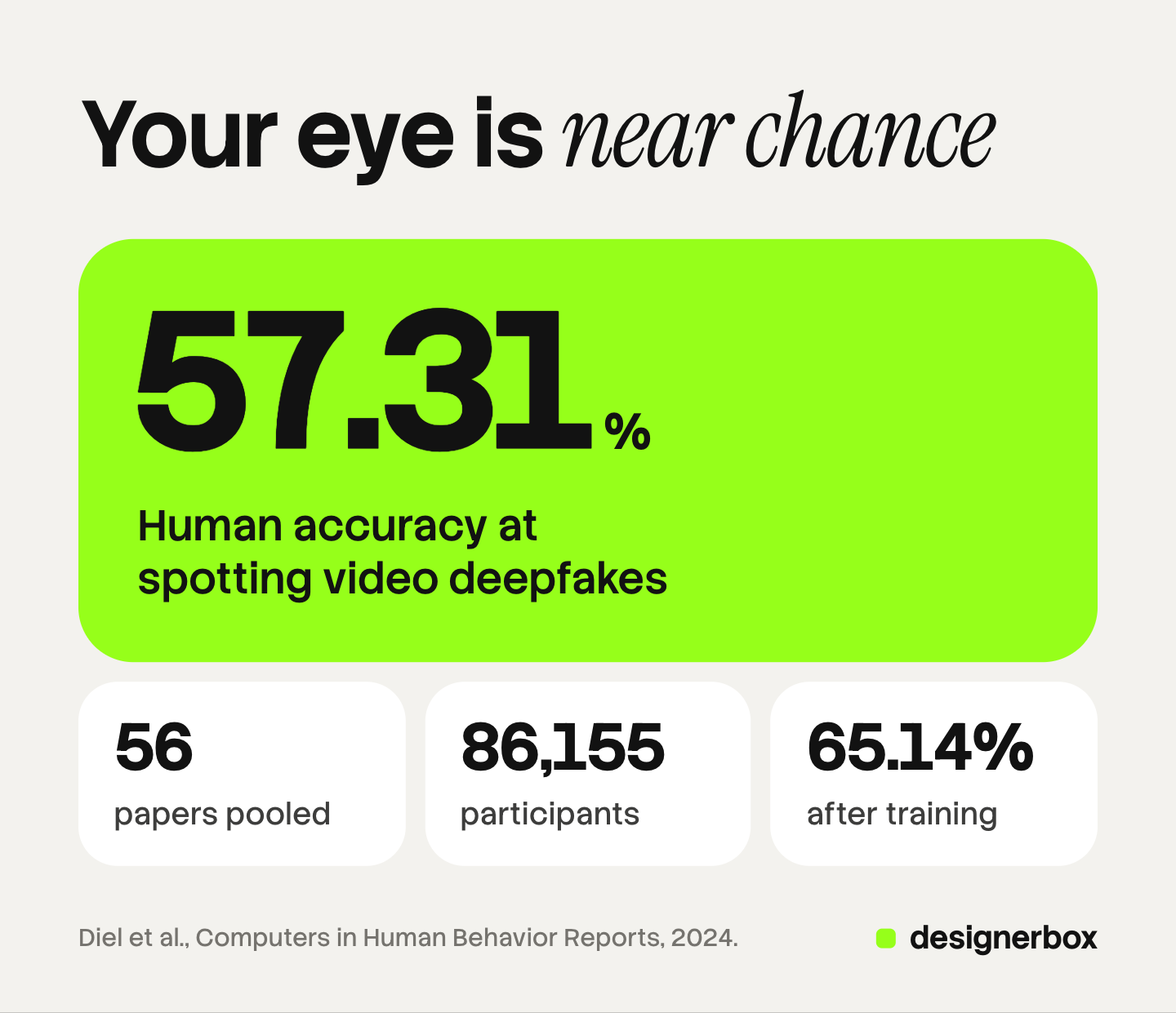
Two details from that paper matter for a viewer. First, the range is wide. The 95% interval for video runs from 47.80% to 66.57%, so some people and some clips score far better than others. Second, training helps. Strategies such as feedback training and AI support raised accuracy to 65.14%, and the authors say the gain was strongest for video.
So a checklist is worth learning, and it is not enough alone. The review covers studies up to 2024, before the video models in use today.
What an AI video detector can and cannot tell you
An AI video detector is a tool that takes a file or a link and returns a score. The score is a probability that AI made or changed the video. It is not a verdict. Three limits apply to every detector, whoever makes it.
A detector is trained on older fakes. Researchers built a benchmark from deepfakes that circulated in 2024, with 45 hours of video. Open-source detectors that scored well on earlier test sets lost 50% of their AUC on video, 48% on audio and 45% on images (Deepfake-Eval-2024, arXiv, read October 2026). AUC is a common measure of how well a tool separates real from fake.
A detector can be wrong in both directions. It can pass an AI clip, and it can flag a real one. Compression, filters and a screen recording all change the file the tool reads.
A watermark check covers one vendor. Google’s SynthID Detector checks whether a file carries Google’s own watermark. Google says it is testing the portal with journalists and media professionals, and offers a waitlist for early testers (deepmind.google, October 2026). The Gemini app can also check a file you upload. Google states that it “can currently only recognize content created by Google AI tools”, and that the video must be under 90 seconds and 100 MB (Gemini Help, October 2026).
Use a detector as one more signal. A high score is a reason to check the source. A low score is not proof that a camera recorded the clip.
What provenance labels prove: Content Credentials, SynthID and platform labels
A provenance label is information that travels with a file, or that a platform shows next to it. It is stronger evidence than any visual sign, because it comes from the tool that made the video. It has one large limit. It can be removed.
| Signal | Who adds it | What it can show | Its limit |
|---|---|---|---|
| Content Credentials (C2PA) | The camera, the editing tool or the AI model | Where the file came from, how it was edited and whether AI was used | The C2PA explainer says the metadata can be removed |
| SynthID | Google’s AI products | That Google AI made or changed the file | Covers Google tools only, and may not be found after many edits |
| YouTube label | The creator, or YouTube | That the video has realistic altered or synthetic content | Depends on disclosure, metadata or detection |
| TikTok label | The creator, or TikTok | That the video is AI-generated | TikTok says labels may be lost when a video is uploaded again elsewhere |
| Meta “AI info” | The person posting, or Meta | That Meta found an AI signal or the poster disclosed | For AI-edited content the label sits in the post menu |
Content Credentials. C2PA is an open standard, now at version 2.4. Its explainer says the metadata can be removed, and that people “should not distrust media without Content Credentials”. It also says provenance “cannot tell you whether the digital content is true, accurate or factual” (C2PA explainer, October 2026). The C2PA guidance adds that metadata “may be routinely removed or corrupted” by platforms during distribution (C2PA guidance, October 2026).
SynthID. Google embeds this invisible watermark in images, audio, text and video from its AI products. Google says it is designed to survive “cropping, adding filters, changing frame rates, or lossy compression” (deepmind.google, October 2026). Videos made with Veo carry it (ai.google.dev, October 2026).
YouTube. YouTube requires creators to disclose when they use AI “to meaningfully alter or generate photorealistic content”. YouTube can also add a label itself for content made with its own AI tools, content with C2PA metadata, and content its systems detect (YouTube Help, October 2026).
TikTok. TikTok requires creators to label “AI-generated or significantly edited content that shows realistic-looking scenes or people” (TikTok Community Guidelines, October 2026). TikTok also reads Content Credentials and uses its own invisible watermark. It said in November 2025 that these efforts had labeled over 1.3 billion videos (TikTok newsroom, read October 2026).
Meta. On Facebook, Instagram and Threads, Meta adds an “AI info” label when it detects “industry standard AI image indicators” or when people disclose that they are uploading AI-generated content. For content that AI only edited, the label is in the post’s menu (Meta newsroom, read October 2026).
OpenAI. The Sora 2 system card said OpenAI’s own products put C2PA metadata on all assets, and a visible moving watermark on videos downloaded from the Sora app (OpenAI, read October 2026). OpenAI removed Sora 2 from its API on 24 September 2026 (OpenAI API deprecations, October 2026).
The reading rule is short. A label that says AI is good evidence. A missing label is no evidence.
A five-step check before you trust or share a video
Use this order. It puts the strongest evidence first and the weakest last.
- Open the label. On YouTube, check the video player and the expanded description. On TikTok, look for the AI-generated label on the video. On Instagram and Facebook, look for “AI info” on the post or in the post menu.
- Find the first upload. Search for the clip on other platforms. Check who posted it first, and when. A real event usually has more than one camera angle.
- Run the eight signs. Watch at full screen with sound. Pause on hands, text and small details.
- Check the watermark, where you can. If the clip may come from a Google tool, ask the Gemini app. It reads SynthID on files under 90 seconds.
- Treat a detector score as a hint. Use it to decide how hard to look, never to end the check.
If two or more steps point to AI, do not share the clip as real footage. If no step gives an answer, say that you do not know.
The law on labeling AI video
In the EU, Article 50 of the AI Act has applied since 2 August 2026. The European Commission states two duties. Providers of AI tools must make sure AI-generated or manipulated content is “marked in a machine-readable format”. People and companies that publish a deep fake must disclose it “upon first exposure at the latest” (European Commission FAQ, October 2026).
One date often gets misread. Tools that were on the market before 2 August 2026 have until 2 December 2026 to add the machine-readable mark. That extra time covers the tool maker’s marking duty only. This section is general information, not legal advice.
For a viewer, the effect is that more AI video in the EU should carry a mark that platforms can read. For a brand, the duty to disclose a deep fake already applies. The four rules that reach advertising are set out in AI disclosure in advertising.
Fixes for brands that make AI video
The same eight signs are a review list for a brand or an agency. The goal is a clip that looks made with care and carries an honest label. The goal is never to hide that AI made it. A viewer who feels tricked blames the brand, and the platform rules above apply to you.

Each sign responds to an input, not to an adjective. Words such as “realistic” give the model nothing to render.
| Sign | The fix | Where to read more |
|---|---|---|
| Light with no source | Name one source and its direction: a window on the left, a lamp behind | The seven layers of a realistic AI video prompt |
| Motion with no weight | Give the model a motion reference, and start on a body under load | Why AI human movement fails |
| Camera too smooth | Name the rig and one move: handheld, locked tripod, slow push | Camera movement in the AI video prompting guide |
| Hands and contact | Fix the still first, and cut before the contact | Why hands and faces break |
| Text | Keep text out of the generated frame. Add it in the edit | The four distortion modes |
| Physics | Cut around a pour, a drop or a collision | Which input mode a shot starts from |
| Continuity | Anchor each clip to one reference image | Character consistency in AI video |
| Audio sync | Start from the audio, then make the picture | Realistic AI lip sync |
Two habits cover most of the list. Keep takes short, because errors grow along a clip. And review on a phone at full speed, the way a viewer watches. A frame that looks clean on a paused desktop monitor can still move wrong. The wider review order for ad creative is in the four checks for AI slop ads, and the still-image version of this list is in AI images that do not look AI-generated.
Then label the result. Use the platform’s AI setting when the clip shows a realistic person or scene, and keep the file’s Content Credentials where your tools write them.
Review and disclosure in DesignerBox
Anyone can make an AI picture. Making hundreds that still look like your brand is the hard part. The same holds for video. One good clip is a test. Forty clips that share the same light, the same model and the same camera move are a campaign.
In DesignerBox you build the fix once as a workflow. The first frame, the reference image, the video model and the take length are steps. A saved workflow runs the same way on the next product, and you set your brand rules once so the workflow reads them on every run. Critic steps score the results of a run, and best-of-N keeps the best one. That is a quality step. It makes no promise about how a viewer or a detector reads the clip.
You cut the short takes together in the video editor, which is a real timeline with several tracks, transitions, animated text and audio. That is also where on-screen text goes, your AI disclosure line included. The finished cut becomes a short video ad. The stills, the video, the editors, the brand rules and the Assets library sit in one place. The full workflow from the first product photo to the finished ad, in one subscription.
An 8-second clip costs 40 to 560 credits, depending on the model, and the cost is shown before the run. AI video and the video editor start on the Premium plan. The free plan cannot make video, and every plan below Ultra is one seat. Plans and credits are on the pricing page.
Start from a template, add your brand and your products, and run it. See the templates.
FAQ
How can you tell if a video is AI-generated?
Check the platform label first, then find the original upload, then watch for visible signs. The signs are light with no source, motion with no weight, a camera that is too smooth, broken hands, garbled text, wrong physics, details that drift and loose lip sync. One sign is not proof. Several signs plus an unknown source are a strong reason to doubt the clip.
Is there an AI video detector that is always right?
No. A detector returns a probability, and it can be wrong in both directions. On the Deepfake-Eval-2024 benchmark, open-source video detectors lost 50% of their AUC compared with older test sets (arXiv, read October 2026). Use a detector score as one signal next to the label and the source.
Can people spot AI video by eye?
Only a little better than chance. A 2024 meta-analysis of 56 papers found 57.31% accuracy on video deepfakes, with a 95% interval from 47.80% to 66.57% (Diel et al., 2024). Training raised accuracy to 65.14%. A checklist helps, and it does not replace a source check.
Does a missing AI label mean a video is real?
No. Content Credentials can be removed, and the C2PA guidance says platforms often remove or corrupt metadata during distribution. SynthID covers Google’s tools only. A label that says AI is good evidence. A missing label tells you nothing.
How do I spot an AI video on TikTok or YouTube?
Look for the platform’s AI label. On YouTube it appears in the video player or the expanded description. On TikTok it appears on the video. Both platforms add a label themselves in some cases, such as when the file carries C2PA metadata. Then run the eight visible signs and check who posted the clip first.
Do brands have to label AI video?
Often, yes. YouTube and TikTok require a label on realistic AI-generated content. In the EU, the duty to disclose a deep fake has applied since 2 August 2026 under Article 50 of the AI Act. The exact duty depends on the content and the market, so read the platform rule and the law for your case.
How does a brand fix the signs of AI video before it ships?
Fix the inputs. Name one light source, supply a motion reference, name the camera rig, keep takes short and cut before hands touch an object. Then label the clip. In DesignerBox these fixes are steps in a saved workflow, critic steps score each result, and you see the cost before each run.
Sources
- Human accuracy on deepfakes, 56 papers and 86,155 participants: Diel, Lalgi, Schröter, MacDorman, Teufel and Bäuerle, “Human performance in detecting deepfakes: A systematic review and meta-analysis of 56 papers”, Computers in Human Behavior Reports, vol. 16, December 2024, doi.org/10.1016/j.chbr.2024.100538, read October 2026
- Detector performance on real-world 2024 deepfakes: Chandra et al., “Deepfake-Eval-2024”, arxiv.org/abs/2503.02857, read October 2026
- No single sign, and the face checks: MIT Media Lab, Detect Fakes, accessed October 2026
- Causal reasoning, object permanence and success bias as model limits: runway.com, accessed October 2026
- Veo 3.1 native audio and SynthID on Veo videos: ai.google.dev, accessed October 2026
- SynthID and the SynthID Detector: deepmind.google, accessed October 2026
- Checking a file in the Gemini app, and its limits: Gemini Help, accessed October 2026
- Content Credentials, removal and what provenance cannot show: C2PA explainer 2.4 and C2PA guidance 2.4, accessed October 2026
- YouTube disclosure and automatic labels: YouTube Help, accessed October 2026
- TikTok labeling rule: TikTok Community Guidelines, effective 24 September 2026, accessed October 2026
- TikTok watermarking, Content Credentials and the 1.3 billion figure: TikTok newsroom, 19 November 2025, accessed October 2026
- Meta “AI info” label: Meta newsroom, updated September 2024, accessed October 2026
- Sora 2 provenance tools: OpenAI Sora 2 system card, accessed October 2026. Sora 2 API removal on 24 September 2026: OpenAI API deprecations, accessed October 2026
- EU AI Act Article 50 dates and duties: European Commission FAQ, last updated 24 July 2026, accessed October 2026
- DesignerBox plan gates and the video credit range: DesignerBox pricing page (designerbox.ai/pricing), October 2026
Detection research verified from the published abstracts of Diel et al. (2024) and Deepfake-Eval-2024. Provenance and platform rules verified from C2PA, Google, YouTube, TikTok, Meta, OpenAI and European Commission pages as of October 2026. DesignerBox plans from the DesignerBox pricing page, October 2026. This article is general information, not legal advice. Individual results vary.