Partnership ads are Meta ads that run with a partner’s account in the header, beside or instead of the brand’s account. The partner is usually a creator, and can also be another brand or business. Meta called them branded content ads before. The advertiser needs the partner’s permission first. Meta documents two permission types: content-level, for one post, and account-level, for an ongoing partnership.
This guide follows Meta’s own help pages, read on 4 October 2026. It covers the setup routes, the header, the placements and the disclosure rules. It ends with a plan for a brand with ten creator posts.
Key Takeaways
- A partnership ad carries two accounts. The header shows up to 2 identities: the partner, the advertiser, or both.
- Meta lists 2 permission types. Content-level permission covers one post, story or reel. Account-level permission covers an ongoing partnership.
- The partner stays in control. Meta says creators and other partners can revoke permission at any time.
- The ads run on three apps. Instagram, Facebook and, since September 2026, WhatsApp Status. Threads is not supported.
- The label is not the whole disclosure. The FTC says a platform’s built-in disclosure feature is no guarantee of a clear disclosure.
What are partnership ads?
Meta’s definition is short. “Partnership ads allow advertisers to run ads with partners: creators, brands and other businesses” (facebook.com, October 2026). The same page says: “Branded content ads are now called partnership ads.”
Meta adds a claim about delivery. It says the ads use signals from both accounts “for improved ranking and incremental performance”. That is Meta’s statement about its own ad system, and it gives no method on that page.
A partnership ad is different from organic branded content. Branded content is an unpaid post where a brand compensated the creator. A partnership ad is a paid ad in Ads Manager. Meta’s setup page says the two are “not the same” and need separate permissions (help.instagram.com, October 2026).
This article covers Meta only. For the wider picture of creator-made ads, read the UGC ads guide.
How do you set up a partnership ad?
The setup has two halves. The partner gives permission, then the advertiser builds the ad in Ads Manager. Meta says: “To run partnership ads, advertisers need permission from the partner whose handle the ad will include” (facebook.com, October 2026).
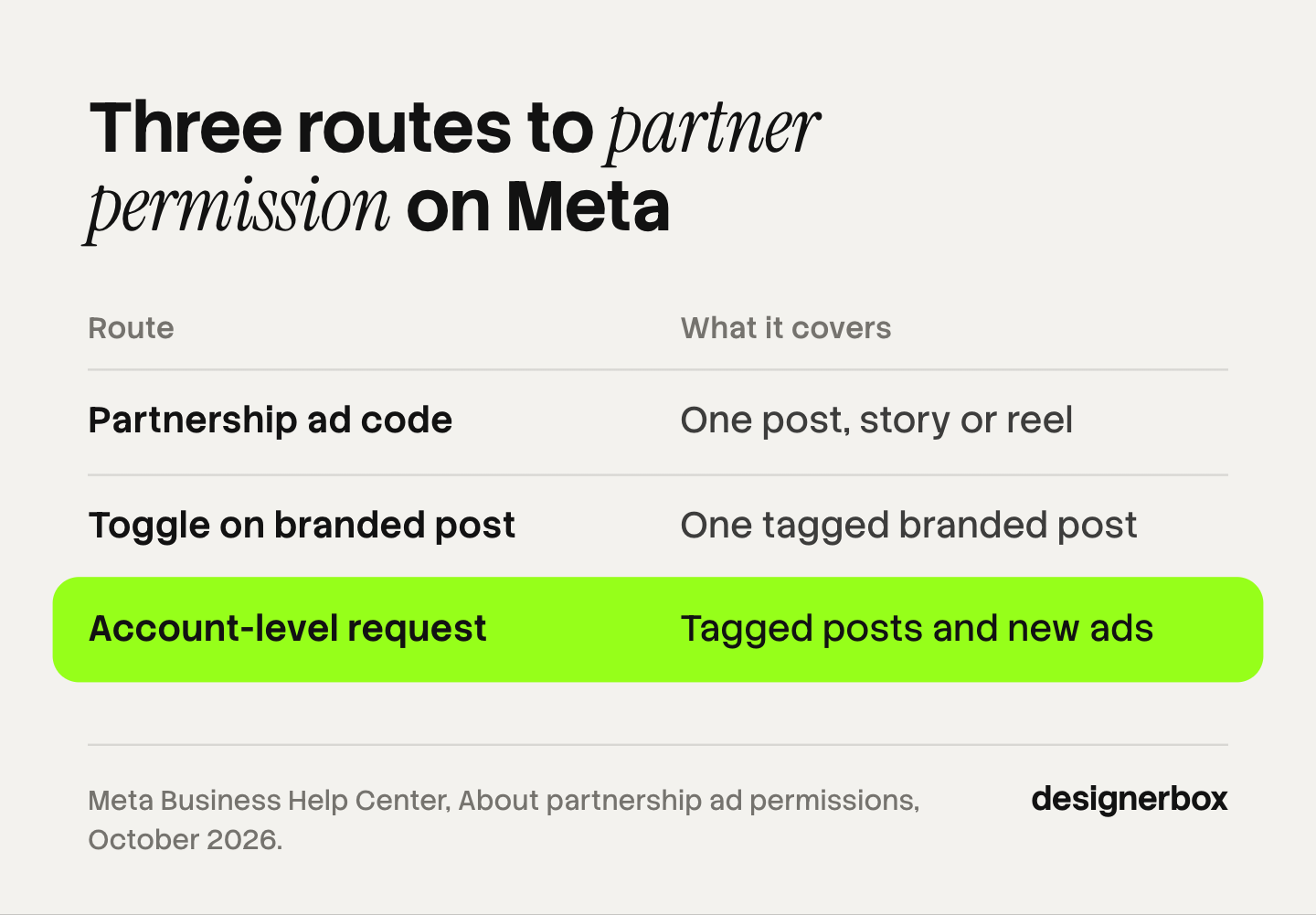
There are three routes to that permission.
| Route | Permission type | What the advertiser can promote |
|---|---|---|
| Partnership ad code | Content-level | Any one post, story or reel, tagged or not |
| ”Allow brand partner to boost” toggle | Content-level | One branded post that tags the advertiser |
| Account-level request | Account-level | Posts that tag the advertiser, and new ads with no post |
Route 1: the partnership ad code
The partner creates a code for one piece of content. On Instagram, the partner taps “Partnership label & ads” and turns on “Get partnership ad code” (help.instagram.com, October 2026). The partner then sends the code to the advertiser.
The advertiser pastes it in Ads Manager. At the ad level, turn on the partnership ad toggle and click “Enter ad code or post info”. Meta says you can paste “your ad code, post ID or post URL”.
Meta says ad codes “can be used by up to 2 partners at a time”. The partner can turn the toggle off. That stops new ads from the code, and active ads continue.
Route 2: the toggle on a branded post
This route works for organic branded content. The creator tags the brand in the paid partnership label and turns on the “Allow brand partner to boost” toggle. The advertiser can then make an ad from that post without a code.
For new branded content, Meta turns the toggle on “for 28 days since your last branded content was posted” (facebook.com, October 2026).
Route 3: account-level permission
The advertiser sends a request from Meta Business Suite, under Creator Marketing and then Manage permissions (facebook.com, October 2026). The partner accepts it in Partnership Ads Hub, the Instagram app or the Facebook app.
After that, the advertiser needs no new request per post. Meta says the advertiser can create ads “from a partner’s handle without pre-existing content”. The advertiser can also use any existing post that tags it, and can include or exclude the partner’s custom audience.
What does each side need to turn on?
Both sides need the right account type first. Partnership ads work for public content on Instagram professional accounts and on Facebook Pages or profiles in professional mode (help.instagram.com, October 2026). The advertiser needs a Facebook Page or a professional account on Instagram.

The partner’s side. The partner gives one permission: a code, the toggle, or an accepted account-level request. If the partner’s Instagram and Facebook accounts are linked, one accepted request covers both.
The advertiser’s side. The advertiser turns on the partnership ad toggle at the ad level in Ads Manager. A brand that works with an agency must grant the agency permissions across the Instagram account, the Facebook Page and the ad account.
The creator cannot edit the post while it runs as a partnership ad. Deleting the post stops the ad. Archiving it on Instagram keeps the ad active.
Payment happens outside Meta. Meta says creators whose content is used for partnership ads “are paid off the platform” (help.instagram.com, October 2026). UGC platforms compares the marketplaces where brands find and pay creators.
What does the ad header show?
The header shows up to 2 identities. In Ads Manager, under Identities, Meta gives three options (help.instagram.com, October 2026):
- Both advertiser and partner. The ad runs from both accounts.
- Partner only. The brand’s account does not show in the header.
- Dynamic identity. Meta’s system chooses the option it predicts will perform best.
Dynamic identity is on by default, and Meta recommends it. Meta also says ranking “will use signals from both accounts” whichever option you select.
The order follows the post. Meta says the first identity “has to be the Instagram account that authored the post”.
Some placements show both accounts whatever you select. Meta says Facebook Marketplace and Facebook Stories deliver with both identities. The WhatsApp Status placement also always shows both.
Which placements and formats support partnership ads?
Meta lists the placements on one page (help.instagram.com, October 2026).
| App | Placements |
|---|---|
| Feed, Web Feed, Explore Feed, Explore Grid, Stories and Reels | |
| Feed, Stories, Reels and Marketplace | |
| Status |
Meta says partnership ads “are not currently available on Threads”.
All six campaign objectives appear in Meta’s table: awareness, traffic, engagement, leads, app promotion and sales. Calls are marked “No” under every objective that offers them. Advantage+ sales campaigns are supported.
The formats have their own limits (help.instagram.com, October 2026):
- Feed. Single image, video and carousel, with up to 10 cards. Carousel ads covers the card specs.
- Stories. Videos of 60 seconds or less, with a maximum of 5 supported stickers. Link stickers are not supported.
- Reels. Videos of 15 minutes or less. A reel published before October 15, 2021 is not eligible.
- Music. Copyrighted music is not supported in Reels unless the advertiser holds the rights.
Partnership ads vs brand ads vs whitelisting
Three setups put creator content in a paid campaign. They differ in whose name appears and who gave access.
| Partnership ad | Ordinary brand ad | Whitelisting | |
|---|---|---|---|
| Header shows | Partner, or partner and brand | Brand only | Usually the creator only |
| Permission | An ad code, the toggle or an account-level request | A content license from the creator | Access to the creator’s account or Page |
| Creator can stop it | Yes, at any time | By contract only | By removing the access |
Whitelisting is an industry word. We found no Meta help page that uses it. It usually describes an older setup: the creator gives the brand advertising access to the creator’s account, and the brand runs ads from that handle. Many marketers now use the word for partnership ads too, so ask a partner which setup they mean.

TikTok has a similar format. Spark Ads run organic TikTok posts as ads, including posts by other creators “with their authorization” (ads.tiktok.com, October 2026). The creator shares an authorization code, and the views and likes stay on the organic post. Spark Ads explains that setup.
Disclosure for partnership ads
Meta’s policy. Meta requires a tag on organic branded content. Its help page says creators must tag business partners “when there’s an exchange of value”. That includes gifted products. People then see a “Paid partnership with” label above the post. Paid ads carry their own Ad label.
US rules. The FTC’s Endorsement Guides ask for a clear disclosure of a material connection between a creator and a brand. The FTC’s guidance says a platform’s built-in feature is not always enough. Asked if an endorser can rely on it, the FTC answers: “Not necessarily” (ftc.gov, October 2026). It adds that it is “always best to add your own disclosure even if a platform offers its own disclosure tool”.
The brand carries the duty too. The same FTC page says: “Your company is ultimately responsible for what others do on your behalf.” If you edit the creator’s caption for the ad, keep the disclosure in it.
Testimonial ads covers what the FTC rule on reviews and testimonials allows. Other countries have their own rules, so check the market where the ad runs.
A plan for a brand with ten creator posts
Ten posts are enough for a first test.
- Sort the posts. Mark which ones tag your brand, which use the paid partnership label, and which use copyrighted music.
- Choose the route per creator. Ask for an ad code for a single post. Send an account-level request to a creator you will work with for months.
- Agree the terms in writing. Set the fee, the usage period, the edits you may make, and who answers comments.
- Build the ads in one campaign. Keep dynamic identity on unless you have a reason to show the creator alone. Meta’s Suggested Posts in Ads Manager lists approved branded content from the last 60 days.
- Read the results per post. The business sees ad results in Ads Manager. The creator sees the same insights as for an organic post.
- Make versions of the winners. A post that works needs new sizes, a static version and other languages.
Ad creative testing shows how many results a test needs before a winner means anything.
Variants around the creator post
DesignerBox is AI creative production for brands and agencies. It does not run ads, and it has no connection to a Meta ad account. Its part starts after a creator post wins: the product stills, static ads, sizes and languages around it.
A partnership ad is one file from one creator. A campaign needs many more. Anyone can make an AI picture. Making hundreds that still look like your brand is the hard part. In DesignerBox you build a workflow once with your brand, your products and your rules. The workflow reads the brand profile on every run.
Three steps fit this job. Winning-ad variations make new versions of an ad that already works. The ads resizer makes each placement size. The ad localizer rebuilds one ad in another language and redraws the layout. The social creatives page shows these workflows. Batch runs one workflow over a sheet of products, and you keep or discard each row. The full workflow from the first product photo to the finished ad, in one subscription.
You see the cost of a run before you press Run.
Here are the limits. You download the results, or send them with a webhook or an S3 step. Then you upload them in Ads Manager yourself. Every plan below Ultra is one seat. Uploading your own photos and the commercial license start on the Pro plan. AI video, virtual try-on, upscaling, the image editor and the video editor start on the Premium plan. Plans and credits are on the pricing page.
Creative for agency teams
An agency that runs partnership ads for several brands needs the same set of files for each one. See DesignerBox for agencies
FAQ
What are partnership ads on Meta?
They are ads on Instagram, Facebook and WhatsApp Status that show a partner’s account in the header. The partner is a creator, a brand or another business. Meta called them branded content ads before. The advertiser needs the partner’s permission to run one.
What is a partnership ad code?
It is a code a creator makes for one post, story or reel. The creator shares it with an advertiser. The advertiser pastes it in Ads Manager to run that content as a partnership ad. Meta says a code can be used by up to 2 partners at a time (help.instagram.com, October 2026).
What is the difference between partnership ads and whitelisting?
Partnership ads are Meta’s documented format. Permission is given per post or per account, and the creator can revoke it at any time. Whitelisting is an industry word that Meta’s help pages do not use. It usually means the brand has direct advertising access to the creator’s account.
Can a creator stop a partnership ad?
Yes. Meta says creators and other partners can revoke permissions at any time. Deleting the original post stops an ad that uses it (facebook.com, October 2026).
Does a partnership ad need a disclosure?
Meta requires the paid partnership label on organic branded content. In the US, the FTC says a platform’s built-in feature is not always enough, and advises adding your own clear disclosure. The brand is responsible together with the creator (ftc.gov, October 2026).
Where does DesignerBox fit with partnership ads?
DesignerBox makes the files around the creator post: product stills, static ads, resized and localized versions. It does not run ads or connect to a Meta account. You download the results and upload them yourself. The cost of a run is shown before the run.
Sources
- Meta Business Help Center, About partnership ads: facebook.com, October 2026
- Meta Business Help Center, About partnership ad permissions: facebook.com, October 2026
- Meta Business Help Center, Manage account-level permissions for partnership ads: facebook.com, October 2026
- Meta Business Help Center, Partnership ad specifications for creators: facebook.com, October 2026
- Instagram Help Center, How to create a partnership ad: help.instagram.com, October 2026
- Instagram Help Center, How to create a partnership ad code: help.instagram.com, October 2026
- Instagram Help Center, About displaying accounts in partnership ads header: help.instagram.com, October 2026
- Instagram Help Center, Supported objectives and placements for partnership ads: help.instagram.com, October 2026
- Instagram Help Center, Eligible formats for partnership ads: help.instagram.com, October 2026
- Instagram Help Center, Eligibility requirements for partnership ads and branded content: help.instagram.com, October 2026
- Instagram Help Center, About branded content on Instagram: help.instagram.com, October 2026
- Instagram Help Center, Measure partnership ad performance: help.instagram.com, October 2026
- FTC, “FTC’s Endorsement Guides: What People Are Asking” (staff guidance): ftc.gov, October 2026
- TikTok Business Help Center, About Spark Ads: ads.tiktok.com, October 2026
- DesignerBox plans and feature gating: DesignerBox pricing page (designerbox.ai/pricing), October 2026
Meta, TikTok and FTC pages checked as of October 2026. This is general information, not legal advice. Individual results vary.