Spark Ads are a TikTok ad format that runs an existing TikTok post as a paid ad. The post can come from your own account or from a creator who authorizes it with a video code. The ad keeps the account name, the caption and the sound of the post. Views, likes, comments, shares and follows from the campaign count on the original post.
TikTok says the format has been available worldwide since July 2021. Three details decide whether a campaign works: how long a code lasts, what the advertiser can change, and which disclosure rule applies.
This guide takes each one from TikTok’s own help pages, read on 4 October 2026. Then it shows how a handful of creator posts becomes a tested set of ads.
Key Takeaways
- A Spark Ad is a post that runs as an ad. The engagement from the campaign stays on the organic post.
- A creator authorizes one post with a video code. The creator picks how long the code lasts: 7, 30, 60 or 365 days.
- You cannot edit the caption after authorization. Agree on the final caption before the creator generates the code.
- Disclosure sits with the post. The creator turns on the commercial content setting, and AI labels follow TikTok’s Community Guidelines.
- Variety comes from more posts. One Spark Ad is one fixed video, so a test needs several posts and several non-Spark versions.
What are Spark Ads?
TikTok calls Spark Ads “a native ad format” that uses organic TikTok posts and their features in advertising (ads.tiktok.com, October 2026). You publish ads from your own account’s posts, or from posts made by other creators with their authorization.

The difference from other ads is where the engagement goes. TikTok says all views, comments, shares, likes and follows gained during the promotion “are attributed to your organic posts”.
Spark Ads work with eight auction objectives, from reach and video views to lead generation and sales. A few limits apply to every account. A video in a Spark Ad can be 10 minutes at most. One TikTok Ads Manager account supports a maximum of 10,000 Spark Ads. A post that TikTok has banned is rejected in Ads Manager too.
How Spark Ads authorization works
TikTok lists three ways to get a post into an ad (ads.tiktok.com, October 2026).
- A linked account. You link a TikTok account in Business Center and choose from its posts.
- A video code. A creator generates a code for one post and sends it to you.
- A push. You upload a video in Ads Manager and publish it to a linked account as a new post.
The Spark Ads code, step by step
The creator does the first half in the TikTok app. TikTok lists the steps (ads.tiktok.com, October 2026).
- The creator allows authorized posts in the account settings, under Privacy or Creator tools.
- The creator opens the post, taps the three dots and taps Ad settings.
- The creator agrees to the advertising content terms and turns on the Ad authorization toggle.
- The creator generates a video code and selects the authorization duration: 7, 30, 60 or 365 days.
- The creator copies the code and sends it to the advertiser.
The advertiser does the second half in TikTok Ads Manager. Open Tools, then Creative library, then Spark ads posts. Click Apply for Authorization, paste the code and confirm the post. TikTok says you can authorize up to 20 video codes at a time.
Four rules that are easy to miss
The same help pages hold four rules that affect planning.
- Duets and Stitches need two codes. TikTok says you enter video codes “from both creators” in the video.
- A private post becomes public once a campaign uses it. You cannot change its privacy during the promotion.
- A creator cannot delete an authorized post. The post has to be un-authorized as a Spark Ad first.
- A code stays until the ads are gone. You can delete a video code only after you delete every ad that uses the video.
The creator chooses the code period, so put it in the agreement. UGC platforms explains where usage terms like this sit when you hire creators through a marketplace.
Spark Ads vs non-Spark in-feed ads
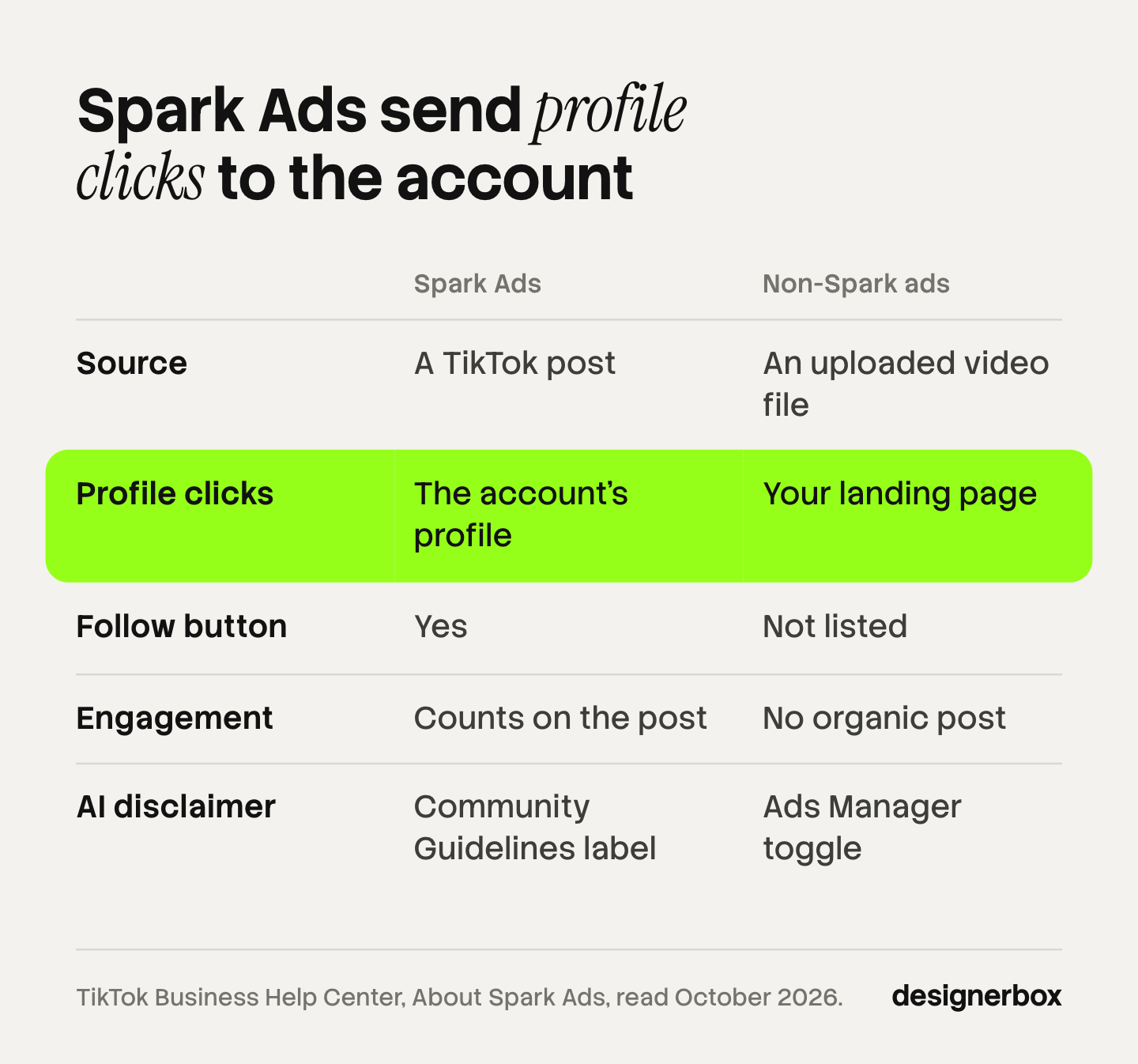
A non-Spark ad is a video file you upload to Ads Manager. A Spark Ad is a real post from a real account. The table uses TikTok’s own comparison and its help pages (ads.tiktok.com, October 2026).
| Spark Ads | Non-Spark in-feed ads | |
|---|---|---|
| Source | A TikTok post, yours or a creator’s | A video file in your library |
| Profile photo and name clicks | Go to the account’s profile | Go to your landing page |
| Follow button | Yes, the viewer can follow the account | Not listed |
| Sound click | Goes to the music page | Not listed |
| Engagement | Counts on the organic post | No organic post behind the ad |
| Extra metrics | Paid followers, paid profile visits, music clicks | Paid clicks, likes, shares, comments |
| AI content disclaimer | Follows the Community Guidelines for posts | A toggle in Ads Manager |
The click row matters most. In a Spark Ad, a tap on the profile photo opens a TikTok profile. That helps an account that wants followers. For a sales campaign it is an extra step, because only the button and the caption go to the landing page.
You do not have to choose one type. TikTok says of Smart+ campaigns: “You can combine Spark Ads and Non-Spark Ads within the same ad group.” How to create TikTok video ads with AI covers the non-Spark side, where you supply the file.
Meta has a similar format called partnership ads, where a brand runs an ad with the creator’s account in the header. The permission steps and labels are Meta’s own, so check Meta’s help pages before you copy a TikTok process to Instagram.
What you can and cannot edit in a Spark Ad
The answer depends on how the post reached the ad.
A post you pull, by link or by code. TikTok says: “You cannot edit a post’s caption after it’s been authorized as an ad.” The display name and text come from the post. You still set the button, the destination and the tracking.
A video you push from Ads Manager. Here you build the post yourself. TikTok lists the ad details as identity, music, text, call to action and destination. After review, the video is published under the linked account in private mode.
One more setting controls where the post appears. TikTok’s “Show through ads only” mode hides a post from the feed and the profile, so people see it only as an ad (ads.tiktok.com, October 2026). In Ads Manager the toggle exists for pushed posts only. A creator can turn it on for a coded post in the TikTok app.
Disclosure and branded content rules
A Spark Ad is a post first, so the rules for posts apply.
Commercial content. TikTok says: “When posting content that promotes a brand, product, or service on TikTok, you must turn on the commercial content disclosure setting.” The creator chooses “Your brand” or “Branded content”. A branded content post shows a “Paid partnership” label. TikTok adds that a post without the proper disclosure “may be removed or restricted” (ads.tiktok.com, October 2026).
Branded content. TikTok’s policy defines it as content that promotes or reviews a third-party brand “in exchange for payment or any other incentive” (tiktok.com, October 2026). A free product can be an incentive. The current policy took effect on 31 August 2026.
AI-generated content. The Ads Manager toggle for AI content does not cover Spark Ads. TikTok’s condition list for that toggle includes “Is not a Spark ad”. Spark ads “live organically on TikTok”, the page says, so they follow the Community Guidelines for AI disclosure (ads.tiktok.com, October 2026). The label goes on the post, before authorization. AI disclosure in advertising covers the rules on other platforms.
The FTC, for US campaigns. TikTok’s label does not end the brand’s duty. The FTC says the responsibility for disclosing a material connection “rests with the influencer and the brand” and “not the platform”. It adds that it is best to add your own disclosure even when a platform has a tool (ftc.gov, October 2026). This is general information, not legal advice.
Check all four before you ask for a code, because the caption is fixed after authorization.
How to scale UGC ads from a few creator posts
A Spark Ad is one fixed video with one fixed caption. A test set grows in two directions: more posts, and non-Spark versions beside them. The steps below are a working method. TikTok does not prescribe them.

Which posts to authorize
Choose posts where the product is clear in the first seconds and the claim is one you can prove. Check that the disclosure setting is on and the caption is final. Organic views are a first filter. They do not prove that a post will sell as an ad.
Agree on the code period with the fee. A 30-day code covers a test. A 365-day code covers a post you plan to keep running.
What to vary
Change one thing between ads, so a result has a cause.
- The creator and the opening. Each new post is a new first three seconds.
- The destination. The same post can run with a different landing page.
- The format beside it. Add non-Spark ads to the same ad group: a static ad with the offer, or a short product clip.
- The market. A Spark Ad speaks one language. A localized non-Spark version covers the next country. AI UGC ads covers creator-style clips made without a creator.
How many
Here is an illustrative count. An agency has 5 creator posts for one product. It authorizes the 3 that pass the checks above. It adds 2 non-Spark versions for each: one static ad and one product clip. That makes 9 ads in the first round, 3 Spark and 6 non-Spark.
Ad creative testing explains how many results a test needs before a winner means anything. The UGC ads guide covers the formats to brief next.
Variants around the creator post
DesignerBox is AI creative production for brands and agencies. It does not run ads and it has no connection to a TikTok account. It makes the files that run beside the creator post.
For an agency, the job is ad variants from your own winners. A creator post wins, and the client needs the same idea as a static ad, in several sizes and languages, for 40 more products. Anyone can make an AI picture. Making hundreds that still look like your brand is the hard part.
In DesignerBox you build a workflow once with the client’s brand, products and rules. Product stills, static ads, localized versions and resized formats come from the same steps. Batch runs the workflow over a sheet of up to 200 rows, so row one and row two hundred follow the same rules. The full workflow from the first product photo to the finished ad, in one subscription. The AI UGC page shows the creator-style clips, and the page for performance marketers shows how a winning ad becomes new versions.
AI video clips are for non-Spark placements. An 8-second clip costs 40 to 560 credits, depending on the model. If a clip is fully AI-generated, turn on the AI disclaimer in Ads Manager. You see the cost of a run before you press Run.
Here are the limits. You download the results, or send them with a webhook or an S3 step, and you upload them to the ad account yourself. Every plan below Ultra is one seat. Uploading your own photos and the commercial license start on the Pro plan. AI video, virtual try-on, upscaling, the image editor and the video editor start on the Premium plan. Plans and credits are on the pricing page.
One workflow per client
Build the workflow once, then run it on each new winner. See DesignerBox for agencies
FAQ
What are Spark Ads on TikTok?
Spark Ads are a TikTok ad format that runs an existing TikTok post as an ad. The post is your own or a creator’s, used with authorization. Views, likes, comments, shares and follows from the campaign count on the original post (ads.tiktok.com, October 2026).
How does a Spark Ads code work?
The creator opens the post in the TikTok app, turns on ad authorization in Ad settings and generates a video code. The advertiser pastes the code in TikTok Ads Manager under Creative library. The code covers one post.
How long does a Spark Ads code last?
The creator selects 7, 30, 60 or 365 days when generating the code (ads.tiktok.com, October 2026). A short code can end before a test has enough results.
What is the difference between Spark Ads and in-feed ads?
A Spark Ad uses a real post from a TikTok account. A non-Spark in-feed ad uses a video file you upload. A tap on the profile photo opens the account’s profile in a Spark Ad and your landing page in a non-Spark ad.
Do Spark Ads need a disclosure?
Yes, when the post promotes a brand, product or service. TikTok requires the commercial content disclosure setting on the post. A post made for a third-party brand shows a “Paid partnership” label. In the US, the FTC says the brand and the creator share the duty to disclose.
Does DesignerBox run Spark Ads?
No. DesignerBox has no connection to a TikTok account or an ad account. It makes the files around the creator post, such as product stills, static ads and localized versions.
Sources
- TikTok, About Spark Ads (last updated June 2026): definition, objectives, limits and the Spark and non-Spark comparison: ads.tiktok.com, October 2026
- TikTok, How to create Spark Ads for Manual and Search Campaigns (last updated June 2026): the three sources and batch authorization: ads.tiktok.com, October 2026
- TikTok, How to create Spark Ads for Smart+ Campaigns (last updated October 2025): video code steps and durations: ads.tiktok.com, October 2026
- TikTok, About Show through ads only mode (last updated January 2026): ads.tiktok.com, October 2026
- TikTok, How to turn on the Commercial Content Disclosure setting (last updated January 2026): ads.tiktok.com, October 2026
- TikTok, How to add disclaimers to ads in TikTok Ads Manager (last updated September 2025): the AI content toggle and Spark ads: ads.tiktok.com, October 2026
- TikTok, Branded Content Policy (effective 31 August 2026): tiktok.com, October 2026
- TikTok for Business blog, “Spark Ads 101”: the July 2021 global launch: ads.tiktok.com, October 2026
- FTC, “FTC’s Endorsement Guides: What People Are Asking”: ftc.gov, October 2026
- DesignerBox plans and feature gating: DesignerBox pricing page (designerbox.ai/pricing), October 2026
TikTok features and policies checked against TikTok’s own pages as of October 2026. This is general information, not legal advice. Individual results vary.