A script breakdown is a list of everything a script needs before anyone films it. On a film set, the first assistant director marks the cast, props, stunts and effects in each scene. The lists feed the schedule and budget. For an AI video ad, the breakdown lists six other things for each line: the shot, the reference image, the motion, the on-screen text, the audio and the clip length.
A 15-second ad made with AI video has no crew and no location. This guide gives the film meaning first, with sources. Then one ad script becomes a breakdown table, a shot list and five storyboard frames.
Key Takeaways
- A script breakdown turns a script into lists. In film, the lists cover cast, props, stunts, effects and equipment, and they feed the schedule and the budget.
- An AI video ad needs a different list. For each script line, write the shot, the reference image, the motion, the on-screen text, the audio and the clip length.
- The clip length is a model limit. Veo 3.1 makes 4, 6 or 8 second clips. Seedance 2.0 and Kling 3.0 reach 15 seconds.
- The breakdown comes first, then the shot list, then the storyboard. A 15-second ad with five lines becomes five shots of 3 seconds.
What is a script breakdown in film?
In film and television, a script breakdown is “an analysis of a screenplay in which all of the production elements are reduced into lists” (wikipedia.org, October 2026). Those lists are the base of the production board, the schedule and the budget.

The first assistant director usually owns the work. ScreenSkills, the UK skills body for screen industries, says first assistant directors “break down the script in pre-production to identify requirements for cast, supporting artists, stunts, special effects, props, and technical equipment” (screenskills.com, October 2026). The same person then compiles the shooting schedule.
The Directors Guild of America described it at a member event in April 2026. Led by the first assistant director, the process “turns the page into a plan, mapping every detail required to execute a Director’s vision” (dga.org, October 2026).
Someone reads the script scene by scene and marks every element with a colored highlight. Each color is one category, such as cast or props. Software now does the marking on screen, and the same Wikipedia entry names the tagging features in Final Draft and Movie Magic Screenwriter.
Every element on a film breakdown is a person or an object that someone has to book, build, buy or bring.
What is a shooting script?
A shooting script is “the version of a screenplay used during the production of a film or video” (wikipedia.org, October 2026). It gives a plan for what footage to shoot. Scenes get numbers when the screenplay is approved for production, and each shot inside a scene is numbered too.
The breakdown is done on the shooting script, because the scene numbers stay fixed. For an ad, the shooting script is the approved voiceover or dialogue, one line per row, with a number on each line. If the script is not written yet, ad script examples for 15, 30 and 60 seconds shows how many words fit each length.
What is a shot list?
A shot list is a written list of every shot the edit needs. Runway, a video model vendor, defines it as “a numbered inventory of every shot needed for a scene or project”, where each entry gives the camera setup, the subject action and the technical details (runway.com, October 2026).
Each row has a shot number, a shot size, an angle, a camera move and a length. The same idea works for stills, and a shot list template for a product photo shoot shows the columns for photography.
Storyboard vs shot list
A storyboard is a set of “simple illustrations or images displayed in sequence” that shows a film or animation before it is made (wikipedia.org, October 2026). A shot list is the same plan in words.
| Document | Form | Question it answers |
|---|---|---|
| Script breakdown | Table of elements per line | What does each line need? |
| Shot list | Numbered text rows | How does the camera see it? |
| Storyboard | One picture per shot | What does it look like? |
| Animatic | Frames cut to time with sound | Does the timing work? |
For AI video, the storyboard frame has a second job. It can become the first frame of the clip. The script to storyboard guide covers that step in detail, and the animatic guide covers the timing test.
What does a script breakdown list for an AI video ad?
An AI video ad has no cast to book and no location to scout. Every item on the breakdown is now an input to a video model or a layer in the edit.
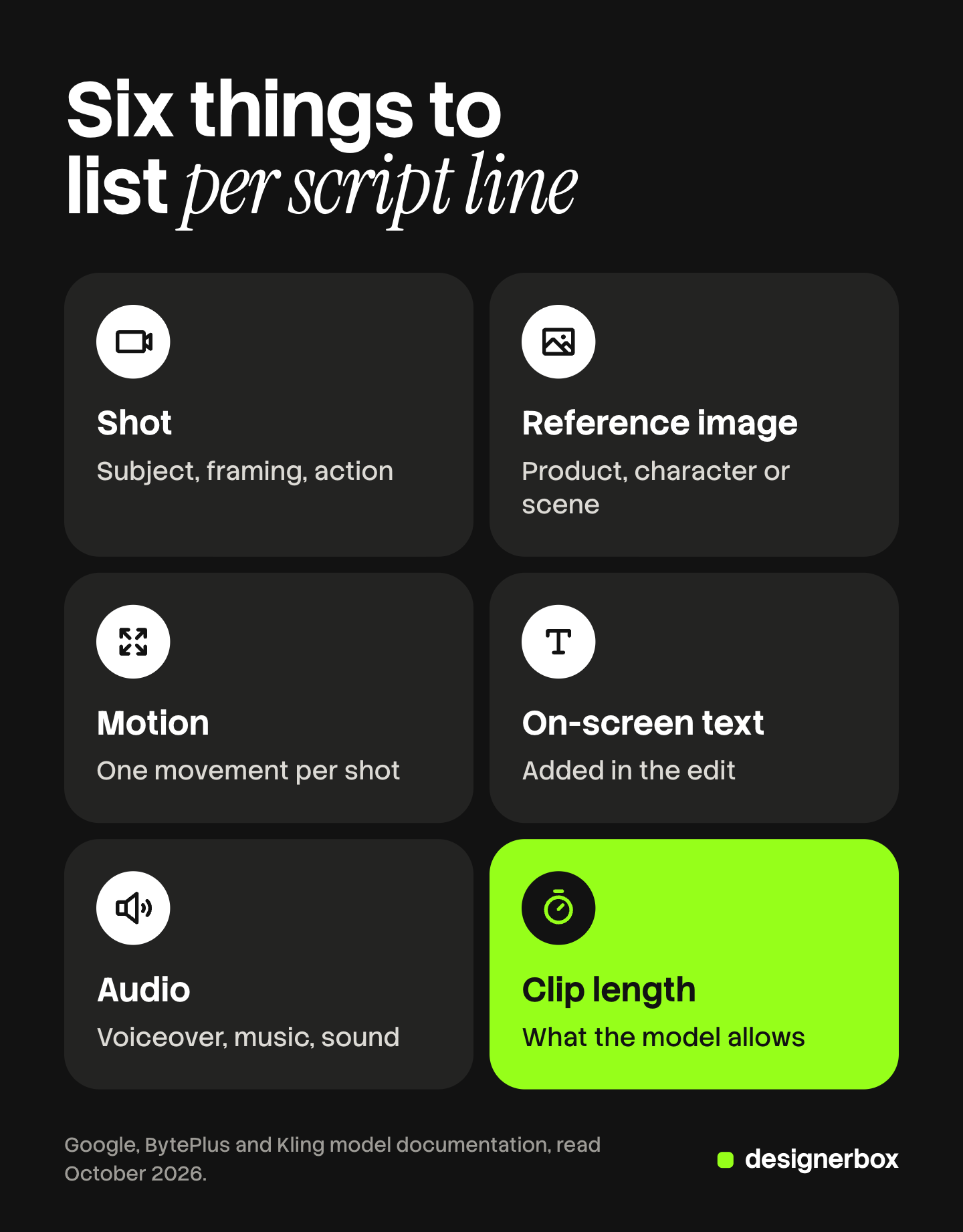
For each line of the script, write six things.
- The shot. One sentence: the subject, the framing and the action. It becomes the prompt.
- The reference image. The product photo, the character or the scene the model must keep true.
- The motion. What moves, and how the camera moves. One movement per shot.
- The on-screen text. The words the viewer reads with the sound off. Add them in the edit.
- The audio. Voiceover, music, or sound made with the clip. Veo 3.1 makes audio with every clip (ai.google.dev, October 2026).
- The clip length. How long the shot runs in the edit, and what length the model can make.
The sixth item has no match in a film breakdown. A video model makes clips in fixed lengths. Here is how the film elements map to the AI ad elements.
| Film breakdown element | AI video ad element |
|---|---|
| Cast and supporting artists | Character reference image |
| Props | Product photo |
| Location and set | Scene reference image or a written setting |
| Stunts and special effects | Motion in the prompt |
| Sound and music | Voiceover, music, sound made with the clip |
| Shooting schedule | Clip length per shot and the number of takes |
How long can one AI video clip be?
The clip length depends on the model. The vendor documents below were read on 4 October 2026.
| Model | Lengths for one clip | For a 3-second shot |
|---|---|---|
| Veo 3.1 | 4, 6 or 8 seconds | Make 4 seconds and cut to 3. With reference images, make 8 |
| Seedance 2.0 | Any whole second from 4 to 15 | Make 4 seconds and cut to 3 |
| Kling 3.0 | Any whole second from 3 to 15 | Make 3 seconds |
Google’s page for Veo 3.1 says the length “Must be “8” when using extension, reference images or with 1080p and 4k resolutions” (ai.google.dev, October 2026). So a short shot with a product reference image is an 8-second clip that you cut down.
BytePlus lists Seedance 2.0 at 4 to 15 seconds (docs.byteplus.com, October 2026). Kling’s API page lists every whole second from 3 to 15 for Kling 3.0. It also allows 1 to 6 shots in one clip, where each shot is at least 1 second and the shots add to the clip length (kling.ai, October 2026).
Write both numbers in the breakdown: the length in the edit and the length you request.
A worked script breakdown for a 15-second ad
The example is a 15-second vertical ad for an invented steel water bottle called Tarn. The claims are invented too.

The script has five lines.
- Warm water by ten o’clock.
- Tarn keeps ice until evening.
- Steel inside. No plastic taste.
- It fits your bag and your cup holder.
- Tarn. Cold all day.
Five lines in 15 seconds gives five shots of 3 seconds. Here is the breakdown.
| Line | Shot | Reference image | Motion | On-screen text | Audio | Length |
|---|---|---|---|---|---|---|
| 1 | A plastic bottle on a sunny desk | Desk scene photo | Slow push toward the bottle | Warm by 10:00 | Voiceover, quiet office sound | 3 s |
| 2 | Ice drops into the Tarn bottle | Product photo, front | Ice falls, camera holds still | Ice until evening | Voiceover, ice sound | 3 s |
| 3 | The open neck of the bottle | Product photo, top | Slow tilt down | Steel inside | Voiceover | 3 s |
| 4 | Hands put the bottle in a bag pocket | Product photo, side, and bag photo | Hand moves in, camera holds still | Fits your bag | Voiceover | 3 s |
| 5 | The bottle on a plain background with the logo | Product photo, front, and logo file | Slow push | Shop the Tarn bottle | Voiceover, music ends | 3 s |
The table shows three problems before any clip exists.
- Three product photos are needed. If the brand has only a front photo, shots 3 and 4 have no reference.
- Shot 4 needs two references. Veo 3.1 accepts up to three reference images, so the shot fits.
- Shot 1 has no product in it. A paid ad may need the product sooner, so shots 1 and 2 could change places.
Each problem costs nothing to fix in a table. For creator-style ads, the same table works with a presenter as the reference image, and UGC script templates gives the lines.
From script to shot list to storyboard frames
The breakdown feeds the next two documents. First, the shot list. It keeps the shot number and adds the camera.
| Shot | Size | Camera move | In the edit | Clip to request |
|---|---|---|---|---|
| 1 | Medium | Push in | 3 s | 4 s |
| 2 | Close | Static | 3 s | 8 s, with a reference |
| 3 | Detail, from above | Tilt down | 3 s | 8 s, with a reference |
| 4 | Medium | Static | 3 s | 8 s, with two references |
| 5 | Medium | Push in | 3 s | 8 s, with a reference |
The last column assumes Veo 3.1 with reference images. The ad runs 15 seconds, and the request is 36 seconds of video. On Kling 3.0 the request could be 15 seconds, because the model makes 3-second clips.
Next, the storyboard. Make one still frame per shot, with the same reference images the breakdown lists.
- A plastic bottle on a desk in hard sunlight, with space for text.
- The Tarn bottle, cap off, one ice cube above the opening.
- The open neck from above, steel visible inside.
- Two hands and the bottle, halfway into a bag pocket.
- The bottle on a plain background, logo below it.
Check each frame against the product photo: the shape, the color, the cap and the logo. A wrong frame costs one image to fix. A wrong clip costs a video run. AI storyboard generators compares the products that make these frames.
When the five frames are approved, each one becomes the first frame of its clip. The motion column becomes the motion prompt.
Script breakdowns as a saved workflow
DesignerBox is AI creative production for brands and agencies. For an agency, a script breakdown repeats for every client and every product. Anyone can make an AI picture. Making hundreds that still look like your brand is the hard part.
In DesignerBox you build the job once as a workflow, with the brand rules and the product photos. The brand storyboard template makes the frames. A video step animates each approved frame. A text to speech step reads the script. The workflow reads the brand profile on every run.
The video editor is a timeline with several tracks. You cut each clip to its length there and add the text and the audio. The AI video ads page shows the ad workflows. The full workflow from the first product photo to the finished ad, in one subscription.
You see the cost of a run before you press Run. An 8-second clip costs 40 to 560 credits, depending on the model.
Here are the limits. You write the breakdown table, and the workflow runs it. You download the results, or send them with a webhook or an S3 step. Every plan below Ultra is one seat. Uploading your own photos and the commercial license start on the Pro plan. AI video, virtual try-on, upscaling, the image editor and the video editor start on the Premium plan. Plans and credits are on the pricing page.
A free plan for your first run
There is a free plan, and it runs on sample products. Start from a template and see how a workflow turns steps into results. Get started free
FAQ
What is a script breakdown?
A script breakdown is an analysis of a script that lists everything needed to make it. In film, the first assistant director marks the cast, props, stunts, effects and equipment in each scene (wikipedia.org and screenskills.com, October 2026).
What is a shot list?
A shot list is a numbered text list of every shot the edit needs. Each row gives the shot size, the camera move and the length. For AI video, add the clip length to request.
What is the difference between a storyboard and a shot list?
A shot list is text, and a storyboard is pictures. The shot list says how the camera sees each shot. The storyboard shows what each shot looks like. Most productions use both.
What is a shooting script?
A shooting script is the version of a screenplay used during production. Its scenes and shots carry numbers (wikipedia.org, October 2026). For an ad, it is the approved script with one numbered line per row.
How do you turn a script into a shot list?
Number the lines of the script. Write one shot for each line: the subject, the framing and the action. Then add the shot size, the angle, the camera move and the length.
Does DesignerBox make the storyboard and the clips?
Yes. The brand storyboard template makes the frames, and a video step animates them. The cost of a run is shown before the run. AI video starts on the Premium plan.
Sources
- ScreenSkills, First assistant director skills (children’s TV): screenskills.com, October 2026
- Directors Guild of America, “Breaking It Down! The Art of the Script Breakdown” (21 April 2026): dga.org, October 2026
- Wikipedia, Script breakdown: wikipedia.org, October 2026
- Wikipedia, Shooting script: wikipedia.org, October 2026
- Wikipedia, Storyboard: wikipedia.org, October 2026
- Runway, “AI shot list: how to build a camera-ready plan”: runway.com, October 2026
- Google, Veo 3.1 in the Gemini API: clip lengths, reference images and audio: ai.google.dev, October 2026
- BytePlus ModelArk, video generation API: Seedance 2.0 duration: docs.byteplus.com, October 2026
- Kling AI, Kling 3.0 text-to-video API: duration and multi-shot: kling.ai, October 2026
- DesignerBox plans and feature gating: DesignerBox pricing page (designerbox.ai/pricing), October 2026
Film definitions and model limits checked against each source as of October 2026. Individual results vary.