
AI tools for content creators cover six weekly jobs: ideas and scripts, product and outfit stills, short video, captions and voice, editing, and scheduling. Pick one tool per job, and check three things first: the rights you get, what the tool does with your uploads, and whether the platform will label the result. On Instagram, realistic AI video and audio need a disclosure.
You have a posting calendar, a few products to show, and one pair of hands. A ranked list of 20 products does not tell you which one saves your Tuesday.
This guide sorts the tools by the job you repeat. Each job names two or three well-known tools with one fact from the tool’s own page, read in October 2026. Then it covers the two rule sets every AI content creator on Instagram needs: Meta’s AI label and the FTC’s disclosure guidance.
Key Takeaways
- Sort tools by job. Six jobs repeat every week. One tool per job is enough for most creators.
- Read the rights page first. Commercial use, ownership and what happens to your uploads differ by tool and by plan.
- Instagram labels AI content. Meta adds an “AI info” label when it detects AI signals or when you disclose.
- Realistic AI video and audio need your disclosure. Meta says it may apply penalties if you skip it.
- An AI picture does not replace your experience. The FTC says you cannot talk about a product you have not tried.
What are AI tools for content creators?
AI tools for content creators are apps that do one part of the weekly content job for you: write a draft, make a picture, cut a video, add captions, or queue the post.
Here are the six jobs, the tool type for each, and what to check before you use it.
| Job | Tool type | What to check before using it |
|---|---|---|
| Ideas and scripts | AI chat | Every fact and product claim in the draft. The chat does not know your product |
| Product and outfit stills | Image maker or product photo editor | Commercial rights on your plan, and whether the product still looks like the real one |
| Short video | Video model or template editor | Whether the clip is realistic AI video or audio. Instagram requires a disclosure for that |
| Captions and voice | Auto captions, text to speech | Caption errors on brand and product names, and the license for any AI voice |
| Editing | Text-based or timeline editor | Export size for Reels, and that the cut did not remove a disclosure |
| Scheduling | Scheduler | Which post types it can publish for you, and where your disclosure line sits in the caption |
Ideas and scripts
An AI chat gives you a first draft: 20 hooks, a 30-second script, or a caption in three lengths.
- ChatGPT lists writing as a core use: “Draft messages, notes, plans, stories, posts, and other writing” (chatgpt.com, October 2026).
- Claude describes the same job from the other side: bring “a half-formed idea” and get back a “draft you can edit and put your name on” (claude.com, October 2026).
- Gemini is Google’s AI chat, and its overview page also lists video generation inside the app (gemini.google, October 2026).
Give it the product page, your own notes from using the product, and two past posts that did well. Our guide to writing a UGC script has the structure for a short product video.
Product and outfit stills
Stills are where a product creator spends the most hours.
- Canva has an AI image generator inside its design editor. It makes an image from a text prompt or a reference photo, in the style and aspect ratio you choose (canva.com, October 2026).
- Adobe Firefly makes images, video, audio and vectors from text prompts. Adobe describes its own Firefly models as “commercially safe” and also offers partner models in the same app (adobe.com, October 2026).
- Photoroom focuses on product photos. Its site lists a background remover, product scenes, a brand kit and instant resize for Instagram and marketplace formats (photoroom.com, October 2026).
One rule applies to all three. Start from a real photo of the real product. A picture made from a text prompt alone shows a product that does not exist, and your follower buys the real one. Our guide to UGC-style product photography explains how to keep the product true while the scene changes.

Short video
Short video is the job where the tools differ most in what they make.
- Veo is Google’s video model. Google describes it as a model to “generate cinematic video with audio” (deepmind.google, October 2026).
- CapCut is a video editor with web, desktop and mobile versions. Its site says you can create slideshows and social media videos, and add automatic captions (capcut.com, October 2026).
For a product creator, the safest use of a video model is motion on a real product photo: a slow turn, a hand reaching in, steam over a cup. Before you use a free plan for a sponsored post, check what free AI video generators allow: the credits, the watermark and the commercial-use terms.
Captions, voice and editing
Most Reels play without sound at first, so on-screen captions carry the message.
- CapCut has an auto caption tool. Its page says captions and voiceovers “can be generated in multiple languages” (capcut.com, October 2026).
- ElevenLabs turns text into speech. Its page describes “ultra-realistic text-to-speech” (elevenlabs.io, October 2026).
- Descript edits video through the transcript. Its site says “deleting a word deletes that moment of video”, and it lists filler word removal and one-click subtitles (descript.com, October 2026).
Read every caption before you export. Auto captions can misspell brand names, and a wrong brand name in a paid post is your problem to fix. A realistic AI voice counts as realistic AI audio under Meta’s rule, so plan the disclosure before you post.
Scheduling and content batching
Scheduling is the last job, and it is the one where AI helps least and structure helps most. The gain comes from content batching: you make a week of posts in one sitting, then queue them.
- Buffer lets you “plan and schedule your content across social media platforms”, and lists Instagram, TikTok, Pinterest and YouTube among its channels (buffer.com, October 2026).
- Later is a social media scheduler that also lists AI tools to write captions (later.com, October 2026).
- Meta Business Suite is Meta’s own tool for creating and managing posts on Facebook and Instagram (facebook.com, October 2026).
One more job starts after the post is live. A post that works brings comments that ask for the link. CreatorFlow, built by the same team as DesignerBox, answers a keyword comment on an Instagram post or Reel with a DM that holds the link (creatorflow.so, October 2026). For the rest of the stack, its creator tools directory lists 190+ tools by job, from link-in-bio and email to scheduling and affiliate platforms (creatorflow.so/creator-tools, October 2026).
Our guide to content batching covers which parts of a week you can make ahead and which parts have to stay live. How often to post on social media gives the posting ranges by platform and the monthly total they add up to.

Instagram AI label rules
The Instagram AI label is called “AI info”. Meta adds it in two cases: when it detects “industry standard AI image indicators” in the file, or when you disclose that the content is AI-generated (about.fb.com, October 2026).
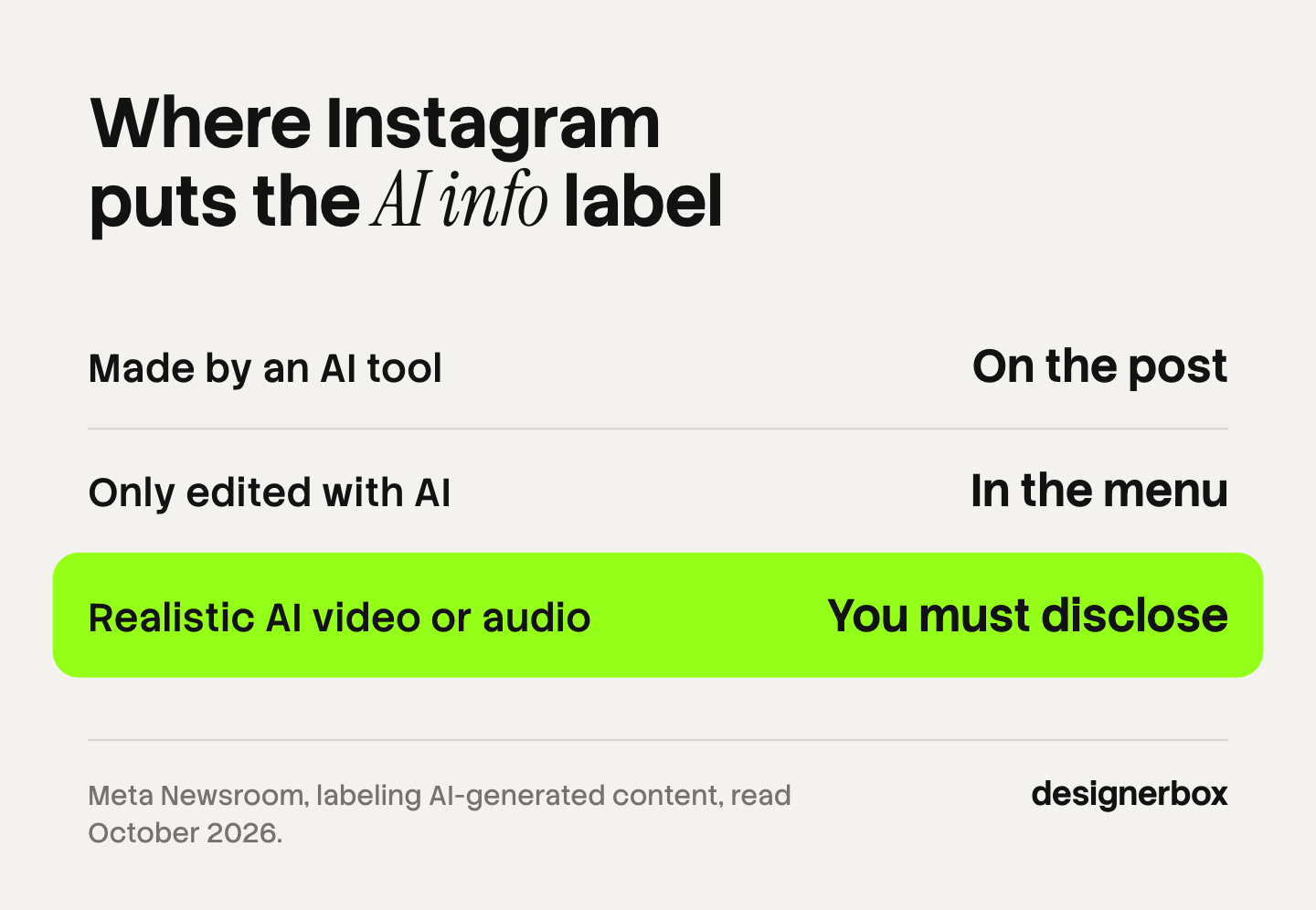
Three points matter for a creator.
- Made with AI or edited with AI. For content Meta detects was generated by an AI tool, the label shows on the post. For content that was only modified or edited by AI tools, Meta moved the label to the post’s menu.
- Realistic video and audio need your disclosure. Meta says it requires people to use its disclosure tool when they post organic content with “a photorealistic video or realistic-sounding audio that was digitally created or altered”, and that it “may apply penalties if they fail to do so” (about.fb.com, October 2026). That sentence names video and audio.
- The label can follow a boosted post. Meta’s business help page says organic content that is labeled can be boosted, and the organic label may remain on the ad (facebook.com, October 2026).
Detection depends on signals in the file. The same business help page names C2PA as one detection method. If a viewer could take a picture for a real photo of a real moment, say that AI made it.
This section is general information, not legal advice. Our article on AI disclosure in advertising covers the rules for ads.
FTC disclosure for product posts
The label says how the picture was made. The FTC disclosure says what connects you to the brand. A post can need both.
The FTC’s guide for influencers says to disclose “any financial, employment, personal, or family relationship with a brand” (ftc.gov, October 2026). An affiliate link is a financial relationship. Four points from the FTC’s own pages apply to AI content:
- You cannot review what you have not tried. The guide says: “You can’t talk about your experience with a product you haven’t tried.”
- A picture alone can be an endorsement. The FTC says posting a picture of a product “could convey, even without words, that you like and approve of the product” (ftc.gov, October 2026).
- The platform tool may not be enough. The guide says: “Don’t assume that a platform’s disclosure tool is good enough.” Add your own clear line as well.
- Put the disclosure where people see it. In a Story, place it over the picture. In a video, say or show it in the video itself. The FTC says “Paid link” next to an affiliate link should be adequate.
Our guide to Instagram affiliate marketing lists where a link can go. If you earn through LTK or Mavely, the networks add their own content rules. Our guide to AI content for LTK creators covers them.
DesignerBox for weekly product content
DesignerBox is AI creative production for brands, creators and agencies. For a creator, it covers the stills and short video jobs for the products you link. It does not write your scripts, and it does not publish or schedule posts.
Anyone can make an AI picture. Making many that still look like one feed is the hard part. In DesignerBox you start from a template, add a product photo, and set your brand once: colors, fonts and rules. You save that as a workflow. Next week you run the same workflow on the next product, and the framing and light stay the same. Batch runs one workflow over a sheet of up to 200 rows. The cost is shown before the run.
The second point is place. The full workflow from the first product photo to the finished post or ad, in one subscription, means the still, the vertical crop and the clip come from one library. An 8-second clip costs 40 to 560 credits, depending on the model. Creator-style clips are on the AI UGC page, and the starting points are on the templates page. Our guide to Instagram content with AI shows a month of posts built this way.
The limits are plain. There is a free plan, and it runs on sample products. Uploading your own photos and the commercial license start on the Pro plan. AI video, virtual try-on, upscaling, the image editor and the video editor start on the Premium plan. Plans and credits are on the pricing page.
If you post a few times a month, a design app and your phone camera may cover the job. DesignerBox fits when you show new products every week and the feed has to hold one look. The pictures show the product. Your own experience with it still has to be real.
FAQ
What are the most useful AI tools for content creators?
The most useful AI tools for content creators are the ones that match your slowest weekly job. An AI chat covers ideas and scripts. An image tool covers product stills. A video editor with auto captions covers Reels. A scheduler covers the queue.
Is AI for content creators allowed on Instagram?
Yes. Instagram allows AI content. Meta adds an “AI info” label when it detects AI signals in the file or when you disclose. Meta requires your disclosure for realistic AI video and realistic AI audio, and says it may apply penalties if you skip it (about.fb.com, October 2026).
What is the Instagram AI label?
The Instagram AI label is “AI info”. It appears on the post when Meta detects that an AI tool made the content, or when you disclose it. For content that AI only edited, the information sits in the post’s menu (about.fb.com, October 2026).
Do I need to disclose AI images of a product I promote?
It depends on what the picture claims. The FTC says you cannot talk about your experience with a product you have not tried, and that a product picture alone can be an endorsement. If you have a link, a gift or a payment, disclose that relationship clearly. If the picture could pass as a real photo, say that AI made it.
Does DesignerBox post to Instagram for me?
No. DesignerBox makes the stills and clips, and you download the results. Publishing runs through Instagram or a scheduler. You see the cost of each run before you start it.
Sources
- Meta, “AI info” label, detection signals and the label for edited content: about.fb.com (read 2 October 2026)
- Meta, disclosure requirement for photorealistic video and realistic-sounding audio in organic posts: about.fb.com (read 2 October 2026)
- Meta Business Help Center, AI info on ads, boosted posts and C2PA detection: facebook.com (read 2 October 2026 with a mobile user agent)
- Meta Business Help Center, create and manage posts in Meta Business Suite: facebook.com (read 2 October 2026)
- FTC, Disclosures 101 for Social Media Influencers: ftc.gov (read 2 October 2026)
- FTC, Endorsement Guides: What People Are Asking: ftc.gov (read 2 October 2026)
- OpenAI, ChatGPT overview: chatgpt.com (read 2 October 2026)
- Anthropic, Claude product overview: claude.com (read 2 October 2026)
- Google, Gemini overview: gemini.google (read 2 October 2026)
- Google DeepMind, Veo: deepmind.google (read 2 October 2026)
- Canva AI image generator: canva.com/ai-image-generator (read 2 October 2026)
- Adobe Firefly product page: adobe.com/products/firefly.html (read 2 October 2026)
- Photoroom home page: photoroom.com (read 2 October 2026)
- CapCut auto caption generator: capcut.com/tools/auto-caption-generator (read 2 October 2026)
- ElevenLabs text to speech: elevenlabs.io/text-to-speech (read 2 October 2026)
- Descript home page: descript.com (read 2 October 2026)
- Buffer home page: buffer.com (read 2 October 2026)
- Later social media scheduler: later.com/social-media-scheduler (read 2 October 2026)
- CreatorFlow, comment-to-DM on Reels, posts and Stories: creatorflow.so (read 2 October 2026)
- CreatorFlow creator tools directory, 190+ tools in eleven groups: creatorflow.so/creator-tools (read 2 October 2026)
- DesignerBox plan gates, the video credit range and batch: designerbox.ai/pricing (October 2026)
Tool scope verified from each tool’s own page, Meta’s AI label rules from the Meta Newsroom and the Meta Business Help Center, and FTC guidance from ftc.gov, as of October 2026. Platform policies change often. Individual results vary.