UGC-style product photography is brand-directed imagery built to look like a customer’s own photo: phone framing, everyday rooms, natural light or hard flash, hands in shot. The brand briefs it, produces it and owns it. It is a production style, not real user-generated content. The gap between how it looks and where it came from decides how you are allowed to caption it.
Three rules cover the look of this format. Make it feel casual. Keep the label visible. Do not imply claims you cannot support. All three are true. None of them names the thing that carries a penalty. In the United States, a photo that reads as a customer’s own can be a consumer testimonial in its own right. Since 21 October 2024 the FTC can seek civil penalties for fake testimonials.
So this guide covers both halves. The six shots worth building and how to brief them, then the exact point where a casual product photo stops being a creative choice and becomes a regulated claim.
Key Takeaways
- UGC-style is a look, not a source. The brand produces it. Real user-generated content comes from a customer who chose to post. Conflating the two in a caption is where teams get into trouble.
- A picture on its own can be an endorsement. The FTC says posting a picture of a product “could convey” that “you like and approve of the product”, with no words attached (ftc.gov, accessed September 2026).
- The caption, not the lighting, sets the legal line. A phone-flash photo of your product on a kitchen counter is a lifestyle still. Add a quoted rave and an implied buyer, and 16 CFR Part 465 is in play.
- Synthetic people are not banned, but a false experience is. The FTC states its rule is drafted so as not to prohibit virtual influencers, while warning that using actors to portray testimonialists can still deceive.
- Six shots cover the format: counter or table moment, shelf-side discovery, in-hand scale, unboxing, in-use routine, and the shared social occasion.
- Hold the product constant while you test everything else. Vary light, crop, room and moment one at a time. Vary the label, the variant and the pack count and you have learned nothing.
What is UGC-style product photography?
UGC-style product photography is commercial product imagery styled to resemble content a customer or creator would shoot on a phone. It uses everyday settings, imperfect framing, direct flash or window light, and often hands. The purpose is to feel native to a social feed rather than to an ad slot. The product still has to be accurate, legible at thumbnail size, and consistent with the claims the brand can support.
The format earns its place because feed-native creative gets read as information instead of advertising. It does not replace clean catalog work. A product page still needs a white-background packshot, detail shots and scale, which is why the seven types of product photography sit alongside each other rather than competing.
UGC-style and lifestyle photography are not the same shot
Teams use the two terms interchangeably and then brief the wrong one. Lifestyle photography is aspirational and art-directed: a considered room, controlled light, a scene the customer wants to be in. Our guide to lifestyle product photography covers that shot. UGC-style is the opposite intent. It aims at ordinary, and the imperfection is the point of the format.
| Lifestyle | UGC-style | |
|---|---|---|
| Implied author | The brand | A customer or creator |
| Light | Shaped, soft, directional | Window light or direct phone flash |
| Framing | Composed, balanced | Off-center, cropped, handheld |
| Setting | Styled and tidied | Lived-in, some clutter |
| Hands | Usually absent | Often present, for scale and energy |
| Main risk | Looks like an ad | Reads as a customer’s own photo |
That last row is the whole reason this format needs its own rules. A lifestyle shot announces that a brand made it. A UGC-style shot deliberately does not, and the more successfully it hides its authorship, the closer it moves to the endorsement rules below.

The six UGC-style shots worth building
Six moments cover almost every product category. Each answers a different buyer question, and each carries a different amount of claim risk.

1. The counter or table moment. The product sitting in a real room among ordinary objects. Lowest risk, highest reuse, works for every category. Start here.
2. Shelf-side discovery. The product being picked off a shelf or out of a cupboard, shot handheld with flash. Reads as retail discovery and gives useful context for size.
3. In-hand scale. A hand holding the product, framed tight. This is the shot that answers “how big is it” most directly.
4. Unboxing. Packaging opened, tissue, a delivery box in frame. Strong for launches, gifting and subscription products. Keep the pack count and the artwork exactly right, because this shot is read as a receipt.
5. The in-use routine. The product mid-application, mid-pour, mid-wear. Highest engagement and highest claim risk together, because an action implies a result.
6. The shared occasion. Several people, several hands, a table. Good for approachability. Treat every prop in frame as a claim you might have to defend.
For a product page, shots 1 and 3 earn their slot permanently. The rest are campaign assets, tested and rotated. What a product page should show and when covers the order the images should appear in. Brands that supply affiliate creators can make a week of these frames from one session. Mavely creator content shows how. Creators on the other side of that link can read what the Mavely app asks of them.
When a UGC-style photo becomes a testimonial
This is the part of the format with a penalty attached.
The FTC’s Endorsement Guides treat depiction as capable of carrying a message. Their guidance states that posting a picture of a product “could convey”, even without words, that “you like and approve of the product”. It also states the governing principle: an endorsement “has to represent the accurate experience and opinion of the endorser” (ftc.gov, accessed September 2026). The Endorsement Guides are guides. The testimonials rule below is a rule.
Separately, the Rule on the Use of Consumer Reviews and Testimonials, 16 CFR Part 465, took effect on 21 October 2024. Section 465.2 makes it an unfair or deceptive practice for a business to write, create or sell a consumer testimonial that materially misrepresents that the testimonialist exists, that they used or had experience with the product, or what that experience was. A business that shares a testimonial it knew, or should have known, was false can also break the rule (16 CFR 465.2, Cornell LII, accessed September 2026).
The FTC’s announcement said the rule lets it seek civil penalties against violators and deter AI-generated fake reviews (ftc.gov, accessed September 2026). The maximum civil penalty is up to $53,088 per violation, for knowing violations. That is the 2025 figure (ftc.gov, accessed September 2026). It still applies in 2026 because the 2026 inflation adjustment was canceled (OMB memo M-26-11, accessed September 2026). This is general information, not legal advice.
Two things follow, and they are less restrictive than they first sound.
A synthetic or hired person is not the violation. The FTC’s own questions and answers on the rule state that Section 465.2 “is drafted specifically so as to not prohibit companies from using virtual influencers”, while noting that using actors to portray testimonialists could still be deceptive under the FTC Act (ftc.gov, accessed September 2026). In the FTC’s description, the rule applies when the testimonial behind the avatar or actor is fake or false. Casting alone is not the trigger.
Misrepresented experience is the violation. The image becomes a testimonial when it carries, expressly or by implication, a claim about a real buyer’s experience. Four signals push it across:
- A quoted line of praise laid over the frame
- A first-person caption written as a customer rather than as the brand
- A star rating, a review card, or a screenshot frame
- Presentation as if it were reposted, resurfaced or reshared content
Strip those four and a UGC-style photo is a product photo shot in a kitchen. Add any of them and you are making a statement about a person’s experience, and that statement has to be true.
The practical rule is simple to operate. Produce UGC-style imagery freely. Caption it in the brand’s voice. Reserve testimonial framing for testimonials you collected, and keep the evidence.
What to disclose when the image is AI-generated
Disclosure is a separate question from the endorsement question, and it turns on whether a realistic person appears rather than on how casual the photo looks.
EU. Article 50 of the AI Act has applied since 2 August 2026 (European Commission FAQ, accessed September 2026). Whoever publishes a deep fake must disclose it. The Commission’s guidelines, published on 20 July 2026, list realistic AI-generated human avatars or personas as persons, and say it is enough that the person could plausibly exist (European Commission guidelines, accessed September 2026). The guidelines are not binding. So a realistic invented person is likely in scope.
A real product shown against an AI background is usually not a deep fake, as long as the image does not mislead about the product. Color correction and background changes for clearly aesthetic reasons usually have only a minor effect. An AI image that makes the product look better than it is in real life can count as a deep fake. A generated still of your product on a counter with no person in it is usually outside the duty. A photoreal face changes the analysis. A hand on its own is not settled, and the safe move is to treat it as inside. The full jurisdictional detail is in labeling rules for AI-generated fashion imagery.
TikTok. TikTok requires creators to label AI-generated or heavily edited content that shows realistic people or scenes (TikTok Community Guidelines, accessed September 2026). In ads, TikTok asks for its AIGC label or your own clear disclaimer on media that is fully AI-generated or heavily AI-edited. It rejects or restricts undisclosed AI ads (TikTok ads policy, accessed September 2026).
Meta. Meta adds an “AI info” label to ads made or heavily changed with its own AI tools. It also checks ads for signs of third-party AI, such as C2PA metadata, and adds the label when it finds them. In most cases the label sits in the three-dot menu under “About this ad”, and Meta says the feature may not be available in every region (facebook.com/business/help, accessed September 2026). Meta asks advertisers to disclose AI themselves only in ads about social issues, elections or politics.
Marketplaces run their own rules on top of the platforms, and they are not consistent with each other. What each marketplace requires for AI product photos has the current position per channel. The image specs for five channels are in ecommerce product photography across five channels.
How to brief the shot so the product survives it
Casual framing is where product accuracy quietly goes wrong. The brief has to hold four things fixed while everything else moves.
- Anchor to the real product. Work from your own photograph of the actual item, not from a description. Generating from a text prompt alone is a common cause of output that reads as generic AI, along with the other tells that give an AI image away.
- Name the room, the light and the crop. “Kitchen counter, late afternoon window light, handheld, slightly off-center, product about a third of frame.” Vague briefs produce studio output with a plant added.
- Lock the label. Current packaging, correct variant, correct pack count, artwork legible. Anything a hand or a prop obscures is a detail the customer cannot verify.
- Set the boundary list before you generate. Allowed rooms, allowed props, whether faces appear, humor level, and every object that could imply a benefit you cannot support.
In DesignerBox this runs as a saved workflow instead of a one-off prompt. The Product in several places template puts an existing product photo into a new setting. Save your scene brief as a workflow, and it runs the same way on the next product. When a recurring face is part of the format, an avatar from Avatars keeps the same AI person across a campaign, in a nine-pose set. That also makes the disclosure decision the same for every asset. The UGC product video app makes a creator-style vertical clip from a product photo and a short brief.

What to test, and what to hold still
UGC-style creative rewards testing because small changes move performance. It punishes sloppy testing for exactly the same reason.
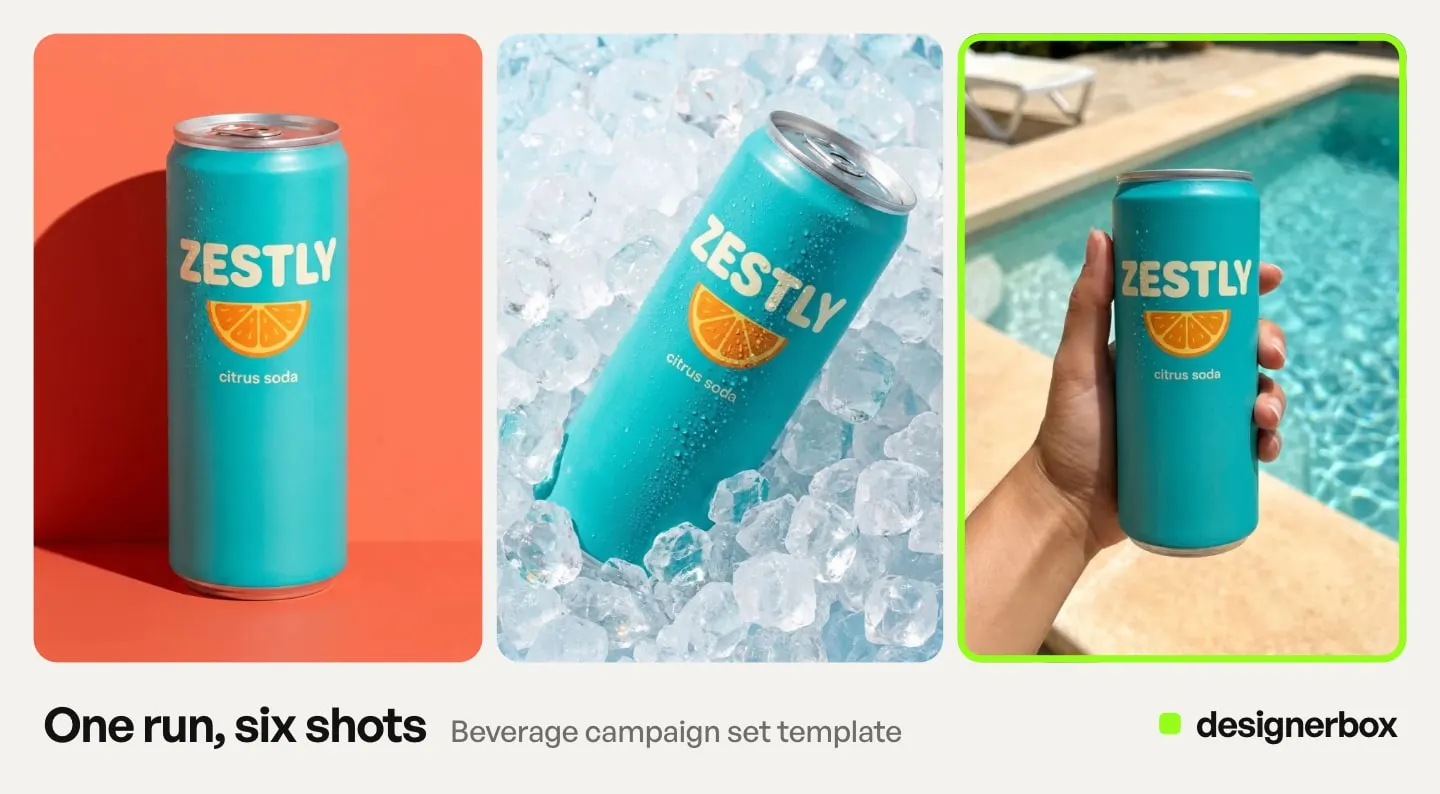
Test one variable per round: flash against window light, handheld against a table set-up, tidy counter against lived-in clutter, unboxing against in-use, hands in frame against product alone. Hold the product itself completely constant. If the label, the variant, the room and the hook all move together, the winner tells you nothing you can apply to the next product.
Worth knowing before you assume a lift: one of the clearest published tests of generated product imagery is a RecSys 2024 industry paper on online retargeting campaigns for ecommerce. Its online A/B tests report that the generated images beat the original product images on click-through in every test it ran, with relative gains of roughly 4% to 40%, all significant at p<0.05 (arxiv.org, accessed September 2026). Note the width of that range. It is a real effect with an unpredictable size, which is an argument for testing rather than for a number you can put in a forecast.
Volume is the other half of the equation. Six shots across a 40-product catalog is 240 images, which is a photoshoot budget conversation before it is a creative one. Both sides of that trade are laid out in what a product photoshoot costs. Uploading your own photos and the commercial license start on the Pro plan. AI video starts on the Premium plan. Plans and credits are on DesignerBox pricing.
That number is also the argument for building the job once. Get the six shots right on a single product. Save the brief as a workflow, with the room, the light, the crop and the boundary list fixed. A saved workflow runs the same way on the next product, so nobody re-briefs the other thirty-nine. The cost is shown before each run. Batch runs one workflow over a whole sheet of products. Anyone can make an AI picture. Making hundreds that still look like your brand is the hard part. Your brand rules sit in one record, and the workflow reads them on every run. The stills, the avatar and the clip come from the same account, so the fortieth creator-style frame still reads as your brand. Start from a template, add your brand and your products, and run it.
FAQ
What is UGC-style product photography?
UGC-style product photography is brand-produced imagery styled to look like a customer’s or creator’s own phone photo. It uses everyday settings, handheld framing, natural light or direct flash, and often hands. The brand briefs, produces and owns it, which distinguishes it from genuine user-generated content submitted by an actual customer.
Should UGC-style product photos look low quality?
No. The format calls for casual framing, not poor execution. The product still has to be recognizable at thumbnail size, the label legible, and the packaging current. Imperfect composition reads as authentic. A blurry, badly lit or confusing image reads as a mistake and gets scrolled past.
Do I have to disclose that a UGC-style product photo is AI-generated?
Sometimes. It turns on whether a realistic person appears and on where the image runs. In the EU, Article 50 of the AI Act puts the disclosure duty on whoever publishes a deep fake. The Commission’s non-binding guidelines, published in July 2026, say a realistic invented person can count as a deep fake. TikTok requires creators to label realistic AI-generated content, and asks advertisers to disclose AI media in ads. Meta labels ads made with its own AI tools, and ads where it detects signs of third-party AI.
Can I use AI-generated UGC-style images in paid ads?
Yes, subject to each platform’s disclosure controls and to ordinary advertising law. The risk sits in the framing, and the generation matters less. Presenting the image as a real customer’s post, or pairing it with a quoted testimonial, brings 16 CFR Part 465 into play. Civil penalties are available for knowing violations.
How many UGC-style images does a product need?
Two permanent, four rotating. An in-hand scale shot and a counter or table moment earn a fixed slot because they answer size and context. Shelf discovery, unboxing, in-use and the shared occasion work better as campaign assets you test and refresh rather than as permanent gallery entries.
When should you not use UGC-style product photos?
Skip the format when the channel requires clean product inspection, such as a marketplace main image on a white background. Skip it in categories where casual presentation undercuts credibility, including regulated goods and high-consideration purchases. Skip it when the scene would imply a benefit, a result or a use case the brand cannot substantiate.
Sources
- Endorsements conveyed by images without words, and the accurate-experience principle: FTC’s Endorsement Guides: What People Are Asking (accessed September 2026)
- Section 465.2 on fake or false consumer testimonials, including misrepresented existence and experience: 16 CFR 465.2, Cornell LII (accessed September 2026)
- The final rule, civil penalties and AI-generated fake reviews: FTC announcement, 14 August 2024 (accessed September 2026)
- Virtual influencers not prohibited by the rule, and the warning on actors portraying testimonialists: The Consumer Reviews and Testimonials Rule: Questions and Answers (accessed September 2026)
- Maximum civil penalty of $53,088 per violation (2025 adjustment): FTC inflation-adjusted civil penalty amounts (accessed September 2026)
- No 2026 inflation adjustment for civil penalties: OMB memo M-26-11, 17 April 2026 (accessed September 2026)
- EU AI Act Article 50 transparency obligations: European Commission FAQ (accessed September 2026)
- Commission guidelines on Article 50, C(2026) 5054, published 20 July 2026: European Commission (accessed September 2026)
- TikTok labeling rule for realistic AI-generated content: TikTok Community Guidelines, integrity and authenticity (accessed September 2026)
- TikTok disclosure for AI-generated ad media: TikTok ads policy, misleading and false content (accessed September 2026)
- Meta AI info labels on ads, including C2PA detection: Meta Business Help Center (accessed September 2026)
- Meta disclosure rule for social issue, election and political ads: Meta ad standards (accessed September 2026)
- Online A/B tests showing generated product images beating the original images on click-through, gains of roughly 4% to 40%, all significant at p<0.05: Dynamic Product Image Generation and Recommendation at Scale for Personalized E-commerce, RecSys 2024 (accessed September 2026)
US endorsement and testimonial rules checked against ftc.gov and Cornell LII, EU obligations against the European Commission’s Article 50 FAQ and guidelines, and platform policy against TikTok and Meta documentation, as of September 2026. This is general information, not legal advice. Individual results vary.