To make AI ads, you write a one-line brief, write a short script, and split the script into shots of a few seconds each. You then generate each shot from a real product photo, join the clips on a timeline with captions and voice, and check the result against the product and the platform’s AI label rules. One ad is several short clips, not one long generation.
A tool demo shows three clicks: paste a link, pick an avatar, download. That gets you a video. It does not get you an ad you can defend, because nobody checked the product, the claim or the label. The work that decides the result sits before and after the generation. Before step one, pick the type of AI video ad generator that fits your input.
This guide covers the six steps in order, the clip lengths the main video models allow, what to film instead of generate, and the labels the platforms ask for. It is written for marketers at brands and agencies who make video ads for physical products every week.
Key Takeaways
- An AI ad is built from short clips. Veo 3.1 makes clips of 4, 6 or 8 seconds, so a 20-second ad needs three to five shots.
- The shot list is the plan. One row per shot, with its length, its picture, its text and its spoken line.
- Start each clip from a product photo. A text prompt describes a product. A photo shows the model your real one.
- The edit is half the job. Captions, voice, the order of the clips and the end card are added on a timeline after the clips exist.
- Check the product before the platform does. Compare the logo, the print, the shape and the color in every clip with the real item.
- Label AI content where the platform asks. TikTok requires a label or disclaimer on AI-generated ads, and Meta adds its own label when it detects AI.
What is an AI ad?
An AI ad is an advertisement where a generative model made some or all of the picture, the voice or the text. In a video ad, that usually means the clips come from a video model, the voice comes from text to speech, and a person still writes the brief, picks the shots and approves the result. The ad runs on the same placements as any filmed ad and follows the same rules.
The term covers static ads too. This guide is about video, because video is where the steps change most. For still ads, the process is closer to design work, and the static ad examples show what the finished pieces look like.
One distinction matters before you start. An AI ad that shows your product in a scene is a production choice. An AI ad where a generated person says “I used this” is a testimonial, and the rules for testimonials apply to it. Step 6 covers that line.
How to make AI ads in 6 steps
The six steps below work with any video model and any editor. The table gives the short version, and each step is explained under it.
| Step | What you make | Done when |
|---|---|---|
| 1. Brief | One line: buyer, product, one claim, one ask | A colleague can repeat it from memory |
| 2. Script | The spoken lines and the text on screen | It fits the length you chose, read aloud |
| 3. Shot list | One row per clip, each inside the model’s clip length | Every second of the ad has a picture |
| 4. Clips | One generated clip per row, from a product photo | The product matches the real item in each one |
| 5. Edit | The clips, captions, voice and end card on a timeline | It reads with the sound off |
| 6. Check and label | A product check, a claims check and the AI label | You could show the proof for every claim |
Step 1: Write the brief in one line
Name the buyer, the product, one claim and one ask. For example: “For runners who train in the rain, the Trail 2 jacket stays dry for two hours, shop the new colors.” If the brief needs a second sentence, it holds two ads.
The claim has to be one you can prove. A number needs a test or a record behind it. If you have no proof, pick a claim the camera can show, such as how the product opens, folds or pours.
Step 2: Write the script to length
Pick the length first, then write to it. Short ads leave room for one idea. Write the spoken lines and the on-screen text side by side, because many viewers watch without sound. TikTok recommends “displaying 5-10 words per second when using text” (TikTok Ads Help Center, last updated June 2025), so a 7-word line needs at least one second on screen. Give it two.
The opening matters most. TikTok advises advertisers to introduce the content proposition in the first 3 seconds, on the same page. The video hooks guide covers the opening in detail, and the UGC script guide covers word counts for the rest.
Step 3: Build the shot list around clip length
This step decides the structure of the ad. A video model does not make a 20-second ad. It makes a clip of a few seconds, and you join several. So the script becomes a shot list: one row per clip, with its length, what the picture shows, the text on screen and the spoken line.
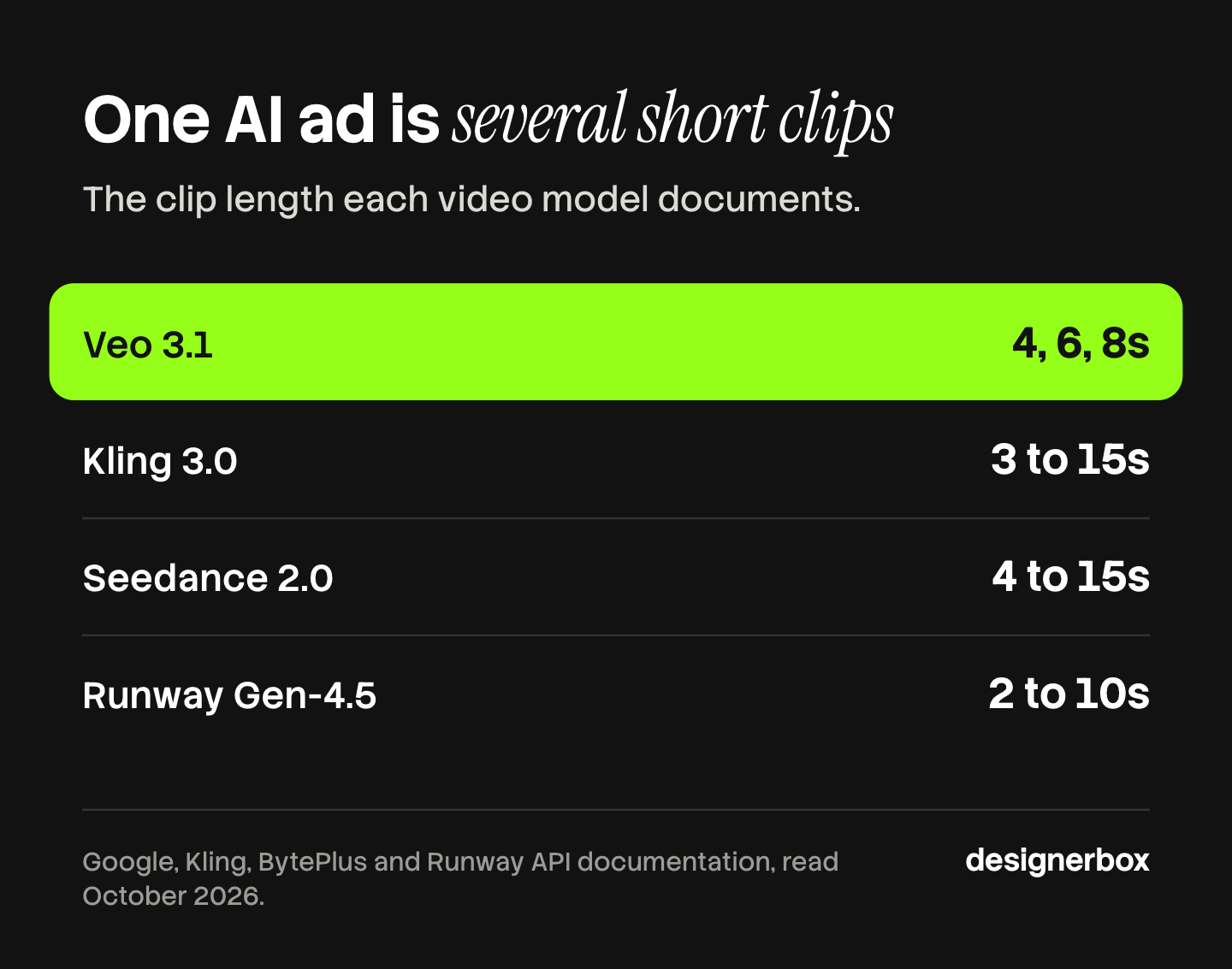
Plan each row inside the clip length of the model you use. These are the lengths each vendor documents:
| Model | Clip length | Source |
|---|---|---|
| Veo 3.1 (Google) | 4, 6 or 8 seconds | Gemini API, Veo guide, October 2026 |
| Kling 3.0 (Kuaishou) | 3 to 15 seconds | Kling API guide, October 2026 |
| Seedance 2.0 (ByteDance) | 4 to 15 seconds | BytePlus ModelArk, October 2026 |
| Gen-4.5 (Runway) | 2 to 10 seconds | Runway API reference, October 2026 |
A 20-second ad on 4 to 8 second clips is three to five shots. A common split is a 4-second opening, two 6-second product shots and a 4-second end card. Short shots also hide a model’s weak points, because a product has less time to drift.
Model lineups move fast. Google lists 22 October 2026 as the earliest shutdown date for the Veo 3.1 preview models in the Gemini API, and names Gemini Omni Flash as the replacement (Gemini API deprecations, October 2026). Check the vendor’s page before you plan a month of work around one model.
Step 4: Generate each clip from a product photo
Start every product shot from a photo of the real product. This is called image-to-video: the photo is the first frame or a reference, and the prompt describes the motion. A text-only prompt makes the model invent your product, and it will invent the label too. The four-shot build from one product photo shows this with a worked example.
Write the prompt for the motion, not for the product. The photo already carries the product. Say what moves, how the camera moves and what the light does. Veo 3.1 also takes cues for sound: Google’s guide says to “use quotes for specific speech” and to describe sound effects in plain words. More structures are in the AI video prompt examples.
Expect to run a shot more than once. Keep the take where the product is right, even if another take looks more dramatic.
Step 5: Edit the clips into one ad
Put the clips on a timeline in shot-list order. Then add the parts a video model does not give you:
- Captions. One line at a time, inside the platform’s safe zone.
- Voice. A recorded voice or text to speech, timed to the cuts.
- Sound. TikTok lists “using sound/music” among its basics, with a vertical 9:16 frame and at least 720p resolution.
- The end card. The product, the offer and the ask, held long enough to read.
Export one master, then make the other sizes from it. Meta recommends 9:16 for Stories and Reels and different ratios for Feed (Meta Business Help Center, October 2026). The guide to editing AI-generated video covers the cut in more depth. The video production workflow guide maps all six stages and the software for each.
Step 6: Check the ad and label it
Run three checks before the ad ships. This is general information, not legal advice.
The product check. Put each clip next to the real product. Look at the logo, the print, the shape, the color and the number of parts. A warped label is the most common fault, and a buyer sees it first.
The claims check. Every number and every result needs proof you could show. A generated presenter can describe the product. A generated presenter cannot give a personal experience. The FTC says its rule on reviews and testimonials “has no blanket prohibition on the use of AI-generated avatars in marketing”, and that an avatar’s statement might still count as a testimonial under the rule (FTC, October 2026). A false one is prohibited.
The label. TikTok allows significantly edited media and AI-generated content in ads if you “apply the AIGC label, or by adding a clear disclaimer, caption, watermark, or sticker of your own” (TikTok ads policy, October 2026). Meta adds an “AI info” label to an ad when it detects third-party AI (Meta Business Help Center, October 2026). In New York, a person who makes an ad and knows it contains a synthetic performer must disclose that in the ad (General Business Law 396-b, October 2026). The guide to AI disclosure in advertising lists the rules by place.
What should you film instead of generate?
Generate the shots where the product is the subject. Film the shots where the truth of the picture is the point. A real before and after, a real customer and a real result all need a camera, because the ad’s claim depends on them being real.
| The shot shows | Film it | Generate it |
|---|---|---|
| The product in a scene or in motion | Possible | Fits well, from a product photo |
| A text card, a number or an end card | Possible | Fits well |
| A presenter who describes the product | Possible | Possible, with the label where the platform asks |
| A real before and after | Yes | No. The result has to be real |
| A customer’s own experience | Yes, with a real customer | No |
| Fine detail the buyer inspects, such as stitching or a screen | Yes, or use the photo as a still | Risky. Check it frame by frame |
Many strong ads mix both. A filmed customer line can sit between two generated product shots. The viewer does not sort the clips by how they were made. The viewer checks whether the product looks right and whether the claim holds. For food and drink, the food commercial guide shows which of five shots AI video can make.
How long does it take, and what drives the cost?
The generation is the short part. The brief, the shot list and the checks take longer, and they are also what you reuse. Once a shot list works for one product, the next product needs a new photo and a new line, not a new plan.
Cost follows the number of takes, not the number of ads. Each clip you generate is billed, including the ones you throw away. A shot that needs five takes costs five clips. The breakdown of what one shipped AI video ad costs works through the full sum, and ad creative testing covers how many versions a test needs.
The same build for every product
Anyone can make an AI picture. Making hundreds that still look like your brand is the hard part. The six steps above are easy to do once. The work is doing them the same way for every product, every week.
DesignerBox is AI creative production for brands and agencies. You build a workflow once with your brand, your products and your rules, and the steps above become one run. AI video ads turn a product photo into a short vertical clip. The video editor is a real timeline, with several tracks, transitions, animated text and audio, so the cut happens in the same place as the clips. A colleague can run the same job as an app: they complete a short form and press Run. The cost is shown before the run.
The full workflow from the first product photo to the finished ad, in one subscription.
Here are the limits. DesignerBox does not publish ads for you: you download the results, or send them with a webhook or an S3 step. It does not read your ad account. An 8-second clip costs 40 to 560 credits, depending on the model. Team features are on the Ultra plan, and every plan below Ultra is one seat. The free plan cannot make video.
Uploading your own photos and the commercial license start on the Pro plan. AI video, virtual try-on, upscaling, the image editor and the video editor start on the Premium plan. Plans and credits are on the pricing page.
A free plan for your first run
There is a free plan, and it runs on sample products. Start from a template and see the cost before you run it. Get started free.
FAQ
How do you make an AI ad?
Write a one-line brief, then a short script. Split the script into shots of a few seconds each. Generate each shot from a real product photo, join the clips on a timeline, and add captions, voice and an end card. Check the product in every clip, check every claim, and add the AI label where the platform asks for it.
How long can an AI-generated video ad be?
The ad can be any length, because it is joined from clips. The clips are short. Veo 3.1 makes clips of 4, 6 or 8 seconds, Kling 3.0 makes 3 to 15 seconds, and Runway Gen-4.5 makes 2 to 10 seconds. A 20-second ad is usually three to five shots.
Can you make an AI commercial from one product photo?
Yes, for the shots where the product is the subject. The photo becomes the first frame or a reference, and the prompt describes the motion. One clear photo on a plain background works best. A real customer, a real result and a real before and after still need a camera.
Do AI ads need a label?
It depends on the platform and the place. TikTok requires the AIGC label or a clear disclaimer on ads with AI-generated or significantly edited media. Meta adds an “AI info” label when it detects third-party AI in an ad. New York requires a disclosure when an ad contains a synthetic performer. This is general information, not legal advice.
What is the most common mistake in AI video ads?
Trying to make the whole ad in one generation. The model then decides the shots, the product and the pacing for you. A shot list fixes this: each clip has one job, starts from a product photo and fits inside the model’s clip length.
How much does it cost to make an AI ad?
The cost follows the number of clips you generate, including the takes you do not keep. A 20-second ad of four shots at three takes each is twelve clips. Vendors bill by the clip or by the second. In DesignerBox the cost is shown before the run.
Sources
- Google, Generate videos with Veo 3.1 in the Gemini API: ai.google.dev/gemini-api/docs/veo, accessed October 2026
- Google, Gemini API deprecations: ai.google.dev/gemini-api/docs/deprecations, accessed October 2026
- Kling API guide, video capability map: kling.ai/document-api/guides/capability-map/video, accessed October 2026
- BytePlus ModelArk, video generation task API: docs.byteplus.com, accessed October 2026
- Runway API reference: docs.dev.runwayml.com/api, accessed October 2026
- TikTok Ads Help Center, Creative best practices for performance ads: ads.tiktok.com, last updated June 2025, accessed October 2026
- TikTok ads policy, misleading and false content: ads.tiktok.com, accessed October 2026
- Meta Business Help Center, aspect ratios by placement: facebook.com/business/help/103816146375741, accessed October 2026
- Meta Business Help Center, AI info labels on ads: facebook.com/business/help/1010479435004531, accessed October 2026
- FTC, Consumer Reviews and Testimonials Rule: Questions and Answers: ftc.gov, accessed October 2026
- New York General Business Law 396-b: nysenate.gov, accessed October 2026
- DesignerBox pricing and product pages (designerbox.ai), October 2026
Model clip lengths and platform rules verified from vendor and platform pages as of October 2026. The example brief and shot split are illustrations, not test results. Individual results vary.