




Reference to video is an AI video method where you give the model images, and it keeps what they show. A photo can steer a clip in three ways. As a start frame, the photo is frame one. As a first and last frame pair, the model fills the motion between two pictures. As a reference image, the photo is an ingredient that the model keeps in new shots.
The three modes look alike in a tool menu, and they control different things. This guide covers what each one controls, the limits that vendors document in October 2026, and how to prepare the photo.
Key Takeaways
- A photo steers a video in three ways. It can be the start frame, one of two end frames, or a reference image.
- A start frame fixes the first picture. The model invents everything after it, so the end of the clip is open.
- A first and last frame pair fixes both ends. The model invents the path between them.
- A reference image fixes a subject. The model keeps a character, a product or a scene, and builds new shots around it.
- Limits differ by model. Veo 3.1 takes up to 3 reference images, Wan 2.7 up to 5 references, and Seedance 2.0 up to 9 images.
What does reference to video mean?
Reference to video means the model reads your images as a guide to what must appear. It does not have to show any of them as a frame. Alibaba’s Wan documentation describes a reference image as one that “provides the visual reference for a main character (person, animal, or object) or scene” (alibabacloud.com, October 2026).
That is different from classic image to video, where the photo is the first frame. In reference to video, the model can open on a new angle, a new place or a new pose.
Vendors use different names. Google writes “reference images”, Kling writes “Elements”, and ByteDance writes “omni reference-to-video”. Some tools call the two-image mode “frames to video”.
Three ways a photo steers an AI video
The table compares the three modes.
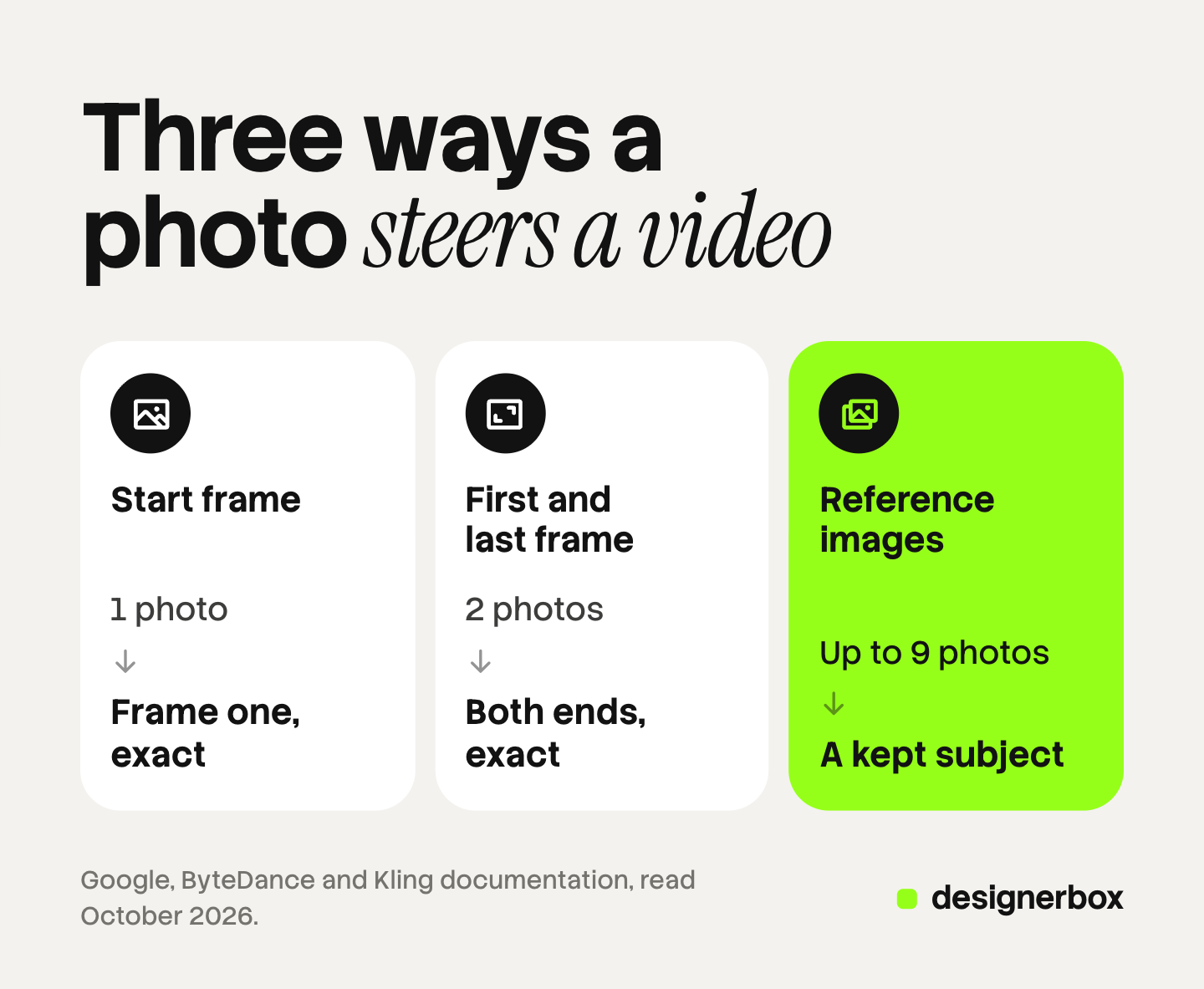
| Mode | What the photo is | What you control | What the model decides |
|---|---|---|---|
| Start frame | Frame one of the clip | The opening picture: subject, light and framing | All motion, and where the clip ends |
| First and last frame | The first and the final frame | Both ends of the move | The path between the two pictures |
| Reference images | An ingredient: a character, a product or a scene | Who or what appears in the clip | Every frame, including the first one |
The number of photos grows down the table, and control over the exact picture shrinks. A start frame fixes one whole picture. A reference fixes a subject and no picture at all.
Mode 1: the start frame
A start frame is the oldest way to make an AI video from an image. You upload one photo, and the model treats it as the first frame. Your prompt describes the motion.
What it controls. The opening picture is exact. The product, the light and the framing are the ones in your photo.
What it cannot control. The model invents every frame after the first. If the camera moves around the subject, the model has to guess the sides it never saw. How to animate a photo with AI ranks motion types by how much the model must invent.
Typical limits. One image. The clip usually takes the shape of the photo. ByteDance’s documentation says that for first-frame video “the model automatically preserves the aspect ratio of the first-frame image” (docs.byteplus.com, October 2026).
Which models offer it. Almost all of them. Veo 3.1, Seedance 2.0 and Runway Gen-4.5 take a first frame. Kling image to video works the same way on Kling 2.6 and Kling 3.0. Runway’s API reference says Gen-4.5 supports only a first frame as its image input (docs.dev.runwayml.com, October 2026). AI image to video for ecommerce compares six models for this mode.
Mode 2: first and last frame
In this mode you give two pictures. The first is the opening frame and the second is the final frame. The model fills the motion between them. Google calls this interpolation.
What it controls. Both ends of the move. A bottle starts closed and ends open. A jacket turns from front to back.
What it cannot control. The path. If the two pictures are far apart, the model has to invent a lot in the middle.
Typical limits. Two images that match. ByteDance says that if the two aspect ratios differ, “the first frame image takes precedence, and the last frame image will be automatically cropped to fit” (docs.byteplus.com, October 2026). Vidu asks that the ratio between its start and end frames stays between 0.8 and 1.25 (platform.vidu.com, October 2026).
Which models offer it. Veo 3.1 takes a last frame as well as a first frame (ai.google.dev, October 2026). Seedance 2.0 and Seedance 2.5 support first and last frames. Kling’s 3.0 guide lists “Start & End Frames-to-Video” for both Kling 2.6 and Kling 3.0 (kling.ai, October 2026). Alibaba documents it for Wan as a separate model (alibabacloud.com, October 2026).
Mode 3: reference images
In reference mode the photo is an ingredient. You give the model a character, a product or a scene, and the model keeps it while it builds new shots. No photo has to appear as a frame.
What it controls. Identity. The same face, the same bag or the same room can appear from a new angle and in a new action.
What it cannot control. The exact frame. The model draws the subject again in every shot, so small details can change. Check logo text, stitching and color on each result. ByteDance says of its API that if you need the frames to “exactly match the specified images”, you should use first and last frames (docs.byteplus.com, October 2026).
Typical limits. The count depends on the model:
- Veo 3.1 and Veo 3.1 Fast take up to 3 reference images, and those clips run 8 seconds. Veo 3.1 Lite does not take them (ai.google.dev, October 2026).
- Seedance 2.0 takes 1 to 9 reference images. Seedance 2.5 takes 1 to 30 (docs.byteplus.com, October 2026).
- Wan 2.7 takes up to 5 reference images and videos together, with one character in each (alibabacloud.com, October 2026).
- Kling 3.0 uses Elements. Its guide says the model “supports multi-image references, or even video references as Elements”. Kling 2.6 has no Element reference (kling.ai, October 2026).
- Vidu takes up to 7 images in its reference to video API (platform.vidu.com, October 2026).
- Runway Gen-4.5 takes no reference images. Runway’s references run on its image model, which takes up to three (docs.dev.runwayml.com, October 2026).
A reference works best when it was built for the job. AI character reference images explains why more angles can make a face drift, and character consistency in AI video covers the same problem across clips.
Which models offer each mode
Every row was read on the vendor’s own documentation in October 2026. These limits change often.
| Model | Start frame | First and last frame | Reference images |
|---|---|---|---|
| Veo 3.1 and Veo 3.1 Fast (Google) | Yes | Yes | Up to 3, at 8 seconds |
| Seedance 2.0 (ByteDance) | Yes | Yes | 1 to 9 |
| Seedance 2.5 (ByteDance) | Yes | Yes | 1 to 30 |
| Kling 2.6 (Kuaishou) | Yes | Yes | No Element reference |
| Kling 3.0 (Kuaishou) | Yes | Yes | Elements, with a start frame |
| Runway Gen-4.5 | Yes | No | No |
| Wan 2.7 reference-to-video (Alibaba) | Optional, 1 image | A separate Wan model | Up to 5 images and videos |
Two notes on the table.
The modes do not mix freely. ByteDance states that first frame, first and last frames, and reference-to-video “are mutually exclusive scenarios and cannot be mixed” on Seedance (docs.byteplus.com, October 2026). Kling 3.0 and Wan 2.7 are the exceptions here. Both accept a start frame together with references.
Veo 3.1 has an end date in Google’s API. Google lists 22 October 2026 as the shutdown date for the Veo 3.1 preview models, with Gemini Omni Flash as the replacement (ai.google.dev, October 2026). Google documents all three modes for Omni Flash (ai.google.dev, October 2026).
How to choose the mode for a shot
Ask what has to be exact.
- The opening picture has to be exact. Use a start frame. This fits an ad that opens on an approved still.
- The ending has to be exact. Use a first and last frame. This fits a reveal, or a clip that must end on the logo.
- The subject has to be the same in many shots. Use reference images. This fits a presenter, or one product in five scenes.
- Two of these are true. Make more stills. Build a still for each shot with an image model, then run each still as a start frame. Product photo to video ad shows that build in four shots.
In the fourth case the still carries the identity, and the video model only adds motion.
How to prepare the photo
Four checks apply to every mode.
Match the aspect ratio to the result. Crop the photo to the shape of the clip before you upload. A square photo in a vertical clip forces a crop or an invented border. Wan’s reference page says that when you provide a first frame, “the video matches the aspect ratio of the first frame image” (alibabacloud.com, October 2026).
Stay inside the size limits. Each vendor publishes its own. Seedance accepts images from 300 to 6,000 pixels a side and under 30 MB. Wan accepts 240 to 8,000 pixels and up to 20 MB. Runway accepts an image URL up to 16MB.
Keep one clear subject. For a reference image, use a clean background and one subject. Wan requires that a character reference “must contain only a single character”.
Check the rules on people. Google allows only adults in the image modes on Veo. ByteDance says Seedance 2.0 and 2.5 “do not support directly uploading reference images or videos that contain real human faces”. Get consent before you use a real person’s photo.
Stills to video in one workflow
DesignerBox is AI creative production for brands and agencies. It makes images, ads and video, and a product photo is one of several inputs. Anyone can make an AI picture. Making hundreds that still look like your brand is the hard part.
The order that works for video is still first, then motion. In DesignerBox you build that order once as a workflow. One step makes the still with your brand rules. The next step goes image to video. The workflow picks the model for each step, and it reads the brand profile on every run. The workflows page shows how the steps connect, and the AI video ads page shows the video work.
Batch runs the workflow over a sheet of 200 rows, so row one and row two hundred get the same steps. The full workflow from the first product photo to the finished ad, in one subscription.
You see the cost of a run before you press Run. An 8-second clip costs 40 to 560 credits, depending on the model.
Here are the limits. The three modes in this guide are vendor features, and a model inside DesignerBox may not offer all of them. You download the results, or send them with a webhook or an S3 step. Every plan below Ultra is one seat. Uploading your own photos and the commercial license start on the Pro plan. AI video, virtual try-on, upscaling, the image editor and the video editor start on the Premium plan. Plans and credits are on the pricing page.
A free plan for your first run
There is a free plan, and it runs on sample products. Start from a template and see how a workflow is built. Get started free
FAQ
What is the difference between image to video and reference to video?
In image to video, your photo is the first frame, and the clip starts from that exact picture. In reference to video, the photo is an ingredient. The model keeps the subject and can open on a new angle or a new place.
What is first and last frame in AI video?
It is a mode that takes two images. The first is the opening frame and the second is the final frame. The model makes the motion between them. Google calls it interpolation, and Kling calls it start and end frames.
How many reference images can an AI video model take?
It depends on the model. In October 2026, Veo 3.1 takes up to 3, Wan 2.7 takes up to 5 images and videos together, and Seedance 2.0 takes up to 9. Seedance 2.5 takes up to 30. Runway Gen-4.5 takes a first frame only.
Can I use a photo of a real person as a reference?
Check the vendor’s rules first. Google allows only adults in the image modes on Veo. ByteDance does not accept direct uploads of real human faces on Seedance 2.0 and 2.5, and it lists approved routes. Get the person’s consent in every case.
How does DesignerBox turn a still into a video?
You build a workflow once. One step makes the still, and the next step goes image to video. The workflow picks the model for each step. The cost of a run is shown before the run, and AI video starts on the Premium plan.
Sources
- Google, Veo in the Gemini API: first frame, last frame, reference images and person rules: ai.google.dev, October 2026
- Google, Gemini API deprecations: Veo 3.1 preview shutdown date and replacement: ai.google.dev, October 2026
- Google, Gemini Omni Flash video generation: ai.google.dev, October 2026
- ByteDance, Seedance video generation API: modes, image counts, image requirements and face rules: docs.byteplus.com, October 2026
- Kuaishou, Kling VIDEO 3.0 model user guide (6 February 2026): kling.ai, October 2026
- Runway, API reference: Gen-4.5 first frame input and image model references: docs.dev.runwayml.com, October 2026
- Runway, API input parameters: image size limits: docs.dev.runwayml.com, October 2026
- Alibaba Cloud, Wan reference-to-video API reference (updated 28 September 2026): alibabacloud.com, October 2026
- Alibaba Cloud, Wan image to video by first and last frame API reference: alibabacloud.com, October 2026
- Vidu API documentation, reference to video and start end to video (platform.vidu.com), October 2026
- DesignerBox plans and feature gating: DesignerBox pricing page (designerbox.ai/pricing), October 2026
Model features checked against each vendor’s own documentation as of October 2026. This is general information, not legal advice. Individual results vary.


