





Can ChatGPT make videos? Not by itself, as of October 2026. OpenAI closed the Sora web and app experiences on 26 April 2026, and it removed Sora 2 from its API on 24 September 2026. ChatGPT still writes the script, the shot list and the prompt. A connected video app or MCP server then runs a video model and returns the clip to the same chat.
Your team already plans in ChatGPT. The campaign angle, the script and the shot list start there. Then someone asks the chat for the video, and the answer is a script and a list of other tools. The plan is done, and the clip does not exist yet.
This guide covers what OpenAI’s own pages say about video in ChatGPT, what the chat does well, how a connected app makes the clip, and what the chat still cannot do. It then shows the same job with DesignerBox MCP as the worked example. It is written for brand and agency teams who plan in ChatGPT and need product video.
Key Takeaways
- ChatGPT has no video model of its own today. OpenAI’s Sora pages say the Sora product has not been available since 26 April 2026, and the deprecations page names no replacement for the Sora 2 API.
- ChatGPT is strong on the words. It writes the script, the shot list and a prompt in the phrasing a video model expects.
- A connected app makes the clip. A plugin from the Plugins Directory, or a remote MCP server added in Developer mode, gives ChatGPT a tool that runs a video model.
- A chat run needs four inputs. A reference photo, a prompt, a model and a format. The reference photo matters most for a product.
- ChatGPT’s video review has limits. It accepts video files, and OpenAI says its analysis of them can be incomplete or inaccurate. A person still watches the clip.
- The video app sets the cost. The run spends that app’s credits, and a ChatGPT subscription does not cover them.
- A chat makes one clip at a time. The same clip for 40 products needs saved steps and brand rules outside the conversation.
Can ChatGPT make videos by itself?
No. In October 2026, ChatGPT does not include a video model. OpenAI’s help center says “The Sora web and app experiences were discontinued on April 26, 2026” (help.openai.com, read October 2026). OpenAI’s Sora page now carries the line “As of April 26, 2026, the Sora product is no longer available”, and it sends readers to image creation in ChatGPT (openai.com, read October 2026).
The developer route closed five months later. OpenAI removed Sora 2 and Sora 2 Pro from its API on 24 September 2026, together with the Videos API. The table lists no recommended replacement for any of them (OpenAI API deprecations, read October 2026).
| Date | What OpenAI changed | Source |
|---|---|---|
| 9 December 2024 | Sora opened at sora.com for ChatGPT Plus and Pro accounts | openai.com |
| 26 April 2026 | The Sora web and app experiences closed | OpenAI Help Center |
| 24 September 2026 | Sora 2, Sora 2 Pro and the Videos API left the API | OpenAI API deprecations |
Will video return to ChatGPT? That is not confirmed. In replies on OpenAI’s developer community in September 2026, OpenAI support wrote that it would share the requests for video in ChatGPT and had no timeline to share (community.openai.com, read October 2026). Plan around what works today.
Images are a different answer. ChatGPT makes pictures on every plan, and how ChatGPT and Gemini image generation compare covers that side.
What ChatGPT does well for video
A video needs a lot of writing before a model renders one frame. ChatGPT does that writing well.
- The script. Give it the product, the buyer and the length. It returns a hook, the body and the closing line, cut to the seconds you have.
- The shot list. It turns the script into shots: the framing, the camera move, the light and the moment the product enters the frame.
- The prompt. Each video model responds to different phrasing. ChatGPT rewrites your shot in the form a named model expects. The AI video prompting guide teaches the same skill by hand.
- The variants. Ask for five hooks on one script and you get five in a minute. Each one is a separate ad to test.
All four are language jobs, and none of them makes a frame. A storyboard is the next step for a longer piece, and script to storyboard covers it.

How does a connected app make the video?
A connected app gives ChatGPT a tool it can call. The app, not ChatGPT, runs the video model. ChatGPT writes the tool’s input, sends the call, waits for the job and shows you the file.
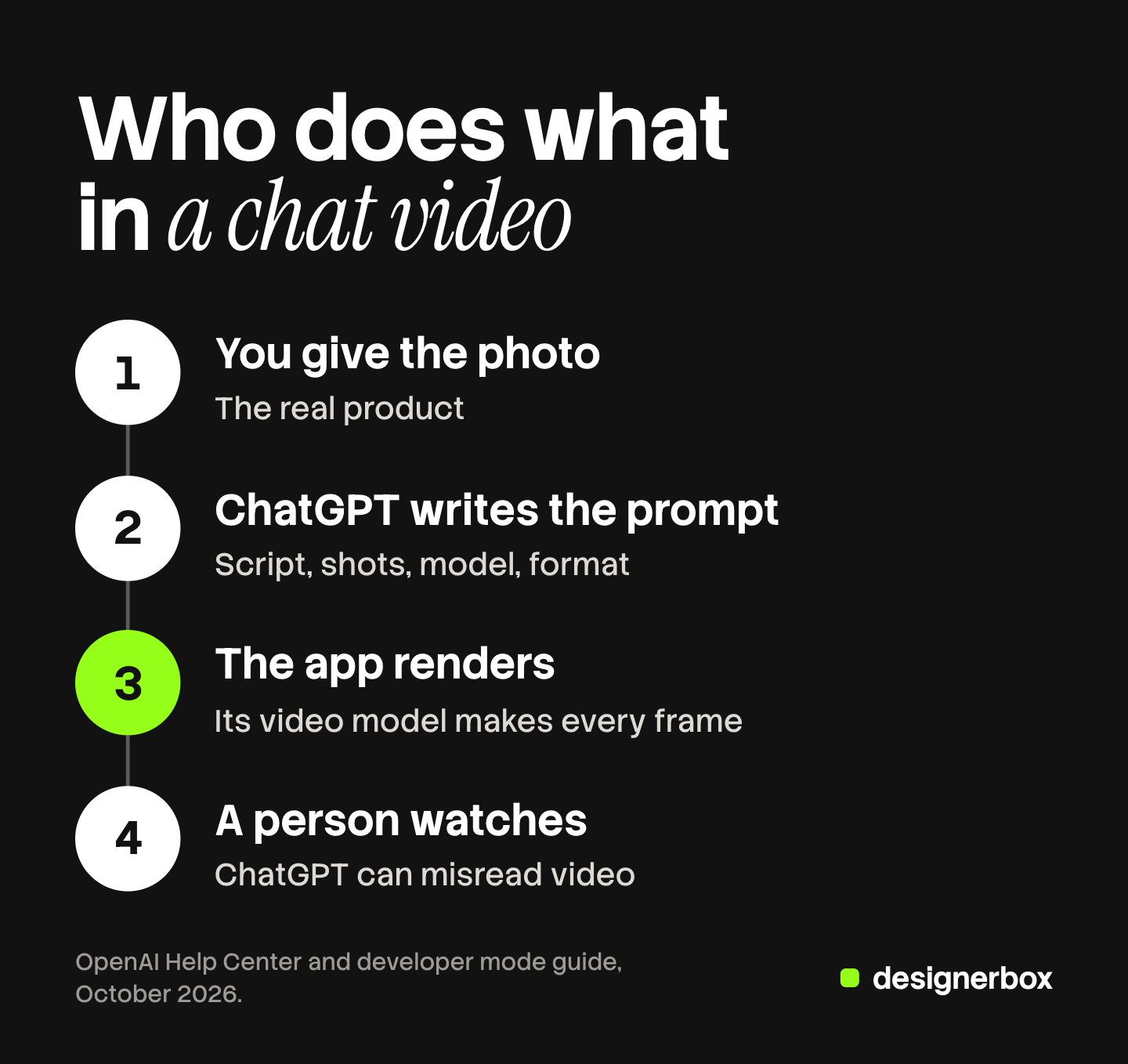
There are two ways to connect one:
- Add a plugin from the Plugins Directory. OpenAI lists third-party plugins there, and some of them make video. You add the plugin and sign in with that vendor’s account (help.openai.com, read October 2026).
- Add a remote MCP server in Developer mode. You turn on Developer mode, paste the server’s URL as an app and sign in. OpenAI’s guide lists Developer mode for Pro, Plus, Business, Enterprise and Education accounts on the web (developers.openai.com, read October 2026). The setup steps are in how to add an MCP server to ChatGPT.
Higgsfield is one published example of the first route. Its plugin is in OpenAI’s directory, and it covers images, video and presets from one chat (OpenAI plugin listing, read October 2026). Higgsfield writes that ChatGPT expands your request into a production prompt, picks a model if you name none, runs the job and returns the clip in the same conversation. It also writes that runs through the plugin use Higgsfield credits (higgsfield.ai/blog, October 2026).
A video run in a chat is asynchronous. ChatGPT sends the job, the server queues it, and ChatGPT checks the status until the file is ready. A picture usually comes back in one call. A clip takes longer, so expect a wait before the result appears.
Two limits come from OpenAI. Its help center answers “No - web only” to the question of MCP apps on mobile (help.openai.com, read October 2026). And ChatGPT asks you to confirm a tool call that changes data or spends money, unless you change the app’s permission level.
What does a ChatGPT video generator need from you?
A “ChatGPT video generator” is ChatGPT plus a connected video model. The run needs four inputs. The chat can write two of them. You supply the other two.
| Input | Who supplies it | What goes wrong without it |
|---|---|---|
| A reference photo | You | The model invents a product that is not yours |
| A prompt | ChatGPT writes it from your brief | The camera move and the light are left to chance |
| A model | You, or ChatGPT from the app’s list | The cost and the clip length change without your decision |
| A format | You | A 16:9 clip arrives for a 9:16 placement |
The reference photo matters most for a product video. With text alone, the video model draws a plausible product. The label, the cap and the stitching are guesses. A customer who clicks the ad then receives a different object. With a photo of the real product as the first frame, the model animates that object. The six rules for AI product video start from the same point.
The model sets hard limits. Each video model has its own clip length, resolution and audio support, and a prompt cannot change them. Read the vendor’s page for the model before you ask for a 30-second clip. With Sora gone from OpenAI’s API, Sora alternatives by job lists the models teams use instead.
What can ChatGPT not do for video?
Three things stay outside the chat, with or without a connected app.
It cannot be your reviewer. ChatGPT accepts video files as attachments. OpenAI’s help center says its analysis of an uploaded video “can be incomplete or inaccurate”, and that it may not analyze the whole video or read its audio correctly (help.openai.com, read October 2026). So a person opens every clip and checks the hands, the logo and the product. Review a still first where you can. ChatGPT can read a still image, and a rejected still costs less than a rejected clip.
It cannot hold a brand standard across many products. A conversation holds your rules while that conversation is open. Product 41 in a new chat starts from nothing: you describe the brand again, upload the photo again and repeat the prompt. Small changes in the wording produce small changes in the light and the framing. Over a catalog, those changes add up to a set that does not match.
It cannot run a list. A chat works on one request, then the next. Forty products mean forty requests, forty waits and forty files to open.
The Claude version of this loop has the same shape, and the Claude AI video generator guide covers that client.
Cost of a clip made from ChatGPT
A ChatGPT plan pays for ChatGPT. The connected app charges for the video, in its own credits or its own plan. Three checks help before the first run:
- Find where the app shows the cost. Some apps show it before a run and some report it after. Ask the chat what the run will cost, and read the tool call before you approve it.
- Know what moves the cost. The model, the clip length and the resolution set it. The words in the prompt do not.
- Count the rejects. A team rarely ships the first clip. The cost of one shipped clip includes the clips you threw away.
What AI video generation costs has the full breakdown, with the vendors’ own rates.
DesignerBox in ChatGPT
Anyone can make an AI picture. Making hundreds that still look like your brand is the hard part.
DesignerBox is AI creative production for brands and agencies. Scale your images, ads and video with AI and keep your brand on every piece: build the workflow once with your brand rules, run it on every product, see the cost before each run, and keep everything from the first product photo to the finished ad in one place.
DesignerBox has 68 tools over MCP, and it runs in an AI chat such as Claude, ChatGPT or Cursor. The server sits at one URL, and ChatGPT signs in with OAuth. Several of the tools make video (DesignerBox MCP page, October 2026):
| You write in ChatGPT | The tool ChatGPT calls | What comes back |
|---|---|---|
| ”Using DesignerBox, animate this product photo into an eight second clip, a slow push in, 16:9.” | generate_video | A clip that starts from your photo |
| ”Using DesignerBox, make a fashion video from this on-model photo: one slow turn, the outfit unchanged.” | fashion_video | A fashion clip that keeps the outfit |
| ”Using DesignerBox, join these three clips with a crossfade, a title card and music.” | create_video_project | One MP4 from the video editor |
| ”Using DesignerBox, stop that video job.” | cancel_video_task | The job stops and the credits are refunded |
The brand standard lives outside the chat. Your brand profile holds the logos, the fonts, the palette and the rules, and the workflow reads your brand rules before every run. A saved workflow keeps the steps in order, so product 41 runs the same way as product 1. The clips then go to the video editor, which is a real timeline with several tracks, transitions, animated text and audio. The full workflow from the first product photo to the finished ad, in one subscription.
Other vendors also connect to ChatGPT, and some also show a cost before a run. The DesignerBox part is the saved workflow and the brand record behind the tool. For the job itself, AI video ads from a product photo shows the result in the browser.
Cost before the run
An 8-second clip costs 40 to 560 credits, depending on the model, and the cost is shown before the run. Your chat can read what each model costs and how many credits you have left before it starts. Every finished run reports the credits it charged, in the same answer as the result. A repeated call within five minutes returns the first result instead of a second charge.
Set the DesignerBox app to Allow read actions in ChatGPT. Reading your workspace charges no credits and runs without a prompt. Every paid run then waits for you to approve it.
Uploading your own photos and the commercial license start on the Pro plan. AI video, virtual try-on, upscaling, the image editor and the video editor start on the Premium plan. Plans and credits are on the pricing page.
Where a chat run stops
- A chat works one request at a time. For a sheet of products, batch runs one workflow over every row inside DesignerBox. The standard is the same on row one and row two hundred, and you keep or discard each row.
- Video is asynchronous. Your chat sends the job, checks its status, then gives you the file. A video timeline takes one to five minutes.
- ChatGPT does not judge the clip. A person watches each result before it ships.
- Results stay in your workspace. They land in Assets, and you download them from there. Nothing goes to a store or a channel on its own.
- The free plan cannot make video. It runs on sample products.
- MCP apps in ChatGPT are web only. The phone apps do not run them.
- Every plan below Ultra is one seat. Team features, shared brand kits and white label are on the Ultra plan.
A free plan for your first run
There is a free plan, and it runs on sample products. Start from a template and see the cost before you run it. Get started free.
FAQ
Can ChatGPT generate videos?
Not by itself in October 2026. OpenAI closed the Sora web and app experiences on 26 April 2026 and removed Sora 2 from its API on 24 September 2026. ChatGPT writes scripts, shot lists and prompts. A connected video app or MCP server generates the clip and returns it to the chat.
Is there a ChatGPT video generator?
There is no video generator built into ChatGPT today. The phrase usually means ChatGPT connected to a third-party video tool. You add a plugin from the Plugins Directory, or a remote MCP server in Developer mode, and ChatGPT calls that tool’s video model.
Can ChatGPT make videos for free?
ChatGPT itself has a free tier, and it can write the script and the prompt there. The clip comes from a connected video app, and that app sets the cost. The DesignerBox free plan cannot make video. AI video starts on the Premium plan.
Can ChatGPT watch a video I upload?
Partly. OpenAI’s help center says ChatGPT accepts video files as attachments and may use tools to analyze them. It also says the analysis can be incomplete or inaccurate, and may not cover the whole video or its audio. Do not use it as the only review of an ad.
Did OpenAI replace Sora with another video model?
No replacement is listed. OpenAI’s deprecations page shows no recommended replacement for Sora 2, Sora 2 Pro or the Videos API, which left the API on 24 September 2026. OpenAI support wrote in September 2026 that it had no timeline to share for video in ChatGPT.
What does ChatGPT need to make a product video with a connected app?
Four inputs: a reference photo of the real product, a prompt, a model and a format. The photo matters most. Without it, the video model draws a product that only resembles yours. ChatGPT can write the prompt and suggest the model from the app’s list.
How much does a video made from ChatGPT cost?
The connected app sets the cost, and a ChatGPT plan does not cover it. The model, the clip length and the resolution move the number. In DesignerBox, your chat can read the cost first, and the finished run reports what it charged.
Sources
- Sora web and app experiences discontinued on 26 April 2026, and the API on 24 September 2026: help.openai.com, read October 2026
- “As of April 26, 2026, the Sora product is no longer available”: openai.com, read October 2026. Sora launch for Plus and Pro accounts on 9 December 2024: openai.com
- Sora 2, Sora 2 Pro and the Videos API removed on 24 September 2026, with no recommended replacement: OpenAI API deprecations, read October 2026
- OpenAI support replies on video in ChatGPT, September 2026: community.openai.com, read October 2026
- Video files as attachments, and the limits of video analysis: help.openai.com, read October 2026
- Plugins Directory and custom MCP apps: help.openai.com, read October 2026
- Developer mode eligibility and remote MCP servers: developers.openai.com, read October 2026
- MCP apps on the web only, and confirmation of write actions: help.openai.com, read October 2026
- Higgsfield plugin for ChatGPT: OpenAI plugin listing, read October 2026, and higgsfield.ai/blog, October 2026
- DesignerBox MCP tools, cost rules and run times: DesignerBox MCP page, October 2026. Plan gates: DesignerBox pricing, October 2026
OpenAI’s Sora, plugin and developer mode facts verified against OpenAI’s help center, developer documentation and deprecations page as of October 2026. OpenAI changes ChatGPT often, so check your own settings. DesignerBox facts verified against the DesignerBox MCP page as of October 2026. Individual results vary.


