
The closest Creatopy alternatives are Abyssale, Bannerflow and Celtra for HTML5 banner sets, Bannerbear and Placid for template rendering over an API, Canva and Adobe Express for low-volume design, and DesignerBox for ads made from your own product photos. Creatopy itself was renamed The Brief in October 2025, and old logins and projects still work (thebrief.ai, October 2026).
So start with one question: which Creatopy job do you want to replace? A team that ships animated display banners to an ad server needs a different tool from a team that fills one template from a product feed.
A note on bias. DesignerBox makes AI creative production software, so it is one of the tools on this list. This guide says where the other tools are the better choice. It prints no vendor prices. Each vendor lists its plans on its own pricing page, named below with the date so you can check it.
Key Takeaways
- Creatopy is now The Brief. The company renamed the product in October 2025. The editor, the projects and the logins carried over (thebrief.ai, October 2026).
- Pick by job. Creatopy did four jobs: banner sets in many sizes, HTML5 export, feed-based ads and brand control. Few alternatives cover all four.
- HTML5 is the dividing line. Abyssale, Bannerflow and Celtra make HTML5 ads. Bannerbear, Placid, Canva, Adobe Express and DesignerBox make images, video or PDFs.
- An API is a plan question. The Brief lists its API on the Enterprise plan. Abyssale, Bannerbear and Placid lead with theirs.
- The size list is long. Google lists 20 sizes for uploaded image ads, so the resize step decides how much manual work remains.
- Templates arrange. They do not make the picture. If the product image does not exist yet, a template tool needs a second tool next to it.
What happened to Creatopy?
Creatopy was renamed The Brief in October 2025. The same company and team run it, and creatopy.com now sends visitors to thebrief.ai. Old projects, files and logins carried over, and active subscriptions moved across at the same rate (thebrief.ai, October 2026).
The Brief describes the change as an expansion. The ad editor stayed, with layers, an animation timeline and smart resize. HTML5 export stayed too, for Google Ads, Display & Video 360, Campaign Manager 360 and other networks. Data feeds from CSV, Google Sheets, Shopify and Channable still fill dynamic ads.
Three things are new. There is a whiteboard for ad strategy with competitor ad research. There is AI image and video generation inside the editor. And there is direct publishing to Google and Meta ad platforms on the upper plans (thebrief.ai, October 2026).
The plan shape changed as well. The Brief sells two single-seat plans, a Team plan for 2 to 10 seats and an Enterprise plan. It states that AI use has no credit system. Ad serving and direct publishing sit above the entry plan, and the API and the white-label editor are on Enterprise (thebrief.ai/pricing, October 2026).
So if you liked Creatopy, the closest replacement is The Brief itself. The rest of this guide is for teams whose job changed, or who want a different shape of tool.
What was Creatopy used for?
Creatopy did four jobs for display and performance teams. Each alternative below covers some of them.
- Banner sets. One design becomes every standard size, with the layout adjusted for each.
- HTML5 export. Animated ads leave as packaged files that an ad network accepts.
- Feed-based ads. A spreadsheet or a product feed fills one template many times.
- Brand control. A brand kit holds the logos, fonts and colors, and teammates cannot change them.
Write down which of the four you use every week. That list is your shortlist filter. What creative automation is covers the wider category these jobs belong to.

The 8 best Creatopy alternatives in 2026
The order runs from the tools closest to Creatopy’s display job to the tools furthest from it.
1. Abyssale
Abyssale is the closest match for automated banner sets. It generates banners, social ads, PDFs, HTML5, GIF and MP4 from a template. It has a REST API with Node.js and Python SDKs, a spreadsheet view for bulk versions and an approval flow that tracks design status (abyssale.com, October 2026). There is a 14-day trial.
Best for teams that want one template rendered into many formats, by hand or over an API.
2. Bannerflow
Bannerflow is a creative management platform built around display. You design HTML5 and video ads, scale one master creative into every format, and connect product feeds for dynamic ads. It also covers translation, publishing, scheduling and digital out-of-home screens. Bannerflow builds and hosts the creative variations, and your ad server handles the audience decisions (bannerflow.com, October 2026).
Best for in-house teams running display campaigns in many markets who want production and publishing in one platform.
3. Celtra
Celtra is a cloud-based creative automation platform for marketing, creative and media teams. It covers ad production and distribution, and Celtra offers creative services and onboarding next to the software. The price depends on the use case and the number of seats, and Celtra prepares a quote for each customer (celtra.com, October 2026).
Best for large brands that need production, distribution and support under one contract.
4. Bannerbear
Bannerbear is an API for template-based images, videos and PDFs. You design a template once, then send data and get a rendered file back. It lists a documented REST API, libraries for the major languages, a Zapier integration, an MCP server for AI agents and direct integrations with more than 50 tools (bannerbear.com, October 2026).
HTML5 banners are outside its scope. The results are images, videos and PDFs.
Best for developers who want rendering inside their own product or pipeline.
5. Placid
Placid generates images, PDFs and videos from dynamic templates. It has an image API, a PDF API and a video API, plus no-code integrations with Make, n8n, Zapier and Webflow. The template editor is drag and drop (placid.app, October 2026).
Like Bannerbear, it fills templates you design. It suits teams with data and no developer.
Best for marketers who automate template images through no-code tools.
6. Canva
Canva covers design broadly, and two features match Creatopy’s job. Brand Kit holds logos, colors, fonts and templates in one place. Resize and Magic Switch change a design to other sizes, and bundles resize one design to several formats at once. Canva lists Magic Resize on Canva Pro, Canva Teams, Canva Education and Canva for Nonprofits (canva.com/help/resize, October 2026).
Best for small teams that make a few static ad sets a month by hand. Canva alternatives for product visuals covers the tools next to it.
7. Adobe Express
Adobe Express is a quick design app with templates, photo and video resize, and generative AI tools for images and video. It has a free plan. Brand kits, which apply brand fonts and colors and lock elements, are on the Premium plan (adobe.com/express, October 2026).
Best for teams already working in Adobe apps who need fast social and display statics.
8. DesignerBox
DesignerBox is AI creative production for brands and agencies. It does a different job from Creatopy. A template tool arranges images you already have. DesignerBox makes the ad image from your own product photo, then resizes it and rebuilds it in other languages.
It does not make HTML5 banners and it does not serve ads. The fit and the limits are in their own section below.
Best for brands and agencies whose ads have to show the real product, and who repeat the same ad set for every new product.
Creatopy alternatives compared
Every cell is the vendor’s own published fact, read on the date in the Sources. Each vendor lists its current prices on its own pricing page.
| Tool | Main job | HTML5 ads | API |
|---|---|---|---|
| The Brief (Creatopy) | Ad editor, feeds, ad serving | Yes | Enterprise plan |
| Abyssale | Template sets in many formats | Yes | Yes |
| Bannerflow | Display production and publishing | Yes | Not checked |
| Celtra | Creative automation for large brands | Not checked | Not checked |
| Bannerbear | Template rendering for developers | No | Yes |
| Placid | Template rendering with no-code tools | No | Yes |
| Canva | Broad design with resize | Not checked | Not checked |
| Adobe Express | Quick design with brand kits | Not checked | Not checked |
| DesignerBox | Ad images and video from product photos | No | No, 68 MCP tools |
“Not checked” means this guide did not confirm the fact on the vendor’s own page. Ask the vendor before you rely on it.
How many sizes does a display campaign need?
Google lists 20 sizes for uploaded image ads, in four groups: 7 square and rectangle sizes, 4 skyscraper sizes, 6 leaderboard sizes and 3 mobile sizes. Each image file can be at most 150KB (Google Ads Help, October 2026).
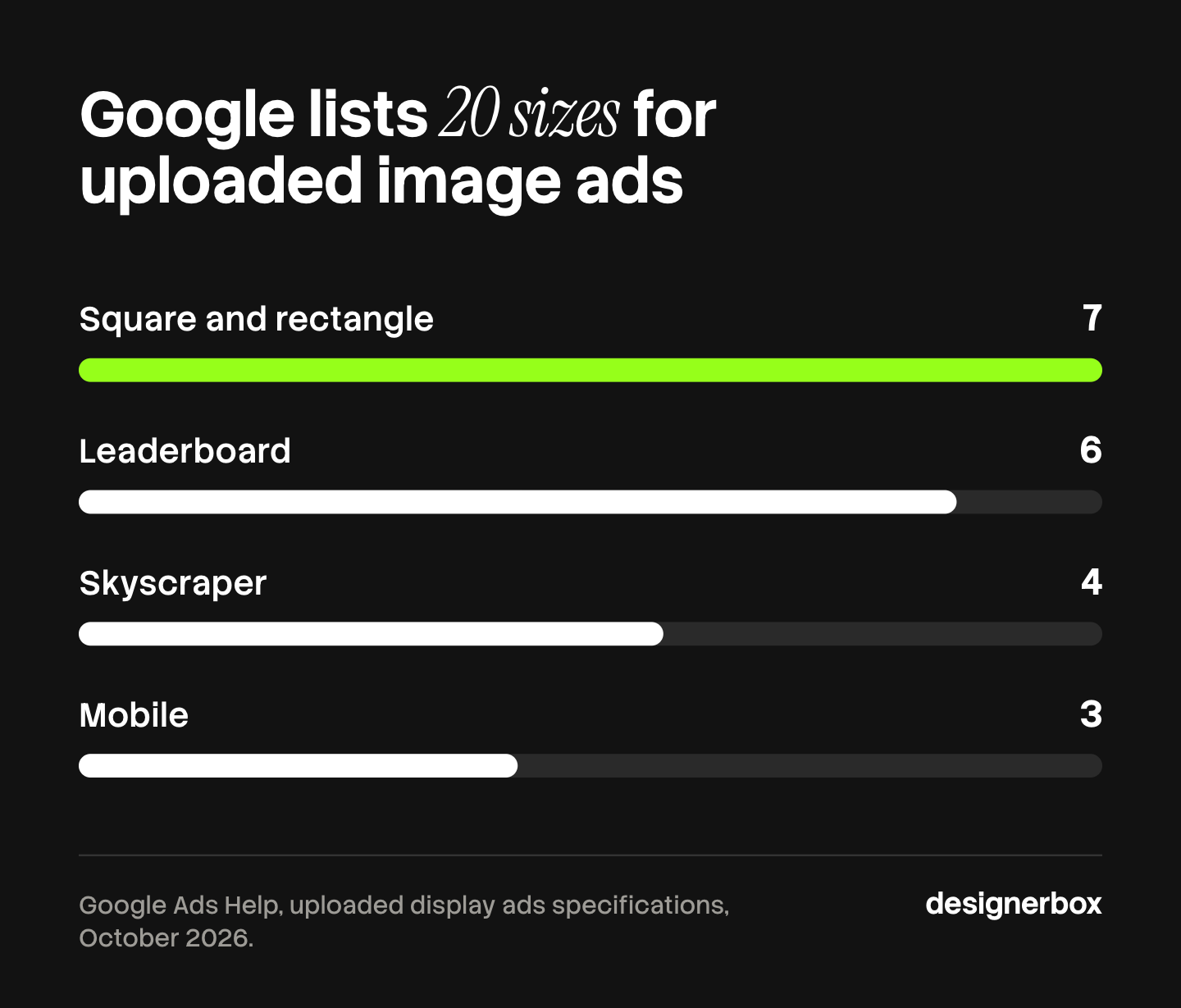
Few campaigns use all 20. The point is that one concept becomes many files before any copy test starts. Three concepts in ten sizes is 30 files, and each new market multiplies that again.
HTML5 adds a second check. Google says access to HTML5 ads requires an account to meet eligibility criteria, and an advertiser applies for access. Accounts without access can use AMPHTML ads or responsive display ads instead (Google Ads Help, October 2026). Confirm your account has HTML5 access before you pay for an HTML5 tool.
Ad variants at scale covers the counting, and localizing ads without rebuilding them covers the market step.
How to pick a Creatopy alternative
Start from the job list you wrote earlier.
- Check HTML5 first. If your media plan needs animated HTML5 banners, the shortlist is The Brief, Abyssale and Bannerflow. Ask Celtra directly.
- Count seats. Per-seat plans change the answer for a team of eight. Read the seat rule on each pricing page.
- Decide who fills the template. A designer, a marketer with a spreadsheet, or code. That picks between an editor, a no-code tool and an API.
- Ask where the image comes from. If the product picture does not exist yet, a template tool cannot make it. You need a tool that does.
- Check which plan carries the feature. Ad serving, direct publishing and the API often sit above the entry plan.
- Run one real campaign in the trial. Use your own sizes and your own brand kit. A demo template proves little.
For the wider field, AdCreative.ai alternatives compares the AI ad generators, and the best AI ad generator starts from the free tiers. What a brand kit holds explains the brand control step.

DesignerBox fit and limits
Anyone can make an AI picture. Making hundreds that still look like your brand is the hard part. DesignerBox fits when the ad has to show your real product and the same ad set repeats for every new product.
You set the brand once: logos, fonts, palette and rules. The workflow reads that brand record on every run. A saved workflow makes the product image, builds the ad, resizes it for each placement and rebuilds it in another language with the layout redrawn. A colleague can run the same job through an app, which is a workflow with a form. Batch runs one workflow over a sheet of up to 200 products, so row one and row two hundred get the same standard. Three critic steps score the results, and best-of-N keeps the best one. You see the cost before each run. The full workflow from the first product photo to the finished ad, in one subscription.
The limits matter for a Creatopy user. DesignerBox results are image and video files. HTML5 banners and ad serving are outside its scope, so The Brief, Abyssale or Bannerflow is the better choice for animated display. DesignerBox does not publish to an ad account. You download the results, or send them with a webhook or an S3 step. DesignerBox does not have a public API. It has 68 tools over MCP, so an AI chat such as Claude, ChatGPT or Cursor can run it.
Uploading your own photos and the commercial license start on the Pro plan. AI video, the image editor and the video editor start on the Premium plan. There is a free plan, and it runs on sample products. For an agency, team features are on the Ultra plan, and every plan below Ultra is one seat. Plans are on the pricing page. The AI ad generator page shows the ad side, and the compare page sets DesignerBox next to other tools.
The first job is one ad set, built once. Start from a template, add your brand and your products, and run it. See the templates.
FAQ
Is Creatopy still available?
Yes, under a new name. Creatopy was renamed The Brief in October 2025, and creatopy.com now sends visitors to thebrief.ai. Old logins and projects carried over (thebrief.ai, October 2026).
What is the closest replacement for Creatopy?
The Brief itself, because it is the same editor. Among other tools, Abyssale and Bannerflow are closest for HTML5 banner sets in many sizes. Bannerbear and Placid are closest for filling templates from data.
Is there a free Creatopy alternative?
Adobe Express has a free plan, and its brand kits are on the Premium plan (adobe.com/express, October 2026). DesignerBox has a free plan that runs on sample products. The Brief and Abyssale offer trials. Check each vendor’s page for what the free tier includes.
Which Creatopy alternative has an API?
Abyssale, Bannerbear and Placid all lead with an API. Abyssale lists Node.js and Python SDKs, and Bannerbear lists a REST API and an MCP server (vendor pages, October 2026). The Brief lists its API on the Enterprise plan. DesignerBox does not have a public API. It has 68 tools over MCP.
Can these tools make HTML5 banner ads?
The Brief, Abyssale and Bannerflow state HTML5 output on their own pages (vendor pages, October 2026). Bannerbear and Placid make images, videos and PDFs. DesignerBox makes image and video files.
Can DesignerBox replace Creatopy?
Only for part of the job. DesignerBox makes the ad image from your product photo, resizes it and localizes it, and it shows the cost before the run. It does not make HTML5 banners or serve ads. Teams that need both often keep a banner tool for display.
Do I need HTML5 access in Google Ads?
For HTML5 ads, yes. Google says an account must meet eligibility criteria and apply for access. Accounts without it can use AMPHTML ads or responsive display ads (Google Ads Help, October 2026).
Sources
- The Brief (formerly Creatopy) rename date, carried-over logins and projects, editor, HTML5 export, data feeds and new features: (thebrief.ai/alternatives/creatopy, October 2026)
- The Brief plan shape, seat counts, no credit system, and the plan that carries the API: (thebrief.ai/pricing, October 2026)
- Abyssale formats, REST API, SDKs, spreadsheet, approval flow and trial: (abyssale.com, October 2026)
- Bannerflow HTML5 and video ads, scaling, feeds, translation, publishing and hosting of creative variations: (bannerflow.com, October 2026)
- Celtra creative automation platform, services and quote-based pricing: (celtra.com/creative-automation, October 2026)
- Bannerbear image, video and PDF rendering, REST API, integrations and MCP server: (bannerbear.com, October 2026)
- Placid image, PDF and video APIs, template editor and no-code integrations: (placid.app, October 2026)
- Canva Brand Kit, Resize and Magic Switch, bundles and the plans that carry Magic Resize: (canva.com/help/resize and canva.com/pro/brand-kit, October 2026)
- Adobe Express free plan, resize, generative AI tools and brand kits on Premium: (adobe.com/express, October 2026)
- Uploaded display ad sizes, the 150KB image limit and HTML5 access requirements: Google Ads Help, uploaded display ads specifications, October 2026
- DesignerBox plan gates, batch and MCP tools: (DesignerBox pricing and product pages, October 2026)
Vendor facts verified from each vendor’s own pages as of October 2026. Individual results vary.