





Meta ads MCP is a server that Meta hosts for its ad accounts. It connects an AI chat, such as Claude or ChatGPT, to your Meta ad account over the Model Context Protocol. The chat can then pull reports, create and edit campaigns, and manage product catalogs in plain language. New campaigns, ad sets and ads start paused. The server does not make the ad creative.
This guide is for a performance agency or an in-house performance marketer. Every Meta fact below comes from Meta’s developer documentation or its Business Help Center, read in October 2026.
Key Takeaways
- Meta hosts an official server. Its address is mcp.facebook.com/ads.
- The tools come in 7 groups. Reporting, ad creation, catalogs, signals, help search, tests and activity logs.
- New ads start paused. A person sets them live.
- Rules limit the chat. The owner of a business portfolio can block actions, such as changing budgets.
- The server does not make creative. It places images and videos that already exist into ads.
- Google’s server only reads. It cannot change a campaign.
What is the Meta Ads MCP server?
The Meta Ads MCP server is a remote server that Meta runs. Meta’s developer page describes it as “a Meta-hosted Model Context Protocol server that lets you manage Meta ads directly from an AI agent” (developers.facebook.com, October 2026). People also search for it as Facebook ads MCP or Meta MCP.

MCP, the Model Context Protocol, is an open standard that connects AI applications to tools and data. A server lists its tools, and the chat picks one when your message asks for it. How MCP differs from a written skill explains the basics.
Two dates matter. Meta announced its ads AI connectors in open beta on April 29, 2026 (facebook.com, October 2026). On July 16, 2026, Meta opened the server to any developer with their own Meta app (developers.facebook.com, October 2026). The help page still carries this note: “You may not have access to all tools/features yet.”
The three parts of ad work in an AI chat
An ads connector gives a chat access to the ad account. It does not give the chat a way to make a picture. Ad work in a chat splits into three parts.
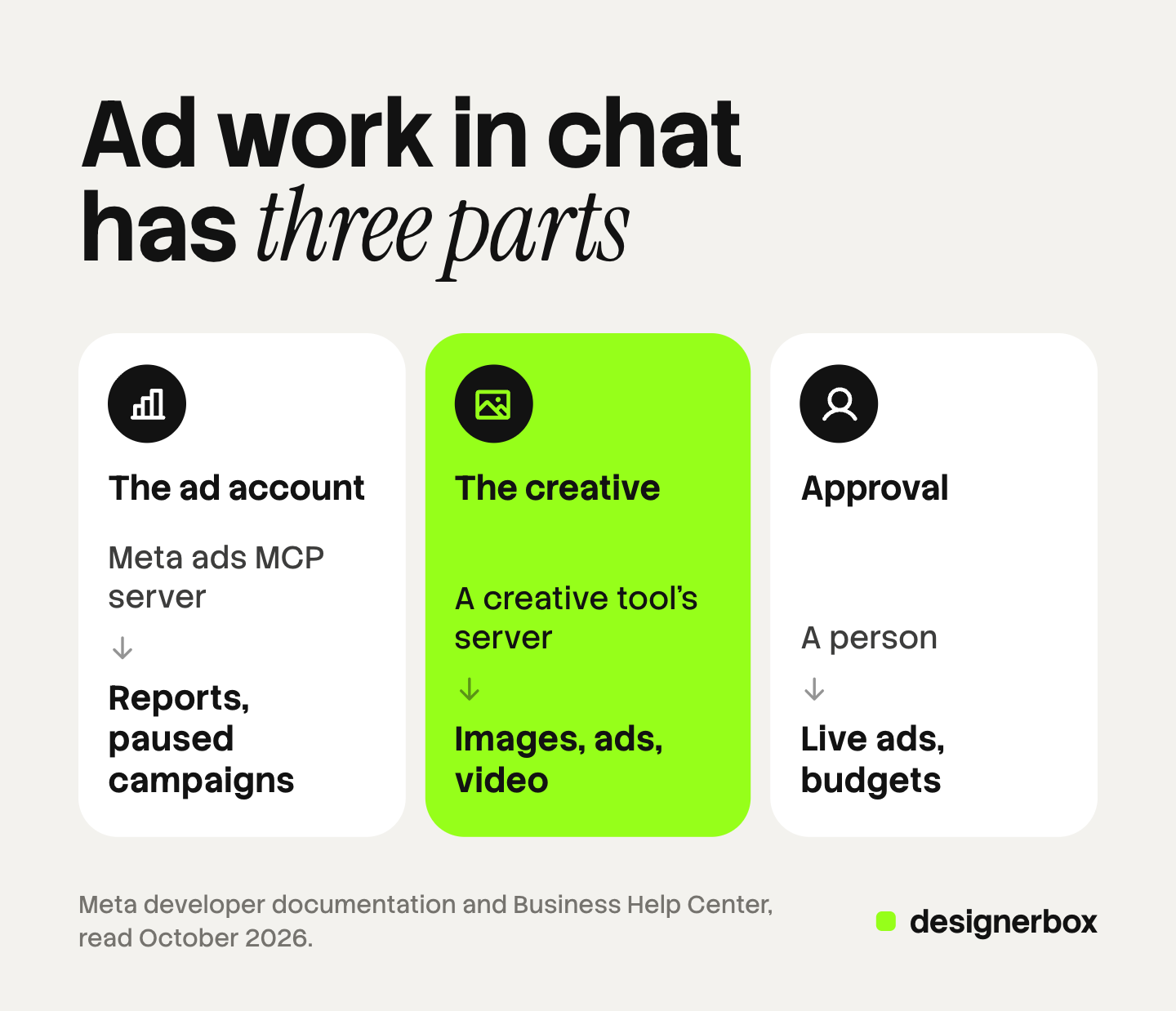
Account data and campaign changes. This is Meta’s server. It reads results and builds or edits campaigns, ad sets, ads, audiences and catalogs.
The creative. This is the image, the video and the text on it. A separate creative tool makes these, often through its own MCP server. The chat calls both servers in one conversation. The other servers a team adds, grouped by job, are in the guide to MCP for marketing.
Approval. A person decides what goes live and how much it spends.
A team that connects only the ads server gets faster reports and faster campaign setup. It does not get more ads to test. The three kinds of AI ad agent covers the same split from the agent side.
What the Meta Ads MCP server does and does not do
Meta’s developer page says “the server exposes tools grouped into seven categories”. The table lists what each group covers and where it stops, from the developer tool lists and the Business Help Center article (facebook.com, October 2026).
| Tool group | What the server does | What it does not do |
|---|---|---|
| Reporting | Pulls spend, impressions, click-through rate and conversions, with breakdowns and date ranges | Read results from other ad platforms |
| Ad creation and management | Creates and edits campaigns, ad sets, ads and custom audiences. Searches the public Ad Library | Set a new ad live without a separate activation step |
| Creatives and media | Builds an ad creative from an existing image or video and previews it per placement | Make the image, the video or the product shot |
| Catalogs | Creates catalogs, products, product sets and feeds. Finds feed issues | Take or edit the product photos in the feed |
| Signals and datasets | Reports signal health and quality | Install a pixel on your website |
| Help and troubleshooting | Searches Meta Business Help Center articles | Review an ad against policy before you submit it |
| Tests and activity logs | Creates A/B tests and conversion lift studies. Shows the change history of an account | Decide which result to scale |
Meta’s two pages differ on creative types. The help article lists single image, single video, carousel and Advantage+ catalog carousel creatives, plus image and video uploads. The developer tool list, updated July 14, 2026, describes a single-image link ad creative. Ask your chat to list the tools it sees. For the feed side, see which catalog ads fields carry images and video.
Official server or a third-party server
Search results for this topic mix two kinds of server. Meta hosts the official one, signs you in, and enforces the rules you set in Business Suite.
Community and vendor servers existed first. They connect a chat to the same ad account through Meta’s public Marketing API. One open-source example on GitHub, from Pipeboard, describes itself as “an independent open-source project that uses Meta’s public APIs” and also runs as a hosted service (github.com/pipeboard-co/meta-ads-mcp, October 2026). Some of these servers cover several ad platforms with one sign-in.
Three questions help you choose. Ask who hosts the server and holds the access token. Ask whether new ads start paused. Ask whether Meta’s Business Suite rules apply, because Meta describes them for its own server only. Anthropic’s general advice is to connect only to servers built and hosted by organizations you trust (support.claude.com, October 2026).
How to connect the Meta Ads MCP server
Meta’s help page lists four supported AI clients: ChatGPT, Claude, Claude Code and Perplexity. The developer page adds that the server “works with any MCP-compatible AI agent”. For the four listed clients, Meta says you need no developer credentials, no API setup and no code.
The server address is the same in every client: https://mcp.facebook.com/ads
These steps use Claude as the example, with the menu names from Anthropic’s help article on custom connectors. Meta’s help page links each client’s own setup page, so follow that page if it differs.
- Check your plan. Custom connectors work on Claude’s Free, Pro, Max, Team and Enterprise plans. Free accounts are limited to one.
- Open the connector settings. On a Pro or Max plan, go to Customize, then Connectors. Press Add, then Add custom connector.
- Enter a name and the server address. Paste the address above and press Continue.
- Sign in to Meta. The chat opens the Facebook Login for Business dialog. You sign in and approve the permissions.
- Turn the connector on. Press the plus button in the chat, then Connectors, and switch it on.
- Start with a read. Ask the chat to list your ad accounts, then the top-spending campaigns of the last 30 days.
On a Team or Enterprise plan, an owner adds the connector to the organization first. Claude for marketing teams covers the plan differences, and the ChatGPT MCP setup covers the same job in ChatGPT.
Developers can also connect through their own Meta app. An agency that manages data for other businesses this way must submit the app for review.
Rules that limit what the chat can change
If you have full control of a business portfolio, you can allow or block agent actions per ad account or catalog. The path is Settings in Meta Business Suite, then Integrations, then Ads MCP server.

The developer documentation lists the actions a rule can deny (developers.facebook.com, October 2026):
- Creating campaigns, ad sets or ads
- Budget increases above a percentage, above an amount, or above a ceiling
- Targeting and audience changes
- Creative changes
- Delivery status changes, such as pausing or activating
- Every agent action on the account or the catalog
Meta’s documentation says these rules are in limited availability. If the menu item is missing, your account does not have access yet.
A partner with access to a client’s ad account can set rules for that account. Those rules apply only to the partner’s own employees. The rules are also available through the Marketing API, so an agency can apply one rule set to many accounts.
What to keep manual
These five decisions are worth keeping with a person.
Activation. Meta’s tool list says write tools create campaigns, ad sets and ads in a paused state. A separate tool sets them active, and Meta notes that it “starts spending budget”. Keep that step with the media buyer.
Budgets. Set a budget ceiling as a rule where you have the rules menu. Where you do not, tell the chat to propose budget changes and wait.
Policy review. The server searches help articles. It does not pre-approve an ad. A person reads the ad against Meta’s advertising standards first.
The creative check. Someone compares each image and video against the real product and the brand rules. Which parts of Facebook ads automation to keep manual covers the creative changes Meta makes at serve time.
Audience uploads and deletes. The server can add or remove people in a customer list audience. It can also delete audiences, products and feeds. Give each of these a named owner.
A read-only start is a sensible first month. Block every write action, then allow one action at a time.
Risks of write access to an ad account
Spend. An active campaign spends real money. The paused default and a budget ceiling are the two controls Meta provides. Meta adds that any action taken for you needs your authorization through the AI agent.
Mistakes and injected instructions. A model can misread a request. Anthropic also warns that a malicious MCP server may include hidden instructions. Read each tool call before you approve a write. The risk grows when several servers share one conversation, which agent orchestration explains.
Account standing. Meta’s help page says using the ads MCP server on its own does not put your account at risk. Bans usually follow violations of Meta’s advertising standards. An ad that a chat created is judged like any other ad.
Is there a Google Ads MCP server?
Yes, and it is narrower. Google documents an MCP server for the Google Ads API with three tools: one lists the accounts you can access, one runs reporting queries, and one describes the data fields. Google’s guide states: “This implementation is strictly read-only. It cannot modify bids, pause campaigns, or create new assets” (developers.google.com, October 2026).
Setup differs too. Google’s guide has you run the server yourself, for example on Google Cloud Run.
Creative production over MCP
DesignerBox is AI creative production for brands and agencies. It makes the images, ads and video that an ad account needs, with your brand rules applied. A product photo is one input. A brief and an ad that already works are others.
DesignerBox runs inside an AI chat such as Claude, ChatGPT or Cursor over MCP. The DesignerBox MCP page has the server address and the setup for each client. Other creative tools have MCP servers too.
Anyone can make an AI picture. Making hundreds that still look like your brand is the hard part. In DesignerBox you build a workflow once with your brand, your products and your rules. The chat then runs that saved workflow, so every result follows the same rules. The AI ad generator page shows the ad workflows.
The cost is shown before the run. The full workflow from the first product photo to the finished ad, in one subscription.
Here are the limits. DesignerBox does not connect to an ad account. You download the results, or send them with a webhook or an S3 step. Every plan below Ultra is one seat. Uploading your own photos and the commercial license start on the Pro plan. AI video, virtual try-on, upscaling, the image editor and the video editor start on the Premium plan. Plans and credits are on the pricing page.
Creative supply for agency accounts
An agency that connects Meta’s server still needs a steady supply of ads to test. See how agencies use DesignerBox
FAQ
What is Meta ads MCP?
Meta ads MCP is the ads MCP server that Meta hosts at mcp.facebook.com/ads. It connects an AI chat to a Meta ad account for reports, campaign changes and catalogs. Meta announced it in open beta on April 29, 2026.
Is there an official Facebook ads MCP server?
Yes. Meta’s ads MCP server covers Facebook and Instagram advertising, because both run through the same Meta ad account. Community and vendor servers also exist, built on Meta’s public Marketing API.
How do I add the Claude Meta ads connector?
In Claude, open Customize, then Connectors, and add a custom connector with the address mcp.facebook.com/ads. Sign in through the Facebook Login for Business dialog. On Team and Enterprise plans, an owner adds the connector first.
Can the Meta Ads MCP server create ad images or videos?
No. It builds an ad creative from an image or video that already exists. A creative tool or a designer makes the image or the video.
Do ads created through the server go live on their own?
Meta says no. Its help page says all ads are paused by default until you set them live. Activation is a separate step that the chat asks you to confirm.
Does Google offer a Google Ads MCP server?
Yes. Google documents an MCP server for the Google Ads API. Google’s guide says it is read-only and cannot modify bids, pause campaigns or create assets.
Does DesignerBox connect to my Meta ad account?
No. DesignerBox makes the images, ads and video. An AI chat such as Claude, ChatGPT or Cursor runs a saved workflow over MCP. You download the results, or send them with a webhook or an S3 step.
Sources
- Meta for Developers, Ads MCP Server overview: Meta-hosted server, server address, seven tool categories (updated July 14, 2026): developers.facebook.com, October 2026
- Meta for Developers, Ads MCP Server, Get started: three sign-in methods, permissions, Employee-role system user tokens (updated September 4, 2026): developers.facebook.com, October 2026
- Meta for Developers, Ad creation and management tools: paused state, activation tool, creative, Ad Library and audience tools (updated July 14, 2026): developers.facebook.com, October 2026
- Meta for Developers, Comprehensive reporting tools: developers.facebook.com, October 2026
- Meta for Developers, Catalog creation and management tools (updated September 7, 2026): developers.facebook.com, October 2026
- Meta for Developers, Rules best practices: actions a rule can deny, limited availability (updated August 12, 2026): developers.facebook.com, October 2026
- Meta for Developers blog, “Meta’s ads MCP server is now available for developers” (July 16, 2026, updated September 22, 2026): developers.facebook.com, October 2026
- Meta Business Help Center, “Manage Ads from an AI Agent with Meta Ads AI connectors”: supported clients, creative types, paused by default, rules in Business Suite, partner rules, account safety: facebook.com, October 2026
- Meta for Business, “Introducing Meta Ads AI Connectors” (April 29, 2026): open beta, no developer credentials for MCP: facebook.com, October 2026
- Anthropic, “Get started with custom connectors using remote MCP”: plans, steps, owner setup, security guidance: support.claude.com, October 2026
- Google Ads API documentation, Google Ads MCP server: three tools, read-only note, Cloud Run setup (last updated September 30, 2026): developers.google.com, October 2026
- Pipeboard, meta-ads-mcp repository README (github.com/pipeboard-co/meta-ads-mcp), October 2026
- DesignerBox MCP and plan gates: DesignerBox MCP page (designerbox.ai/mcp) and DesignerBox pricing page (designerbox.ai/pricing), October 2026
Meta, Anthropic and Google features checked against each company’s own pages as of October 2026. Meta is still expanding access, so your account may show fewer tools. This is general information, not legal advice. Individual results vary.


