
Pinterest affiliate marketing means you add a tracked product link to a Pin and earn a commission when someone clicks it and buys. Pinterest allows affiliate links, and it is not part of the commission agreement. You join an affiliate program, publish a Pin with an original image, link it to the product page, and disclose that the link pays you.
The link is the easy part. A Pin needs an image that is new to Pinterest, and Pinterest tells creators to publish original content every week. Five products with three images each is 15 new images a week.
This guide is for a creator who runs their links as a one-person business. It covers Pinterest’s affiliate rules, FTC disclosure, Pin sizes, how Pins are found and how Pinterest labels AI images. Every Pinterest rule below was read on Pinterest’s own pages in October 2026.
Key Takeaways
- Pinterest allows affiliate links. Its Affiliate Guidelines ask for one account, original content, clear disclosure and “affiliate links in moderation”.
- Pinterest does not pay the commission. Your affiliate program does.
- The recommended Pin size is 2:3. That is 1000 x 1500 pixels. A title holds 100 characters, and the first 40 may show in the feed.
- Search finds Pins. Pinterest reads the title, the description, the board and the image.
- Disclose in words. The FTC says “affiliate link” alone may not be clear. “Paid link” next to the link, or “#ad” at the start, is clearer.
- AI images get a label. Pinterest adds “AI modified”, and users can choose to see fewer AI Pins in some categories.
What is Pinterest affiliate marketing?
Pinterest affiliate marketing is a way for a creator to earn commission from product Pins. You take a unique link from an affiliate program and add it to a Pin as the destination link. When a person clicks the Pin and buys, the program pays you.
Pinterest explains it in its own creator guide (create.pinterest.com, October 2026). It says “Pinterest isn’t part of the affiliate agreements”, and it lists its official partners as Rakuten, LTK, ShopStyle and Amazon Associates US. Your commission depends on the terms of the program you join, so this guide prints no rate and no income figure.
The same guide says the link “should go directly to a shop’s product detail page”. Our guides to content for Mavely creators and content for LTK creators cover those two programs. The Amazon Influencer Program is an extension of Amazon Associates for social media creators.
Pinterest’s rules for affiliate links
Pinterest’s Affiliate Guidelines sit inside its Commercial and Branded Content Guidelines (policy.pinterest.com, last updated April 2025, read October 2026). There are five rules.
- Follow the Paid Partnership Guidelines. Those ask for “a clear disclosure to indicate the commercial nature of your content”.
- Use one account. Pinterest says “you should operate only one Pinterest account”, and it should be your real presence.
- Publish original content. Affiliate content “should be original and add unique value for Pinners”.
- Be open about your links. That covers the commercial purpose and how the link behaves. Some link shorteners are not supported.
- Do not manipulate the system. Pinterest lists four examples: fake accounts, asking others to save your affiliate Pins in exchange for a favor, asking others to create Pins with your affiliate ID, and “creating affiliate Pins repetitively or in large volumes”.
The last example ends with an instruction: marketers “should follow our spam policy and use affiliate links in moderation”. Pinterest gives no number for moderation. It says it “may remove, limit or block the distribution of content or accounts” that break these guidelines.
How to disclose an affiliate Pin
Pinterest asks for disclosure, and so does the US Federal Trade Commission. This is general information, not legal advice.
The FTC’s guidance for endorsers answers the affiliate questions (ftc.gov, October 2026). Three answers matter most for a Pin:
- “Affiliate link” may not be enough. The FTC says consumers “might not understand that ‘affiliate link’ means that the person placing the link is getting paid for purchases made through the link”.
- “Paid link” is clearer. The FTC says “‘Paid link’ right next to an affiliate link should be an adequate disclosure”.
- Put it where people see it. The FTC says “Ad:”, “Paid ad” or “#ad” at the start of a post “would likely be effective”. A disclosure at the end is “easier to miss”.
On Pinterest, a description does not appear in the home feed or in search. So put a short disclosure in the title or on the image as well.
Pinterest also has a paid partnership label for brand deals, which you turn on in the Pinterest app (help.pinterest.com, October 2026). The FTC says a platform’s own tool is no guarantee of a clear disclosure, so add your own words too.
One more FTC line matters when you show a product you do not own: “You can’t talk about your experience with a product if you haven’t tried it.”
Pin formats and sizes
To create a Pin, you upload an image or video, then add a title, a description, a link and a board. On the web you can select up to 10 images, and each one becomes a new Pin. You can tag up to 10 related topics (help.pinterest.com, October 2026).
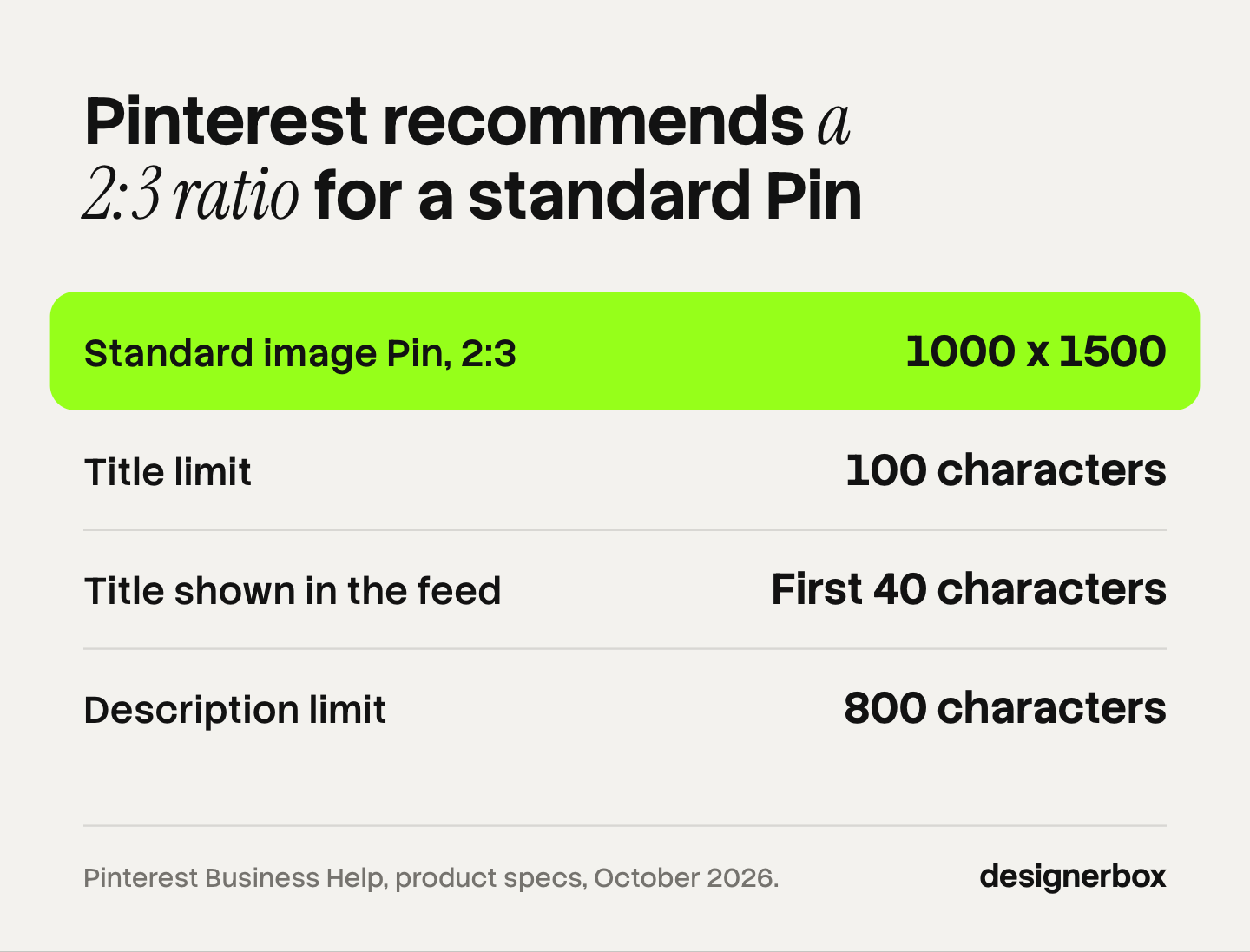
Pinterest publishes the sizes on its product specs page (help.pinterest.com, October 2026). The page is written for ads, and it says the standard formats also work for organic Pins.
| Format | Recommended size or ratio | File | Limits |
|---|---|---|---|
| Standard image Pin | 2:3, or 1000 x 1500 pixels | PNG or JPEG, up to 20 MB on desktop and 32 MB in the app | Title 100 characters, description 800 characters |
| Standard video Pin | Square 1:1 or vertical 2:3, 4:5 or 9:16 | MP4, MOV or M4V, up to 2 GB | 4 seconds to 15 minutes |
| Carousel | 1:1 or 2:3 | PNG or JPEG, 20 MB per image | 2 to 5 images |
| Idea format, full screen | 9:16, or 1080 x 1920 pixels | Image or video | Title 100 characters, video up to 5 minutes |
Two details from the same page change how you design a Pin:
- A Pin taller than 2:3 “might get cut off in people’s feeds”.
- The first 40 characters of the title may show in the feed. Put the product and the benefit there.
How Pins are found: search, boards and saves
Pinterest calls itself a visual search engine. Its creator guide says content “doesn’t rely primarily on followers to be discovered” (create.pinterest.com, October 2026).

Pinterest’s help page on distribution lists what helps (help.pinterest.com, October 2026):
- Keywords in the title and description. Pinterest says descriptions help it decide relevance, even where people do not see them.
- A relevant board. Group Pins into themed boards, and put topic keywords in the board title.
- Saves. Pinterest says the more your ideas are saved, the more your content appears across Pinterest.
The same page says there is “no set engagement window for Pins”. A Pin can gain clicks “hours, days, months, or even years” after you publish it.
Pinterest AI labels and the “AI modified” tag
Pinterest labels AI images. Its help page says that when its system detects that AI was used “to generate or modify a Pin”, people see an “AI modified” label at the bottom left of the Pin in close-up (help.pinterest.com, October 2026).
Pinterest finds AI content in three ways:
- Metadata. It reads the Pin’s metadata under the IPTC Metadata Standard.
- Its own detection. It has “classifiers that automatically detect Gen AI content”.
- Your own mark. The Pin form has a “Mark as AI-Modified” toggle for content made fully or partly with AI.
If you think a label is wrong, you can appeal through Pinterest support. Users also have a control. Since 16 October 2025, a person can choose to see fewer GenAI Pins in certain categories under “refine your recommendations” (newsroom.pinterest.com, October 2026). The first categories included art, beauty, fashion and home decor, and Pinterest added food and drink in December 2025. Fashion and home decor are common affiliate categories.
We found no Pinterest page that says a label lowers the reach of a Pin. The user control does mean some people will see fewer labeled Pins. So keep real photos in the mix.
The FTC question is separate. An AI scene of a real product is an illustration. A caption that says you used the product, when you did not, is a false statement. Our guide to labeling AI-generated fashion images covers the other platforms.
How many fresh images one product needs
Pinterest asks for new images, and it warns against repeats. Its distribution page says to “create original content weekly”. It also says to avoid duplicate Pins: if you upload content that already exists on Pinterest, “you may get flagged as spam”. A Pinterest creator guide says the system highlights “imagery that are new to the platform” (create.pinterest.com, October 2026).
So one product needs many pictures over time. Here is our arithmetic for a small account. It is an example, and Pinterest sets no quota.
| Step | Sum | Images |
|---|---|---|
| Products you link this month | 5 | |
| Images per product each week | 5 x 3 | 15 a week |
| Four weeks | 15 x 4 | 60 a month |
Sixty images means the same lamp in a bedroom, on a desk, next to a sofa and in a close-up.
Pinterest’s limit is on repetitive affiliate Pins. Twelve copies of one image with twelve titles is repetition. Twelve different, useful images is original content. Our guide to affiliate roundup images shows how to build a roundup from several products, and UGC-style product photography covers the casual look. For the same job on another platform, see Instagram affiliate marketing. AI tools for content creators sorts the tool types by the jobs you repeat each week.
Other ways to make money on Pinterest
Pinterest’s creator pages describe three ways to earn from Pins.
- Affiliate links. You earn commission per sale, paid by the program.
- Paid partnerships. A brand pays you to make a Pin. The paid partnership label appears when you publish, and the brand’s name is added when the brand approves the tag.
- Product tags. You tag the products shown in a Pin. Pinterest says product tagging is available in 14 countries, including the US, Canada and the UK.
All three need Pins that people save. A free business account shows saves, Pin clicks and outbound clicks in Pinterest Analytics.
For the rest of the stack, CreatorFlow’s creator tools directory lists 190+ tools by job, from link-in-bio and email to scheduling and affiliate platforms. CreatorFlow is built by the same team as DesignerBox (creatorflow.so/creator-tools, October 2026).
Product images for a weekly Pin plan
Anyone can make an AI picture. Making hundreds that still look like your brand is the hard part. On Pinterest that means 60 Pins a month that look like one account.
DesignerBox is AI creative production for brands, creators and agencies. You build one workflow for your look, with your colors, your fonts and your rules. Then you run it on each product photo. A page of product photography backgrounds shows the scenes you can place a product in. Batch runs one workflow over a whole sheet of products, and you keep or discard each row.
The full workflow from the first product photo to the finished ad, in one subscription. You see the cost before each run. There is a free plan, and it runs on sample products. Uploading your own photos and the commercial license start on the Pro plan. AI video, virtual try-on, upscaling, the image editor and the video editor start on the Premium plan. Plans and credits are on the pricing page.
Here are the limits. DesignerBox does not post to Pinterest: you download the results and publish them yourself. A result is an AI image, so mark it as AI modified. A creator who publishes a few Pins a month may not need it.
FAQ
Does Pinterest allow affiliate links?
Yes. Pinterest’s Affiliate Guidelines allow them and set five rules. They ask for one account, original content and clear disclosure, and they say to use affiliate links in moderation.
What is the best Pinterest Pin size?
Pinterest recommends a 2:3 aspect ratio, or 1000 x 1500 pixels, for a standard image Pin. A taller Pin might be cut off in the feed. The full-screen Idea format uses 9:16, or 1080 x 1920 pixels.
How do I disclose an affiliate link on Pinterest?
Say it in plain words, where people see it. The FTC says “#ad” or “Ad:” at the start of a post would likely be effective, and “Paid link” next to the link should be adequate. Descriptions do not show in the feed, so add a short disclosure to the title or the image.
What does the “AI modified” label on Pinterest mean?
It means Pinterest detected that AI was used to generate or modify the Pin, or that the owner marked it. The label appears at the bottom left when someone opens the Pin. You can appeal a label through Pinterest support.
Can I use AI images for affiliate Pins?
Pinterest’s pages do not ban them. Pinterest labels them, and users can choose to see fewer AI Pins in some categories. Mark the Pin as AI modified, and never describe an experience with a product that you did not have.
Sources
- Pinterest Create, “Getting started with affiliate links on Pinterest,” 6 June 2025. create.pinterest.com, accessed October 2026
- Pinterest Policy, Commercial and Branded Content Guidelines, including the Paid Partnership and Affiliate Guidelines, last updated April 2025. policy.pinterest.com, accessed October 2026
- Pinterest Business Help, product specs. help.pinterest.com, accessed October 2026
- Pinterest Business Help, Pin performance and distribution. help.pinterest.com, accessed October 2026
- Pinterest Business Help, paid partnerships for creators. help.pinterest.com, accessed October 2026
- Pinterest Help, “Create a Pin from an image or video.” help.pinterest.com, accessed October 2026
- Pinterest Help, Gen AI labels. help.pinterest.com, accessed October 2026
- Pinterest Newsroom, “Pinterest rolls out new tools to give users more control over GenAI content,” 16 October 2025, updated 12 December 2025. newsroom.pinterest.com, accessed October 2026
- Pinterest Create, “How to increase your discoverability on Pinterest.” create.pinterest.com, accessed October 2026
- Pinterest Create, “The best ways to grow on Pinterest.” create.pinterest.com, accessed October 2026
- US Federal Trade Commission, “FTC’s Endorsement Guides: What People Are Asking.” ftc.gov, accessed October 2026
- CreatorFlow creator tools directory, 190+ tools in eleven groups. creatorflow.so/creator-tools, accessed 2 October 2026
- DesignerBox pricing page (designerbox.ai/pricing), October 2026
Affiliate, disclosure, Pin size and AI label rules verified from Pinterest’s policy, help, creator and newsroom pages and from the FTC, as of October 2026. Individual results vary.