




UGC for apps is a short, creator-style video where a person talks about an app and the screen shows it working. For an app or a SaaS product, the proof is the screen itself. So the reliable build has two parts: you record the real screen, and you film or generate the person and the scenes around it. AI should never draw the interface.
A physical product gives a video model something to copy: a bottle, a shoe, a jacket. An app gives it nothing. Ask a video model for “a budgeting app on a phone” and it draws a screen that does not exist, with buttons your product does not have. An ad built on that screen shows a product nobody can download.
This guide covers the four formats that work for apps and SaaS, which parts to record and which parts AI can make, the build in order, and the store rules that differ from ad rules. It is written for performance marketers and agencies who run app install or trial campaigns.
Key Takeaways
- The screen is the proof. In an app ad, the screen recording does the job a product shot does for a physical product.
- Record the interface, always. A video model invents screens. A generated interface advertises features that do not exist.
- AI fits the parts around the screen. The presenter, the voice, the scene and the translated versions can be generated.
- Four formats cover most app ads. Talking head with screen cutaways, the narrated walkthrough, the split screen, and the problem then solution.
- Store previews are stricter than ads. Apple says app previews “may only use video screen captures of the app itself”.
- A generated presenter cannot give a personal review. “I use this every day” from an avatar is a testimonial from nobody.
What are UGC ads for apps?
UGC ads for apps are paid video ads made to look like a person’s own post about an app. A presenter speaks to the camera, and the video cuts to the app in use. They run in vertical feeds such as TikTok, Reels and YouTube Shorts. Their job is an install, a trial or a demo request, so each one shows a single feature solving a single problem.
The term “UGC” is loose here. Most of these ads are scripted and paid for. Some use real customers, some use paid UGC creators, some use actors, and a growing number use a generated presenter. What they share is the style: one person, plain language, a phone-shaped frame. The UGC ads guide covers the format for all products.
SaaS adds one difference. The buyer often is not the user. A founder buys the tool and a team uses it. So a SaaS ad names the role it speaks to in the first line, and shows the one screen that role cares about. The wider set of formats for software is in the guide to SaaS ads.
The four formats of UGC ads for apps
Each format is a different mix of two things: a person and a screen. Pick the format from what your proof is.
| Format | What the viewer sees | Fits when |
|---|---|---|
| Talking head with screen cutaways | A person speaks, and the video cuts to the app three or four times | The benefit needs a sentence to explain |
| Narrated walkthrough | The screen for the whole ad, with a voice over it | The app is visual and quick to understand |
| Split screen | The person in one half, the app in the other | A reaction to a result is the hook |
| Problem then solution | The old way first, then the app doing it | The buyer already uses a slower method |
Three rules apply to all four.
One feature per ad. An app does twenty things. The ad shows one. A second feature is a second ad.
Show the result on the screen, not only the tap. A viewer does not care that a button exists. Show the finished report, the cleared inbox or the booked slot.
Make the screen readable at phone size. A full desktop dashboard in a vertical frame is too small to read. Crop to the one panel that matters, and hold it long enough to read. The video hooks guide covers the first three seconds.
What can AI make in an app ad?
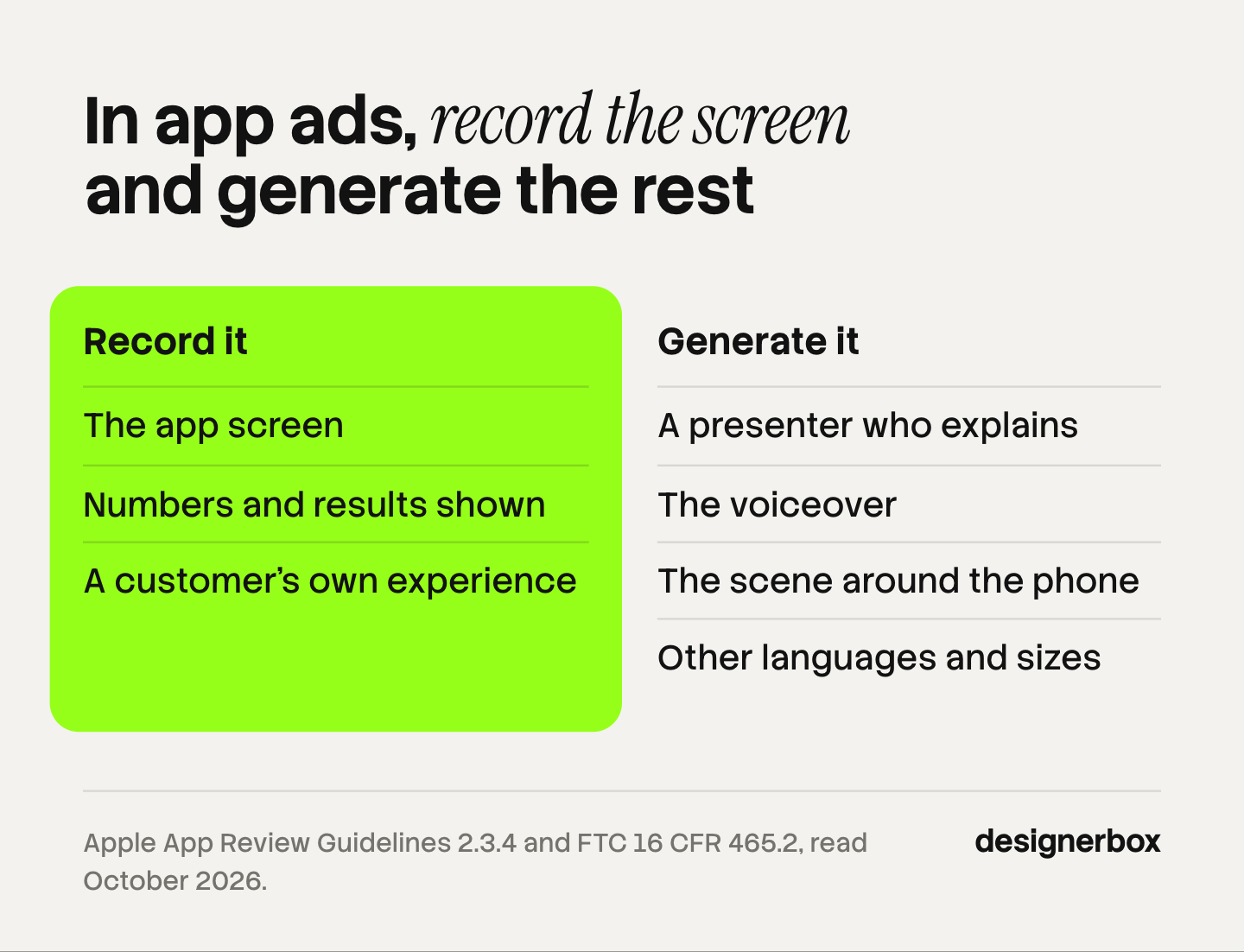
AI can make the presenter, the voice, the scene around the phone and the versions in other languages and sizes. It cannot make your interface or a customer’s experience. Record the first and collect the second from real people. This split keeps every claim on screen true while the costly parts, casting and filming, get cheaper.
| Part of the ad | Record or collect it | Generate it |
|---|---|---|
| The app screen | Yes. Always a real recording | No. The model invents an interface |
| Numbers and results shown | Yes, from a real account | No |
| A customer’s own experience | Yes, from a real customer | No |
| A presenter who explains the feature | Possible | Possible, with the label where the platform asks |
| The voiceover | Possible | Fits well, with text to speech |
| A scene: a desk, a commute, a kitchen | Possible | Fits well |
| Other languages and sizes | Possible | Fits well |
The first row is the one that causes trouble. A generated screen looks close enough to pass a quick review, and then a buyer downloads the app and cannot find the feature. That is a misleading ad, and it is also a wasted install.
There is a middle case: a mockup. You can place a real screenshot into a generated scene, such as a phone on a desk. The pixels of the screen are still real, so the claim still holds. Check that the model did not redraw the text inside it.
How to build a UGC ad for an app
Build the ad in this order. The screen recording comes before the presenter, because the script has to match what the screen really shows.
- Pick one feature and one buyer. Write it as one line: “For freelance designers, the invoice goes out in two taps.”
- Record the screen. Use a clean test account with realistic data. Record at the highest resolution the device gives, in the orientation the ad will use.
- Write the script against the recording. Time each spoken line to what the screen shows in that second. The UGC script guide covers word counts.
- Make the presenter clips. Film a person, or generate one. Keep each clip short. Most video models make clips of a few seconds, and Veo 3.1 makes 4, 6 or 8 seconds (Gemini API, October 2026).
- Assemble on a timeline. Presenter, cut to screen, back to presenter, end card. Add captions for viewers with the sound off. TikTok recommends “displaying 5-10 words per second when using text” (TikTok Ads Help Center, last updated June 2025).
- Check it against the live app. Every screen in the ad must exist in the version a new user gets today.
- Make the variants. Keep the screen recording and change the opening line, the presenter or the language. Then test one change at a time.
Step 6 matters more for software than for any other product. Apps change often. An ad that showed the right screen in June can show a removed feature in October. Keep the recording date with each ad, and re-record when the interface changes. An agency that runs this for several app clients needs a fixed process, covered in the guide to the AI UGC agency.
Store preview videos are not ads
The video on your App Store or Google Play page follows the store’s rules, not the ad platform’s. The rules are tighter, and a UGC-style ad usually does not qualify.
Apple. The App Review Guidelines say previews “may only use video screen captures of the app itself”, and that you can “add narration and video or textual overlays” to explain what is not clear (App Review Guidelines 2.3.4, October 2026). Apple’s product page guidance adds that you can have up to three app previews for each language, each up to 30 seconds long, using footage captured on the device (Apple Developer, October 2026). So a presenter on camera does not belong in an App Store preview. A voiceover does.
Google Play. You add one preview video to the store listing by entering a YouTube URL. Google also tells developers to avoid content that suggests “user testimonials” or price and promotional information in listing graphics (Play Console Help, October 2026).
Google App campaigns. These take text, images, videos and HTML5 assets, and Google says its system also tests “assets from your app’s store listing” (Google Ads Help, October 2026). So the store video can end up inside an ad. Make it clean enough to work in both places.
The practical result: make two masters from one screen recording. The first is the store preview, with the screen, text overlays and a voice. The second is the ad, where the presenter is added around the same recording.
Claims and labels
An app ad carries the same claim rules as any ad, and two points come up often. This is general information, not legal advice.
Testimonials. The FTC says its rule on reviews and testimonials “has no blanket prohibition on the use of AI-generated avatars in marketing”, and that an avatar’s statement might be considered a testimonial under the rule (FTC, October 2026). A false testimonial is prohibited. In practice, a generated presenter can say “this app sends the invoice in two taps”. It cannot say “this app saved my business”.
AI labels. TikTok allows AI-generated content in ads if you “apply the AIGC label, or by adding a clear disclaimer, caption, watermark, or sticker of your own” (TikTok ads policy, October 2026). Meta adds an “AI info” label when it detects third-party AI in an ad (Meta Business Help Center, October 2026). The full picture for generated presenters is in the guide to AI UGC ads.
Numbers. “Saves 6 hours a week” needs a source you could show. If the number comes from one customer, say so on screen. If you have no number, show the task being done and let the viewer judge the time.
Presenter clips and versions around your screen recording
Anyone can make an AI picture. Making hundreds that still look like your brand is the hard part. An app campaign needs the same ad in several openings, sizes and languages, and each one has to keep your colors, your voice and your real screen.
DesignerBox is AI creative production for brands and agencies. It is built around product photos, so here is what it does for an app, stated plainly. It makes the parts around the screen: creator-style clips, a talking avatar with lip sync, voiceover from text to speech, and versions of one ad in other sizes and languages. You build a workflow once with your brand rules, and each new feature ad is one run. The cost is shown before the run.
The full workflow from the first product photo to the finished ad, in one subscription. The setup for paid social is on the page for performance marketers.
Here are the limits. DesignerBox does not record your app, and it does not generate your interface. You record the screen yourself. It does not publish ads or read your ad account: you download the results, or send them with a webhook or an S3 step. An 8-second clip costs 40 to 560 credits, depending on the model. Team features are on the Ultra plan, and every plan below Ultra is one seat. The free plan cannot make video.
Uploading your own photos and the commercial license start on the Pro plan. AI video, virtual try-on, upscaling, the image editor and the video editor start on the Premium plan. Plans and credits are on the pricing page.
A free plan for your first run
There is a free plan, and it runs on sample products. Start from a template and see the cost before you run it. Get started free.
FAQ
What is UGC for apps?
UGC for apps is creator-style video about an app: a person speaks to the camera, and the video shows the app in use. Brands run it as paid ads in vertical feeds to get installs, trials or demo requests. Most of it is scripted. The person can be a real customer, a paid UGC creator, an actor or a generated presenter.
Does UGC work for SaaS?
It fits SaaS when the product solves a task you can show in a few seconds of screen. Name the role in the first line, show one screen and one result. It fits less well when the value is a long setup or a team-wide change, because a short vertical video cannot show that.
Can AI generate the app screen in an ad?
It can, and you should not use it. A video model draws an interface that does not exist, with features your app does not have. Record the real screen and place it in the ad. A real screenshot inside a generated scene is fine, as long as the model did not redraw the text.
Can you use a UGC ad as an App Store preview video?
Usually not. Apple says app previews may only use video screen captures of the app itself, with narration and overlays allowed. Each preview can be up to 30 seconds. A presenter on camera does not meet that rule, so make a separate cut for the store from the same screen recording.
How long should a UGC ad for an app be?
Short enough for one feature. A 20-second ad is three to five clips with one or two screen cutaways. Apple caps store previews at 30 seconds. Test two lengths against each other, because the right length depends on how long the feature takes to show.
Do AI presenters in app ads need a label?
On TikTok, yes: ads with AI-generated content need the AIGC label or your own clear disclaimer. Meta adds an “AI info” label when it detects third-party AI. Some places have their own laws, such as New York’s disclosure rule for synthetic performers in ads. This is general information, not legal advice.
Sources
- Apple, App Review Guidelines, section 2.3.4: developer.apple.com/app-store/review/guidelines, accessed October 2026
- Apple Developer, App previews: developer.apple.com/app-store/app-previews, accessed October 2026
- Play Console Help, Add preview assets to showcase your app: support.google.com/googleplay/android-developer/answer/9866151, accessed October 2026
- Google Ads Help, About App campaigns: support.google.com/google-ads/answer/6247380, accessed October 2026
- Google, Generate videos with Veo 3.1 in the Gemini API: ai.google.dev/gemini-api/docs/veo, accessed October 2026
- TikTok Ads Help Center, Creative best practices for performance ads: ads.tiktok.com, last updated June 2025, accessed October 2026
- TikTok ads policy, misleading and false content: ads.tiktok.com, accessed October 2026
- Meta Business Help Center, AI info labels on ads: facebook.com/business/help/1010479435004531, accessed October 2026
- FTC, Consumer Reviews and Testimonials Rule: Questions and Answers: ftc.gov, accessed October 2026
- DesignerBox pricing and product pages (designerbox.ai), October 2026
Store and platform rules verified from Apple, Google, TikTok, Meta and FTC pages as of October 2026. The example lines are illustrations, not test results. Individual results vary.


