




A wedding invitation video is a short clip that invites guests and gives them five details: the names, the date, the time, the place and the RSVP route. Most run 15 to 30 seconds in a vertical 9:16 frame. The picture is the easy part. The video fails when the text is wrong, the faces are wrong, the music has no license, or the file does not suit the channel.
Two kinds of reader make these videos: a couple with a folder of photos, and a small business that sells invitation videos to many couples. The steps are the same for both. The last two sections are for the business.
Key Takeaways
-
Five details, all on screen. Names, date, time, place and RSVP route.
-
Type the text. Never ask a model to draw it. OpenAI and Google both say their image models can still get text wrong. Add the names and the date as a text layer in an editor.
-
Check the faces against the real photos. The couple must approve every frame that shows them.
-
License the music. Instagram says its music library is for personal, non-commercial use. On YouTube, a copyright owner can block a claimed video.
-
Export for the channel. WhatsApp’s default video limit is 100MB at 720p on a faster connection. Instagram Reels accept ratios between 1.91:1 and 9:16.
-
Sellers need written consent and proof approval. Both come before delivery.
What is a wedding invitation video?
A wedding invitation video is a digital wedding invitation in video form. It shows the couple or a designed card, plays music, and puts the event details on screen. Guests get it as a file in a chat, as a link, or as a post. Some people call it a video wedding invitation.
Two relatives use the same steps:
- An animated wedding invitation is a designed card that moves: lettering that writes itself, or an envelope that opens. It may show no photo at all.
- A save the date video goes first, often months earlier. It carries only the names, the date and the city.
An AI wedding invitation is any of these where an image or video model made part of the picture.
What a wedding invitation video must contain
A wedding invitation video must contain five details, and each one must stay on screen long enough to read. Collect them in writing from the couple before you open any tool. Copy and paste them. Do not retype a name from memory.
| Detail | What to put on screen | The usual error |
|---|---|---|
| Names | Both names, spelled as the couple wrote them | One changed letter, or a missing accent |
| Date | Day, month and year, with the weekday | A weekday that does not match the date |
| Time | The start time, with the time zone if guests travel | The time of the party, with no ceremony time |
| Place | The venue name and the city | A venue name with no city |
| RSVP route | A link, a phone number or an email, and a reply-by date | An RSVP line with no deadline |
A guest takes a screenshot of the card with the details, so put all five on one card near the end. Hold that card for at least four seconds. That is this guide’s own rule. Test it on someone who has not seen the card.

Wedding invitation video length and ratio by channel
Plan the file for the place where guests will open it. Most invitations go to phones, so a vertical 9:16 frame of 15 to 30 seconds is a safe default. That range is this guide’s recommendation, and no platform sets it. The table shows what each platform’s own help page says.
| Channel | What the platform says | What to export |
|---|---|---|
| WhatsApp chat | The default video limit is 100MB at 720p on a faster connection, and 64MB at 480p on a slower one | A 9:16 file at 720p, under 64MB |
| WhatsApp document | The maximum document size is 2 GB | The full-quality file for the couple to keep |
| WhatsApp Status | A Status video runs 90 seconds at most | The same short file |
| Instagram Reels | Ratios between 1.91:1 and 9:16, with at least 30 frames per second and 720 pixels | 9:16 at 1080 by 1920, 30 frames per second |
| YouTube | A copyright owner can monetize, track or block a claimed video | A 16:9 version, with music you have a license for |
The WhatsApp figures come from its help page on longer videos (faq.whatsapp.com, October 2026). The Reels figures come from Instagram’s page on Reel size (help.instagram.com, October 2026).
Make the vertical file first. A 16:9 version is a second export with its own text position. Our guide on how to make AI videos fast covers that kind of repeat work.
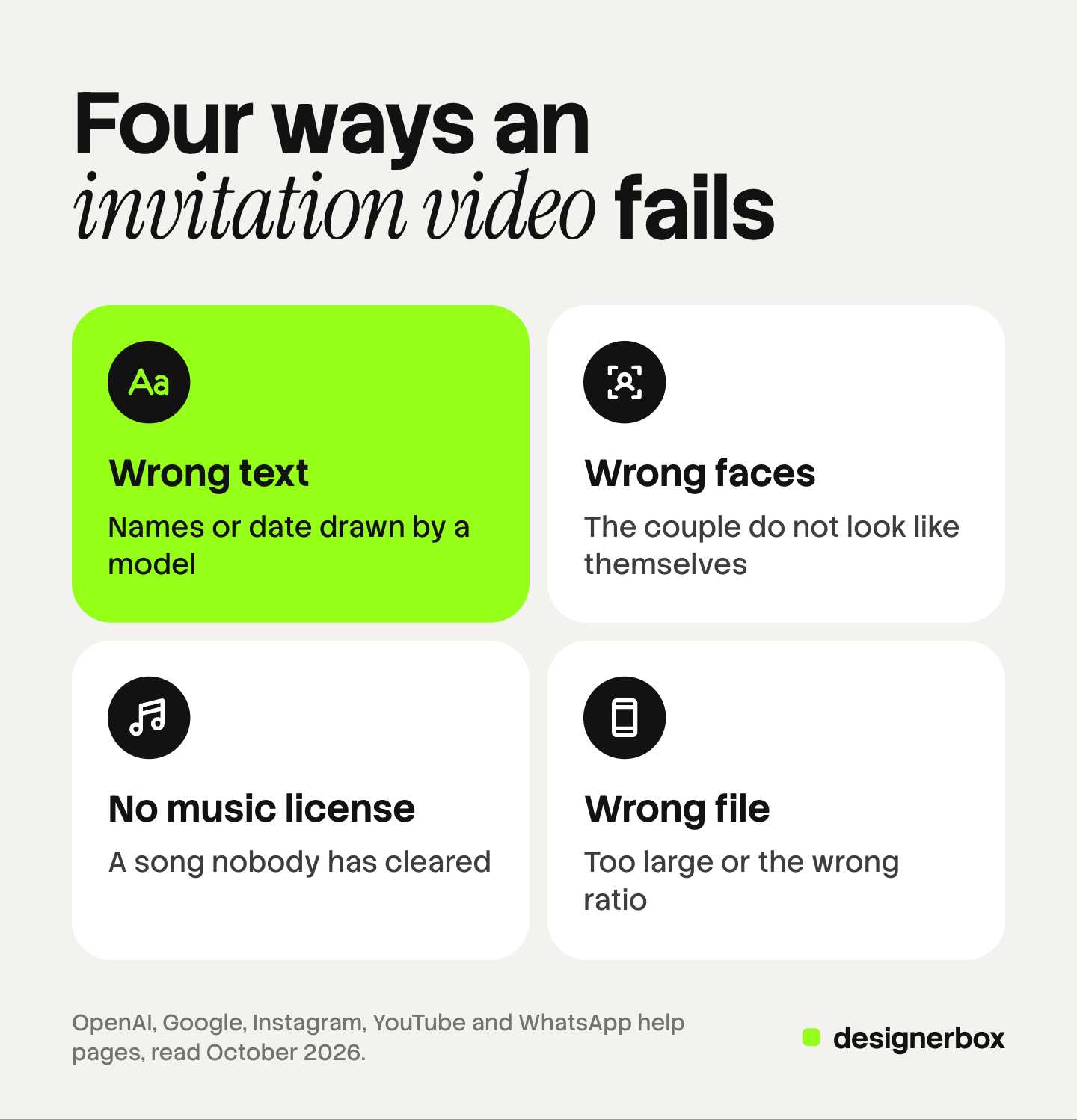
Four reasons a wedding invitation video fails
A wedding invitation video fails for four plain reasons, and none of them is the picture. Each one has a check you can run before you send the file.
1. The names or the date are wrong
Image models still misdraw text. OpenAI’s image guide lists text rendering as a limit: the model “can still struggle with precise text placement and clarity” (developers.openai.com, October 2026). Google says its Nano Banana Pro model “can still struggle with small faces, accurate spelling, and fine details in images” (deepmind.google, October 2026).
So keep the words outside the model. Make the picture with no text in it. Then type the names and the date as a text layer in a video editor. A typed layer has real letters, and you can correct one in seconds.
2. The couple do not look like themselves
A generated frame can change a face a little: a different jaw, a different eye color. The couple and their families will see it at once. OpenAI’s guide says its image model “may occasionally struggle to maintain visual consistency for recurring characters”.
Give the model clear reference photos. Google’s Veo 3.1 accepts up to three reference images of a person, character or product (ai.google.dev, October 2026). Then compare every frame with the real photos.
There is a safer route. Use the couple’s real photos as they are, and generate only the parts with no people: the envelope, the flowers, the venue at sunset.
3. The music is not licensed
A favorite song has the most rules. Instagram says the music in its library “is intended for personal, non-commercial use”, and certain business accounts do not have access to it (help.instagram.com, October 2026). A couple who post from a personal account can add a library song inside the app. A seller who posts from a business account may not have that choice.
A song that you place in the file yourself needs its own license. On YouTube, a copyright owner can monetize, track or block a claimed video, and a block can apply worldwide (support.google.com, October 2026). Meta’s Sound Collection has over 14,000 songs and sounds that can be used for commercial purposes, according to the same Instagram page. Keep the license with the order.
4. The file does not suit the channel
A file above WhatsApp’s video limit will not send as a normal video. A 16:9 film shows small on a vertical phone screen. Use the table above, export one file for each channel, and open each file on a phone before you send it.
How to make a wedding invitation video in seven steps
Seven steps take you from a folder of photos to a finished file.
- Collect the five details in writing. This text is the single source for every card.
- Collect the photos. Ask for clear, recent photos of each person, and at least one of the two together.
- Write a short script. Plan four to six beats: an opening image, two or three moments, the invitation line, and the details card.
- Make the key frames as stills. Create one still image for each beat, with no text in it. A still costs less than a clip, so correct faces and colors here. A flat lay of the printed invitation works as an opening frame with no faces in it.
- Turn the stills into clips. Animate each approved still. Veo 3.1, for example, makes clips of 4, 6 or 8 seconds, so a 24-second invitation is several clips joined in an editor.
- Add the text and the music in an editor. Paste the five details from step 1 onto a text layer. Add the licensed track. If someone speaks the invitation line, our guide to AI lip sync explains what makes a spoken line look right.
- Proofread, export and test. Read every card aloud against the written details. Export one file for each channel. Send each file to your own phone first.
A seller’s checklist for wedding invitation videos
A business that sells invitation videos needs the same seven steps and five controls. The work repeats for every couple, so one missed check repeats too.

Written consent for the photos and the likeness. Ask both people to agree in writing that you may use their photos to make the video. Ask separately before you show their video as a sample in your shop or your ads. New York’s Civil Rights Law section 50, for example, requires written consent before a business uses a living person’s name, portrait, picture, likeness or voice for advertising or trade (nysenate.gov, October 2026). Laws differ by state and by country. This is general information, not legal advice. Our guide to the model release form lists what such a document usually covers.
An order form with the five details. Never accept the details by voice. A form gives you the exact spelling.
Proof approval before delivery. Send a proof with a watermark. Ask the couple to confirm the five details in writing. State how many correction rounds the order includes. Deliver the final file only after that reply.
A turnaround promise you can keep. Count the days from the moment you have the complete form and the photos. State the delivery channel and the file types in the listing.
A license for every track. Offer a short list of tracks that you hold a license for.
If you sell on a marketplace, the listing needs its own pictures and clips. Our guides to Etsy product photos and Etsy listing videos cover that part.
Invitation video production in DesignerBox
DesignerBox is AI creative production for brands and agencies. It makes images, ads and video with your brand rules on every run. This section is for a business that sells invitation videos to many couples. A couple who need one video for their own wedding do not need it.
Anyone can make an AI picture. Making hundreds that still look like your brand is the hard part. A shop with three invitation styles has that problem with every new couple. In DesignerBox, you build each style once as a workflow, with your colors, your framing and your rules.
Then you publish the workflow as an app, which is a workflow with a form. A colleague types the names, the date and the place, adds the photos and presses Run. The cost is shown before the run. An 8-second clip costs 40 to 560 credits, depending on the model.
The lettering goes on in the video editor. It is a timeline with several tracks, animated text, audio and transitions. Type the names and the date there, add your licensed track, and check every letter against the order form.
The full workflow from the first product photo to the finished ad, in one subscription. The same account makes your shop’s own listing pictures and ads.
Here are the limits. DesignerBox does not check a likeness for you, so the couple’s approval stays in your process. It does not supply a music license. It does not send the file to guests: you download the results, or send them with a webhook or an S3 step. Every plan below Ultra is one seat. Uploading your own photos and the commercial license start on the Pro plan. AI video, virtual try-on, upscaling, the image editor and the video editor start on the Premium plan. Plans and credits are on the pricing page.
There is a free plan, and it runs on sample products. Get started free.
FAQ
How long should a wedding invitation video be?
Plan for 15 to 30 seconds. That is long enough for an opening image, a few moments and a details card that stays on screen for at least four seconds.
Can AI make a wedding invitation video from photos?
Yes. An image model makes the key frames from reference photos, and a video model animates them into short clips. Two parts still need a person. Type the names and the date as a text layer, and compare every face with the real photos.
Can I use a popular song in a wedding invitation video?
Only with a license, or inside an app that licenses it for your kind of account. Instagram says its music library is for personal, non-commercial use. On YouTube, a copyright owner can block a claimed video. A business should use tracks that it holds a license for.
What size should a wedding invitation video be for WhatsApp?
WhatsApp says the default video limit is 100MB at 720p on a faster connection and 64MB at 480p on a slower one. Export a 9:16 file at 720p under 64MB. Send the full-quality file to the couple as a document, which can be up to 2 GB.
What is the difference between a save the date video and a wedding invitation video?
A save the date video goes first and carries the names, the date and the city. A wedding invitation video follows later with the time, the venue and the RSVP route.
Sources
- WhatsApp Help Center, Can’t send longer videos: video size limits, the 2 GB document limit and the 90-second Status limit: faq.whatsapp.com, accessed October 2026
- Instagram Help Center, Reel size and aspect ratios on Instagram: help.instagram.com, accessed October 2026
- Instagram Help Center, music in the licensed library and Meta’s Sound Collection: help.instagram.com, accessed October 2026
- YouTube Help, Learn about copyright claims: support.google.com, accessed October 2026
- OpenAI, image generation guide, limitations: developers.openai.com, accessed October 2026
- Google DeepMind, Nano Banana Pro model page, limitations: deepmind.google, accessed October 2026
- Google, Veo 3.1 in the Gemini API: clip durations, reference images and aspect ratios: ai.google.dev, accessed October 2026
- New York Civil Rights Law section 50, right of privacy: nysenate.gov, accessed October 2026
- DesignerBox apps, video editor and pricing pages (designerbox.ai/product/apps, designerbox.ai/product/video-editor and designerbox.ai/pricing), October 2026: plan gates and seats
Platform limits, model limits and the New York statute were read on each source’s own page in October 2026. Limits change, so read the page again before you rely on it. The legal note is general information, not legal advice.


