




White label AI video is AI-made video that an agency or reseller sells under its own brand, with the software vendor out of sight. It has three levels. At the first level the file carries no vendor mark. At the second, your client works in an interface with your name on it. At the third, you hold the right to resell the software itself. Each vendor’s terms decide which level you get, and they differ a lot.
Many agencies buy an “agency plan” and assume it covers all three. Often it covers the first one only. The export is clean, and the terms still forbid selling access to the service. That gap appears when a client asks for a login.
This guide is for agencies and resellers. It explains the three levels, quotes what nine vendors’ own help pages and terms said on 4 October 2026, and lists the labels and badges that stay visible after you rebrand everything else.
Key Takeaways
- White label AI video has three levels. A file with no vendor mark, an interface under your brand, and the right to resell the software.
- Level one is common. Synthesia, HeyGen and Pictory all remove their mark on paid plans, by their own help pages.
- Level two needs an API or an SDK. Creatomate, Shotstack and Banuba each offer one that sits inside your own product.
- Level three is a contract. Of the terms read for this guide, only Viddyoze’s white label terms grant a right to resell. Several others forbid it without written consent.
- Some marks cannot be removed. Runway’s API terms require a “Powered by Runway” badge, and Google marks Veo video with SynthID.
- The duty to label AI video stays with the seller. EU Article 50 and the platform rules apply to the company that publishes the video.
What is white label AI video?
White label AI video is video made with an AI product and sold under the seller’s brand. The buyer sees the agency’s name on the proposal, the invoice and the file. The vendor that made the software stays in the background. White label AI video software is the product an agency uses to do this, and the phrase covers very different arrangements.

The question that sorts them is simple. What does your client touch? If the client receives finished files, you need a clean export and a commercial license. If the client logs in and makes video, you need your own interface. If you sell the software to other agencies, you need resale rights in writing.
This guide covers video. White label content covers the wider model: how a studio sells image and video sets under its own name and prices each set. For stills, see the white label AI image generator guide.
The three levels of white label AI video
The three levels differ in what the client sees and in what you need to set up.
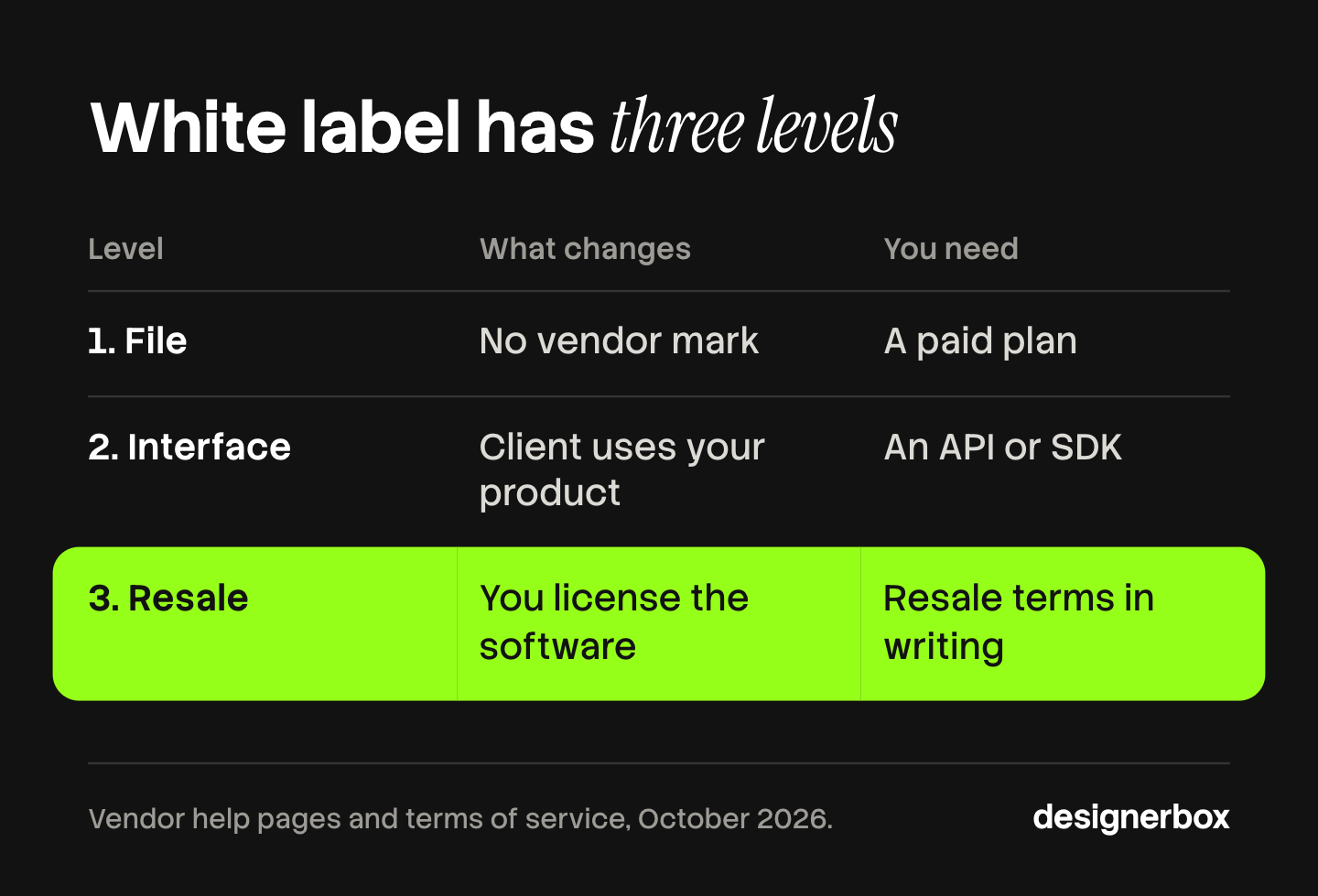
| Level | What changes | What you need | What the client sees |
|---|---|---|---|
| 1. File | The export has no vendor mark | A paid plan and a commercial license | Your files |
| 2. Interface | The client works inside your product | An API or an SDK, and a front end you build | Your product |
| 3. Resale | You license the software to others | Resale terms in writing | Your software, under your contract |
Each level includes the one before it and costs more to set up. Level one is a subscription. Level two is a development project. Level three is a negotiation.
Level 1: a file with no vendor mark
At this level the vendor’s logo leaves the export. Most paid plans do this, and the vendors say so on their help pages.
- Synthesia. Synthesia is an established avatar video product. Its help page says the watermark appears “under certain conditions, such as being on the Basic plan or generating a video in API test mode” (help.synthesia.io, October 2026).
- HeyGen. HeyGen makes avatar video and translation. Its help page says: “Removing the watermark is available on all paid plans” (help.heygen.com, October 2026).
- Pictory. Pictory turns scripts and long recordings into short videos. Its help page says the watermark is on free trial downloads, and after you subscribe to a paid plan “this watermark will no longer be present” (kb.pictory.ai, October 2026).
A clean file is what most agency work needs. You make the video, you deliver it, and the client never opens the software. AI UGC video tools for agencies compares six products on seats and brand separation for this kind of work.
Check one more thing on the free tier. HeyGen’s terms say free plan results “may not be sold, sublicensed, redistributed, monetized, or used in” client work (heygen.com/terms, October 2026). A free tier is for a test.
Level 2: your own interface
At this level your client uses a product with your brand on it, and the vendor runs behind it. That needs an API, an SDK, or both.
- Creatomate. Creatomate is a rendering API built on templates. Its pricing page says “the API is available on all plans”, and its Preview SDK lets you “embed Creatomate’s renderer in your own web applications” (creatomate.com, October 2026).
- Shotstack. Shotstack is a video editing API. Its pricing page lists “API Access” and a “White Label Video Editor SDK” under what all plans include (shotstack.io, October 2026). The SDK page allows use in any application “as long as it doesn’t directly compete with Shotstack”.
- Banuba. Banuba licenses a video editor for mobile and web apps. It says it offers “an SDK and an API”, and that “nothing in the product points back to Banuba unless you want it to” (banuba.com, October 2026).
These three are editing and rendering products. They assemble and edit video inside your app. The AI video itself comes from a model, so check each model’s terms as well.
Level two moves the cost from subscriptions to development. You build the sign-in, the form and the storage, and you keep each client’s files apart. Video automation explains how a video API takes a template and data and returns a file.
Level 3: the right to resell the software
This level is about contract terms. An API does not give you the right to sell access to a service under your name. The terms do, or they do not.
Here is what the terms said on 4 October 2026.
| Vendor | What the terms say about resale |
|---|---|
| Viddyoze | Its white label terms include “the right to resell the Templates on a white label basis” (viddyoze.com) |
| Synthesia | Its acceptable use policy lists “sublicensing, reselling, time sharing or similarly exploiting the Services” as prohibited (synthesia.io) |
| HeyGen | Users may not build an interface to the service “by white-labeling any portion of the Services, unless we explicitly make such functionality available to you” (heygen.com/terms) |
| Shotstack | Rights “must not be leased, assigned, sold, licensed, resold or transferred to any third party” without “prior written consent” (shotstack.io/terms) |
| Luma | API customers may not “white-label, rebrand, resell, sublicense” the service or its output “as a standalone product or service” without written consent (lumalabs.ai) |
Read this table as scope. Each vendor sells a service for making video, and delivering finished videos to clients is the normal use of all of them. The clauses limit one thing: reselling access to the service itself.
Three of the five rows say “written consent” or “unless we make it available”. So the route to level three is a conversation with the vendor and a signed agreement. Viddyoze sells that agreement as a product. It says you can run its platform “on your own domain” (viddyoze.com, October 2026).
Terms change. Read the current version before you sign a client, and keep a dated copy.
What model vendor terms add
Many white label video products call an AI video model. The model vendor’s terms pass down to you.
Runway. Runway’s terms say applications made available to end users “must prominently display ‘Powered by Runway’ and link to runway.com” (runwayml.com, October 2026). Its developer documentation has an attribution page for the badge. If your product calls the Runway API, the vendor is visible by contract.
Google Veo. Google says: “Videos created by Veo are watermarked using SynthID, our tool for watermarking and identifying AI-generated content” (ai.google.dev, October 2026). People do not see the SynthID mark, and software can detect it.
OpenAI. OpenAI removed Sora 2 and the Videos API from its API on 24 September 2026 and named no replacement (developers.openai.com, October 2026). A white label product built on that one model needed a new model that week. Build on a product that can change models.
Luma. Luma’s terms say it may “embed watermarks, content credentials, provenance metadata” in results, and customers may not remove them (lumalabs.ai, October 2026).
The labels that stay with the seller
White label removes the vendor’s name. It does not remove the duty to say that a video is AI-made. That duty sits with the company that publishes the video.
EU AI Act. Article 50 has applied since 2 August 2026. The European Commission says: “Deployers must disclose deepfake content to a natural person upon first exposure at the latest” (digital-strategy.ec.europa.eu, October 2026). The same page says deployers cannot rely only on the machine-readable mark the tool maker adds. A realistic AI presenter in an ad is the common case for an agency.
YouTube. YouTube says: “we require creators to disclose when they use AI to meaningfully alter or generate photorealistic content” (support.google.com, October 2026).
TikTok. TikTok says it requires people to disclose realistic AI-generated content (tiktok.com, October 2026).
Content Credentials add a technical layer. The C2PA standard describes a Content Credential as a structure “that records an asset’s provenance” (spec.c2pa.org, October 2026).
Put the labeling duty in the client contract. Say who adds the label and who checks it. AI disclosure in advertising covers each rule in detail. This section is general information, not legal advice.
How to choose a white label level for an agency
Start from the client, then read the terms. The AI video agency guide compares seven platforms on seats, client separation and client terms.
- Decide what the client touches. Files only means level one. A login means level two. Software sold to other agencies means level three.
- Pick one repeatable result. A 15-second product video with a fixed structure is easier to price and to check than open-ended video work.
- Read four clauses. Resale and sublicensing, commercial use, attribution or badges, and who owns the results. AI images and commercial use explains the ownership questions.
- Ask how clients are billed and kept apart. Seats, workspaces and keys per client decide your margin and your privacy promise.
- Plan for a model change. Ask what happens to your product when a model is removed.
Most agencies need level one. It is the cheapest level, and it keeps the client relationship with you. Agency creative pricing shows how to price finished sets on a retainer.

Finished video sets under your name
DesignerBox is AI creative production for brands and agencies. For white label work it sits at level one: you sell finished image and video sets under your own name. Your client does not sign in to DesignerBox.
Anyone can make an AI picture. Making hundreds that still look like your brand is the hard part. In DesignerBox you build a workflow once for each client brand, with its products and its rules. The workflow reads the brand profile on every run. A colleague runs it as an app through a short form, and batch runs it over a whole sheet of products. The workflow picks the model for each step, so a removed model changes one step.
The video editor is a real timeline, with several tracks, transitions, animated text and audio. The full workflow from the first product photo to the finished ad, in one subscription.
An 8-second clip costs 40 to 560 credits, depending on the model, and you see the cost before you press Run.
Here are the limits. DesignerBox does not have a public API, so it is not a level two product. It has 68 tools over MCP, which lets an AI chat such as Claude, ChatGPT or Cursor run your workflows. Your client does not see work in progress. You download the results, or send them with a webhook or an S3 step. Every paid plan removes the DesignerBox mark from your results. The commercial license starts on the Pro plan, and AI video and the video editor start on the Premium plan. Team features, shared brand kits and white label options are on the Ultra plan, and every plan below Ultra is one seat. The agencies page explains the team setup, and plans are on the pricing page.
A demo for your agency
Bring one client brand and one video you make every week. See it built as a workflow. Book a demo
FAQ
What is white label AI video software?
It is software for making AI video that you sell under your own brand. At the simplest level the exported file has no vendor mark. At deeper levels your client uses an interface with your brand on it, or you hold the right to resell the software.
Can I resell AI video software to other agencies?
Only if the terms allow it. Several vendors’ terms forbid reselling the service without written consent. Viddyoze’s white label terms grant a right to resell its templates on a white label basis (viddyoze.com, October 2026). For most vendors you need a signed agreement.
Do paid plans remove the watermark?
Often, yes. Synthesia, HeyGen and Pictory each say on their help pages that paid plans remove the visible watermark (October 2026). Some marks stay. Google marks Veo video with SynthID, which people do not see.
Do I need developers to white label AI video?
For a clean file, no. For an interface under your own brand, yes. You connect an API or an SDK and build the sign-in, the form and the storage. Creatomate, Shotstack and Banuba each offer an API or SDK for this (October 2026).
Is a white label AI platform the same as an API?
No. An API is a technical route into a service. White label is a commercial arrangement about whose brand the client sees and what you may sell. An API can make level two possible, and the terms still decide whether you may resell.
Who has to label a white label AI video?
The company that publishes it. Under EU Article 50, the deployer discloses a deepfake at first exposure, and the platforms have their own rules for realistic AI video. Removing the vendor’s name does not move that duty. Put it in the client contract.
Is DesignerBox a white label AI video platform?
It fits level one. You make finished sets and sell them under your name, and paid plans remove the DesignerBox mark. White label options are on the Ultra plan. DesignerBox does not have a public API, and the cost of a run is shown before the run.
Sources
- Synthesia, watermark help page and acceptable use policy (help.synthesia.io, synthesia.io/legal/acceptable-use-policy), October 2026
- HeyGen, watermark help page and terms of service, last updated 23 July 2026 (help.heygen.com, heygen.com/terms), October 2026
- Pictory, watermark help page (kb.pictory.ai), October 2026
- Creatomate, pricing page: API and Preview SDK (creatomate.com/pricing), October 2026
- Shotstack, pricing page, video editor SDK page and terms dated 17 September 2026 (shotstack.io), October 2026
- Banuba, white label video editor and Video Editor SDK pages (banuba.com), October 2026
- Viddyoze, white label page and white label terms (viddyoze.com), October 2026
- Luma, API terms of use and terms of service (lumalabs.ai/legal), October 2026
- Runway, terms of use dated 15 September 2026: runwayml.com, and API attribution: docs.dev.runwayml.com, October 2026
- Google, Veo in the Gemini API and SynthID: ai.google.dev, October 2026
- OpenAI, API deprecations: Videos API and Sora 2 removed on 24 September 2026: developers.openai.com, October 2026
- European Commission, transparency obligations under Article 50 of the AI Act: digital-strategy.ec.europa.eu, October 2026
- YouTube, disclosing altered or synthetic content: support.google.com, October 2026
- TikTok, AI-generated content: tiktok.com, October 2026
- C2PA, Content Credentials explainer 2.4: spec.c2pa.org, October 2026
- DesignerBox agency partner page and pricing page (designerbox.ai/agency-partners, designerbox.ai/pricing), October 2026
Vendor terms and help pages read on each company’s own site as of October 2026. Terms change, so read the current version. This is general information, not legal advice.


