
Arcads vs Creatify comes down to what you already have. Arcads starts from a script and an actor: you choose a face from its library, add your lines, and get a creator-style clip. Creatify starts from a product page link: it reads the page, writes the script and builds the ad. Both make AI UGC video, and both libraries are built on real people.
You have probably read comparisons that settle this on a monthly price and an opinion about which actors look more real. A price changes with the next plan update. Realism is a judgment you can only make on your own product, in your own category.
This guide compares Arcads and Creatify on things you can check. It covers the input each one starts from, what each vendor’s own terms say about the people on screen, and what an agency or a brand has to check before either ad runs. We make DesignerBox, which sits in the same category, so read our section with that in mind. This guide prints no prices.
Key Takeaways
- The starting input is the real difference. Arcads asks for a script and an actor. Creatify asks for a product link and writes the script itself (arcads.ai/terms and creatify.ai/features/url-to-video, October 2026).
- Both libraries are real people. Arcads’ terms describe “a catalogue of videos made by different creators”. Creatify says its stock avatars “are based on real human actors” who gave written consent (arcads.ai/terms and creatify.ai/ai-ethics, October 2026).
- The actor comes with terms. On Arcads, a creator can limit the fields an actor may be used in, and can ask for a video to be withdrawn (arcads.ai/terms, October 2026).
- Both vendors put the ad’s claims on you. Arcads’ license excludes “misleading or deceptive advertising”. Creatify’s terms make you responsible for any commercial use of what you create.
- Neither tool decides whether the ad is lawful. The FTC says its rule “has no blanket prohibition on the use of AI-generated avatars in marketing”. The rule is about what the actor says.
- Run 5 checks before either ad goes live. They cover the script, the product, the actor’s terms, the platform label and the file you keep.
Arcads vs Creatify: the input each one starts from
Arcads and Creatify ask you for different things on the first screen. Arcads asks who should speak and what they should say. Creatify asks what you sell. The rest of each product follows from that first question, and so does the work you do before you open it.
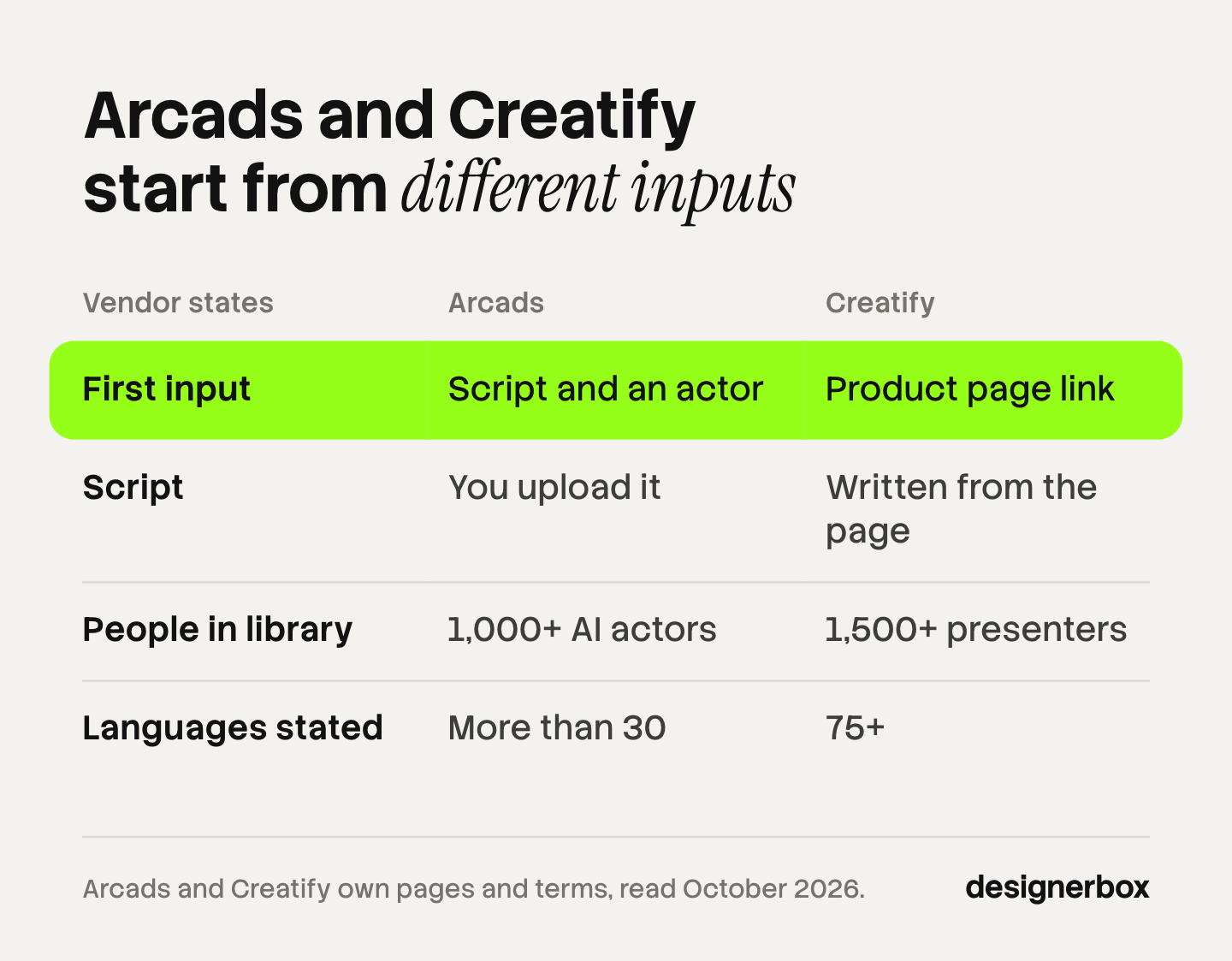
Arcads’ terms set out three ways to make a video. You can start from the catalog of creator videos, from a video you own, or from a prompt. You then upload a script, and the platform matches the lip movement and the voice to it (arcads.ai/terms, in force 22 September 2026, read October 2026). The script is your job.
Creatify’s link feature takes three steps: paste your product URL, choose an AI avatar, then generate and adjust. Its page says “Creatify pulls your assets, writes the script, and delivers a ready-to-run video ad” (creatify.ai/features/url-to-video, October 2026). The product page is your job.
That gives you a first test. If your team already writes scripts and tests hooks, the script-first route fits how you work. If you have 40 product pages and no scripts, the link-first route saves the writing step. In that case you still read every line the software wrote, because the ad’s claims are yours.
Both products have grown past their first input. Arcads now lists image tools, video models and a workflow canvas. Creatify lists four ways to start: “Agent, Ad Flow, URL-to-video, or start from scratch” (arcads.ai and creatify.ai, October 2026). The first input still shows what each product is built around.
What Arcads does well
Arcads is built around the actor. Its homepage says “Use our library of 1,000+ Captivating AI Actors, or create your own AI Avatar” (arcads.ai, October 2026). The same page lists talking actors, unboxing, product showcase, actor swap, captions and video translation, with “Accurate translation in more than 30 languages”. It also states “Free trial available”.
You control the script and the voice. Arcads’ help center describes its talking actor route as “Full voice control”, with a custom actor you make first so that the product is in the frame. The guide says the actors in the library “are not yet holding your product”. So you upload your product image as a reference and create a custom actor who holds it (intercom.help/arcads, October 2026).
Arcads has also widened its scope. Its homepage names “Create Workflow”, described as “one infinite canvas” for a team’s ad workflows. Its help center has collections for an API and for an MCP connection (arcads.ai and intercom.help/arcads, October 2026). The terms say the API comes with a customized offer.
Outside scope on the pages we read: a link-to-video feature, and launching ads to an ad account. We also did not find a public pricing page for Arcads. Our Arcads alternatives comparison covers the tools closest to it.
What Creatify does well
Creatify is built around the product page and the ad account. Its homepage says “Turn any link into a ready-to-post video”, and the link feature writes the script from the page it reads (creatify.ai, October 2026). For a store with many products and little copy, that removes the blank page.
Its avatar page states “Choose from 1,500+ ultra-realistic presenters, upload your own photo, or describe one from scratch”, with lip sync “in 75+ languages”. It also says of a designed avatar, “You can even have them hold your product” (creatify.ai/features/ai-avatar, October 2026).
Creatify goes further after the render than Arcads does on the pages we read. Its avatar page says “Launch ads directly to Meta, TikTok, YouTube, LinkedIn, Snapchat, and AppLovin Axon”. Its homepage lists batch creation, an ad cloner, image ads, and reporting on spend, ROAS and CTR per creative (creatify.ai, October 2026). Its pricing page lists a free plan, whose exports carry a watermark, and “Creatify MCP for Claude & ChatGPT” on a paid plan (creatify.ai/pricing, October 2026).
Outside scope on the pages we read: starting from a creator video you choose first and then scripting every word yourself, which is the route Arcads puts first. The Creatify alternatives guide covers the tools closest to it.
Arcads vs Creatify feature presence
This table shows what each vendor states on its own pages. A cell says what is listed. It does not rate quality, and it carries no price.
| What the vendor states | Arcads | Creatify |
|---|---|---|
| First input | A script, plus an actor, your own video or a prompt | A product page link, or Agent, Ad Flow or a blank project |
| Who writes the script | You upload it | Written from the product page |
| People in the library | ”1,000+” AI actors | ”1,500+” presenters |
| Your own presenter | Custom actor, or a copy of yourself | Photo upload, or describe one |
| Your product in frame | Custom actor made from your product image | Assets pulled from the link, product-holding avatars |
| Languages stated | More than 30 | 75+ |
| Launch to ad accounts | Not listed on the pages read | Meta, TikTok, YouTube, LinkedIn, Snapchat, AppLovin Axon |
| MCP and API | Both have help center collections | Both listed |
| Free start | Free trial | Free plan, with a watermark on exports |
| Where the library comes from | Videos made by creators | Real human actors, with written consent |
Sources: arcads.ai, arcads.ai/terms, intercom.help/arcads, creatify.ai, creatify.ai/features/url-to-video, creatify.ai/features/ai-avatar, creatify.ai/pricing and creatify.ai/ai-ethics, all read on 4 October 2026. “Not listed” means we did not find the feature on the pages we read. It does not mean the tool cannot do it.
Who are the actors, and what do the terms allow?
In both tools, a library actor is a real person’s image and voice, used under terms. That matters more to an agency than which face looks most natural, because the terms decide where the ad may run and for how long.
Arcads’ terms call the library “a catalogue of videos made by different creators”. When you make a video from one, three conditions apply. You may not use it in a way that harms the creator’s dignity. You may not clone the creator or alter their image or voice. And the creator “may also choose to restrict the use of the Video Model to certain fields of activity or certain uses”, with those limits shown on the platform. The terms add that Arcads may ask you to delete a video “in the event of a withdrawal request made by the Creator” (arcads.ai/terms, October 2026).
Arcads’ license also names what you may change in a finished video. The list covers cropping, music, text and subtitles, emoji, B-roll, GIFs, sound effects, the format, and your name, brand and logo. Other changes need written approval. The license does not cover a video that “infringes the rules of ads platforms” or one used for “misleading or deceptive advertising” (arcads.ai/terms, October 2026).
Creatify states its position on a separate page. Its stock avatars “are based on real human actors who have provided their explicit written consent for the use of their images and voice”, and a custom avatar needs “the explicit consent of the individual whose avatar is being created” (creatify.ai/ai-ethics, October 2026).
Creatify’s terms say “You own all your original content in the Assets you create with the Services”. They also say you are responsible for “any personal, private, or commercial use” of those assets, and for the rights to anything you upload. Free Tier users “have limited rights” (creatify.ai/terms, effective 23 September 2024, read October 2026). Its moderation policy rules out political campaigning, unauthorized legal, medical or financial advice, and deceptive practices (creatify.ai/moderation-policy, October 2026).
Three practical points follow for both tools. First, check an actor’s use limits before you build a campaign around that face. Second, keep a record of which actor appears in which live ad, so you can act on a withdrawal request. Third, read the content rules against your category before you buy. Arcads’ help center lists political content and several product categories as not allowed on any plan (intercom.help/arcads, article dated 2 July 2026).
What must you check before either ad runs?
The tool does not decide whether the ad may run. The script, the product and the label do. This is general information, not legal advice.

Start with the FTC. Its staff Q&A on the Consumer Reviews and Testimonials Rule says the rule “has no blanket prohibition on the use of AI-generated avatars in marketing”. It adds that a company’s use of a stock avatar might count as a testimonial, and “That would be prohibited under the rule only if the underlying testimonials were fake or false” (ftc.gov, October 2026).
The rule text names the problem. Under 16 CFR 465.2, a business may not create a testimonial that materially misrepresents that the testimonialist exists, or that they “used or otherwise had experience with the product” (law.cornell.edu, October 2026). A creator-style script often opens in the first person: “I have used this for a month.” An AI actor has not used anything. Our guide to AI UGC ads and the FTC line sorts example lines into the two groups.
This is where the two inputs differ in practice. With Arcads you wrote the script, so you know every claim in it. With Creatify the software wrote it from your product page, so you read it line by line before you approve it.
Then check the platform. TikTok’s ads policy allows AI-generated or heavily AI-edited media if you “Apply the AIGC label, or by adding a clear disclaimer, caption, watermark, or sticker of your own” (ads.tiktok.com, October 2026). Meta says it “will automatically apply an AI info label when we detect your ad was created or edited by third-party generative AI tools”, and notes the feature may not be available in every region (facebook.com, October 2026). Rules outside the United States, and state laws inside it, are in our guide to AI disclosure in advertising.
Those rules come down to five checks, and they apply to an ad from either tool:
- Sort every script line. A line that describes the product can stay if it is true. A line that claims personal experience needs a real customer behind it, or it goes.
- Compare the product in the frame with the real one. Check the label, the closure and the proportions in every shot.
- Read the actor’s limits. Confirm the actor may be used for your category, and note where the ad runs.
- Label per placement. Apply TikTok’s label yourself. Expect Meta to add its own where it detects AI.
- Keep the file and the record. Save the final cut, the script and the actor’s name, so you can pull or replace one ad fast.
Arcads or Creatify: pick by job
Choose by the job you repeat, and then test both on one real product. Both list a free start, so the test costs you an afternoon.
You already write scripts and test hooks. Start with Arcads. Its route begins with the actor and your words, and the same script can run across several actors.
You have product pages and no scripts. Start with Creatify. The link route writes a first script and pulls the page’s assets for you.
You want to launch and measure in the same place. Creatify lists ad account connections and creative reporting. We did not find ad account connections on the Arcads pages we read.
You run ads in many languages. Both state translation. Check your own language list against each vendor’s page before you commit.
You work for clients. Check seats, brand separation and each actor’s use limits before you pick. Our shortlist of AI UGC video tools for agencies filters on those points.
You are not sure either one fits. Our roundup of AI UGC video generators covers ten tools, and the MakeUGC alternatives guide sorts nine by job.
Whichever you test, use the same product and the same script. Then judge the result on your own screen, in your own category. That is the only realism test that counts.
When the product itself must be in frame
Some ads fail if the product is wrong by a small amount. A skincare label, a shoe’s stitching and a bottle’s cap are details a buyer checks. For those ads, the actor matters less than the product photo you start from.

Both tools have a route for this. Arcads’ guide has you build a custom actor from your own product image, and tells you to write prompt rules so the product keeps the same shape, size and proportions (intercom.help/arcads, October 2026). Creatify pulls assets from your product page and lists avatars that hold a product.
There is a third route. You start from the product photo instead of the actor or the link. You make the still first, check the product in it, and only then turn it into a clip. Corrections cost less on a still than on a moving shot. The steps are in our guide to AI product video, and which UGC style videos to generate and which to film covers the cases where a real person should hold the product.
This route suits a brand or an agency with many products, where each one needs the same set of ads. It is slower for one clip. It is the work DesignerBox is built for.
One workflow for every product ad
DesignerBox is AI creative production for brands and agencies. It does not have a large actor library, and it does not turn a link into a video. If your job is casting a face from a long list, Arcads and Creatify are built for that, and DesignerBox is not the shortest path. DesignerBox also does not launch ads to an ad account. You download the results, or send them with a webhook or an S3 step.
Where it fits is the ad you make again for the next product. Anyone can make an AI picture. Making hundreds that still look like your brand is the hard part. You build a workflow once with your brand, your product photos and your script rules. The workflow reads the brand on every run, so the same presenter, light and framing apply to the next product. Publish the workflow as an app, and a colleague adds a product photo and presses Run. Batch runs one workflow over a sheet of up to 200 products, and you review the results in one pass.
The stills, the clips and the cut stay together. The AI UGC page shows the presenter workflow, and the video editor is a timeline with several tracks, transitions, animated text and audio. The full workflow from the first product photo to the finished ad, in one subscription. DesignerBox has 68 tools over MCP, so an AI chat such as Claude, ChatGPT or Cursor can run it.
The cost is shown before each run. An 8-second clip costs 40 to 560 credits, depending on the model.
Know the limits before you choose. There is a free plan, and it runs on sample products. It cannot make video. Uploading your own photos and the commercial license start on the Pro plan. AI video, virtual try-on, upscaling, the image editor and the video editor start on the Premium plan. Team features, shared brand kits and white label are on the Ultra plan, and every plan below Ultra is one seat. Plans and credits are on the pricing page.
Start from a template, add your brand and your products, and run it. See the templates.
FAQ
Is Arcads or Creatify better for UGC ads?
Neither is better for every team. Arcads fits a team that writes its own scripts and wants to choose the actor first. Creatify fits a team that has product pages and wants the script written from them, with launch to ad accounts in the same product. Test both on one real product with the same script.
What is the main difference between Arcads and Creatify?
The starting input. Arcads begins with a script and an actor from its library, a video of your own, or a prompt (arcads.ai/terms, October 2026). Creatify’s link feature begins with a product URL, then writes the script and builds the ad (creatify.ai/features/url-to-video, October 2026). Both have added other ways to start.
Are the actors in Arcads and Creatify real people?
Both vendors say their libraries come from real people. Arcads’ terms describe “a catalogue of videos made by different creators”. Creatify says its stock avatars “are based on real human actors who have provided their explicit written consent” (arcads.ai/terms and creatify.ai/ai-ethics, October 2026). Both also let you create a custom presenter.
Can I use Arcads or Creatify ads commercially?
Both allow commercial use under conditions, so read the terms for your plan. Arcads grants a non-exclusive license and says the client is “solely responsible for the use made of the Video”. Creatify says you own your original content, and that Free Tier users “have limited rights” (arcads.ai/terms and creatify.ai/terms, October 2026).
Do I have to label an Arcads or Creatify ad as AI?
On TikTok, yes, when the ad has fully AI-generated or heavily AI-edited media. You apply the AIGC label or your own clear disclaimer. Meta says it adds an “AI info” label itself when it detects third-party AI in an ad. Sources for both are in the checks section above.
Can an AI actor say it has used my product?
That is the line to avoid. The FTC rule covers a testimonial that misrepresents that the person exists or had experience with the product. An AI actor describing what the product does is a different kind of line from one claiming a personal result. Use a real customer for a real testimonial.
What do Arcads and Creatify cost?
This guide prints no prices, because they change. Creatify lists its plans on its own pricing page (creatify.ai/pricing, October 2026). Arcads states a free trial on its homepage, and we did not find a public pricing page for it. In DesignerBox, the cost is shown before each run.
Sources
- Arcads: arcads.ai (homepage), arcads.ai/terms (Terms and Conditions, in force 22 September 2026), and the help center at intercom.help/arcads (How to show a product in a video; Which content type are prohibited, dated 2 July 2026; collection index), all read 4 October 2026.
- Creatify: creatify.ai (homepage), creatify.ai/features/url-to-video, creatify.ai/features/ai-avatar, creatify.ai/pricing, creatify.ai/terms (effective 23 September 2024), creatify.ai/moderation-policy and creatify.ai/ai-ethics, all read 4 October 2026.
- FTC, Consumer Reviews and Testimonials Rule: Questions and Answers, ftc.gov, read 4 October 2026.
- 16 CFR 465.2, as reproduced by Cornell Legal Information Institute, law.cornell.edu, read 4 October 2026.
- TikTok ads policy, misleading and false content, ads.tiktok.com, read 4 October 2026.
- Meta Business Help Center, AI info on ads created or edited with generative AI tools, facebook.com, read 4 October 2026.
- DesignerBox plans, the video credit range and feature gating: DesignerBox pricing page (designerbox.ai/pricing), October 2026.
Arcads and Creatify features and terms verified from each vendor’s own pages as of October 2026. Regulatory and platform rules checked against primary sources on 4 October 2026. This is general information, not legal advice. Terms and policies change, so re-check them before you publish a campaign. Individual results vary.