AI images for paid social campaigns are ad stills where AI builds the scene, the person or the layout around a real product or offer. To make them, count the files the campaign needs first. One concept needs five image files across Meta, TikTok, Pinterest and LinkedIn. Then brief each concept, build the tallest file first, check every result, and label it where the platform asks.
The prompt is the short part. A campaign with three concepts and four networks needs 15 files before you test one hook. Each network has its own shape, its own pixel size and its own rule on AI labels.
This guide is for agencies and brand teams that run paid social ads every week. It covers the file count, the image specs, a brief that works, the checks before launch and the AI label rules on four networks, as of October 2026.
Key Takeaways
- Count files before you write a prompt. One concept needs five image files to cover Meta feed, Meta Stories, TikTok, Pinterest and LinkedIn.
- Build the tallest file first. Start at 9:16 and crop to 4:5, 2:3 and 1:1. A crop keeps detail. A stretch invents it.
- Keep the product real. Place your product photo into the scene. A prompt that describes the product makes a different product.
- Leave the safe zone empty. Meta asks for roughly 14% of the top and 35% of the bottom of a 9:16 image free from text and logos.
- Label rules differ by network. TikTok asks you to label fully AI or heavily AI-edited ad media. Meta and Pinterest add labels themselves when they detect AI. LinkedIn’s ad policy has no AI rule.
- A fake customer is still fake. An AI person with an invented quote is a made-up testimonial, whatever the image looks like.
What are AI images for paid social campaigns?
AI images for paid social campaigns are still ads made for the feeds of Facebook, Instagram, TikTok, Pinterest and LinkedIn, where AI makes part of the picture. Usually that is the background, a person holding or wearing the product, the layout, or the extra sizes. The product and the offer stay real, because the buyer receives them.
Paid social uses more images than other channels. Each network shows a different shape. Each audience needs its own message. An ad also wears out: the same people see it again and stop reacting, which is why teams refresh ads when fatigue appears. AI lowers the cost of each extra file. It does not lower the number of files you need.
The five image files one concept needs
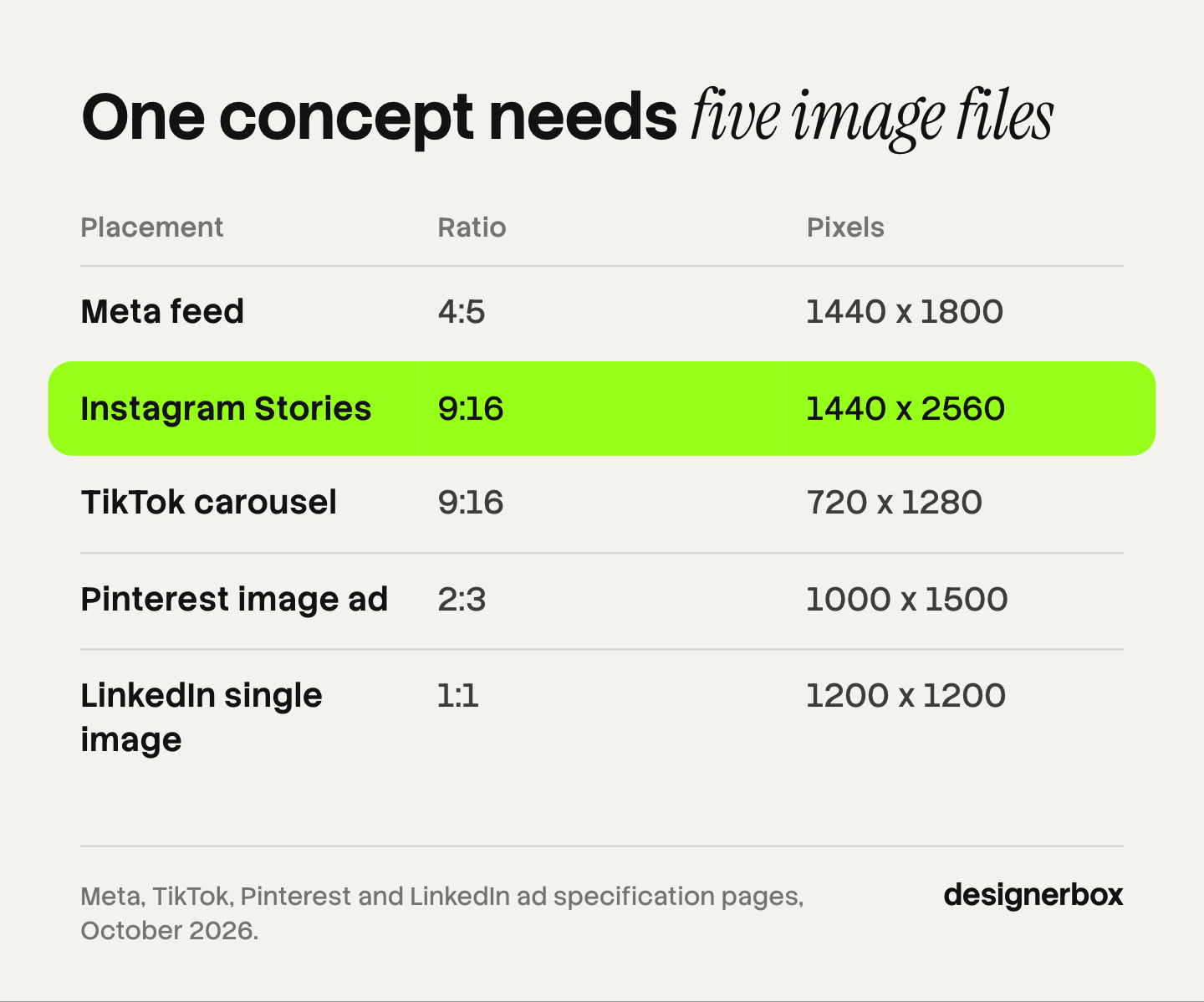
One concept needs five image files to run on four networks. The sizes below are each platform’s own recommendation, read in October 2026.
| Placement | Ratio | Recommended size | Platform note |
|---|---|---|---|
| Facebook and Instagram feed | 4:5 | 1440 x 1800 px | JPG or PNG, up to 30MB |
| Instagram Stories | 9:16 | 1440 x 2560 px | Keep text out of the top 14% and bottom 35% |
| TikTok carousel | 9:16 | 720 x 1280 px | 2 to 35 images per ad |
| Pinterest standard image ad | 2:3 | 1000 x 1500 px | PNG or JPEG |
| LinkedIn single image ad | 1:1 | 1200 x 1200 px | Up to 5 MB |
Meta recommends 1440 x 1800 pixels at 4:5 for image ads in Facebook feed and Instagram feed (Meta Ads Guide, accessed October 2026). For an image in Instagram Stories it recommends 1440 x 2560 pixels at 9:16. It also says to leave roughly 14% of the top, 35% of the bottom and 6% on each side free from text and logos (Meta Ads Guide, accessed October 2026).
On TikTok, still images run as carousel ads. A standard carousel takes 2 to 35 images, and the vertical size is 720 x 1280 pixels (TikTok Ads Manager help, last updated September 2026). So the TikTok file is never one image. Plan at least two per concept. When one image beats a carousel or a video is covered in image ads by platform.
Pinterest recommends a 2:3 ratio, or 1000 x 1500 pixels, for a standard image ad (Pinterest Business Help, accessed October 2026). LinkedIn accepts 1.91:1, 1:1 and 4:5 for a single image ad. It says paid vertical images serve only on mobile devices, so the 1:1 file at 1200 x 1200 pixels is the one that serves everywhere (LinkedIn Help, accessed October 2026).
Here is the arithmetic for a small campaign. It is an illustration only. Three concepts times five files is 15 images. Two headlines on each makes 30. That is the number to plan and budget for. For the full ratio list, video included, see one concept in every platform size.
How to make AI images for paid social ads
Work in six steps. The order matters, because each step removes rework from the next one.
- Count the files. List the networks, the placements and the concepts. Multiply them. Agree on the number before anyone opens an image model.
- Write one brief per concept. One audience, one message, one scene. The next section shows the brief.
- Place the product, do not describe it. Start from your real product photo and build the scene around it. The rule and the five product checks are in the guide to AI product ads.
- Build the 9:16 file first. Keep the product and the headline inside the safe zone. Then crop to 4:5, 2:3 and 1:1. Extend the background where a crop cuts into the subject.
- Check every image against the source. Product, people, text, safe zone, brand. One person signs off.
- Label where the platform asks, then launch. The table below gives the rule for each network.
After launch, test one change at a time. A test with five changes cannot tell you which one worked. The method is in the guide to ad creative testing.
How to brief an AI image for a paid social ad
A brief for an AI image names five things: who sees it, what it says, what is in the frame, what must not change, and where it runs. A prompt with only the scene gives a good-looking picture with no job. For copy-ready wording, see 24 advertising prompts by ad format.
| Brief line | What to write | Example |
|---|---|---|
| Audience | One group, one situation | New parents who shop on a phone at night |
| Message | One claim the image must carry | Folds flat in one move |
| Frame | Subject, setting, light, camera distance | Stroller half folded in a hallway, daylight, waist height |
| Fixed | What must match the real product | Logo, frame color, wheel shape |
| Placement | Network and file from the list above | Instagram Stories, 9:16 |
Five concept types cover most paid social image ads. Pick two or three per campaign, so the test compares different arguments and not different colors.
- Product in a scene. The real product in a setting the buyer knows.
- Product in use. Hands or a person using it. Check the hands and the grip.
- Problem and result. The situation before the product, then with it. Show only a result you can prove.
- Offer. The product, the price or the discount, and the end date.
- Native look. An image that reads like a post from the feed. There are 30 formats in these static ad examples.
Checks before an AI image goes live
Check five things on every image, at full size, next to the source photo. An ad that passes a quick look on a phone can still fail all five.
| Check | What to look for |
|---|---|
| Product | Label text, logo, color, shape and scale match the photo |
| People | Hands, teeth, eyes, and how the product is held |
| Text in the image | Every word is spelled right and is your real offer |
| Safe zone | Nothing important in the top 14% or bottom 35% of a 9:16 file |
| Brand | Your fonts, colors and logo position, the same on every file |
The people row needs the closest look. Extra fingers and a product that floats above a hand are common faults. The fixes are in the guide to AI images that do not look AI-generated.

The last check is about truth. An AI person with a quote such as “this changed my skin in a week” is a testimonial from someone who does not exist. The FTC says its rule on reviews and testimonials has “no blanket prohibition on the use of AI-generated avatars in marketing” (FTC, accessed October 2026). The rule does cover a testimonial that falsely suggests the person exists or used the product. So use AI people to show the product. Do not give them opinions.
AI label rules on Meta, TikTok, Pinterest and LinkedIn
The four networks treat AI images in ads differently. Only TikTok asks the advertiser to add a label on ordinary product ads.
| Network | What the advertiser does | What the platform does |
|---|---|---|
| Meta | Nothing for most ads. Disclosure is required in ads about social issues, elections or politics | Adds an “AI info” label when you use its own AI features, or when it detects third-party AI |
| TikTok | Applies the AIGC label, or a clear disclaimer, caption, watermark or sticker, on fully AI or heavily AI-edited media | Rejects or restricts an ad with undisclosed AI content |
| Nothing required on the help page we read | Labels Pins it detects as AI-generated or AI-modified. You can appeal | |
| Nothing. The ad policy has no AI rule | Requires that ads are not fraudulent or deceptive |
Meta. Meta says it applies an AI info label when you use features such as Background Generation or Image Generation. It also applies one when it detects that third-party AI made or edited the ad, using signals such as C2PA metadata. The label sits in the three-dot menu under “About this ad” (Meta Business Help Center, accessed October 2026). Advertisers must disclose AI themselves only in ads about social issues, elections or politics.
TikTok. TikTok allows AI-generated and significantly edited media in ads if you disclose it. Its policy says: “If we identify AI-generated content that has not been disclosed, your ad will be rejected or restricted.” Changes to lighting, brightness or color, removing or changing a background, and denoising count as minor and need no label (TikTok ads policy, last updated April 2026).
Pinterest. Pinterest reads image metadata and runs its own classifiers to find AI-generated or AI-modified Pins, then adds a label. If you think a label is wrong, you can appeal through its support team (Pinterest Help, accessed October 2026). For organic Pins that carry a commission link, see our guide to Pinterest affiliate marketing.
LinkedIn. LinkedIn’s advertising policy, last revised on 18 November 2025, does not mention AI. It says: “Ads must not be fraudulent or deceptive” (LinkedIn, accessed October 2026).
In the EU, Article 50 of the AI Act has applied since 2 August 2026. The brand’s duty covers deep fakes, which must be disclosed “upon first exposure at the latest” (European Commission, accessed October 2026). The Commission’s guidelines give a real product on an AI background as an example of what is not a deep fake, as long as the ad does not mislead about the product (European Commission, published 20 July 2026). This section is general information, not legal advice. For the full picture, see AI disclosure in advertising.
Limits of AI images in paid social
AI images cover the still placements. They do not cover everything a campaign needs.
- Video placements want video. Reels and TikTok In-Feed are video first. A still in a 9:16 slot is a fallback.
- A result needs proof. AI can draw a before and an after. It cannot make the result true.
- Small text breaks. Image models still misspell words on labels and in fine print. Set the offer text as live text on top of the image.
- Volume without rules drifts. Thirty files made one prompt at a time end up in thirty styles.
One workflow for every campaign
Anyone can make an AI picture. Making hundreds that still look like your brand is the hard part. In DesignerBox, you build the image job once as a workflow and run it for every concept, product and client.
- The brand is a record. You set logos, fonts, colors and rules once in your brand profile. The workflow reads it on every run.
- The product stays the product. The workflow starts from your product photo. The image editor makes one edit after another, and the picture keeps its detail and resolution.
- Sizes come from one master. The ads resizer makes one ad in every size the ad platforms need.
- Review is a step. Critic steps score the results of a run, and best-of-N keeps the best one. You still run the five checks above.
- Volume is one run. Batch runs the workflow over a whole sheet of products or concepts, and you review the results in one pass.
The full workflow from the first product photo to the finished ad, in one subscription. Uploading your own photos and the commercial license start on the Pro plan. The image editor starts on the Premium plan. Plans and credits are on the pricing page.
Here are two limits. DesignerBox does not post to your ad accounts: you download the results, or send them with a webhook or an S3 step. Every plan below Ultra is one seat, so an agency team needs Ultra. The page for performance marketers shows the ad job from brief to files.
A free plan for your first run
There is a free plan, and it runs on sample products. Start from a template and see the cost before you run it.
FAQ
Can I use AI images in paid social ads?
Yes. None of the four ad policies we read bans AI images. TikTok asks you to label fully AI or heavily AI-edited media. Meta and Pinterest add labels themselves when they detect AI. On every network the ad must not mislead about the product.
How many images does a paid social campaign need?
Count concepts times placements. One concept needs five image files to cover Meta feed, Instagram Stories, TikTok, Pinterest and LinkedIn. Three concepts need 15. Add headline versions and the count doubles.
What size should AI images for Facebook and Instagram ads be?
Meta recommends 1440 x 1800 pixels at 4:5 for feed image ads and 1440 x 2560 pixels at 9:16 for Stories. Check the Meta Ads Guide on the day you build, because the numbers change.
Do I have to label AI images in paid social ads?
On TikTok, yes, when the media is fully AI or heavily AI-edited. A changed background does not need a label there. Meta asks advertisers to disclose only in ads about social issues, elections or politics. LinkedIn’s ad policy has no AI rule.
Do AI images work as well as photos in paid social campaigns?
It depends on the image and the test. The published studies disagree, and most compare different things. The data is in the guide to AI generated ads. Run your own test with one change at a time.
What is the fastest way to make AI image ads for several clients?
Build the job once and run it again. In DesignerBox, one workflow per brand holds the brand rules, the sizes and the review step, and the cost is shown before the run.
Sources
- Meta Ads Guide: image ads in Facebook Feed, accessed October 2026
- Meta Ads Guide: image ads in Instagram Feed, accessed October 2026
- Meta Ads Guide: image ads in Instagram Stories, accessed October 2026
- Meta Business Help Center: AI info labels on ads, accessed October 2026
- Meta Transparency Center: ads about social issues, elections or politics, read September 2026
- TikTok Ads Manager help: specifications for carousel ads, last updated September 2026, accessed October 2026
- TikTok ads policy: misleading and false content, last updated April 2026, accessed October 2026
- Pinterest Business Help: product specs, accessed October 2026
- Pinterest Help: Gen AI labels, accessed October 2026
- LinkedIn Help: single image ads advertising specifications, accessed October 2026
- LinkedIn advertising policies, last revised 18 November 2025, accessed October 2026
- FTC: Consumer Reviews and Testimonials Rule, questions and answers, accessed October 2026
- European Commission: transparency obligations under Article 50 of the AI Act, accessed October 2026
- European Commission: guidelines on the transparency obligations of Article 50, published 20 July 2026, read September 2026
- DesignerBox brand, image editor, batch and pricing pages (designerbox.ai), October 2026
Platform specs and label rules verified from Meta, TikTok, Pinterest, LinkedIn, FTC and European Commission pages as of October 2026. Individual results vary.