
An AI social media carousel is a multi-slide post generated from one product photo or brief instead of designed slide by slide. The model you pick sets what a set costs. The catch is that a carousel is not one asset across platforms: Instagram takes up to 20 photos and videos in one post, while LinkedIn shows a swipeable set only as a document post.
You design a ten-slide carousel. It looks right on Instagram. You take the same ten files to LinkedIn and there is no carousel option for them, because LinkedIn retired its image carousel posts in December 2023.
So the set gets rebuilt, twice, and the version that reaches TikTok has type sitting under the interface because the frame is the wrong shape.
This covers what each platform accepts, the one design decision that makes a set reusable instead of rebuilt, how to hold a single look across ten frames, and what a monthly carousel cadence costs. It is written for marketing teams shipping carousels on more than one platform.
Key Takeaways
- Instagram takes 20 slides. A single Instagram feed post accepts up to 20 photos and videos (help.instagram.com, September 2026). The cap is a ceiling, and a set does not have to reach it.
- LinkedIn carousels are documents. LinkedIn retired its image carousel posts in December 2023 (Social Media Today, read September 2026). Today the swipeable post is a document post: a PPT, PPTX, DOC, DOCX or PDF file up to 100MB and 300 pages, and LinkedIn says PDFs give the highest quality upload (linkedin.com, September 2026).
- TikTok shows fewer slides than it accepts. TikTok’s carousel ad specs list 2 to 35 images, and a maximum of 20 images shown (ads.tiktok.com, September 2026). Check which carousel format you buy before you make more than 20 slides.
- TikTok carousel ads require audio. TikTok says music is a must and must run at least two seconds (ads.tiktok.com, September 2026). A silent image set is not a deliverable there.
- Design at 1080x1350 and two platforms share one frame. The 4:5 frame sits inside Instagram’s supported range, and LinkedIn takes the same slides as the pages of one PDF. TikTok is the recut, not Instagram.
- The model sets the price of the set. Each slide is a run on the model you pick, and a recut to a second aspect ratio is another run.
- Count slides, not sets. Four carousels a month across two frame shapes is 80 slides plus retries.
AI social media carousel specs by platform
The specifications diverge more than the word “carousel” suggests. This is the table to plan against.
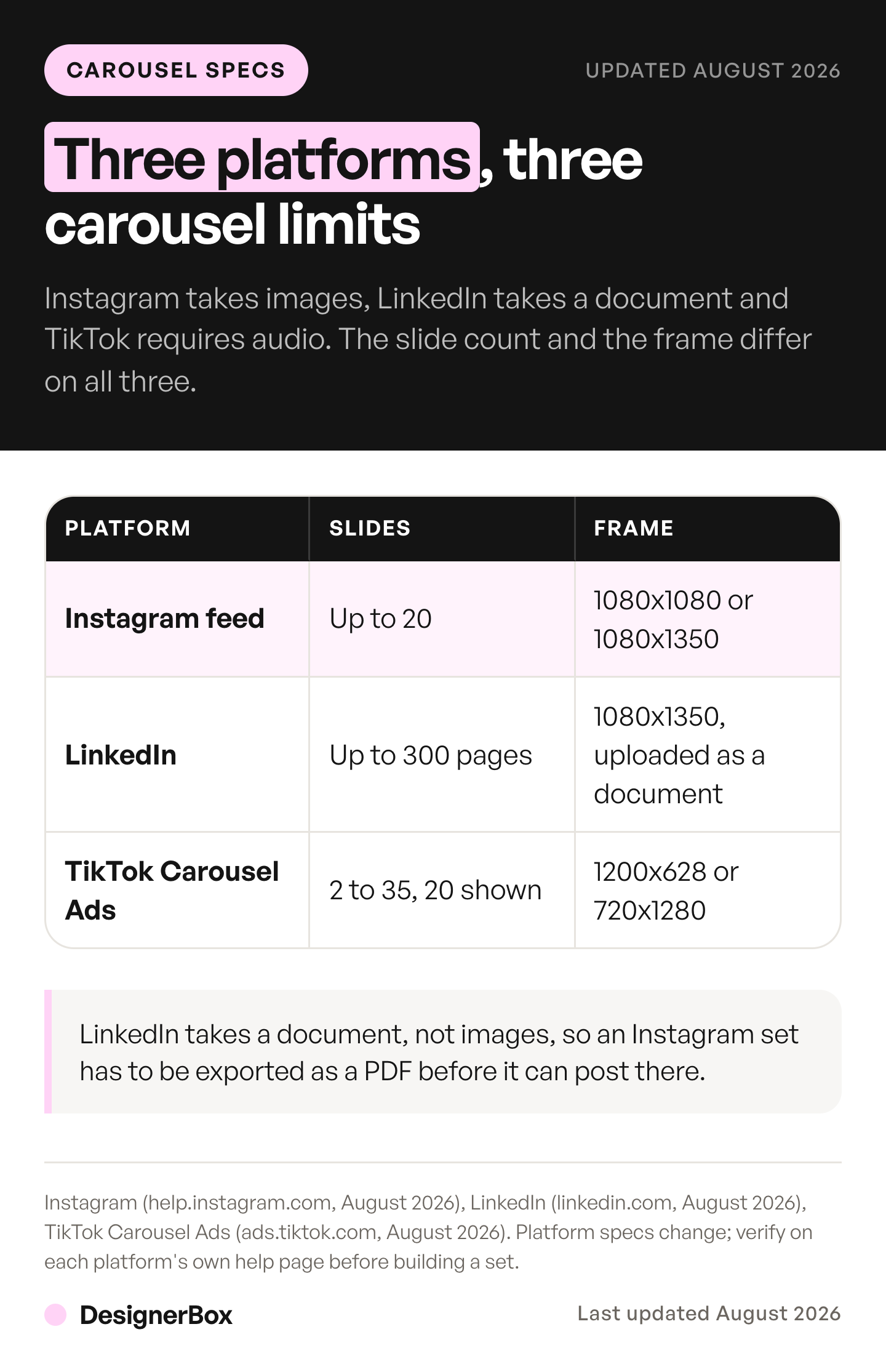
| Platform | Slides | What you upload | Frame |
|---|---|---|---|
| Instagram feed | Up to 20 | Photos and videos | 1080 wide, from 1.91:1 to 3:4, one orientation for the whole post |
| LinkedIn document post | Up to 300 pages | A document: PDF, PPT, PPTX, DOC, DOCX, up to 100MB | No pixel size set; every PDF page must share one page size |
| TikTok Carousel Ads | 2 to 35 images, 20 shown at most | JPG, JPEG, PNG, plus music of 2 seconds or more | 1200x628, 640x640, or 720x1280 |
Sources: help.instagram.com and help.instagram.com, linkedin.com, and ads.tiktok.com, all accessed September 2026.
Three things in that table decide the workflow.
LinkedIn is a different file type entirely. LinkedIn retired its image carousel posts in December 2023, and the swipeable post that remains is a document post. That means the LinkedIn deliverable is a document, and the production step is an export rather than a second generation. PDF is the format to use: LinkedIn tells you to convert files to PDF for the highest quality upload, and to fit every page to the same page size. The 100MB and 300-page ceilings are generous enough to be irrelevant for a ten-slide set.
TikTok’s two numbers are not the same number. The specs list up to 35 images, and a maximum of 20 shown. Making 30 slides for a TikTok carousel can spend credits on slides nobody reaches.
TikTok needs sound. TikTok says music is a must on carousel ads and has to run at least two seconds. Budget a track alongside the images, because the set is not shippable without one.
The parallel argument for video, where a single clip also fails to travel between platforms untouched, is worked through in the guide to AI for social media content. A small team that runs social alone can start from a weekly AI social media routine for small business.
The one decision that stops rebuilds
Pick the frame before the first slide, not after.
A carousel set is only reusable if its shape works on more than one platform. Design at 1080x1350, the 4:5 portrait frame, and two of the three platforms are covered by one set of files. Instagram keeps a photo at full resolution when it is 1080 pixels wide with an aspect ratio between 1.91:1 and 3:4 (help.instagram.com, September 2026), so 4:5 fits. LinkedIn’s document help sets no pixel size, so the same slides export as the pages of one PDF.
That leaves TikTok, which wants 720x1280 vertical, a taller 9:16 frame. TikTok is the recut. Plan for one recut instead of three rebuilds.
Two production rules follow from that.
Design every slide at one ratio, and keep the set uniform. Mixed shapes inside one set get cropped to agree with each other, which is how type ends up clipped. Uniformity is what stops the platform making the crop decision for you.
Keep type inside a safe margin. Interface elements, captions, and profile chrome sit over the bottom and right of a vertical frame. Type that reads perfectly in your canvas can sit under a button in the feed. Leave roughly 15% clear at the bottom of any 9:16 recut.
Holding one look across ten slides
Ten independently generated images do not read as one post. They read as ten posts.

Consistency in a carousel comes from three constraints, in order of how much they matter.
A fixed layout, varied content. Decide once where the subject sits, where type sits, and how many words a slide carries. Vary only what is inside the frame. A carousel that changes composition every slide reads as a folder rather than an argument.
Two colors and one typeface. A frequent tell of a generated set is color drift across slides. Naming the two colors in every generation, and checking them at the end, catches it.
Edit forward instead of generating fresh. Once slide one is approved, build slide two by editing slide one rather than generating from nothing. An edit inherits the approved look. A fresh generation re-rolls it.
For slides that carry legible type, start with models whose makers document text rendering. Google says Nano Banana Pro can generate legible, stylized text for infographics, menus, diagrams and marketing assets (ai.google.dev, September 2026). ByteDance presents Seedream 5.0 Pro for high-density infographics (seed.bytedance.com, September 2026). The model list shows the image models DesignerBox runs. Expect to proofread every word: rendered type still misspells, and a typo across a ten-slide set is ten mistakes.
If a recurring presenter appears in the set, that is a reference-set problem rather than a carousel problem, and the mechanics are in the guide to AI avatars for brands. Locking a repeatable layout across a whole channel is covered in the guide to AI photo templates. If the template editor itself is the thing you are reassessing, seven Canva alternatives compared covers that decision.
What a carousel cadence costs
Each slide is a run on the model you pick, and so is each edit. The slide count multiplies that cost, so the model choice sets the price of a whole month before you make a single slide. DesignerBox shows the cost before the run, so you price the month rather than discover it.
Count the slides, not the sets. Four carousels a month at ten slides each is 40 slides on one frame shape, and 80 once you recut for TikTok. Add retries, which carousels always need, because a typo on slide six means slide six again. How many posts a week that cadence should hold is worked through in how often to post on social media.
The LinkedIn version is the cheap one. Because it takes the same 1080x1350 frames as Instagram portrait, the extra step is a PDF export rather than a second set of generations.
Uploading your own photos and the commercial license start on the Pro plan. A business that publishes carousels as marketing needs that license. AI video, virtual try-on, upscaling, the image editor and the video editor start on the Premium plan. Plans and credits are on the pricing page.
Making the second month cheaper than the first
The first carousel is a design job. Every one after it should be a rerun.

Anyone can make an AI picture. Making hundreds that still look like your brand is the hard part. Build the set once, with your layout, your two colors, your frame and your export targets stored as one saved sequence. Then run that sequence again for the next product, the next drop and the next campaign. A saved workflow runs the same way on the next product. You set the brand once, and the workflow reads it on every run. Batch runs that workflow over a whole sheet of products at once. The work then stops being a design job and becomes a system. That is the reason to set up a carousel properly the first time. For the TikTok recut, the ads resizer makes one ad in every size the ad platforms need.
Teams whose carousels are paid social can start from a static ad template. Organic carousels start from a social content template. The paid format has its own limits, covered in carousel ads.
An Instagram-first version of this, covering Reels and a reusable avatar alongside carousels, is in the guide to Instagram content with AI. On Instagram, a carousel that works brings comments that ask for the link. CreatorFlow, built by the same team as DesignerBox, answers a keyword comment with a DM that holds the link. It works on Reels, posts and Stories (creatorflow.so, October 2026).
Six steps to a reusable set
- Choose the frame first. 1080x1350 covers Instagram portrait and LinkedIn portrait with one set of files.
- Fix the layout. Subject position, type position, word count per slide, two colors. Write it down before generating.
- Generate slide one and approve it properly. Everything after inherits from it, so a compromise here repeats ten times.
- Edit forward for slides two onward. Each edit inherits the look of the slide before it.
- Export per platform. PDF for LinkedIn, image set for Instagram, a 9:16 recut with a safe bottom margin and an audio track for TikTok.
- Save it as a workflow. The next set should cost a brief, not a rebuild.
The image editor, the video editor, your brand rules, your Assets and the AI models sit in the same place. The full workflow from the first product photo to the finished ad, in one subscription. Start from a template, add your brand and your products, and run it. See the templates.
FAQ
How many slides can an Instagram carousel have?
Up to 20. A single Instagram feed post accepts up to 20 photos and videos shared together (help.instagram.com, September 2026), and one orientation applies to every photo in the post. The cap is not a target: every extra slide is another chance for the reader to stop swiping.
Can I post the same carousel to Instagram and LinkedIn?
Not as the same file type. LinkedIn retired its image carousel posts in December 2023. Its swipeable post today is a document post, supporting PDF, PPT, PPTX, DOC, and DOCX up to 100MB and 300 pages (linkedin.com, September 2026). The practical route is to design at 1080x1350, publish the images to Instagram, and export the same frames as a PDF for LinkedIn.
What size should a social media carousel be?
Design at 1080x1350, a 4:5 portrait frame. It sits inside Instagram’s supported range of 1.91:1 to 3:4, and the same slides export as the pages of a LinkedIn PDF. TikTok wants a taller vertical frame at 720x1280, so treat TikTok as a recut from the same source rather than a separate design.
How many images can a TikTok carousel have?
TikTok’s carousel ad specs list 2 to 35 images and a maximum of 20 images shown (ads.tiktok.com, September 2026). Making more than 20 slides can spend credits on slides that will not display. TikTok also says music is a must and must run at least two seconds.
How much does an AI carousel cost to make?
It depends on the model you pick, and DesignerBox shows the cost before the run. Count slides, not sets: four ten-slide sets a month across two frame shapes is 80 slides plus retries.
Why do my AI carousel slides look inconsistent?
Because each slide was generated independently. Fix the layout and the two colors before generating, then build each slide by editing the previously approved slide instead of generating a new one. An edit inherits the look you already signed off.
Can AI write the text on carousel slides?
It can render type, and type is still a weak point of AI image generation. Words misspell and letters distort, and across ten slides a single systematic error becomes ten. Keep each slide to a short line, use a model positioned for text rendering, and proofread every slide at full size before publishing.
Sources
Platform slide limits, accepted file types, aspect ratios, and audio requirements verified from Instagram Help, LinkedIn Help, and TikTok Ads Manager help as of September 2026. LinkedIn’s retirement of carousel posts in December 2023 from Social Media Today. Text rendering claims from Google’s image generation docs and ByteDance’s Seedream 5.0 Pro page, September 2026. TikTok figures cited are the published Carousel Ads specifications; organic photo-post limits differ between TikTok’s own surfaces, so confirm in the app before planning a batch around a specific cap. DesignerBox plans and credits from the DesignerBox pricing page (designerbox.ai/pricing), September 2026. CreatorFlow comment-to-DM on Reels, posts and Stories from creatorflow.so, accessed 2 October 2026. Individual results vary.