





Script to video AI turns a written script into a finished video. For a product ad, it works in five moves: split the script into shots, give each shot a length the model can make, lock the product and the presenter with reference images, make each shot as its own clip, then join the clips with one voice and captions. One prompt for the whole script does not work.
Here is the usual first try. A team pastes a 30-second script into a video model and presses the button. The clip that returns is 8 seconds long. The bottle in it has a different cap from the real one. The presenter says the first line and stops in the middle of the second.
This guide is for a brand or an agency that turns a product ad script into video. It covers the clip limits of current models, the shot table, the reference images, the voice, the captions, and the claims a script cannot make. It does not cover short films.
Key Takeaways
- One prompt is one clip. Google documents Veo 3.1 clips of 4, 6 or 8 seconds, so a 30-second script needs several clips (ai.google.dev, October 2026).
- Split by shot, then by seconds. Each shot gets one camera position, one action and a length the model can make.
- Lock the product with images. A text description makes a product of the same kind. A reference image makes your product.
- Record the voice once. One voice track across all clips keeps the same voice from the first shot to the last.
- Put numbers and prices in the edit. Add on-screen text and captions in the video editor, where every letter is exact.
- The script still has to be true. The FTC says an avatar’s testimonial is prohibited when the underlying testimonial is fake or false (ftc.gov, October 2026).
What is script to video AI?
Script to video AI is any tool or method that takes written lines and returns video. The name covers three different things, and they give three different results.
| Kind | What it does with the script | What you get |
|---|---|---|
| Stock assembly | Reads the script and matches each line to stock footage, a voice and subtitles | A narrated video with footage of other products and places |
| Presenter video | An avatar reads the script to the camera | A talking presenter, with or without your product in the frame |
| Shot-by-shot generation | Each shot of the script becomes its own clip from a video model | New footage of your product, built clip by clip |
A product ad needs the third kind, often with the second kind for the lines a person speaks. Stock footage cannot show your product. This guide covers the third kind, and it names the point where the presenter joins.
Why does pasting a whole script into one prompt fail?
It fails for four reasons, and only the first one is about length.
- The clip is shorter than the script. Most models make 4 to 15 seconds in one generation. A 30-second script does not fit.
- A script holds several shots. A prompt describes what one camera sees. A script holds a product close-up, a person, a use scene and an end card. The model picks one and drops the rest.
- The model draws the product from words. “A blue steel water bottle” returns a blue steel water bottle. It does not return yours, with your cap, your logo and your proportions.
- One fault costs the whole clip. If the logo is wrong in second three, you make everything again. With one clip per shot, you make only that shot again.
Some newer models take several shots in one request. That helps with the second reason. It does not help with the third, so the reference images stay.
How long can one AI video clip be?
One generation runs from 2 to 30 seconds, depending on the model. Most of the models a brand uses today stop at 8 to 15 seconds. These are the limits each vendor documents.
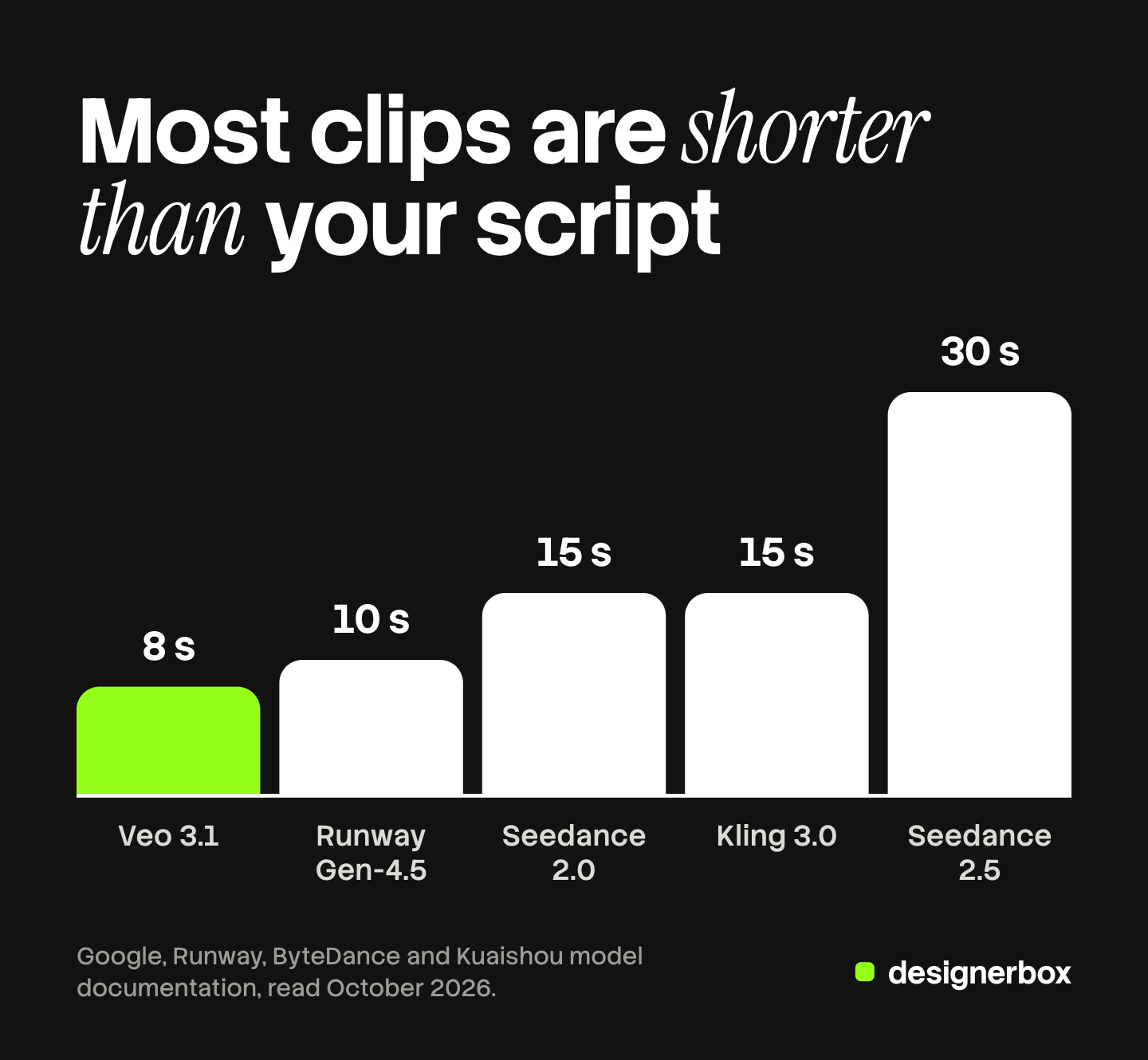
| Model | One generation | What helps a script | Source |
|---|---|---|---|
| Veo 3.1 | 4, 6 or 8 seconds | Up to three reference images of one person, character or product. Audio is always on | ai.google.dev, October 2026 |
| Runway Gen-4.5 | 2 to 10 seconds | Starts from a first frame image | docs.dev.runwayml.com, October 2026 |
| Seedance 2.0 | 4 to 15 seconds | Takes reference images. Real human faces cannot be uploaded directly | docs.byteplus.com, October 2026 |
| Kling 3.0 | 3 to 15 seconds | Up to 6 shots in one clip | kling.ai, October 2026 |
| Seedance 2.5 | 4 to 30 seconds | The longest single clip in this table | docs.byteplus.com, October 2026 |
Two notes on the table. On Veo 3.1, a clip with reference images must be 8 seconds long, so plan those shots at 8 seconds and trim them in the edit. And model lists change: Google lists 22 October 2026 as the earliest shutdown date for the Veo 3.1 preview models in the Gemini API, and names Gemini Omni Flash as the replacement (Gemini API deprecations, October 2026).
A 30-second clip limit does not remove the split. A product ad changes shot every few seconds, and each shot needs its own product reference and its own retake. Plan in shots of 4 to 8 seconds, whatever the model allows.
How do you split a script into shots?
Start from the spoken lines, and cut a new shot each time the camera must show something new. Then give each shot four things: seconds, what the camera sees, the words spoken over it, and the reference image it uses.

A voice reads about 3 words a second, so a 6-second shot carries about 18 words at most. The word counts for 15, 30 and 60 seconds are in ad script examples, and the creator-style version is in the guide to the UGC script.
Here is a 30-second script for an insulated water bottle, split into six shots. The seconds add to 30.
| Shot | Seconds | What the camera sees | Words spoken | Reference |
|---|---|---|---|---|
| 1 | 4 | Close on the bottle on a desk, hand reaches for it | ”Warm water by noon. Every day.” | Product photo, front |
| 2 | 4 | Hand opens the cap, ice inside | ”This bottle has two steel walls.” | Product photo, cap open |
| 3 | 6 | Presenter at a desk, holds the bottle, talks to camera | ”I fill it at eight. I drink it at four. It is still cold.” | Presenter still, product photo |
| 4 | 6 | Bottle goes into a bag pocket, person walks outside | ”It fits a bag pocket and does not leak.” | Product photo, side |
| 5 | 6 | Three colors in a row on a plain surface | ”Three colors. One size.” | Product photo, all colors |
| 6 | 4 | End card: bottle, logo, the offer as text | ”Order yours today.” | Product photo, front |
Three rules make the table work. Each shot ends on a full sentence, so no line is cut between two clips. Each shot has one camera position and one action. And each row names its reference image, so nobody describes the product from memory.
Shot 3 holds a claim. “It is still cold” at four needs a test that proves it, and the section on claims below covers why.
If a client must approve the look before any video is made, put one still frame per shot on a board first. That step has its own guide: script to storyboard.
How do you keep the product and the presenter the same in every shot?
Use reference images, and use the same ones in every shot. Words describe a kind of product. Images show the one you sell.
The product. Take clean photos of the real product: front, side, and any state the script shows, such as the cap open. Use them as the first frame of a shot or as reference images. A first frame fixes exactly how the shot starts. A reference image tells the model what the product looks like and lets the camera start anywhere.
The presenter. Make one still of the presenter before any video, and reuse it. A presenter made from a new text prompt in each shot becomes a different person in each shot. Check the model’s rules first: ByteDance says its Seedance 2.5 and 2.0 models “do not support directly uploading reference images or videos that contain real human faces” (docs.byteplus.com, October 2026). The methods that hold a face across clips are in how to keep characters consistent in AI video.
The place and the light. Write one line for the location and the light, and paste it into every shot prompt word for word. “Bright desk by a window, soft daylight from the left” should not change between shot 1 and shot 3.
Each model wants its prompt in a different order. The AI video prompting guide compares the structures the vendors document, so this guide does not repeat them.
How do you add the voice and the captions?
Add both in the edit, after the clips exist. A voice made inside each clip changes from clip to clip, and text made by a video model often has wrong letters.
Voiceover over product shots. Make one voice track for the whole script, from a person or from text to speech. Lay it under all the clips in the video editor. Some models add sound to every clip. Veo 3.1 audio is “always on” in Google’s documentation, so turn the clip sound down or off where the voiceover runs. Read length and voice choice are covered in AI voiceover for UGC ads.
A presenter who speaks on camera. Shot 3 in the table needs lips that match the words. That is lip sync, and it has its own limits on face angle and line length. They are in AI lip sync for video ads. Keep a spoken shot to one or two short sentences.
Captions and on-screen text. You already have the exact words, because you wrote the script. Add captions as text in the editor, timed to the voice. Add prices, numbers and the offer the same way. Do not ask the video model to draw them.
The join. Trim each clip to the seconds in your table and place the cuts on the voice, at the end of a sentence. The cutting steps are in how to edit AI-generated video.
Can an AI video script generator write the script?
Yes, a language model can draft the script, and it is useful for the first version and for variants. It does not know your product facts, your proof or your legal limits. You give it those. What the chat can and cannot do after the draft is in can ChatGPT make videos.
Give it four inputs: the product and one true benefit, the proof you hold, the length in seconds, and the reader. Ask for lines with seconds and word counts. Then read the draft aloud with a timer, and check every claim against your proof. A script written for the ear splits into shots much more easily than a script written for the page.
Where does script to video AI still break?
It breaks in six places. Plan for each before you promise a delivery date.
- Small text on the product. Labels and logos can warp when the product turns. Use a first frame, keep the move slow, and check each clip at full size.
- Hands. Opening a cap or pouring is harder than holding. Keep hand actions short.
- Long spoken lines. Lip sync drifts on long sentences. Split the line across two shots.
- Light between clips. Two clips of the same desk can differ in color. Reuse the location line, and correct color in the edit.
- Exact numbers. A model cannot be trusted to draw “24 hours” or a price. Add them as text.
- Retakes. Some shots need several takes before one is right. Count that time and cost before you start.
None of these stops the job. Each one is a reason to keep shots short and to look at every clip before it goes into the cut.
What can a script not claim in an AI video?
A script cannot claim what the brand cannot prove, and generated video makes three false claims easy to make by accident.
- A testimonial from nobody. A generated presenter who says “I used it for a month” reports an experience that no person had. The FTC says its rule on reviews and testimonials has “no blanket prohibition on the use of AI-generated avatars in marketing”. It also says an avatar’s testimonial is prohibited “if the underlying testimonials were fake or false” (ftc.gov, October 2026). Write the presenter’s lines as the brand speaking, or use the words of a real customer with permission.
- A demonstration the product did not do. A generated shot of ice still solid at four shows a result. If no test produced that result, the shot is a claim without proof.
- A before and after that was never photographed. Both halves must be real.
In the bottle script, shot 3 stays only if the brand holds a test that shows cold water after eight hours. Without the test, change the line to something the camera can show, such as the two steel walls.
Platforms also ask for labels on some AI-made ads. The rules by platform are in AI disclosure in advertising. This section is general information, not legal advice.
Script to finished ad, on brand
Anyone can make an AI picture. Making hundreds that still look like your brand is the hard part. One script with six shots is already six clips. Three products and two lengths make it thirty-six, and each clip needs the same product, the same colors and the same voice.
DesignerBox is AI creative production for brands and agencies. Scale your images, ads and video with AI and keep your brand on every piece: build the workflow once with your brand rules, run it on every product, see the cost before each run, and keep everything from the first product photo to the finished ad in one place. AI video ads start from your product photos, so each shot begins with the real product. A talking avatar with lip sync reads the lines a presenter speaks.
You set the brand once, with its logo, colors, products and rules, and the workflow reads it on every run. A saved workflow runs the same way on the next product, and batch runs it over the whole sheet at once. The video editor is a real timeline, with several tracks, transitions, animated text and audio. You join the shots there, lay the voice under them and add the captions.
The full workflow from the first product photo to the finished ad, in one subscription.
Here are the limits. DesignerBox does not turn a pasted script into a finished ad in one step: you split the script into shots first. It does not check your claims, and the proof stays with the brand. It does not publish ads into Meta or TikTok. You download the results, or send them with a webhook or an S3 step. AI video and the video editor start on the Premium plan, and an 8-second clip costs 40 to 560 credits, depending on the model. Uploading your own photos and the commercial license start on the Pro plan. The free plan cannot make video. Plans and credits are on the pricing page.
A free plan for your first run
There is a free plan, and it runs on sample products. Start from a template and see the cost before you run it. Get started free.
FAQ
What is script to video AI?
Script to video AI turns written lines into video. Some tools match the script to stock footage and a voice. Some have an avatar read it. Video models make new footage, one short clip per shot. A product ad uses the third kind, because only that one shows your own product.
Can AI make a full video from one script?
Yes, in parts. Most video models make 4 to 15 seconds in one generation, so a 30-second script becomes five to eight clips. You split the script into shots, make each shot, and join them in a video editor with one voice track.
How long can an AI video from a script be?
One clip runs 2 to 30 seconds, depending on the model. Veo 3.1 makes 4, 6 or 8 seconds, and Seedance 2.5 reaches 30 (docs.byteplus.com, October 2026). The finished ad can be any length, because you join clips in the edit.
How many shots does a 30-second script need?
Plan five to eight shots of 4 to 8 seconds each. Cut a new shot each time the camera must show something new. Each shot should end on a full sentence, so no spoken line is cut between two clips.
How do I keep my product the same in every shot?
Use the same product photos in every shot, as the first frame or as reference images. Do not describe the product from memory. Paste one fixed line for the location and the light into every shot prompt.
Should the voice come from the video model or from a separate track?
Use a separate track for a voiceover. One track across all clips keeps one voice and one pace. Use the model’s own speech or lip sync only for shots where a presenter talks to the camera, and keep those lines short.
What does script to video cost in DesignerBox?
An 8-second clip costs 40 to 560 credits, depending on the model, and the cost is shown before the run. AI video starts on the Premium plan.
Sources
- Google, Gemini API documentation, “Generate videos with Veo 3.1”: ai.google.dev/gemini-api/docs/veo, read October 2026
- Google, Gemini API deprecations: ai.google.dev/gemini-api/docs/deprecations, read October 2026
- Runway, API reference, Gen-4.5 duration and first frame input: docs.dev.runwayml.com/api, read October 2026
- BytePlus ModelArk, “Create a video generation task” (Seedance 2.0 and 2.5 duration, reference rules): docs.byteplus.com/en/docs/ModelArk/1520757, read October 2026
- Kling AI, API documentation, Kling 3.0 text to video (duration and multi-shot): kling.ai/document-api/api/video/3-0-omni/text-to-video, read October 2026
- Federal Trade Commission, “The Consumer Reviews and Testimonials Rule: Questions and Answers”: ftc.gov, read October 2026
- DesignerBox pricing and product pages, October 2026
Model limits verified from Google, Runway, ByteDance and Kuaishou documentation as of October 2026. Individual results vary.


